Environmental Footprint Assessment
            Introduction


            11/12/2012
Agenda
1. Introduction
2. Project Goals
3. Timeline
4. Using the Tool
5. Supporting Resources
6. Additional Support
Project Goals

• Measure energy use and other environmental impacts within
  the Gap Inc. supply chain

• Identify and share best practices to facilitate improvement and
  cost-savings

• Support all suppliers in achieving their sustainability goals

• Improve the circumstances of the workers, consumers, and
  communities that Gap Inc. interacts with every day
Timeline


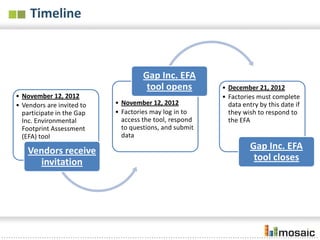
                                    Gap Inc. EFA
                                     tool opens         • December 21, 2012
• November 12, 2012                                     • Factories must complete
• Vendors are invited to   • November 12, 2012            data entry by this date if
  participate in the Gap   • Factories may log in to      they wish to respond to
  Inc. Environmental         access the tool, respond     the EFA
  Footprint Assessment       to questions, and submit
  (EFA) tool                 data

    Vendors receive                                               Gap Inc. EFA
      invitation                                                   tool closes
Overview
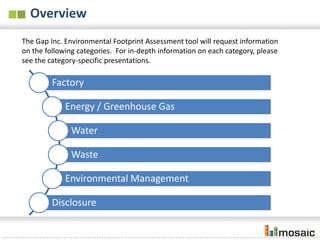
The Gap Inc. Environmental Footprint Assessment tool will request information
on the following categories. For in-depth information on each category, please
see the category-specific presentations.

         Factory

             Energy / Greenhouse Gas

              Water

              Waste

             Environmental Management

         Disclosure
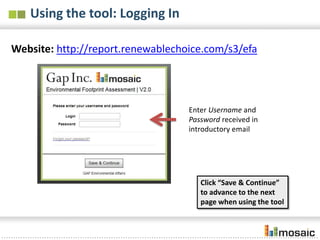
Using the tool: Logging In

Website: http://report.renewablechoice.com/s3/efa


                                   Enter Username and
                                   Password received in
                                   introductory email


                                      Click “Save & Continue”
                                      to advance to the next
                                      page when using the tool
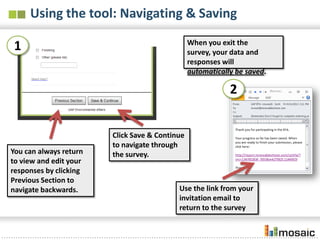
Using the tool: Navigating & Saving
                                                When you exit the survey,
1                                               your data and responses
                                                will automatically be saved.


                                                            2


                        Click Save & Continue
                        to navigate through
You can always return   the survey.
to view and edit your
responses by clicking
Previous Section to
navigate backwards.                        Use the link from your
                                           invitation email to
                                           return to the survey
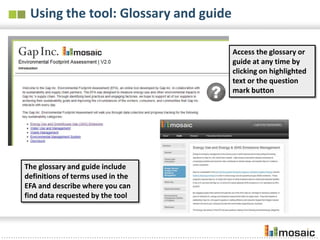
Using the tool: Glossary and guide

                                      Access the glossary or
                                      guide at any time by
                                      clicking on highlighted
                                      text or the question
                                      mark button


The glossary and guide include
definitions of terms used in the
EFA and describe where you can
find data requested by the tool
Using the tool: Providing factory Information
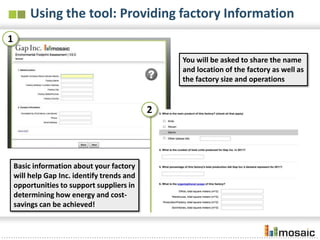
1
                                                 You will be asked to share the name
                                                 and location of the factory as well as
                                                 the factory size and operations


                                             2


    Basic information about your factory
    will help Gap Inc. identify trends and
    opportunities to support suppliers in
    determining how energy and cost-
    savings can be achieved!
Supporting resources

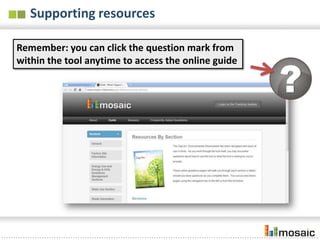
Remember: you can click the question mark from
within the tool anytime to access the online guide
Additional support


Gap Inc. has partnered with Renewable
Choice to provide ongoing support during
the data collection period.
Please contact them directly at
GAPEFA@renewablechoice.com if you have
any questions.

Gap efa intro

  • 1.
    Environmental Footprint Assessment Introduction 11/12/2012
  • 2.
    Agenda 1. Introduction 2. ProjectGoals 3. Timeline 4. Using the Tool 5. Supporting Resources 6. Additional Support
  • 3.
    Project Goals • Measureenergy use and other environmental impacts within the Gap Inc. supply chain • Identify and share best practices to facilitate improvement and cost-savings • Support all suppliers in achieving their sustainability goals • Improve the circumstances of the workers, consumers, and communities that Gap Inc. interacts with every day
  • 4.
    Timeline Gap Inc. EFA tool opens • December 21, 2012 • November 12, 2012 • Factories must complete • Vendors are invited to • November 12, 2012 data entry by this date if participate in the Gap • Factories may log in to they wish to respond to Inc. Environmental access the tool, respond the EFA Footprint Assessment to questions, and submit (EFA) tool data Vendors receive Gap Inc. EFA invitation tool closes
  • 5.
    Overview The Gap Inc.Environmental Footprint Assessment tool will request information on the following categories. For in-depth information on each category, please see the category-specific presentations. Factory Energy / Greenhouse Gas Water Waste Environmental Management Disclosure
  • 6.
    Using the tool:Logging In Website: http://report.renewablechoice.com/s3/efa Enter Username and Password received in introductory email Click “Save & Continue” to advance to the next page when using the tool
  • 7.
    Using the tool:Navigating & Saving When you exit the survey, 1 your data and responses will automatically be saved. 2 Click Save & Continue to navigate through You can always return the survey. to view and edit your responses by clicking Previous Section to navigate backwards. Use the link from your invitation email to return to the survey
  • 8.
    Using the tool:Glossary and guide Access the glossary or guide at any time by clicking on highlighted text or the question mark button The glossary and guide include definitions of terms used in the EFA and describe where you can find data requested by the tool
  • 9.
    Using the tool:Providing factory Information 1 You will be asked to share the name and location of the factory as well as the factory size and operations 2 Basic information about your factory will help Gap Inc. identify trends and opportunities to support suppliers in determining how energy and cost- savings can be achieved!
  • 10.
    Supporting resources Remember: youcan click the question mark from within the tool anytime to access the online guide
  • 11.
    Additional support Gap Inc.has partnered with Renewable Choice to provide ongoing support during the data collection period. Please contact them directly at GAPEFA@renewablechoice.com if you have any questions.