Class-1 1
Fundamentals of R-Programing
Anantha Krishnan
9/15/23
Class-1 2
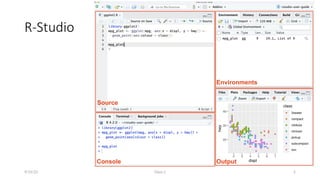
R-Studio
9/15/23
Class-1 3
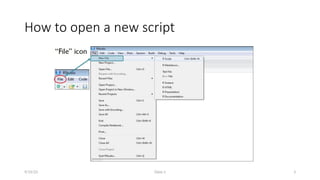
How to open a new script
9/15/23
Class-1 4
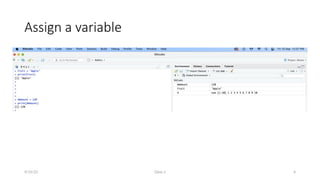
Assign a variable
9/15/23
Class-1 5
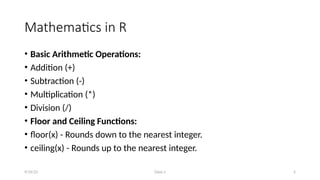
Mathematics in R
• Basic Arithmetic Operations:
• Addition (+)
• Subtraction (-)
• Multiplication (*)
• Division (/)
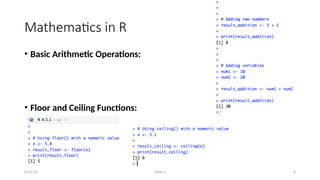
• Floor and Ceiling Functions:
• floor(x) - Rounds down to the nearest integer.
• ceiling(x) - Rounds up to the nearest integer.
9/15/23
Class-1 6
Mathematics in R
• Basic Arithmetic Operations:
• Floor and Ceiling Functions:
9/15/23
Class-1 7
Mathematics in R
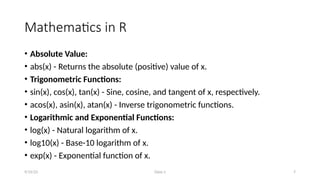
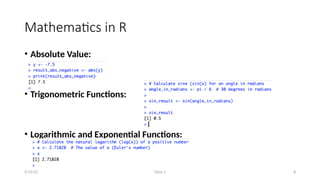
• Absolute Value:
• abs(x) - Returns the absolute (positive) value of x.
• Trigonometric Functions:
• sin(x), cos(x), tan(x) - Sine, cosine, and tangent of x, respectively.
• acos(x), asin(x), atan(x) - Inverse trigonometric functions.
• Logarithmic and Exponential Functions:
• log(x) - Natural logarithm of x.
• log10(x) - Base-10 logarithm of x.
• exp(x) - Exponential function of x.
9/15/23
Class-1 8
Mathematics in R
• Absolute Value:
• Trigonometric Functions:
• Logarithmic and Exponential Functions:
9/15/23
Class-1 9
Mathematics in R
• Statistical Tests:
• t-tests, chi-square tests, ANOVA, and other hypothesis tests.
• Random Number Generation:
• Generating random numbers from various distributions (e.g., rnorm(),
runif()).
• Linear Algebra:
• Matrix inversion (solve()).
• Singular Value Decomposition (svd()).
9/15/23
Class-1 10
Upload and excel sheet in R environment
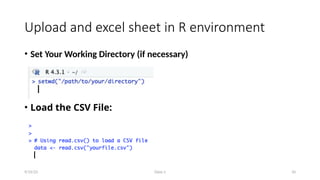
• Set Your Working Directory (if necessary)
• Load the CSV File:
9/15/23
Class-1 11
Inspect your data in R
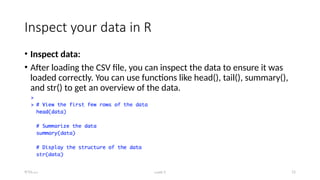
• Inspect data:
• After loading the CSV file, you can inspect the data to ensure it was
loaded correctly. You can use functions like head(), tail(), summary(),
and str() to get an overview of the data.
9/15/23
Class-1 12
Inspect your data in R
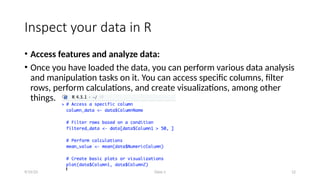
• Access features and analyze data:
• Once you have loaded the data, you can perform various data analysis
and manipulation tasks on it. You can access specific columns, filter
rows, perform calculations, and create visualizations, among other
things.
9/15/23
Class-1 13
Descriptive Statistics in R
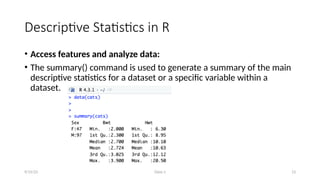
• Access features and analyze data:
• The summary() command is used to generate a summary of the main
descriptive statistics for a dataset or a specific variable within a
dataset.
9/15/23
Class-1 14
Packages in R
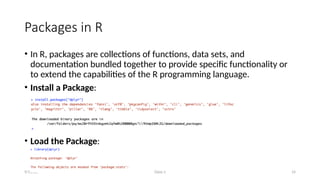
• In R, packages are collections of functions, data sets, and
documentation bundled together to provide specific functionality or
to extend the capabilities of the R programming language.
• Install a Package:
• Load the Package:
9/15/23
Class-1 15
Packages in R
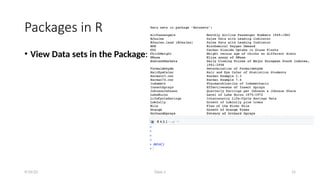
• View Data sets in the Package:
9/15/23
Class-1 16
Packages in R
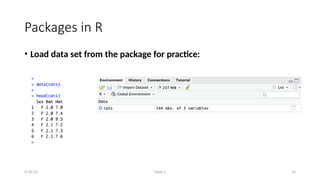
• Load data set from the package for practice:
9/15/23
Class-1 17
9/15/23
Class-2 18
Data Analysis and Visualization in
R
Anantha Krishnan
09/30/23
Class-2 19
Data analysis in R
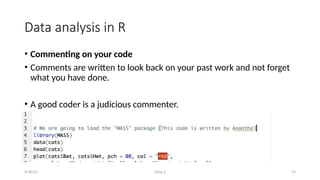
• Commenting on your code
• Comments are written to look back on your past work and not forget
what you have done.
• A good coder is a judicious commenter.
9/30/23
Class-2 20
Data analysis in R
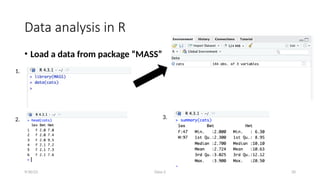
• Load a data from package “MASS”
9/30/23
1.
2. 3.
Class-2 21
Data analysis in R
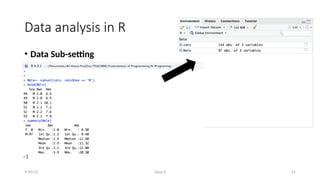
• Data Sub-setting
9/30/23
Class-2 22
Data analysis in R
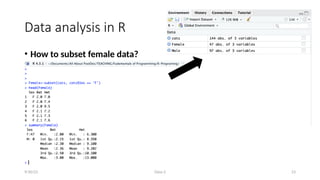
• How to subset female data?
9/30/23
Class-2 23
Data analysis in R
• How to subset female data?
9/30/23
Class-2 24
Data analysis in R
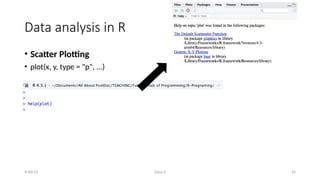
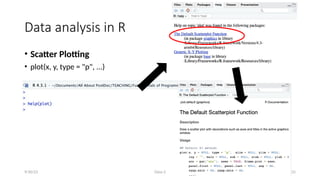
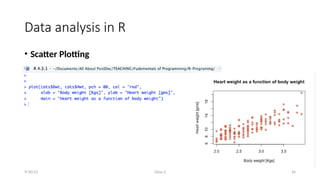
• Scatter Plotting
• plot(x, y, type = "p", ...)
9/30/23
Class-2 25
Data analysis in R
• Scatter Plotting
• plot(x, y, type = "p", ...)
9/30/23
Class-2 26
Data analysis in R
• Scatter Plotting
9/30/23
Class-2 27
Data analysis in R
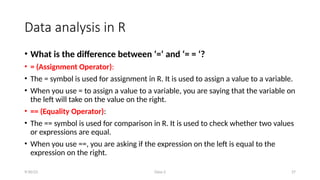
• What is the difference between ‘=‘ and ‘= = ‘?
• = (Assignment Operator):
• The = symbol is used for assignment in R. It is used to assign a value to a variable.
• When you use = to assign a value to a variable, you are saying that the variable on
the left will take on the value on the right.
• == (Equality Operator):
• The == symbol is used for comparison in R. It is used to check whether two values
or expressions are equal.
• When you use ==, you are asking if the expression on the left is equal to the
expression on the right.
9/30/23
Class-2 28
Data analysis in R
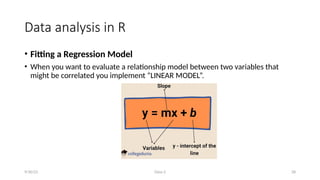
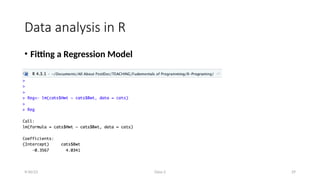
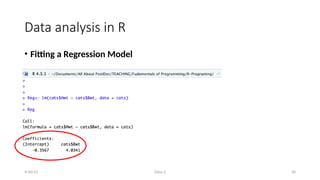
• Fitting a Regression Model
• When you want to evaluate a relationship model between two variables that
might be correlated you implement “LINEAR MODEL”.
9/30/23
Class-2 29
Data analysis in R
• Fitting a Regression Model
9/30/23
Class-2 30
Data analysis in R
• Fitting a Regression Model
9/30/23
Class-2 31
Data analysis in R
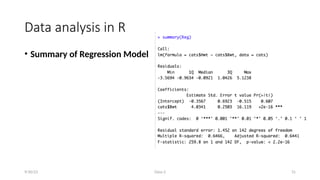
• Summary of Regression Model
9/30/23
Class-2 32
Data analysis in R
• R-Squared
• R-squared is like a score that tells you how good your prediction is based
on the independent variable. It's expressed as a percentage between 0%
and 100%.
• If R-squared is close to 0% (let's say 0.05%) = Your prediction is
terrible.
• If R-squared is close to 100% (let's say 99.9%)= Your prediction is
almost perfect.
9/30/23
Class-2 33
Data analysis in R
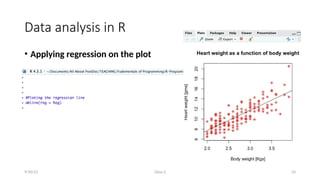
• Applying regression on the plot
9/30/23
Class-2 34
Data analysis in R
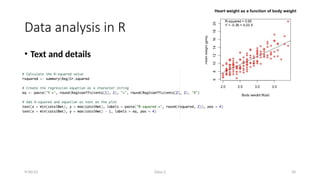
• Text and details
9/30/23
Class-1 35
9/15/23

Fundementals of R Programming_Class_2.pptx

  • 1.
    Class-1 1 Fundamentals ofR-Programing Anantha Krishnan 9/15/23
  • 2.
  • 3.
    Class-1 3 How toopen a new script 9/15/23
  • 4.
    Class-1 4 Assign avariable 9/15/23
  • 5.
    Class-1 5 Mathematics inR • Basic Arithmetic Operations: • Addition (+) • Subtraction (-) • Multiplication (*) • Division (/) • Floor and Ceiling Functions: • floor(x) - Rounds down to the nearest integer. • ceiling(x) - Rounds up to the nearest integer. 9/15/23
  • 6.
    Class-1 6 Mathematics inR • Basic Arithmetic Operations: • Floor and Ceiling Functions: 9/15/23
  • 7.
    Class-1 7 Mathematics inR • Absolute Value: • abs(x) - Returns the absolute (positive) value of x. • Trigonometric Functions: • sin(x), cos(x), tan(x) - Sine, cosine, and tangent of x, respectively. • acos(x), asin(x), atan(x) - Inverse trigonometric functions. • Logarithmic and Exponential Functions: • log(x) - Natural logarithm of x. • log10(x) - Base-10 logarithm of x. • exp(x) - Exponential function of x. 9/15/23
  • 8.
    Class-1 8 Mathematics inR • Absolute Value: • Trigonometric Functions: • Logarithmic and Exponential Functions: 9/15/23
  • 9.
    Class-1 9 Mathematics inR • Statistical Tests: • t-tests, chi-square tests, ANOVA, and other hypothesis tests. • Random Number Generation: • Generating random numbers from various distributions (e.g., rnorm(), runif()). • Linear Algebra: • Matrix inversion (solve()). • Singular Value Decomposition (svd()). 9/15/23
  • 10.
    Class-1 10 Upload andexcel sheet in R environment • Set Your Working Directory (if necessary) • Load the CSV File: 9/15/23
  • 11.
    Class-1 11 Inspect yourdata in R • Inspect data: • After loading the CSV file, you can inspect the data to ensure it was loaded correctly. You can use functions like head(), tail(), summary(), and str() to get an overview of the data. 9/15/23
  • 12.
    Class-1 12 Inspect yourdata in R • Access features and analyze data: • Once you have loaded the data, you can perform various data analysis and manipulation tasks on it. You can access specific columns, filter rows, perform calculations, and create visualizations, among other things. 9/15/23
  • 13.
    Class-1 13 Descriptive Statisticsin R • Access features and analyze data: • The summary() command is used to generate a summary of the main descriptive statistics for a dataset or a specific variable within a dataset. 9/15/23
  • 14.
    Class-1 14 Packages inR • In R, packages are collections of functions, data sets, and documentation bundled together to provide specific functionality or to extend the capabilities of the R programming language. • Install a Package: • Load the Package: 9/15/23
  • 15.
    Class-1 15 Packages inR • View Data sets in the Package: 9/15/23
  • 16.
    Class-1 16 Packages inR • Load data set from the package for practice: 9/15/23
  • 17.
  • 18.
    Class-2 18 Data Analysisand Visualization in R Anantha Krishnan 09/30/23
  • 19.
    Class-2 19 Data analysisin R • Commenting on your code • Comments are written to look back on your past work and not forget what you have done. • A good coder is a judicious commenter. 9/30/23
  • 20.
    Class-2 20 Data analysisin R • Load a data from package “MASS” 9/30/23 1. 2. 3.
  • 21.
    Class-2 21 Data analysisin R • Data Sub-setting 9/30/23
  • 22.
    Class-2 22 Data analysisin R • How to subset female data? 9/30/23
  • 23.
    Class-2 23 Data analysisin R • How to subset female data? 9/30/23
  • 24.
    Class-2 24 Data analysisin R • Scatter Plotting • plot(x, y, type = "p", ...) 9/30/23
  • 25.
    Class-2 25 Data analysisin R • Scatter Plotting • plot(x, y, type = "p", ...) 9/30/23
  • 26.
    Class-2 26 Data analysisin R • Scatter Plotting 9/30/23
  • 27.
    Class-2 27 Data analysisin R • What is the difference between ‘=‘ and ‘= = ‘? • = (Assignment Operator): • The = symbol is used for assignment in R. It is used to assign a value to a variable. • When you use = to assign a value to a variable, you are saying that the variable on the left will take on the value on the right. • == (Equality Operator): • The == symbol is used for comparison in R. It is used to check whether two values or expressions are equal. • When you use ==, you are asking if the expression on the left is equal to the expression on the right. 9/30/23
  • 28.
    Class-2 28 Data analysisin R • Fitting a Regression Model • When you want to evaluate a relationship model between two variables that might be correlated you implement “LINEAR MODEL”. 9/30/23
  • 29.
    Class-2 29 Data analysisin R • Fitting a Regression Model 9/30/23
  • 30.
    Class-2 30 Data analysisin R • Fitting a Regression Model 9/30/23
  • 31.
    Class-2 31 Data analysisin R • Summary of Regression Model 9/30/23
  • 32.
    Class-2 32 Data analysisin R • R-Squared • R-squared is like a score that tells you how good your prediction is based on the independent variable. It's expressed as a percentage between 0% and 100%. • If R-squared is close to 0% (let's say 0.05%) = Your prediction is terrible. • If R-squared is close to 100% (let's say 99.9%)= Your prediction is almost perfect. 9/30/23
  • 33.
    Class-2 33 Data analysisin R • Applying regression on the plot 9/30/23
  • 34.
    Class-2 34 Data analysisin R • Text and details 9/30/23
  • 35.