FUNCTIONS IN R
PROGRAMMING
PRESENTED BY
CHINCHU P
INTRODUCTION
 A function is a set of statements organized together to perform a
specific task.
 R has a large number of in-built functions and the user can create
their own functions.
 In R, a function is an object so the R interpreter is able to pass
control to the function , along with arguments that may be
necessary for the function to accomplish the actions.
FUNCTION DEFINITION
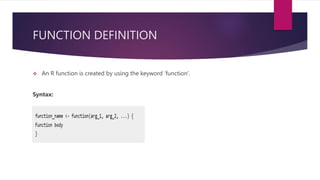
 An R function is created by using the keyword ‘function’.
Syntax:
FUNCTION COMPONENTS
 The different parts of a function are-
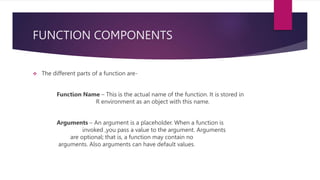
Function Name – This is the actual name of the function. It is stored in
R environment as an object with this name.
Arguments – An argument is a placeholder. When a function is
invoked ,you pass a value to the argument. Arguments
are optional; that is, a function may contain no
arguments. Also arguments can have default values.
Continued:-
Function Body – The function body contains a collection of -
statements that defines what the function does.
Return Value – The return value of a function is the last expression in
the function body to be evaluated.
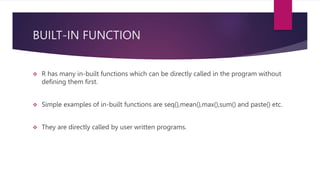
BUILT-IN FUNCTION
 R has many in-built functions which can be directly called in the program without
defining them first.
 Simple examples of in-built functions are seq(),mean(),max(),sum() and paste() etc.
 They are directly called by user written programs.
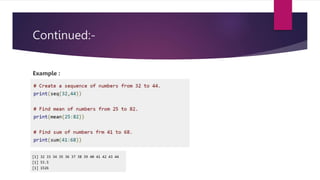
Continued:-
Example :
USER-DEFINED FUNCTION
 User defined functions are specific to what a user wants.
 Once its created they can be used like the built-in functions.
Example:-
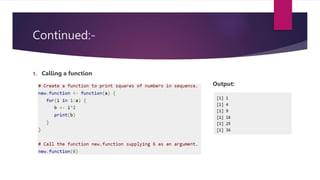
CALLING A FUNCTION
 It is nothing but calling the original function with a valid number of arguments.
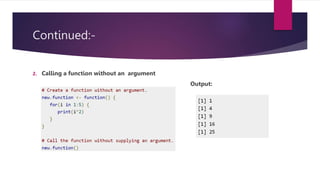
 A function can be called with an argument ,without an argument and with a
default value as well.
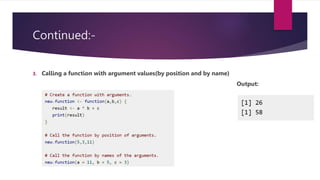
 The arguments to a function call can be supplied in the same sequence as defined
in the function or they can be supplied in a different sequence but assigned to the
names of the arguments.
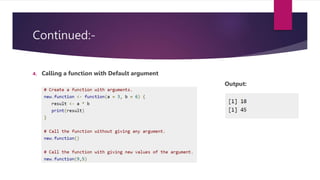
 We can define the value of the arguments in the function definition and call the
function without supplying any argument to get the default result . we can also
call such functions by supplying new values of the argument and get non default
result.
Continued:-
1. Calling a function
Output:
Continued:-
2. Calling a function without an argument
Output:
Continued:-
3. Calling a function with argument values(by position and by name)
Output:
Continued:-
4. Calling a function with Default argument
Output:
Lazy Evaluation of function
 Arguments to functions are evaluated lazily, which means so they are evaluated
only when needed by the function body.
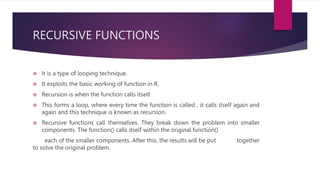
RECURSIVE FUNCTIONS
 It is a type of looping technique.
 It exploits the basic working of function in R.
 Recursion is when the function calls itself.
 This forms a loop, where every time the function is called , it calls itself again and
again and this technique is known as recursion.
 Recursive functions call themselves. They break down the problem into smaller
components. The function() calls itself within the original function()
each of the smaller components. After this, the results will be put together
to solve the original problem.
Continued:-
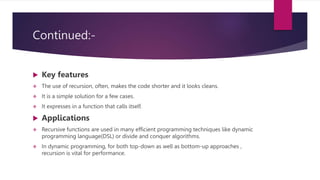
 Key features
 The use of recursion, often, makes the code shorter and it looks cleans.
 It is a simple solution for a few cases.
 It expresses in a function that calls itself.
 Applications
 Recursive functions are used in many efficient programming techniques like dynamic
programming language(DSL) or divide and conquer algorithms.
 In dynamic programming, for both top-down as well as bottom-up approaches ,
recursion is vital for performance.
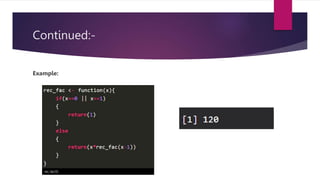
Continued:-
Example:
rec_fac(5)
KEY POINTS TO REMEMBER
1. What is a Function
2. Definition
3. Syntax
4. Function components
5. Built-in function
6. User-defined function
7. Function call
8. Recursive Function
9. Examples
TASK
1.Create a function for rectangle , calculate the area and print the result.
2.Create a function to check whether the given number is odd or even.
THANK YOU

FUNCTIONS IN R PROGRAMMING.pptx

  • 1.
  • 2.
    INTRODUCTION  A functionis a set of statements organized together to perform a specific task.  R has a large number of in-built functions and the user can create their own functions.  In R, a function is an object so the R interpreter is able to pass control to the function , along with arguments that may be necessary for the function to accomplish the actions.
  • 3.
    FUNCTION DEFINITION  AnR function is created by using the keyword ‘function’. Syntax:
  • 4.
    FUNCTION COMPONENTS  Thedifferent parts of a function are- Function Name – This is the actual name of the function. It is stored in R environment as an object with this name. Arguments – An argument is a placeholder. When a function is invoked ,you pass a value to the argument. Arguments are optional; that is, a function may contain no arguments. Also arguments can have default values.
  • 5.
    Continued:- Function Body –The function body contains a collection of - statements that defines what the function does. Return Value – The return value of a function is the last expression in the function body to be evaluated.
  • 6.
    BUILT-IN FUNCTION  Rhas many in-built functions which can be directly called in the program without defining them first.  Simple examples of in-built functions are seq(),mean(),max(),sum() and paste() etc.  They are directly called by user written programs.
  • 7.
  • 8.
    USER-DEFINED FUNCTION  Userdefined functions are specific to what a user wants.  Once its created they can be used like the built-in functions. Example:-
  • 9.
    CALLING A FUNCTION It is nothing but calling the original function with a valid number of arguments.  A function can be called with an argument ,without an argument and with a default value as well.  The arguments to a function call can be supplied in the same sequence as defined in the function or they can be supplied in a different sequence but assigned to the names of the arguments.  We can define the value of the arguments in the function definition and call the function without supplying any argument to get the default result . we can also call such functions by supplying new values of the argument and get non default result.
  • 10.
    Continued:- 1. Calling afunction Output:
  • 11.
    Continued:- 2. Calling afunction without an argument Output:
  • 12.
    Continued:- 3. Calling afunction with argument values(by position and by name) Output:
  • 13.
    Continued:- 4. Calling afunction with Default argument Output:
  • 14.
    Lazy Evaluation offunction  Arguments to functions are evaluated lazily, which means so they are evaluated only when needed by the function body.
  • 15.
    RECURSIVE FUNCTIONS  Itis a type of looping technique.  It exploits the basic working of function in R.  Recursion is when the function calls itself.  This forms a loop, where every time the function is called , it calls itself again and again and this technique is known as recursion.  Recursive functions call themselves. They break down the problem into smaller components. The function() calls itself within the original function() each of the smaller components. After this, the results will be put together to solve the original problem.
  • 16.
    Continued:-  Key features The use of recursion, often, makes the code shorter and it looks cleans.  It is a simple solution for a few cases.  It expresses in a function that calls itself.  Applications  Recursive functions are used in many efficient programming techniques like dynamic programming language(DSL) or divide and conquer algorithms.  In dynamic programming, for both top-down as well as bottom-up approaches , recursion is vital for performance.
  • 17.
  • 18.
    KEY POINTS TOREMEMBER 1. What is a Function 2. Definition 3. Syntax 4. Function components 5. Built-in function 6. User-defined function 7. Function call 8. Recursive Function 9. Examples
  • 19.
    TASK 1.Create a functionfor rectangle , calculate the area and print the result. 2.Create a function to check whether the given number is odd or even.
  • 20.