www.tmasolutions.com
Content
2
About Frontify
3
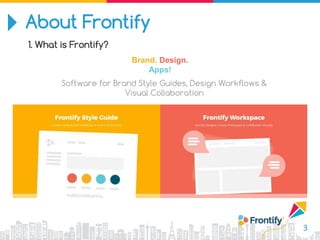
1. What is Frontify?
Brand. Design.
Apps!
Software for Brand Style Guides, Design Workflows &
Visual Collaboration
About Frontify
4
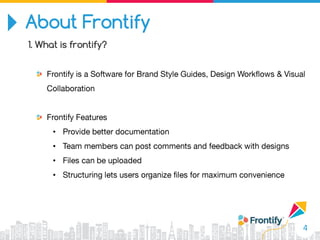
1. What is frontify?
•
•
•
•
About Frontify
5
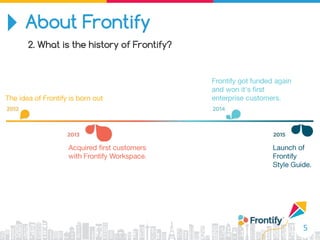
2. What is the history of Frontify?
About Frontify
6
2. What is the history of Frontify?
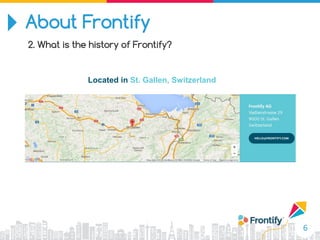
Located in St. Gallen, Switzerland
About Frontify
7
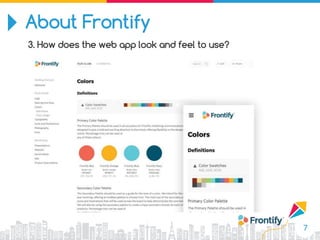
3. How does the web app look and feel to use?
About Frontify
8
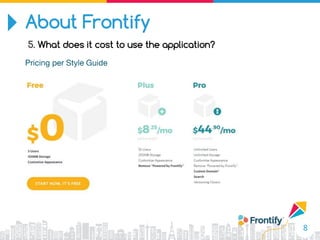
5. What does it cost to use the application?
About Frontify
9
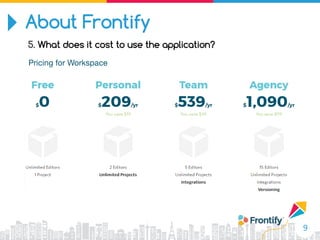
5. What does it cost to use the application?
Features
10
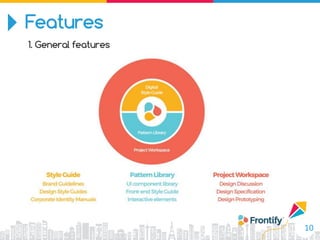
1. General features
Features
11
1. General features
Features
12
2. Frontify Style Guide Fast Creation & Editing
Features
13
2. Frontify Style Guide Easy to Share
Features
14
2. Frontify Style Guide Always Up to Date
Features
15
2. Frontify Style Guide Print & Digital Guidelines
Features
16
2. Frontify Style Guide Flexible Structure & Open World
Features
17
2. Frontify Style Guide PDF, Print View
Features
18
2. Frontify Workspace Digital Asset Management
Features
19
2. Frontify Workspace Visual Design Collaboration
Features
20
2. Frontify Workspace Design Iteration & Approval Workflow
Features
21
2. Frontify Workspace Prototyping & Presentations
Features
22
2. Frontify Workspace UX & Design Specifications
Features
23
2. Frontify Workspace Design & Code Married
Advances
•
•
•
•
•
•
THANK YOU!
Tel:
:
Fax:
Email:

Frontify

Editor's Notes

  • #5 Frontify is a web design and front end development tool that helps teams work more efficiently and effectively. The user can provide better documentation without wasting a lot of time on the process.  Each project participant can supply comments and feedback that others can access through the application without spending precious time in meetings. Frontify is a tool to communicate between team members to reduce the chances of a misunderstanding while improving the way ideas, feedback and suggestions are shared.
  • #6 Frontify has earned a lot of positive feedback from most users on the web. Frontify was launched by a software company and web development. Frontify continues to offer an attractive selection of tools that can help teams work more efficiently in many key project areas.
  • #8 Frontify has a very clean, modern interface that is a strong point for the application. The user never feels crowded or untidy as they work. There is a open space to let the user get comfortable with simple visual elements. The experience stays professional without complicated or boring. New users spend a few minutes to explore everything the application can do.
  • #12 https://brand.frontify.com/d/qAiubNBytHKf/ui-patterns#/getting-started/layout https://brand.frontify.com/d/qAiubNBytHKf/style-guide https://app.frontify.com/screen/469860#measures
  • #13 Create your brand or design guidelines with an online tool.  Frontify Style Guide is build to be usable without learning, so that you can get started instantly. 
  • #14 PRIVATE SHARING Invite your team to your Style Guide and restrict the access to specific users. Choose between 3 simple access levels: viewer, editor & owner PUBLIC SHARING If you want to allow access to people without a login, simply generate & share a public link or custom domain
  • #15 Your guidelines are where you are - access your style guide from everywhere. The view of the style guide is responsive and optimized for many devices.
  • #16 Existing brand manuals only contain static content. Frontify Style Guides allow you to create all kind of digital content of your brand: social media usage, video / audio content, app designs, online marketing guidelines & many more..
  • #17 Beside basic blocks (rich text, images, files, etc.) you can use smart blocks (like reusable color palettes, embeddable web fonts, dev starter kits, and many more). you can customized blocks that fit your needs.
  • #18 Export your style guide to a PDF document or print it directly.
  • #19 Frontify supports all design related files. Beside of the graphic standards like PNG, JPG we also support specific formats like Photoshop, Illustrator, SVG, PDF and even more.
  • #20 Upload your design iterations and demonstrate to your clients your progress with the revision history. Switch between versions and make changes visible for the complete team.
  • #22 You can create prototype for your client by building an interactive prototype which can be used with touch gestures on tablets or smartphones.
  • #23 Create Colors, Typography, Measures, Grids, Interactions and more. Defining and measuring your designs and UI (user interface) components
  • #24 This is environment for dev, they can create element by coding and view live