INTRODUCES
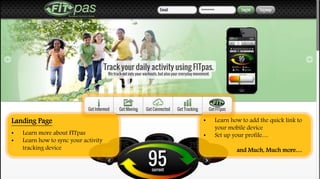
Landing Page
• Learn more about FITpas
• Learn how to sync your activity
tracking device
• Learn how to add the quick link to
your mobile device
• Set up your profile…
and Much, Much more…
FITpas on your Mobile Device!!
Need to access your FITpas profile on the go…? Easy! Simply save the
FITpas Icon to your personal Mobile Device and enter activities any time.
Available on:
• Apple
• Android
• Microsoft
• Blackberry
Example of adding FITpas to your
Apple Device!!
FITpas can seamlessly pull in activity data from over
100+ Activity Devices…and the list is growing.
Simply select your preferred
device within your FITpas
profile, follow the
connection steps, and
THAT’S IT!!
Select Master Activity Icon
Select Sub Category
Enter Duration
Hit Submit
Profile Page
Entering an Activity!
Dashboard Page
Details for the
current day include:
1) Total duration of all
activities for this day.
2) Total calories burned for
all activities this day.
3) Daily Goal for calories
burned for this day.
Weekly Summary
1. FITpas Score
2. Active Burned Calories
against your Goal!
Personal Activity Score
…based on Active Burned Calories
for the day!
0 - 100 Active Metabolism
(highly active)
101 - 200 Balanced Metabolism
(moderately active)
201 - 300 Challenged Metabolism
(lightly active)
Click here to switch over to Calendar View!
Activity Page
Display details of the most recent 5 activities! Click here to see Calendar view…
and Here
Calendar
1. Use the drop downs
to find a specific date
in the year!
2. View & Edit activities
directly from the
Calendar
Weekly summary of
Active Burned Calories &
FITpas score
Reports Page
1. Select date range from swiveling
carousel to view historical scores
2. Use the graph to dive into specific
information
Profile Page
1. Enter Activities
2. Edit personal bio-markers
3. Review & edit account
information
* FITpas will notify user to review profile
every 30 days!
Corporate Wellness
Benefits of the
Corporate Wellness Program
Validated Research
FITpas Digital Display
Group Reports
Track your company’s score
and participation!
Due to spiraling healthcare costs, the need for
"quantifiable health-tracking data" is more apparent
than ever. Using a measurable tracking protocol ,
aligning with recognizable standards accepted by both
the healthcare and medical communities, this issue has
been solved with the creation of FITpas!
"FITpas is a tool that can be used by the Medical and Health
care communities, Corporate Wellness programs for rewards
eligibility, the Fitness Industry to attract and engage members,
and finally dedicated Junior and Senior programs to deal with
childhood obesity and general improved activity respectively."
Motivate your Group by
showing Company status!
Quoted from a White Pager following research
conducted by Missouri Baptist University in 2013:
FITpas – powered by FITwave 12
White Label- Custom Themes Add value to your existing Website or Intranet
with customized themes & branding!
Group Monthly Graph
Represents and compares:
1. Group score for the month
2. Group participation for the
month
Report Summary
Summary of employee
Scores & Participation for a
selected month!
For more information and questions:
www.fitpas-fit.com
Phone: (877) 716-3630
Email: info@fitpas-fit.com

FITpas Tutorial

  • 1.
  • 2.
    Landing Page • Learnmore about FITpas • Learn how to sync your activity tracking device • Learn how to add the quick link to your mobile device • Set up your profile… and Much, Much more…
  • 3.
    FITpas on yourMobile Device!! Need to access your FITpas profile on the go…? Easy! Simply save the FITpas Icon to your personal Mobile Device and enter activities any time. Available on: • Apple • Android • Microsoft • Blackberry Example of adding FITpas to your Apple Device!!
  • 4.
    FITpas can seamlesslypull in activity data from over 100+ Activity Devices…and the list is growing. Simply select your preferred device within your FITpas profile, follow the connection steps, and THAT’S IT!!
  • 5.
    Select Master ActivityIcon Select Sub Category Enter Duration Hit Submit Profile Page Entering an Activity!
  • 6.
    Dashboard Page Details forthe current day include: 1) Total duration of all activities for this day. 2) Total calories burned for all activities this day. 3) Daily Goal for calories burned for this day. Weekly Summary 1. FITpas Score 2. Active Burned Calories against your Goal! Personal Activity Score …based on Active Burned Calories for the day! 0 - 100 Active Metabolism (highly active) 101 - 200 Balanced Metabolism (moderately active) 201 - 300 Challenged Metabolism (lightly active)
  • 7.
    Click here toswitch over to Calendar View! Activity Page Display details of the most recent 5 activities! Click here to see Calendar view…
  • 8.
    and Here Calendar 1. Usethe drop downs to find a specific date in the year! 2. View & Edit activities directly from the Calendar Weekly summary of Active Burned Calories & FITpas score
  • 9.
    Reports Page 1. Selectdate range from swiveling carousel to view historical scores 2. Use the graph to dive into specific information
  • 10.
    Profile Page 1. EnterActivities 2. Edit personal bio-markers 3. Review & edit account information * FITpas will notify user to review profile every 30 days!
  • 11.
    Corporate Wellness Benefits ofthe Corporate Wellness Program Validated Research FITpas Digital Display Group Reports Track your company’s score and participation! Due to spiraling healthcare costs, the need for "quantifiable health-tracking data" is more apparent than ever. Using a measurable tracking protocol , aligning with recognizable standards accepted by both the healthcare and medical communities, this issue has been solved with the creation of FITpas! "FITpas is a tool that can be used by the Medical and Health care communities, Corporate Wellness programs for rewards eligibility, the Fitness Industry to attract and engage members, and finally dedicated Junior and Senior programs to deal with childhood obesity and general improved activity respectively." Motivate your Group by showing Company status! Quoted from a White Pager following research conducted by Missouri Baptist University in 2013:
  • 12.
    FITpas – poweredby FITwave 12 White Label- Custom Themes Add value to your existing Website or Intranet with customized themes & branding!
  • 13.
    Group Monthly Graph Representsand compares: 1. Group score for the month 2. Group participation for the month Report Summary Summary of employee Scores & Participation for a selected month!
  • 14.
    For more informationand questions: www.fitpas-fit.com Phone: (877) 716-3630 Email: info@fitpas-fit.com