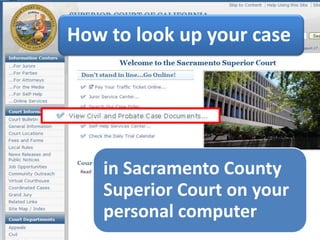

In this presentation, you will learn how to find your case on the Sacramento County Superior Court's website. You can use the court's website to read and print all documents filed in your case.You will need to know your case number. This number can be found on the front of any paperwork filed in court, such as the Summons and Complaint.You will need a computer with an internet connection. If you do not have internet access, you can use the computers at the Law Library or any public library.
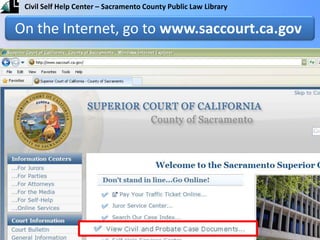
On the Internet, go to www.saccourt.ca.gov
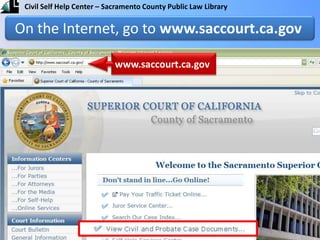
On the Internet, go to www.saccourt.ca.govwww.saccourt.ca.gov
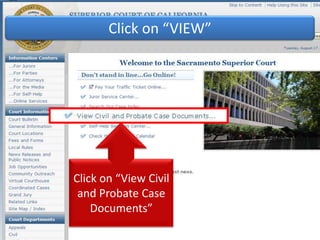
Click on “VIEW”Click on “View Civil and Probate Case Documents”
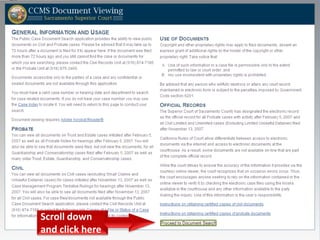
Scroll down and click here
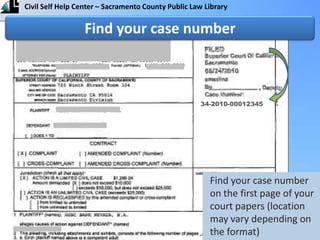
Find your case number34-2010-00012345Find your case number on the first page of your court papers (location may vary depending on the format)
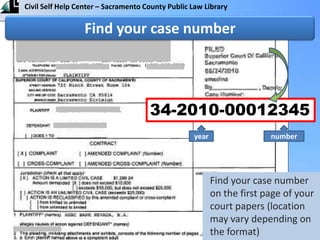
Find your case number34-2010-00012345numberyearFind your case number on the first page of your court papers (location may vary depending on the format)
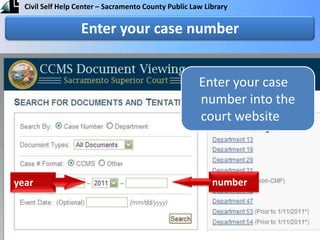
Enter your case number into the court websiteEnter your case numbernumberyear
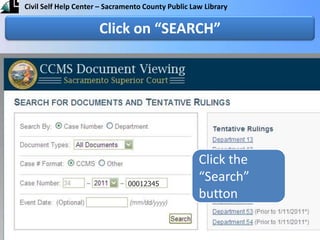
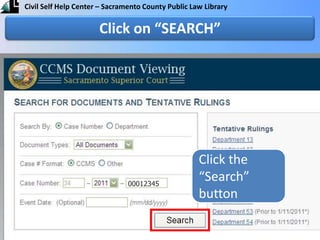
Click the “Search” buttonClick on “SEARCH”00012345
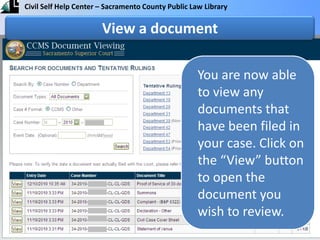
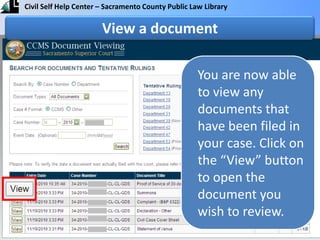
You are now able to view any documents that have been filed in your case. Click on the “View” button to open the document you wish to review.View a document
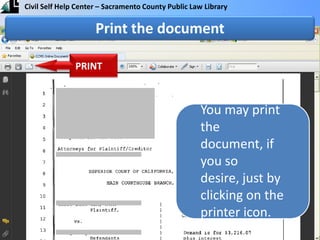
You may print the document, if you so desire, just by clicking on the printer icon.Print the document PRINT
For more information, visit the Civil Self Help Center or talk to a law librarian.

Find Your Case (English)

  • 2.
    In this presentation,you will learn how to find your case on the Sacramento County Superior Court's website. You can use the court's website to read and print all documents filed in your case.You will need to know your case number. This number can be found on the front of any paperwork filed in court, such as the Summons and Complaint.You will need a computer with an internet connection. If you do not have internet access, you can use the computers at the Law Library or any public library.
  • 3.
    On the Internet,go to www.saccourt.ca.gov
  • 4.
    On the Internet,go to www.saccourt.ca.govwww.saccourt.ca.gov
  • 5.
    Click on “VIEW”Clickon “View Civil and Probate Case Documents”
  • 6.
    Scroll down andclick here
  • 7.
    Find your casenumber34-2010-00012345Find your case number on the first page of your court papers (location may vary depending on the format)
  • 8.
    Find your casenumber34-2010-00012345numberyearFind your case number on the first page of your court papers (location may vary depending on the format)
  • 9.
    Enter your casenumber into the court websiteEnter your case numbernumberyear
  • 10.
    Click the “Search”buttonClick on “SEARCH”00012345
  • 11.
    Click the “Search”buttonClick on “SEARCH”00012345
  • 12.
    You are nowable to view any documents that have been filed in your case. Click on the “View” button to open the document you wish to review.View a document
  • 13.
    You are nowable to view any documents that have been filed in your case. Click on the “View” button to open the document you wish to review.View a document
  • 14.
    You may printthe document, if you so desire, just by clicking on the printer icon.Print the document PRINT
  • 15.
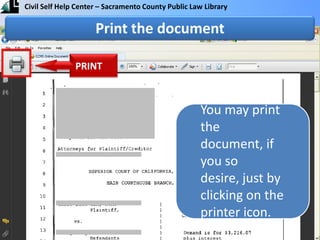
    You may printthe document, if you so desire, just by clicking on the printer icon.Print the document PRINT
  • 16.
    For more information,visit the Civil Self Help Center or talk to a law librarian.