Metamorphic Testing of Sensor Processing for Android Applications
By
Marco Peterson
A thesis submitted to the Faculty of the College of Graduate Studies of Virginia
State University in partial fulfillment of the requirements for the degree of Master
of Science in Computer Science in the School of Engineering, Science, and
Technology
Virginia
2015
Approved by:
______________________________
Dr. Kostadin Damevski (Advisor)
_______________________________
Dr. Hui Chen (Committee Member)
_______________________________
Dr. David Walter (Committee
Member)
ABSTRACT
The field of Software Engineering has always strived to enable the creation of more reliable and
accurate software by implementing a range of software testing techniques to ensure source code
executes as intended. Traditional software testing is done by evaluating results against an oracle,
consisting of a set of acceptable outputs for each test case. A test case is another program created
to emulate real world inputs and scenarios a particular software might encounter. This is an
effective method of testing and is summarily an industry standard of today; but as we all know,
no program is without its bugs and glitches. Detecting theses errors more effectively has become
one of the most pressing objectives for many computer science industries. Perhaps the chief error
detection obstacle software engineers face today is known as the oracle problem. The oracle
problem arises from one of two situations. The first is when the answer to the problem the
software under test is solving is difficult to constrain. This issue occurs most often in machine
learning software, where a machine must perform a task without be explicitly programed, such
as the self-driving car. In this case a source code must learn how to complete a task from the
input of the world around it. The second situation is when it is either impossible or too expensive
to create a test for all reasonable inputs a software might encounter. Both situations leave the
software developer without a means to test their software effectively. In the case of sensor data
calculations, it is very difficult to calculate accurate results when given wide range of possible
sensor inputs. The goal of this Thesis is to evaluate the effectiveness of a technique known as
Metamorphic testing on sensor based application on Android platforms in order to solve issues
such as the oracle problem. Metamorphic Testing is a software testing technique that takes
already existing test cases for a particular software and builds new test cases. This method
essentiallyreuses testcases toapplydifferentmathematical properties until anerroris found.
ACKNOWLEDGEMENTS
I would like to thank my advisor Dr. Kostadin Damevski for the continuous support of my
Master’s thesis and research. His patience, motivation, enthusiasm, and immense knowledge
paved the way for this research.
I would also like to thank Dr. Hui Chen for his help and expertise over the course of my
time in Master’s Program. Lastly I would like to thank all the Professors and Staff for their help
and guidance over the entire life span of my time at Virginia State University
Last but by no means least; I would like to acknowledge the support from my friends and
peers for all their help both directly and indirectly.
iii
TABLE OF CONTENTS
List of Figures……………………………………………………………………………………….v
List of Tables………………………………………………………………………………………..vi
1. Introduction .......................................................................................................................1
1.0 Overview...............................................................................................................1
1.1 Aims and Objectives............................................................................................2
1.2 Research Questions..............................................................................................3
1.3 Chapter Outline....................................................................................................3
2. Problem Statement/Hypothesis...................................................................................... 4
2.0 Problem Statement............................................................................................... 4
2.1 Hypothesis ............................................................................................................ 5
3. Background/Related Works ........................................................................................... 6
3.0 Traditional White-Box Testing........................................................................... 6
3.0.1 Simulation Testing…………………………………………………… 7
3.0.2 Symbolic Execution………………………………………………….. 9
3.1 Path Explosion…………………………………………………………………. 10
3.2 The Oracle Problem............................................................................... 11
3.3 Machine Learning……………………………………………………………….11
3.4 Metamorphic Testing………………………………………………………….. 12
3.4.1 List of Common Metamorphic Properties................................... 14
3.4.2 Stacking Metamorphic Tests ..................................................... 15
3.5 Step Detection Algorithm ...................................................................... 16
3.5.1 Step Cycle Detection…………………………………………………. 17
3.5.2 Calculating Steps Filter………………………………………………. 19
3.6 Fault Seeding and Detection……………………………………………………20
4. Design and Approach...................................................................................... 21
4.0 Android Frame Work............................................................................ 21
4.1 Test Case Detection ............................................................................... 23
4.1.1 DetectingAndroid API Tests……………………………………….. 24
4.1.2 Listof Android API Tests Searched for……………………………. 24
4.1.3 DetectingDeveloper Created Tests………………………………….25
4.1.4 Test CaseDetection Procedure………………………………………28
4.2 Data Collection (SenSee)........................................................................ 29
4.2.1 Data Collection Procedure……………………………………………31
4.3 Error Detection…………………………………………………………………. 32
4.4 Applied Metamorphic Transforms ......................................................... 33
4.4.1 Multiplicative Transforms…………………………………………… 34
4.4.2 Interpolating Transform………………………..……………………..35
4.4.3 Adding Avg Noise Transform ……………………………………….35
4.4.4 Down Sampling Transform…………………………………………...36
4.4.5 Semantical Transform…………………………………………………37
4.5 Fault Seeding Study……………………………………………………………..38
iv
5. Evaluation........................................................................................................................... 40
5.0 Study Recap ..........................................................................................................40
5.1 Test Case Detection Results................................................................................40
5.2 Initial Transform Results ....................................................................................41
5.3 Fault Seeding/Error Detection Results.............................................................43
5.4 Full Transform Taxonomy……………………………………………………...45
5.5 Discussion .............................................................................................................47
5.6 Limitations of Study ............................................................................................48
6. Summary............................................................................................................................ 49
6.0 Summary...............................................................................................................49
6.1 Recommendations for Future Research............................................................50
Appendix A....................................................................................................................................... 51
Appendix B....................................................................................................................................... 56
Appendix C....................................................................................................................................... 58
Appendix D ...................................................................................................................................... 62
Appendix E ....................................................................................................................................... 64
Appendix F ....................................................................................................................................... 65
Bibliography..................................................................................................................................... 72
v
LIST OF FIGURES
3.1 Rapid Growth of Conditional Possibilities .......................................................... 8
3.2 Simulation Testing Single Path Execution ........................................................... 9
3.3 Symbolic Execution Path Execution.................................................................... 10
3.4 Simple Cosine Test Case.................................................................................... 13
3.5 Metamorphic Stacking ...................................................................................... 15
3.6 Accelerometer Sensor Data................................................................................ 17
3.7 Stride Diagram ................................................................................................. 19
3.8 Dynamic Threshold Leveling............................................................................. 20
4.1 Android Frame Work........................................................................................ 22
4.2 t1 Test Case ...................................................................................................... 26
4.3 t2 Test Case...................................................................................................... 27
4.4 Caller Method................................................................................................... 28
4.5 Parsing Algorithm Output................................................................................. 29
4.6 Accelerometer Sensor Data with Tag Lines ......................................................... 30
4.7 SenSee Capture and Transform Diagram ............................................................ 31
4.8 Original 10 Step Data Set................................................................................... 33
4.9 Multiplicative Transform on 10 Step Data Set ..................................................... 34
4.10 Interpolating Transform on 10 Step Data Set ..................................................... 35
4.11 Add Average Noise Transform on 10 Step Data Set ........................................... 36
4.12 Down Sampling Transform on 10 Step Data Set................................................. 37
4.13 Semantical Transform on 10 Step Data Set......................................................... 38
3.7 Stride Diagram ................................................................................................. 38
v
LIST OF TABLES
5.1 Base Line Pedometer Results before Transforms ................................................. 42
5.2 Pedometer Application Results for each Transform ............................................. 43
5.3 Transforms Results after Introducing an Error………………………………………...35
5.1 Questionnaire for evaluation ............................................................................. 33
5.2 Distribution of the participants’ responses.......................................................... 39
5.3 Transforms Results after Introducing an Error…………………………………….......44
vi
CHAPTER 1 - INTRODUCTION
1.0 Overview
Reducing the cost of software development while improving software quality is an
important objective for the software industry. A study by Tassey estimated the annual cost for
software testing to be between $22.2 to $59.9 billion dollars, with over half of those costs borne
from mitigation activities caused by correcting errors after a software’s release [15]. Checking a
product for faults is standard practice in almost all fields, and is fundamentally important to
product quality. This is especially true in the field of software engineering for two reasons. The
first is the complexity required from many modern software products. The second reason is
due to potential consequences of a software failure. The production of reliable software is one
of the fundamental requirements for applying computers to today's challenging problems [12].
As computer programs grow in size and complexity, testing costs will only increase. More
research is needed to reduce these costs by developing new, more effective testing methods and
approaches.
A novel testing technique that aims to improve upon the state of the practice is
metamorphic testing. It has been used to help improve software accuracy and reliability in several
fields includingBioinformatics, Genetic Sequencing, and MachineLearning. The focus of this thesis
is applying this technique to sensor based application,
more specifically Android based sensor applications. Many applications today use sensor data to
calculate some result. Applications ranging from calculating blood pressure and heart rate to
docking ships with the international space station. However, calculating a desired result from a set
of raw sensor data is not easy, especially if the mathematical procedure to do so does not already
exist. This problem becomes exponentially more difficult when you are performing calculations
usingmore than one sensor. Perhaps the best example of this is today’s weather forecasting system.
Thousands of sensor arrays recording everything from humidity, temperature, and wind speed are
used in attempt to predict the forecast days in advance, but it is not always accurate. Weather
forecasting is an example of an oracle problem. This is when all possible sensor inputs and
combinations are impossible to calculate, so creating a computer program to accurately predict the
weather one hundred percent of the time has proven to be equally impossible. Solving and testing
for the oracle problem has become a fundamental goal for computer scientist today.
Weather forecasting is one of the most complex sensor based application in existence
today, nonetheless the basic principles remain the same. We are applying metamorphic testing on
a smaller scale in an attempt to understand how metamorphic properties can be used to improve
both the source code through error detection and the overall error threshold accuracy of the
software. The tools we created will also provide Android developers with a platform to perform
metamorphic testing on their own applications.
1.1 Aims and Objectives
The goal of this thesis is to evaluate a testing technique known as Metamorphic Testing
within the Android platform. The objective is to evaluate the effectiveness of metamorphic
testing in finding errors within Android source code as well as to evaluate the current testing
practices being used by Android developers.
2
1.2 Research Questions
∑ What testing methods are Android developers currently using?
∑ Can metamorphic testing be applied to sensor based Android applications?
∑ How effective is metamorphic testing for detecting errors in Android source code?
∑ What Metamorphic transforms are most effective in evaluating the first three questions?
∑ Can we find transforms that can be applied to other software outside of Android?
1.3 Chapter Outline
This thesis consistof six chapters. Chapter 1 presents the overall goal the thesis, including
research questions, aims, objectives, and overview. Chapter 2 illustrates the problem statement
and hypothesis based on related work in this area of research, as well as give a brief history of
software testing explaining where metamorphic testing derived its concepts. Chapter 3 in the
background chapter. It provides an in-depth explanation on metamorphic testing and the
methods used to collect the sensor data used during this thesis. It also outlines the related works
in the fields of metamorphic testing, machine learning and fault seeding. Chapter 4 provides a
detailed explanation of the Android frame work, and the transforms used to during our
evaluation. This chapter also provides a high level explanation on how we were able to capture
and transform onboard Android sensor data. Chapter 5 explains the results of your evaluation as
well as the study’s limits. FinallyChapter 6 summarizes our work and provides recommendations
for future research.
3
CHAPTER 2 – PROBLEM STATEMENT/HYPOTHESIS
2.0 Problem Statement
The conventional method to test software is to examine pairs of expected output data and
input data, then check to see if the expected output has been achieved when a given inputis passed
through the code being tested. If the output is incorrect, then it is safe to say your program has a
bug/error; but what if the output is correct? Is the code now faultless? The answer is no, as even
for a relatively simple program, reliably finding all errors that may exist is a difficult task. As
software increases in complexity, many computer programs are tasked with problems for which
the correct output is difficult to express in all cases or with 100% confidence. This is known as the
oracle problem in software testing. Finding errors, logic mistakes, and general bugs is inherently
difficult if a developer does not know what the final outcome should be once a program’s
computations are complete. As mentioned in the movie “The Hitchhiker’s Guide to the Galaxy” a
computer attempts to compute the meaning of life [21], generating an arbitrary answer of 42. But,
is that answer correct? Perhaps the better question is how someone would test this computer
program for correctness. Metamorphic testing has been shown to be effective by several studies [1]
[1] [18] [19] in a wide range of testing applications, especially testing software that possesses the
oracle problem.
This thesis contains the methods needed to apply metamorphic testing to sensor based
Android applications. The goal is to provide Android developers with a new tool to further test
and improve their applications, as well as provide an understanding of metamorphic testing and
it’s properties so it can be applied to other problems.
2.1 Hypothesis
Metamorphic testing transforms can be used to test sensor-based Android
applications in order to improve overall error detection and error threshold.
5
CHAPTER 3 – BACKGROUND/RELATED WORKS
3.0 Traditional White-Box Testing
The term white-box testing is used to describe a group of methods used for testing a
software’s internal source code by constructing test cases. Also known as clear box testing, or
glass box testing (Beizer, 1995),these connotations indicate that a developer has full visibility of
the internal workings of the software product, specifically, the logic and the structure of the code
[8]. This visibility allows developers to create test cases specifically designed to exercise a
software’s processing path and determine if it has reached an appropriate result. This method is
used to test a variety of source code functions such as data flow, decision statements, networking
connections, and program pathing. All of these examples require the developer to evaluate the
Software Under Test (SUT) using a predefined set of inputs against the expected set of outputs.
There are two central “white-box” testing methods thatcan be applied when creating a test
case for a particular piece of software. The first is known as “Unit Testing”. The most fundamental
testing method of the two, Unit testing is used to test one specific part of a code, usually a function
or family of functions known as modules or units. It has become a good programing practice to
create several separate modular functions to construct an overall piece of software, breaking a large
piece of code down into a bunch of small pieces of code that perform a very specific task that
contribute to the overall program as a whole. The primary goal of unit testing is to take the smallest
piece of
testable software in the application, isolate it from the remainder of the code, and determine
whether it behaves exactly as you expect [7].
The next type of testing method is Integration testing. Just like its name suggests, this tests
the assimilating of smaller pieces of code into a larger piece of code after they have been verified
to be correct through unit testing. This insures that all the modules in the system are working
together as intended [10].
When constructing test cases for error detection, developers can choose to implement them
using a variety of approaches. The best approaches exercise all possible inputs and conditions
within a given program in an attempt to insure no bug is left undetected, this is called “Full
Coverage”. However testing with full coverage approaches my not always be possible or practical.
Methods such as Simulation Testing and Symbolic Extraction allow for deliberate and effective
testing for some software, but not all.
3.0.1 Simulation Testing
Perhaps the most basic form of software testing, simulation testing is the simple process of
feeding a predefined input into a program and evaluating the result for accuracy. These tests are
designed mimic the operation of world scenarios, such as the day-to-day operation of a bank, the
running of an assembly line in a factory, or the staff assignment of a hospital or call center [9].
However simulation testing has a fundamental flaw when it comes to testing software that have
condition statements. Using this method you can only test one condition at a time, if your program
has multiple conditions with several layers of nested conditions the number of possible results
grows very quickly, and testing for each of those results becomes more difficult.
For Example, if your program has an “If Statement” it can execute one of the two possible
7
conditions at a time, either the true condition or the false condition. Another test is required to
execute the other condition. Most software today have several if statements with in their source
code, many of which as nested within each other. Figure 3.1 illustrates how these possible
conditions statement can grow rapidly
Figure 3.1 – Rapid Growth of Conditional Possibilities
This is just an example of one conditional statement. Other conditional statements such
as “If Else Statements can have more than just 2 possible branches, further complicating the
conditional logic of any given program.
Furthermore the same type of graph can be drawn to depict a programs over structure.
Complex programs will have individual functions they may or may not be called during a
particular test. These types of complexities make it very difficult to achieve Full Coverage when
8
testing large complex software. Figure 3.2 depicts how simulation testing can only execute
one path at a time with in a complex program.
Figure 3.2 – Simulation Testing Single Path Execution [11]
FSM = Finite State Machine (i.e. Computer Program)
3.0.2 Symbolic Execution
In an attempt to obtain full coverage for complex programs, James King created the first
automatic testing method called Symbolic Execution in 1976.Symbolic Extraction does away with
concreate inputs (i.e. numbers) into a program. Instead it supplies dynamic variables (or
symbols) as inputs into the software being tested; while keeping track of the conditions needed to
travel along each path of the source code [6]. This condition state tracking allows the symbols to
dynamically change in order to meet conditions needed explore and test another part of the
program.
For example if the symbol encountered an “If Statement” the value of the symbol could
change to satisfy the true condition. Since the current condition state is recorded, the symbol
variable can back track through the code, and then change to satisfy the false condition.
Repeating this process over and over this method of testing will ultimately achieve full coverage
as illustrated by figure 3.3 [6].
9
Figure 3.3 – Symbolic Execution Path Execution [11]
Even though Symbolic Execution is able to achieve full coverage, it is only able to do so
for relatively exceedingly large programs. As programs get large, their conditional statements
grow exponentially, costing more memory to track current paths and more time to execute.
This eventually caused the testing method to become unpractical. This phenomenon is known
“Path Explosion”.
3.1 Path Explosion
Symbolic techniques have been shown to be very effective in path-based test case
generation; however, they fail to scale to large programs [16]. This is because the possible
number of execution paths to be considered symbolically is so, eventually only a small part of the
Program path space is actually explored [14]. There have been several studies and projects
dedicated to increasing the number of possible paths methods such as these can handle. Most
notably the field of model checking [17], even winning the Turing Award in 2007 [35]. Todays
most advanced software contains millions of lines of code with billions of possible paths. Only
10
time will tell if new developments in this field will keep up with the path of ever increasing
path explosion, however these methods of testing are optimal for solving other testing hurtles
such as the oracle problem such as those found in machine learning. This is especially true if
these machines contain large decision making processes with billions of possibilities.
3.2 The Oracle Problem
Traditional unit and integration testing methods are great for testing software that have a
known answer. Model testing is even better at automatically generating full coverage tests for
constrained software. Both of these testing metrics still require finding inputs that cause execution
to reveal faults [5]. What if you didn’t know all the possible input combinations or execution paths
a software might take to produce a result? Furthermore, what if you don’t know what the answer
should be? Applying computers to solve for unknown problems is one of the stables of the
industry, but testing such software is incredibly difficult and costly. This is known as the oracle
problem [5], and solving it has been a major issue for several fields of computer science. After all,
answering questions we do not know the answer to is the fundamental requirement for scientific
advancement. Solving the oracle problem involves constructing some sort of test oracle or table of
expected results that can be compared to a given set of inputs [18].Most of these types of
applications fall under the umbrella of machine learning.
3.3 Machine Learning
Thebasic definition ofMachineLearningis gettingcomputers toact withoutbeingexplicitly
programmed,and over the pasttwo decades MachineLearninghasbecomeoneof the mainstays of
information technology[19].Thesealgorithms canbeas simpleas thespamfilterin youremail
learningwhich emailstosend toyour junkfolder, or as complex as the self-drivingcar;butthey
11
all face the same fundamental problem. These computer applications do not start off knowing all
the answers to every problem they may face, hence the name “machine learning”. When
developing these applications, how do programmers know that the software they have written
will instruct a self-driving car to stop at a red light instead of speeding through it? In situations
like these, traditional testing measures cannot be applied due to large number of possible inputs
and execution paths. Many these software also lack a definitive result the computation it is trying
to execute. Here Metamorphic Testing can be applied to the machines known set of rules to
evaluate if the program will react in the desired manner when presented a choice. The idea is
relatively simple, but extremely difficult to execute.
3.4 Metamorphic Testing
The concept of metamorphic testing was formally introduced to the world in 1998 by
three professors from the University of Hong Kong. Dr. Chen, Dr. Cheung, and Dr. Yiu [20].
They observed three fundamental problems with current white-box testing methods. The first
observation made was that software which passes its initial test cases were considered successful
and are seldom investigated further for errors. Second, no matter how much testing is done, a
software will most likely still contain errors. Lastly, obtaining a test oracle to test against in many
software applications (especially in the development phase) is unrealistic in many situations. [20]
Solving the oracle problem allows developers to tackle computing challenges that we do not
know the answer to. Perhaps chief among these is the challenge of machine learning.
However the aim of this thesis is to tackle the second observation made by Dr. Chen and
his colleagues, which states that almost all software contains errors. These errors can either be
logical errors that break the software in general, as well as mathematical or algorithmic errors
that cause the program give an inaccurate or inconsistent result. In order to solve this problem we
12
must address the first observation which states once a software passes its first test case is seldom
tested again for further errors. In most cases a tested program still contains errors that the first
test case did not reveal. Typically when this happens a new unit test case is created in an attempt
to find the error.
This is where metamorphic testing differs from traditional white-box unit testing. Instead
of making more test cases from scratch, metamorphic testing derives new test cases from the
existing passingones by applying a transform to the original output of the original test case.
These Transforms are typically a mathematical operation or set of operations applied to the
original data in order to change the output result. The result should be changed in a predictable
manner based upon the transform applied. For example, if a Transform adds three to every
number in your data set, the result should reflect the transform applied, if it does not you have
found a potential error in your source code. The term metamorphic testing comes from the fact
that this method morphs existing input test data in order to reevaluate the source code using the
same test case. Figure 3.4 for example uses a simple cosine property to check a result.
Figure 3.4 – Simple Cosine Test Case
We know thatcosineexhibits certain mathematical properties,soifwemake changes tothe
inputwecan predictthe output.Thosecosineproperties arewhat’s called metamorphicproperties.
This is a simpleexampleof a metamorphic propertythatcan existwithin a program.
13
This logic of metamorphic properties can be implemented to create new tests that can
challenge your software functionality and accuracy. For instance we took a test case that
previously passed, and morphed the input data in a similar way so that the output values
should not change. If the test now fails, then we have discovered an error in the program. This is
an example of the Semantically Equivalent Property. There are several metamorphic properties
commonly used to produce similar tests (listed below). Depending upon what computational
techniques a program performs determines what metamorphic properties are feasible when
creating a metamorphic test.
3.4.1 List of common metamorphic Properties
• Additive: Increase (or decrease) numerical values by a constant
• Multiplicative: Multiply numerical values by a constant
• Permutative: Randomly permute the order of elements in a set
• Invertive: Create the “opposite” of a set
• Inclusive: Add a new element to a set
• Exclusive: Remove an element from a set
• Compositional: Compose a set
• Noise-based: include input values that will not affect the output
• Semantically Equivalent: create inputs that are have the same “meaning” as the original
• Heuristic: create inputs that are “close” to the original
• Statistical: create inputs that exhibit the same statistical properties
14
3.4.2 Stacking Metamorphic Tests
The concept behind metamorphic stacking is simple. Take a transformed output,
then apply another transform. Keep transforming the input data until you have reached a
desired threshold. This is where metamorphic testing shines in its ability to find changes or
errors in code, while improving overall software accuracy and reliability.
For example, a developer could apply multiple Noise based transforms to determine how
much noise a particular application can handle before it starts to fail. Similarly we could then
apply several averaging transforms to input data in an attempt to cancel out the noise, or apply
an exclusive transform to simply remove the noise from the data set. Methods like these help
reduce possible errors that might exist in your code while improving overall accuracy and
reliability of your software. Continuously testing passingtest cases until the software breaks. The
figure below details the transform flow.
Figure 3.5 Metamorphic Stacking
15
Applying a transform is relatively simple, but how do you know which transform to
apply? Not every transform is going to fit every problem. As of right now there is no industry
standard for applying data transformations, mainly because the field of computer science
encompasses such a wide range of industries. Many of these individual industries do have a set
frame work for finding software errors, but these methods often cannot be applied to another
industry. To understand how we applied metamorphic testing to our Android application you
must first understand the metamorphic properties of the software itself.
3.5 Step Detection Algorithm
This thesis uses a pedometer application as a test bed to evaluate if metamorphic
testing can be applied to Android sensor data, and if so; it will be used to measure its
effectiveness. In order to do this we will be manipulating the metamorphic properties within
this application’s mathematical and logical algorithms. Exploring and applying the correct
properties requires an understanding of basic human step detection.
Most people are familiar with the basic function of a pedometer, which is to count the
number of steps you take. Nonetheless, how does it count steps? Not to many years ago
pedometers had physical balls that rolled back and forth to determine steps. Every time the ball
made a full back and forth cycle the pedometer registered one step, but this system takes up a lot
of space and does not hold a high threshold of accuracy. Most pedometers today use a
microelectromechanical system or MEMS [22]. MEMS use a series of accelerators to detect and
calculate when a full step cycle has occurred. When running or walking your body moves in
three dimensions. Accelerometers measure the rate acceleration for each of the X, Y, and Z axes
[23]. The Figure below depicts a sample of this data. The next section will explain the math
behind calculatinga human step.
16
Figure 3.6 – Accelerometer Sensor Data
Sensor DataAccleration
25
20
15
10
5
0
-5
1163146617691106121136151166181196211226241256271286301316331346361376391406421436451
Time
X Axis Y Axis Z Axis
3.5.1 Step Cycle Detection
Key Terms
Lead Leg – Leg in front of the runner.
Trail Leg – Leg behind the runner.
Stride position - The position where your lead leg is extended out to the farthest point in front
of your body.
Kick Position - The position your trail leg is extended out to the farthest point behind of
your body.
Once this data is collected it can be calculated to determine when a human step cycle
has been completed, from there we can begin to count these cycles; thus giving us a step counter.
17
Figure 3.7 illustrated below should help explain the concept. We will start with the most apparent
axis in the data set, which is the Z axis or your “side-to-side” movement. Since acceleration is the
measure of the change in speed not a measure of constant speed, your “side-to-side” motion will
have the greatest range of data set. When running or walking a person generally swings their
arms, creating a back and forth sideways motion. Finding this axis is key when your pedometer
axes are not specific to individual orientation. For example many phones have pedometer
applications that function no matter how you orient your phone on your body. When you start
moving the software first looks for the data that has the highest acceleration osculation and
declares it the Z axis, this is called Peak Detection.
Next is the Vertical acceleration or the Y axis. When running your body moves in an “up-
and-down” motion. When you’re running and transitioning from the “stride” position (The
position where your lead leg is extended out to the farthest point in front of your body) to the
“kick” position (The position your trail leg is extended out to the farthest point behind of your
body) Your body is moving up, and thus registering an acceleration force to the Y axis. At the top
of this momentum your body will eventually slow, coming to a complete to stop before it falls
back down. The height of this upward motion corresponds to a peak on the Y axis graph. Your
body is suspended in air for a very brief period, during this time acceleration is zero, so the Y axis
line begins fall. As you transition from the “kick” position back to the “stride” position your body
begins to accelerate upward. The Y axis graph will again rise because you are again accelerating.
It might seem counter intuitive for the acceleration line graph to rise when you are accelerating
downward, but acceleration in any direction; up, down, left, right, forward, and back are all
considered positive acceleration values. A step cycle is considered complete when transition from
kick to stride position and the back to the kick position.
18
The final axis is forward acceleration. Conceptually you might think that this would be
the value that has the highest acceleration, but again if this was a measure of overall movement
then yes the forward axis would have the highest range and thus, the highest peaks on our graph.
However, since acceleration is the measure of change in speed, the X axis has the least “back-and-
forth” motion of the 3 axes. As you run or walk your forward acceleration as you transition from
the kick position to the stride position increases, because you are in the process of bringing your
lead leg out in front of you (commonly called striding out). When your lead leg hits the ground
and starts becoming your trail leg and begins transitioning into the kick position, the forward
acceleration slows down. At the same time the your vertical acceleration increases, because at this
point your body is moving farther up than it is moving forward.
Figure 3.7 – Stride Diagram [23]
3.5.2 Calculating Steps Filter
Filtering the data serves to purposes, the first is to smooth out the accelerometer data,
the second is to cancel out false positives. This is achieved by using Dynamic Precision [24], the
process of continuously updating the average of a data set. In this case we have 3 data sets, the X,
19
Y, and Z axes. In order to find the average we first need to find the minimum value and
maximum values of a predefined subset of the entire axis array, in our case every fifty samples.
The average value is equal to (Max + Min)/2. This average is called the dynamic threshold level. A
step is counted if the original axis line with a negative slope crosses the threshold line. Figure 3.8
below is an example of how this method is applied to the Z axis values.
Figure 3.8 - dynamic threshold leveling [23]
3.6 Fault Seeding and Detection
In order to evaluate the Metamorphic Testing for error detection, we must introduce some
errors to the software under test, otherwise known as fault seeding [26]. In this case the software
under test is an Android pedometer application. The basic concept behind fault seeding is simple.
Insert a logical or mathematical error into a piece of software, than run it through a test case. This
helps a developer determine if his/her test case can effectively detect that particular type of fault.
These faults can either be introduced to the code manually or generated automatically using
techniques such as Dependency Graphs [25].
20
CHAPTER 4 – DESIGN AND APPROACH
4.0 Android Frame Work
The Android Operating system has become one the most popular development platforms
over the last few years due in large part to its robust libraries. Perhaps more importantly, it’s
detailed documentation that provides developers with an in-depth understanding of how to use
its vast library of functions and how to test them, as well as a large suite of built in test cases and
functions. Through this documentation [28] [29], and understanding of java, we were able to
construct not only a metamorphic testing frame work for the Android platform, but also a parsing
algorithm to automatically check Android applications for testing functions, also known as test
case detection. This creation of these two tools was done by carefully taking advantage of some
known Android functions and repurposing them to generate an output that is useful to us.
The Android system inheres to the following frame work: In order for any application to
receive data from any device sensor, that application must ask for permission from the Android
operating system. This is done by calling the “RegisterListener” Function from Android’s API
(Application Programming Interface) [27]. This Function takes two parameters; the first is the name
of the object you would like thatsensor data forwarded back to. This name will be reused elsewhere
in the code to collect that particular type of sensor data. The second parameter is the type of sensor
data your application needs. This is important because smart phones today have a large assortment
of sensors ranging from GPS to microphones, this parameter specifies what senor data the
operating system forwards to the requesting application.
Once an application has sensor permission from the Android operating system we can
then use that object name to receive data. Within that object is another function from the Android
API called “onSensorChanged” [30]. Android uses this function to receive new values every time the
data changes. For example whenever your GPS location changes on your phone that GPS data is
sent to the onSensorChanged functions for all applications that currently have permission to access
the GPS sensor. Since all new sensor data is sent to this function, it is here where applications must
perform any and all computations on sensor data, as well as any tests. These tests and calculations
can either be done by native source code that is within onSensorChanged function itself, or there
may be other modular functions that are called upon to perform the calculation tasks for any given
application. This is also holds true for any tests or test functions that may exist. Figure 6 illustrates
how the Android frame work operates.
Figure 4.1 – Android Frame Work
22
4.1 Test Case Detection
Now that we understand the frame work that powers sensors, we can repurpose it to
evaluate ifsensor based Android applications are taking advantage of the testing libraries and tools
provided by the Android API. We can alsodetermine if the developers are implementing their own
testing methods; and if so what kind of testing are they implementing. In order to detect Android
tests cases for sensor applications we first need to determine if the app uses any sensor data from
the device itself. Mobile devices contain many sensors, but not all apps make use of them. For
example an application that keeps track of the number of steps you take throughout the day may
use a device’s accelerometer or GPS sensors to calculate steps. Whereas an application that simply
sends or receives messages (FaceBook for example) will make nouse of a device’s onboard sensors.
To extract this information from an application’s source code we used a SrcML.net [31] function
called GetDescendantsAndSelf<MethodCall>() [32]. When used this function parses through a given
source code looking for a specific function by name. In this case we are looking for the Android
function called getDefualtSensor [27]. By searching for this function, SrcML can return the type and
number of sensors any particular application is using. If there is no sensor in use we can skip that
application and continue parsing the next one. The code used to complete this task can be found
in appendix A.
Once we know that an application makes use of a device’s sensors, the next step is to check
if the application performs anyinternal test during or after anycalculations that may be performed
on the incoming inputdata from the sensors. For example the step counting application should test
itself to see if the desired output is being achieved when given a set of input sensor data. There are
two different types of testing scenario’s we are looking for. The first is to determine if any testing
is done utilizing Androids built-in testing library. The Android API comes with a variety of built-
in testing functions that can be used to test a wide range of Android’s functionalities. The second
scenario is locating developer created testing functions.
23
This is when a developer uses either traditional white box testing or some other testing strategy to
create his own test cases. The ultimate goal is to detect both developer created test functions and
Android’s built test functions, however the strategies used for detecting these two types are
drastically different.
4.1.1 Detecting Android API Tests
We will start with the easier of the two scenarios to detect; which is detecting test cases
that have been built into the Android API. Since we already know the names of the Android test
functions and what they do thanks to Android API documentation. From this we can determine
if a developer decides to use one of Android’s built in testing libraries. This is done much the
samewayfind the getDefaultSensor function,simplychangethenameof the keyword you’re
lookingfor duringthe parsingprocess.In this experimentwesearched forsix Android test
functions toseeif developers where takingadvantageofthesebuiltin tools. Thefull listof
Android tests we searched forcan befound below. We hypothesized thatdevelopers would
attempt to usethe provided testingmethods before buildingonefrom scratch.
4.1.2 List of Android API Tests searched for
∑ ActivityUnitTestCase - This class provides isolated testing of a single activity. The
activity under test will be created with minimal connection to the system infrastructure,
and you can inject mocked or nested versions of many of Activity's dependencies [27].
∑ ServiceTestCase - This test case provides a framework in which you can test Service
classes in a controlled environment. It provides basic support for the lifecycle of a
Service, and hooks with which you can inject various dependencies and control the
environment in which your Service is tested [27].
24
∑ ApplicationTestCase - This test case provides a framework in which you can test
Application classes in a controlled environment. It provides basic support for the
lifecycle of an Application, and hooks by which you can inject various dependencies and
control the environment in which your Application is tested [27].
∑ ProviderTestCase2 - This test case class provides a framework for testing a single
Content Provider and for testing your app code with an isolated content provider.
Instead of using the system map of providers that is based on the manifests of other
applications, the test case creates its own internal map. It then uses this map to
resolve providers given an authority. This allows you to inject test providers and to
null out providers that you do not want to use [27].
∑ LoaderTestCase - A convenience class for testing Loaders. This test case provides a
simple way to synchronously get the result from a Loader making it easy to assert that
the Loader returns the expected result [27].
∑ ActivityInstrumentationTestCase2 - this class provides functional testing of a single
activity. The activity under test will be created using the system infrastructure (by calling
InstrumentationTestCase.launchActivity()) and you will then be able to manipulate your
Activity directly [27].
4.1.3 Detecting Developer Created Tests
To find developer created test cases we set the parsing algorithm to search for the
onSensorChanged function, the exact same way we search for the getDefualtSensor function. We
know that the onSensorChanged function is were all Android applications receive incoming sensor
data from the Android operating system, finding this function is the first step in detecting any
developer created tests that may exist.
There are two ways a developer can implement a testing function within the
onSensorChanged function. Either the testing source code and, or testing function, can exist
natively with in the onSensorChanged function itself (referred to as a t1 test case). Or embed into
another function outside of onSensorChanged, which performs the calculations on the sensor data,
and then later called by that calculation function to perfume testing (referred to as a t2 test case).
The t1 test case is the simpler of the two. The calculations are done within
the onSensorChanged function either by performing source code calculations native to
25
onSensorChanged or using a calculation function call to some function that exists outside of the
scope of onSensorChanged. However the calculations are done the testing function that is used to
evaluate these calculation is called with in the onSensorChanged function itself. In this scenario we
only need to determine the test cases parent function one level up, which in our case is easy
because we already know the parent is the onSensorChanged function. The Parsing algorithm then
can return all the children of the onSenorChanged function, among them will be the testing
function or functions we are looking to detect. Figure 4.2 below illustrate the flow of the sensor
data from onSensorChanged to calculations on the sensor data, to the passingof calculated data to
a test function.
Figure 4.2 – t1 Test Case
If the test case is embedded in another function that exists outside of the onSensorChanged
function, we refer to it as a t2 test case. This is when the sensor data is passed to another function
to perform the mathematical calculations, then the test function for these calculations is called
with in the function performing the math. This is a more real world scenario, because when
creating a software almost all of your code, especially computational code, is contained within a
26
function. This is also much harder to find where the testing function is located because we no
longer know what the name of its parent function is. For the t1 test case we relied on the Android
API to tell us what the name of the function was, then we simply search for that function name
when parsing the code. In this scenario the developer could have named his calculation function
anything. To solve this problem we need to return all the functions called by the
OnSensorChanged function, and then return all of the functions called within those functions.
Figure 4.3 below illustrates how the t2 test function is called (embedded) by a calculation
function.
Figure 4.3 – t2 Test Case
As you can see the sensor data is simply passed from the onSensorChanged function to the
calculation function where it is processed, and then passed to the test function.
The code to mine this information out of the java code during parsing is below.
27
Figure 4.4 – Caller Method
4.1.4 Test Case Detection Procedure
We used Microsoft Visual Studio with a SrcML.net plugin to program the source code that
powers our parsingprogram. We then applied the algorithm to a body of thirty sensor driven open
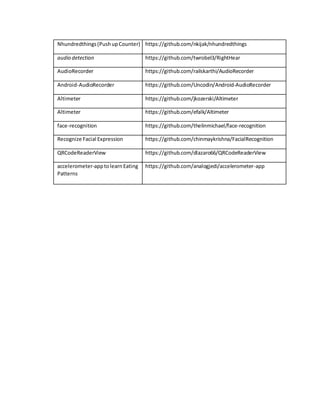
source Android applications downloaded from repositories such as GitHub [33]. The complete list
of applications and their download sources can be found in Appendix B. All applications were
downloaded and stored in a single folder that would serve as a root directory, or starting point, for
our algorithm. To execute the program we used Visual Studios’ “Run Tests” feature, at which time
the program would display sensortypes, implementations of onSensorChanged, as well the children
functions for onSensorChanged for each application stored within the root directory. Figure 4.5 is an
example output displayed after the program has completed.
28
Figure 4.5 – Parsing Algorithm Output
4.2 Data Collection (SenSee)
SenSee is an Android application created by Virginia State staff and students using the
same rules applied for test case detection [34]. The basic principle behind SenSee is to allow a user
to perform a series of actions or tasks using Android sensor data, while at the same time allowing
him or her to record and tag those actions in order to provide some ground truth for the data that
is being collected. We used it to establish the number of steps actually taken by an individual
during our evaluation of a pedometer application. Using the SenSee’s tag feature we were able to
identify where each step or set of steps accrued when evaluating the sensor data, and thus
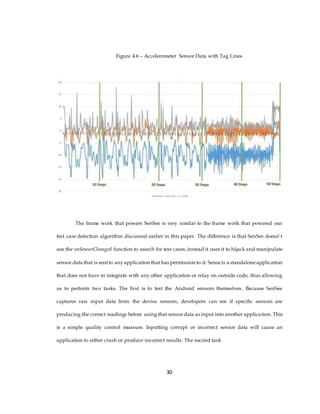
effectively eliminating the oracle problem. Figure 4.6 below illustrates the real world step tags
recorded when collecting sensor data.
29
Figure 4.6 – Accelerometer Sensor Data with Tag Lines
The frame work that powers SenSee is very similar to the frame work that powered our
test case detection algorithm discussed earlier in this paper. The difference is that SenSee doesn’t
use the onSensorChanged function to search for test cases,instead it uses it to hijack and manipulate
sensor data that is sentto anyapplication that has permission to it. Senseis a standaloneapplication
that does not have to integrate with any other application or relay on outside code, thus allowing
us to perform two tasks. The first is to test the Android sensors themselves. Because SenSee
captures raw input data from the devise sensors, developers can see if specific sensors are
producing the correct readings before using that sensordata as input into another application. This
is a simple quality control measure. Inputting corrupt or incorrect sensor data will cause an
application to either crash or produce incorrect results. The second task
30
SenSee allows us to do is to control what data is sent to a particular application. This ability opens
the door for metamorphic testing for Android platforms and is the focus of this thesis.
Figure 4.7 – SenSee Capture and Transform Diagram
4.2.1 Data Collection Procedure
To collect data we used 3 participants, consisting of male and female, using 3 Android
devices all running SenSee. This was done insure that Sensor data could be recorded over multiple
Android devices as well as confirm the pedometer app being test could handle both male and
female walking postures. Our participants walked a predefined number of steps whilethe Android
device recorded all accelerometer sensor data along the way. SenSee stores all recoded data as a
CSV file which is then taken from the device and stored on a computer running a virtual copy of
SenSee, Via Android Studio, where it then can be feed into any Android application, in our case
we used an open source pedometer application.
31
4.3 Error Detection
The overall goal of this study is to detect errors using metamorphic testing, but to do that
we must first define what an error is. The term error in the field of computer science can refer to
many things, but we are focused on two types of errors.
The first is a programing error. This an error that exists within the code that leads to bugs
or unintended glitches. Almost all software contains errors with it’s source code with varying
degrees of disruption to the overall function of the software. In order to find these bugs you must
first determine that they exist. This is harder to achieve in some software than it is in others. Simple
applications generally contain less lines of code and have less dependency on external functions to
operate, so finding a programing error if one exists is much easier. Larger and more complex pieces
of software, the Windows Operating System for example, can contain millions of lines of code
within thousands of functions that all depend upon one another to perform correctly. Finding
errors in environments such as these is far more difficult. If these errors persist they can lead to a
dramatic fluctuations to our second type of error.
Threshold error is the amount of incorrect results a particular software can handle before
failing. For example, if a software can be up to 20% incorrect and still be considered effective, that
software has a 20% error threshold, thus that software must be correct 80% of the time or higher to
achieve that threshold. This number can vary greatly between software depending on the software
application. Nuclear power plants or flight control systems contain software that meets a much
higher error threshold, because the cost of failure can be catastrophic. In general the amount of
threshold error a software produces is a direct consequence to the number of program errors that
are contained with its source code. To combat this we must either detect or take steps to minimize
any logical or computational errors that may exist.
32
4.4 Applied Metamorphic Transforms
In order to detect these errors we applied a serious of metamorphic transforms to our
Android application. Because our application is a step detections application that uses a devices
onboard accelerometer sensor, we can use SenSee to alter the data being received by the application
itself. To better display the transforms effects on our sensor data we will be comparing the results
from one of our data sets. This particular data set only recorded 10 steps so it should be easier to
follow. The original accelerometer values for this data set is shown figure 4.8, which shows the
values for X,Y, and Z; as well as the positive average over all the axis.This average is what the step
detection algorithm uses to determine a step.
Figure 4.8 – Original 10 Step Data Set
Original Data
30
25
20
15
10
5
0 -
5 -
10
-15
-20
-25
136
131
126
121
116
111
106
101
96
91
86
81
76
71
66
61
56
51
46
41
36
31
26
21
16
11
61
X Axis Y Axis Z Axis Pos Avg
33
4.4.1 Multiplicative Transforms
The first transforms we applied were a serious of multiplicative transforms, in our case we
multiplied the accelerometer input values by two. At first we multiplied all three axis by two, this
resulted in higher peaks across all the axis and thus a higher average peak, causing the algorithm
to count more steps then were actually taken. Next limited the multiplication to only one axis, in
our case to the z axis. The algorithm still counted a high number of steps, but was 15% less than
multiplying all 3 axis by a factor of 2. This can be a powerful tool for source code error detection.
Multiplying data by a constant allows developers to stretch their algorithms to the breaking point,
proving incite on how much alteration or out laying data points it can handle before failing.
Figure 4.9 – Multiplicative Transform on 10 Step Data Set
MultiplyAll Axis by 2
60
50
40
30
20
10
0
-10
-20
-30
-40
-50
136
131
126
121
116
111
106
101
96
91
86
81
76
71
66
61
56
51
46
41
36
31
26
21
16
11
61
X Axis Y Axis Z Axis Pos Avg
34
4.4.2 Interpolating Transforms
This transform is simply taking the average of every adjacent pair of numbers with in the
data array and averaged them together. The resulting average was then inserted in between those
two numbers. This smoothed out the data resulting in smaller peaks, but not to such a degree that
the algorithm could no longer perform peak detection. The result was a higher degree of accuracy
and allowed for a lower threshold error across almost all data sets tested. This transform can be an
invaluable tool to help developers eliminate noise or unwanted data from their data sets, it is a
poor tool for error detection because of its tendency to mitigate them.
Figure 4.10 – Interpolating Transform on 10 Step Data Set
Interpolating Transform
30
25
20
15
10
5
0 -
5 -
10
-15
-20
-25
1
11
21
31
41
51
61
71
81
91
101
111
121
131
141
151
161
171
181
191
201
211
221
231
241
251
261
271
X Axis Y Axis Z Axis Pos Avg
4.4.3 Adding Avg Noise Transforms
This transform finds the overall average of a particular set of data, in our case the X,Y,
and Z axises, then adds that average value to every number in data set. This rises the overall
35
average of the data set as a whole, while flattening the data set at the same time. This method
doesn’t provide the same threshold accuracy result interpolating does, but it still produces a
noticeable improvement. The effectiveness of this Transform as an error detection tool is largely
passed on the metamorphic properties of the software in question. If your software relies on data
that has a wide range of both large and small numbers being a specific distance from each other,
this transform can be used to test how fare or close those numbers can before your algorithm fails.
For example our pedometers peak detection algorithm contains a statement that checks to see if
the last peak recorded is at least two thirds as high as the current peak, if yes count as a step, if no
discard as walking motion noise.
Figure 4.11 – Add Average Noise Transform on 10 Step Data Set
Add Avg Noise
20
15
10
5
0
-5
-10
-15
136
131
126
121
116
111
106
101
96
91
86
81
76
71
66
61
56
51
46
41
36
31
26
21
16
11
61
X Axis Y Axis Z Axis Pos Avg
4.4.4 Down Sampling Transforms
36
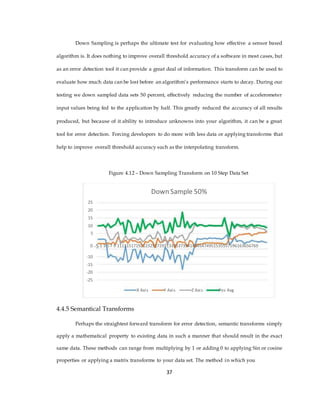
Down Sampling is perhaps the ultimate test for evaluating how effective a sensor based
algorithm is. It does nothing to improve overall threshold accuracy of a software in most cases, but
as an error detection tool it can provide a great deal of information. This transform can be used to
evaluate how much data can be lost before an algorithm’s performance starts to decay. During our
testing we down sampled data sets 50 percent, effectively reducing the number of accelerometer
input values being fed to the application by half. This greatly reduced the accuracy of all results
produced, but because of it ability to introduce unknowns into your algorithm, it can be a great
tool for error detection. Forcing developers to do more with less data or applying transforms that
help to improve overall threshold accuracy such as the interpolating transform.
Figure 4.12 – Down Sampling Transform on 10 Step Data Set
Down Sample 50%
25
20
15
10
5
0 -5 1 3 5 7 9 111315171921232527293133353739414345474951535557596163656769
-10
-15
-20
-25
X Axis Y Axis Z Axis Pos Avg
4.4.5 Semantical Transforms
Perhaps the straightest forward transform for error detection, semantic transforms simply
apply a mathematical property to existing data in such a manner that should result in the exact
same data. These methods can range from multiplying by 1 or adding 0 to applying Sin or cosine
properties or applying a matrix transforms to your data set. The method in which you
37
apply this transform can very based on testing needs, but the result should always be the same. If
your data changes over the course of this transform, your software is fundamentally flawed.
Figure 4.13 – Semantical Transform on 10 Step Data Set
Semantic
30
20
10
0
-10
-20
-30
1
7
13
19
25
31
37
43
49
55
61
67
73
79
85
91
97
103
109
115
121
127
133
X Axis Y Axis Z Axis Pos Avg
4.5 Fault Seeding Study
In order to evaluate the effectiveness of metamorphic testing and its transforms for error
detection, we used a method called fault seeding. Fault seeding is simply the introduction of
known errors into software source code, in our case we are introducing a number of errors into the
step detection algorithm with in the pedometer application. In order to evaluate against a wide
range of possible real world errors, we enlisted the help of several graduate students and professors
with in the computer science department at VSU.
38
We gave our participants a set of instructions, which can be found in Appendix D, asking
them to introduce several computational or logical errors into a serious of functions that govern
the pedometer’s step detection algorithm. Using the original source code as a base case, we first
recorded all the results produced by the original code using both raw unmodified input sensor
data, and morphed transform data. This was simply a matter of recording the number of steps the
algorithm calculated after a particular transform or transforms were applied. These results were
then compared to the results of the corrupted code after the same set of transforms were applied.
The full list of results can be found in Appendix B.
39
CHAPTER 5 – EVALUATION
5.0 Study Recap
Over the course of this endeavor he have created several unique tools and methodologies
for Android developers to find and create test cases for any given sensor driven applications.Our
objective was to determine what testing strategies are being deployed by indie developers today,
as well as conclude if metamorphic testing is possible on Android platforms, and if so evaluate is
effectiveness. The final evaluation of these systems is outlined below.
5.1 Test Case Detection Results
After applying our parsing algorithm to a body of thirty open source applications, we
found that all most all of them fail to perform some sort of internal testing. The complete results
sheet of this analysis cabbe found in Appendix C. Only three Android created test casewere found,
as well as 3 user defined test cases. All six of the detected test cases were located amongst three
application. Thus only 10% of the applications we tested contained some sort of internal testing
functionality. This may be due to the fact that our pool of applications are in fact open source. If
we applied out algorithm to a body of paid closed source applications such as “FaceBook” or
“Clash of Clans”, my hypotheses is that we would detect far more internal test case.
To further validate our results we compared our finding to that of a much larger test case
detection study conducted at Singapore Management University [35]. Using a pool of over 600
Android applications collect from 2 online repositories, F-Droid [37] and GitHub [33], these
researchers concluded that only 14% of the applications evaluated contained test cases. These
findings are very close to our own conclusion of 10%. This Study went one step further and also
found that only 9% of the apps that have executable test cases have coverage above 40%. This
means that less than 1% of open source Android application contain test cases that examine more
than half of its source code.
5.2 Initial Transform Results
In order to be certain our transforms were working as intended we applied them to a
serious of incoming sensor data, and them checked the new resulting to determine if the correct
mathematical operations had been applied. This transformed data was them feed into our step
detection application. The number of steps detected was then recorded. During this stage we could
evaluate what effect each transform had on overall threshold accuracy of the application, and thus
its overall performance. Some transforms greatly increased accuracy over all data sets tested while
other had adverse effects. For example transforms that applied data averages to the data set as a
whole tended to decrease the error threshold, which in turn increased accuracy. Other transforms
such as adding noise tended to decrease over all accuracy. All of these results were used as a base
case for our error detection experiment. The complete transform analysis can
be found in Appendix F.
41
Figure 5.1 – Base Line Pedometer Results before Transforms
Base Line Data
# of Steps
Device
Steps Calculated When
Data Set Name Actually App Sensitivity = Default
Used
Taken Sensitivity
Marcos10Hip.csv 10
Note 3
14
Phone
Marcos50Hip.csv 50
Note 3
49
Phone
Cece50StepsV2.csv 50
Note 3
68
Phone
CeCe100StepsHip.csv Galaxy S350 47
Cece50StepsHipS3.csv 25
Android
21
Tablet
Each “.csv” contains several thousand points of accelerometer data recorded using
SenSee. The table above simply depicts the resulting steps the pedometer application calculated
after each data set was processed, and compares it to the number of steps actually taken. The
next figure (Figure 5.2) illustrates the application’s calculated steps using transforms data sets as
input.
42
Figure 5.2 – Pedometer Application Results for each Transform
CalculatedSteps AfterTransform
Multipl Multipl
Convert
Add Down Base
Insert To Interpol
Data Set Name y all By y Z Axis Semantic Avg Sample Line
Noise Rounde ating
Two By Two Noise 50% Shift
d Noise
Marcos10Hip.csv 14 12 75 11 10 10 4 10 11
Marcos50Hip.csv 98 72 450 53 49 56 42 52 54
Cece50StepsV2.csv 70 60 251 44 44 39 18 44 40
Cece50StepsHipS3.c
86 70 336 49 47 51 29 47 52
sv
accelerometer.csv 68 51 5370 11 21 12 26 24 17
As you can see some transforms, like insert noise, causes the accuracy of calculated steps
to fall dramatically for all data sets. While others such as adding average noise increase overall
accuracy for the given data sets. Now that we have these transform results, we can use them as a
new base line in order to detect errors or changes either within the existing source code or future
interactions of it.
5.3 Fault Seeding/Error Detection Results
After determining a transform base line for our original source code, we then evaluated
our transforms by introducing errors or defects into the application’s source code. Some of these
errors were small in scale and were only detected with transforms that altered the input data on
large scale, while other defects caused the applications to fail all together. Figure 5.3 shows an
43
example of how the transforms are effected after an error has been introduced into the source code.
In this particular situation the error was small. A mathematical operation has changed from
addition to subtraction. The corrupted source code still calculated 10 out of 10 steps. Using
traditional white-box testing this error may have gone unnoticed, but by applying several
transforms to the input data, 2 of those transforms (Inserting Random noise & Average Noise)
returned results that did not match out base line transforms, thus revealing an error or change in
the code.
Figure 5.3 – Transforms Results after Introducing an Error
CalculatedSteps After Transform
Multiply Multiply Insert Convert To
Seman
Add Down Inter Base
all By Z Axis By Random Rounded Avg Sample polat Line
tic
Two Two Noise Noise Noise 50% ing Shift
Original
Transfo
14 12 75 11 10 10 4 10 11
rm
Result
Result
with 14 12 77 10 10 9 4 10 11
Error
After discarding the Random noise transform due the fact it will almost always produce a
result different from the base line, we are left with one transform that was able to detect this
particular error. High lighting the fact that even after applying a wide range of metamorphic
transforms you still may not be able to detect every error, however this is a fare better option than
traditional white-box testing. In this casea traditional unit test would have more than likely passed
this particular source code if it did not employ some sort of metamorphic functionality. As a
developer if you want to increase the rate of error detection you are left with two options.
44
Either apply more transforms to your applications input data, for example we could have applied
twenty-five transforms instead of nine; or you can apply transforms that better exercise your source
code’s computations. The later solution requires developers to have a concreate understanding of
how their source code works. After this understanding is achieved how you know whattransforms
should be applied.
Over the course of this project we have discovered several uses for our particular
transforms and how they may be best applied to other scenarios.We havecompiled this knowledge
into a taxonomy that can be found below.
5.4 Full Transform Taxonomy
1) Multiplicative Transforms:Multiplynumerical valuesbyaconstant
This Transform is relatively simple. You should know what the outcome should be. This
transform is very good a testing for what is called limit errors in your software. If your
program can only handle an 8 bit number and multiplying by a large content results in a 9
bit number your program will either dismiss the last bit or fail all together depending on
the machine. The same can be down by multiplying large decimal numbers to your
software to see how many decimal points your program can calculate before failing.
We appliedthismethodtoourappby multiplyingall ouraccelerometerdatapointsbya
factor of two.We didnot encounteranylimitingerrorswithinthe app,howeverusing
thistransformwe discoveredthatthe algorithmsstepdetectionbecomeslessandless
reliable the higherthe accelerometervaluesare.
2) Insert Random Noise Transforms: This TransformAddsa noise value atcomplete
randominsertedinbetweenevery
If your algorithmneedstocancel outunneededoruselessdata,applyingthistransform
isa goodway to testif your software caneffectivelyhandlethe insertion of large spikes
inyour data. For example if youneedtoignore all datathatisabove or below a certain
threshold,butwhatif some of the randomdata is withinthe limitsof thatthreshold,
thiswill serve tocorruptyour data.Determiningthe mosteffective thresholdlimitfor
such algorithmsiswhere thismetamorphictestshines.
The app we appliedthistransformto,didnothave no such method.
45
3) Convert to RoundedNoise Transforms: ThisTransformmodifiesall the existingarray
valuesbyconvertingthemtosome value plusorminus1 fromthe original data.
Insteadof insertingnoise intothe datasetthistransformconvertsthe existingdata.
The transformwill onlychange the numbertoa value nohigheror lowerthana value of
one fromthe original number.Thistransformisgreattosee how yoursystemhandles
small fluctuationsorerrorsinyourdata. Many applicationsrequireahumaninput,
these inputare notalwaysthe most accrete so yoursystemshouldbe able tohandle
these errors.
4) SemanticTransforms: ThisTransformcreatesinputsthatare have the same “meaning”
as the original.
Thisis a verysimple buteffective methodtochecktosee if your seeminglycorrect
outputsare actuallycorrectmathematically.Byapplyingamathematical functionto
your data thatshouldresultinthe exactsame output,suchas multiplyingbyCos(45),
iseffective infinding“orderof operations”errorsandothercommonmathematical
mistakes.
Whenwe appliedthistransformto ourdata set the resultingdatawasthe same,thus
we were able toconclude the applicationhadnoobviousmisuse of mathematical
operations.
5) Interpolation:Transformthat adds average noise tothe data setin betweeneach
original datapoint.
Thismethodworksbyfindingthe average of twoconsecutive numbersthaninserting
that average value in-betweenthose numbers.ThisTransformhelpstoguardagainst
small errorsor inconsistenciesinyourdata,muchlike the “converted to rounded noise
transform”.Thusthismethodwill determineif yourdatasetis reliable.
Applyingthistransformtoourstepdetectionappimprovedappsresultsbyafactor of
20% on average. So if software engineers want to make their products more reliable,
thiswould be a goodplace to start.
46
6) Down Sampling Transforms: ThisTransformdownsizesthe array by deletingacertain
percentage of the values.
Thisdeletesacertainpercentage of datapointwithyourdata set,for example we
deleted50%of the data pointswhentestingonthe stepdetectionapp.Thiscando
manythings.If your data setcollectsdatarapidly,ata rate of 500 date pointsa second
for example,yoursystemmaybe able tohandle a 50 percentcutin data pointand still
be able to performwell.If yourdatadoesn’trapidlycollectdata,thanthe resultswill be
more corrupted.So if a software engineerwantstoknow how manydata pointshe can
lossbefore hissystemstartsbecomingunreliablethistransformisagood tool to have.
Knowingthiscanallowhim/hertoeitherincreasethe numberof datapointscollected
withinagiventime frame,orcombat the lossof data by usinganthertransformsuchas
interpolation.
7) Add Average Noise Transform: ThisTransformadds the average value of a data setto
everypointinthe data set.
ThisTransformis similartothe interpolationtransform, butinsteadof inserting
averagesin-between2data points,thistransformaddsthe average value of the
data setto each pointin the data set.
9) Add Average Noise Transform: ThisTransformmovesthe base line of the inputdata
basedon definedRise andRunvalues.
5.5 Discussion
Most software testing practices today use a set of test cases constructed on some predefined
criteria in order to evaluate if a software’s processes are being executed correctly. These methods
take some input data,run it through the program, then check to see if the resulting output is correct,
if it is that test is considered “passed”. The Android operating system uses the java programing
language, which is known for its large library of functions, to include testing functions that use this
“test case” frame work. So we performed our own empirical study
47
in order to determine what testing techniques are being used by current sensor driven Android
applications today.
5.5 Study Limitations
Although we successfully engineered a method for developers to apply metamorphic
testing to all sensordriven Android devices, our study did have some limitations. Thefirst of which
pertains to our parsing algorithm. When searching for developer created test cases, the algorithm
returns all the functions within a source code that may performing testing. However to quickly
analyzerather or not a function is testing function we are relaying on the programmer to name that
function as a test. If the testing function is not correctly named it becomes much harder to decipher
the true purpose of that function, and usuallyrequires a manual inspection of the code to determine
its purpose.
The second limitation evolves the Android applications tested during the test case
detection study. Because many of these applications were pulled from open source repositories
such as GitHub, they are often created with no commercial purpose in mind, and thus many of
these applications require a very low degree of reliability and accuracy, thus this may be way our
parsing algorithm returned a very low number of test case. If this algorithm was applied to a set of
commercial applications such as “FaceBook” or “Google Maps”, we find a much higher number of
test cases. These applications are closed source, and as of the date of this study, the means to get
the source code for these applications are either illegal or very expensive.
48
CHAPTER 6 - SUMMARY
6.0 Summary
As our technological advances increase, new problems will arise for which there is no
current answer. As these problems grow in sizeand complexity, so too will the computer programs
needed to compute them, but with this growth comes the possibility for more software errors.
Developing new tests to detect these errors will become more and more difficult on an exponential
scale, but perhaps Edsger W. Dijkstra but it best by stating “Program testing can be used to show
the presence of bugs, but never to show their absence” [12]. Creating a perfect program is nearly
impossible, but if testing advanced testing metrics like metamorphic testing we can get pretty close.
There has been many advances in the field of static error detection, programs with known inputs
and outputs. These advance include methods like symbolic execution and model checking, even
winning a Turing Award in 2007 [35], but there has be relatively little advancement in dynamic
error detection. As we rely more on computer systems to calculate more complex unknowns, the
testing metrics used to evaluate these systems must also evolve. Problems such as the oracle
problem will be key if we hope to produce reliable independent software.
Our objective was to evaluate and provide a means which Android developers may use
to better their applications through the use of metamorphic testing. This study concluded that
metamorphic testing is not only possible but feasible, and provided a means to universally apply
it to all sensor based Android applications.
6.1 Recommendations for Future Research
My recommendations for future research would be to expand on more transforms that
we did not get to cover in this study, and evaluate them on a more complex Android application.
50
APPENDIX A – Parsing Algorithm Code
namespace CodeAnalysisToolkit
{
[TestFixture]
public class SimpleAnalyticsCalculator_Thesis
{
//------Test Case Class---------------------------------------------------
[TestCase]
public void CalculateSimpleProjectStats()
{
int NumOfApps = 30;
//-----------Current Working Method to Get sub directories -----------
// Get list of files in the specific directory.
string[] TopDirectories = Directory.GetDirectories(@"C:SchoolGrad
School (Comp Sci)ThesisApps",
"*.*",
SearchOption.TopDirectoryOnly);
// Display all the files.
//for (int i = 0; i <= NumOfApps; i++)
//{
// Console.WriteLine(TopDirectories[i]);
//}
//Print out all Top Sub Directoies for Specified
Path //foreach (string file in TopDirectories)
//{
// Console.WriteLine(file);
//}
//----------End of Print Sub directory Method-------------------------
for (int i = 0; i < NumOfApps; i++)
{
var dataProject = new
DataProject<CompleteWorkingSet>(TopDirectories[i],
Path.GetFullPath(TopDirectories[i]),
"..//..//..//SrcML");
Console.WriteLine();
Debug.WriteLine("#############################################");
Debug.WriteLine("Parsing " + TopDirectories[i]);
dataProject.UpdateAsync().Wait();
51
NamespaceDefinition globalNamespace;
Assert.That(dataProject.WorkingSet.TryObtainReadLock(5000, out
globalNamespace));
DisplaySensorTypes(globalNamespace);
//DisplayWhetherAppIsUnitTested(globalNamespace);
DisplayCallsToOnSensorChanged(globalNamespace);
//GetTypeForKeyword(globalNamespace);
DisplayTestCaseClasses(globalNamespace);
}
}
//-------Display Sensor Type Class----------------------------------------
private void DisplaySensorTypes(NamespaceDefinition globalNamespace)
{
var getDefaultSensorCalls = from statement in
globalNamespace.GetDescendantsAndSelf()
from expression in
statement.GetExpressions()
from call in
expression.GetDescendantsAndSelf<MethodCall>()
where call.Name ==
"getDefaultSensor" select call;
foreach (var call in getDefaultSensorCalls)
{
if (call.Arguments.Any())
{
var firstArg = call.Arguments.First();
var components = firstArg.Components;
if (components.Count() == 3 &&
components.ElementAt(0).ToString() == "Sensor" &&
components.ElementAt(1).ToString() == ".")
{
Debug.WriteLine("sensor "
+ components.ElementAt(2).ToString() + " found");
}
}
}
}
//-------Display If this class has a Unit test----------------------------
private void DisplayWhetherAppIsUnitTested(NamespaceDefinition
globalNamespace)
{
var testClasses = from klas in
globalNamespace.GetDescendants<TypeDefinition>()
where klas.GetParentTypes(false).Any(t => t.Name ==
"ServiceTestCase")
select klas;
if (testClasses.Count() == 0)
52
{
Debug.WriteLine("This File Does not contain any tests");
}
else
{
Debug.WriteLine("----- ");
Debug.WriteLine("rn");
Debug.WriteLine(testClasses.Count() + " TestClasses ");
Debug.WriteLine("----- ");
foreach(var testClass in testClasses)
{
Debug.WriteLine(testClass.GetFullName() + " is a test class");
}
}
}
//-------Display If ActivityUnitTestCase test-----------------------------
---------------------------------
private void DisplayTestCaseClasses(NamespaceDefinition globalNamespace)
{
var testClasses = from klas in
globalNamespace.GetDescendants<TypeDefinition>()
where klas.ParentTypeNames.Any(t
=> t.Name.Contains("ActivityUnitTestCase") ||
t.Name.Contains("ServiceTestCase") ||
t.Name.Contains("ApplicationTestCase")
|| t.Name.Contains("ProviderTestCase2")
|| t.Name.Contains("LoaderTestCase") ||
t.Name.Contains("ActivityInstrumentationTestCase2"))
select klas;
if (testClasses.Count() == 0)
{
Debug.WriteLine("This File Does not contain any test case
classes");
}
else
{
Debug.WriteLine("----- ");
Debug.WriteLine("rn");
Debug.WriteLine(testClasses.Count() + " Test Classes found
"); Debug.WriteLine("----- ");
foreach (var testClass in testClasses)
53
{
Debug.WriteLine(testClass.GetFullName());
//foreach(var parent in testClass.ParentTypeNames)
//{
// Debug.WriteLine("parent: " + parent);
//}
}
}
}
//-------Display Calls to OnSensorChanged Class---------------------------
---------------------
private void DisplayCallsToOnSensorChanged(NamespaceDefinition
globalNamespace)
{
var senChangedMethods = from method in
globalNamespace.GetDescendants<MethodDefinition>()
where method.Name ==
"onSensorChanged" select method;
if (senChangedMethods.Count() == 0)
{
Debug.WriteLine("This File Does not contain any Sensor Change
Mehtods");
}
else
{
Debug.WriteLine("----- ");
Debug.WriteLine("rn");
Debug.WriteLine(senChangedMethods.Count() + " Implementations of
" + senChangedMethods.First().GetFullName());
Debug.WriteLine("----- ");
int n = senChangedMethods.Count();
for (int i = 0; i < n; i++)
{
var senChangedMethod = senChangedMethods.ElementAt(i);
Debug.WriteLine("Implementations of onSensorChaged # " + (i +
1) + ": " + senChangedMethod.GetFullName());
//"GetCallsToSelf" returns the number of times the number is
called
var callsToSenChanged = senChangedMethod.GetCallsToSelf();
for (int j = 0; j < callsToSenChanged.Count(); j++)
{
var callerMethod =
callsToSenChanged.ElementAt(j).ParentStatement
.GetAncestorsAndSelf<MethodDefinition>();
if (callerMethod.Any())
{
54
Debug.WriteLine(" Called by --> " +
callerMethod.ElementAt(0).GetFullName());
}
}
//Debug.WriteLine("----- ");
}
} //End of Else does not Equal 0 Check
}
55
APPENDIX B
List of Apps Used in Test Case Detection Study
Android-Compass URL NoLonger Available
Android-pedometer https://github.com/bagilevi/Android-pedometer
GlassSensorTest https://github.com/lnanek/GlassSensorTest
KineticSensors https://github.com/sebLopezCot/KineticSensors
My-StepCounter https://github.com/MichaelJames6/My-StepCounter
Pedometer https://github.com/phishman3579/Android-pedometer
TiltPong https://github.com/mah68/TiltPong
Tilt-snake Co URL NoLonger Available
satstat https://github.com/mvglasow/satstat
cartsbusboarding https://github.com/carts-uiet/cartsbusboarding
ThermometerExtended2 https://github.com/mateuszbuda/ThermometerExtended2
Android-sensorium https://github.com/fmetzger/Android-sensorium
CommunityCompass https://bitbucket.org/alekseyt/compass/downloads
getback_gps https://github.com/ruleant/getback_gps
sosmobileclient https://github.com/52North/sosmobileclient
org.thecongers.mtpms https://github.com/kconger/org.thecongers.mtpms
SAnd https://github.com/kas70/SAnd
sensorreadout https://github.com/onyxbits/sensorreadout
pushup https://github.com/pjq/pushup
pushup_counter https://github.com/lyahdav/pushup_counter
56
Nhundredthings(PushupCounter) https://github.com/nkijak/nhundredthings
audio detection https://github.com/twrobel3/RightHear
AudioRecorder https://github.com/railskarthi/AudioRecorder
Android-AudioRecorder https://github.com/Uncodin/Android-AudioRecorder
Altimeter https://github.com/jkozerski/Altimeter
Altimeter https://github.com/efalk/Altimeter
face-recognition https://github.com/thelinmichael/face-recognition
Recognize Facial Expression https://github.com/chinmaykrishna/FacialRecognition
QRCodeReaderView https://github.com/dlazaro66/QRCodeReaderView
accelerometer-apptolearnEating https://github.com/analogjedi/accelerometer-app
Patterns
57
APPENDIX C
Results from Test Case Detection Study
Sand App
Description:Usesyour phonessensors (barometerand compass) to show your current
orientation,heightand air pressure.
AnalyticsOutput
ParsingC:SchoolGradSchool (CompSci)ThesisAppsSAnd-master
sensorTYPE_ORIENTATION found
sensorTYPE_PRESSURE found
-----
1 Implementationsof com.platypus.SAnd.MainActivity.onSensorChanged
-----
Implementationsof onSensorChaged#1: com.platypus.SAnd.MainActivity.onSensorChanged
-----
1 TestClassesfound
-----
com.platypus.SAnd.ApplicationTest
Conclusion:
onSensorChanged– Notestingof sensorcomputationwasperformedwithinthisfunction.
ApplicationTest- No Testingwasactuallyperformedinthistestcall,Perhapsthe developershad
plannedtoperformsome testinginthe future,butinthisversionthe functioncall isempty.
58
Cartsbusboarding App
Description:CommunicationAssistedRoad Transportation System.Bus Boarding Event
DetectionModule.
AnalyticsOutput
ParsingC:SchoolGradSchool (CompSci)ThesisAppscartsbusboarding-master
sensorTYPE_ACCELEROMETER found
-----
1 Implementationsof in.ac.iitb.cse.cartsbusboarding.acc.AccListener.onSensorChanged
-----
Implementations of onSensorChaged # 1:
in.ac.iitb.cse.cartsbusboarding.acc.AccListener.onSensorChanged
-----
2 TestClassesfound
-----
in.ac.iitb.cse.cartsbusboarding.test.ApplicationTest
in.ac.iitb.cse.cartsbusboarding.test.acc.FeatureCalculatorTest
59
Conclusion
onSensorChanged– Notestingof sensorcomputationwasperformedwithinthis function.
ApplicationTest- No Testingwasactuallyperformedinthistestcall,Perhapsthe developershad
plannedtoperformsome testinginthe future,butinthisversionthe functioncall isempty.
FeatureCalculatorTest– Thisfile doescontaintesting,evensome degree of metamorphic
testingbyusingthe average andstandard deviationsof the sensordatato the accuracy of his
results.
60
61
APPENDIX D
Fault seeding instructionsSheet
Introduction: Your goal is to introduce some errors with in the provided code. These
errors can be both computational and logical. The purpose of this experiment is to
identify your bug using a process called metamorphic testing, a process were we
attempt to identify a fault that exists in a piece of software by transforming the
properties of its input data. This is done by taking advantage of the mathematical
properties that exist in most software’s allowing us to transform the input data in
manner that will produce a predictable result. If the result is different, then we have
detected a flaw. The errors that you introduce will help us determine if our transforms
are adequate for detecting real bugs and mistakes a developer may make. If you can
create a bug we cannot detect than, we will have discovered a problem we have not
for seen, and thus will allow us to create a transform to detect that it.
The Code: The code we have provided you is the step detection function for an Android
prodometer application. This function works by adding up the X,Y, and Z values from the
Android accelerometer sensor and storing it into a value named “vSum”. This value also
has some additional calculations applied to it so account for things like earth’s gravity
and magnetic field. “vSum” is than divided by three and stored in a value called “v”. This
“v” variable is used to calculate steps. There is a serious of loops that checks to see if “v”
has reached a certain threshold, if yes then the algorithm counts a step, if not then the
algorithm considers this data to be motion noise and ignores it.
We have provided an excel spread sheet of the “v” Value graphed in order to give a
visual representation. Generally every peak represented on the graph should be a step
counted by the algorithm.
Instructions: Make some changes to the existing code. You are free to add or remove
any code, but remember the purpose is not to break the code to the point of
uncompilability, but to instead introduce a bug that is either app breaking or subtle
62
enough to get passed a testing team, either way the code must compile in order
to apply our transforms.
Examples:
∑ change the constant values used for mathematical computation
∑ Changes the conditions in for loops
∑ Delete or add condition statements
Excel Chart: This can also be found in the attached Excel Spread Sheet.
v = vSum/3
280
270
260
250
240
230
220
210
1
16
31
46
61
76
91
10
612
113
615
116
618
119
621
122
624
125
627
128
630
131
633
134
636
137
639
140
642
143
6451
63
APPENDIX E
Complete Base Line Transform Analysis
Green boxes = Results that are more than 70% Accurate
64
BIBLIOGRAPHY
[1]T. Chen, S. Cheung and S. Yiu, Metamorphic Testing: A New Approach for Generating Next Test
Cases. Hong Kong: Department of Computer Science Hong Kong University, 1998.
[2]G. Kaiser and F. Su, 'Finding Bugs in Machine Learning, Data Mining and Big Data Applications |
Programming Systems Laboratory', Psl.cs.columbia.edu, 2015.[Online]. Available:
http://www.psl.cs.columbia.edu/64/metamorphic-testing/. [Accessed: 17- May- 2015].
[3] Istqbexamcertification.com, 'What is Software Testing?', 2015.[Online]. Available:
http://istqbexamcertification.com/what-is-a-software-testing/. [Accessed: 06- May- 2015].
[4] Istqbexamcertification.com, 'What is Test design? or How to specify test cases?', 2015.[Online].
Available: http://istqbexamcertification.com/what-is-test-design-or-how-to-specify-test-cases/.
[Accessed: 10- May- 2015].
[5]E. Barr, M. Harman, P. McMinn, M. Shahbaz and S. Yoo, The Oracle Problem in Software Testing:
A Survey. IEEE TRANSACTIONS ON SOFTWARE ENG, 2015.
[6]J. King, Symbolic Execution and Program Testing. IBM Thomas J. Watson Research Center, 1976.
[7] Msdn.microsoft.com, 'Unit Testing', 2015. [Online]. Available: https://msdn.microsoft.com/en-
us/library/Aa292197%28v=VS.71%29.aspx.[Accessed:19-May-2015].
[8] agile.csc.ncsu.edu,'White-Box Testing',2015.[Online].Available:
http://agile.csc.ncsu.edu/SEMaterials/WhiteBox.pdf.[Accessed:23-May-2015].
[9]S. Webmaster, 'What is Simulation - Simulation Software Explained', Simul8.com, 2015.[Online].
Available: http://www.simul8.com/products/what_is_simulation.htm. [Accessed: 17- Jul- 2015].
72
[10] Softwaretestinghelp.com, 'What is Integration Testing and How It is Performed? — Software Testing
Help', 2015.[Online]. Available: http://www.softwaretestinghelp.com/what-is-integration-testing.
[Accessed: 20- Jun- 2015].
[11]C. Pasareanu, 'Symbolic Execution and Model Checking for Testing', YouTube, 2015.[Online].
Available: https://www.youtube.com/watch?v=azTVEwxN8zM. [Accessed: 02- Jun- 2015].
[12]E. Dijkstra, 'E.W. Dijkstra Archive: Structured programming (EWD268)', Cs.utexas.edu, 2015. [Online].
Available: https://www.cs.utexas.edu/users/EWD/transcriptions/EWD02xx/EWD268.html. [Accessed:
10- Jun- 2015].
[13]P. Boonstoppel, C. Cadar and D. Engler, Attacking Path Explosion in Constraint-Based Test Generation.
Computer Systems Laboratory, Stanford University.
[14]M. Chair, P. Schaumont and P. Plassmann, Strategies for Scalable Symbolic Execution-based Test
Generation. Blacksburg, Virginia: Virginia Polytechnic Institute and State University Department
of Computer Engineering, 2010.
[15]G. Tassey, The Economic Impacts of Inadequate Infrastructure for Software Testing. Gaithersburg:
National Institute of Standards and Technology, 2002.
[16] J. Burnim and K. Sen, Heuristics for Scalable Dynamic Test Generation," in Automated
Software Engineering, 2008.ASE 2008.23rd IEEE/ACM International Conference on,
pp. 443{446,September 2008.
[17] Cs.cmu.edu, 'Model Checking at CMU', 2015. [Online]. Available:
https://www.cs.cmu.edu/~modelcheck/.[Accessed:20-Jun-2015].
[18]X. Xie, J. Ho, C. Murphy, G. Kaiser, B. Xu and T. Chen, Testing and Validating Machine Learning
Classifiers by Metamorphic Testing. National Institutes of Health, 2011.
[19]A. Smola and S. Vishwanathan, INTRODUCTION TO MACHINE LEARNING. University of
Cambridge, 2008.
73
[20]Z. Zhou, D. Huang, T. Tse, Z. Yang, H. Huang and T. Chen, Metamorphic Testing and Its
Applications. Hong Kong: International Symposium on Future Software Technology, 2004.
[21] The Independent, '42: The answer to life, the universe and everything', 2011. [Online]. Available:
http://www.independent.co.uk/life-style/history/42-the-answer-to-life-the-universe-and-
everything-2205734.html. [Accessed: 20- Jul- 2015].
[22] Compliantmechanisms.byu.edu, 'Introduction to Microelectromechanical Systems (MEMS) |
Compliant Mechanisms', 2015.[Online]. Available:
https://compliantmechanisms.byu.edu/content/introduction-microelectromechanical-systems-mems.
[Accessed: 20- Jul- 2015].
[23]N. Zhoa, Full-Featured Pedometer Design Realized with 3-Axis Digital Accelerometer.
[24]D. Beyer, T. Henzinger and G. Theoduloz, Program Analysis with Dynamic Precision Adjustment. 2015.
[25]M. Harrold, J. Offutt and K. Tewary, An Approach to Fault Modeling and Fault Seeding Using the
Program Dependence Graph.
[26]F. Grigorjev, N. Lascano and J. Staude, A Fault Seeding Experience. Motorola Global Software Group.
[27] Developer.Android.com, 'SensorManager | Android Developers', 2015.[Online]. Available:
http://developer.Android.com/reference/Android/hardware/SensorManager.html. [Accessed: 20-
Jul-2015].
[28]T. Fundamentals, 'Testing Fundamentals | Android Developers', Developer.Android.com, 2015.
[Online]. Available: http://developer.Android.com/tools/testing/testing_Android.html. [Accessed:
23-Jun- 2015].
[29] Vogella.com, 'Android application testing with the Android test framework - Tutorial', 2015.
[Online]. Available: http://www.vogella.com/tutorials/AndroidTesting/article.html. [Accessed:
25-Jun- 2015].
74
[30] Developer.Android.com, 'SensorEventListener | Android Developers', 2015. [Online]. Available:
http://developer.Android.com/reference/Android/hardware/SensorEventListener.html. [Accessed:
20-Jul- 2015].
[31] Srcml.org, 'What is SrcML.Net', 2015.[Online]. Available: http://www.srcml.org/about-srcml.html.
[Accessed: 20- Jul- 2015].
[32] GitHub, 'abb-iss/SrcML.NET', 2014.[Online]. Available: https://github.com/abb-
iss/SrcML.NET/blob/master/ABB.SrcML.Data.Test/CodeParserTests.cs. [Accessed: 20- Jul- 2015].
[33] GitHub, 'Build software better, together', 2015. [Online]. Available: https://github.com/. [Accessed:
20- Jul- 2015].
[34] SenSee Application, 2015.[Online]. Available:
https://play.google.com/store/apps/details?id=sysnetlab.Android.sdc&hl=en. [Accessed: 20-
Mar-2015].
[35] Amturing.acm.org, 'Edmund Clarke - A.M. Turing Award Winner', 2015. [Online]. Available:
http://amturing.acm.org/award_winners/clarke_1167964.cfm.[Accessed:03-Jul-2015].
[36]P. Kochhar, F. Thung, N. Nagappan, T. Zimmermann and D. Lo, Understanding the Test Automation
Culture of App Developers. Singapore Management University, 2015.
[37] F-droid.org, 'F-Droid | Free and Open Source Android App Repository', 2015. [Online]. Available:
https://f-droid.org/. [Accessed: 23- Jul- 2015].
75

Final Draft 3 Thesis v3 Post Defense

  • 1.
    Metamorphic Testing ofSensor Processing for Android Applications By Marco Peterson A thesis submitted to the Faculty of the College of Graduate Studies of Virginia State University in partial fulfillment of the requirements for the degree of Master of Science in Computer Science in the School of Engineering, Science, and Technology Virginia 2015 Approved by: ______________________________ Dr. Kostadin Damevski (Advisor) _______________________________ Dr. Hui Chen (Committee Member) _______________________________ Dr. David Walter (Committee Member)
  • 2.
    ABSTRACT The field ofSoftware Engineering has always strived to enable the creation of more reliable and accurate software by implementing a range of software testing techniques to ensure source code executes as intended. Traditional software testing is done by evaluating results against an oracle, consisting of a set of acceptable outputs for each test case. A test case is another program created to emulate real world inputs and scenarios a particular software might encounter. This is an effective method of testing and is summarily an industry standard of today; but as we all know, no program is without its bugs and glitches. Detecting theses errors more effectively has become one of the most pressing objectives for many computer science industries. Perhaps the chief error detection obstacle software engineers face today is known as the oracle problem. The oracle problem arises from one of two situations. The first is when the answer to the problem the software under test is solving is difficult to constrain. This issue occurs most often in machine learning software, where a machine must perform a task without be explicitly programed, such as the self-driving car. In this case a source code must learn how to complete a task from the input of the world around it. The second situation is when it is either impossible or too expensive to create a test for all reasonable inputs a software might encounter. Both situations leave the software developer without a means to test their software effectively. In the case of sensor data calculations, it is very difficult to calculate accurate results when given wide range of possible sensor inputs. The goal of this Thesis is to evaluate the effectiveness of a technique known as Metamorphic testing on sensor based application on Android platforms in order to solve issues such as the oracle problem. Metamorphic Testing is a software testing technique that takes
  • 3.
    already existing testcases for a particular software and builds new test cases. This method essentiallyreuses testcases toapplydifferentmathematical properties until anerroris found.
  • 4.
    ACKNOWLEDGEMENTS I would liketo thank my advisor Dr. Kostadin Damevski for the continuous support of my Master’s thesis and research. His patience, motivation, enthusiasm, and immense knowledge paved the way for this research. I would also like to thank Dr. Hui Chen for his help and expertise over the course of my time in Master’s Program. Lastly I would like to thank all the Professors and Staff for their help and guidance over the entire life span of my time at Virginia State University Last but by no means least; I would like to acknowledge the support from my friends and peers for all their help both directly and indirectly. iii
  • 5.
    TABLE OF CONTENTS Listof Figures……………………………………………………………………………………….v List of Tables………………………………………………………………………………………..vi 1. Introduction .......................................................................................................................1 1.0 Overview...............................................................................................................1 1.1 Aims and Objectives............................................................................................2 1.2 Research Questions..............................................................................................3 1.3 Chapter Outline....................................................................................................3 2. Problem Statement/Hypothesis...................................................................................... 4 2.0 Problem Statement............................................................................................... 4 2.1 Hypothesis ............................................................................................................ 5 3. Background/Related Works ........................................................................................... 6 3.0 Traditional White-Box Testing........................................................................... 6 3.0.1 Simulation Testing…………………………………………………… 7 3.0.2 Symbolic Execution………………………………………………….. 9 3.1 Path Explosion…………………………………………………………………. 10 3.2 The Oracle Problem............................................................................... 11 3.3 Machine Learning……………………………………………………………….11 3.4 Metamorphic Testing………………………………………………………….. 12 3.4.1 List of Common Metamorphic Properties................................... 14 3.4.2 Stacking Metamorphic Tests ..................................................... 15 3.5 Step Detection Algorithm ...................................................................... 16 3.5.1 Step Cycle Detection…………………………………………………. 17 3.5.2 Calculating Steps Filter………………………………………………. 19 3.6 Fault Seeding and Detection……………………………………………………20 4. Design and Approach...................................................................................... 21 4.0 Android Frame Work............................................................................ 21 4.1 Test Case Detection ............................................................................... 23 4.1.1 DetectingAndroid API Tests……………………………………….. 24 4.1.2 Listof Android API Tests Searched for……………………………. 24 4.1.3 DetectingDeveloper Created Tests………………………………….25 4.1.4 Test CaseDetection Procedure………………………………………28 4.2 Data Collection (SenSee)........................................................................ 29 4.2.1 Data Collection Procedure……………………………………………31 4.3 Error Detection…………………………………………………………………. 32 4.4 Applied Metamorphic Transforms ......................................................... 33 4.4.1 Multiplicative Transforms…………………………………………… 34 4.4.2 Interpolating Transform………………………..……………………..35 4.4.3 Adding Avg Noise Transform ……………………………………….35 4.4.4 Down Sampling Transform…………………………………………...36 4.4.5 Semantical Transform…………………………………………………37 4.5 Fault Seeding Study……………………………………………………………..38
  • 6.
  • 7.
    5. Evaluation........................................................................................................................... 40 5.0Study Recap ..........................................................................................................40 5.1 Test Case Detection Results................................................................................40 5.2 Initial Transform Results ....................................................................................41 5.3 Fault Seeding/Error Detection Results.............................................................43 5.4 Full Transform Taxonomy……………………………………………………...45 5.5 Discussion .............................................................................................................47 5.6 Limitations of Study ............................................................................................48 6. Summary............................................................................................................................ 49 6.0 Summary...............................................................................................................49 6.1 Recommendations for Future Research............................................................50 Appendix A....................................................................................................................................... 51 Appendix B....................................................................................................................................... 56 Appendix C....................................................................................................................................... 58 Appendix D ...................................................................................................................................... 62 Appendix E ....................................................................................................................................... 64 Appendix F ....................................................................................................................................... 65 Bibliography..................................................................................................................................... 72 v
  • 8.
    LIST OF FIGURES 3.1Rapid Growth of Conditional Possibilities .......................................................... 8 3.2 Simulation Testing Single Path Execution ........................................................... 9 3.3 Symbolic Execution Path Execution.................................................................... 10 3.4 Simple Cosine Test Case.................................................................................... 13 3.5 Metamorphic Stacking ...................................................................................... 15 3.6 Accelerometer Sensor Data................................................................................ 17 3.7 Stride Diagram ................................................................................................. 19 3.8 Dynamic Threshold Leveling............................................................................. 20 4.1 Android Frame Work........................................................................................ 22 4.2 t1 Test Case ...................................................................................................... 26 4.3 t2 Test Case...................................................................................................... 27 4.4 Caller Method................................................................................................... 28 4.5 Parsing Algorithm Output................................................................................. 29 4.6 Accelerometer Sensor Data with Tag Lines ......................................................... 30 4.7 SenSee Capture and Transform Diagram ............................................................ 31 4.8 Original 10 Step Data Set................................................................................... 33 4.9 Multiplicative Transform on 10 Step Data Set ..................................................... 34 4.10 Interpolating Transform on 10 Step Data Set ..................................................... 35 4.11 Add Average Noise Transform on 10 Step Data Set ........................................... 36 4.12 Down Sampling Transform on 10 Step Data Set................................................. 37 4.13 Semantical Transform on 10 Step Data Set......................................................... 38 3.7 Stride Diagram ................................................................................................. 38 v
  • 9.
    LIST OF TABLES 5.1Base Line Pedometer Results before Transforms ................................................. 42 5.2 Pedometer Application Results for each Transform ............................................. 43 5.3 Transforms Results after Introducing an Error………………………………………...35 5.1 Questionnaire for evaluation ............................................................................. 33 5.2 Distribution of the participants’ responses.......................................................... 39 5.3 Transforms Results after Introducing an Error…………………………………….......44 vi
  • 10.
    CHAPTER 1 -INTRODUCTION 1.0 Overview Reducing the cost of software development while improving software quality is an important objective for the software industry. A study by Tassey estimated the annual cost for software testing to be between $22.2 to $59.9 billion dollars, with over half of those costs borne from mitigation activities caused by correcting errors after a software’s release [15]. Checking a product for faults is standard practice in almost all fields, and is fundamentally important to product quality. This is especially true in the field of software engineering for two reasons. The first is the complexity required from many modern software products. The second reason is due to potential consequences of a software failure. The production of reliable software is one of the fundamental requirements for applying computers to today's challenging problems [12]. As computer programs grow in size and complexity, testing costs will only increase. More research is needed to reduce these costs by developing new, more effective testing methods and approaches. A novel testing technique that aims to improve upon the state of the practice is metamorphic testing. It has been used to help improve software accuracy and reliability in several fields includingBioinformatics, Genetic Sequencing, and MachineLearning. The focus of this thesis is applying this technique to sensor based application,
  • 11.
    more specifically Androidbased sensor applications. Many applications today use sensor data to calculate some result. Applications ranging from calculating blood pressure and heart rate to docking ships with the international space station. However, calculating a desired result from a set of raw sensor data is not easy, especially if the mathematical procedure to do so does not already exist. This problem becomes exponentially more difficult when you are performing calculations usingmore than one sensor. Perhaps the best example of this is today’s weather forecasting system. Thousands of sensor arrays recording everything from humidity, temperature, and wind speed are used in attempt to predict the forecast days in advance, but it is not always accurate. Weather forecasting is an example of an oracle problem. This is when all possible sensor inputs and combinations are impossible to calculate, so creating a computer program to accurately predict the weather one hundred percent of the time has proven to be equally impossible. Solving and testing for the oracle problem has become a fundamental goal for computer scientist today. Weather forecasting is one of the most complex sensor based application in existence today, nonetheless the basic principles remain the same. We are applying metamorphic testing on a smaller scale in an attempt to understand how metamorphic properties can be used to improve both the source code through error detection and the overall error threshold accuracy of the software. The tools we created will also provide Android developers with a platform to perform metamorphic testing on their own applications. 1.1 Aims and Objectives The goal of this thesis is to evaluate a testing technique known as Metamorphic Testing within the Android platform. The objective is to evaluate the effectiveness of metamorphic testing in finding errors within Android source code as well as to evaluate the current testing practices being used by Android developers. 2
  • 12.
    1.2 Research Questions ∑What testing methods are Android developers currently using? ∑ Can metamorphic testing be applied to sensor based Android applications? ∑ How effective is metamorphic testing for detecting errors in Android source code? ∑ What Metamorphic transforms are most effective in evaluating the first three questions? ∑ Can we find transforms that can be applied to other software outside of Android? 1.3 Chapter Outline This thesis consistof six chapters. Chapter 1 presents the overall goal the thesis, including research questions, aims, objectives, and overview. Chapter 2 illustrates the problem statement and hypothesis based on related work in this area of research, as well as give a brief history of software testing explaining where metamorphic testing derived its concepts. Chapter 3 in the background chapter. It provides an in-depth explanation on metamorphic testing and the methods used to collect the sensor data used during this thesis. It also outlines the related works in the fields of metamorphic testing, machine learning and fault seeding. Chapter 4 provides a detailed explanation of the Android frame work, and the transforms used to during our evaluation. This chapter also provides a high level explanation on how we were able to capture and transform onboard Android sensor data. Chapter 5 explains the results of your evaluation as well as the study’s limits. FinallyChapter 6 summarizes our work and provides recommendations for future research. 3
  • 13.
    CHAPTER 2 –PROBLEM STATEMENT/HYPOTHESIS 2.0 Problem Statement The conventional method to test software is to examine pairs of expected output data and input data, then check to see if the expected output has been achieved when a given inputis passed through the code being tested. If the output is incorrect, then it is safe to say your program has a bug/error; but what if the output is correct? Is the code now faultless? The answer is no, as even for a relatively simple program, reliably finding all errors that may exist is a difficult task. As software increases in complexity, many computer programs are tasked with problems for which the correct output is difficult to express in all cases or with 100% confidence. This is known as the oracle problem in software testing. Finding errors, logic mistakes, and general bugs is inherently difficult if a developer does not know what the final outcome should be once a program’s computations are complete. As mentioned in the movie “The Hitchhiker’s Guide to the Galaxy” a computer attempts to compute the meaning of life [21], generating an arbitrary answer of 42. But, is that answer correct? Perhaps the better question is how someone would test this computer program for correctness. Metamorphic testing has been shown to be effective by several studies [1] [1] [18] [19] in a wide range of testing applications, especially testing software that possesses the oracle problem. This thesis contains the methods needed to apply metamorphic testing to sensor based Android applications. The goal is to provide Android developers with a new tool to further test
  • 14.
    and improve theirapplications, as well as provide an understanding of metamorphic testing and it’s properties so it can be applied to other problems. 2.1 Hypothesis Metamorphic testing transforms can be used to test sensor-based Android applications in order to improve overall error detection and error threshold. 5
  • 15.
    CHAPTER 3 –BACKGROUND/RELATED WORKS 3.0 Traditional White-Box Testing The term white-box testing is used to describe a group of methods used for testing a software’s internal source code by constructing test cases. Also known as clear box testing, or glass box testing (Beizer, 1995),these connotations indicate that a developer has full visibility of the internal workings of the software product, specifically, the logic and the structure of the code [8]. This visibility allows developers to create test cases specifically designed to exercise a software’s processing path and determine if it has reached an appropriate result. This method is used to test a variety of source code functions such as data flow, decision statements, networking connections, and program pathing. All of these examples require the developer to evaluate the Software Under Test (SUT) using a predefined set of inputs against the expected set of outputs. There are two central “white-box” testing methods thatcan be applied when creating a test case for a particular piece of software. The first is known as “Unit Testing”. The most fundamental testing method of the two, Unit testing is used to test one specific part of a code, usually a function or family of functions known as modules or units. It has become a good programing practice to create several separate modular functions to construct an overall piece of software, breaking a large piece of code down into a bunch of small pieces of code that perform a very specific task that contribute to the overall program as a whole. The primary goal of unit testing is to take the smallest piece of
  • 16.
    testable software inthe application, isolate it from the remainder of the code, and determine whether it behaves exactly as you expect [7]. The next type of testing method is Integration testing. Just like its name suggests, this tests the assimilating of smaller pieces of code into a larger piece of code after they have been verified to be correct through unit testing. This insures that all the modules in the system are working together as intended [10]. When constructing test cases for error detection, developers can choose to implement them using a variety of approaches. The best approaches exercise all possible inputs and conditions within a given program in an attempt to insure no bug is left undetected, this is called “Full Coverage”. However testing with full coverage approaches my not always be possible or practical. Methods such as Simulation Testing and Symbolic Extraction allow for deliberate and effective testing for some software, but not all. 3.0.1 Simulation Testing Perhaps the most basic form of software testing, simulation testing is the simple process of feeding a predefined input into a program and evaluating the result for accuracy. These tests are designed mimic the operation of world scenarios, such as the day-to-day operation of a bank, the running of an assembly line in a factory, or the staff assignment of a hospital or call center [9]. However simulation testing has a fundamental flaw when it comes to testing software that have condition statements. Using this method you can only test one condition at a time, if your program has multiple conditions with several layers of nested conditions the number of possible results grows very quickly, and testing for each of those results becomes more difficult. For Example, if your program has an “If Statement” it can execute one of the two possible 7
  • 17.
    conditions at atime, either the true condition or the false condition. Another test is required to execute the other condition. Most software today have several if statements with in their source code, many of which as nested within each other. Figure 3.1 illustrates how these possible conditions statement can grow rapidly Figure 3.1 – Rapid Growth of Conditional Possibilities This is just an example of one conditional statement. Other conditional statements such as “If Else Statements can have more than just 2 possible branches, further complicating the conditional logic of any given program. Furthermore the same type of graph can be drawn to depict a programs over structure. Complex programs will have individual functions they may or may not be called during a particular test. These types of complexities make it very difficult to achieve Full Coverage when 8
  • 18.
    testing large complexsoftware. Figure 3.2 depicts how simulation testing can only execute one path at a time with in a complex program. Figure 3.2 – Simulation Testing Single Path Execution [11] FSM = Finite State Machine (i.e. Computer Program) 3.0.2 Symbolic Execution In an attempt to obtain full coverage for complex programs, James King created the first automatic testing method called Symbolic Execution in 1976.Symbolic Extraction does away with concreate inputs (i.e. numbers) into a program. Instead it supplies dynamic variables (or symbols) as inputs into the software being tested; while keeping track of the conditions needed to travel along each path of the source code [6]. This condition state tracking allows the symbols to dynamically change in order to meet conditions needed explore and test another part of the program. For example if the symbol encountered an “If Statement” the value of the symbol could change to satisfy the true condition. Since the current condition state is recorded, the symbol variable can back track through the code, and then change to satisfy the false condition. Repeating this process over and over this method of testing will ultimately achieve full coverage as illustrated by figure 3.3 [6]. 9
  • 19.
    Figure 3.3 –Symbolic Execution Path Execution [11] Even though Symbolic Execution is able to achieve full coverage, it is only able to do so for relatively exceedingly large programs. As programs get large, their conditional statements grow exponentially, costing more memory to track current paths and more time to execute. This eventually caused the testing method to become unpractical. This phenomenon is known “Path Explosion”. 3.1 Path Explosion Symbolic techniques have been shown to be very effective in path-based test case generation; however, they fail to scale to large programs [16]. This is because the possible number of execution paths to be considered symbolically is so, eventually only a small part of the Program path space is actually explored [14]. There have been several studies and projects dedicated to increasing the number of possible paths methods such as these can handle. Most notably the field of model checking [17], even winning the Turing Award in 2007 [35]. Todays most advanced software contains millions of lines of code with billions of possible paths. Only 10
  • 20.
    time will tellif new developments in this field will keep up with the path of ever increasing path explosion, however these methods of testing are optimal for solving other testing hurtles such as the oracle problem such as those found in machine learning. This is especially true if these machines contain large decision making processes with billions of possibilities. 3.2 The Oracle Problem Traditional unit and integration testing methods are great for testing software that have a known answer. Model testing is even better at automatically generating full coverage tests for constrained software. Both of these testing metrics still require finding inputs that cause execution to reveal faults [5]. What if you didn’t know all the possible input combinations or execution paths a software might take to produce a result? Furthermore, what if you don’t know what the answer should be? Applying computers to solve for unknown problems is one of the stables of the industry, but testing such software is incredibly difficult and costly. This is known as the oracle problem [5], and solving it has been a major issue for several fields of computer science. After all, answering questions we do not know the answer to is the fundamental requirement for scientific advancement. Solving the oracle problem involves constructing some sort of test oracle or table of expected results that can be compared to a given set of inputs [18].Most of these types of applications fall under the umbrella of machine learning. 3.3 Machine Learning Thebasic definition ofMachineLearningis gettingcomputers toact withoutbeingexplicitly programmed,and over the pasttwo decades MachineLearninghasbecomeoneof the mainstays of information technology[19].Thesealgorithms canbeas simpleas thespamfilterin youremail learningwhich emailstosend toyour junkfolder, or as complex as the self-drivingcar;butthey 11
  • 21.
    all face thesame fundamental problem. These computer applications do not start off knowing all the answers to every problem they may face, hence the name “machine learning”. When developing these applications, how do programmers know that the software they have written will instruct a self-driving car to stop at a red light instead of speeding through it? In situations like these, traditional testing measures cannot be applied due to large number of possible inputs and execution paths. Many these software also lack a definitive result the computation it is trying to execute. Here Metamorphic Testing can be applied to the machines known set of rules to evaluate if the program will react in the desired manner when presented a choice. The idea is relatively simple, but extremely difficult to execute. 3.4 Metamorphic Testing The concept of metamorphic testing was formally introduced to the world in 1998 by three professors from the University of Hong Kong. Dr. Chen, Dr. Cheung, and Dr. Yiu [20]. They observed three fundamental problems with current white-box testing methods. The first observation made was that software which passes its initial test cases were considered successful and are seldom investigated further for errors. Second, no matter how much testing is done, a software will most likely still contain errors. Lastly, obtaining a test oracle to test against in many software applications (especially in the development phase) is unrealistic in many situations. [20] Solving the oracle problem allows developers to tackle computing challenges that we do not know the answer to. Perhaps chief among these is the challenge of machine learning. However the aim of this thesis is to tackle the second observation made by Dr. Chen and his colleagues, which states that almost all software contains errors. These errors can either be logical errors that break the software in general, as well as mathematical or algorithmic errors that cause the program give an inaccurate or inconsistent result. In order to solve this problem we 12
  • 22.
    must address thefirst observation which states once a software passes its first test case is seldom tested again for further errors. In most cases a tested program still contains errors that the first test case did not reveal. Typically when this happens a new unit test case is created in an attempt to find the error. This is where metamorphic testing differs from traditional white-box unit testing. Instead of making more test cases from scratch, metamorphic testing derives new test cases from the existing passingones by applying a transform to the original output of the original test case. These Transforms are typically a mathematical operation or set of operations applied to the original data in order to change the output result. The result should be changed in a predictable manner based upon the transform applied. For example, if a Transform adds three to every number in your data set, the result should reflect the transform applied, if it does not you have found a potential error in your source code. The term metamorphic testing comes from the fact that this method morphs existing input test data in order to reevaluate the source code using the same test case. Figure 3.4 for example uses a simple cosine property to check a result. Figure 3.4 – Simple Cosine Test Case We know thatcosineexhibits certain mathematical properties,soifwemake changes tothe inputwecan predictthe output.Thosecosineproperties arewhat’s called metamorphicproperties. This is a simpleexampleof a metamorphic propertythatcan existwithin a program. 13
  • 23.
    This logic ofmetamorphic properties can be implemented to create new tests that can challenge your software functionality and accuracy. For instance we took a test case that previously passed, and morphed the input data in a similar way so that the output values should not change. If the test now fails, then we have discovered an error in the program. This is an example of the Semantically Equivalent Property. There are several metamorphic properties commonly used to produce similar tests (listed below). Depending upon what computational techniques a program performs determines what metamorphic properties are feasible when creating a metamorphic test. 3.4.1 List of common metamorphic Properties • Additive: Increase (or decrease) numerical values by a constant • Multiplicative: Multiply numerical values by a constant • Permutative: Randomly permute the order of elements in a set • Invertive: Create the “opposite” of a set • Inclusive: Add a new element to a set • Exclusive: Remove an element from a set • Compositional: Compose a set • Noise-based: include input values that will not affect the output • Semantically Equivalent: create inputs that are have the same “meaning” as the original • Heuristic: create inputs that are “close” to the original • Statistical: create inputs that exhibit the same statistical properties 14
  • 24.
    3.4.2 Stacking MetamorphicTests The concept behind metamorphic stacking is simple. Take a transformed output, then apply another transform. Keep transforming the input data until you have reached a desired threshold. This is where metamorphic testing shines in its ability to find changes or errors in code, while improving overall software accuracy and reliability. For example, a developer could apply multiple Noise based transforms to determine how much noise a particular application can handle before it starts to fail. Similarly we could then apply several averaging transforms to input data in an attempt to cancel out the noise, or apply an exclusive transform to simply remove the noise from the data set. Methods like these help reduce possible errors that might exist in your code while improving overall accuracy and reliability of your software. Continuously testing passingtest cases until the software breaks. The figure below details the transform flow. Figure 3.5 Metamorphic Stacking
  • 25.
  • 26.
    Applying a transformis relatively simple, but how do you know which transform to apply? Not every transform is going to fit every problem. As of right now there is no industry standard for applying data transformations, mainly because the field of computer science encompasses such a wide range of industries. Many of these individual industries do have a set frame work for finding software errors, but these methods often cannot be applied to another industry. To understand how we applied metamorphic testing to our Android application you must first understand the metamorphic properties of the software itself. 3.5 Step Detection Algorithm This thesis uses a pedometer application as a test bed to evaluate if metamorphic testing can be applied to Android sensor data, and if so; it will be used to measure its effectiveness. In order to do this we will be manipulating the metamorphic properties within this application’s mathematical and logical algorithms. Exploring and applying the correct properties requires an understanding of basic human step detection. Most people are familiar with the basic function of a pedometer, which is to count the number of steps you take. Nonetheless, how does it count steps? Not to many years ago pedometers had physical balls that rolled back and forth to determine steps. Every time the ball made a full back and forth cycle the pedometer registered one step, but this system takes up a lot of space and does not hold a high threshold of accuracy. Most pedometers today use a microelectromechanical system or MEMS [22]. MEMS use a series of accelerators to detect and calculate when a full step cycle has occurred. When running or walking your body moves in three dimensions. Accelerometers measure the rate acceleration for each of the X, Y, and Z axes [23]. The Figure below depicts a sample of this data. The next section will explain the math behind calculatinga human step. 16
  • 27.
    Figure 3.6 –Accelerometer Sensor Data Sensor DataAccleration 25 20 15 10 5 0 -5 1163146617691106121136151166181196211226241256271286301316331346361376391406421436451 Time X Axis Y Axis Z Axis 3.5.1 Step Cycle Detection Key Terms Lead Leg – Leg in front of the runner. Trail Leg – Leg behind the runner. Stride position - The position where your lead leg is extended out to the farthest point in front of your body. Kick Position - The position your trail leg is extended out to the farthest point behind of your body. Once this data is collected it can be calculated to determine when a human step cycle has been completed, from there we can begin to count these cycles; thus giving us a step counter.
  • 28.
  • 29.
    Figure 3.7 illustratedbelow should help explain the concept. We will start with the most apparent axis in the data set, which is the Z axis or your “side-to-side” movement. Since acceleration is the measure of the change in speed not a measure of constant speed, your “side-to-side” motion will have the greatest range of data set. When running or walking a person generally swings their arms, creating a back and forth sideways motion. Finding this axis is key when your pedometer axes are not specific to individual orientation. For example many phones have pedometer applications that function no matter how you orient your phone on your body. When you start moving the software first looks for the data that has the highest acceleration osculation and declares it the Z axis, this is called Peak Detection. Next is the Vertical acceleration or the Y axis. When running your body moves in an “up- and-down” motion. When you’re running and transitioning from the “stride” position (The position where your lead leg is extended out to the farthest point in front of your body) to the “kick” position (The position your trail leg is extended out to the farthest point behind of your body) Your body is moving up, and thus registering an acceleration force to the Y axis. At the top of this momentum your body will eventually slow, coming to a complete to stop before it falls back down. The height of this upward motion corresponds to a peak on the Y axis graph. Your body is suspended in air for a very brief period, during this time acceleration is zero, so the Y axis line begins fall. As you transition from the “kick” position back to the “stride” position your body begins to accelerate upward. The Y axis graph will again rise because you are again accelerating. It might seem counter intuitive for the acceleration line graph to rise when you are accelerating downward, but acceleration in any direction; up, down, left, right, forward, and back are all considered positive acceleration values. A step cycle is considered complete when transition from kick to stride position and the back to the kick position. 18
  • 30.
    The final axisis forward acceleration. Conceptually you might think that this would be the value that has the highest acceleration, but again if this was a measure of overall movement then yes the forward axis would have the highest range and thus, the highest peaks on our graph. However, since acceleration is the measure of change in speed, the X axis has the least “back-and- forth” motion of the 3 axes. As you run or walk your forward acceleration as you transition from the kick position to the stride position increases, because you are in the process of bringing your lead leg out in front of you (commonly called striding out). When your lead leg hits the ground and starts becoming your trail leg and begins transitioning into the kick position, the forward acceleration slows down. At the same time the your vertical acceleration increases, because at this point your body is moving farther up than it is moving forward. Figure 3.7 – Stride Diagram [23] 3.5.2 Calculating Steps Filter Filtering the data serves to purposes, the first is to smooth out the accelerometer data, the second is to cancel out false positives. This is achieved by using Dynamic Precision [24], the process of continuously updating the average of a data set. In this case we have 3 data sets, the X, 19
  • 31.
    Y, and Zaxes. In order to find the average we first need to find the minimum value and maximum values of a predefined subset of the entire axis array, in our case every fifty samples. The average value is equal to (Max + Min)/2. This average is called the dynamic threshold level. A step is counted if the original axis line with a negative slope crosses the threshold line. Figure 3.8 below is an example of how this method is applied to the Z axis values. Figure 3.8 - dynamic threshold leveling [23] 3.6 Fault Seeding and Detection In order to evaluate the Metamorphic Testing for error detection, we must introduce some errors to the software under test, otherwise known as fault seeding [26]. In this case the software under test is an Android pedometer application. The basic concept behind fault seeding is simple. Insert a logical or mathematical error into a piece of software, than run it through a test case. This helps a developer determine if his/her test case can effectively detect that particular type of fault. These faults can either be introduced to the code manually or generated automatically using techniques such as Dependency Graphs [25]. 20
  • 32.
    CHAPTER 4 –DESIGN AND APPROACH 4.0 Android Frame Work The Android Operating system has become one the most popular development platforms over the last few years due in large part to its robust libraries. Perhaps more importantly, it’s detailed documentation that provides developers with an in-depth understanding of how to use its vast library of functions and how to test them, as well as a large suite of built in test cases and functions. Through this documentation [28] [29], and understanding of java, we were able to construct not only a metamorphic testing frame work for the Android platform, but also a parsing algorithm to automatically check Android applications for testing functions, also known as test case detection. This creation of these two tools was done by carefully taking advantage of some known Android functions and repurposing them to generate an output that is useful to us. The Android system inheres to the following frame work: In order for any application to receive data from any device sensor, that application must ask for permission from the Android operating system. This is done by calling the “RegisterListener” Function from Android’s API (Application Programming Interface) [27]. This Function takes two parameters; the first is the name of the object you would like thatsensor data forwarded back to. This name will be reused elsewhere in the code to collect that particular type of sensor data. The second parameter is the type of sensor data your application needs. This is important because smart phones today have a large assortment of sensors ranging from GPS to microphones, this parameter specifies what senor data the operating system forwards to the requesting application.
  • 33.
    Once an applicationhas sensor permission from the Android operating system we can then use that object name to receive data. Within that object is another function from the Android API called “onSensorChanged” [30]. Android uses this function to receive new values every time the data changes. For example whenever your GPS location changes on your phone that GPS data is sent to the onSensorChanged functions for all applications that currently have permission to access the GPS sensor. Since all new sensor data is sent to this function, it is here where applications must perform any and all computations on sensor data, as well as any tests. These tests and calculations can either be done by native source code that is within onSensorChanged function itself, or there may be other modular functions that are called upon to perform the calculation tasks for any given application. This is also holds true for any tests or test functions that may exist. Figure 6 illustrates how the Android frame work operates. Figure 4.1 – Android Frame Work
  • 34.
  • 35.
    4.1 Test CaseDetection Now that we understand the frame work that powers sensors, we can repurpose it to evaluate ifsensor based Android applications are taking advantage of the testing libraries and tools provided by the Android API. We can alsodetermine if the developers are implementing their own testing methods; and if so what kind of testing are they implementing. In order to detect Android tests cases for sensor applications we first need to determine if the app uses any sensor data from the device itself. Mobile devices contain many sensors, but not all apps make use of them. For example an application that keeps track of the number of steps you take throughout the day may use a device’s accelerometer or GPS sensors to calculate steps. Whereas an application that simply sends or receives messages (FaceBook for example) will make nouse of a device’s onboard sensors. To extract this information from an application’s source code we used a SrcML.net [31] function called GetDescendantsAndSelf<MethodCall>() [32]. When used this function parses through a given source code looking for a specific function by name. In this case we are looking for the Android function called getDefualtSensor [27]. By searching for this function, SrcML can return the type and number of sensors any particular application is using. If there is no sensor in use we can skip that application and continue parsing the next one. The code used to complete this task can be found in appendix A. Once we know that an application makes use of a device’s sensors, the next step is to check if the application performs anyinternal test during or after anycalculations that may be performed on the incoming inputdata from the sensors. For example the step counting application should test itself to see if the desired output is being achieved when given a set of input sensor data. There are two different types of testing scenario’s we are looking for. The first is to determine if any testing is done utilizing Androids built-in testing library. The Android API comes with a variety of built- in testing functions that can be used to test a wide range of Android’s functionalities. The second scenario is locating developer created testing functions. 23
  • 36.
    This is whena developer uses either traditional white box testing or some other testing strategy to create his own test cases. The ultimate goal is to detect both developer created test functions and Android’s built test functions, however the strategies used for detecting these two types are drastically different. 4.1.1 Detecting Android API Tests We will start with the easier of the two scenarios to detect; which is detecting test cases that have been built into the Android API. Since we already know the names of the Android test functions and what they do thanks to Android API documentation. From this we can determine if a developer decides to use one of Android’s built in testing libraries. This is done much the samewayfind the getDefaultSensor function,simplychangethenameof the keyword you’re lookingfor duringthe parsingprocess.In this experimentwesearched forsix Android test functions toseeif developers where takingadvantageofthesebuiltin tools. Thefull listof Android tests we searched forcan befound below. We hypothesized thatdevelopers would attempt to usethe provided testingmethods before buildingonefrom scratch. 4.1.2 List of Android API Tests searched for ∑ ActivityUnitTestCase - This class provides isolated testing of a single activity. The activity under test will be created with minimal connection to the system infrastructure, and you can inject mocked or nested versions of many of Activity's dependencies [27]. ∑ ServiceTestCase - This test case provides a framework in which you can test Service classes in a controlled environment. It provides basic support for the lifecycle of a Service, and hooks with which you can inject various dependencies and control the environment in which your Service is tested [27]. 24
  • 37.
    ∑ ApplicationTestCase -This test case provides a framework in which you can test Application classes in a controlled environment. It provides basic support for the lifecycle of an Application, and hooks by which you can inject various dependencies and control the environment in which your Application is tested [27]. ∑ ProviderTestCase2 - This test case class provides a framework for testing a single Content Provider and for testing your app code with an isolated content provider. Instead of using the system map of providers that is based on the manifests of other applications, the test case creates its own internal map. It then uses this map to resolve providers given an authority. This allows you to inject test providers and to null out providers that you do not want to use [27]. ∑ LoaderTestCase - A convenience class for testing Loaders. This test case provides a simple way to synchronously get the result from a Loader making it easy to assert that the Loader returns the expected result [27]. ∑ ActivityInstrumentationTestCase2 - this class provides functional testing of a single activity. The activity under test will be created using the system infrastructure (by calling InstrumentationTestCase.launchActivity()) and you will then be able to manipulate your Activity directly [27]. 4.1.3 Detecting Developer Created Tests To find developer created test cases we set the parsing algorithm to search for the onSensorChanged function, the exact same way we search for the getDefualtSensor function. We know that the onSensorChanged function is were all Android applications receive incoming sensor data from the Android operating system, finding this function is the first step in detecting any developer created tests that may exist. There are two ways a developer can implement a testing function within the onSensorChanged function. Either the testing source code and, or testing function, can exist natively with in the onSensorChanged function itself (referred to as a t1 test case). Or embed into another function outside of onSensorChanged, which performs the calculations on the sensor data, and then later called by that calculation function to perfume testing (referred to as a t2 test case). The t1 test case is the simpler of the two. The calculations are done within the onSensorChanged function either by performing source code calculations native to 25
  • 38.
    onSensorChanged or usinga calculation function call to some function that exists outside of the scope of onSensorChanged. However the calculations are done the testing function that is used to evaluate these calculation is called with in the onSensorChanged function itself. In this scenario we only need to determine the test cases parent function one level up, which in our case is easy because we already know the parent is the onSensorChanged function. The Parsing algorithm then can return all the children of the onSenorChanged function, among them will be the testing function or functions we are looking to detect. Figure 4.2 below illustrate the flow of the sensor data from onSensorChanged to calculations on the sensor data, to the passingof calculated data to a test function. Figure 4.2 – t1 Test Case If the test case is embedded in another function that exists outside of the onSensorChanged function, we refer to it as a t2 test case. This is when the sensor data is passed to another function to perform the mathematical calculations, then the test function for these calculations is called with in the function performing the math. This is a more real world scenario, because when creating a software almost all of your code, especially computational code, is contained within a 26
  • 39.
    function. This isalso much harder to find where the testing function is located because we no longer know what the name of its parent function is. For the t1 test case we relied on the Android API to tell us what the name of the function was, then we simply search for that function name when parsing the code. In this scenario the developer could have named his calculation function anything. To solve this problem we need to return all the functions called by the OnSensorChanged function, and then return all of the functions called within those functions. Figure 4.3 below illustrates how the t2 test function is called (embedded) by a calculation function. Figure 4.3 – t2 Test Case As you can see the sensor data is simply passed from the onSensorChanged function to the calculation function where it is processed, and then passed to the test function. The code to mine this information out of the java code during parsing is below. 27
  • 40.
    Figure 4.4 –Caller Method 4.1.4 Test Case Detection Procedure We used Microsoft Visual Studio with a SrcML.net plugin to program the source code that powers our parsingprogram. We then applied the algorithm to a body of thirty sensor driven open source Android applications downloaded from repositories such as GitHub [33]. The complete list of applications and their download sources can be found in Appendix B. All applications were downloaded and stored in a single folder that would serve as a root directory, or starting point, for our algorithm. To execute the program we used Visual Studios’ “Run Tests” feature, at which time the program would display sensortypes, implementations of onSensorChanged, as well the children functions for onSensorChanged for each application stored within the root directory. Figure 4.5 is an example output displayed after the program has completed. 28
  • 41.
    Figure 4.5 –Parsing Algorithm Output 4.2 Data Collection (SenSee) SenSee is an Android application created by Virginia State staff and students using the same rules applied for test case detection [34]. The basic principle behind SenSee is to allow a user to perform a series of actions or tasks using Android sensor data, while at the same time allowing him or her to record and tag those actions in order to provide some ground truth for the data that is being collected. We used it to establish the number of steps actually taken by an individual during our evaluation of a pedometer application. Using the SenSee’s tag feature we were able to identify where each step or set of steps accrued when evaluating the sensor data, and thus effectively eliminating the oracle problem. Figure 4.6 below illustrates the real world step tags recorded when collecting sensor data. 29
  • 42.
    Figure 4.6 –Accelerometer Sensor Data with Tag Lines The frame work that powers SenSee is very similar to the frame work that powered our test case detection algorithm discussed earlier in this paper. The difference is that SenSee doesn’t use the onSensorChanged function to search for test cases,instead it uses it to hijack and manipulate sensor data that is sentto anyapplication that has permission to it. Senseis a standaloneapplication that does not have to integrate with any other application or relay on outside code, thus allowing us to perform two tasks. The first is to test the Android sensors themselves. Because SenSee captures raw input data from the devise sensors, developers can see if specific sensors are producing the correct readings before using that sensordata as input into another application. This is a simple quality control measure. Inputting corrupt or incorrect sensor data will cause an application to either crash or produce incorrect results. The second task 30
  • 43.
    SenSee allows usto do is to control what data is sent to a particular application. This ability opens the door for metamorphic testing for Android platforms and is the focus of this thesis. Figure 4.7 – SenSee Capture and Transform Diagram 4.2.1 Data Collection Procedure To collect data we used 3 participants, consisting of male and female, using 3 Android devices all running SenSee. This was done insure that Sensor data could be recorded over multiple Android devices as well as confirm the pedometer app being test could handle both male and female walking postures. Our participants walked a predefined number of steps whilethe Android device recorded all accelerometer sensor data along the way. SenSee stores all recoded data as a CSV file which is then taken from the device and stored on a computer running a virtual copy of SenSee, Via Android Studio, where it then can be feed into any Android application, in our case we used an open source pedometer application. 31
  • 44.
    4.3 Error Detection Theoverall goal of this study is to detect errors using metamorphic testing, but to do that we must first define what an error is. The term error in the field of computer science can refer to many things, but we are focused on two types of errors. The first is a programing error. This an error that exists within the code that leads to bugs or unintended glitches. Almost all software contains errors with it’s source code with varying degrees of disruption to the overall function of the software. In order to find these bugs you must first determine that they exist. This is harder to achieve in some software than it is in others. Simple applications generally contain less lines of code and have less dependency on external functions to operate, so finding a programing error if one exists is much easier. Larger and more complex pieces of software, the Windows Operating System for example, can contain millions of lines of code within thousands of functions that all depend upon one another to perform correctly. Finding errors in environments such as these is far more difficult. If these errors persist they can lead to a dramatic fluctuations to our second type of error. Threshold error is the amount of incorrect results a particular software can handle before failing. For example, if a software can be up to 20% incorrect and still be considered effective, that software has a 20% error threshold, thus that software must be correct 80% of the time or higher to achieve that threshold. This number can vary greatly between software depending on the software application. Nuclear power plants or flight control systems contain software that meets a much higher error threshold, because the cost of failure can be catastrophic. In general the amount of threshold error a software produces is a direct consequence to the number of program errors that are contained with its source code. To combat this we must either detect or take steps to minimize any logical or computational errors that may exist. 32
  • 45.
    4.4 Applied MetamorphicTransforms In order to detect these errors we applied a serious of metamorphic transforms to our Android application. Because our application is a step detections application that uses a devices onboard accelerometer sensor, we can use SenSee to alter the data being received by the application itself. To better display the transforms effects on our sensor data we will be comparing the results from one of our data sets. This particular data set only recorded 10 steps so it should be easier to follow. The original accelerometer values for this data set is shown figure 4.8, which shows the values for X,Y, and Z; as well as the positive average over all the axis.This average is what the step detection algorithm uses to determine a step. Figure 4.8 – Original 10 Step Data Set Original Data 30 25 20 15 10 5 0 - 5 - 10 -15 -20 -25 136 131 126 121 116 111 106 101 96 91 86 81 76 71 66 61 56 51 46 41 36 31 26 21 16 11 61 X Axis Y Axis Z Axis Pos Avg 33
  • 46.
    4.4.1 Multiplicative Transforms Thefirst transforms we applied were a serious of multiplicative transforms, in our case we multiplied the accelerometer input values by two. At first we multiplied all three axis by two, this resulted in higher peaks across all the axis and thus a higher average peak, causing the algorithm to count more steps then were actually taken. Next limited the multiplication to only one axis, in our case to the z axis. The algorithm still counted a high number of steps, but was 15% less than multiplying all 3 axis by a factor of 2. This can be a powerful tool for source code error detection. Multiplying data by a constant allows developers to stretch their algorithms to the breaking point, proving incite on how much alteration or out laying data points it can handle before failing. Figure 4.9 – Multiplicative Transform on 10 Step Data Set MultiplyAll Axis by 2 60 50 40 30 20 10 0 -10 -20 -30 -40 -50 136 131 126 121 116 111 106 101 96 91 86 81 76 71 66 61 56 51 46 41 36 31 26 21 16 11 61 X Axis Y Axis Z Axis Pos Avg 34
  • 47.
    4.4.2 Interpolating Transforms Thistransform is simply taking the average of every adjacent pair of numbers with in the data array and averaged them together. The resulting average was then inserted in between those two numbers. This smoothed out the data resulting in smaller peaks, but not to such a degree that the algorithm could no longer perform peak detection. The result was a higher degree of accuracy and allowed for a lower threshold error across almost all data sets tested. This transform can be an invaluable tool to help developers eliminate noise or unwanted data from their data sets, it is a poor tool for error detection because of its tendency to mitigate them. Figure 4.10 – Interpolating Transform on 10 Step Data Set Interpolating Transform 30 25 20 15 10 5 0 - 5 - 10 -15 -20 -25 1 11 21 31 41 51 61 71 81 91 101 111 121 131 141 151 161 171 181 191 201 211 221 231 241 251 261 271 X Axis Y Axis Z Axis Pos Avg 4.4.3 Adding Avg Noise Transforms This transform finds the overall average of a particular set of data, in our case the X,Y, and Z axises, then adds that average value to every number in data set. This rises the overall 35
  • 48.
    average of thedata set as a whole, while flattening the data set at the same time. This method doesn’t provide the same threshold accuracy result interpolating does, but it still produces a noticeable improvement. The effectiveness of this Transform as an error detection tool is largely passed on the metamorphic properties of the software in question. If your software relies on data that has a wide range of both large and small numbers being a specific distance from each other, this transform can be used to test how fare or close those numbers can before your algorithm fails. For example our pedometers peak detection algorithm contains a statement that checks to see if the last peak recorded is at least two thirds as high as the current peak, if yes count as a step, if no discard as walking motion noise. Figure 4.11 – Add Average Noise Transform on 10 Step Data Set Add Avg Noise 20 15 10 5 0 -5 -10 -15 136 131 126 121 116 111 106 101 96 91 86 81 76 71 66 61 56 51 46 41 36 31 26 21 16 11 61 X Axis Y Axis Z Axis Pos Avg 4.4.4 Down Sampling Transforms 36
  • 49.
    Down Sampling isperhaps the ultimate test for evaluating how effective a sensor based algorithm is. It does nothing to improve overall threshold accuracy of a software in most cases, but as an error detection tool it can provide a great deal of information. This transform can be used to evaluate how much data can be lost before an algorithm’s performance starts to decay. During our testing we down sampled data sets 50 percent, effectively reducing the number of accelerometer input values being fed to the application by half. This greatly reduced the accuracy of all results produced, but because of it ability to introduce unknowns into your algorithm, it can be a great tool for error detection. Forcing developers to do more with less data or applying transforms that help to improve overall threshold accuracy such as the interpolating transform. Figure 4.12 – Down Sampling Transform on 10 Step Data Set Down Sample 50% 25 20 15 10 5 0 -5 1 3 5 7 9 111315171921232527293133353739414345474951535557596163656769 -10 -15 -20 -25 X Axis Y Axis Z Axis Pos Avg 4.4.5 Semantical Transforms Perhaps the straightest forward transform for error detection, semantic transforms simply apply a mathematical property to existing data in such a manner that should result in the exact same data. These methods can range from multiplying by 1 or adding 0 to applying Sin or cosine properties or applying a matrix transforms to your data set. The method in which you 37
  • 50.
    apply this transformcan very based on testing needs, but the result should always be the same. If your data changes over the course of this transform, your software is fundamentally flawed. Figure 4.13 – Semantical Transform on 10 Step Data Set Semantic 30 20 10 0 -10 -20 -30 1 7 13 19 25 31 37 43 49 55 61 67 73 79 85 91 97 103 109 115 121 127 133 X Axis Y Axis Z Axis Pos Avg 4.5 Fault Seeding Study In order to evaluate the effectiveness of metamorphic testing and its transforms for error detection, we used a method called fault seeding. Fault seeding is simply the introduction of known errors into software source code, in our case we are introducing a number of errors into the step detection algorithm with in the pedometer application. In order to evaluate against a wide range of possible real world errors, we enlisted the help of several graduate students and professors with in the computer science department at VSU. 38
  • 51.
    We gave ourparticipants a set of instructions, which can be found in Appendix D, asking them to introduce several computational or logical errors into a serious of functions that govern the pedometer’s step detection algorithm. Using the original source code as a base case, we first recorded all the results produced by the original code using both raw unmodified input sensor data, and morphed transform data. This was simply a matter of recording the number of steps the algorithm calculated after a particular transform or transforms were applied. These results were then compared to the results of the corrupted code after the same set of transforms were applied. The full list of results can be found in Appendix B. 39
  • 52.
    CHAPTER 5 –EVALUATION 5.0 Study Recap Over the course of this endeavor he have created several unique tools and methodologies for Android developers to find and create test cases for any given sensor driven applications.Our objective was to determine what testing strategies are being deployed by indie developers today, as well as conclude if metamorphic testing is possible on Android platforms, and if so evaluate is effectiveness. The final evaluation of these systems is outlined below. 5.1 Test Case Detection Results After applying our parsing algorithm to a body of thirty open source applications, we found that all most all of them fail to perform some sort of internal testing. The complete results sheet of this analysis cabbe found in Appendix C. Only three Android created test casewere found, as well as 3 user defined test cases. All six of the detected test cases were located amongst three application. Thus only 10% of the applications we tested contained some sort of internal testing functionality. This may be due to the fact that our pool of applications are in fact open source. If we applied out algorithm to a body of paid closed source applications such as “FaceBook” or “Clash of Clans”, my hypotheses is that we would detect far more internal test case. To further validate our results we compared our finding to that of a much larger test case detection study conducted at Singapore Management University [35]. Using a pool of over 600
  • 53.
    Android applications collectfrom 2 online repositories, F-Droid [37] and GitHub [33], these researchers concluded that only 14% of the applications evaluated contained test cases. These
  • 54.
    findings are veryclose to our own conclusion of 10%. This Study went one step further and also found that only 9% of the apps that have executable test cases have coverage above 40%. This means that less than 1% of open source Android application contain test cases that examine more than half of its source code. 5.2 Initial Transform Results In order to be certain our transforms were working as intended we applied them to a serious of incoming sensor data, and them checked the new resulting to determine if the correct mathematical operations had been applied. This transformed data was them feed into our step detection application. The number of steps detected was then recorded. During this stage we could evaluate what effect each transform had on overall threshold accuracy of the application, and thus its overall performance. Some transforms greatly increased accuracy over all data sets tested while other had adverse effects. For example transforms that applied data averages to the data set as a whole tended to decrease the error threshold, which in turn increased accuracy. Other transforms such as adding noise tended to decrease over all accuracy. All of these results were used as a base case for our error detection experiment. The complete transform analysis can be found in Appendix F. 41
  • 55.
    Figure 5.1 –Base Line Pedometer Results before Transforms Base Line Data # of Steps Device Steps Calculated When Data Set Name Actually App Sensitivity = Default Used Taken Sensitivity Marcos10Hip.csv 10 Note 3 14 Phone Marcos50Hip.csv 50 Note 3 49 Phone Cece50StepsV2.csv 50 Note 3 68 Phone CeCe100StepsHip.csv Galaxy S350 47 Cece50StepsHipS3.csv 25 Android 21 Tablet Each “.csv” contains several thousand points of accelerometer data recorded using SenSee. The table above simply depicts the resulting steps the pedometer application calculated after each data set was processed, and compares it to the number of steps actually taken. The next figure (Figure 5.2) illustrates the application’s calculated steps using transforms data sets as input. 42
  • 56.
    Figure 5.2 –Pedometer Application Results for each Transform CalculatedSteps AfterTransform Multipl Multipl Convert Add Down Base Insert To Interpol Data Set Name y all By y Z Axis Semantic Avg Sample Line Noise Rounde ating Two By Two Noise 50% Shift d Noise Marcos10Hip.csv 14 12 75 11 10 10 4 10 11 Marcos50Hip.csv 98 72 450 53 49 56 42 52 54 Cece50StepsV2.csv 70 60 251 44 44 39 18 44 40 Cece50StepsHipS3.c 86 70 336 49 47 51 29 47 52 sv accelerometer.csv 68 51 5370 11 21 12 26 24 17 As you can see some transforms, like insert noise, causes the accuracy of calculated steps to fall dramatically for all data sets. While others such as adding average noise increase overall accuracy for the given data sets. Now that we have these transform results, we can use them as a new base line in order to detect errors or changes either within the existing source code or future interactions of it. 5.3 Fault Seeding/Error Detection Results After determining a transform base line for our original source code, we then evaluated our transforms by introducing errors or defects into the application’s source code. Some of these errors were small in scale and were only detected with transforms that altered the input data on large scale, while other defects caused the applications to fail all together. Figure 5.3 shows an 43
  • 57.
    example of howthe transforms are effected after an error has been introduced into the source code. In this particular situation the error was small. A mathematical operation has changed from addition to subtraction. The corrupted source code still calculated 10 out of 10 steps. Using traditional white-box testing this error may have gone unnoticed, but by applying several transforms to the input data, 2 of those transforms (Inserting Random noise & Average Noise) returned results that did not match out base line transforms, thus revealing an error or change in the code. Figure 5.3 – Transforms Results after Introducing an Error CalculatedSteps After Transform Multiply Multiply Insert Convert To Seman Add Down Inter Base all By Z Axis By Random Rounded Avg Sample polat Line tic Two Two Noise Noise Noise 50% ing Shift Original Transfo 14 12 75 11 10 10 4 10 11 rm Result Result with 14 12 77 10 10 9 4 10 11 Error After discarding the Random noise transform due the fact it will almost always produce a result different from the base line, we are left with one transform that was able to detect this particular error. High lighting the fact that even after applying a wide range of metamorphic transforms you still may not be able to detect every error, however this is a fare better option than traditional white-box testing. In this casea traditional unit test would have more than likely passed this particular source code if it did not employ some sort of metamorphic functionality. As a developer if you want to increase the rate of error detection you are left with two options. 44
  • 58.
    Either apply moretransforms to your applications input data, for example we could have applied twenty-five transforms instead of nine; or you can apply transforms that better exercise your source code’s computations. The later solution requires developers to have a concreate understanding of how their source code works. After this understanding is achieved how you know whattransforms should be applied. Over the course of this project we have discovered several uses for our particular transforms and how they may be best applied to other scenarios.We havecompiled this knowledge into a taxonomy that can be found below. 5.4 Full Transform Taxonomy 1) Multiplicative Transforms:Multiplynumerical valuesbyaconstant This Transform is relatively simple. You should know what the outcome should be. This transform is very good a testing for what is called limit errors in your software. If your program can only handle an 8 bit number and multiplying by a large content results in a 9 bit number your program will either dismiss the last bit or fail all together depending on the machine. The same can be down by multiplying large decimal numbers to your software to see how many decimal points your program can calculate before failing. We appliedthismethodtoourappby multiplyingall ouraccelerometerdatapointsbya factor of two.We didnot encounteranylimitingerrorswithinthe app,howeverusing thistransformwe discoveredthatthe algorithmsstepdetectionbecomeslessandless reliable the higherthe accelerometervaluesare. 2) Insert Random Noise Transforms: This TransformAddsa noise value atcomplete randominsertedinbetweenevery If your algorithmneedstocancel outunneededoruselessdata,applyingthistransform isa goodway to testif your software caneffectivelyhandlethe insertion of large spikes inyour data. For example if youneedtoignore all datathatisabove or below a certain threshold,butwhatif some of the randomdata is withinthe limitsof thatthreshold, thiswill serve tocorruptyour data.Determiningthe mosteffective thresholdlimitfor such algorithmsiswhere thismetamorphictestshines. The app we appliedthistransformto,didnothave no such method. 45
  • 59.
    3) Convert toRoundedNoise Transforms: ThisTransformmodifiesall the existingarray valuesbyconvertingthemtosome value plusorminus1 fromthe original data. Insteadof insertingnoise intothe datasetthistransformconvertsthe existingdata. The transformwill onlychange the numbertoa value nohigheror lowerthana value of one fromthe original number.Thistransformisgreattosee how yoursystemhandles small fluctuationsorerrorsinyourdata. Many applicationsrequireahumaninput, these inputare notalwaysthe most accrete so yoursystemshouldbe able tohandle these errors. 4) SemanticTransforms: ThisTransformcreatesinputsthatare have the same “meaning” as the original. Thisis a verysimple buteffective methodtochecktosee if your seeminglycorrect outputsare actuallycorrectmathematically.Byapplyingamathematical functionto your data thatshouldresultinthe exactsame output,suchas multiplyingbyCos(45), iseffective infinding“orderof operations”errorsandothercommonmathematical mistakes. Whenwe appliedthistransformto ourdata set the resultingdatawasthe same,thus we were able toconclude the applicationhadnoobviousmisuse of mathematical operations. 5) Interpolation:Transformthat adds average noise tothe data setin betweeneach original datapoint. Thismethodworksbyfindingthe average of twoconsecutive numbersthaninserting that average value in-betweenthose numbers.ThisTransformhelpstoguardagainst small errorsor inconsistenciesinyourdata,muchlike the “converted to rounded noise transform”.Thusthismethodwill determineif yourdatasetis reliable. Applyingthistransformtoourstepdetectionappimprovedappsresultsbyafactor of 20% on average. So if software engineers want to make their products more reliable, thiswould be a goodplace to start. 46
  • 60.
    6) Down SamplingTransforms: ThisTransformdownsizesthe array by deletingacertain percentage of the values. Thisdeletesacertainpercentage of datapointwithyourdata set,for example we deleted50%of the data pointswhentestingonthe stepdetectionapp.Thiscando manythings.If your data setcollectsdatarapidly,ata rate of 500 date pointsa second for example,yoursystemmaybe able tohandle a 50 percentcutin data pointand still be able to performwell.If yourdatadoesn’trapidlycollectdata,thanthe resultswill be more corrupted.So if a software engineerwantstoknow how manydata pointshe can lossbefore hissystemstartsbecomingunreliablethistransformisagood tool to have. Knowingthiscanallowhim/hertoeitherincreasethe numberof datapointscollected withinagiventime frame,orcombat the lossof data by usinganthertransformsuchas interpolation. 7) Add Average Noise Transform: ThisTransformadds the average value of a data setto everypointinthe data set. ThisTransformis similartothe interpolationtransform, butinsteadof inserting averagesin-between2data points,thistransformaddsthe average value of the data setto each pointin the data set. 9) Add Average Noise Transform: ThisTransformmovesthe base line of the inputdata basedon definedRise andRunvalues. 5.5 Discussion Most software testing practices today use a set of test cases constructed on some predefined criteria in order to evaluate if a software’s processes are being executed correctly. These methods take some input data,run it through the program, then check to see if the resulting output is correct, if it is that test is considered “passed”. The Android operating system uses the java programing language, which is known for its large library of functions, to include testing functions that use this “test case” frame work. So we performed our own empirical study 47
  • 61.
    in order todetermine what testing techniques are being used by current sensor driven Android applications today. 5.5 Study Limitations Although we successfully engineered a method for developers to apply metamorphic testing to all sensordriven Android devices, our study did have some limitations. Thefirst of which pertains to our parsing algorithm. When searching for developer created test cases, the algorithm returns all the functions within a source code that may performing testing. However to quickly analyzerather or not a function is testing function we are relaying on the programmer to name that function as a test. If the testing function is not correctly named it becomes much harder to decipher the true purpose of that function, and usuallyrequires a manual inspection of the code to determine its purpose. The second limitation evolves the Android applications tested during the test case detection study. Because many of these applications were pulled from open source repositories such as GitHub, they are often created with no commercial purpose in mind, and thus many of these applications require a very low degree of reliability and accuracy, thus this may be way our parsing algorithm returned a very low number of test case. If this algorithm was applied to a set of commercial applications such as “FaceBook” or “Google Maps”, we find a much higher number of test cases. These applications are closed source, and as of the date of this study, the means to get the source code for these applications are either illegal or very expensive. 48
  • 62.
    CHAPTER 6 -SUMMARY 6.0 Summary As our technological advances increase, new problems will arise for which there is no current answer. As these problems grow in sizeand complexity, so too will the computer programs needed to compute them, but with this growth comes the possibility for more software errors. Developing new tests to detect these errors will become more and more difficult on an exponential scale, but perhaps Edsger W. Dijkstra but it best by stating “Program testing can be used to show the presence of bugs, but never to show their absence” [12]. Creating a perfect program is nearly impossible, but if testing advanced testing metrics like metamorphic testing we can get pretty close. There has been many advances in the field of static error detection, programs with known inputs and outputs. These advance include methods like symbolic execution and model checking, even winning a Turing Award in 2007 [35], but there has be relatively little advancement in dynamic error detection. As we rely more on computer systems to calculate more complex unknowns, the testing metrics used to evaluate these systems must also evolve. Problems such as the oracle problem will be key if we hope to produce reliable independent software. Our objective was to evaluate and provide a means which Android developers may use to better their applications through the use of metamorphic testing. This study concluded that metamorphic testing is not only possible but feasible, and provided a means to universally apply it to all sensor based Android applications.
  • 63.
    6.1 Recommendations forFuture Research My recommendations for future research would be to expand on more transforms that we did not get to cover in this study, and evaluate them on a more complex Android application. 50
  • 64.
    APPENDIX A –Parsing Algorithm Code namespace CodeAnalysisToolkit { [TestFixture] public class SimpleAnalyticsCalculator_Thesis { //------Test Case Class--------------------------------------------------- [TestCase] public void CalculateSimpleProjectStats() { int NumOfApps = 30; //-----------Current Working Method to Get sub directories ----------- // Get list of files in the specific directory. string[] TopDirectories = Directory.GetDirectories(@"C:SchoolGrad School (Comp Sci)ThesisApps", "*.*", SearchOption.TopDirectoryOnly); // Display all the files. //for (int i = 0; i <= NumOfApps; i++) //{ // Console.WriteLine(TopDirectories[i]); //} //Print out all Top Sub Directoies for Specified Path //foreach (string file in TopDirectories) //{ // Console.WriteLine(file); //} //----------End of Print Sub directory Method------------------------- for (int i = 0; i < NumOfApps; i++) { var dataProject = new DataProject<CompleteWorkingSet>(TopDirectories[i], Path.GetFullPath(TopDirectories[i]), "..//..//..//SrcML"); Console.WriteLine(); Debug.WriteLine("#############################################"); Debug.WriteLine("Parsing " + TopDirectories[i]); dataProject.UpdateAsync().Wait(); 51
  • 65.
    NamespaceDefinition globalNamespace; Assert.That(dataProject.WorkingSet.TryObtainReadLock(5000, out globalNamespace)); DisplaySensorTypes(globalNamespace); //DisplayWhetherAppIsUnitTested(globalNamespace); DisplayCallsToOnSensorChanged(globalNamespace); //GetTypeForKeyword(globalNamespace); DisplayTestCaseClasses(globalNamespace); } } //-------DisplaySensor Type Class---------------------------------------- private void DisplaySensorTypes(NamespaceDefinition globalNamespace) { var getDefaultSensorCalls = from statement in globalNamespace.GetDescendantsAndSelf() from expression in statement.GetExpressions() from call in expression.GetDescendantsAndSelf<MethodCall>() where call.Name == "getDefaultSensor" select call; foreach (var call in getDefaultSensorCalls) { if (call.Arguments.Any()) { var firstArg = call.Arguments.First(); var components = firstArg.Components; if (components.Count() == 3 && components.ElementAt(0).ToString() == "Sensor" && components.ElementAt(1).ToString() == ".") { Debug.WriteLine("sensor " + components.ElementAt(2).ToString() + " found"); } } } } //-------Display If this class has a Unit test---------------------------- private void DisplayWhetherAppIsUnitTested(NamespaceDefinition globalNamespace) { var testClasses = from klas in globalNamespace.GetDescendants<TypeDefinition>() where klas.GetParentTypes(false).Any(t => t.Name == "ServiceTestCase") select klas; if (testClasses.Count() == 0) 52
  • 66.
    { Debug.WriteLine("This File Doesnot contain any tests"); } else { Debug.WriteLine("----- "); Debug.WriteLine("rn"); Debug.WriteLine(testClasses.Count() + " TestClasses "); Debug.WriteLine("----- "); foreach(var testClass in testClasses) { Debug.WriteLine(testClass.GetFullName() + " is a test class"); } } } //-------Display If ActivityUnitTestCase test----------------------------- --------------------------------- private void DisplayTestCaseClasses(NamespaceDefinition globalNamespace) { var testClasses = from klas in globalNamespace.GetDescendants<TypeDefinition>() where klas.ParentTypeNames.Any(t => t.Name.Contains("ActivityUnitTestCase") || t.Name.Contains("ServiceTestCase") || t.Name.Contains("ApplicationTestCase") || t.Name.Contains("ProviderTestCase2") || t.Name.Contains("LoaderTestCase") || t.Name.Contains("ActivityInstrumentationTestCase2")) select klas; if (testClasses.Count() == 0) { Debug.WriteLine("This File Does not contain any test case classes"); } else { Debug.WriteLine("----- "); Debug.WriteLine("rn"); Debug.WriteLine(testClasses.Count() + " Test Classes found "); Debug.WriteLine("----- "); foreach (var testClass in testClasses) 53
  • 67.
    { Debug.WriteLine(testClass.GetFullName()); //foreach(var parent intestClass.ParentTypeNames) //{ // Debug.WriteLine("parent: " + parent); //} } } } //-------Display Calls to OnSensorChanged Class--------------------------- --------------------- private void DisplayCallsToOnSensorChanged(NamespaceDefinition globalNamespace) { var senChangedMethods = from method in globalNamespace.GetDescendants<MethodDefinition>() where method.Name == "onSensorChanged" select method; if (senChangedMethods.Count() == 0) { Debug.WriteLine("This File Does not contain any Sensor Change Mehtods"); } else { Debug.WriteLine("----- "); Debug.WriteLine("rn"); Debug.WriteLine(senChangedMethods.Count() + " Implementations of " + senChangedMethods.First().GetFullName()); Debug.WriteLine("----- "); int n = senChangedMethods.Count(); for (int i = 0; i < n; i++) { var senChangedMethod = senChangedMethods.ElementAt(i); Debug.WriteLine("Implementations of onSensorChaged # " + (i + 1) + ": " + senChangedMethod.GetFullName()); //"GetCallsToSelf" returns the number of times the number is called var callsToSenChanged = senChangedMethod.GetCallsToSelf(); for (int j = 0; j < callsToSenChanged.Count(); j++) { var callerMethod = callsToSenChanged.ElementAt(j).ParentStatement .GetAncestorsAndSelf<MethodDefinition>(); if (callerMethod.Any()) { 54
  • 68.
    Debug.WriteLine(" Called by--> " + callerMethod.ElementAt(0).GetFullName()); } } //Debug.WriteLine("----- "); } } //End of Else does not Equal 0 Check } 55
  • 69.
    APPENDIX B List ofApps Used in Test Case Detection Study Android-Compass URL NoLonger Available Android-pedometer https://github.com/bagilevi/Android-pedometer GlassSensorTest https://github.com/lnanek/GlassSensorTest KineticSensors https://github.com/sebLopezCot/KineticSensors My-StepCounter https://github.com/MichaelJames6/My-StepCounter Pedometer https://github.com/phishman3579/Android-pedometer TiltPong https://github.com/mah68/TiltPong Tilt-snake Co URL NoLonger Available satstat https://github.com/mvglasow/satstat cartsbusboarding https://github.com/carts-uiet/cartsbusboarding ThermometerExtended2 https://github.com/mateuszbuda/ThermometerExtended2 Android-sensorium https://github.com/fmetzger/Android-sensorium CommunityCompass https://bitbucket.org/alekseyt/compass/downloads getback_gps https://github.com/ruleant/getback_gps sosmobileclient https://github.com/52North/sosmobileclient org.thecongers.mtpms https://github.com/kconger/org.thecongers.mtpms SAnd https://github.com/kas70/SAnd sensorreadout https://github.com/onyxbits/sensorreadout pushup https://github.com/pjq/pushup pushup_counter https://github.com/lyahdav/pushup_counter
  • 70.
  • 71.
    Nhundredthings(PushupCounter) https://github.com/nkijak/nhundredthings audio detectionhttps://github.com/twrobel3/RightHear AudioRecorder https://github.com/railskarthi/AudioRecorder Android-AudioRecorder https://github.com/Uncodin/Android-AudioRecorder Altimeter https://github.com/jkozerski/Altimeter Altimeter https://github.com/efalk/Altimeter face-recognition https://github.com/thelinmichael/face-recognition Recognize Facial Expression https://github.com/chinmaykrishna/FacialRecognition QRCodeReaderView https://github.com/dlazaro66/QRCodeReaderView accelerometer-apptolearnEating https://github.com/analogjedi/accelerometer-app Patterns
  • 72.
  • 73.
    APPENDIX C Results fromTest Case Detection Study Sand App Description:Usesyour phonessensors (barometerand compass) to show your current orientation,heightand air pressure. AnalyticsOutput ParsingC:SchoolGradSchool (CompSci)ThesisAppsSAnd-master sensorTYPE_ORIENTATION found sensorTYPE_PRESSURE found ----- 1 Implementationsof com.platypus.SAnd.MainActivity.onSensorChanged ----- Implementationsof onSensorChaged#1: com.platypus.SAnd.MainActivity.onSensorChanged ----- 1 TestClassesfound ----- com.platypus.SAnd.ApplicationTest Conclusion: onSensorChanged– Notestingof sensorcomputationwasperformedwithinthisfunction. ApplicationTest- No Testingwasactuallyperformedinthistestcall,Perhapsthe developershad plannedtoperformsome testinginthe future,butinthisversionthe functioncall isempty. 58
  • 74.
    Cartsbusboarding App Description:CommunicationAssistedRoad TransportationSystem.Bus Boarding Event DetectionModule. AnalyticsOutput ParsingC:SchoolGradSchool (CompSci)ThesisAppscartsbusboarding-master sensorTYPE_ACCELEROMETER found ----- 1 Implementationsof in.ac.iitb.cse.cartsbusboarding.acc.AccListener.onSensorChanged ----- Implementations of onSensorChaged # 1: in.ac.iitb.cse.cartsbusboarding.acc.AccListener.onSensorChanged ----- 2 TestClassesfound ----- in.ac.iitb.cse.cartsbusboarding.test.ApplicationTest in.ac.iitb.cse.cartsbusboarding.test.acc.FeatureCalculatorTest 59
  • 75.
    Conclusion onSensorChanged– Notestingof sensorcomputationwasperformedwithinthisfunction. ApplicationTest- No Testingwasactuallyperformedinthistestcall,Perhapsthe developershad plannedtoperformsome testinginthe future,butinthisversionthe functioncall isempty. FeatureCalculatorTest– Thisfile doescontaintesting,evensome degree of metamorphic testingbyusingthe average andstandard deviationsof the sensordatato the accuracy of his results. 60
  • 76.
  • 77.
    APPENDIX D Fault seedinginstructionsSheet Introduction: Your goal is to introduce some errors with in the provided code. These errors can be both computational and logical. The purpose of this experiment is to identify your bug using a process called metamorphic testing, a process were we attempt to identify a fault that exists in a piece of software by transforming the properties of its input data. This is done by taking advantage of the mathematical properties that exist in most software’s allowing us to transform the input data in manner that will produce a predictable result. If the result is different, then we have detected a flaw. The errors that you introduce will help us determine if our transforms are adequate for detecting real bugs and mistakes a developer may make. If you can create a bug we cannot detect than, we will have discovered a problem we have not for seen, and thus will allow us to create a transform to detect that it. The Code: The code we have provided you is the step detection function for an Android prodometer application. This function works by adding up the X,Y, and Z values from the Android accelerometer sensor and storing it into a value named “vSum”. This value also has some additional calculations applied to it so account for things like earth’s gravity and magnetic field. “vSum” is than divided by three and stored in a value called “v”. This “v” variable is used to calculate steps. There is a serious of loops that checks to see if “v” has reached a certain threshold, if yes then the algorithm counts a step, if not then the algorithm considers this data to be motion noise and ignores it. We have provided an excel spread sheet of the “v” Value graphed in order to give a visual representation. Generally every peak represented on the graph should be a step counted by the algorithm. Instructions: Make some changes to the existing code. You are free to add or remove any code, but remember the purpose is not to break the code to the point of uncompilability, but to instead introduce a bug that is either app breaking or subtle 62
  • 78.
    enough to getpassed a testing team, either way the code must compile in order to apply our transforms. Examples: ∑ change the constant values used for mathematical computation ∑ Changes the conditions in for loops ∑ Delete or add condition statements Excel Chart: This can also be found in the attached Excel Spread Sheet. v = vSum/3 280 270 260 250 240 230 220 210 1 16 31 46 61 76 91 10 612 113 615 116 618 119 621 122 624 125 627 128 630 131 633 134 636 137 639 140 642 143 6451
  • 79.
  • 80.
    APPENDIX E Complete BaseLine Transform Analysis Green boxes = Results that are more than 70% Accurate
  • 81.
  • 82.
    BIBLIOGRAPHY [1]T. Chen, S.Cheung and S. Yiu, Metamorphic Testing: A New Approach for Generating Next Test Cases. Hong Kong: Department of Computer Science Hong Kong University, 1998. [2]G. Kaiser and F. Su, 'Finding Bugs in Machine Learning, Data Mining and Big Data Applications | Programming Systems Laboratory', Psl.cs.columbia.edu, 2015.[Online]. Available: http://www.psl.cs.columbia.edu/64/metamorphic-testing/. [Accessed: 17- May- 2015]. [3] Istqbexamcertification.com, 'What is Software Testing?', 2015.[Online]. Available: http://istqbexamcertification.com/what-is-a-software-testing/. [Accessed: 06- May- 2015]. [4] Istqbexamcertification.com, 'What is Test design? or How to specify test cases?', 2015.[Online]. Available: http://istqbexamcertification.com/what-is-test-design-or-how-to-specify-test-cases/. [Accessed: 10- May- 2015]. [5]E. Barr, M. Harman, P. McMinn, M. Shahbaz and S. Yoo, The Oracle Problem in Software Testing: A Survey. IEEE TRANSACTIONS ON SOFTWARE ENG, 2015. [6]J. King, Symbolic Execution and Program Testing. IBM Thomas J. Watson Research Center, 1976. [7] Msdn.microsoft.com, 'Unit Testing', 2015. [Online]. Available: https://msdn.microsoft.com/en- us/library/Aa292197%28v=VS.71%29.aspx.[Accessed:19-May-2015]. [8] agile.csc.ncsu.edu,'White-Box Testing',2015.[Online].Available: http://agile.csc.ncsu.edu/SEMaterials/WhiteBox.pdf.[Accessed:23-May-2015]. [9]S. Webmaster, 'What is Simulation - Simulation Software Explained', Simul8.com, 2015.[Online]. Available: http://www.simul8.com/products/what_is_simulation.htm. [Accessed: 17- Jul- 2015]. 72
  • 83.
    [10] Softwaretestinghelp.com, 'Whatis Integration Testing and How It is Performed? — Software Testing Help', 2015.[Online]. Available: http://www.softwaretestinghelp.com/what-is-integration-testing. [Accessed: 20- Jun- 2015]. [11]C. Pasareanu, 'Symbolic Execution and Model Checking for Testing', YouTube, 2015.[Online]. Available: https://www.youtube.com/watch?v=azTVEwxN8zM. [Accessed: 02- Jun- 2015]. [12]E. Dijkstra, 'E.W. Dijkstra Archive: Structured programming (EWD268)', Cs.utexas.edu, 2015. [Online]. Available: https://www.cs.utexas.edu/users/EWD/transcriptions/EWD02xx/EWD268.html. [Accessed: 10- Jun- 2015]. [13]P. Boonstoppel, C. Cadar and D. Engler, Attacking Path Explosion in Constraint-Based Test Generation. Computer Systems Laboratory, Stanford University. [14]M. Chair, P. Schaumont and P. Plassmann, Strategies for Scalable Symbolic Execution-based Test Generation. Blacksburg, Virginia: Virginia Polytechnic Institute and State University Department of Computer Engineering, 2010. [15]G. Tassey, The Economic Impacts of Inadequate Infrastructure for Software Testing. Gaithersburg: National Institute of Standards and Technology, 2002. [16] J. Burnim and K. Sen, Heuristics for Scalable Dynamic Test Generation," in Automated Software Engineering, 2008.ASE 2008.23rd IEEE/ACM International Conference on, pp. 443{446,September 2008. [17] Cs.cmu.edu, 'Model Checking at CMU', 2015. [Online]. Available: https://www.cs.cmu.edu/~modelcheck/.[Accessed:20-Jun-2015]. [18]X. Xie, J. Ho, C. Murphy, G. Kaiser, B. Xu and T. Chen, Testing and Validating Machine Learning Classifiers by Metamorphic Testing. National Institutes of Health, 2011. [19]A. Smola and S. Vishwanathan, INTRODUCTION TO MACHINE LEARNING. University of Cambridge, 2008. 73
  • 84.
    [20]Z. Zhou, D.Huang, T. Tse, Z. Yang, H. Huang and T. Chen, Metamorphic Testing and Its Applications. Hong Kong: International Symposium on Future Software Technology, 2004. [21] The Independent, '42: The answer to life, the universe and everything', 2011. [Online]. Available: http://www.independent.co.uk/life-style/history/42-the-answer-to-life-the-universe-and- everything-2205734.html. [Accessed: 20- Jul- 2015]. [22] Compliantmechanisms.byu.edu, 'Introduction to Microelectromechanical Systems (MEMS) | Compliant Mechanisms', 2015.[Online]. Available: https://compliantmechanisms.byu.edu/content/introduction-microelectromechanical-systems-mems. [Accessed: 20- Jul- 2015]. [23]N. Zhoa, Full-Featured Pedometer Design Realized with 3-Axis Digital Accelerometer. [24]D. Beyer, T. Henzinger and G. Theoduloz, Program Analysis with Dynamic Precision Adjustment. 2015. [25]M. Harrold, J. Offutt and K. Tewary, An Approach to Fault Modeling and Fault Seeding Using the Program Dependence Graph. [26]F. Grigorjev, N. Lascano and J. Staude, A Fault Seeding Experience. Motorola Global Software Group. [27] Developer.Android.com, 'SensorManager | Android Developers', 2015.[Online]. Available: http://developer.Android.com/reference/Android/hardware/SensorManager.html. [Accessed: 20- Jul-2015]. [28]T. Fundamentals, 'Testing Fundamentals | Android Developers', Developer.Android.com, 2015. [Online]. Available: http://developer.Android.com/tools/testing/testing_Android.html. [Accessed: 23-Jun- 2015]. [29] Vogella.com, 'Android application testing with the Android test framework - Tutorial', 2015. [Online]. Available: http://www.vogella.com/tutorials/AndroidTesting/article.html. [Accessed: 25-Jun- 2015]. 74
  • 85.
    [30] Developer.Android.com, 'SensorEventListener| Android Developers', 2015. [Online]. Available: http://developer.Android.com/reference/Android/hardware/SensorEventListener.html. [Accessed: 20-Jul- 2015]. [31] Srcml.org, 'What is SrcML.Net', 2015.[Online]. Available: http://www.srcml.org/about-srcml.html. [Accessed: 20- Jul- 2015]. [32] GitHub, 'abb-iss/SrcML.NET', 2014.[Online]. Available: https://github.com/abb- iss/SrcML.NET/blob/master/ABB.SrcML.Data.Test/CodeParserTests.cs. [Accessed: 20- Jul- 2015]. [33] GitHub, 'Build software better, together', 2015. [Online]. Available: https://github.com/. [Accessed: 20- Jul- 2015]. [34] SenSee Application, 2015.[Online]. Available: https://play.google.com/store/apps/details?id=sysnetlab.Android.sdc&hl=en. [Accessed: 20- Mar-2015]. [35] Amturing.acm.org, 'Edmund Clarke - A.M. Turing Award Winner', 2015. [Online]. Available: http://amturing.acm.org/award_winners/clarke_1167964.cfm.[Accessed:03-Jul-2015]. [36]P. Kochhar, F. Thung, N. Nagappan, T. Zimmermann and D. Lo, Understanding the Test Automation Culture of App Developers. Singapore Management University, 2015. [37] F-droid.org, 'F-Droid | Free and Open Source Android App Repository', 2015. [Online]. Available: https://f-droid.org/. [Accessed: 23- Jul- 2015]. 75