Using Input/Output Files
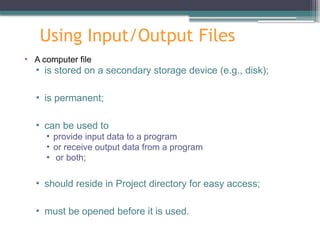
•A computer file
• is stored on a secondary storage device (e.g., disk);
• is permanent;
• can be used to
• provide input data to a program
• or receive output data from a program
• or both;
• should reside in Project directory for easy access;
• must be opened before it is used.
3.
General File I/OSteps
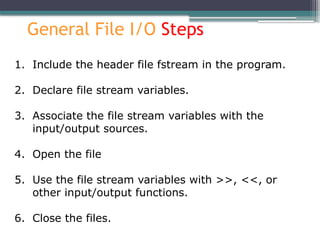
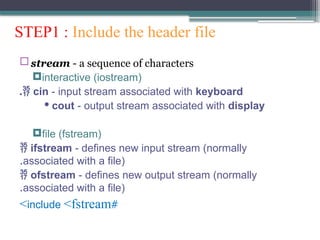
1. Include the header file fstream in the program.
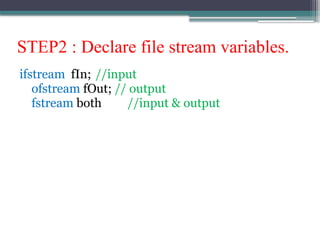
2. Declare file stream variables.
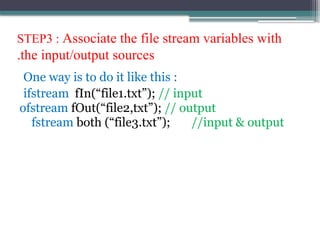
3. Associate the file stream variables with the
input/output sources.
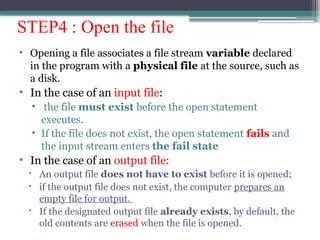
4. Open the file
5. Use the file stream variables with >>, <<, or
other input/output functions.
6. Close the files.
4.
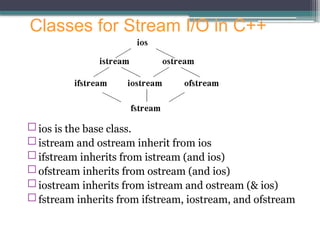
ios isthe base class.
istream and ostream inherit from ios
ifstream inherits from istream (and ios)
ofstream inherits from ostream (and ios)
iostream inherits from istream and ostream (& ios)
fstream inherits from ifstream, iostream, and ofstream
Classes for Stream I/O in C++
5.
STEP1 : Includethe header file
stream - a sequence of characters
interactive (iostream)
cin - input stream associated with keyboard
.
· cout - output stream associated with display
file (fstream)
ifstream - defines new input stream (normally
associated with a file)
.
ofstream - defines new output stream (normally
associated with a file)
.
#
include <fstream
>
STEP3 : Associatethe file stream variables with
the input/output sources
.
One way is to do it like this :
ifstream fIn(“file1.txt”); // input
ofstream fOut(“file2,txt”); // output
fstream both (“file3.txt”); //input & output
8.
STEP4 : Openthe file
• Opening a file associates a file stream variable declared
in the program with a physical file at the source, such as
a disk.
• In the case of an input file:
• the file must exist before the open statement
executes.
• If the file does not exist, the open statement fails and
the input stream enters the fail state
• In the case of an output file:
An output file does not have to exist before it is opened;
if the output file does not exist, the computer prepares an
empty file for output.
If the designated output file already exists, by default, the
old contents are erased when the file is opened.
9.
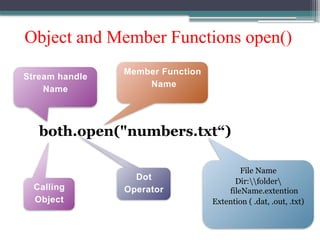
Object and MemberFunctions open()
both.open("numbers.txt“)
Stream handle
Name
Calling
Object
Dot
Operator
Member Function
Name
File Name
Dir:folder
fileName.extention
Extention ( .dat, .out, .txt)
10.
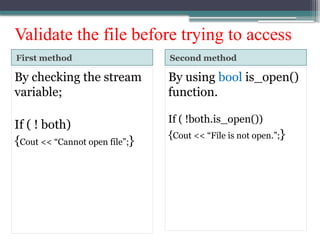
Validate the filebefore trying to access
First method Second method
By checking the stream
variable;
If ( ! both)
{Cout << “Cannot open file”;}
By using bool is_open()
function.
If ( !both.is_open())
{Cout << “File is not open.”;}
11.
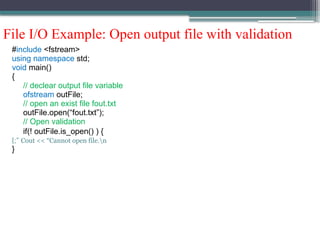
File I/O Example:Open output file with validation
#include <fstream>
using namespace std;
void main()
{
// declear output file variable
ofstream outFile;
// open an exist file fout.txt
outFile.open(“fout.txt”);
// Open validation
if(! outFile.is_open() ) {
Cout << “Cannot open file.n
;”
}
}
12.
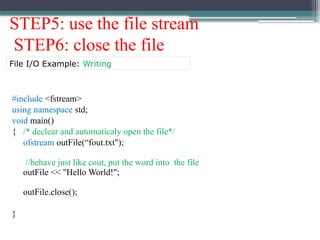
STEP5: use thefile stream
STEP6: close the file
#include <fstream>
using namespace std;
void main()
{ /* declear and automaticaly open the file*/
ofstream outFile(“fout.txt");
//behave just like cout, put the word into the file
outFile << "Hello World!";
outFile.close();
}
File I/O Example: Writing
13.
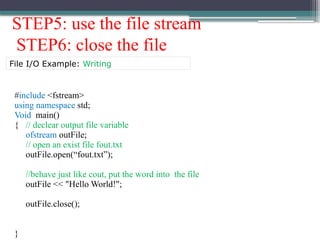
STEP5: use thefile stream
STEP6: close the file
#include <fstream>
using namespace std;
Void main()
{ // declear output file variable
ofstream outFile;
// open an exist file fout.txt
outFile.open(“fout.txt”);
//behave just like cout, put the word into the file
outFile << "Hello World!";
outFile.close();
}
File I/O Example: Writing
14.
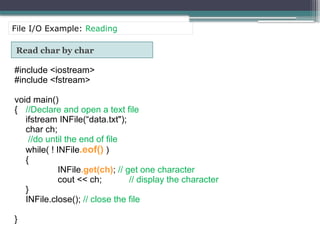
Read char bychar
#include <iostream>
#include <fstream>
void main()
{ //Declare and open a text file
ifstream INFile(“data.txt");
char ch;
//do until the end of file
while( ! INFile.eof() )
{
INFile.get(ch); // get one character
cout << ch; // display the character
}
INFile.close(); // close the file
}
File I/O Example: Reading
15.
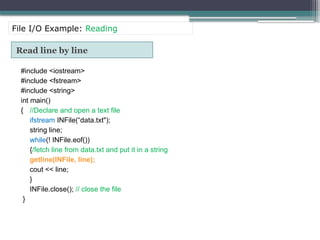
Read line byline
#include <iostream>
#include <fstream>
#include <string>
int main()
{ //Declare and open a text file
ifstream INFile(“data.txt");
string line;
while(! INFile.eof())
{/fetch line from data.txt and put it in a string
getline(INFile, line);
cout << line;
}
INFile.close(); // close the file
}
File I/O Example: Reading
16.
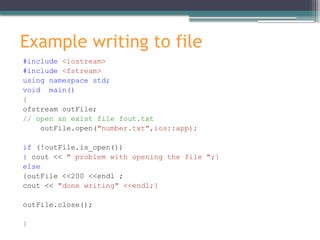
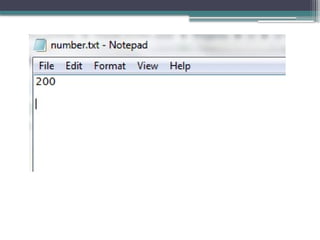
Example writing tofile
#include <iostream>
#include <fstream>
using namespace std;
void main()
{
ofstream outFile;
// open an exist file fout.txt
outFile.open("number.txt",ios::app);
if (!outFile.is_open())
{ cout << " problem with opening the file ";}
else
{outFile <<200 <<endl ;
cout << "done writing" <<endl;}
outFile.close();
}
18.
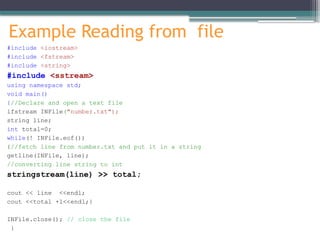
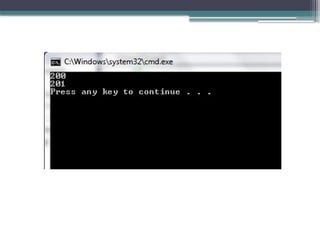
Example Reading fromfile
#include <iostream>
#include <fstream>
#include <string>
#include <sstream>
using namespace std;
void main()
{//Declare and open a text file
ifstream INFile("number.txt");
string line;
int total=0;
while(! INFile.eof())
{//fetch line from number.txt and put it in a string
getline(INFile, line);
//converting line string to int
stringstream(line) >> total;
cout << line <<endl;
cout <<total +1<<endl;}
INFile.close(); // close the file
}
Editor's Notes
#11 This program will create the file fout.txt in the directory from where you are executing it, and will put “Hello, world!” into it.
Here is what every line means:
#include <fstream> - You need to include this file in order to use C++’s functions for File I/O.
In this file, are declared several classes, including ifstream, ofstream and fstream, which are all derived from istream and ostream.
ofstream outFile(“cpp-home.txt”);
ofstream means “output file stream”. It creates a handle for a stream to write in a file.
outFile – that’s the name of the handle. You can pick whatever you want!
(“fout.txt”); - opens the file fout.txt, which should be placed in the directory from where you execute the program. If such a file does not exists, it will be created for you, so you don’t need to worry about that!
Now, let’s look a bit deeper. First, I’d like to mention that ofstream is a class. So, ofstream outFile(“fout.txt”); creates an object from this class. What we pass in the brackets, as parameter, is actually what we pass to the constructor. It is the name of the file. So, to summarize: we create an object from class ofstream, and we pass the name of the file we want to create, as an argument to the class’ constructor. There are other things, too, that we can pass, but I will look into that, later.
outFile<< “Hello World,!”; - “<<” looks familiar? Yes, you’ve seen it in cout <<. This (“<<”) is a predefined operator. Anyway, what this line makes, is to put the text above in the file. As mentioned before, outFile is a handle to the opened file stream. So, we write the handle name, << and after it we write the text in inverted commas. If we want to pass variables instead of text in inverted commas, just pass it as a regular use of the cout <<. This way:
outFile << variablename;
That’s it!
outFile.close(); - As we have opened the stream, when we finish using it, we have to close it. outFile is an object from class ofstream, and this class (ofstream) has a function that closes the stream. That is the close() function. So, we just write the name of the handle, dot and close(), in order to close the file stream!
Notice: Once you have closed the file, you can’t access it anymore, until you open it again.
#12 This program will create the file fout.txt in the directory from where you are executing it, and will put “Hello, world!” into it.
Here is what every line means:
#include <fstream> - You need to include this file in order to use C++’s functions for File I/O.
In this file, are declared several classes, including ifstream, ofstream and fstream, which are all derived from istream and ostream.
ofstream outFile(“cpp-home.txt”);
ofstream means “output file stream”. It creates a handle for a stream to write in a file.
outFile – that’s the name of the handle. You can pick whatever you want!
(“fout.txt”); - opens the file fout.txt, which should be placed in the directory from where you execute the program. If such a file does not exists, it will be created for you, so you don’t need to worry about that!
Now, let’s look a bit deeper. First, I’d like to mention that ofstream is a class. So, ofstream outFile(“fout.txt”); creates an object from this class. What we pass in the brackets, as parameter, is actually what we pass to the constructor. It is the name of the file. So, to summarize: we create an object from class ofstream, and we pass the name of the file we want to create, as an argument to the class’ constructor. There are other things, too, that we can pass, but I will look into that, later.
outFile<< “Hello World,!”; - “<<” looks familiar? Yes, you’ve seen it in cout <<. This (“<<”) is a predefined operator. Anyway, what this line makes, is to put the text above in the file. As mentioned before, outFile is a handle to the opened file stream. So, we write the handle name, << and after it we write the text in inverted commas. If we want to pass variables instead of text in inverted commas, just pass it as a regular use of the cout <<. This way:
outFile << variablename;
That’s it!
outFile.close(); - As we have opened the stream, when we finish using it, we have to close it. outFile is an object from class ofstream, and this class (ofstream) has a function that closes the stream. That is the close() function. So, we just write the name of the handle, dot and close(), in order to close the file stream!
Notice: Once you have closed the file, you can’t access it anymore, until you open it again.
#13 This program will create the file fout.txt in the directory from where you are executing it, and will put “Hello, world!” into it.
Here is what every line means:
#include <fstream> - You need to include this file in order to use C++’s functions for File I/O.
In this file, are declared several classes, including ifstream, ofstream and fstream, which are all derived from istream and ostream.
ofstream outFile(“cpp-home.txt”);
ofstream means “output file stream”. It creates a handle for a stream to write in a file.
outFile – that’s the name of the handle. You can pick whatever you want!
(“fout.txt”); - opens the file fout.txt, which should be placed in the directory from where you execute the program. If such a file does not exists, it will be created for you, so you don’t need to worry about that!
Now, let’s look a bit deeper. First, I’d like to mention that ofstream is a class. So, ofstream outFile(“fout.txt”); creates an object from this class. What we pass in the brackets, as parameter, is actually what we pass to the constructor. It is the name of the file. So, to summarize: we create an object from class ofstream, and we pass the name of the file we want to create, as an argument to the class’ constructor. There are other things, too, that we can pass, but I will look into that, later.
outFile<< “Hello World,!”; - “<<” looks familiar? Yes, you’ve seen it in cout <<. This (“<<”) is a predefined operator. Anyway, what this line makes, is to put the text above in the file. As mentioned before, outFile is a handle to the opened file stream. So, we write the handle name, << and after it we write the text in inverted commas. If we want to pass variables instead of text in inverted commas, just pass it as a regular use of the cout <<. This way:
outFile << variablename;
That’s it!
outFile.close(); - As we have opened the stream, when we finish using it, we have to close it. outFile is an object from class ofstream, and this class (ofstream) has a function that closes the stream. That is the close() function. So, we just write the name of the handle, dot and close(), in order to close the file stream!
Notice: Once you have closed the file, you can’t access it anymore, until you open it again.