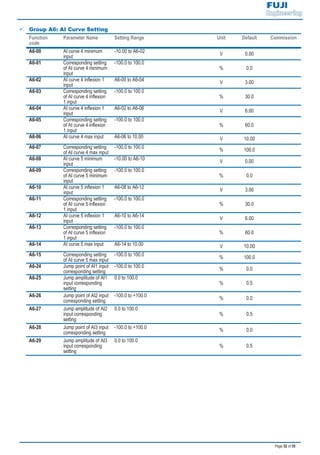
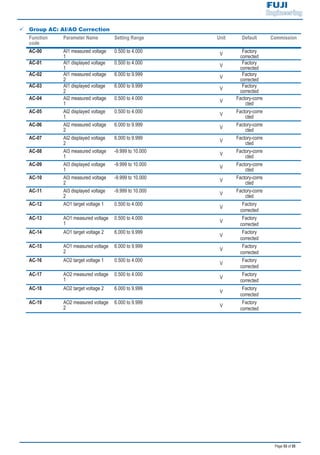
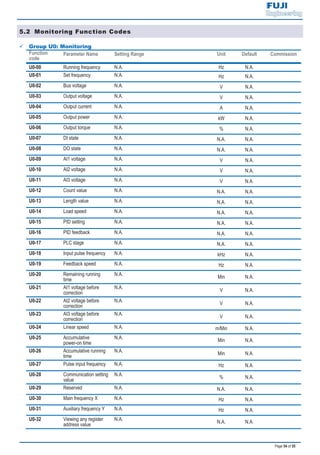
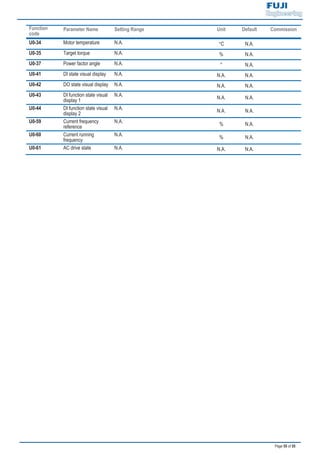
Quick Start Guide
inverter
Page 1 of 55
CHAPTER 1 PRODUCT INFORMATION
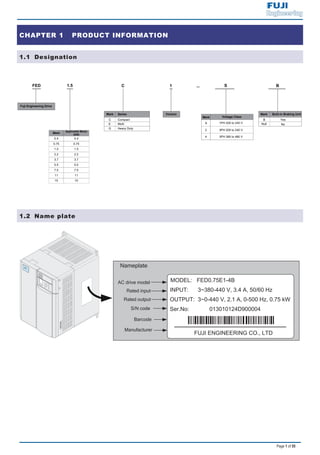
1.1 Designation
1.2 Name plate
Nameplate
AC drive model
Rated input
Rated output
Manufacturer
Barcode
S/N code
Page 2 of 55
1.3 General Specifications
: At 6 kHz carrier frequency without derating.
: The mounting dimensions are shown below.
FEW/RED
A
W
B
H
D
FE
D/R
EWFE
D/R
EWLO
CA
LRU
N/E
RR
A
W
BH1
D
H
For models above 7.5 kW, the fan
is installed on the top of the AC
drive.
FE
D/R
EWFE
D/R
EWLO
CA
LRU
N/E
RR
Figure 1..Model of 0.4 to 2.2 kW Figure 2..Model of 3.7 to 15 kW
H [mm]
W [mm]
D [mm]
A [mm]
B [mm]
H1 [mm]
1.9 3.4 5.0 5.8 10.5 14.6 20.5 26.0 35.0
[kW] 0.4 0.75 1.5 2.2 3.7 5.5 7.5 11 15
[HP] 0.5 1 2 3 5 7.5 10 15 20
1.5 2.1 3.8 5.1 9.0 13.0 17.0 25.0 32.0
1.0 1.5 3.0 4.0 5.9 8.9 11.0 17.0 21.0
[kW] ≥ 0.15 ≥ 0.15 ≥ 0.15 ≥ 0.25 ≥ 0.30 ≥ 0.40 ≥ 0.50 ≥ 0.80 ≥ 1.00
[Ω] ≥ 300 ≥ 300 ≥ 220 ≥ 200 ≥ 130 ≥ 90 ≥ 65 ≥ 43 ≥ 32
Three-phase 380 to 440 VAC, -15% to 20% (323 to 528 VAC)
Three-phase 380 VAC (proportional to input voltage)
260 298
Mounting Hole Diameter [mm] 5 6
120% for 1 hour & 150% for 60 Sec &180% for 2 Sec
Max. Output Voltage
Dimension
DriveInput
Rated Input Voltage
Rated Input Current(A)
Rated Input Frequency 50/60 Hz, 5% (47.5 to 63 Hz)
128
Cooling Method Air Fan
108 130 140 180
96 108 122 160
158 164148 171 175.5
Max. Output Frequency 300 Hz for SVC control, 500 Hz for V/F control
Recommended
Braking Resistor
DriveOutput
Applicable
Motor
Output Current, [A]
Power Capacity, [kVA]
Overload Capacity
185 234 270
Frame Size
Voltage Class
Drive Model
1 4 5
Three-phase 380 VAC
2 3
118 198 248 284
/ 209
Page 3 of 55
: Drives of 220 VAC power supply (both single-phase and three-phase) are being developed.
: At 6 kHz carrier frequency without derating.
: The mounting dimensions are shown below.
FEW/RED
A
W
B
H
D
FE
D/R
EWFE
D/R
EWLO
CA
LRU
N/E
RR
A
W
BH1
D
H
FE
D/R
EWFE
D/R
EWLO
CA
LRU
N/E
RR
Figure 3..Model of 0.4 to 2.2 kW Figure 4..Model of 3.7 to 7.5 kW
2 3 5
H [mm] 185 270
W [mm] 130 180
D [mm] 158 164 175.5
A [mm] 108 160
B [mm] 198 284
H1 [mm] 209 298
5.4 8.2 14.0 23.0 3.4 5.0 5.8 10.5 14.6 26.0 35.0
[kW] 0.4 0.75 1.5 2.2 0.4 0.75 1.5 2.2 3.7 5.5 7.5
[HP] 0.5 1 2 3 0.5 1 2 3 5 7.5 10
2.3 4.0 7.0 9.6 2.1 3.8 5.1 9.0 13.0 25.0 32
1.0 1.5 3.0 4.0 1.5 3.0 4.0 5.9 8.9 17.0 21.0
[kW] ≥ 0.08 ≥ 0.08 ≥ 0.10 / ≥ 0.15 ≥ 0.15 ≥ 0.25 ≥ 300 ≥ 0.40 ≥ 0.80 ≥ 1.00
[Ω] ≥ 200 ≥ 150 ≥ 100 / ≥ 150 ≥ 110 ≥ 100 ≥ 65 ≥ 45 ≥ 110 ≥ 100
148
Dimension
148
Voltage Class
Drive Model
Frame Size 1 2 1
300 Hz for SVC control, 500 Hz for V/F control
Mounting Hole Diameter [mm]
DriveInput
Rated Input Voltage
Rated Input Current(A)
Rated Input Frequency 50/60 Hz, 5% (47.5 to 63 Hz)
Recommended
Braking Resistor
Cooling Method Air Fan
Three-phase 220 VACSingle-phase 220 VAC
171
DriveOutput
Applicable
Motor
Output Current, [A]
Power Capacity, [kVA]
Overload Capacity 120% for 1 hour & 150% for 60 Sec &180% for 2 Sec
Max. Output Voltage Three-phase 220 VAC (proportional to input voltage)
Max. Output Frequency
Single-phase 220 VAC, -15 to 20%
(187 to 264 VAC)
Three-phase 220 VAC, -15 to 20%
(187 to 264 VAC)
4
/
128
5 Ø6
108
118
234
140
122
248
260
96
158
Page 4 of 55
CHAPTER 2 WIRING
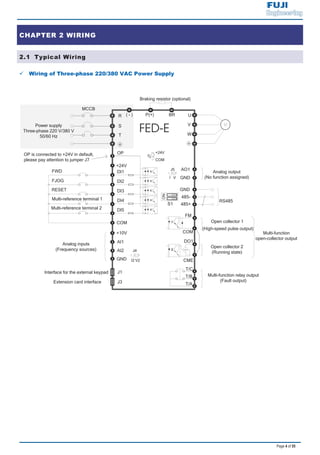
2.1 Typical Wiring
9 Wiring of Three-phase 220/380 VAC Power Supply
DI1
DI2
DI3
DI4
DI5
COM
W
V
UP(+) BR
Braking resistor (optional)
+24V
OP
T/C
T/B
T/A
Multi-function relay output
(Fault output)
+10V
AI1
GND
GND
AO1
Analog output
(No function assigned)
+24V
COM
J7
GND
485-
485+
Analog inputs
(Frequency sources)
RS485
J3
J1Interface for the external keypad
COM
FM
DO1
CME
Open collector 1
(High-speed pulse output)
Extension card interface
Open collector 2
(Running state)
Multi-function
open-collector output
AI2
VI
J5
J4
I2 V2
Power supply
Three-phase 220 V/380 V
50/60 Hz
R
S
MCCB
T
( - )
FWD
Multi-reference terminal 2
FJOG
RESET
Multi-reference terminal 1
ON
S1
OP is connected to +24V in default,
please pay attention to jumper J7
Page 5 of 55
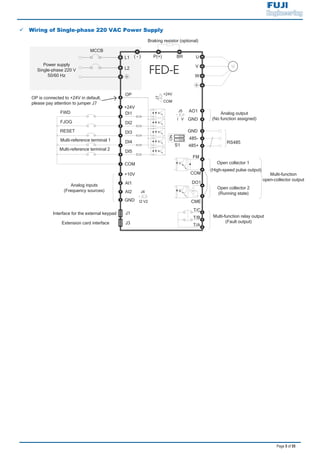
9 Wiring of Single-phase 220 VAC Power Supply
DI1
DI2
DI3
DI4
DI5
COM
W
V
UP(+) BR
Braking resistor (optional)
+24V
OP
T/C
T/B
T/A
Multi-function relay output
(Fault output)
+10V
AI1
GND
GND
AO1
Analog output
(No function assigned)
+24V
COM
J7
GND
485-
485+
Analog inputs
(Frequency sources)
RS485
J3
J1Interface for the external keypad
COM
FM
DO1
CME
Open collector 1
(High-speed pulse output)
Extension card interface
Open collector 2
(Running state)
Multi-function
open-collector output
AI2
VI
J5
J4
I2 V2
MCCB
Power supply
Single-phase 220 V
50/60 Hz
L1
L2
( - )
FWD
Multi-reference terminal 2
FJOG
RESET
Multi-reference terminal 1
ON
S1
OP is connected to +24V in default,
please pay attention to jumper J7
Page 6 of 55
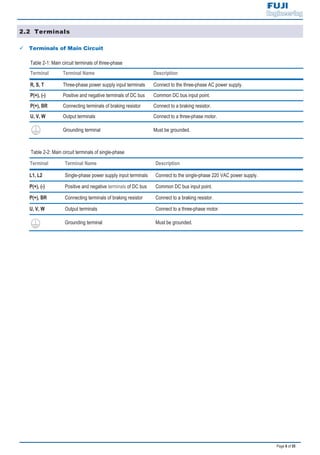
2.2 Terminals
9 Terminals of Main Circuit
Table 2-1: Main circuit terminals of three-phase
Terminal Terminal Name Description
R, S, T Three-phase power supply input terminals Connect to the three-phase AC power supply.
P(+), (-) Positive and negative terminals of DC bus Common DC bus input point.
P(+), BR Connecting terminals of braking resistor Connect to a braking resistor.
U, V, W Output terminals Connect to a three-phase motor.
Grounding terminal Must be grounded.
Table 2-2: Main circuit terminals of single-phase
Terminal Terminal Name Description
L1, L2 Single-phase power supply input terminals Connect to the single-phase 220 VAC power supply.
P(+), (-) Positive and negative terminals of DC bus Common DC bus input point.
P(+), BR Connecting terminals of braking resistor Connect to a braking resistor.
U, V, W Output terminals Connect to a three-phase motor.
Grounding terminal Must be grounded.
Page 7 of 55
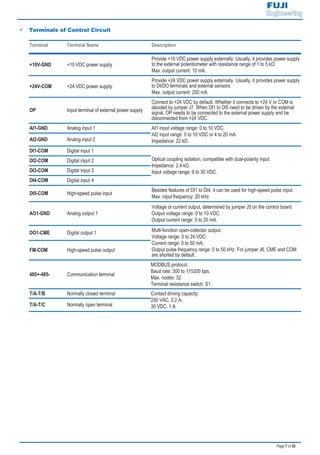
9 Terminals of Control Circuit
Terminal Terminal Name Description
+10V-GND +10 VDC power supply
Provide +10 VDC power supply externally. Usually, it provides power supply
to the external potentiometer with resistance range of 1 to 5 kΩ.
Max. output current: 10 mA.
+24V-COM +24 VDC power supply
Provide +24 VDC power supply externally. Usually, it provides power supply
to DI/DO terminals and external sensors.
Max. output current: 200 mA.
OP Input terminal of external power supply
Connect to +24 VDC by default. Whether it connects to +24 V or COM is
decided by jumper J7. When DI1 to DI5 need to be driven by the external
signal, OP needs to be connected to the external power supply and be
disconnected from +24 VDC.
AI1-GND Analog input 1 AI1 input voltage range: 0 to 10 VDC.
AI2 input range: 0 to 10 VDC or 4 to 20 mA.
Impedance: 22 kΩ.AI2-GND Analog input 2
DI1-COM Digital input 1
Optical coupling isolation, compatible with dual-polarity input.
Impedance: 2.4 kΩ.
Input voltage range: 9 to 30 VDC.
DI2-COM Digital input 2
DI3-COM Digital input 3
DI4-COM Digital input 4
DI5-COM High-speed pulse input
Besides features of DI1 to DI4, it can be used for high-speed pulse input.
Max. input frequency: 20 kHz.
AO1-GND Analog output 1
Voltage or current output, determined by jumper J5 on the control board.
Output voltage range: 0 to 10 VDC.
Output current range: 0 to 20 mA.
DO1-CME Digital output 1 Multi-function open-collector output.
Voltage range: 0 to 24 VDC.
Current range: 0 to 50 mA.
Output pulse frequency range: 0 to 50 kHz. For jumper J6, CME and COM
are shorted by default.
FM-COM High-speed pulse output
485+-485- Communication terminal
MODBUS protocol.
Baud rate: 300 to 115200 bps.
Max. nodes: 32.
Terminal resistance switch: S1.
T/A-T/B Normally closed terminal Contact driving capacity:
250 VAC, 0.2 A;
30 VDC, 1 A.T/A-T/C Normally open terminal
Page 8 of 55
CHAPTER 3 EASY SETUP
3.1 Logic of Control
9 Complete Timing Diagram
F0-08
[x.x Hz]
F0-18
F0-17 F6-09 F6-08 [x.x Sec]
[x.x Sec] [x.x% ] [x.x% ]
F6-11
DC injection braking 2 frequency threshold
F6-04
[x.x Sec]
F6-03 F6-08 F6-09
[x.x Hz] [x.x% ] [x.x% ]
0
F6-06 [x.x Sec]: F6-13 [x%]: F6-14 [x.x Sec]:
DC injection braking 1 active time(if F6-00=0) DC injjection braking 2 level DC injection braking 2 active time
Pre-excitation active time (if F6-00=2)
F6-05 [x%]: F6-12 [x.x Sec] (default: 0.0 Sec)
DC injection braking 1 level (if F6-00=0) DC injection braking 2 delay time
Pre-excitation level (if F6-00=2)
t1
Time
DI 1 Forward
IGBT's Active
Frequency
Frequency
output
command
[ x.x Hz]: default 0.0 Hz
t9
ON
OFF
ON
OFF
t2 t4 t5 t6
t7
t8t3
0%
DC Injection/
Pre-excitation
Motor Current
20%
40%
Stages
100%
100%
50%
0%
Page 9 of 55
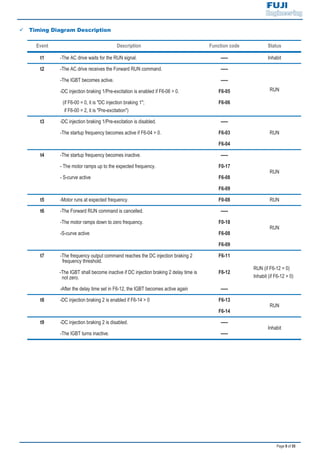
9 Timing Diagram Description
Event Description Function code Status
t1 -The AC drive waits for the RUN signal. ----- Inhabit
t2 -The AC drive receives the Forward RUN command. -----
RUN
-The IGBT becomes active. -----
-DC injection braking 1/Pre-excitation is enabled if F6-06 > 0. F6-05
(if F6-00 = 0, it is "DC injection braking 1";
if F6-00 = 2, it is "Pre-excitation")
F6-06
t3 -DC injection braking 1/Pre-excitation is disabled. -----
RUN-The startup frequency becomes active if F6-04 > 0. F6-03
F6-04
t4 -The startup frequency becomes inactive. -----
RUN
- The motor ramps up to the expected frequency. F0-17
- S-curve active F6-08
F6-09
t5 -Motor runs at expected frequency. F0-08 RUN
t6 -The Forward RUN command is cancelled. -----
RUN
-The motor ramps down to zero frequency. F0-18
-S-curve active F6-08
F6-09
t7 -The frequency output command reaches the DC injection braking 2
frequency threshold.
F6-11
RUN (if F6-12 = 0)
Inhabit (if F6-12 > 0)
-The IGBT shall become inactive if DC injection braking 2 delay time is
not zero.
F6-12
-After the delay time set in F6-12, the IGBT becomes active again -----
t8 -DC injection braking 2 is enabled if F6-14 > 0 F6-13
RUN
F6-14
t9 -DC injection braking 2 is disabled. -----
Inhabit
-The IGBT turns inactive. -----
Page 10 of 55
3.2 Step By Step Setup
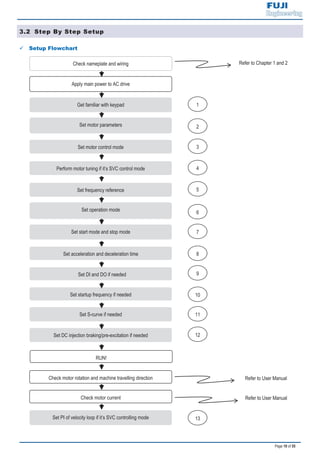
9 Setup Flowchart
Refer to Chapter 1 and 2
Refer to User Manual
Set PI of velocity loop if it’s SVC controlling mode
Get familiar with keypad
Set motor parameters
Check nameplate and wiring
Apply main power to AC drive
Check motor rotation and machine travelling direction
Check motor current
Set motor control mode
Set S-curve if needed
Set acceleration and deceleration time
Set DI and DO if needed
Set startup frequency if needed
Set DC injection braking/pre-excitation if needed
RUN!
Set frequency reference
Set operation mode
Set start mode and stop mode
Perform motor tuning if it’s SVC control mode
2
3
4
5
6
7
8
9
10
1
11
12
13
Page 11 of 55
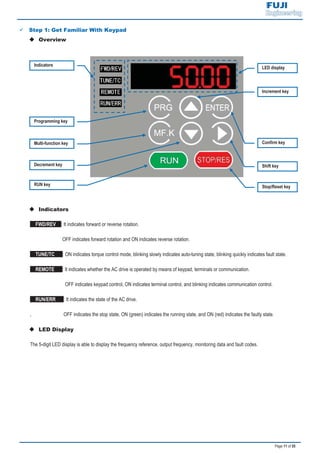
9 Step 1: Get Familiar With Keypad
‹ Overview
‹ Indicators
FWD/REV : It indicates forward or reverse rotation.
OFF indicates forward rotation and ON indicates reverse rotation.
TUNE/TC : ON indicates torque control mode, blinking slowly indicates auto-tuning state, blinking quickly indicates fault state.
REMOTE : It indicates whether the AC drive is operated by means of keypad, terminals or communication.
OFF indicates keypad control, ON indicates terminal control, and blinking indicates communication control.
RUN/ERR : It indicates the state of the AC drive.
, OFF indicates the stop state, ON (green) indicates the running state, and ON (red) indicates the faulty state.
‹ LED Display
The 5-digit LED display is able to display the frequency reference, output frequency, monitoring data and fault codes.
Indicators
LED display
Confirm key
Shift key
Stop/Reset key
Programming key
RUN key
Decrement key
Increment key
Multi-function key
Page 12 of 55
‹ Keys On Keypad
Key Key Name Function
Programming Enter or exit Level I menu.
Confirm Enter the menu interfaces level by level, and confirm the parameter setting.
Increment Increase data or function code.
Decrement Decrease data or function code.
Shift Select the displayed parameters in turn in the stop or running state, and select the digit to be
modified when modifying parameters.
RUN Start the AC drive in the keypad operation mode.
Stop/Reset Stop the AC drive when it is in the running state and perform the reset operation when it is in
the faulty state. The functions of this key are restricted by F7-02.
Multifunction Perform function switchover (such as quick switchover of command source or direction)
according to the setting of F7-01.
Function
code
Parameter Name Setting Range Unit Default Commission
F7-01 MF.K key function
selection
0: MF.K key disabled
1: Switchover from remote control (terminal or
communication) to keypad control
2: Switchover between forward rotation and
reverse rotation
3: Forward jog
4: Reverse jog
5: Individualized parameter display
N.A. 0
F7-02 STOP/RESET key
function
0: STOP/RESET key enabled only in keypad
control
1: STOP/RESET key enabled in any
operation mode
N.A. 1
Page 13 of 55
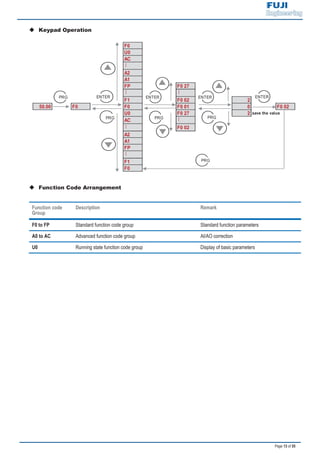
‹ Keypad Operation
F0
U0
AC
…
A2
A1
FP F0 27
…
…
F1 F0 02 2
50.00 F0 F0 F0 01 0 F0 02
U0 F0 27 2 save the value
AC
…
…
F0 02
A2
A1
FP
…
F1
F0
PRG
ENTER
PRG
ENTER
PRG
ENTER ENTER
PRG
PRG
‹ Function Code Arrangement
Function code
Group
Description Remark
F0 to FP Standard function code group Standard function parameters
A0 to AC Advanced function code group AI/AO correction
U0 Running state function code group Display of basic parameters
Page 14 of 55
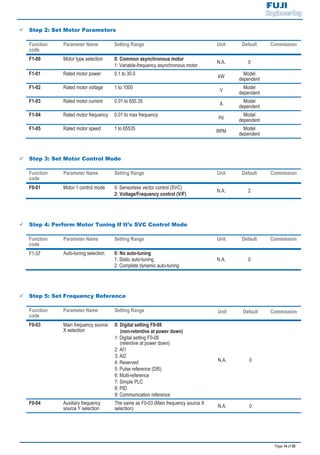
9 Step 2: Set Motor Parameters
Function
code
Parameter Name Setting Range Unit Default Commission
F1-00 Motor type selection 0: Common asynchronous motor
1: Variable-frequency asynchronous motor
N.A. 0
F1-01 Rated motor power 0.1 to 30.0
kW
Model
dependent
F1-02 Rated motor voltage 1 to 1000
V
Model
dependent
F1-03 Rated motor current 0.01 to 655.35
A
Model
dependent
F1-04 Rated motor frequency 0.01 to max frequency
Hz
Model
dependent
F1-05 Rated motor speed 1 to 65535
RPM
Model
dependent
9 Step 3: Set Motor Control Mode
Function
code
Parameter Name Setting Range Unit Default Commission
F0-01 Motor 1 control mode 0: Sensorless vector control (SVC)
2: Voltage/Frequency control (V/F)
N.A. 2
9 Step 4: Perform Motor Tuning If It’s SVC Control Mode
Function
code
Parameter Name Setting Range Unit Default Commission
F1-37 Auto-tuning selection 0: No auto-tuning
1: Static auto-tuning
2: Complete dynamic auto-tuning
N.A. 0
9 Step 5: Set Frequency Reference
Function
code
Parameter Name Setting Range Unit Default Commission
F0-03 Main frequency source
X selection
0: Digital setting F0-08
(non-retentive at power down)
1: Digital setting F0-08
(retentive at power down)
2: AI1
3: AI2
4: Reserved
5: Pulse reference (DI5)
6: Multi-reference
7: Simple PLC
8: PID
9: Communication reference
N.A. 0
F0-04 Auxiliary frequency
source Y selection
The same as F0-03 (Main frequency source X
selection) N.A. 0
Page 15 of 55
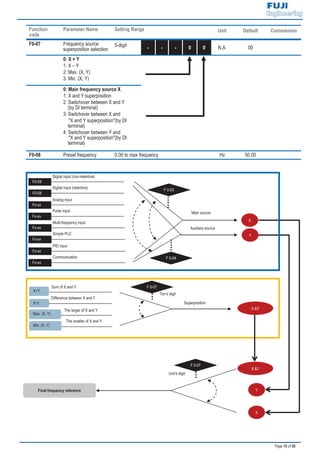
Function
code
Parameter Name Setting Range Unit Default Commission
F0-07 Frequency source
superposition selection
5-digit - - - 0 0 N.A. 00
0: X + Y
1: X – Y
2: Max. (X, Y)
3: Min. (X, Y)
0: Main frequency source X
1: X and Y superposition
2: Switchover between X and Y
(by DI terminal)
3: Switchover between X and
"X and Y superposition"(by DI
terminal)
4: Switchover between Y and
"X and Y superposition"(by DI
terminal)
F0-08 Preset frequency 0.00 to max frequency Hz 50.00
X
Y
X &Y
Unit’s digit
F 0-07
Final frequency reference
Superposition
X &Y
Ten’s digit
F 0-07
The larger of X and Y
Max. (X, Y)
The smaller of X and Y
Min. (X, Y)
Difference between X and Y
X-Y
Sum of X and Y
X+Y
F 0-04
Auxiliary source
Main source
F 0-03
X
Y
Communication
Fx-xx
PID input
Fx-xx
Simple PLC
Fx-xx
Multi-frequency input
Fx-xx
Pulse input
Fx-xx
Analog input
Fx-xx
Digital input (retentive)
F0-08
Digital input (non-retentive)
F0-08
Page 16 of 55
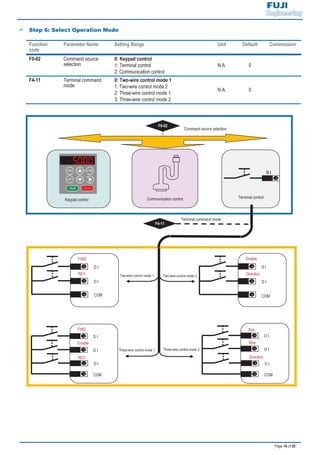
9 Step 6: Select Operation Mode
Function
code
Parameter Name Setting Range Unit Default Commission
F0-02 Command source
selection
0: Keypad control
1: Terminal control
2: Communication control
N.A. 0
F4-11 Terminal command
mode
0: Two-wire control mode 1
1: Two-wire control mode 2
2: Three-wire control mode 1
3: Three-wire control mode 2
N.A. 0
Command source selection
Terminal command mode
F0-02
Keypad control Communication control Terminal control
D I
F4-11
Two-wire control mode 1 Two-wire control mode 2
Three-wire control mode 1 Three-wire control mode 2
FWD
D I
REV
D I
D I
COM
Enable
D I
COM
Run
D I
Direction
Stop
D I
Enable
D I
Direction
D I
COM
FWD
COM
REV
D I
D I
Page 17 of 55
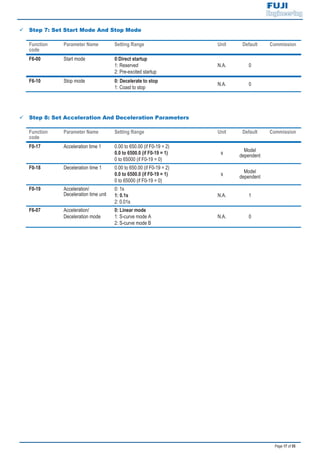
9 Step 7: Set Start Mode And Stop Mode
Function
code
Parameter Name Setting Range Unit Default Commission
F6-00 Start mode 0:Direct startup
1: Reserved
2: Pre-excited startup
N.A. 0
F6-10 Stop mode 0: Decelerate to stop
1: Coast to stop
N.A. 0
9 Step 8: Set Acceleration And Deceleration Parameters
Function
code
Parameter Name Setting Range Unit Default Commission
F0-17 Acceleration time 1 0.00 to 650.00 (if F0-19 = 2)
0.0 to 6500.0 (if F0-19 = 1)
0 to 65000 (if F0-19 = 0)
s
Model
dependent
F0-18 Deceleration time 1 0.00 to 650.00 (if F0-19 = 2)
0.0 to 6500.0 (if F0-19 = 1)
0 to 65000 (if F0-19 = 0)
s Model
dependent
F0-19 Acceleration/
Deceleration time unit
0: 1s
1: 0.1s
2: 0.01s
N.A. 1
F6-07 Acceleration/
Deceleration mode
0: Linear mode
1: S-curve mode A
2: S-curve mode B
N.A. 0
Page 18 of 55
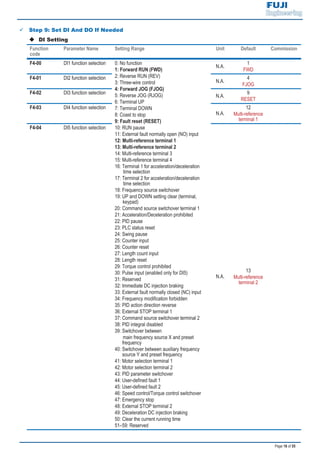
9 Step 9: Set DI And DO If Needed
‹ DI Setting
Function
code
Parameter Name Setting Range Unit Default Commission
F4-00 DI1 function selection 0: No function
1: Forward RUN (FWD)
2: Reverse RUN (REV)
3: Three-wire control
4: Forward JOG (FJOG)
5: Reverse JOG (RJOG)
6: Terminal UP
7: Terminal DOWN
8: Coast to stop
9: Fault reset (RESET)
10: RUN pause
11: External fault normally open (NO) input
12: Multi-reference terminal 1
13: Multi-reference terminal 2
14: Multi-reference terminal 3
15: Multi-reference terminal 4
16: Terminal 1 for acceleration/deceleration
time selection
17: Terminal 2 for acceleration/deceleration
time selection
18: Frequency source switchover
19: UP and DOWN setting clear (terminal,
keypad)
20: Command source switchover terminal 1
21: Acceleration/Deceleration prohibited
22: PID pause
23: PLC status reset
24: Swing pause
25: Counter input
26: Counter reset
27: Length count input
28: Length reset
29: Torque control prohibited
30: Pulse input (enabled only for DI5)
31: Reserved
32: Immediate DC injection braking
33: External fault normally closed (NC) input
34: Frequency modification forbidden
35: PID action direction reverse
36: External STOP terminal 1
37: Command source switchover terminal 2
38: PID integral disabled
39: Switchover between
main frequency source X and preset
frequency
40: Switchover between auxiliary frequency
source Y and preset frequency
41: Motor selection terminal 1
42: Motor selection terminal 2
43: PID parameter switchover
44: User-defined fault 1
45: User-defined fault 2
46: Speed control/Torque control switchover
47: Emergency stop
48: External STOP terminal 2
49: Deceleration DC injection braking
50: Clear the current running time
51–59: Reserved
N.A.
1
FWD
F4-01 DI2 function selection
N.A.
4
FJOG
F4-02 DI3 function selection
N.A.
9
RESET
F4-03 DI4 function selection
N.A.
12
Multi-reference
terminal 1
F4-04 DI5 function selection
N.A.
13
Multi-reference
terminal 2
Page 19 of 55
Function
code
Parameter Name Setting Range Unit Default Commission
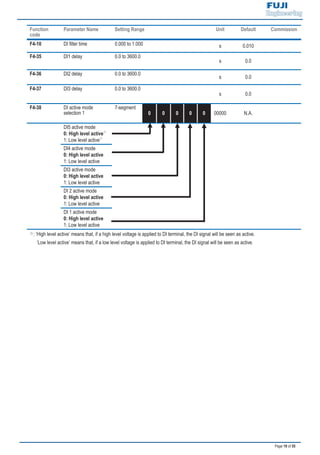
F4-10 DI filter time 0.000 to 1.000 s 0.010
F4-35 DI1 delay 0.0 to 3600.0
s 0.0
F4-36 DI2 delay 0.0 to 3600.0
s 0.0
F4-37 DI3 delay 0.0 to 3600.0
s 0.0
F4-38 DI active mode
selection 1
7-segment
0 0 0 0 0 00000 N.A.
DI5 active mode
0: High level active
1: Low level active
DI4 active mode
0: High level active
1: Low level active
DI3 active mode
0: High level active
1: Low level active
DI 2 active mode
0: High level active
1: Low level active
DI 1 active mode
0: High level active
1: Low level active
: ‘High level active’ means that, if a high level voltage is applied to DI terminal, the DI signal will be seen as active.
‘Low level active’ means that, if a low level voltage is applied to DI terminal, the DI signal will be seen as active.
Page 20 of 55
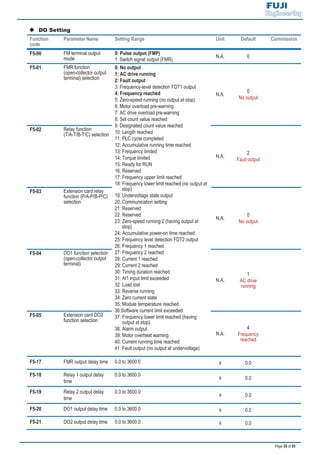
‹ DO Setting
Function
code
Parameter Name Setting Range Unit Default Commission
F5-00 FM terminal output
mode
0: Pulse output (FMP)
1: Switch signal output (FMR)
N.A. 0
F5-01 FMR function
(open-collector output
terminal) selection
0: No output
1: AC drive running
2: Fault output
3: Frequency-level detection FDT1 output
4: Frequency reached
5: Zero-speed running (no output at stop)
6: Motor overload pre-warning
7: AC drive overload pre-warning
8: Set count value reached
9: Designated count value reached
10: Length reached
11: PLC cycle completed
12: Accumulative running time reached
13: Frequency limited
14: Torque limited
15: Ready for RUN
16: Reserved
17: Frequency upper limit reached
18: Frequency lower limit reached (no output at
stop)
19: Undervoltage state output
20: Communication setting
21: Reserved
22: Reserved
23: Zero-speed running 2 (having output at
stop)
24: Accumulative power-on time reached
25: Frequency level detection FDT2 output
26: Frequency 1 reached
27: Frequency 2 reached
28: Current 1 reached
29: Current 2 reached
30: Timing duration reached
31: AI1 input limit exceeded
32: Load lost
33: Reverse running
34: Zero current state
35: Module temperature reached
36:Software current limit exceeded
37: Frequency lower limit reached (having
output at stop)
38: Alarm output
39: Motor overheat warning
40: Current running time reached
41: Fault output (no output at undervoltage)
N.A.
0
No output
F5-02 Relay function
(T/A-T/B-T/C) selection
N.A.
2
Fault output
F5-03 Extension card relay
function (P/A-P/B-P/C)
selection
N.A.
0
No output
F5-04 DO1 function selection
(open-collector output
terminal)
N.A.
1
AC drive
running
F5-05 Extension card DO2
function selection
N.A.
4
Frequency
reached
F5-17 FMR output delay time 0.0 to 3600.0 s 0.0
F5-18 Relay 1 output delay
time
0.0 to 3600.0
s 0.0
F5-19 Relay 2 output delay
time
0.0 to 3600.0
s 0.0
F5-20 DO1 output delay time 0.0 to 3600.0 s 0.0
F5-21 DO2 output delay time 0.0 to 3600.0 s 0.0
Page 21 of 55
Function
code
Parameter Name Setting Range Unit Default Commission
F5-22 DO active mode
selection
7-segment
0 0 0 0 0 N.A. 00000
DO2 active mode
0: Positive logic
1: Negative logic
DO1 active mode
0: Positive logic
1: Negative logic
Relay 2 active mode
0: Positive logic
1: Negative logic
Relay 1 active mode
0: Positive logic
1: Negative logic
FMR active mode
0: Positive logic
1: Negative logic
: ‘Positive logic’ means that, DO output terminal is normally the default state.
‘Negative logic’ means the opposite situation.
9 Step 10: Set Startup Frequency If Needed
Function
code
Parameter Name Setting Range Unit Default Commission
F6-03 Startup frequency 0.00 to 10.00 Hz 0.00
F6-04 Startup frequency
active time
0.0 to 100.0 s 0.0
9 Step 11: Set S-Curve If Needed
Function
code
Parameter Name Setting Range Unit Default Commission
F6-07 Acceleration/
Deceleration mode
0: Linear mode
1: S-curve mode A
2: S-curve mode B
N.A. 0 1
F6-08 Time proportion of
S-curve start segment
0.0 to [100.0 minus F6-09]
% 30.0
F6-09 Time proportion of
S-curve end segment
0.0 to [100.0 minus F6-08]
% 30.0
Page 22 of 55
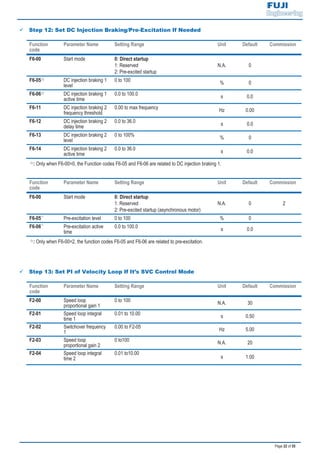
9 Step 12: Set DC Injection Braking/Pre-Excitation If Needed
Function
code
Parameter Name Setting Range Unit Default Commission
F6-00 Start mode 0: Direct startup
1: Reserved
2: Pre-excited startup
N.A. 0
F6-05 DC injection braking 1
level
0 to 100
% 0
F6-06 DC injection braking 1
active time
0.0 to 100.0
s 0.0
F6-11 DC injection braking 2
frequency threshold
0.00 to max frequency
Hz 0.00
F6-12 DC injection braking 2
delay time
0.0 to 36.0
s 0.0
F6-13 DC injection braking 2
level
0 to 100%
% 0
F6-14 DC injection braking 2
active time
0.0 to 36.0
s 0.0
: Only when F6-00=0, the Function codes F6-05 and F6-06 are related to DC injection braking 1.
Function
code
Parameter Name Setting Range Unit Default Commission
F6-00 Start mode 0: Direct startup
1: Reserved
2: Pre-excited startup (asynchronous motor)
N.A. 0 2
F6-05 Pre-excitation level 0 to 100 % 0
F6-06 Pre-excitation active
time
0.0 to 100.0 s 0.0
: Only when F6-00=2, the function codes F6-05 and F6-06 are related to pre-excitation.
9 Step 13: Set PI of Velocity Loop If It’s SVC Control Mode
Function
code
Parameter Name Setting Range Unit Default Commission
F2-00 Speed loop
proportional gain 1
0 to 100 N.A. 30
F2-01 Speed loop integral
time 1
0.01 to 10.00 s 0.50
F2-02 Switchover frequency
1
0.00 to F2-05 Hz 5.00
F2-03 Speed loop
proportional gain 2
0 to100 N.A. 20
F2-04 Speed loop integral
time 2
0.01 to10.00
s 1.00
Page 23 of 55
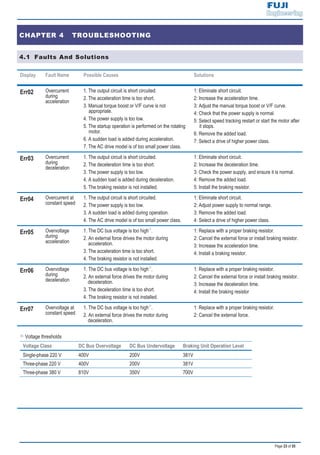
CHAPTER 4 TROUBLESHOOTING
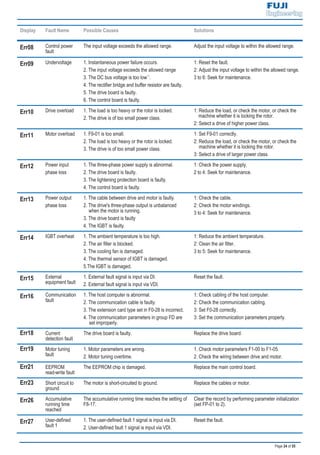
4.1 Faults And Solutions
Display Fault Name Possible Causes Solutions
Err02 Overcurrent
during
acceleration
1. The output circuit is short circuited.
2. The acceleration time is too short.
3. Manual torque boost or V/F curve is not
appropriate.
4. The power supply is too low.
5. The startup operation is performed on the rotating
motor.
6. A sudden load is added during acceleration.
7. The AC drive model is of too small power class.
1: Eliminate short circuit.
2: Increase the acceleration time.
3: Adjust the manual torque boost or V/F curve.
4: Check that the power supply is normal.
5: Select speed tracking restart or start the motor after
it stops.
6: Remove the added load.
7: Select a drive of higher power class.
Err03 Overcurrent
during
deceleration
1. The output circuit is short circuited.
2. The deceleration time is too short.
3. The power supply is too low.
4. A sudden load is added during deceleration.
5. The braking resistor is not installed.
1: Eliminate short circuit.
2: Increase the deceleration time.
3: Check the power supply, and ensure it is normal.
4: Remove the added load.
5: Install the braking resistor.
Err04 Overcurrent at
constant speed
1. The output circuit is short circuited.
2. The power supply is too low.
3. A sudden load is added during operation.
4. The AC drive model is of too small power class.
1: Eliminate short circuit.
2: Adjust power supply to normal range.
3: Remove the added load.
4: Select a drive of higher power class.
Err05 Overvoltage
during
acceleration
1. The DC bus voltage is too high .
2. An external force drives the motor during
acceleration.
3. The acceleration time is too short.
4. The braking resistor is not installed.
1: Replace with a proper braking resistor.
2: Cancel the external force or install braking resistor.
3: Increase the acceleration time.
4: Install a braking resistor.
Err06 Overvoltage
during
deceleration
1. The DC bus voltage is too high .
2. An external force drives the motor during
deceleration.
3. The deceleration time is too short.
4. The braking resistor is not installed.
1: Replace with a proper braking resistor.
2: Cancel the external force or install braking resistor.
3: Increase the deceleration time.
4: Install the braking resistor
Err07 Overvoltage at
constant speed
1. The DC bus voltage is too high .
2. An external force drives the motor during
deceleration.
1: Replace with a proper braking resistor.
2: Cancel the external force.
: Voltage thresholds
Voltage Class DC Bus Overvoltage DC Bus Undervoltage Braking Unit Operation Level
Single-phase 220 V 400V 200V 381V
Three-phase 220 V 400V 200V 381V
Three-phase 380 V 810V 350V 700V
Page 24 of 55
Display Fault Name Possible Causes Solutions
Err08 Control power
fault
The input voltage exceeds the allowed range. Adjust the input voltage to within the allowed range.
Err09 Undervoltage 1. Instantaneous power failure occurs.
2. The input voltage exceeds the allowed range
3. The DC bus voltage is too low .
4. The rectifier bridge and buffer resistor are faulty.
5. The drive board is faulty.
6. The control board is faulty.
1: Reset the fault.
2: Adjust the input voltage to within the allowed range.
3 to 6: Seek for maintenance.
Err10 Drive overload 1. The load is too heavy or the rotor is locked.
2. The drive is of too small power class.
1: Reduce the load, or check the motor, or check the
machine whether it is locking the rotor.
2: Select a drive of higher power class.
Err11 Motor overload 1. F9-01 is too small.
2. The load is too heavy or the rotor is locked.
3. The drive is of too small power class.
1: Set F9-01 correctly.
2: Reduce the load, or check the motor, or check the
machine whether it is locking the rotor.
3: Select a drive of larger power class.
Err12 Power input
phase loss
1. The three-phase power supply is abnormal.
2. The drive board is faulty.
3. The lightening protection board is faulty.
4. The control board is faulty.
1: Check the power supply.
2 to 4: Seek for maintenance.
Err13 Power output
phase loss
1. The cable between drive and motor is faulty.
2. The drive's three-phase output is unbalanced
when the motor is running.
3. The drive board is faulty
4. The IGBT is faulty.
1: Check the cable.
2: Check the motor windings.
3 to 4: Seek for maintenance.
Err14 IGBT overheat 1. The ambient temperature is too high.
2. The air filter is blocked.
3. The cooling fan is damaged.
4. The thermal sensor of IGBT is damaged.
5.The IGBT is damaged.
1: Reduce the ambient temperature.
2: Clean the air filter.
3 to 5: Seek for maintenance.
Err15 External
equipment fault
1. External fault signal is input via DI.
2. External fault signal is input via VDI.
Reset the fault.
Err16 Communication
fault
1. The host computer is abnormal.
2. The communication cable is faulty.
3. The extension card type set in F0-28 is incorrect.
4. The communication parameters in group FD are
set improperly.
1: Check cabling of the host computer.
2: Check the communication cabling.
3: Set F0-28 correctly.
3: Set the communication parameters properly.
Err18 Current
detection fault
The drive board is faulty. Replace the drive board.
Err19 Motor tuning
fault
1. Motor parameters are wrong.
2. Motor tuning overtime.
1. Check motor parameters F1-00 to F1-05.
2. Check the wiring between drive and motor.
Err21 EEPROM
read-write fault
The EEPROM chip is damaged. Replace the main control board.
Err23 Short circuit to
ground
The motor is short-circuited to ground. Replace the cables or motor.
Err26 Accumulative
running time
reached
The accumulative running time reaches the setting of
F8-17.
Clear the record by performing parameter initialization
(set FP-01 to 2).
Err27 User-defined
fault 1
1. The user-defined fault 1 signal is input via DI.
2. User-defined fault 1 signal is input via VDI.
Reset the fault.
Page 25 of 55
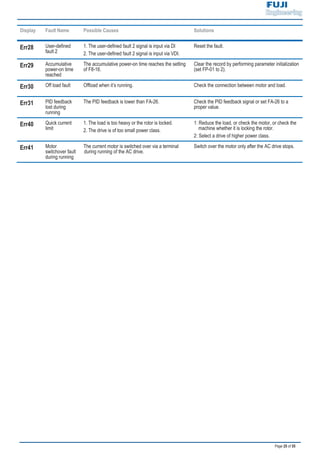
Display Fault Name Possible Causes Solutions
Err28 User-defined
fault 2
1. The user-defined fault 2 signal is input via DI
2. The user-defined fault 2 signal is input via VDI.
Reset the fault.
Err29 Accumulative
power-on time
reached
The accumulative power-on time reaches the setting
of F8-16.
Clear the record by performing parameter initialization
(set FP-01 to 2).
Err30 Off load fault Offload when it’s running. Check the connection between motor and load.
Err31 PID feedback
lost during
running
The PID feedback is lower than FA-26. Check the PID feedback signal or set FA-26 to a
proper value.
Err40 Quick current
limit
1. The load is too heavy or the rotor is locked.
2. The drive is of too small power class.
1: Reduce the load, or check the motor, or check the
machine whether it is locking the rotor.
2: Select a drive of higher power class.
Err41 Motor
switchover fault
during running
The current motor is switched over via a terminal
during running of the AC drive.
Switch over the motor only after the AC drive stops.
Page 26 of 55
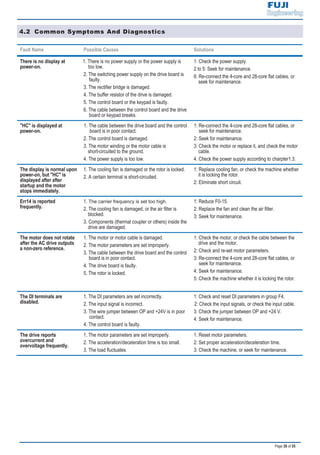
4.2 Common Symptoms And Diagnostics
Fault Name Possible Causes Solutions
There is no display at
power-on.
1. There is no power supply or the power supply is
too low.
2. The switching power supply on the drive board is
faulty.
3. The rectifier bridge is damaged.
4. The buffer resistor of the drive is damaged.
5. The control board or the keypad is faulty.
6. The cable between the control board and the drive
board or keypad breaks.
1: Check the power supply.
2 to 5: Seek for maintenance.
6: Re-connect the 4-core and 28-core flat cables, or
seek for maintenance.
"HC" is displayed at
power-on.
1. The cable between the drive board and the control
board is in poor contact.
2. The control board is damaged.
3. The motor winding or the motor cable is
short-circuited to the ground.
4. The power supply is too low.
1: Re-connect the 4-core and 28-core flat cables, or
seek for maintenance.
2: Seek for maintenance.
3: Check the motor or replace it, and check the motor
cable.
4. Check the power supply according to charpter1.3.
The display is normal upon
power-on, but "HC" is
displayed after after
startup and the motor
stops immediately.
1. The cooling fan is damaged or the rotor is locked.
2. A certain terminal is short-circuited.
1: Replace cooling fan, or check the machine whether
it is locking the rotor.
2: Eliminate short circuit.
Err14 is reported
frequently.
1. .
2. The cooling fan is damaged, or the air filter is
blocked.
3. Components (thermal coupler or others) inside the
drive are damaged.
1: Reduce F0-15.
2: Replace the fan and clean the air filter.
3: Seek for maintenance.
The motor does not rotate
after the AC drive outputs
a non-zero reference.
1. The motor or motor cable is damaged.
2. The motor parameters are set improperly.
3. The cable between the drive board and the control
board is in poor contact.
4. The drive board is faulty.
5. The rotor is locked.
1: Check the motor, or check the cable between the
drive and the motor.
2: Check and re-set motor parameters.
3: Re-connect the 4-core and 28-core flat cables, or
seek for maintenance.
4: Seek for maintenance.
5: Check the machine whether it is locking the rotor.
The DI terminals are
disabled.
1. The DI parameters are set incorrectly.
2. The input signal is incorrect.
3. The wire jumper between OP and +24V is in poor
contact.
4. The control board is faulty.
1: Check and reset DI parameters in group F4.
2: Check the input signals, or check the input cable.
3: Check the jumper between OP and +24 V.
4: Seek for maintenance.
The drive reports
overcurrent and
overvoltage frequently.
1. The motor parameters are set improperly.
2. The acceleration/deceleration time is too small.
3. The load fluctuates.
1: Reset motor parameters.
2: Set proper acceleration/deceleration time.
3: Check the machine, or seek for maintenance.
Page 27 of 55
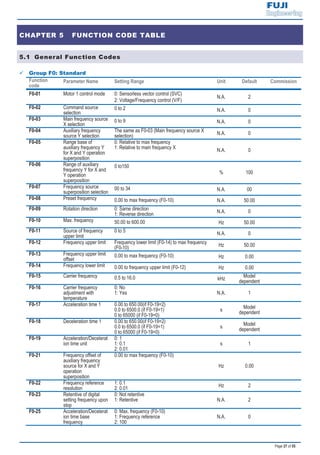
CHAPTER 5 FUNCTION CODE TABLE
5.1 General Function Codes
9 Group F0: Standard
Function
code
Parameter Name Setting Range Unit Default Commission
F0-01 Motor 1 control mode 0: Sensorless vector control (SVC)
2: Voltage/Frequency control (V/F)
N.A. 2
F0-02 Command source
selection
0 to 2 N.A. 0
F0-03 Main frequency source
X selection
0 to 9 N.A. 0
F0-04 Auxiliary frequency
source Y selection
The same as F0-03 (Main frequency source X
selection) N.A. 0
F0-05 Range base of
auxiliary frequency Y
for X and Y operation
superposition
0: Relative to max frequency
1: Relative to main frequency X
N.A. 0
F0-06 Range of auxiliary
frequency Y for X and
Y operation
superposition
0 to150
% 100
F0-07 Frequency source
superposition selection
00 to 34 N.A. 00
F0-08 Preset frequency 0.00 to max frequency (F0-10) N.A. 50.00
F0-09 Rotation direction 0: Same direction
1: Reverse direction N.A. 0
F0-10 Max. frequency 50.00 to 600.00 Hz 50.00
F0-11 Source of frequency
upper limit
0 to 5
N.A. 0
F0-12 Frequency upper limit Frequency lower limit (F0-14) to max frequency
(F0-10) Hz 50.00
F0-13 Frequency upper limit
offset
0.00 to max frequency (F0-10) Hz 0.00
F0-14 Frequency lower limit 0.00 to frequency upper limit (F0-12) Hz 0.00
F0-15 Carrier frequency 0.5 to 16.0 kHz
Model
dependent
F0-16 Carrier frequency
adjustment with
temperature
0: No
1: Yes N.A. 1
F0-17 Acceleration time 1 0.00 to 650.00(if F0-19=2)
0.0 to 6500.0 (if F0-19=1)
0 to 65000 (if F0-19=0)
s
Model
dependent
F0-18 Deceleration time 1 0.00 to 650.00(if F0-19=2)
0.0 to 6500.0 (if F0-19=1)
0 to 65000 (if F0-19=0)
s
Model
dependent
F0-19 Acceleration/Decelerat
ion time unit
0: 1
1: 0.1
2: 0.01
s 1
F0-21 Frequency offset of
auxiliary frequency
source for X and Y
operation
superposition
0.00 to max frequency (F0-10)
Hz 0.00
F0-22 Frequency reference
resolution
1: 0.1
2: 0.01 Hz 2
F0-23 Retentive of digital
setting frequency upon
stop
0: Not retentive
1: Retentive N.A. 2
F0-25 Acceleration/Decelerat
ion time base
frequency
0: Max. frequency (F0-10)
1: Frequency reference
2: 100
N.A. 0
Page 28 of 55
F0-26 Base frequency for
UP/DOWN
modification during
running
0: Running frequency
1: Frequency reference
N.A. 0
F0-27 Binding command
source to frequency
source
0000 to 9999
N.A. 0000
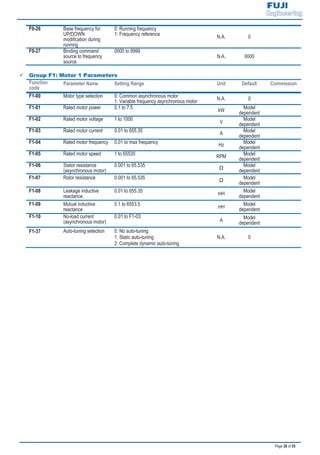
9 Group F1: Motor 1 Parameters
Function
code
Parameter Name Setting Range Unit Default Commission
F1-00 Motor type selection 0: Common asynchronous motor
1: Variable frequency asynchronous motor N.A. 0
F1-01 Rated motor power 0.1 to 7.5
kW
Model
dependent
F1-02 Rated motor voltage 1 to 1000
V
Model
dependent
F1-03 Rated motor current 0.01 to 655.35
A
Model
dependent
F1-04 Rated motor frequency 0.01 to max frequency
Hz
Model
dependent
F1-05 Rated motor speed 1 to 65535
RPM
Model
dependent
F1-06 Stator resistance
(asynchronous motor)
0.001 to 65.535
Ω
Model
dependent
F1-07 Rotor resistance 0.001 to 65.535
Ω
Model
dependent
F1-08 Leakage inductive
reactance
0.01 to 655.35
mH
Model
dependent
F1-09 Mutual inductive
reactance
0.1 to 6553.5
mH
Model
dependent
F1-10 No-load current
(asynchronous motor)
0.01 to F1-03
A
Model
dependent
F1-37 Auto-tuning selection 0: No auto-tuning
1: Static auto-tuning
2: Complete dynamic auto-tuning
N.A. 0
Page 29 of 55
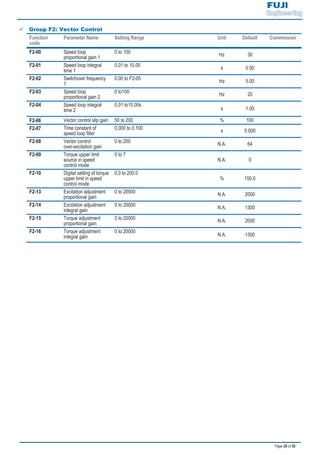
9 Group F2: Vector Control
Function
code
Parameter Name Setting Range Unit Default Commission
F2-00 Speed loop
proportional gain 1
0 to 100
Hz 30
F2-01 Speed loop integral
time 1
0.01 to 10.00
s 0.50
F2-02 Switchover frequency
1
0.00 to F2-05
Hz 5.00
F2-03 Speed loop
proportional gain 2
0 to100
Hz 20
F2-04 Speed loop integral
time 2
0.01 to10.00s
s 1.00
F2-06 Vector control slip gain 50 to 200 % 100
F2-07 Time constant of
speed loop filter
0.000 to 0.100 s 0.000
F2-08 Vector control
over-excitation gain
0 to 200 N.A. 64
F2-09 Torque upper limit
source in speed
control mode
0 to 7
N.A. 0
F2-10 Digital setting of torque
upper limit in speed
control mode
0.0 to 200.0
% 150.0
F2-13 Excitation adjustment
proportional gain
0 to 20000 N.A. 2000
F2-14 Excitation adjustment
integral gain
0 to 20000 N.A. 1300
F2-15 Torque adjustment
proportional gain
0 to 20000 N.A. 2000
F2-16 Torque adjustment
integral gain
0 to 20000
N.A. 1300
Page 30 of 55
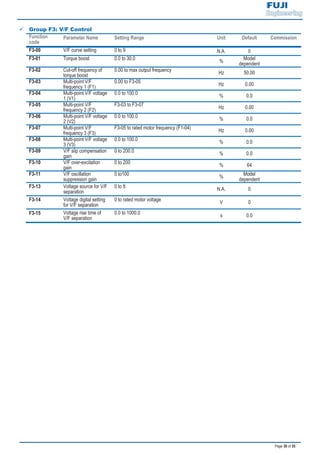
9 Group F3: V/F Control
Function
code
Parameter Name Setting Range Unit Default Commission
F3-00 V/F curve setting 0 to 9 N.A. 0
F3-01 Torque boost 0.0 to 30.0
%
Model
dependent
F3-02 Cut-off frequency of
torque boost
0.00 to max output frequency
Hz 50.00
F3-03 Multi-point V/F
frequency 1 (F1)
0.00 to F3-05
Hz 0.00
F3-04 Multi-point V/F voltage
1 (V1)
0.0 to 100.0
% 0.0
F3-05 Multi-point V/F
frequency 2 (F2)
F3-03 to F3-07
Hz 0.00
F3-06 Multi-point V/F voltage
2 (V2)
0.0 to 100.0
% 0.0
F3-07 Multi-point V/F
frequency 3 (F3)
F3-05 to rated motor frequency (F1-04)
Hz 0.00
F3-08 Multi-point V/F voltage
3 (V3)
0.0 to 100.0
% 0.0
F3-09 V/F slip compensation
gain
0 to 200.0
% 0.0
F3-10 V/F over-excitation
gain
0 to 200
% 64
F3-11 V/F oscillation
suppression gain
0 to100
%
Model
dependent
F3-13 Voltage source for V/F
separation
0 to 8 N.A. 0
F3-14 Voltage digital setting
for V/F separation
0 to rated motor voltage V 0
F3-15 Voltage rise time of
V/F separation
0.0 to 1000.0 s 0.0
Page 31 of 55
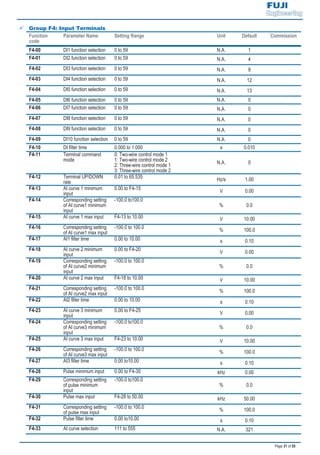
9 Group F4: Input Terminals
Function
code
Parameter Name Setting Range Unit Default Commission
F4-00 DI1 function selection 0 to 59 N.A. 1
F4-01 DI2 function selection 0 to 59 N.A. 4
F4-02 DI3 function selection 0 to 59 N.A. 9
F4-03 DI4 function selection 0 to 59 N.A. 12
F4-04 DI5 function selection 0 to 59 N.A. 13
F4-05 DI6 function selection 0 to 59 N.A. 0
F4-06 DI7 function selection 0 to 59 N.A. 0
F4-07 DI8 function selection 0 to 59 N.A. 0
F4-08 DI9 function selection 0 to 59 N.A. 0
F4-09 DI10 function selection 0 to 59 N.A. 0
F4-10 DI filter time 0.000 to 1.000 s 0.010
F4-11 Terminal command
mode
0: Two-wire control mode 1
1: Two-wire control mode 2
2: Three-wire control mode 1
3: Three-wire control mode 2
N.A. 0
F4-12 Terminal UP/DOWN
rate
0.01 to 65.535
Hz/s 1.00
F4-13 AI curve 1 minimum
input
0.00 to F4-15
V 0.00
F4-14 Corresponding setting
of AI curve1 minimum
input
-100.0 to100.0
% 0.0
F4-15 AI curve 1 max input F4-13 to 10.00 V 10.00
F4-16 Corresponding setting
of AI curve1 max input
-100.0 to 100.0
% 100.0
F4-17 AI1 filter time 0.00 to 10.00 s 0.10
F4-18 AI curve 2 minimum
input
0.00 to F4-20
V 0.00
F4-19 Corresponding setting
of AI curve2 minimum
input
-100.0 to 100.0
% 0.0
F4-20 AI curve 2 max input F4-18 to 10.00 V 10.00
F4-21 Corresponding setting
of AI curve2 max input
-100.0 to 100.0
% 100.0
F4-22 AI2 filter time 0.00 to 10.00 s 0.10
F4-23 AI curve 3 minimum
input
0.00 to F4-25
V 0.00
F4-24 Corresponding setting
of AI curve3 minimum
input
-100.0 to100.0
% 0.0
F4-25 AI curve 3 max input F4-23 to 10.00 V 10.00
F4-26 Corresponding setting
of AI curve3 max input
-100.0 to 100.0
% 100.0
F4-27 AI3 filter time 0.00 to10.00 s 0.10
F4-28 Pulse minimum input 0.00 to F4-30 kHz 0.00
F4-29 Corresponding setting
of pulse minimum
input
-100.0 to100.0
% 0.0
F4-30 Pulse max input F4-28 to 50.00 kHz 50.00
F4-31 Corresponding setting
of pulse max input
-100.0 to 100.0
% 100.0
F4-32 Pulse filter time 0.00 to10.00 s 0.10
F4-33 AI curve selection 111 to 555 N.A. 321
Page 32 of 55
Function
code
Parameter Name Setting Range Unit Default Commission
F4-34 Setting for AI less than
minimum input
000 to 111
N.A. 000
F4-35 DI1 delay time 0.0 to 3600.0 s 0.0
F4-36 DI2 delay time 0.0 to 3600.0 s 0.0
F4-37 DI3 delay time 0.0 to 3600.0 s 0.0
F4-38 DI active mode
selection 1
00000 to 11111
N.A. 00000
F4-39 DI active mode
selection 2
00000 to 11111
N.A. 00000
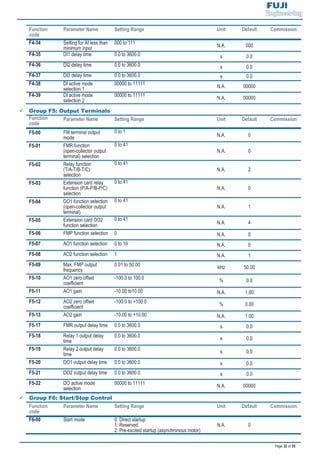
9 Group F5: Output Terminals
Function
code
Parameter Name Setting Range Unit Default Commission
F5-00 FM terminal output
mode
0 to 1
N.A. 0
F5-01 FMR function
(open-collector output
terminal) selection
0 to 41
N.A. 0
F5-02 Relay function
(T/A-T/B-T/C)
selection
0 to 41
N.A. 2
F5-03 Extension card relay
function (P/A-P/B-P/C)
selection
0 to 41
N.A. 0
F5-04 DO1 function selection
(open-collector output
terminal)
0 to 41
N.A. 1
F5-05 Extension card DO2
function selection
0 to 41
N.A. 4
F5-06 FMP function selection 0 N.A. 0
F5-07 AO1 function selection 0 to 16 N.A. 0
F5-08 AO2 function selection 1 N.A. 1
F5-09 Max. FMP output
frequency
0.01 to 50.00 kHz 50.00
F5-10 AO1 zero offset
coefficient
-100.0 to 100.0 % 0.0
F5-11 AO1 gain -10.00 to10.00 N.A. 1.00
F5-12 AO2 zero offset
coefficient
-100.0 to +100.0 % 0.00
F5-13 AO2 gain -10.00 to +10.00 N.A. 1.00
F5-17 FMR output delay time 0.0 to 3600.0 s 0.0
F5-18 Relay 1 output delay
time
0.0 to 3600.0 s 0.0
F5-19 Relay 2 output delay
time
0.0 to 3600.0 s 0.0
F5-20 DO1 output delay time 0.0 to 3600.0 s 0.0
F5-21 DO2 output delay time 0.0 to 3600.0 s 0.0
F5-22 DO active mode
selection
00000 to 11111 N.A. 00000
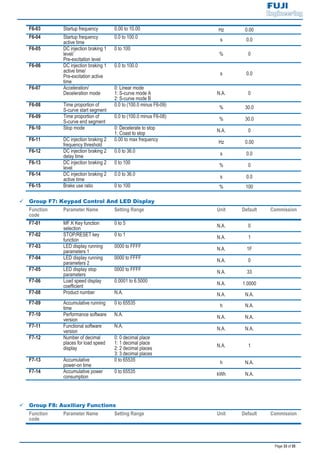
9 Group F6: Start/Stop Control
Function
code
Parameter Name Setting Range Unit Default Commission
F6-00 Start mode 0: Direct startup
1: Reserved
2: Pre-excited startup (asynchronous motor)
N.A. 0
Page 33 of 55
F6-03 Startup frequency 0.00 to 10.00 Hz 0.00
F6-04 Startup frequency
active time
0.0 to 100.0
s 0.0
F6-05 DC injection braking 1
level/
Pre-excitation level
0 to 100
% 0
F6-06 DC injection braking 1
active time/
Pre-excitation active
time
0.0 to 100.0
s 0.0
F6-07 Acceleration/
Deceleration mode
0: Linear mode
1: S-curve mode A
2: S-curve mode B
N.A. 0
F6-08 Time proportion of
S-curve start segment
0.0 to (100.0 minus F6-09)
% 30.0
F6-09 Time proportion of
S-curve end segment
0.0 to (100.0 minus F6-08)
% 30.0
F6-10 Stop mode 0: Decelerate to stop
1: Coast to stop N.A. 0
F6-11 DC injection braking 2
frequency threshold
0.00 to max frequency
Hz 0.00
F6-12 DC injection braking 2
delay time
0.0 to 36.0
s 0.0
F6-13 DC injection braking 2
level
0 to 100
% 0
F6-14 DC injection braking 2
active time
0.0 to 36.0
s 0.0
F6-15 Brake use ratio 0 to 100 % 100
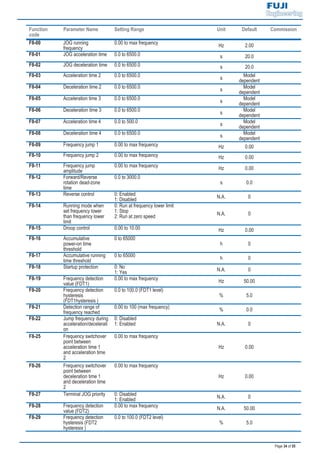
9 Group F7: Keypad Control And LED Display
Function
code
Parameter Name Setting Range Unit Default Commission
F7-01 MF.K Key function
selection
0 to 5
N.A. 0
F7-02 STOP/RESET key
function
0 to 1
N.A. 1
F7-03 LED display running
parameters 1
0000 to FFFF
N.A. 1F
F7-04 LED display running
parameters 2
0000 to FFFF
N.A. 0
F7-05 LED display stop
parameters
0000 to FFFF
N.A. 33
F7-06 Load speed display
coefficient
0.0001 to 6.5000
N.A. 1.0000
F7-08 Product number N.A. N.A. N.A.
F7-09 Accumulative running
time
0 to 65535
h N.A.
F7-10 Performance software
version
N.A. N.A. N.A.
F7-11 Functional software
version
N.A.
N.A. N.A.
F7-12 Number of decimal
places for load speed
display
0: 0 decimal place
1: 1 decimal place
2: 2 decimal places
3: 3 decimal places
N.A. 1
F7-13 Accumulative
power-on time
0 to 65535
h N.A.
F7-14 Accumulative power
consumption
0 to 65535
kWh N.A.
9 Group F8: Auxiliary Functions
Function
code
Parameter Name Setting Range Unit Default Commission
Page 34 of 55
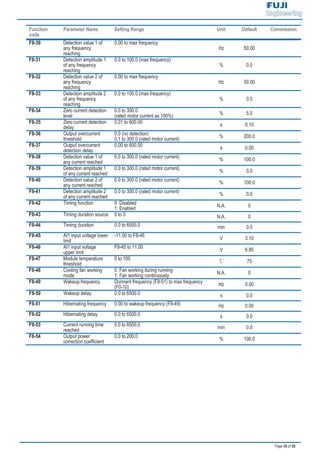
Function
code
Parameter Name Setting Range Unit Default Commission
F8-00 JOG running
frequency
0.00 to max frequency
Hz 2.00
F8-01 JOG acceleration time 0.0 to 6500.0 s 20.0
F8-02 JOG deceleration time 0.0 to 6500.0 s 20.0
F8-03 Acceleration time 2 0.0 to 6500.0
s
Model
dependent
F8-04 Deceleration time 2 0.0 to 6500.0
s
Model
dependent
F8-05 Acceleration time 3 0.0 to 6500.0
s
Model
dependent
F8-06 Deceleration time 3 0.0 to 6500.0
s
Model
dependent
F8-07 Acceleration time 4 0.0 to 500.0
s
Model
dependent
F8-08 Deceleration time 4 0.0 to 6500.0
s
Model
dependent
F8-09 Frequency jump 1 0.00 to max frequency Hz 0.00
F8-10 Frequency jump 2 0.00 to max frequency Hz 0.00
F8-11 Frequency jump
amplitude
0.00 to max frequency
Hz 0.00
F8-12 Forward/Reverse
rotation dead-zone
time
0.0 to 3000.0
s 0.0
F8-13 Reverse control 0: Enabled
1: Disabled N.A. 0
F8-14 Running mode when
set frequency lower
than frequency lower
limit
0: Run at frequency lower limit
1: Stop
2: Run at zero speed N.A. 0
F8-15 Droop control 0.00 to 10.00 Hz 0.00
F8-16 Accumulative
power-on time
threshold
0 to 65000
h 0
F8-17 Accumulative running
time threshold
0 to 65000
h 0
F8-18 Startup protection 0: No
1: Yes N.A. 0
F8-19 Frequency detection
value (FDT1)
0.00 to max frequency
Hz 50.00
F8-20 Frequency detection
hysteresis
(FDT1hysteresis )
0.0 to 100.0 (FDT1 level)
% 5.0
F8-21 Detection range of
frequency reached
0.00 to 100 (max frequency)
% 0.0
F8-22 Jump frequency during
acceleration/decelerati
on
0: Disabled
1: Enabled N.A. 0
F8-25 Frequency switchover
point between
acceleration time 1
and acceleration time
2
0.00 to max frequency
Hz 0.00
F8-26 Frequency switchover
point between
deceleration time 1
and deceleration time
2
0.00 to max frequency
Hz 0.00
F8-27 Terminal JOG priority 0: Disabled
1: Enabled N.A. 0
F8-28 Frequency detection
value (FDT2)
0.00 to max frequency
N.A. 50.00
F8-29 Frequency detection
hysteresis (FDT2
hysteresis )
0.0 to 100.0 (FDT2 level)
% 5.0
Page 35 of 55
Function
code
Parameter Name Setting Range Unit Default Commission
F8-30 Detection value 1 of
any frequency
reaching
0.00 to max frequency
Hz 50.00
F8-31 Detection amplitude 1
of any frequency
reaching
0.0 to 100.0 (max frequency)
% 0.0
F8-32 Detection value 2 of
any frequency
reaching
0.00 to max frequency
Hz 50.00
F8-33 Detection amplitude 2
of any frequency
reaching
0.0 to 100.0 (max frequency)
% 0.0
F8-34 Zero current detection
level
0.0 to 300.0
(rated motor current as 100%) % 5.0
F8-35 Zero current detection
delay
0.01 to 600.00
s 0.10
F8-36 Output overcurrent
threshold
0.0 (no detection)
0.1 to 300.0 (rated motor current) % 200.0
F8-37 Output overcurrent
detection delay
0.00 to 600.00
s 0.00
F8-38 Detection value 1 of
any current reached
0.0 to 300.0 (rated motor current)
% 100.0
F8-39 Detection amplitude 1
of any current reached
0.0 to 300.0 (rated motor current)
% 0.0
F8-40 Detection value 2 of
any current reached
0.0 to 300.0 (rated motor current)
% 100.0
F8-41 Detection amplitude 2
of any current reached
0.0 to 300.0 (rated motor current)
% 0.0
F8-42 Timing function 0: Disabled
1: Enabled N.A. 0
F8-43 Timing duration source 0 to 3 N.A. 0
F8-44 Timing duration 0.0 to 6500.0 min 0.0
F8-45 AI1 input voltage lower
limit
-11.00 to F8-46
V 3.10
F8-46 AI1 input voltage
upper limit
F8-45 to 11.00
V 6.80
F8-47 Module temperature
threshold
0 to 100 75
F8-48 Cooling fan working
mode
0: Fan working during running
1: Fan working continuously N.A. 0
F8-49 Wakeup frequency Dormant frequency (F8-51) to max frequency
(F0-10) Hz 0.00
F8-50 Wakeup delay 0.0 to 6500.0 s 0.0
F8-51 Hibernating frequency 0.00 to wakeup frequency (F8-49) Hz 0.00
F8-52 Hibernating delay 0.0 to 6500.0 s 0.0
F8-53 Current running time
reached
0.0 to 6500.0
min 0.0
F8-54 Output power
correction coefficient
0.0 to 200.0
% 100.0
Page 36 of 55
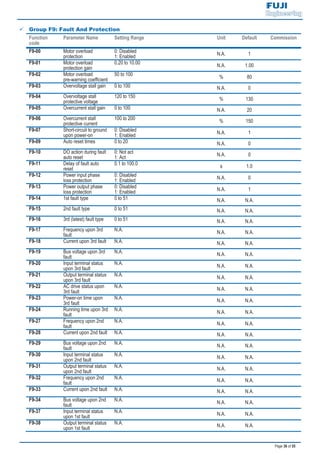
9 Group F9: Fault And Protection
Function
code
Parameter Name Setting Range Unit Default Commission
F9-00 Motor overload
protection
0: Disabled
1: Enabled N.A. 1
F9-01 Motor overload
protection gain
0.20 to 10.00
N.A. 1.00
F9-02 Motor overload
pre-warning coefficient
50 to 100
% 80
F9-03 Overvoltage stall gain 0 to 100 N.A. 0
F9-04 Overvoltage stall
protective voltage
120 to 150
% 130
F9-05 Overcurrent stall gain 0 to 100 N.A. 20
F9-06 Overcurrent stall
protective current
100 to 200
% 150
F9-07 Short-circuit to ground
upon power-on
0: Disabled
1: Enabled N.A. 1
F9-09 Auto reset times 0 to 20 N.A. 0
F9-10 DO action during fault
auto reset
0: Not act
1: Act N.A. 0
F9-11 Delay of fault auto
reset
0.1 to 100.0
s 1.0
F9-12 Power input phase
loss protection
0: Disabled
1: Enabled N.A. 0
F9-13 Power output phase
loss protection
0: Disabled
1: Enabled N.A. 1
F9-14 1st fault type 0 to 51 N.A. N.A.
F9-15 2nd fault type 0 to 51 N.A. N.A.
F9-16 3rd (latest) fault type 0 to 51 N.A. N.A.
F9-17 Frequency upon 3rd
fault
N.A. N.A. N.A.
F9-18 Current upon 3rd fault N.A. N.A. N.A.
F9-19 Bus voltage upon 3rd
fault
N.A. N.A. N.A.
F9-20 Input terminal status
upon 3rd fault
N.A.
N.A. N.A.
F9-21 Output terminal status
upon 3rd fault
N.A. N.A. N.A.
F9-22 AC drive status upon
3rd fault
N.A. N.A. N.A.
F9-23 Power-on time upon
3rd fault
N.A.
N.A. N.A.
F9-24 Running time upon 3rd
fault
N.A. N.A. N.A.
F9-27 Frequency upon 2nd
fault
N.A. N.A. N.A.
F9-28 Current upon 2nd fault N.A. N.A. N.A.
F9-29 Bus voltage upon 2nd
fault
N.A.
N.A. N.A.
F9-30 Input terminal status
upon 2nd fault
N.A. N.A. N.A.
F9-31 Output terminal status
upon 2nd fault
N.A. N.A. N.A.
F9-32 Frequency upon 2nd
fault
N.A.
N.A. N.A.
F9-33 Current upon 2nd fault N.A. N.A. N.A.
F9-34 Bus voltage upon 2nd
fault
N.A. N.A. N.A.
F9-37 Input terminal status
upon 1st fault
N.A. N.A. N.A.
F9-38 Output terminal status
upon 1st fault
N.A.
N.A. N.A.
Page 37 of 55
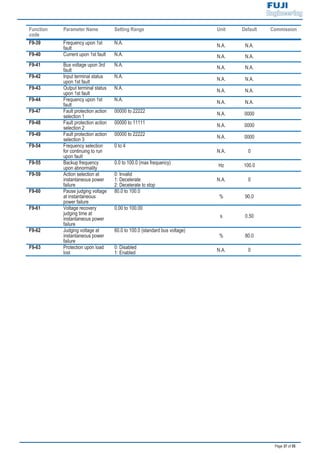
Function
code
Parameter Name Setting Range Unit Default Commission
F9-39 Frequency upon 1st
fault
N.A.
N.A. N.A.
F9-40 Current upon 1st fault N.A. N.A. N.A.
F9-41 Bus voltage upon 3rd
fault
N.A. N.A. N.A.
F9-42 Input terminal status
upon 1st fault
N.A. N.A. N.A.
F9-43 Output terminal status
upon 1st fault
N.A.
N.A. N.A.
F9-44 Frequency upon 1st
fault
N.A. N.A. N.A.
F9-47 Fault protection action
selection 1
00000 to 22222
N.A. 0000
F9-48 Fault protection action
selection 2
00000 to 11111
N.A. 0000
F9-49 Fault protection action
selection 3
00000 to 22222
N.A. 0000
F9-54 Frequency selection
for continuing to run
upon fault
0 to 4
N.A. 0
F9-55 Backup frequency
upon abnormality
0.0 to 100.0 (max frequency)
Hz 100.0
F9-59 Action selection at
instantaneous power
failure
0: Invalid
1: Decelerate
2: Decelerate to stop
N.A. 0
F9-60 Pause judging voltage
at instantaneous
power failure
80.0 to 100.0
% 90.0
F9-61 Voltage recovery
judging time at
instantaneous power
failure
0.00 to 100.00
s 0.50
F9-62 Judging voltage at
instantaneous power
failure
60.0 to 100.0 (standard bus voltage)
% 80.0
F9-63 Protection upon load
lost
0: Disabled
1: Enabled N.A. 0
Page 38 of 55
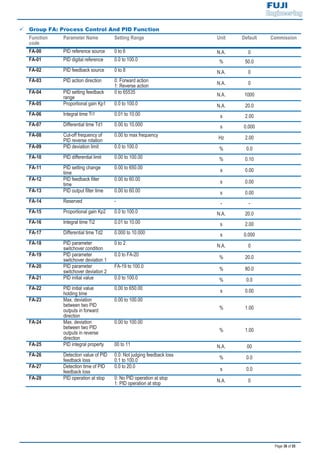
9 Group FA: Process Control And PID Function
Function
code
Parameter Name Setting Range Unit Default Commission
FA-00 PID reference source 0 to 6 N.A. 0
FA-01 PID digital reference 0.0 to 100.0 % 50.0
FA-02 PID feedback source 0 to 8 N.A. 0
FA-03 PID action direction 0: Forward action
1: Reverse action N.A. 0
FA-04 PID setting feedback
range
0 to 65535
N.A. 1000
FA-05 Proportional gain Kp1 0.0 to 100.0 N.A. 20.0
FA-06 Integral time Ti1 0.01 to 10.00 s 2.00
FA-07 Differential time Td1 0.00 to 10.000 s 0.000
FA-08 Cut-off frequency of
PID reverse rotation
0.00 to max frequency
Hz 2.00
FA-09 PID deviation limit 0.0 to 100.0 % 0.0
FA-10 PID differential limit 0.00 to 100.00 % 0.10
FA-11 PID setting change
time
0.00 to 650.00
s 0.00
FA-12 PID feedback filter
time
0.00 to 60.00
s 0.00
FA-13 PID output filter time 0.00 to 60.00 s 0.00
FA-14 Reserved - - -
FA-15 Proportional gain Kp2 0.0 to 100.0 N.A. 20.0
FA-16 Integral time Ti2 0.01 to 10.00 s 2.00
FA-17 Differential time Td2 0.000 to 10.000 s 0.000
FA-18 PID parameter
switchover condition
0 to 2
N.A. 0
FA-19 PID parameter
switchover deviation 1
0.0 to FA-20
% 20.0
FA-20 PID parameter
switchover deviation 2
FA-19 to 100.0
% 80.0
FA-21 PID initial value 0.0 to 100.0 % 0.0
FA-22 PID initial value
holding time
0.00 to 650.00
s 0.00
FA-23 Max. deviation
between two PID
outputs in forward
direction
0.00 to 100.00
% 1.00
FA-24 Max. deviation
between two PID
outputs in reverse
direction
0.00 to 100.00
% 1.00
FA-25 PID integral property 00 to 11 N.A. 00
FA-26 Detection value of PID
feedback loss
0.0: Not judging feedback loss
0.1 to 100.0 % 0.0
FA-27 Detection time of PID
feedback loss
0.0 to 20.0
s 0.0
FA-28 PID operation at stop 0: No PID operation at stop
1: PID operation at stop N.A. 0
Page 39 of 55
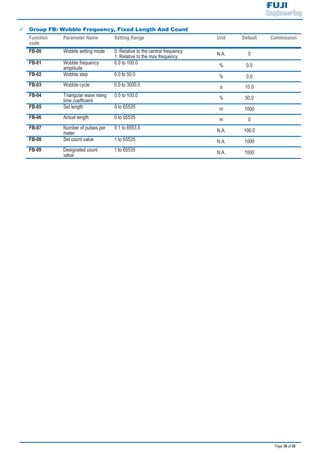
9 Group FB: Wobble Frequency, Fixed Length And Count
Function
code
Parameter Name Setting Range Unit Default Commission
FB-00 Wobble setting mode 0: Relative to the central frequency
1: Relative to the max frequency N.A. 0
FB-01 Wobble frequency
amplitude
0.0 to 100.0 % 0.0
FB-02 Wobble step 0.0 to 50.0 % 0.0
FB-03 Wobble cycle 0.0 to 3000.0 s 10.0
FB-04 Triangular wave rising
time coefficient
0.0 to 100.0 % 50.0
FB-05 Set length 0 to 65535 m 1000
FB-06 Actual length 0 to 65535 m 0
FB-07 Number of pulses per
meter
0.1 to 6553.5
N.A. 100.0
FB-08 Set count value 1 to 65535 N.A. 1000
FB-09 Designated count
value
1 to 65535 N.A. 1000
Page 40 of 55
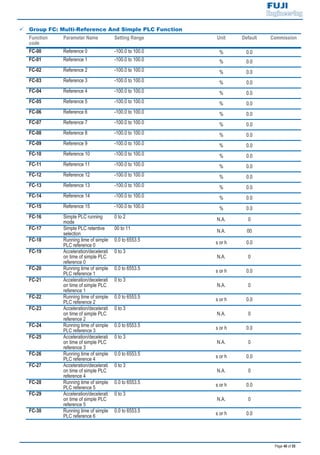
9 Group FC: Multi-Reference And Simple PLC Function
Function
code
Parameter Name Setting Range Unit Default Commission
FC-00 Reference 0 -100.0 to 100.0 % 0.0
FC-01 Reference 1 -100.0 to 100.0 % 0.0
FC-02 Reference 2 -100.0 to 100.0 % 0.0
FC-03 Reference 3 -100.0 to 100.0 % 0.0
FC-04 Reference 4 -100.0 to 100.0 % 0.0
FC-05 Reference 5 -100.0 to 100.0 % 0.0
FC-06 Reference 6 -100.0 to 100.0 % 0.0
FC-07 Reference 7 -100.0 to 100.0 % 0.0
FC-08 Reference 8 -100.0 to 100.0 % 0.0
FC-09 Reference 9 -100.0 to 100.0 % 0.0
FC-10 Reference 10 -100.0 to 100.0 % 0.0
FC-11 Reference 11 -100.0 to 100.0 % 0.0
FC-12 Reference 12 -100.0 to 100.0 % 0.0
FC-13 Reference 13 -100.0 to 100.0 % 0.0
FC-14 Reference 14 -100.0 to 100.0 % 0.0
FC-15 Reference 15 -100.0 to 100.0 % 0.0
FC-16 Simple PLC running
mode
0 to 2 N.A. 0
FC-17 Simple PLC retentive
selection
00 to 11 N.A. 00
FC-18 Running time of simple
PLC reference 0
0.0 to 6553.5
s or h 0.0
FC-19 Acceleration/decelerati
on time of simple PLC
reference 0
0 to 3
N.A. 0
FC-20 Running time of simple
PLC reference 1
0.0 to 6553.5 s or h 0.0
FC-21 Acceleration/decelerati
on time of simple PLC
reference 1
0 to 3
N.A. 0
FC-22 Running time of simple
PLC reference 2
0.0 to 6553.5 s or h 0.0
FC-23 Acceleration/decelerati
on time of simple PLC
reference 2
0 to 3
N.A. 0
FC-24 Running time of simple
PLC reference 3
0.0 to 6553.5
s or h 0.0
FC-25 Acceleration/decelerati
on time of simple PLC
reference 3
0 to 3
N.A. 0
FC-26 Running time of simple
PLC reference 4
0.0 to 6553.5 s or h 0.0
FC-27 Acceleration/decelerati
on time of simple PLC
reference 4
0 to 3
N.A. 0
FC-28 Running time of simple
PLC reference 5
0.0 to 6553.5 s or h 0.0
FC-29 Acceleration/decelerati
on time of simple PLC
reference 5
0 to 3
N.A. 0
FC-30 Running time of simple
PLC reference 6
0.0 to 6553.5
s or h 0.0
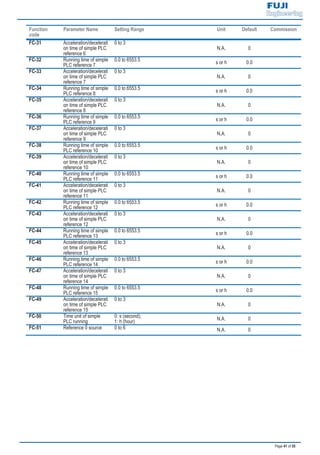
Page 41 of 55
Function
code
Parameter Name Setting Range Unit Default Commission
FC-31 Acceleration/decelerati
on time of simple PLC
reference 6
0 to 3
N.A. 0
FC-32 Running time of simple
PLC reference 7
0.0 to 6553.5
s or h 0.0
FC-33 Acceleration/decelerati
on time of simple PLC
reference 7
0 to 3
N.A. 0
FC-34 Running time of simple
PLC reference 8
0.0 to 6553.5 s or h 0.0
FC-35 Acceleration/decelerati
on time of simple PLC
reference 8
0 to 3
N.A. 0
FC-36 Running time of simple
PLC reference 9
0.0 to 6553.5 s or h 0.0
FC-37 Acceleration/decelerati
on time of simple PLC
reference 9
0 to 3
N.A. 0
FC-38 Running time of simple
PLC reference 10
0.0 to 6553.5
s or h 0.0
FC-39 Acceleration/decelerati
on time of simple PLC
reference 10
0 to 3
N.A. 0
FC-40 Running time of simple
PLC reference 11
0.0 to 6553.5 s or h 0.0
FC-41 Acceleration/decelerati
on time of simple PLC
reference 11
0 to 3
N.A. 0
FC-42 Running time of simple
PLC reference 12
0.0 to 6553.5 s or h 0.0
FC-43 Acceleration/decelerati
on time of simple PLC
reference 12
0 to 3
N.A. 0
FC-44 Running time of simple
PLC reference 13
0.0 to 6553.5
s or h 0.0
FC-45 Acceleration/decelerati
on time of simple PLC
reference 13
0 to 3
N.A. 0
FC-46 Running time of simple
PLC reference 14
0.0 to 6553.5 s or h 0.0
FC-47 Acceleration/decelerati
on time of simple PLC
reference 14
0 to 3
N.A. 0
FC-48 Running time of simple
PLC reference 15
0.0 to 6553.5 s or h 0.0
FC-49 Acceleration/decelerati
on time of simple PLC
reference 15
0 to 3
N.A. 0
FC-50 Time unit of simple
PLC running
0: s (second);
1: h (hour) N.A. 0
FC-51 Reference 0 source 0 to 6 N.A. 0
Page 42 of 55
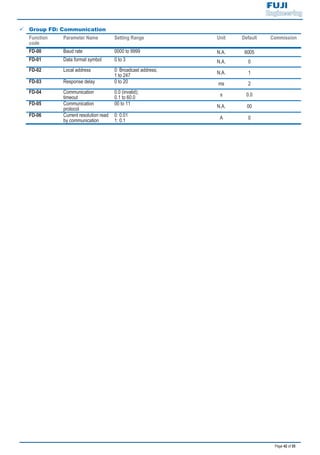
9 Group FD: Communication
Function
code
Parameter Name Setting Range Unit Default Commission
FD-00 Baud rate 0000 to 9999 N.A. 6005
FD-01 Data format symbol 0 to 3 N.A. 0
FD-02 Local address 0: Broadcast address;
1 to 247 N.A. 1
FD-03 Response delay 0 to 20 ms 2
FD-04 Communication
timeout
0.0 (invalid);
0.1 to 60.0
s 0.0
FD-05 Communication
protocol
00 to 11
N.A. 00
FD-06 Current resolution read
by communication
0: 0.01
1: 0.1 A 0
Page 43 of 55
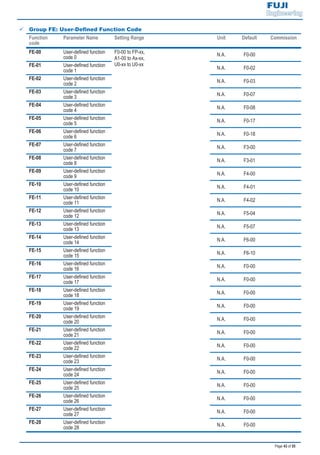
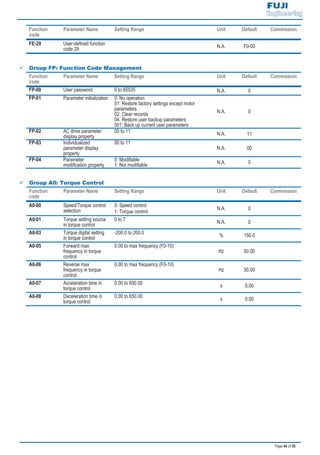
9 Group FE: User-Defined Function Code
Function
code
Parameter Name Setting Range Unit Default Commission
FE-00 User-defined function
code 0
F0-00 to FP-xx,
A1-00 to Ax-xx,
U0-xx to U0-xx
N.A. F0-00
FE-01 User-defined function
code 1 N.A. F0-02
FE-02 User-defined function
code 2 N.A. F0-03
FE-03 User-defined function
code 3 N.A. F0-07
FE-04 User-defined function
code 4 N.A. F0-08
FE-05 User-defined function
code 5 N.A. F0-17
FE-06 User-defined function
code 6 N.A. F0-18
FE-07 User-defined function
code 7 N.A. F3-00
FE-08 User-defined function
code 8 N.A. F3-01
FE-09 User-defined function
code 9 N.A. F4-00
FE-10 User-defined function
code 10 N.A. F4-01
FE-11 User-defined function
code 11 N.A. F4-02
FE-12 User-defined function
code 12 N.A. F5-04
FE-13 User-defined function
code 13 N.A. F5-07
FE-14 User-defined function
code 14 N.A. F6-00
FE-15 User-defined function
code 15 N.A. F6-10
FE-16 User-defined function
code 16 N.A. F0-00
FE-17 User-defined function
code 17 N.A. F0-00
FE-18 User-defined function
code 18 N.A. F0-00
FE-19 User-defined function
code 19 N.A. F0-00
FE-20 User-defined function
code 20 N.A. F0-00
FE-21 User-defined function
code 21 N.A. F0-00
FE-22 User-defined function
code 22 N.A. F0-00
FE-23 User-defined function
code 23 N.A. F0-00
FE-24 User-defined function
code 24 N.A. F0-00
FE-25 User-defined function
code 25 N.A. F0-00
FE-26 User-defined function
code 26 N.A. F0-00
FE-27 User-defined function
code 27 N.A. F0-00
FE-28 User-defined function
code 28 N.A. F0-00
Page 44 of 55
Function
code
Parameter Name Setting Range Unit Default Commission
FE-29 User-defined function
code 29 N.A. F0-00
9 Group FP: Function Code Management
Function
code
Parameter Name Setting Range Unit Default Commission
FP-00 User password 0 to 65535 N.A. 0
FP-01 Parameter initialization 0: No operation
01: Restore factory settings except motor
parameters
02: Clear records
04: Restore user backup parameters
501: Back up current user parameters
N.A. 0
FP-02 AC drive parameter
display property
00 to 11
N.A. 11
FP-03 Individualized
parameter display
property
00 to 11
N.A. 00
FP-04 Parameter
modification property
0: Modifiable
1: Not modifiable N.A. 0
9 Group A0: Torque Control
Function
code
Parameter Name Setting Range Unit Default Commission
A0-00 Speed/Torque control
selection
0: Speed control
1: Torque control
N.A. 0
A0-01 Torque setting source
in torque control
0 to 7 N.A. 0
A0-03 Torque digital setting
in torque control
-200.0 to 200.0 % 150.0
A0-05 Forward max
frequency in torque
control
0.00 to max frequency (F0-10)
Hz 50.00
A0-06 Reverse max
frequency in torque
control
0.00 to max frequency (F0-10)
Hz 50.00
A0-07 Acceleration time in
torque control
0.00 to 650.00 s 0.00
A0-08 Deceleration time in
torque control
0.00 to 650.00 s 0.00
Page 45 of 55
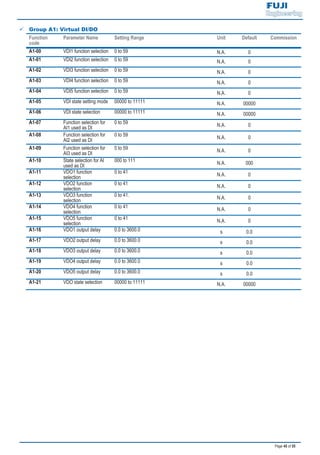
9 Group A1: Virtual DI/DO
Function
code
Parameter Name Setting Range Unit Default Commission
A1-00 VDI1 function selection 0 to 59 N.A. 0
A1-01 VDI2 function selection 0 to 59 N.A. 0
A1-02 VDI3 function selection 0 to 59 N.A. 0
A1-03 VDI4 function selection 0 to 59 N.A. 0
A1-04 VDI5 function selection 0 to 59 N.A. 0
A1-05 VDI state setting mode 00000 to 11111 N.A. 00000
A1-06 VDI state selection 00000 to 11111 N.A. 00000
A1-07 Function selection for
AI1 used as DI
0 to 59 N.A. 0
A1-08 Function selection for
AI2 used as DI
0 to 59 N.A. 0
A1-09 Function selection for
AI3 used as DI
0 to 59 N.A. 0
A1-10 State selection for AI
used as DI
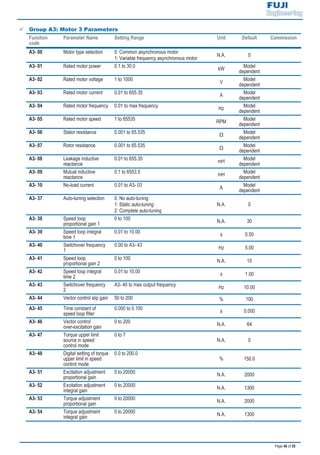
000 to 111 N.A. 000
A1-11 VDO1 function
selection
0 to 41
N.A. 0
A1-12 VDO2 function
selection
0 to 41 N.A. 0
A1-13 VDO3 function
selection
0 to 41. N.A. 0
A1-14 VDO4 function
selection
0 to 41
N.A. 0
A1-15 VDO5 function
selection
0 to 41 N.A. 0
A1-16 VDO1 output delay 0.0 to 3600.0 s 0.0
A1-17 VDO2 output delay 0.0 to 3600.0 s 0.0
A1-18 VDO3 output delay 0.0 to 3600.0 s 0.0
A1-19 VDO4 output delay 0.0 to 3600.0 s 0.0
A1-20 VDO5 output delay 0.0 to 3600.0 s 0.0
A1-21 VDO state selection 00000 to 11111 N.A. 00000
Page 46 of 55
9 Group A2: Motor 2 Parameters
Function
code
Parameter Name Setting Range Unit Default Commission
A2-00 Motor type selection 0: Common asynchronous motor
1: Variable frequency asynchronous motor
N.A. 0
A2-01 Rated motor power 0.1 to 30.0
kW
Model
dependent
A2-02 Rated motor voltage 1 to 1000
V
Model
dependent
A2-03 Rated motor current 0.01 to 655.35
A
Model
dependent
A2-04 Rated motor frequency 0.01 to max frequency
Hz
Model
dependent
A2-05 Rated motor speed 1 to 65535
RPM
Model
dependent
A2-06 Stator resistance 0.001 to 65.535
Ω
Model
dependent
A2-07 Rotor resistance 0.001 to 65.535
Ω
Model
dependent
A2-08 Leakage inductive
reactance
0.01 to 655.35
mH
Model
dependent
A2-09 Mutual inductive
reactance
0.1 to 6553.5
mH
Model
dependent
A2-10 No-load current 0.01 to A2-03
A
Model
dependent
A2-37 Auto-tuning selection 0: No auto-tuning
1: Static auto-tuning
2: Complete auto-tuning
N.A. 0
A2-38 Speed loop
proportional gain 1
0 to 100 N.A. 30
A2-39 Speed loop integral
time 1
0.01 to 10.00 s 0.50
A2-40 Switchover frequency
1
0.00 to A2-43 Hz 5.00
A2-41 Speed loop
proportional gain 2
0 to 100 N.A. 15
A2-42 Speed loop integral
time 2
0.01 to 10.00 s 1.00
A2-43 Switchover frequency
2
A2-40 to max output frequency Hz 10.00
A2-44 Vector control slip gain 50 to 200 % 100
A2-45 Time constant of
speed loop filter
0.000 to 0.100 s 0.000
A2-46 Vector control
over-excitation gain
0 to 200 N.A. 64
A2-47 Torque upper limit
source in speed
control mode
0 to 7
N.A. 0
A2-48 Digital setting of torque
upper limit in speed
control mode
0.0 to 200.0
% 150.0
A2-51 Excitation adjustment
proportional gain
0 to 20000 N.A. 2000
A2-52 Excitation adjustment
integral gain
0 to 20000 N.A. 1300
A2-53 Torque adjustment
proportional gain
0 to 20000 N.A. 2000
A2-54 Torque adjustment
integral gain
0 to 20000 N.A. 1300
Page 47 of 55
Function
code
Parameter Name Setting Range Unit Default Commission
A2-61 Motor 2 control mode 0: Sensorless vector control (SVC )
2: Voltage/Frequency (V/F) control
N.A. 0
A2-62 Motor 2
acceleration/decelerati
on time
0: Same as motor 1
1: Acceleration/Deceleration time 1
2: Acceleration/Deceleration time 2
3: Acceleration/Deceleration time 3
4: Acceleration/Deceleration time 4
N.A. 0
A2-63 Motor 2 torque boost 0.0: Fixed torque boost,
0.1 to 30
%
Model
dependent
A2-65 Motor 2 oscillation
suppression gain
0 to 100
N.A.
Model
dependent
Page 48 of 55
9 Group A3: Motor 3 Parameters
Function
code
Parameter Name Setting Range Unit Default Commission
A3- 00 Motor type selection 0: Common asynchronous motor
1: Variable frequency asynchronous motor
N.A. 0
A3- 01 Rated motor power 0.1 to 30.0
kW
Model
dependent
A3- 02 Rated motor voltage 1 to 1000
V
Model
dependent
A3- 03 Rated motor current 0.01 to 655.35
A
Model
dependent
A3- 04 Rated motor frequency 0.01 to max frequency
Hz
Model
dependent
A3- 05 Rated motor speed 1 to 65535
RPM
Model
dependent
A3- 06 Stator resistance 0.001 to 65.535
Ω
Model
dependent
A3- 07 Rotor resistance 0.001 to 65.535
Ω
Model
dependent
A3- 08 Leakage inductive
reactance
0.01 to 655.35
mH
Model
dependent
A3- 09 Mutual inductive
reactance
0.1 to 6553.5
mH
Model
dependent
A3- 10 No-load current 0.01 to A3- 03
A
Model
dependent
A3- 37 Auto-tuning selection 0: No auto-tuning
1: Static auto-tuning
2: Complete auto-tuning
N.A. 0
A3- 38 Speed loop
proportional gain 1
0 to 100 N.A. 30
A3- 39 Speed loop integral
time 1
0.01 to 10.00 s 0.50
A3- 40 Switchover frequency
1
0.00 to A3- 43 Hz 5.00
A3- 41 Speed loop
proportional gain 2
0 to 100 N.A. 15
A3- 42 Speed loop integral
time 2
0.01 to 10.00 s 1.00
A3- 43 Switchover frequency
2
A3- 40 to max output frequency Hz 10.00
A3- 44 Vector control slip gain 50 to 200 % 100
A3- 45 Time constant of
speed loop filter
0.000 to 0.100 s 0.000
A3- 46 Vector control
over-excitation gain
0 to 200 N.A. 64
A3- 47 Torque upper limit
source in speed
control mode
0 to 7
N.A. 0
A3- 48 Digital setting of torque
upper limit in speed
control mode
0.0 to 200.0
% 150.0
A3- 51 Excitation adjustment
proportional gain
0 to 20000 N.A. 2000
A3- 52 Excitation adjustment
integral gain
0 to 20000 N.A. 1300
A3- 53 Torque adjustment
proportional gain
0 to 20000 N.A. 2000
A3- 54 Torque adjustment
integral gain
0 to 20000 N.A. 1300
Page 49 of 55
Function
code
Parameter Name Setting Range Unit Default Commission
A3- 61 Motor 2 control mode 0: Sensorless vector control (SVC )
2: Voltage/Frequency (V/F) control
N.A. 0
A3- 62 Motor 2
acceleration/decelerati
on time
0: Same as motor 1
1: Acceleration/Deceleration time 1
2: Acceleration/Deceleration time 2
3: Acceleration/Deceleration time 3
4: Acceleration/Deceleration time 4
N.A. 0
A3- 63 Motor 2 torque boost 0.0: Fixed torque boost,
0.1 to 30
%
Model
dependent
A3- 65 Motor 2 oscillation
suppression gain
0 to 100
N.A.
Model
dependent
Page 50 of 55
9 Group A4: Motor 4 Parameters
Function
code
Parameter Name Setting Range Unit Default Commission
A4- 00 Motor type selection 0: Common asynchronous motor
1: Variable frequency asynchronous motor
N.A. 0
A4- 01 Rated motor power 0.1 to 30.0
kW
Model
dependent
A4- 02 Rated motor voltage 1 to 1000
V
Model
dependent
A4- 03 Rated motor current 0.01 to 655.35
A
Model
dependent
A4- 04 Rated motor frequency 0.01 to max frequency
Hz
Model
dependent
A4- 05 Rated motor speed 1 to 65535
RPM
Model
dependent
A4- 06 Stator resistance 0.001 to 65.535
Ω
Model
dependent
A4- 07 Rotor resistance 0.001 to 65.535
Ω
Model
dependent
A4- 08 Leakage inductive
reactance
0.01 to 655.35
mH
Model
dependent
A4- 09 Mutual inductive
reactance
0.1 to 6553.5
mH
Model
dependent
A4- 10 No-load current 0.01 to A4- 03
A
Model
dependent
A4- 37 Auto-tuning selection 0: No auto-tuning
1: Static auto-tuning
2: Complete auto-tuning
N.A. 0
A4- 38 Speed loop
proportional gain 1
0 to 100 N.A. 30
A4- 39 Speed loop integral
time 1
0.01 to 10.00 s 0.50
A4- 40 Switchover frequency
1
0.00 to A4- 43 Hz 5.00
A4- 41 Speed loop
proportional gain 2
0 to 100 N.A. 15
A4- 42 Speed loop integral
time 2
0.01 to 10.00 s 1.00
A4- 43 Switchover frequency
2
A4- 40 to max output frequency Hz 10.00
A4- 44 Vector control slip gain 50 to 200 % 100
A4- 45 Time constant of
speed loop filter
0.000 to 0.100 s 0.000
A4- 46 Vector control
over-excitation gain
0 to 200 N.A. 64
A4- 47 Torque upper limit
source in speed
control mode
0 to 7
N.A. 0
A4- 48 Digital setting of torque
upper limit in speed
control mode
0.0 to 200.0
% 150.0
A4- 51 Excitation adjustment
proportional gain
0 to 20000 N.A. 2000
A4- 52 Excitation adjustment
integral gain
0 to 20000 N.A. 1300
A4- 53 Torque adjustment
proportional gain
0 to 20000 N.A. 2000
A4- 54 Torque adjustment
integral gain
0 to 20000 N.A. 1300
Page 51 of 55
Function
code
Parameter Name Setting Range Unit Default Commission
A4- 61 Motor 2 control mode 0: Sensorless vector control (SVC )
2: Voltage/Frequency (V/F) control
N.A. 0
A4- 62 Motor 2
acceleration/decelerati
on time
0: Same as motor 1
1: Acceleration/Deceleration time 1
2: Acceleration/Deceleration time 2
3: Acceleration/Deceleration time 3
4: Acceleration/Deceleration time 4
N.A. 0
A4- 63 Motor 2 torque boost 0.0: Fixed torque boost,
0.1 to 30
%
Model
dependent
A4- 65 Motor 2 oscillation
suppression gain
0 to 100
N.A.
Model
dependent
9 Group A5: Control Optimization
Function
code
Parameter Name Setting Range Unit Default Commission
A5-00 DPWM switchover
frequency upper limit
0.00 to 15.00
Hz 12.00
A5-01 PWM modulation
mode
0: Asynchronous modulation
1: Synchronous modulation N.A. 0
A5-02 Dead zone
compensation mode
selection
0: No compensation
1: Compensation N.A. 1
A5-03 Random PWM depth 0 to 10 N.A. 0
A5-04 Fast current limit 0: Disabled
1: Enabled
N.A. 1
A5-06 Undervoltage
threshold
60.0 to 140.0
% 100.0
A5-07 Reserved N.A. N.A. N.A.
A5-08 Dead-zone time
adjustment
100 to 200
% 150
A5-09 Narrow pulse control 0: Disabled
1: Enabled
N.A. 0
Page 52 of 55
9 Group A6: AI Curve Setting
Function
code
Parameter Name Setting Range Unit Default Commission
A6-00 AI curve 4 minimum
input
-10.00 to A6-02
V 0.00
A6-01 Corresponding setting
of AI curve 4 minimum
input
-100.0 to 100.0
% 0.0
A6-02 AI curve 4 inflexion 1
input
A6-00 to A6-04 V 3.00
A6-03 Corresponding setting
of AI curve 4 inflexion
1 input
-100.0 to 100.0
% 30.0
A6-04 AI curve 4 inflexion 1
input
A6-02 to A6-06 V 6.00
A6-05 Corresponding setting
of AI curve 4 inflexion
1 input
-100.0 to 100.0
% 60.0
A6-06 AI curve 4 max input A6-06 to 10.00 V 10.00
A6-07 Corresponding setting
of AI curve 4 max input
-100.0 to 100.0
% 100.0
A6-08 AI curve 5 minimum
input
-10.00 to A6-10 V 0.00
A6-09 Corresponding setting
of AI curve 5 minimum
input
-100.0 to 100.0
% 0.0
A6-10 AI curve 5 inflexion 1
input
A6-08 to A6-12 V 3.00
A6-11 Corresponding setting
of AI curve 5 inflexion
1 input
-100.0 to 100.0
% 30.0
A6-12 AI curve 5 inflexion 1
input
A6-10 to A6-14
V 6.00
A6-13 Corresponding setting
of AI curve 5 inflexion
1 input
-100.0 to 100.0
% 60.0
A6-14 AI curve 5 max input A6-14 to 10.00 V 10.00
A6-15 Corresponding setting
of AI curve 5 max input
-100.0 to 100.0 % 100.0
A6-24 Jump point of AI1 input
corresponding setting
-100.0 to 100.0 % 0.0
A6-25 Jump amplitude of AI1
input corresponding
setting
0.0 to 100.0
% 0.5
A6-26 Jump point of AI2 input
corresponding setting
-100.0 to +100.0
% 0.0
A6-27 Jump amplitude of AI2
input corresponding
setting
0.0 to 100.0
% 0.5
A6-28 Jump point of AI3 input
corresponding setting
-100.0 to +100.0 % 0.0
A6-29 Jump amplitude of AI3
input corresponding
setting
0.0 to 100.0
% 0.5
Page 53 of 55
9 Group AC: AI/AO Correction
Function
code
Parameter Name Setting Range Unit Default Commission
AC-00 AI1 measured voltage
1
0.500 to 4.000
V
Factory
corrected
AC-01 AI1 displayed voltage
1
0.500 to 4.000 V Factory
corrected
AC-02 AI1 measured voltage
2
6.000 to 9.999 V Factory
corrected
AC-03 AI1 displayed voltage
2
6.000 to 9.999
V
Factory
corrected
AC-04 AI2 measured voltage
1
0.500 to 4.000 V Factory-corre
cted
AC-05 AI2 displayed voltage
1
0.500 to 4.000 V Factory-corre
cted
AC-06 AI2 measured voltage
2
6.000 to 9.999 V Factory-corre
cted
AC-07 AI2 displayed voltage
2
6.000 to 9.999 V Factory-corre
cted
AC-08 AI3 measured voltage
1
-9.999 to 10.000 V Factory-corre
cted
AC-09 AI3 displayed voltage
1
-9.999 to 10.000 V Factory-corre
cted
AC-10 AI3 measured voltage
2
-9.999 to 10.000 V Factory-corre
cted
AC-11 AI3 displayed voltage
2
-9.999 to 10.000 V Factory-corre
cted
AC-12 AO1 target voltage 1 0.500 to 4.000
V
Factory
corrected
AC-13 AO1 measured voltage
1
0.500 to 4.000
V
Factory
corrected
AC-14 AO1 target voltage 2 6.000 to 9.999
V
Factory
corrected
AC-15 AO1 measured voltage
2
6.000 to 9.999
V
Factory
corrected
AC-16 AO2 target voltage 1 0.500 to 4.000
V
Factory
corrected
AC-17 AO2 measured voltage
1
0.500 to 4.000
V
Factory
corrected
AC-18 AO2 target voltage 2 6.000 to 9.999
V
Factory
corrected
AC-19 AO2 measured voltage
2
6.000 to 9.999
V
Factory
corrected
Page 54 of 55
5.2 Monitoring Function Codes
9 Group U0: Monitoring
Function
code
Parameter Name Setting Range Unit Default Commission
U0-00 Running frequency N.A. Hz N.A.
U0-01 Set frequency N.A. Hz N.A.
U0-02 Bus voltage N.A. V N.A.
U0-03 Output voltage N.A. V N.A.
U0-04 Output current N.A. A N.A.
U0-05 Output power N.A. kW N.A.
U0-06 Output torque N.A. % N.A.
U0-07 DI state N.A. N.A. N.A.
U0-08 DO state N.A. N.A. N.A.
U0-09 AI1 voltage N.A. V N.A.
U0-10 AI2 voltage N.A. V N.A.
U0-11 AI3 voltage N.A. V N.A.
U0-12 Count value N.A. N.A. N.A.
U0-13 Length value N.A. N.A. N.A.
U0-14 Load speed N.A. N.A. N.A.
U0-15 PID setting N.A. N.A. N.A.
U0-16 PID feedback N.A. N.A. N.A.
U0-17 PLC stage N.A. N.A. N.A.
U0-18 Input pulse frequency N.A. kHz N.A.
U0-19 Feedback speed N.A. Hz N.A.
U0-20 Remaining running
time
N.A. Min N.A.
U0-21 AI1 voltage before
correction
N.A. V N.A.
U0-22 AI2 voltage before
correction
N.A. V N.A.
U0-23 AI3 voltage before
correction
N.A. V N.A.
U0-24 Linear speed N.A. m/Min N.A.
U0-25 Accumulative
power-on time
N.A. Min N.A.
U0-26 Accumulative running
time
N.A. Min N.A.
U0-27 Pulse input frequency N.A. Hz N.A.
U0-28 Communication setting
value
N.A. % N.A.
U0-29 Reserved N.A. N.A. N.A.
U0-30 Main frequency X N.A. Hz N.A.
U0-31 Auxiliary frequency Y N.A. Hz N.A.
U0-32 Viewing any register
address value
N.A. N.A. N.A.
Page 55 of 55
Function
code
Parameter Name Setting Range Unit Default Commission
U0-34 Motor temperature N.A. qC N.A.
U0-35 Target torque N.A. % N.A.
U0-37 Power factor angle N.A. ° N.A.
U0-41 DI state visual display N.A. N.A. N.A.
U0-42 DO state visual display N.A. N.A. N.A.
U0-43 DI function state visual
display 1
N.A. N.A. N.A.
U0-44 DI function state visual
display 2
N.A. N.A. N.A.
U0-59 Current frequency
reference
N.A. % N.A.
U0-60 Current running
frequency
N.A. % N.A.
U0-61 AC drive state N.A. N.A. N.A.
Warranty Agreement
If there is any problem during the service, contact ’s agent or directly.
FUJI ENGINEERING (THAILAND) CO., LTD
98/6 Sethsiri Rd, T. Tanoon nakornchaisri,
A.Dusit, Bangkok, 10300
Tel: 662 102-0599
Fax: 662 102-0598
Website: www.Fuji-Engineering.com

Fed e-quick-start-manual-bientanfuji-dienhathe.com

  • 1.
  • 3.
    Page 1 of55 CHAPTER 1 PRODUCT INFORMATION 1.1 Designation 1.2 Name plate Nameplate AC drive model Rated input Rated output Manufacturer Barcode S/N code
  • 4.
    Page 2 of55 1.3 General Specifications : At 6 kHz carrier frequency without derating. : The mounting dimensions are shown below. FEW/RED A W B H D FE D/R EWFE D/R EWLO CA LRU N/E RR A W BH1 D H For models above 7.5 kW, the fan is installed on the top of the AC drive. FE D/R EWFE D/R EWLO CA LRU N/E RR Figure 1..Model of 0.4 to 2.2 kW Figure 2..Model of 3.7 to 15 kW H [mm] W [mm] D [mm] A [mm] B [mm] H1 [mm] 1.9 3.4 5.0 5.8 10.5 14.6 20.5 26.0 35.0 [kW] 0.4 0.75 1.5 2.2 3.7 5.5 7.5 11 15 [HP] 0.5 1 2 3 5 7.5 10 15 20 1.5 2.1 3.8 5.1 9.0 13.0 17.0 25.0 32.0 1.0 1.5 3.0 4.0 5.9 8.9 11.0 17.0 21.0 [kW] ≥ 0.15 ≥ 0.15 ≥ 0.15 ≥ 0.25 ≥ 0.30 ≥ 0.40 ≥ 0.50 ≥ 0.80 ≥ 1.00 [Ω] ≥ 300 ≥ 300 ≥ 220 ≥ 200 ≥ 130 ≥ 90 ≥ 65 ≥ 43 ≥ 32 Three-phase 380 to 440 VAC, -15% to 20% (323 to 528 VAC) Three-phase 380 VAC (proportional to input voltage) 260 298 Mounting Hole Diameter [mm] 5 6 120% for 1 hour & 150% for 60 Sec &180% for 2 Sec Max. Output Voltage Dimension DriveInput Rated Input Voltage Rated Input Current(A) Rated Input Frequency 50/60 Hz, 5% (47.5 to 63 Hz) 128 Cooling Method Air Fan 108 130 140 180 96 108 122 160 158 164148 171 175.5 Max. Output Frequency 300 Hz for SVC control, 500 Hz for V/F control Recommended Braking Resistor DriveOutput Applicable Motor Output Current, [A] Power Capacity, [kVA] Overload Capacity 185 234 270 Frame Size Voltage Class Drive Model 1 4 5 Three-phase 380 VAC 2 3 118 198 248 284 / 209
  • 5.
    Page 3 of55 : Drives of 220 VAC power supply (both single-phase and three-phase) are being developed. : At 6 kHz carrier frequency without derating. : The mounting dimensions are shown below. FEW/RED A W B H D FE D/R EWFE D/R EWLO CA LRU N/E RR A W BH1 D H FE D/R EWFE D/R EWLO CA LRU N/E RR Figure 3..Model of 0.4 to 2.2 kW Figure 4..Model of 3.7 to 7.5 kW 2 3 5 H [mm] 185 270 W [mm] 130 180 D [mm] 158 164 175.5 A [mm] 108 160 B [mm] 198 284 H1 [mm] 209 298 5.4 8.2 14.0 23.0 3.4 5.0 5.8 10.5 14.6 26.0 35.0 [kW] 0.4 0.75 1.5 2.2 0.4 0.75 1.5 2.2 3.7 5.5 7.5 [HP] 0.5 1 2 3 0.5 1 2 3 5 7.5 10 2.3 4.0 7.0 9.6 2.1 3.8 5.1 9.0 13.0 25.0 32 1.0 1.5 3.0 4.0 1.5 3.0 4.0 5.9 8.9 17.0 21.0 [kW] ≥ 0.08 ≥ 0.08 ≥ 0.10 / ≥ 0.15 ≥ 0.15 ≥ 0.25 ≥ 300 ≥ 0.40 ≥ 0.80 ≥ 1.00 [Ω] ≥ 200 ≥ 150 ≥ 100 / ≥ 150 ≥ 110 ≥ 100 ≥ 65 ≥ 45 ≥ 110 ≥ 100 148 Dimension 148 Voltage Class Drive Model Frame Size 1 2 1 300 Hz for SVC control, 500 Hz for V/F control Mounting Hole Diameter [mm] DriveInput Rated Input Voltage Rated Input Current(A) Rated Input Frequency 50/60 Hz, 5% (47.5 to 63 Hz) Recommended Braking Resistor Cooling Method Air Fan Three-phase 220 VACSingle-phase 220 VAC 171 DriveOutput Applicable Motor Output Current, [A] Power Capacity, [kVA] Overload Capacity 120% for 1 hour & 150% for 60 Sec &180% for 2 Sec Max. Output Voltage Three-phase 220 VAC (proportional to input voltage) Max. Output Frequency Single-phase 220 VAC, -15 to 20% (187 to 264 VAC) Three-phase 220 VAC, -15 to 20% (187 to 264 VAC) 4 / 128 5 Ø6 108 118 234 140 122 248 260 96 158
  • 6.
    Page 4 of55 CHAPTER 2 WIRING 2.1 Typical Wiring 9 Wiring of Three-phase 220/380 VAC Power Supply DI1 DI2 DI3 DI4 DI5 COM W V UP(+) BR Braking resistor (optional) +24V OP T/C T/B T/A Multi-function relay output (Fault output) +10V AI1 GND GND AO1 Analog output (No function assigned) +24V COM J7 GND 485- 485+ Analog inputs (Frequency sources) RS485 J3 J1Interface for the external keypad COM FM DO1 CME Open collector 1 (High-speed pulse output) Extension card interface Open collector 2 (Running state) Multi-function open-collector output AI2 VI J5 J4 I2 V2 Power supply Three-phase 220 V/380 V 50/60 Hz R S MCCB T ( - ) FWD Multi-reference terminal 2 FJOG RESET Multi-reference terminal 1 ON S1 OP is connected to +24V in default, please pay attention to jumper J7
  • 7.
    Page 5 of55 9 Wiring of Single-phase 220 VAC Power Supply DI1 DI2 DI3 DI4 DI5 COM W V UP(+) BR Braking resistor (optional) +24V OP T/C T/B T/A Multi-function relay output (Fault output) +10V AI1 GND GND AO1 Analog output (No function assigned) +24V COM J7 GND 485- 485+ Analog inputs (Frequency sources) RS485 J3 J1Interface for the external keypad COM FM DO1 CME Open collector 1 (High-speed pulse output) Extension card interface Open collector 2 (Running state) Multi-function open-collector output AI2 VI J5 J4 I2 V2 MCCB Power supply Single-phase 220 V 50/60 Hz L1 L2 ( - ) FWD Multi-reference terminal 2 FJOG RESET Multi-reference terminal 1 ON S1 OP is connected to +24V in default, please pay attention to jumper J7
  • 8.
    Page 6 of55 2.2 Terminals 9 Terminals of Main Circuit Table 2-1: Main circuit terminals of three-phase Terminal Terminal Name Description R, S, T Three-phase power supply input terminals Connect to the three-phase AC power supply. P(+), (-) Positive and negative terminals of DC bus Common DC bus input point. P(+), BR Connecting terminals of braking resistor Connect to a braking resistor. U, V, W Output terminals Connect to a three-phase motor. Grounding terminal Must be grounded. Table 2-2: Main circuit terminals of single-phase Terminal Terminal Name Description L1, L2 Single-phase power supply input terminals Connect to the single-phase 220 VAC power supply. P(+), (-) Positive and negative terminals of DC bus Common DC bus input point. P(+), BR Connecting terminals of braking resistor Connect to a braking resistor. U, V, W Output terminals Connect to a three-phase motor. Grounding terminal Must be grounded.
  • 9.
    Page 7 of55 9 Terminals of Control Circuit Terminal Terminal Name Description +10V-GND +10 VDC power supply Provide +10 VDC power supply externally. Usually, it provides power supply to the external potentiometer with resistance range of 1 to 5 kΩ. Max. output current: 10 mA. +24V-COM +24 VDC power supply Provide +24 VDC power supply externally. Usually, it provides power supply to DI/DO terminals and external sensors. Max. output current: 200 mA. OP Input terminal of external power supply Connect to +24 VDC by default. Whether it connects to +24 V or COM is decided by jumper J7. When DI1 to DI5 need to be driven by the external signal, OP needs to be connected to the external power supply and be disconnected from +24 VDC. AI1-GND Analog input 1 AI1 input voltage range: 0 to 10 VDC. AI2 input range: 0 to 10 VDC or 4 to 20 mA. Impedance: 22 kΩ.AI2-GND Analog input 2 DI1-COM Digital input 1 Optical coupling isolation, compatible with dual-polarity input. Impedance: 2.4 kΩ. Input voltage range: 9 to 30 VDC. DI2-COM Digital input 2 DI3-COM Digital input 3 DI4-COM Digital input 4 DI5-COM High-speed pulse input Besides features of DI1 to DI4, it can be used for high-speed pulse input. Max. input frequency: 20 kHz. AO1-GND Analog output 1 Voltage or current output, determined by jumper J5 on the control board. Output voltage range: 0 to 10 VDC. Output current range: 0 to 20 mA. DO1-CME Digital output 1 Multi-function open-collector output. Voltage range: 0 to 24 VDC. Current range: 0 to 50 mA. Output pulse frequency range: 0 to 50 kHz. For jumper J6, CME and COM are shorted by default. FM-COM High-speed pulse output 485+-485- Communication terminal MODBUS protocol. Baud rate: 300 to 115200 bps. Max. nodes: 32. Terminal resistance switch: S1. T/A-T/B Normally closed terminal Contact driving capacity: 250 VAC, 0.2 A; 30 VDC, 1 A.T/A-T/C Normally open terminal
  • 10.
    Page 8 of55 CHAPTER 3 EASY SETUP 3.1 Logic of Control 9 Complete Timing Diagram F0-08 [x.x Hz] F0-18 F0-17 F6-09 F6-08 [x.x Sec] [x.x Sec] [x.x% ] [x.x% ] F6-11 DC injection braking 2 frequency threshold F6-04 [x.x Sec] F6-03 F6-08 F6-09 [x.x Hz] [x.x% ] [x.x% ] 0 F6-06 [x.x Sec]: F6-13 [x%]: F6-14 [x.x Sec]: DC injection braking 1 active time(if F6-00=0) DC injjection braking 2 level DC injection braking 2 active time Pre-excitation active time (if F6-00=2) F6-05 [x%]: F6-12 [x.x Sec] (default: 0.0 Sec) DC injection braking 1 level (if F6-00=0) DC injection braking 2 delay time Pre-excitation level (if F6-00=2) t1 Time DI 1 Forward IGBT's Active Frequency Frequency output command [ x.x Hz]: default 0.0 Hz t9 ON OFF ON OFF t2 t4 t5 t6 t7 t8t3 0% DC Injection/ Pre-excitation Motor Current 20% 40% Stages 100% 100% 50% 0%
  • 11.
    Page 9 of55 9 Timing Diagram Description Event Description Function code Status t1 -The AC drive waits for the RUN signal. ----- Inhabit t2 -The AC drive receives the Forward RUN command. ----- RUN -The IGBT becomes active. ----- -DC injection braking 1/Pre-excitation is enabled if F6-06 > 0. F6-05 (if F6-00 = 0, it is "DC injection braking 1"; if F6-00 = 2, it is "Pre-excitation") F6-06 t3 -DC injection braking 1/Pre-excitation is disabled. ----- RUN-The startup frequency becomes active if F6-04 > 0. F6-03 F6-04 t4 -The startup frequency becomes inactive. ----- RUN - The motor ramps up to the expected frequency. F0-17 - S-curve active F6-08 F6-09 t5 -Motor runs at expected frequency. F0-08 RUN t6 -The Forward RUN command is cancelled. ----- RUN -The motor ramps down to zero frequency. F0-18 -S-curve active F6-08 F6-09 t7 -The frequency output command reaches the DC injection braking 2 frequency threshold. F6-11 RUN (if F6-12 = 0) Inhabit (if F6-12 > 0) -The IGBT shall become inactive if DC injection braking 2 delay time is not zero. F6-12 -After the delay time set in F6-12, the IGBT becomes active again ----- t8 -DC injection braking 2 is enabled if F6-14 > 0 F6-13 RUN F6-14 t9 -DC injection braking 2 is disabled. ----- Inhabit -The IGBT turns inactive. -----
  • 12.
    Page 10 of55 3.2 Step By Step Setup 9 Setup Flowchart Refer to Chapter 1 and 2 Refer to User Manual Refer to User Manual Set PI of velocity loop if it’s SVC controlling mode Get familiar with keypad Set motor parameters Check nameplate and wiring Apply main power to AC drive Check motor rotation and machine travelling direction Check motor current Set motor control mode Set S-curve if needed Set acceleration and deceleration time Set DI and DO if needed Set startup frequency if needed Set DC injection braking/pre-excitation if needed RUN! Set frequency reference Set operation mode Set start mode and stop mode Perform motor tuning if it’s SVC control mode 2 3 4 5 6 7 8 9 10 1 11 12 13
  • 13.
    Page 11 of55 9 Step 1: Get Familiar With Keypad ‹ Overview ‹ Indicators FWD/REV : It indicates forward or reverse rotation. OFF indicates forward rotation and ON indicates reverse rotation. TUNE/TC : ON indicates torque control mode, blinking slowly indicates auto-tuning state, blinking quickly indicates fault state. REMOTE : It indicates whether the AC drive is operated by means of keypad, terminals or communication. OFF indicates keypad control, ON indicates terminal control, and blinking indicates communication control. RUN/ERR : It indicates the state of the AC drive. , OFF indicates the stop state, ON (green) indicates the running state, and ON (red) indicates the faulty state. ‹ LED Display The 5-digit LED display is able to display the frequency reference, output frequency, monitoring data and fault codes. Indicators LED display Confirm key Shift key Stop/Reset key Programming key RUN key Decrement key Increment key Multi-function key
  • 14.
    Page 12 of55 ‹ Keys On Keypad Key Key Name Function Programming Enter or exit Level I menu. Confirm Enter the menu interfaces level by level, and confirm the parameter setting. Increment Increase data or function code. Decrement Decrease data or function code. Shift Select the displayed parameters in turn in the stop or running state, and select the digit to be modified when modifying parameters. RUN Start the AC drive in the keypad operation mode. Stop/Reset Stop the AC drive when it is in the running state and perform the reset operation when it is in the faulty state. The functions of this key are restricted by F7-02. Multifunction Perform function switchover (such as quick switchover of command source or direction) according to the setting of F7-01. Function code Parameter Name Setting Range Unit Default Commission F7-01 MF.K key function selection 0: MF.K key disabled 1: Switchover from remote control (terminal or communication) to keypad control 2: Switchover between forward rotation and reverse rotation 3: Forward jog 4: Reverse jog 5: Individualized parameter display N.A. 0 F7-02 STOP/RESET key function 0: STOP/RESET key enabled only in keypad control 1: STOP/RESET key enabled in any operation mode N.A. 1
  • 15.
    Page 13 of55 ‹ Keypad Operation F0 U0 AC … A2 A1 FP F0 27 … … F1 F0 02 2 50.00 F0 F0 F0 01 0 F0 02 U0 F0 27 2 save the value AC … … F0 02 A2 A1 FP … F1 F0 PRG ENTER PRG ENTER PRG ENTER ENTER PRG PRG ‹ Function Code Arrangement Function code Group Description Remark F0 to FP Standard function code group Standard function parameters A0 to AC Advanced function code group AI/AO correction U0 Running state function code group Display of basic parameters
  • 16.
    Page 14 of55 9 Step 2: Set Motor Parameters Function code Parameter Name Setting Range Unit Default Commission F1-00 Motor type selection 0: Common asynchronous motor 1: Variable-frequency asynchronous motor N.A. 0 F1-01 Rated motor power 0.1 to 30.0 kW Model dependent F1-02 Rated motor voltage 1 to 1000 V Model dependent F1-03 Rated motor current 0.01 to 655.35 A Model dependent F1-04 Rated motor frequency 0.01 to max frequency Hz Model dependent F1-05 Rated motor speed 1 to 65535 RPM Model dependent 9 Step 3: Set Motor Control Mode Function code Parameter Name Setting Range Unit Default Commission F0-01 Motor 1 control mode 0: Sensorless vector control (SVC) 2: Voltage/Frequency control (V/F) N.A. 2 9 Step 4: Perform Motor Tuning If It’s SVC Control Mode Function code Parameter Name Setting Range Unit Default Commission F1-37 Auto-tuning selection 0: No auto-tuning 1: Static auto-tuning 2: Complete dynamic auto-tuning N.A. 0 9 Step 5: Set Frequency Reference Function code Parameter Name Setting Range Unit Default Commission F0-03 Main frequency source X selection 0: Digital setting F0-08 (non-retentive at power down) 1: Digital setting F0-08 (retentive at power down) 2: AI1 3: AI2 4: Reserved 5: Pulse reference (DI5) 6: Multi-reference 7: Simple PLC 8: PID 9: Communication reference N.A. 0 F0-04 Auxiliary frequency source Y selection The same as F0-03 (Main frequency source X selection) N.A. 0
  • 17.
    Page 15 of55 Function code Parameter Name Setting Range Unit Default Commission F0-07 Frequency source superposition selection 5-digit - - - 0 0 N.A. 00 0: X + Y 1: X – Y 2: Max. (X, Y) 3: Min. (X, Y) 0: Main frequency source X 1: X and Y superposition 2: Switchover between X and Y (by DI terminal) 3: Switchover between X and "X and Y superposition"(by DI terminal) 4: Switchover between Y and "X and Y superposition"(by DI terminal) F0-08 Preset frequency 0.00 to max frequency Hz 50.00 X Y X &Y Unit’s digit F 0-07 Final frequency reference Superposition X &Y Ten’s digit F 0-07 The larger of X and Y Max. (X, Y) The smaller of X and Y Min. (X, Y) Difference between X and Y X-Y Sum of X and Y X+Y F 0-04 Auxiliary source Main source F 0-03 X Y Communication Fx-xx PID input Fx-xx Simple PLC Fx-xx Multi-frequency input Fx-xx Pulse input Fx-xx Analog input Fx-xx Digital input (retentive) F0-08 Digital input (non-retentive) F0-08
  • 18.
    Page 16 of55 9 Step 6: Select Operation Mode Function code Parameter Name Setting Range Unit Default Commission F0-02 Command source selection 0: Keypad control 1: Terminal control 2: Communication control N.A. 0 F4-11 Terminal command mode 0: Two-wire control mode 1 1: Two-wire control mode 2 2: Three-wire control mode 1 3: Three-wire control mode 2 N.A. 0 Command source selection Terminal command mode F0-02 Keypad control Communication control Terminal control D I F4-11 Two-wire control mode 1 Two-wire control mode 2 Three-wire control mode 1 Three-wire control mode 2 FWD D I REV D I D I COM Enable D I COM Run D I Direction Stop D I Enable D I Direction D I COM FWD COM REV D I D I
  • 19.
    Page 17 of55 9 Step 7: Set Start Mode And Stop Mode Function code Parameter Name Setting Range Unit Default Commission F6-00 Start mode 0:Direct startup 1: Reserved 2: Pre-excited startup N.A. 0 F6-10 Stop mode 0: Decelerate to stop 1: Coast to stop N.A. 0 9 Step 8: Set Acceleration And Deceleration Parameters Function code Parameter Name Setting Range Unit Default Commission F0-17 Acceleration time 1 0.00 to 650.00 (if F0-19 = 2) 0.0 to 6500.0 (if F0-19 = 1) 0 to 65000 (if F0-19 = 0) s Model dependent F0-18 Deceleration time 1 0.00 to 650.00 (if F0-19 = 2) 0.0 to 6500.0 (if F0-19 = 1) 0 to 65000 (if F0-19 = 0) s Model dependent F0-19 Acceleration/ Deceleration time unit 0: 1s 1: 0.1s 2: 0.01s N.A. 1 F6-07 Acceleration/ Deceleration mode 0: Linear mode 1: S-curve mode A 2: S-curve mode B N.A. 0
  • 20.
    Page 18 of55 9 Step 9: Set DI And DO If Needed ‹ DI Setting Function code Parameter Name Setting Range Unit Default Commission F4-00 DI1 function selection 0: No function 1: Forward RUN (FWD) 2: Reverse RUN (REV) 3: Three-wire control 4: Forward JOG (FJOG) 5: Reverse JOG (RJOG) 6: Terminal UP 7: Terminal DOWN 8: Coast to stop 9: Fault reset (RESET) 10: RUN pause 11: External fault normally open (NO) input 12: Multi-reference terminal 1 13: Multi-reference terminal 2 14: Multi-reference terminal 3 15: Multi-reference terminal 4 16: Terminal 1 for acceleration/deceleration time selection 17: Terminal 2 for acceleration/deceleration time selection 18: Frequency source switchover 19: UP and DOWN setting clear (terminal, keypad) 20: Command source switchover terminal 1 21: Acceleration/Deceleration prohibited 22: PID pause 23: PLC status reset 24: Swing pause 25: Counter input 26: Counter reset 27: Length count input 28: Length reset 29: Torque control prohibited 30: Pulse input (enabled only for DI5) 31: Reserved 32: Immediate DC injection braking 33: External fault normally closed (NC) input 34: Frequency modification forbidden 35: PID action direction reverse 36: External STOP terminal 1 37: Command source switchover terminal 2 38: PID integral disabled 39: Switchover between main frequency source X and preset frequency 40: Switchover between auxiliary frequency source Y and preset frequency 41: Motor selection terminal 1 42: Motor selection terminal 2 43: PID parameter switchover 44: User-defined fault 1 45: User-defined fault 2 46: Speed control/Torque control switchover 47: Emergency stop 48: External STOP terminal 2 49: Deceleration DC injection braking 50: Clear the current running time 51–59: Reserved N.A. 1 FWD F4-01 DI2 function selection N.A. 4 FJOG F4-02 DI3 function selection N.A. 9 RESET F4-03 DI4 function selection N.A. 12 Multi-reference terminal 1 F4-04 DI5 function selection N.A. 13 Multi-reference terminal 2
  • 21.
    Page 19 of55 Function code Parameter Name Setting Range Unit Default Commission F4-10 DI filter time 0.000 to 1.000 s 0.010 F4-35 DI1 delay 0.0 to 3600.0 s 0.0 F4-36 DI2 delay 0.0 to 3600.0 s 0.0 F4-37 DI3 delay 0.0 to 3600.0 s 0.0 F4-38 DI active mode selection 1 7-segment 0 0 0 0 0 00000 N.A. DI5 active mode 0: High level active 1: Low level active DI4 active mode 0: High level active 1: Low level active DI3 active mode 0: High level active 1: Low level active DI 2 active mode 0: High level active 1: Low level active DI 1 active mode 0: High level active 1: Low level active : ‘High level active’ means that, if a high level voltage is applied to DI terminal, the DI signal will be seen as active. ‘Low level active’ means that, if a low level voltage is applied to DI terminal, the DI signal will be seen as active.
  • 22.
    Page 20 of55 ‹ DO Setting Function code Parameter Name Setting Range Unit Default Commission F5-00 FM terminal output mode 0: Pulse output (FMP) 1: Switch signal output (FMR) N.A. 0 F5-01 FMR function (open-collector output terminal) selection 0: No output 1: AC drive running 2: Fault output 3: Frequency-level detection FDT1 output 4: Frequency reached 5: Zero-speed running (no output at stop) 6: Motor overload pre-warning 7: AC drive overload pre-warning 8: Set count value reached 9: Designated count value reached 10: Length reached 11: PLC cycle completed 12: Accumulative running time reached 13: Frequency limited 14: Torque limited 15: Ready for RUN 16: Reserved 17: Frequency upper limit reached 18: Frequency lower limit reached (no output at stop) 19: Undervoltage state output 20: Communication setting 21: Reserved 22: Reserved 23: Zero-speed running 2 (having output at stop) 24: Accumulative power-on time reached 25: Frequency level detection FDT2 output 26: Frequency 1 reached 27: Frequency 2 reached 28: Current 1 reached 29: Current 2 reached 30: Timing duration reached 31: AI1 input limit exceeded 32: Load lost 33: Reverse running 34: Zero current state 35: Module temperature reached 36:Software current limit exceeded 37: Frequency lower limit reached (having output at stop) 38: Alarm output 39: Motor overheat warning 40: Current running time reached 41: Fault output (no output at undervoltage) N.A. 0 No output F5-02 Relay function (T/A-T/B-T/C) selection N.A. 2 Fault output F5-03 Extension card relay function (P/A-P/B-P/C) selection N.A. 0 No output F5-04 DO1 function selection (open-collector output terminal) N.A. 1 AC drive running F5-05 Extension card DO2 function selection N.A. 4 Frequency reached F5-17 FMR output delay time 0.0 to 3600.0 s 0.0 F5-18 Relay 1 output delay time 0.0 to 3600.0 s 0.0 F5-19 Relay 2 output delay time 0.0 to 3600.0 s 0.0 F5-20 DO1 output delay time 0.0 to 3600.0 s 0.0 F5-21 DO2 output delay time 0.0 to 3600.0 s 0.0
  • 23.
    Page 21 of55 Function code Parameter Name Setting Range Unit Default Commission F5-22 DO active mode selection 7-segment 0 0 0 0 0 N.A. 00000 DO2 active mode 0: Positive logic 1: Negative logic DO1 active mode 0: Positive logic 1: Negative logic Relay 2 active mode 0: Positive logic 1: Negative logic Relay 1 active mode 0: Positive logic 1: Negative logic FMR active mode 0: Positive logic 1: Negative logic : ‘Positive logic’ means that, DO output terminal is normally the default state. ‘Negative logic’ means the opposite situation. 9 Step 10: Set Startup Frequency If Needed Function code Parameter Name Setting Range Unit Default Commission F6-03 Startup frequency 0.00 to 10.00 Hz 0.00 F6-04 Startup frequency active time 0.0 to 100.0 s 0.0 9 Step 11: Set S-Curve If Needed Function code Parameter Name Setting Range Unit Default Commission F6-07 Acceleration/ Deceleration mode 0: Linear mode 1: S-curve mode A 2: S-curve mode B N.A. 0 1 F6-08 Time proportion of S-curve start segment 0.0 to [100.0 minus F6-09] % 30.0 F6-09 Time proportion of S-curve end segment 0.0 to [100.0 minus F6-08] % 30.0
  • 24.
    Page 22 of55 9 Step 12: Set DC Injection Braking/Pre-Excitation If Needed Function code Parameter Name Setting Range Unit Default Commission F6-00 Start mode 0: Direct startup 1: Reserved 2: Pre-excited startup N.A. 0 F6-05 DC injection braking 1 level 0 to 100 % 0 F6-06 DC injection braking 1 active time 0.0 to 100.0 s 0.0 F6-11 DC injection braking 2 frequency threshold 0.00 to max frequency Hz 0.00 F6-12 DC injection braking 2 delay time 0.0 to 36.0 s 0.0 F6-13 DC injection braking 2 level 0 to 100% % 0 F6-14 DC injection braking 2 active time 0.0 to 36.0 s 0.0 : Only when F6-00=0, the Function codes F6-05 and F6-06 are related to DC injection braking 1. Function code Parameter Name Setting Range Unit Default Commission F6-00 Start mode 0: Direct startup 1: Reserved 2: Pre-excited startup (asynchronous motor) N.A. 0 2 F6-05 Pre-excitation level 0 to 100 % 0 F6-06 Pre-excitation active time 0.0 to 100.0 s 0.0 : Only when F6-00=2, the function codes F6-05 and F6-06 are related to pre-excitation. 9 Step 13: Set PI of Velocity Loop If It’s SVC Control Mode Function code Parameter Name Setting Range Unit Default Commission F2-00 Speed loop proportional gain 1 0 to 100 N.A. 30 F2-01 Speed loop integral time 1 0.01 to 10.00 s 0.50 F2-02 Switchover frequency 1 0.00 to F2-05 Hz 5.00 F2-03 Speed loop proportional gain 2 0 to100 N.A. 20 F2-04 Speed loop integral time 2 0.01 to10.00 s 1.00
  • 25.
    Page 23 of55 CHAPTER 4 TROUBLESHOOTING 4.1 Faults And Solutions Display Fault Name Possible Causes Solutions Err02 Overcurrent during acceleration 1. The output circuit is short circuited. 2. The acceleration time is too short. 3. Manual torque boost or V/F curve is not appropriate. 4. The power supply is too low. 5. The startup operation is performed on the rotating motor. 6. A sudden load is added during acceleration. 7. The AC drive model is of too small power class. 1: Eliminate short circuit. 2: Increase the acceleration time. 3: Adjust the manual torque boost or V/F curve. 4: Check that the power supply is normal. 5: Select speed tracking restart or start the motor after it stops. 6: Remove the added load. 7: Select a drive of higher power class. Err03 Overcurrent during deceleration 1. The output circuit is short circuited. 2. The deceleration time is too short. 3. The power supply is too low. 4. A sudden load is added during deceleration. 5. The braking resistor is not installed. 1: Eliminate short circuit. 2: Increase the deceleration time. 3: Check the power supply, and ensure it is normal. 4: Remove the added load. 5: Install the braking resistor. Err04 Overcurrent at constant speed 1. The output circuit is short circuited. 2. The power supply is too low. 3. A sudden load is added during operation. 4. The AC drive model is of too small power class. 1: Eliminate short circuit. 2: Adjust power supply to normal range. 3: Remove the added load. 4: Select a drive of higher power class. Err05 Overvoltage during acceleration 1. The DC bus voltage is too high . 2. An external force drives the motor during acceleration. 3. The acceleration time is too short. 4. The braking resistor is not installed. 1: Replace with a proper braking resistor. 2: Cancel the external force or install braking resistor. 3: Increase the acceleration time. 4: Install a braking resistor. Err06 Overvoltage during deceleration 1. The DC bus voltage is too high . 2. An external force drives the motor during deceleration. 3. The deceleration time is too short. 4. The braking resistor is not installed. 1: Replace with a proper braking resistor. 2: Cancel the external force or install braking resistor. 3: Increase the deceleration time. 4: Install the braking resistor Err07 Overvoltage at constant speed 1. The DC bus voltage is too high . 2. An external force drives the motor during deceleration. 1: Replace with a proper braking resistor. 2: Cancel the external force. : Voltage thresholds Voltage Class DC Bus Overvoltage DC Bus Undervoltage Braking Unit Operation Level Single-phase 220 V 400V 200V 381V Three-phase 220 V 400V 200V 381V Three-phase 380 V 810V 350V 700V
  • 26.
    Page 24 of55 Display Fault Name Possible Causes Solutions Err08 Control power fault The input voltage exceeds the allowed range. Adjust the input voltage to within the allowed range. Err09 Undervoltage 1. Instantaneous power failure occurs. 2. The input voltage exceeds the allowed range 3. The DC bus voltage is too low . 4. The rectifier bridge and buffer resistor are faulty. 5. The drive board is faulty. 6. The control board is faulty. 1: Reset the fault. 2: Adjust the input voltage to within the allowed range. 3 to 6: Seek for maintenance. Err10 Drive overload 1. The load is too heavy or the rotor is locked. 2. The drive is of too small power class. 1: Reduce the load, or check the motor, or check the machine whether it is locking the rotor. 2: Select a drive of higher power class. Err11 Motor overload 1. F9-01 is too small. 2. The load is too heavy or the rotor is locked. 3. The drive is of too small power class. 1: Set F9-01 correctly. 2: Reduce the load, or check the motor, or check the machine whether it is locking the rotor. 3: Select a drive of larger power class. Err12 Power input phase loss 1. The three-phase power supply is abnormal. 2. The drive board is faulty. 3. The lightening protection board is faulty. 4. The control board is faulty. 1: Check the power supply. 2 to 4: Seek for maintenance. Err13 Power output phase loss 1. The cable between drive and motor is faulty. 2. The drive's three-phase output is unbalanced when the motor is running. 3. The drive board is faulty 4. The IGBT is faulty. 1: Check the cable. 2: Check the motor windings. 3 to 4: Seek for maintenance. Err14 IGBT overheat 1. The ambient temperature is too high. 2. The air filter is blocked. 3. The cooling fan is damaged. 4. The thermal sensor of IGBT is damaged. 5.The IGBT is damaged. 1: Reduce the ambient temperature. 2: Clean the air filter. 3 to 5: Seek for maintenance. Err15 External equipment fault 1. External fault signal is input via DI. 2. External fault signal is input via VDI. Reset the fault. Err16 Communication fault 1. The host computer is abnormal. 2. The communication cable is faulty. 3. The extension card type set in F0-28 is incorrect. 4. The communication parameters in group FD are set improperly. 1: Check cabling of the host computer. 2: Check the communication cabling. 3: Set F0-28 correctly. 3: Set the communication parameters properly. Err18 Current detection fault The drive board is faulty. Replace the drive board. Err19 Motor tuning fault 1. Motor parameters are wrong. 2. Motor tuning overtime. 1. Check motor parameters F1-00 to F1-05. 2. Check the wiring between drive and motor. Err21 EEPROM read-write fault The EEPROM chip is damaged. Replace the main control board. Err23 Short circuit to ground The motor is short-circuited to ground. Replace the cables or motor. Err26 Accumulative running time reached The accumulative running time reaches the setting of F8-17. Clear the record by performing parameter initialization (set FP-01 to 2). Err27 User-defined fault 1 1. The user-defined fault 1 signal is input via DI. 2. User-defined fault 1 signal is input via VDI. Reset the fault.
  • 27.
    Page 25 of55 Display Fault Name Possible Causes Solutions Err28 User-defined fault 2 1. The user-defined fault 2 signal is input via DI 2. The user-defined fault 2 signal is input via VDI. Reset the fault. Err29 Accumulative power-on time reached The accumulative power-on time reaches the setting of F8-16. Clear the record by performing parameter initialization (set FP-01 to 2). Err30 Off load fault Offload when it’s running. Check the connection between motor and load. Err31 PID feedback lost during running The PID feedback is lower than FA-26. Check the PID feedback signal or set FA-26 to a proper value. Err40 Quick current limit 1. The load is too heavy or the rotor is locked. 2. The drive is of too small power class. 1: Reduce the load, or check the motor, or check the machine whether it is locking the rotor. 2: Select a drive of higher power class. Err41 Motor switchover fault during running The current motor is switched over via a terminal during running of the AC drive. Switch over the motor only after the AC drive stops.
  • 28.
    Page 26 of55 4.2 Common Symptoms And Diagnostics Fault Name Possible Causes Solutions There is no display at power-on. 1. There is no power supply or the power supply is too low. 2. The switching power supply on the drive board is faulty. 3. The rectifier bridge is damaged. 4. The buffer resistor of the drive is damaged. 5. The control board or the keypad is faulty. 6. The cable between the control board and the drive board or keypad breaks. 1: Check the power supply. 2 to 5: Seek for maintenance. 6: Re-connect the 4-core and 28-core flat cables, or seek for maintenance. "HC" is displayed at power-on. 1. The cable between the drive board and the control board is in poor contact. 2. The control board is damaged. 3. The motor winding or the motor cable is short-circuited to the ground. 4. The power supply is too low. 1: Re-connect the 4-core and 28-core flat cables, or seek for maintenance. 2: Seek for maintenance. 3: Check the motor or replace it, and check the motor cable. 4. Check the power supply according to charpter1.3. The display is normal upon power-on, but "HC" is displayed after after startup and the motor stops immediately. 1. The cooling fan is damaged or the rotor is locked. 2. A certain terminal is short-circuited. 1: Replace cooling fan, or check the machine whether it is locking the rotor. 2: Eliminate short circuit. Err14 is reported frequently. 1. . 2. The cooling fan is damaged, or the air filter is blocked. 3. Components (thermal coupler or others) inside the drive are damaged. 1: Reduce F0-15. 2: Replace the fan and clean the air filter. 3: Seek for maintenance. The motor does not rotate after the AC drive outputs a non-zero reference. 1. The motor or motor cable is damaged. 2. The motor parameters are set improperly. 3. The cable between the drive board and the control board is in poor contact. 4. The drive board is faulty. 5. The rotor is locked. 1: Check the motor, or check the cable between the drive and the motor. 2: Check and re-set motor parameters. 3: Re-connect the 4-core and 28-core flat cables, or seek for maintenance. 4: Seek for maintenance. 5: Check the machine whether it is locking the rotor. The DI terminals are disabled. 1. The DI parameters are set incorrectly. 2. The input signal is incorrect. 3. The wire jumper between OP and +24V is in poor contact. 4. The control board is faulty. 1: Check and reset DI parameters in group F4. 2: Check the input signals, or check the input cable. 3: Check the jumper between OP and +24 V. 4: Seek for maintenance. The drive reports overcurrent and overvoltage frequently. 1. The motor parameters are set improperly. 2. The acceleration/deceleration time is too small. 3. The load fluctuates. 1: Reset motor parameters. 2: Set proper acceleration/deceleration time. 3: Check the machine, or seek for maintenance.
  • 29.
    Page 27 of55 CHAPTER 5 FUNCTION CODE TABLE 5.1 General Function Codes 9 Group F0: Standard Function code Parameter Name Setting Range Unit Default Commission F0-01 Motor 1 control mode 0: Sensorless vector control (SVC) 2: Voltage/Frequency control (V/F) N.A. 2 F0-02 Command source selection 0 to 2 N.A. 0 F0-03 Main frequency source X selection 0 to 9 N.A. 0 F0-04 Auxiliary frequency source Y selection The same as F0-03 (Main frequency source X selection) N.A. 0 F0-05 Range base of auxiliary frequency Y for X and Y operation superposition 0: Relative to max frequency 1: Relative to main frequency X N.A. 0 F0-06 Range of auxiliary frequency Y for X and Y operation superposition 0 to150 % 100 F0-07 Frequency source superposition selection 00 to 34 N.A. 00 F0-08 Preset frequency 0.00 to max frequency (F0-10) N.A. 50.00 F0-09 Rotation direction 0: Same direction 1: Reverse direction N.A. 0 F0-10 Max. frequency 50.00 to 600.00 Hz 50.00 F0-11 Source of frequency upper limit 0 to 5 N.A. 0 F0-12 Frequency upper limit Frequency lower limit (F0-14) to max frequency (F0-10) Hz 50.00 F0-13 Frequency upper limit offset 0.00 to max frequency (F0-10) Hz 0.00 F0-14 Frequency lower limit 0.00 to frequency upper limit (F0-12) Hz 0.00 F0-15 Carrier frequency 0.5 to 16.0 kHz Model dependent F0-16 Carrier frequency adjustment with temperature 0: No 1: Yes N.A. 1 F0-17 Acceleration time 1 0.00 to 650.00(if F0-19=2) 0.0 to 6500.0 (if F0-19=1) 0 to 65000 (if F0-19=0) s Model dependent F0-18 Deceleration time 1 0.00 to 650.00(if F0-19=2) 0.0 to 6500.0 (if F0-19=1) 0 to 65000 (if F0-19=0) s Model dependent F0-19 Acceleration/Decelerat ion time unit 0: 1 1: 0.1 2: 0.01 s 1 F0-21 Frequency offset of auxiliary frequency source for X and Y operation superposition 0.00 to max frequency (F0-10) Hz 0.00 F0-22 Frequency reference resolution 1: 0.1 2: 0.01 Hz 2 F0-23 Retentive of digital setting frequency upon stop 0: Not retentive 1: Retentive N.A. 2 F0-25 Acceleration/Decelerat ion time base frequency 0: Max. frequency (F0-10) 1: Frequency reference 2: 100 N.A. 0
  • 30.
    Page 28 of55 F0-26 Base frequency for UP/DOWN modification during running 0: Running frequency 1: Frequency reference N.A. 0 F0-27 Binding command source to frequency source 0000 to 9999 N.A. 0000 9 Group F1: Motor 1 Parameters Function code Parameter Name Setting Range Unit Default Commission F1-00 Motor type selection 0: Common asynchronous motor 1: Variable frequency asynchronous motor N.A. 0 F1-01 Rated motor power 0.1 to 7.5 kW Model dependent F1-02 Rated motor voltage 1 to 1000 V Model dependent F1-03 Rated motor current 0.01 to 655.35 A Model dependent F1-04 Rated motor frequency 0.01 to max frequency Hz Model dependent F1-05 Rated motor speed 1 to 65535 RPM Model dependent F1-06 Stator resistance (asynchronous motor) 0.001 to 65.535 Ω Model dependent F1-07 Rotor resistance 0.001 to 65.535 Ω Model dependent F1-08 Leakage inductive reactance 0.01 to 655.35 mH Model dependent F1-09 Mutual inductive reactance 0.1 to 6553.5 mH Model dependent F1-10 No-load current (asynchronous motor) 0.01 to F1-03 A Model dependent F1-37 Auto-tuning selection 0: No auto-tuning 1: Static auto-tuning 2: Complete dynamic auto-tuning N.A. 0
  • 31.
    Page 29 of55 9 Group F2: Vector Control Function code Parameter Name Setting Range Unit Default Commission F2-00 Speed loop proportional gain 1 0 to 100 Hz 30 F2-01 Speed loop integral time 1 0.01 to 10.00 s 0.50 F2-02 Switchover frequency 1 0.00 to F2-05 Hz 5.00 F2-03 Speed loop proportional gain 2 0 to100 Hz 20 F2-04 Speed loop integral time 2 0.01 to10.00s s 1.00 F2-06 Vector control slip gain 50 to 200 % 100 F2-07 Time constant of speed loop filter 0.000 to 0.100 s 0.000 F2-08 Vector control over-excitation gain 0 to 200 N.A. 64 F2-09 Torque upper limit source in speed control mode 0 to 7 N.A. 0 F2-10 Digital setting of torque upper limit in speed control mode 0.0 to 200.0 % 150.0 F2-13 Excitation adjustment proportional gain 0 to 20000 N.A. 2000 F2-14 Excitation adjustment integral gain 0 to 20000 N.A. 1300 F2-15 Torque adjustment proportional gain 0 to 20000 N.A. 2000 F2-16 Torque adjustment integral gain 0 to 20000 N.A. 1300
  • 32.
    Page 30 of55 9 Group F3: V/F Control Function code Parameter Name Setting Range Unit Default Commission F3-00 V/F curve setting 0 to 9 N.A. 0 F3-01 Torque boost 0.0 to 30.0 % Model dependent F3-02 Cut-off frequency of torque boost 0.00 to max output frequency Hz 50.00 F3-03 Multi-point V/F frequency 1 (F1) 0.00 to F3-05 Hz 0.00 F3-04 Multi-point V/F voltage 1 (V1) 0.0 to 100.0 % 0.0 F3-05 Multi-point V/F frequency 2 (F2) F3-03 to F3-07 Hz 0.00 F3-06 Multi-point V/F voltage 2 (V2) 0.0 to 100.0 % 0.0 F3-07 Multi-point V/F frequency 3 (F3) F3-05 to rated motor frequency (F1-04) Hz 0.00 F3-08 Multi-point V/F voltage 3 (V3) 0.0 to 100.0 % 0.0 F3-09 V/F slip compensation gain 0 to 200.0 % 0.0 F3-10 V/F over-excitation gain 0 to 200 % 64 F3-11 V/F oscillation suppression gain 0 to100 % Model dependent F3-13 Voltage source for V/F separation 0 to 8 N.A. 0 F3-14 Voltage digital setting for V/F separation 0 to rated motor voltage V 0 F3-15 Voltage rise time of V/F separation 0.0 to 1000.0 s 0.0
  • 33.
    Page 31 of55 9 Group F4: Input Terminals Function code Parameter Name Setting Range Unit Default Commission F4-00 DI1 function selection 0 to 59 N.A. 1 F4-01 DI2 function selection 0 to 59 N.A. 4 F4-02 DI3 function selection 0 to 59 N.A. 9 F4-03 DI4 function selection 0 to 59 N.A. 12 F4-04 DI5 function selection 0 to 59 N.A. 13 F4-05 DI6 function selection 0 to 59 N.A. 0 F4-06 DI7 function selection 0 to 59 N.A. 0 F4-07 DI8 function selection 0 to 59 N.A. 0 F4-08 DI9 function selection 0 to 59 N.A. 0 F4-09 DI10 function selection 0 to 59 N.A. 0 F4-10 DI filter time 0.000 to 1.000 s 0.010 F4-11 Terminal command mode 0: Two-wire control mode 1 1: Two-wire control mode 2 2: Three-wire control mode 1 3: Three-wire control mode 2 N.A. 0 F4-12 Terminal UP/DOWN rate 0.01 to 65.535 Hz/s 1.00 F4-13 AI curve 1 minimum input 0.00 to F4-15 V 0.00 F4-14 Corresponding setting of AI curve1 minimum input -100.0 to100.0 % 0.0 F4-15 AI curve 1 max input F4-13 to 10.00 V 10.00 F4-16 Corresponding setting of AI curve1 max input -100.0 to 100.0 % 100.0 F4-17 AI1 filter time 0.00 to 10.00 s 0.10 F4-18 AI curve 2 minimum input 0.00 to F4-20 V 0.00 F4-19 Corresponding setting of AI curve2 minimum input -100.0 to 100.0 % 0.0 F4-20 AI curve 2 max input F4-18 to 10.00 V 10.00 F4-21 Corresponding setting of AI curve2 max input -100.0 to 100.0 % 100.0 F4-22 AI2 filter time 0.00 to 10.00 s 0.10 F4-23 AI curve 3 minimum input 0.00 to F4-25 V 0.00 F4-24 Corresponding setting of AI curve3 minimum input -100.0 to100.0 % 0.0 F4-25 AI curve 3 max input F4-23 to 10.00 V 10.00 F4-26 Corresponding setting of AI curve3 max input -100.0 to 100.0 % 100.0 F4-27 AI3 filter time 0.00 to10.00 s 0.10 F4-28 Pulse minimum input 0.00 to F4-30 kHz 0.00 F4-29 Corresponding setting of pulse minimum input -100.0 to100.0 % 0.0 F4-30 Pulse max input F4-28 to 50.00 kHz 50.00 F4-31 Corresponding setting of pulse max input -100.0 to 100.0 % 100.0 F4-32 Pulse filter time 0.00 to10.00 s 0.10 F4-33 AI curve selection 111 to 555 N.A. 321
  • 34.
    Page 32 of55 Function code Parameter Name Setting Range Unit Default Commission F4-34 Setting for AI less than minimum input 000 to 111 N.A. 000 F4-35 DI1 delay time 0.0 to 3600.0 s 0.0 F4-36 DI2 delay time 0.0 to 3600.0 s 0.0 F4-37 DI3 delay time 0.0 to 3600.0 s 0.0 F4-38 DI active mode selection 1 00000 to 11111 N.A. 00000 F4-39 DI active mode selection 2 00000 to 11111 N.A. 00000 9 Group F5: Output Terminals Function code Parameter Name Setting Range Unit Default Commission F5-00 FM terminal output mode 0 to 1 N.A. 0 F5-01 FMR function (open-collector output terminal) selection 0 to 41 N.A. 0 F5-02 Relay function (T/A-T/B-T/C) selection 0 to 41 N.A. 2 F5-03 Extension card relay function (P/A-P/B-P/C) selection 0 to 41 N.A. 0 F5-04 DO1 function selection (open-collector output terminal) 0 to 41 N.A. 1 F5-05 Extension card DO2 function selection 0 to 41 N.A. 4 F5-06 FMP function selection 0 N.A. 0 F5-07 AO1 function selection 0 to 16 N.A. 0 F5-08 AO2 function selection 1 N.A. 1 F5-09 Max. FMP output frequency 0.01 to 50.00 kHz 50.00 F5-10 AO1 zero offset coefficient -100.0 to 100.0 % 0.0 F5-11 AO1 gain -10.00 to10.00 N.A. 1.00 F5-12 AO2 zero offset coefficient -100.0 to +100.0 % 0.00 F5-13 AO2 gain -10.00 to +10.00 N.A. 1.00 F5-17 FMR output delay time 0.0 to 3600.0 s 0.0 F5-18 Relay 1 output delay time 0.0 to 3600.0 s 0.0 F5-19 Relay 2 output delay time 0.0 to 3600.0 s 0.0 F5-20 DO1 output delay time 0.0 to 3600.0 s 0.0 F5-21 DO2 output delay time 0.0 to 3600.0 s 0.0 F5-22 DO active mode selection 00000 to 11111 N.A. 00000 9 Group F6: Start/Stop Control Function code Parameter Name Setting Range Unit Default Commission F6-00 Start mode 0: Direct startup 1: Reserved 2: Pre-excited startup (asynchronous motor) N.A. 0
  • 35.
    Page 33 of55 F6-03 Startup frequency 0.00 to 10.00 Hz 0.00 F6-04 Startup frequency active time 0.0 to 100.0 s 0.0 F6-05 DC injection braking 1 level/ Pre-excitation level 0 to 100 % 0 F6-06 DC injection braking 1 active time/ Pre-excitation active time 0.0 to 100.0 s 0.0 F6-07 Acceleration/ Deceleration mode 0: Linear mode 1: S-curve mode A 2: S-curve mode B N.A. 0 F6-08 Time proportion of S-curve start segment 0.0 to (100.0 minus F6-09) % 30.0 F6-09 Time proportion of S-curve end segment 0.0 to (100.0 minus F6-08) % 30.0 F6-10 Stop mode 0: Decelerate to stop 1: Coast to stop N.A. 0 F6-11 DC injection braking 2 frequency threshold 0.00 to max frequency Hz 0.00 F6-12 DC injection braking 2 delay time 0.0 to 36.0 s 0.0 F6-13 DC injection braking 2 level 0 to 100 % 0 F6-14 DC injection braking 2 active time 0.0 to 36.0 s 0.0 F6-15 Brake use ratio 0 to 100 % 100 9 Group F7: Keypad Control And LED Display Function code Parameter Name Setting Range Unit Default Commission F7-01 MF.K Key function selection 0 to 5 N.A. 0 F7-02 STOP/RESET key function 0 to 1 N.A. 1 F7-03 LED display running parameters 1 0000 to FFFF N.A. 1F F7-04 LED display running parameters 2 0000 to FFFF N.A. 0 F7-05 LED display stop parameters 0000 to FFFF N.A. 33 F7-06 Load speed display coefficient 0.0001 to 6.5000 N.A. 1.0000 F7-08 Product number N.A. N.A. N.A. F7-09 Accumulative running time 0 to 65535 h N.A. F7-10 Performance software version N.A. N.A. N.A. F7-11 Functional software version N.A. N.A. N.A. F7-12 Number of decimal places for load speed display 0: 0 decimal place 1: 1 decimal place 2: 2 decimal places 3: 3 decimal places N.A. 1 F7-13 Accumulative power-on time 0 to 65535 h N.A. F7-14 Accumulative power consumption 0 to 65535 kWh N.A. 9 Group F8: Auxiliary Functions Function code Parameter Name Setting Range Unit Default Commission
  • 36.
    Page 34 of55 Function code Parameter Name Setting Range Unit Default Commission F8-00 JOG running frequency 0.00 to max frequency Hz 2.00 F8-01 JOG acceleration time 0.0 to 6500.0 s 20.0 F8-02 JOG deceleration time 0.0 to 6500.0 s 20.0 F8-03 Acceleration time 2 0.0 to 6500.0 s Model dependent F8-04 Deceleration time 2 0.0 to 6500.0 s Model dependent F8-05 Acceleration time 3 0.0 to 6500.0 s Model dependent F8-06 Deceleration time 3 0.0 to 6500.0 s Model dependent F8-07 Acceleration time 4 0.0 to 500.0 s Model dependent F8-08 Deceleration time 4 0.0 to 6500.0 s Model dependent F8-09 Frequency jump 1 0.00 to max frequency Hz 0.00 F8-10 Frequency jump 2 0.00 to max frequency Hz 0.00 F8-11 Frequency jump amplitude 0.00 to max frequency Hz 0.00 F8-12 Forward/Reverse rotation dead-zone time 0.0 to 3000.0 s 0.0 F8-13 Reverse control 0: Enabled 1: Disabled N.A. 0 F8-14 Running mode when set frequency lower than frequency lower limit 0: Run at frequency lower limit 1: Stop 2: Run at zero speed N.A. 0 F8-15 Droop control 0.00 to 10.00 Hz 0.00 F8-16 Accumulative power-on time threshold 0 to 65000 h 0 F8-17 Accumulative running time threshold 0 to 65000 h 0 F8-18 Startup protection 0: No 1: Yes N.A. 0 F8-19 Frequency detection value (FDT1) 0.00 to max frequency Hz 50.00 F8-20 Frequency detection hysteresis (FDT1hysteresis ) 0.0 to 100.0 (FDT1 level) % 5.0 F8-21 Detection range of frequency reached 0.00 to 100 (max frequency) % 0.0 F8-22 Jump frequency during acceleration/decelerati on 0: Disabled 1: Enabled N.A. 0 F8-25 Frequency switchover point between acceleration time 1 and acceleration time 2 0.00 to max frequency Hz 0.00 F8-26 Frequency switchover point between deceleration time 1 and deceleration time 2 0.00 to max frequency Hz 0.00 F8-27 Terminal JOG priority 0: Disabled 1: Enabled N.A. 0 F8-28 Frequency detection value (FDT2) 0.00 to max frequency N.A. 50.00 F8-29 Frequency detection hysteresis (FDT2 hysteresis ) 0.0 to 100.0 (FDT2 level) % 5.0
  • 37.
    Page 35 of55 Function code Parameter Name Setting Range Unit Default Commission F8-30 Detection value 1 of any frequency reaching 0.00 to max frequency Hz 50.00 F8-31 Detection amplitude 1 of any frequency reaching 0.0 to 100.0 (max frequency) % 0.0 F8-32 Detection value 2 of any frequency reaching 0.00 to max frequency Hz 50.00 F8-33 Detection amplitude 2 of any frequency reaching 0.0 to 100.0 (max frequency) % 0.0 F8-34 Zero current detection level 0.0 to 300.0 (rated motor current as 100%) % 5.0 F8-35 Zero current detection delay 0.01 to 600.00 s 0.10 F8-36 Output overcurrent threshold 0.0 (no detection) 0.1 to 300.0 (rated motor current) % 200.0 F8-37 Output overcurrent detection delay 0.00 to 600.00 s 0.00 F8-38 Detection value 1 of any current reached 0.0 to 300.0 (rated motor current) % 100.0 F8-39 Detection amplitude 1 of any current reached 0.0 to 300.0 (rated motor current) % 0.0 F8-40 Detection value 2 of any current reached 0.0 to 300.0 (rated motor current) % 100.0 F8-41 Detection amplitude 2 of any current reached 0.0 to 300.0 (rated motor current) % 0.0 F8-42 Timing function 0: Disabled 1: Enabled N.A. 0 F8-43 Timing duration source 0 to 3 N.A. 0 F8-44 Timing duration 0.0 to 6500.0 min 0.0 F8-45 AI1 input voltage lower limit -11.00 to F8-46 V 3.10 F8-46 AI1 input voltage upper limit F8-45 to 11.00 V 6.80 F8-47 Module temperature threshold 0 to 100 75 F8-48 Cooling fan working mode 0: Fan working during running 1: Fan working continuously N.A. 0 F8-49 Wakeup frequency Dormant frequency (F8-51) to max frequency (F0-10) Hz 0.00 F8-50 Wakeup delay 0.0 to 6500.0 s 0.0 F8-51 Hibernating frequency 0.00 to wakeup frequency (F8-49) Hz 0.00 F8-52 Hibernating delay 0.0 to 6500.0 s 0.0 F8-53 Current running time reached 0.0 to 6500.0 min 0.0 F8-54 Output power correction coefficient 0.0 to 200.0 % 100.0
  • 38.
    Page 36 of55 9 Group F9: Fault And Protection Function code Parameter Name Setting Range Unit Default Commission F9-00 Motor overload protection 0: Disabled 1: Enabled N.A. 1 F9-01 Motor overload protection gain 0.20 to 10.00 N.A. 1.00 F9-02 Motor overload pre-warning coefficient 50 to 100 % 80 F9-03 Overvoltage stall gain 0 to 100 N.A. 0 F9-04 Overvoltage stall protective voltage 120 to 150 % 130 F9-05 Overcurrent stall gain 0 to 100 N.A. 20 F9-06 Overcurrent stall protective current 100 to 200 % 150 F9-07 Short-circuit to ground upon power-on 0: Disabled 1: Enabled N.A. 1 F9-09 Auto reset times 0 to 20 N.A. 0 F9-10 DO action during fault auto reset 0: Not act 1: Act N.A. 0 F9-11 Delay of fault auto reset 0.1 to 100.0 s 1.0 F9-12 Power input phase loss protection 0: Disabled 1: Enabled N.A. 0 F9-13 Power output phase loss protection 0: Disabled 1: Enabled N.A. 1 F9-14 1st fault type 0 to 51 N.A. N.A. F9-15 2nd fault type 0 to 51 N.A. N.A. F9-16 3rd (latest) fault type 0 to 51 N.A. N.A. F9-17 Frequency upon 3rd fault N.A. N.A. N.A. F9-18 Current upon 3rd fault N.A. N.A. N.A. F9-19 Bus voltage upon 3rd fault N.A. N.A. N.A. F9-20 Input terminal status upon 3rd fault N.A. N.A. N.A. F9-21 Output terminal status upon 3rd fault N.A. N.A. N.A. F9-22 AC drive status upon 3rd fault N.A. N.A. N.A. F9-23 Power-on time upon 3rd fault N.A. N.A. N.A. F9-24 Running time upon 3rd fault N.A. N.A. N.A. F9-27 Frequency upon 2nd fault N.A. N.A. N.A. F9-28 Current upon 2nd fault N.A. N.A. N.A. F9-29 Bus voltage upon 2nd fault N.A. N.A. N.A. F9-30 Input terminal status upon 2nd fault N.A. N.A. N.A. F9-31 Output terminal status upon 2nd fault N.A. N.A. N.A. F9-32 Frequency upon 2nd fault N.A. N.A. N.A. F9-33 Current upon 2nd fault N.A. N.A. N.A. F9-34 Bus voltage upon 2nd fault N.A. N.A. N.A. F9-37 Input terminal status upon 1st fault N.A. N.A. N.A. F9-38 Output terminal status upon 1st fault N.A. N.A. N.A.
  • 39.
    Page 37 of55 Function code Parameter Name Setting Range Unit Default Commission F9-39 Frequency upon 1st fault N.A. N.A. N.A. F9-40 Current upon 1st fault N.A. N.A. N.A. F9-41 Bus voltage upon 3rd fault N.A. N.A. N.A. F9-42 Input terminal status upon 1st fault N.A. N.A. N.A. F9-43 Output terminal status upon 1st fault N.A. N.A. N.A. F9-44 Frequency upon 1st fault N.A. N.A. N.A. F9-47 Fault protection action selection 1 00000 to 22222 N.A. 0000 F9-48 Fault protection action selection 2 00000 to 11111 N.A. 0000 F9-49 Fault protection action selection 3 00000 to 22222 N.A. 0000 F9-54 Frequency selection for continuing to run upon fault 0 to 4 N.A. 0 F9-55 Backup frequency upon abnormality 0.0 to 100.0 (max frequency) Hz 100.0 F9-59 Action selection at instantaneous power failure 0: Invalid 1: Decelerate 2: Decelerate to stop N.A. 0 F9-60 Pause judging voltage at instantaneous power failure 80.0 to 100.0 % 90.0 F9-61 Voltage recovery judging time at instantaneous power failure 0.00 to 100.00 s 0.50 F9-62 Judging voltage at instantaneous power failure 60.0 to 100.0 (standard bus voltage) % 80.0 F9-63 Protection upon load lost 0: Disabled 1: Enabled N.A. 0
  • 40.
    Page 38 of55 9 Group FA: Process Control And PID Function Function code Parameter Name Setting Range Unit Default Commission FA-00 PID reference source 0 to 6 N.A. 0 FA-01 PID digital reference 0.0 to 100.0 % 50.0 FA-02 PID feedback source 0 to 8 N.A. 0 FA-03 PID action direction 0: Forward action 1: Reverse action N.A. 0 FA-04 PID setting feedback range 0 to 65535 N.A. 1000 FA-05 Proportional gain Kp1 0.0 to 100.0 N.A. 20.0 FA-06 Integral time Ti1 0.01 to 10.00 s 2.00 FA-07 Differential time Td1 0.00 to 10.000 s 0.000 FA-08 Cut-off frequency of PID reverse rotation 0.00 to max frequency Hz 2.00 FA-09 PID deviation limit 0.0 to 100.0 % 0.0 FA-10 PID differential limit 0.00 to 100.00 % 0.10 FA-11 PID setting change time 0.00 to 650.00 s 0.00 FA-12 PID feedback filter time 0.00 to 60.00 s 0.00 FA-13 PID output filter time 0.00 to 60.00 s 0.00 FA-14 Reserved - - - FA-15 Proportional gain Kp2 0.0 to 100.0 N.A. 20.0 FA-16 Integral time Ti2 0.01 to 10.00 s 2.00 FA-17 Differential time Td2 0.000 to 10.000 s 0.000 FA-18 PID parameter switchover condition 0 to 2 N.A. 0 FA-19 PID parameter switchover deviation 1 0.0 to FA-20 % 20.0 FA-20 PID parameter switchover deviation 2 FA-19 to 100.0 % 80.0 FA-21 PID initial value 0.0 to 100.0 % 0.0 FA-22 PID initial value holding time 0.00 to 650.00 s 0.00 FA-23 Max. deviation between two PID outputs in forward direction 0.00 to 100.00 % 1.00 FA-24 Max. deviation between two PID outputs in reverse direction 0.00 to 100.00 % 1.00 FA-25 PID integral property 00 to 11 N.A. 00 FA-26 Detection value of PID feedback loss 0.0: Not judging feedback loss 0.1 to 100.0 % 0.0 FA-27 Detection time of PID feedback loss 0.0 to 20.0 s 0.0 FA-28 PID operation at stop 0: No PID operation at stop 1: PID operation at stop N.A. 0
  • 41.
    Page 39 of55 9 Group FB: Wobble Frequency, Fixed Length And Count Function code Parameter Name Setting Range Unit Default Commission FB-00 Wobble setting mode 0: Relative to the central frequency 1: Relative to the max frequency N.A. 0 FB-01 Wobble frequency amplitude 0.0 to 100.0 % 0.0 FB-02 Wobble step 0.0 to 50.0 % 0.0 FB-03 Wobble cycle 0.0 to 3000.0 s 10.0 FB-04 Triangular wave rising time coefficient 0.0 to 100.0 % 50.0 FB-05 Set length 0 to 65535 m 1000 FB-06 Actual length 0 to 65535 m 0 FB-07 Number of pulses per meter 0.1 to 6553.5 N.A. 100.0 FB-08 Set count value 1 to 65535 N.A. 1000 FB-09 Designated count value 1 to 65535 N.A. 1000
  • 42.
    Page 40 of55 9 Group FC: Multi-Reference And Simple PLC Function Function code Parameter Name Setting Range Unit Default Commission FC-00 Reference 0 -100.0 to 100.0 % 0.0 FC-01 Reference 1 -100.0 to 100.0 % 0.0 FC-02 Reference 2 -100.0 to 100.0 % 0.0 FC-03 Reference 3 -100.0 to 100.0 % 0.0 FC-04 Reference 4 -100.0 to 100.0 % 0.0 FC-05 Reference 5 -100.0 to 100.0 % 0.0 FC-06 Reference 6 -100.0 to 100.0 % 0.0 FC-07 Reference 7 -100.0 to 100.0 % 0.0 FC-08 Reference 8 -100.0 to 100.0 % 0.0 FC-09 Reference 9 -100.0 to 100.0 % 0.0 FC-10 Reference 10 -100.0 to 100.0 % 0.0 FC-11 Reference 11 -100.0 to 100.0 % 0.0 FC-12 Reference 12 -100.0 to 100.0 % 0.0 FC-13 Reference 13 -100.0 to 100.0 % 0.0 FC-14 Reference 14 -100.0 to 100.0 % 0.0 FC-15 Reference 15 -100.0 to 100.0 % 0.0 FC-16 Simple PLC running mode 0 to 2 N.A. 0 FC-17 Simple PLC retentive selection 00 to 11 N.A. 00 FC-18 Running time of simple PLC reference 0 0.0 to 6553.5 s or h 0.0 FC-19 Acceleration/decelerati on time of simple PLC reference 0 0 to 3 N.A. 0 FC-20 Running time of simple PLC reference 1 0.0 to 6553.5 s or h 0.0 FC-21 Acceleration/decelerati on time of simple PLC reference 1 0 to 3 N.A. 0 FC-22 Running time of simple PLC reference 2 0.0 to 6553.5 s or h 0.0 FC-23 Acceleration/decelerati on time of simple PLC reference 2 0 to 3 N.A. 0 FC-24 Running time of simple PLC reference 3 0.0 to 6553.5 s or h 0.0 FC-25 Acceleration/decelerati on time of simple PLC reference 3 0 to 3 N.A. 0 FC-26 Running time of simple PLC reference 4 0.0 to 6553.5 s or h 0.0 FC-27 Acceleration/decelerati on time of simple PLC reference 4 0 to 3 N.A. 0 FC-28 Running time of simple PLC reference 5 0.0 to 6553.5 s or h 0.0 FC-29 Acceleration/decelerati on time of simple PLC reference 5 0 to 3 N.A. 0 FC-30 Running time of simple PLC reference 6 0.0 to 6553.5 s or h 0.0
  • 43.
    Page 41 of55 Function code Parameter Name Setting Range Unit Default Commission FC-31 Acceleration/decelerati on time of simple PLC reference 6 0 to 3 N.A. 0 FC-32 Running time of simple PLC reference 7 0.0 to 6553.5 s or h 0.0 FC-33 Acceleration/decelerati on time of simple PLC reference 7 0 to 3 N.A. 0 FC-34 Running time of simple PLC reference 8 0.0 to 6553.5 s or h 0.0 FC-35 Acceleration/decelerati on time of simple PLC reference 8 0 to 3 N.A. 0 FC-36 Running time of simple PLC reference 9 0.0 to 6553.5 s or h 0.0 FC-37 Acceleration/decelerati on time of simple PLC reference 9 0 to 3 N.A. 0 FC-38 Running time of simple PLC reference 10 0.0 to 6553.5 s or h 0.0 FC-39 Acceleration/decelerati on time of simple PLC reference 10 0 to 3 N.A. 0 FC-40 Running time of simple PLC reference 11 0.0 to 6553.5 s or h 0.0 FC-41 Acceleration/decelerati on time of simple PLC reference 11 0 to 3 N.A. 0 FC-42 Running time of simple PLC reference 12 0.0 to 6553.5 s or h 0.0 FC-43 Acceleration/decelerati on time of simple PLC reference 12 0 to 3 N.A. 0 FC-44 Running time of simple PLC reference 13 0.0 to 6553.5 s or h 0.0 FC-45 Acceleration/decelerati on time of simple PLC reference 13 0 to 3 N.A. 0 FC-46 Running time of simple PLC reference 14 0.0 to 6553.5 s or h 0.0 FC-47 Acceleration/decelerati on time of simple PLC reference 14 0 to 3 N.A. 0 FC-48 Running time of simple PLC reference 15 0.0 to 6553.5 s or h 0.0 FC-49 Acceleration/decelerati on time of simple PLC reference 15 0 to 3 N.A. 0 FC-50 Time unit of simple PLC running 0: s (second); 1: h (hour) N.A. 0 FC-51 Reference 0 source 0 to 6 N.A. 0
  • 44.
    Page 42 of55 9 Group FD: Communication Function code Parameter Name Setting Range Unit Default Commission FD-00 Baud rate 0000 to 9999 N.A. 6005 FD-01 Data format symbol 0 to 3 N.A. 0 FD-02 Local address 0: Broadcast address; 1 to 247 N.A. 1 FD-03 Response delay 0 to 20 ms 2 FD-04 Communication timeout 0.0 (invalid); 0.1 to 60.0 s 0.0 FD-05 Communication protocol 00 to 11 N.A. 00 FD-06 Current resolution read by communication 0: 0.01 1: 0.1 A 0
  • 45.
    Page 43 of55 9 Group FE: User-Defined Function Code Function code Parameter Name Setting Range Unit Default Commission FE-00 User-defined function code 0 F0-00 to FP-xx, A1-00 to Ax-xx, U0-xx to U0-xx N.A. F0-00 FE-01 User-defined function code 1 N.A. F0-02 FE-02 User-defined function code 2 N.A. F0-03 FE-03 User-defined function code 3 N.A. F0-07 FE-04 User-defined function code 4 N.A. F0-08 FE-05 User-defined function code 5 N.A. F0-17 FE-06 User-defined function code 6 N.A. F0-18 FE-07 User-defined function code 7 N.A. F3-00 FE-08 User-defined function code 8 N.A. F3-01 FE-09 User-defined function code 9 N.A. F4-00 FE-10 User-defined function code 10 N.A. F4-01 FE-11 User-defined function code 11 N.A. F4-02 FE-12 User-defined function code 12 N.A. F5-04 FE-13 User-defined function code 13 N.A. F5-07 FE-14 User-defined function code 14 N.A. F6-00 FE-15 User-defined function code 15 N.A. F6-10 FE-16 User-defined function code 16 N.A. F0-00 FE-17 User-defined function code 17 N.A. F0-00 FE-18 User-defined function code 18 N.A. F0-00 FE-19 User-defined function code 19 N.A. F0-00 FE-20 User-defined function code 20 N.A. F0-00 FE-21 User-defined function code 21 N.A. F0-00 FE-22 User-defined function code 22 N.A. F0-00 FE-23 User-defined function code 23 N.A. F0-00 FE-24 User-defined function code 24 N.A. F0-00 FE-25 User-defined function code 25 N.A. F0-00 FE-26 User-defined function code 26 N.A. F0-00 FE-27 User-defined function code 27 N.A. F0-00 FE-28 User-defined function code 28 N.A. F0-00
  • 46.
    Page 44 of55 Function code Parameter Name Setting Range Unit Default Commission FE-29 User-defined function code 29 N.A. F0-00 9 Group FP: Function Code Management Function code Parameter Name Setting Range Unit Default Commission FP-00 User password 0 to 65535 N.A. 0 FP-01 Parameter initialization 0: No operation 01: Restore factory settings except motor parameters 02: Clear records 04: Restore user backup parameters 501: Back up current user parameters N.A. 0 FP-02 AC drive parameter display property 00 to 11 N.A. 11 FP-03 Individualized parameter display property 00 to 11 N.A. 00 FP-04 Parameter modification property 0: Modifiable 1: Not modifiable N.A. 0 9 Group A0: Torque Control Function code Parameter Name Setting Range Unit Default Commission A0-00 Speed/Torque control selection 0: Speed control 1: Torque control N.A. 0 A0-01 Torque setting source in torque control 0 to 7 N.A. 0 A0-03 Torque digital setting in torque control -200.0 to 200.0 % 150.0 A0-05 Forward max frequency in torque control 0.00 to max frequency (F0-10) Hz 50.00 A0-06 Reverse max frequency in torque control 0.00 to max frequency (F0-10) Hz 50.00 A0-07 Acceleration time in torque control 0.00 to 650.00 s 0.00 A0-08 Deceleration time in torque control 0.00 to 650.00 s 0.00
  • 47.
    Page 45 of55 9 Group A1: Virtual DI/DO Function code Parameter Name Setting Range Unit Default Commission A1-00 VDI1 function selection 0 to 59 N.A. 0 A1-01 VDI2 function selection 0 to 59 N.A. 0 A1-02 VDI3 function selection 0 to 59 N.A. 0 A1-03 VDI4 function selection 0 to 59 N.A. 0 A1-04 VDI5 function selection 0 to 59 N.A. 0 A1-05 VDI state setting mode 00000 to 11111 N.A. 00000 A1-06 VDI state selection 00000 to 11111 N.A. 00000 A1-07 Function selection for AI1 used as DI 0 to 59 N.A. 0 A1-08 Function selection for AI2 used as DI 0 to 59 N.A. 0 A1-09 Function selection for AI3 used as DI 0 to 59 N.A. 0 A1-10 State selection for AI used as DI 000 to 111 N.A. 000 A1-11 VDO1 function selection 0 to 41 N.A. 0 A1-12 VDO2 function selection 0 to 41 N.A. 0 A1-13 VDO3 function selection 0 to 41. N.A. 0 A1-14 VDO4 function selection 0 to 41 N.A. 0 A1-15 VDO5 function selection 0 to 41 N.A. 0 A1-16 VDO1 output delay 0.0 to 3600.0 s 0.0 A1-17 VDO2 output delay 0.0 to 3600.0 s 0.0 A1-18 VDO3 output delay 0.0 to 3600.0 s 0.0 A1-19 VDO4 output delay 0.0 to 3600.0 s 0.0 A1-20 VDO5 output delay 0.0 to 3600.0 s 0.0 A1-21 VDO state selection 00000 to 11111 N.A. 00000
  • 48.
    Page 46 of55 9 Group A2: Motor 2 Parameters Function code Parameter Name Setting Range Unit Default Commission A2-00 Motor type selection 0: Common asynchronous motor 1: Variable frequency asynchronous motor N.A. 0 A2-01 Rated motor power 0.1 to 30.0 kW Model dependent A2-02 Rated motor voltage 1 to 1000 V Model dependent A2-03 Rated motor current 0.01 to 655.35 A Model dependent A2-04 Rated motor frequency 0.01 to max frequency Hz Model dependent A2-05 Rated motor speed 1 to 65535 RPM Model dependent A2-06 Stator resistance 0.001 to 65.535 Ω Model dependent A2-07 Rotor resistance 0.001 to 65.535 Ω Model dependent A2-08 Leakage inductive reactance 0.01 to 655.35 mH Model dependent A2-09 Mutual inductive reactance 0.1 to 6553.5 mH Model dependent A2-10 No-load current 0.01 to A2-03 A Model dependent A2-37 Auto-tuning selection 0: No auto-tuning 1: Static auto-tuning 2: Complete auto-tuning N.A. 0 A2-38 Speed loop proportional gain 1 0 to 100 N.A. 30 A2-39 Speed loop integral time 1 0.01 to 10.00 s 0.50 A2-40 Switchover frequency 1 0.00 to A2-43 Hz 5.00 A2-41 Speed loop proportional gain 2 0 to 100 N.A. 15 A2-42 Speed loop integral time 2 0.01 to 10.00 s 1.00 A2-43 Switchover frequency 2 A2-40 to max output frequency Hz 10.00 A2-44 Vector control slip gain 50 to 200 % 100 A2-45 Time constant of speed loop filter 0.000 to 0.100 s 0.000 A2-46 Vector control over-excitation gain 0 to 200 N.A. 64 A2-47 Torque upper limit source in speed control mode 0 to 7 N.A. 0 A2-48 Digital setting of torque upper limit in speed control mode 0.0 to 200.0 % 150.0 A2-51 Excitation adjustment proportional gain 0 to 20000 N.A. 2000 A2-52 Excitation adjustment integral gain 0 to 20000 N.A. 1300 A2-53 Torque adjustment proportional gain 0 to 20000 N.A. 2000 A2-54 Torque adjustment integral gain 0 to 20000 N.A. 1300
  • 49.
    Page 47 of55 Function code Parameter Name Setting Range Unit Default Commission A2-61 Motor 2 control mode 0: Sensorless vector control (SVC ) 2: Voltage/Frequency (V/F) control N.A. 0 A2-62 Motor 2 acceleration/decelerati on time 0: Same as motor 1 1: Acceleration/Deceleration time 1 2: Acceleration/Deceleration time 2 3: Acceleration/Deceleration time 3 4: Acceleration/Deceleration time 4 N.A. 0 A2-63 Motor 2 torque boost 0.0: Fixed torque boost, 0.1 to 30 % Model dependent A2-65 Motor 2 oscillation suppression gain 0 to 100 N.A. Model dependent
  • 50.
    Page 48 of55 9 Group A3: Motor 3 Parameters Function code Parameter Name Setting Range Unit Default Commission A3- 00 Motor type selection 0: Common asynchronous motor 1: Variable frequency asynchronous motor N.A. 0 A3- 01 Rated motor power 0.1 to 30.0 kW Model dependent A3- 02 Rated motor voltage 1 to 1000 V Model dependent A3- 03 Rated motor current 0.01 to 655.35 A Model dependent A3- 04 Rated motor frequency 0.01 to max frequency Hz Model dependent A3- 05 Rated motor speed 1 to 65535 RPM Model dependent A3- 06 Stator resistance 0.001 to 65.535 Ω Model dependent A3- 07 Rotor resistance 0.001 to 65.535 Ω Model dependent A3- 08 Leakage inductive reactance 0.01 to 655.35 mH Model dependent A3- 09 Mutual inductive reactance 0.1 to 6553.5 mH Model dependent A3- 10 No-load current 0.01 to A3- 03 A Model dependent A3- 37 Auto-tuning selection 0: No auto-tuning 1: Static auto-tuning 2: Complete auto-tuning N.A. 0 A3- 38 Speed loop proportional gain 1 0 to 100 N.A. 30 A3- 39 Speed loop integral time 1 0.01 to 10.00 s 0.50 A3- 40 Switchover frequency 1 0.00 to A3- 43 Hz 5.00 A3- 41 Speed loop proportional gain 2 0 to 100 N.A. 15 A3- 42 Speed loop integral time 2 0.01 to 10.00 s 1.00 A3- 43 Switchover frequency 2 A3- 40 to max output frequency Hz 10.00 A3- 44 Vector control slip gain 50 to 200 % 100 A3- 45 Time constant of speed loop filter 0.000 to 0.100 s 0.000 A3- 46 Vector control over-excitation gain 0 to 200 N.A. 64 A3- 47 Torque upper limit source in speed control mode 0 to 7 N.A. 0 A3- 48 Digital setting of torque upper limit in speed control mode 0.0 to 200.0 % 150.0 A3- 51 Excitation adjustment proportional gain 0 to 20000 N.A. 2000 A3- 52 Excitation adjustment integral gain 0 to 20000 N.A. 1300 A3- 53 Torque adjustment proportional gain 0 to 20000 N.A. 2000 A3- 54 Torque adjustment integral gain 0 to 20000 N.A. 1300
  • 51.
    Page 49 of55 Function code Parameter Name Setting Range Unit Default Commission A3- 61 Motor 2 control mode 0: Sensorless vector control (SVC ) 2: Voltage/Frequency (V/F) control N.A. 0 A3- 62 Motor 2 acceleration/decelerati on time 0: Same as motor 1 1: Acceleration/Deceleration time 1 2: Acceleration/Deceleration time 2 3: Acceleration/Deceleration time 3 4: Acceleration/Deceleration time 4 N.A. 0 A3- 63 Motor 2 torque boost 0.0: Fixed torque boost, 0.1 to 30 % Model dependent A3- 65 Motor 2 oscillation suppression gain 0 to 100 N.A. Model dependent
  • 52.
    Page 50 of55 9 Group A4: Motor 4 Parameters Function code Parameter Name Setting Range Unit Default Commission A4- 00 Motor type selection 0: Common asynchronous motor 1: Variable frequency asynchronous motor N.A. 0 A4- 01 Rated motor power 0.1 to 30.0 kW Model dependent A4- 02 Rated motor voltage 1 to 1000 V Model dependent A4- 03 Rated motor current 0.01 to 655.35 A Model dependent A4- 04 Rated motor frequency 0.01 to max frequency Hz Model dependent A4- 05 Rated motor speed 1 to 65535 RPM Model dependent A4- 06 Stator resistance 0.001 to 65.535 Ω Model dependent A4- 07 Rotor resistance 0.001 to 65.535 Ω Model dependent A4- 08 Leakage inductive reactance 0.01 to 655.35 mH Model dependent A4- 09 Mutual inductive reactance 0.1 to 6553.5 mH Model dependent A4- 10 No-load current 0.01 to A4- 03 A Model dependent A4- 37 Auto-tuning selection 0: No auto-tuning 1: Static auto-tuning 2: Complete auto-tuning N.A. 0 A4- 38 Speed loop proportional gain 1 0 to 100 N.A. 30 A4- 39 Speed loop integral time 1 0.01 to 10.00 s 0.50 A4- 40 Switchover frequency 1 0.00 to A4- 43 Hz 5.00 A4- 41 Speed loop proportional gain 2 0 to 100 N.A. 15 A4- 42 Speed loop integral time 2 0.01 to 10.00 s 1.00 A4- 43 Switchover frequency 2 A4- 40 to max output frequency Hz 10.00 A4- 44 Vector control slip gain 50 to 200 % 100 A4- 45 Time constant of speed loop filter 0.000 to 0.100 s 0.000 A4- 46 Vector control over-excitation gain 0 to 200 N.A. 64 A4- 47 Torque upper limit source in speed control mode 0 to 7 N.A. 0 A4- 48 Digital setting of torque upper limit in speed control mode 0.0 to 200.0 % 150.0 A4- 51 Excitation adjustment proportional gain 0 to 20000 N.A. 2000 A4- 52 Excitation adjustment integral gain 0 to 20000 N.A. 1300 A4- 53 Torque adjustment proportional gain 0 to 20000 N.A. 2000 A4- 54 Torque adjustment integral gain 0 to 20000 N.A. 1300
  • 53.
    Page 51 of55 Function code Parameter Name Setting Range Unit Default Commission A4- 61 Motor 2 control mode 0: Sensorless vector control (SVC ) 2: Voltage/Frequency (V/F) control N.A. 0 A4- 62 Motor 2 acceleration/decelerati on time 0: Same as motor 1 1: Acceleration/Deceleration time 1 2: Acceleration/Deceleration time 2 3: Acceleration/Deceleration time 3 4: Acceleration/Deceleration time 4 N.A. 0 A4- 63 Motor 2 torque boost 0.0: Fixed torque boost, 0.1 to 30 % Model dependent A4- 65 Motor 2 oscillation suppression gain 0 to 100 N.A. Model dependent 9 Group A5: Control Optimization Function code Parameter Name Setting Range Unit Default Commission A5-00 DPWM switchover frequency upper limit 0.00 to 15.00 Hz 12.00 A5-01 PWM modulation mode 0: Asynchronous modulation 1: Synchronous modulation N.A. 0 A5-02 Dead zone compensation mode selection 0: No compensation 1: Compensation N.A. 1 A5-03 Random PWM depth 0 to 10 N.A. 0 A5-04 Fast current limit 0: Disabled 1: Enabled N.A. 1 A5-06 Undervoltage threshold 60.0 to 140.0 % 100.0 A5-07 Reserved N.A. N.A. N.A. A5-08 Dead-zone time adjustment 100 to 200 % 150 A5-09 Narrow pulse control 0: Disabled 1: Enabled N.A. 0
  • 54.
    Page 52 of55 9 Group A6: AI Curve Setting Function code Parameter Name Setting Range Unit Default Commission A6-00 AI curve 4 minimum input -10.00 to A6-02 V 0.00 A6-01 Corresponding setting of AI curve 4 minimum input -100.0 to 100.0 % 0.0 A6-02 AI curve 4 inflexion 1 input A6-00 to A6-04 V 3.00 A6-03 Corresponding setting of AI curve 4 inflexion 1 input -100.0 to 100.0 % 30.0 A6-04 AI curve 4 inflexion 1 input A6-02 to A6-06 V 6.00 A6-05 Corresponding setting of AI curve 4 inflexion 1 input -100.0 to 100.0 % 60.0 A6-06 AI curve 4 max input A6-06 to 10.00 V 10.00 A6-07 Corresponding setting of AI curve 4 max input -100.0 to 100.0 % 100.0 A6-08 AI curve 5 minimum input -10.00 to A6-10 V 0.00 A6-09 Corresponding setting of AI curve 5 minimum input -100.0 to 100.0 % 0.0 A6-10 AI curve 5 inflexion 1 input A6-08 to A6-12 V 3.00 A6-11 Corresponding setting of AI curve 5 inflexion 1 input -100.0 to 100.0 % 30.0 A6-12 AI curve 5 inflexion 1 input A6-10 to A6-14 V 6.00 A6-13 Corresponding setting of AI curve 5 inflexion 1 input -100.0 to 100.0 % 60.0 A6-14 AI curve 5 max input A6-14 to 10.00 V 10.00 A6-15 Corresponding setting of AI curve 5 max input -100.0 to 100.0 % 100.0 A6-24 Jump point of AI1 input corresponding setting -100.0 to 100.0 % 0.0 A6-25 Jump amplitude of AI1 input corresponding setting 0.0 to 100.0 % 0.5 A6-26 Jump point of AI2 input corresponding setting -100.0 to +100.0 % 0.0 A6-27 Jump amplitude of AI2 input corresponding setting 0.0 to 100.0 % 0.5 A6-28 Jump point of AI3 input corresponding setting -100.0 to +100.0 % 0.0 A6-29 Jump amplitude of AI3 input corresponding setting 0.0 to 100.0 % 0.5
  • 55.
    Page 53 of55 9 Group AC: AI/AO Correction Function code Parameter Name Setting Range Unit Default Commission AC-00 AI1 measured voltage 1 0.500 to 4.000 V Factory corrected AC-01 AI1 displayed voltage 1 0.500 to 4.000 V Factory corrected AC-02 AI1 measured voltage 2 6.000 to 9.999 V Factory corrected AC-03 AI1 displayed voltage 2 6.000 to 9.999 V Factory corrected AC-04 AI2 measured voltage 1 0.500 to 4.000 V Factory-corre cted AC-05 AI2 displayed voltage 1 0.500 to 4.000 V Factory-corre cted AC-06 AI2 measured voltage 2 6.000 to 9.999 V Factory-corre cted AC-07 AI2 displayed voltage 2 6.000 to 9.999 V Factory-corre cted AC-08 AI3 measured voltage 1 -9.999 to 10.000 V Factory-corre cted AC-09 AI3 displayed voltage 1 -9.999 to 10.000 V Factory-corre cted AC-10 AI3 measured voltage 2 -9.999 to 10.000 V Factory-corre cted AC-11 AI3 displayed voltage 2 -9.999 to 10.000 V Factory-corre cted AC-12 AO1 target voltage 1 0.500 to 4.000 V Factory corrected AC-13 AO1 measured voltage 1 0.500 to 4.000 V Factory corrected AC-14 AO1 target voltage 2 6.000 to 9.999 V Factory corrected AC-15 AO1 measured voltage 2 6.000 to 9.999 V Factory corrected AC-16 AO2 target voltage 1 0.500 to 4.000 V Factory corrected AC-17 AO2 measured voltage 1 0.500 to 4.000 V Factory corrected AC-18 AO2 target voltage 2 6.000 to 9.999 V Factory corrected AC-19 AO2 measured voltage 2 6.000 to 9.999 V Factory corrected
  • 56.
    Page 54 of55 5.2 Monitoring Function Codes 9 Group U0: Monitoring Function code Parameter Name Setting Range Unit Default Commission U0-00 Running frequency N.A. Hz N.A. U0-01 Set frequency N.A. Hz N.A. U0-02 Bus voltage N.A. V N.A. U0-03 Output voltage N.A. V N.A. U0-04 Output current N.A. A N.A. U0-05 Output power N.A. kW N.A. U0-06 Output torque N.A. % N.A. U0-07 DI state N.A. N.A. N.A. U0-08 DO state N.A. N.A. N.A. U0-09 AI1 voltage N.A. V N.A. U0-10 AI2 voltage N.A. V N.A. U0-11 AI3 voltage N.A. V N.A. U0-12 Count value N.A. N.A. N.A. U0-13 Length value N.A. N.A. N.A. U0-14 Load speed N.A. N.A. N.A. U0-15 PID setting N.A. N.A. N.A. U0-16 PID feedback N.A. N.A. N.A. U0-17 PLC stage N.A. N.A. N.A. U0-18 Input pulse frequency N.A. kHz N.A. U0-19 Feedback speed N.A. Hz N.A. U0-20 Remaining running time N.A. Min N.A. U0-21 AI1 voltage before correction N.A. V N.A. U0-22 AI2 voltage before correction N.A. V N.A. U0-23 AI3 voltage before correction N.A. V N.A. U0-24 Linear speed N.A. m/Min N.A. U0-25 Accumulative power-on time N.A. Min N.A. U0-26 Accumulative running time N.A. Min N.A. U0-27 Pulse input frequency N.A. Hz N.A. U0-28 Communication setting value N.A. % N.A. U0-29 Reserved N.A. N.A. N.A. U0-30 Main frequency X N.A. Hz N.A. U0-31 Auxiliary frequency Y N.A. Hz N.A. U0-32 Viewing any register address value N.A. N.A. N.A.
  • 57.
    Page 55 of55 Function code Parameter Name Setting Range Unit Default Commission U0-34 Motor temperature N.A. qC N.A. U0-35 Target torque N.A. % N.A. U0-37 Power factor angle N.A. ° N.A. U0-41 DI state visual display N.A. N.A. N.A. U0-42 DO state visual display N.A. N.A. N.A. U0-43 DI function state visual display 1 N.A. N.A. N.A. U0-44 DI function state visual display 2 N.A. N.A. N.A. U0-59 Current frequency reference N.A. % N.A. U0-60 Current running frequency N.A. % N.A. U0-61 AC drive state N.A. N.A. N.A.
  • 58.
    Warranty Agreement If thereis any problem during the service, contact ’s agent or directly.
  • 60.
    FUJI ENGINEERING (THAILAND)CO., LTD 98/6 Sethsiri Rd, T. Tanoon nakornchaisri, A.Dusit, Bangkok, 10300 Tel: 662 102-0599 Fax: 662 102-0598 Website: www.Fuji-Engineering.com