ESSENTIAL FEATURES OF MS
WORD
1. Fast Typing: Text in a word processor becomes
fast since there is no associated mechanical
carriage movement.
2. Editing functions: Any type of correction(insert,
delete, change, etc.) can be easily done as and
on demand.
3. Permanent storage: Documents can be stored
indefinitely. The saved document can be called
up at any time
4. Formatting functions: Entered text can be created
in any form and style (bold, italic, underline,
different fonts, etc.).
5. Alignment: You can align your text as you like, for
example, left, right, or centered
6. Line Spacing: You can set the line spacing from
one to nine according to your preference.
7. Search and Replace: You can search for a specific
word in the entire document and replace it with
another word.
8. Thesaurus: you can exchange a word with one of
its synonyms.
9. Spell Checker: Not only can it check spelling
mistakes, but it can also suggest possible
alternatives for misspelled words.
10. Naming a Document: You can name a document
and retrieve it from your hard drive at any time
for editing, updating, correction, and even for
printing.
11. Naming a Document: You can name a document
and retrieve it from your hard drive at any time
for editing, updating, correction, and even for
printing.
Procedure of Mail Merge to send
letters to parents of students
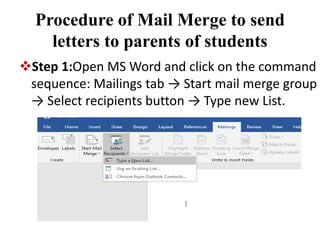
Step 1:Open MS Word and click on the command
sequence: Mailings tab → Start mail merge group
→ Select recipients button → Type new List.
A dialog namely “New Address List” will pop
up. To add a new record, click on the “New Entry”
button at the bottom of the dialog and click OK
when you are done
The second step is to prepare our master letter
for use in the mail merge.
• Create a blank word document.
• Click Mailings tab → Start Mail Merge group →
Start Mail Merge → Letters command.
• Now we can start typing the letter.
• Now we would like to add the name and address
and other details for the people on the list.
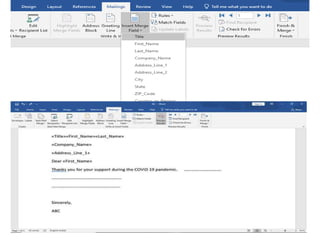
• Mailings tab→ Write & Insert Field group → Insert
Merge Field button.
• A pop-down will appear showing all the table
headings, so choose Title and press the spacebar
to create a space.
Step 3:
• Mailings tab→ Preview Results group → Preview
Results button
• Once we are happy with the preview, you can
carry out the actual mail merge.
• To do this you click the Mailings tab → Finish
group → Finish & Merge button and choose Edit
Individual Documents.
• In the Merge to New Document panel, click All to
create a separate letter for each person on the
Names list.
• We can save this with an appropriate name, such
as ABC.docx
ESSENTIAL FEATURES OF MS
POWER POINT
1. Slide Creation: The main function of PowerPoint
is to create visually appealing presentations for
various purposes by using several options like
texts, images, graphs tables, videos, etc
2. Data Visualization: PPT helps in creating slides
that are organized and presentable by including
charts, graphs, and other visual options. This
makes the slides easy to understand for the
viewers.
3. Slide Customization: A PowerPoint can provide a
number of customization options. With the help
of these options, the users can change fonts, and
color backgrounds, and apply themes or
templates to the slides to make the presentation
more appealing.
4. Slide Show Options: PowerPoint also provides a
number of options for presenting slideshows.
These functions include setting the timing
between the slides, setting loop slideshows, and
customizing slide transitions. The timings
between the slides can be automatic or can be
set manually.
features_of_MS_Word_&_MS_powerpoint.pptx

features_of_MS_Word_&_MS_powerpoint.pptx

  • 1.
    ESSENTIAL FEATURES OFMS WORD 1. Fast Typing: Text in a word processor becomes fast since there is no associated mechanical carriage movement. 2. Editing functions: Any type of correction(insert, delete, change, etc.) can be easily done as and on demand. 3. Permanent storage: Documents can be stored indefinitely. The saved document can be called up at any time
  • 2.
    4. Formatting functions:Entered text can be created in any form and style (bold, italic, underline, different fonts, etc.). 5. Alignment: You can align your text as you like, for example, left, right, or centered 6. Line Spacing: You can set the line spacing from one to nine according to your preference. 7. Search and Replace: You can search for a specific word in the entire document and replace it with another word. 8. Thesaurus: you can exchange a word with one of its synonyms.
  • 3.
    9. Spell Checker:Not only can it check spelling mistakes, but it can also suggest possible alternatives for misspelled words. 10. Naming a Document: You can name a document and retrieve it from your hard drive at any time for editing, updating, correction, and even for printing. 11. Naming a Document: You can name a document and retrieve it from your hard drive at any time for editing, updating, correction, and even for printing.
  • 4.
    Procedure of MailMerge to send letters to parents of students Step 1:Open MS Word and click on the command sequence: Mailings tab → Start mail merge group → Select recipients button → Type new List.
  • 5.
    A dialog namely“New Address List” will pop up. To add a new record, click on the “New Entry” button at the bottom of the dialog and click OK when you are done
  • 6.
    The second stepis to prepare our master letter for use in the mail merge. • Create a blank word document. • Click Mailings tab → Start Mail Merge group → Start Mail Merge → Letters command. • Now we can start typing the letter. • Now we would like to add the name and address and other details for the people on the list. • Mailings tab→ Write & Insert Field group → Insert Merge Field button. • A pop-down will appear showing all the table headings, so choose Title and press the spacebar to create a space.
  • 9.
    Step 3: • Mailingstab→ Preview Results group → Preview Results button • Once we are happy with the preview, you can carry out the actual mail merge. • To do this you click the Mailings tab → Finish group → Finish & Merge button and choose Edit Individual Documents. • In the Merge to New Document panel, click All to create a separate letter for each person on the Names list. • We can save this with an appropriate name, such as ABC.docx
  • 11.
    ESSENTIAL FEATURES OFMS POWER POINT 1. Slide Creation: The main function of PowerPoint is to create visually appealing presentations for various purposes by using several options like texts, images, graphs tables, videos, etc 2. Data Visualization: PPT helps in creating slides that are organized and presentable by including charts, graphs, and other visual options. This makes the slides easy to understand for the viewers.
  • 12.
    3. Slide Customization:A PowerPoint can provide a number of customization options. With the help of these options, the users can change fonts, and color backgrounds, and apply themes or templates to the slides to make the presentation more appealing. 4. Slide Show Options: PowerPoint also provides a number of options for presenting slideshows. These functions include setting the timing between the slides, setting loop slideshows, and customizing slide transitions. The timings between the slides can be automatic or can be set manually.