AFF Software
Fadal
2 AFF Software August 2001
Fadal AFF Software
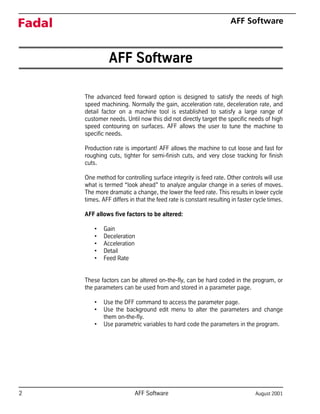
AFF Software
The advanced feed forward option is designed to satisfy the needs of high
speed machining. Normally the gain, acceleration rate, deceleration rate, and
detail factor on a machine tool is established to satisfy a large range of
customer needs. Until now this did not directly target the specific needs of high
speed contouring on surfaces. AFF allows the user to tune the machine to
specific needs.
Production rate is important! AFF allows the machine to cut loose and fast for
roughing cuts, tighter for semi-finish cuts, and very close tracking for finish
cuts.
One method for controlling surface integrity is feed rate. Other controls will use
what is termed “look ahead” to analyze angular change in a series of moves.
The more dramatic a change, the lower the feed rate. This results in lower cycle
times. AFF differs in that the feed rate is constant resulting in faster cycle times.
AFF allows five factors to be altered:
• Gain
• Deceleration
• Acceleration
• Detail
• Feed Rate
These factors can be altered on-the-fly, can be hard coded in the program, or
the parameters can be used from and stored in a parameter page.
• Use the DFF command to access the parameter page.
• Use the background edit menu to alter the parameters and change
them on-the-fly.
• Use parametric variables to hard code the parameters in the program.
August 2001 AFF Software 3
Fadal AFF Software
Effects of Each
Parameter
1) Gain has a “multiplying” effect on the servo system. The higher the Gain
setting, the faster the response of the axis motors. An excessively high gain
setting (above 150) causes an audible noise from the machine. The lower
the setting, the softer or more sluggish the reaction time becomes. The
normal setting is 100. Each increase or decrease is stated as a percentage.
For example 120 is a 20% increase and 90 would represent a 10%
decrease. The higher gain settings reduce the cycle time, but a gain that is
too high (above 150) could cause over travel.
2) Deceleration affects the time for the axes slow down at the end of each
programmed move. This is more commonly called the decel ramp. It is
measured in milliseconds. The adjustable range is from 5 to 1000
milliseconds with the typical setting being at 400. Increasing the
deceleration time will add time to the cycle; however, this insures a “soft
landing” at the end of a move. If this time is too short with a high feed rate,
over travel may occur.
3) Acceleration affects the time the axes take to accelerate to feed rate at the
beginning of a move. This is more commonly referred to as the accel ramp.
This is measured in milliseconds. The adjustable range is from 5 to 500
milliseconds with the typical setting falling between 10 and 40. Increasing
the value of the acceleration ramp lengthens the cycle time. One reason to
lengthen this would be when the mass on the table is excessive and the
machine reports motor over load messages from trying to quickly
accelerate the large mass.
4) Detail affects the allowable deviation from the specified tool path. The
adjustable range is .0002” to .250” (or .005mm to 6.35mm in the metric
mode). This factor has a dramatic effect on cycle time. The closer the
detail, the longer the cycle time. For rough cuts this parameter can be
large, resulting in a savings in time. It can then be adjusted to a smaller
window for finer detail when needed. The control will start the next move
when the tool is positioned within the detail distance from the end of the
current move. With a large detail window, the control can begin the next
move sooner than if a smaller window is selected.
4 AFF Software August 2001
Fadal AFF Software
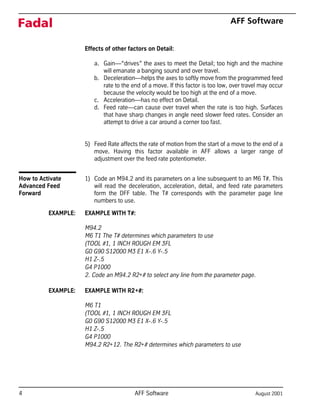
Effects of other factors on Detail:
a. Gain—“drives” the axes to meet the Detail; too high and the machine
will emanate a banging sound and over travel.
b. Deceleration—helps the axes to softly move from the programmed feed
rate to the end of a move. If this factor is too low, over travel may occur
because the velocity would be too high at the end of a move.
c. Acceleration—has no effect on Detail.
d. Feed rate—can cause over travel when the rate is too high. Surfaces
that have sharp changes in angle need slower feed rates. Consider an
attempt to drive a car around a corner too fast.
5) Feed Rate affects the rate of motion from the start of a move to the end of a
move. Having this factor available in AFF allows a larger range of
adjustment over the feed rate potentiometer.
How to Activate
Advanced Feed
Forward
1) Code an M94.2 and its parameters on a line subsequent to an M6 T#. This
will read the deceleration, acceleration, detail, and feed rate parameters
form the DFF table. The T# corresponds with the parameter page line
numbers to use.
EXAMPLE: EXAMPLE WITH T#:
M94.2
M6 T1 The T# determines which parameters to use
(TOOL #1, 1 INCH ROUGH EM 3FL
G0 G90 S12000 M3 E1 X-.6 Y-.5
H1 Z-.5
G4 P1000
2. Code an M94.2 R2+# to select any line from the parameter page.
EXAMPLE: EXAMPLE WITH R2+#:
M6 T1
(TOOL #1, 1 INCH ROUGH EM 3FL
G0 G90 S12000 M3 E1 X-.6 Y-.5
H1 Z-.5
G4 P1000
M94.2 R2+12. The R2+# determines which parameters to use
August 2001 AFF Software 5
Fadal AFF Software
Advanced Feed
Forward During Tool
Changes
AFF remains in effect during a tool change. The M94.2 is modal and will remain
in effect until the M95.2 code is used.
The T# establishes which parameter line to use from the DFF table. If a different
line is needed, use the M94.2 R2+# to determine which line from the DFF table
to use.
How to Deactivate
Advanced Feed
Forward
1) Code an M95.2 on a separate line to deactivate AFF.
2) Code an M91 to return to normal gain.
EXAMPLE: G90 G0 Z.1
M5 M9
M95.2 Deactivate AFF
M91 Return to normal gain
G49 Z0
M6 T2
How to Enter
Parameters Into the
Parameter Page
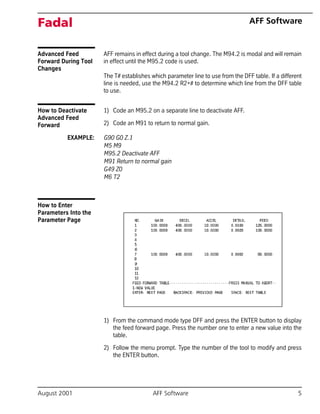
1) From the command mode type DFF and press the ENTER button to display
the feed forward page. Press the number one to enter a new value into the
table.
2) Follow the menu prompt. Type the number of the tool to modify and press
the ENTER button.
6 AFF Software August 2001
Fadal AFF Software
3) Each parameter will display. Press the ENTER button to bypass any
parameter or type the desired number and then press the ENTER button to
change the number.
How to Alter
Parameters On-the-Fly
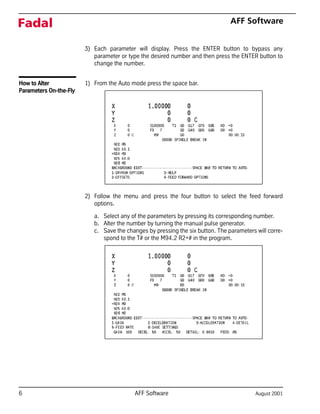
1) From the Auto mode press the space bar.
2) Follow the menu and press the four button to select the feed forward
options.
a. Select any of the parameters by pressing its corresponding number.
b. Alter the number by turning the manual pulse generator.
c. Save the changes by pressing the six button. The parameters will corre-
spond to the T# or the M94.2 R2+# in the program.
August 2001 AFF Software 7
Fadal AFF Software
How to Code
Parameters Into the
Program
1) Along with the M94.2
a. The R1+# represents the Deceleration value.
b. The P# represents the Acceleration value.
c. The Q# represents the Detail value.
2) Along with the M90 the P# represents the Gain value.
3) The F word in the program will establish the feed rate.
EXAMPLE: M6 T1
(TOOL #1, 1 INCH ROUGH EM 3FL
G0 G90 G8 S12000 M3 E1 X-.6 Y-.5
H1 Z-.5
G4 P1000
M94.2 R1+40. P10. Q.01
M90 P120.
F120.
Machine Setup 1) From the command mode, type SETP and press the ENTER button.
2) Press the space bar to the second page of the SETP menu.
a. Cursor over to BINARY BUFFERS.
b. Select 1) 15
Doing this reduces the look-ahead buffer. When altering the AFF parameters
on-the-fly, the changes become effective almost while the changes occur.
Suggested AFF
Settings
Rough Cuts: 1) To use this setting, program with at least .005 stock on all surfaces.
2) Gain—100, Deceleration—400, Acceleration—10, Detail—.005
Semi-Finish Cuts: 1) To use this setting, program at least .002 stock on all surfaces.
2) Gain—100, Deceleration—400, Acceleration—10, Detail—.002
Finish Cuts: 1) To use this setting, program with at least .0001 surface tolerance.
2) Gain—100, Deceleration—400, Acceleration—10, Detail—.0002

Fadal AFF Software - Advanced Feed Forward Manual

  • 1.
  • 2.
    2 AFF SoftwareAugust 2001 Fadal AFF Software AFF Software The advanced feed forward option is designed to satisfy the needs of high speed machining. Normally the gain, acceleration rate, deceleration rate, and detail factor on a machine tool is established to satisfy a large range of customer needs. Until now this did not directly target the specific needs of high speed contouring on surfaces. AFF allows the user to tune the machine to specific needs. Production rate is important! AFF allows the machine to cut loose and fast for roughing cuts, tighter for semi-finish cuts, and very close tracking for finish cuts. One method for controlling surface integrity is feed rate. Other controls will use what is termed “look ahead” to analyze angular change in a series of moves. The more dramatic a change, the lower the feed rate. This results in lower cycle times. AFF differs in that the feed rate is constant resulting in faster cycle times. AFF allows five factors to be altered: • Gain • Deceleration • Acceleration • Detail • Feed Rate These factors can be altered on-the-fly, can be hard coded in the program, or the parameters can be used from and stored in a parameter page. • Use the DFF command to access the parameter page. • Use the background edit menu to alter the parameters and change them on-the-fly. • Use parametric variables to hard code the parameters in the program.
  • 3.
    August 2001 AFFSoftware 3 Fadal AFF Software Effects of Each Parameter 1) Gain has a “multiplying” effect on the servo system. The higher the Gain setting, the faster the response of the axis motors. An excessively high gain setting (above 150) causes an audible noise from the machine. The lower the setting, the softer or more sluggish the reaction time becomes. The normal setting is 100. Each increase or decrease is stated as a percentage. For example 120 is a 20% increase and 90 would represent a 10% decrease. The higher gain settings reduce the cycle time, but a gain that is too high (above 150) could cause over travel. 2) Deceleration affects the time for the axes slow down at the end of each programmed move. This is more commonly called the decel ramp. It is measured in milliseconds. The adjustable range is from 5 to 1000 milliseconds with the typical setting being at 400. Increasing the deceleration time will add time to the cycle; however, this insures a “soft landing” at the end of a move. If this time is too short with a high feed rate, over travel may occur. 3) Acceleration affects the time the axes take to accelerate to feed rate at the beginning of a move. This is more commonly referred to as the accel ramp. This is measured in milliseconds. The adjustable range is from 5 to 500 milliseconds with the typical setting falling between 10 and 40. Increasing the value of the acceleration ramp lengthens the cycle time. One reason to lengthen this would be when the mass on the table is excessive and the machine reports motor over load messages from trying to quickly accelerate the large mass. 4) Detail affects the allowable deviation from the specified tool path. The adjustable range is .0002” to .250” (or .005mm to 6.35mm in the metric mode). This factor has a dramatic effect on cycle time. The closer the detail, the longer the cycle time. For rough cuts this parameter can be large, resulting in a savings in time. It can then be adjusted to a smaller window for finer detail when needed. The control will start the next move when the tool is positioned within the detail distance from the end of the current move. With a large detail window, the control can begin the next move sooner than if a smaller window is selected.
  • 4.
    4 AFF SoftwareAugust 2001 Fadal AFF Software Effects of other factors on Detail: a. Gain—“drives” the axes to meet the Detail; too high and the machine will emanate a banging sound and over travel. b. Deceleration—helps the axes to softly move from the programmed feed rate to the end of a move. If this factor is too low, over travel may occur because the velocity would be too high at the end of a move. c. Acceleration—has no effect on Detail. d. Feed rate—can cause over travel when the rate is too high. Surfaces that have sharp changes in angle need slower feed rates. Consider an attempt to drive a car around a corner too fast. 5) Feed Rate affects the rate of motion from the start of a move to the end of a move. Having this factor available in AFF allows a larger range of adjustment over the feed rate potentiometer. How to Activate Advanced Feed Forward 1) Code an M94.2 and its parameters on a line subsequent to an M6 T#. This will read the deceleration, acceleration, detail, and feed rate parameters form the DFF table. The T# corresponds with the parameter page line numbers to use. EXAMPLE: EXAMPLE WITH T#: M94.2 M6 T1 The T# determines which parameters to use (TOOL #1, 1 INCH ROUGH EM 3FL G0 G90 S12000 M3 E1 X-.6 Y-.5 H1 Z-.5 G4 P1000 2. Code an M94.2 R2+# to select any line from the parameter page. EXAMPLE: EXAMPLE WITH R2+#: M6 T1 (TOOL #1, 1 INCH ROUGH EM 3FL G0 G90 S12000 M3 E1 X-.6 Y-.5 H1 Z-.5 G4 P1000 M94.2 R2+12. The R2+# determines which parameters to use
  • 5.
    August 2001 AFFSoftware 5 Fadal AFF Software Advanced Feed Forward During Tool Changes AFF remains in effect during a tool change. The M94.2 is modal and will remain in effect until the M95.2 code is used. The T# establishes which parameter line to use from the DFF table. If a different line is needed, use the M94.2 R2+# to determine which line from the DFF table to use. How to Deactivate Advanced Feed Forward 1) Code an M95.2 on a separate line to deactivate AFF. 2) Code an M91 to return to normal gain. EXAMPLE: G90 G0 Z.1 M5 M9 M95.2 Deactivate AFF M91 Return to normal gain G49 Z0 M6 T2 How to Enter Parameters Into the Parameter Page 1) From the command mode type DFF and press the ENTER button to display the feed forward page. Press the number one to enter a new value into the table. 2) Follow the menu prompt. Type the number of the tool to modify and press the ENTER button.
  • 6.
    6 AFF SoftwareAugust 2001 Fadal AFF Software 3) Each parameter will display. Press the ENTER button to bypass any parameter or type the desired number and then press the ENTER button to change the number. How to Alter Parameters On-the-Fly 1) From the Auto mode press the space bar. 2) Follow the menu and press the four button to select the feed forward options. a. Select any of the parameters by pressing its corresponding number. b. Alter the number by turning the manual pulse generator. c. Save the changes by pressing the six button. The parameters will corre- spond to the T# or the M94.2 R2+# in the program.
  • 7.
    August 2001 AFFSoftware 7 Fadal AFF Software How to Code Parameters Into the Program 1) Along with the M94.2 a. The R1+# represents the Deceleration value. b. The P# represents the Acceleration value. c. The Q# represents the Detail value. 2) Along with the M90 the P# represents the Gain value. 3) The F word in the program will establish the feed rate. EXAMPLE: M6 T1 (TOOL #1, 1 INCH ROUGH EM 3FL G0 G90 G8 S12000 M3 E1 X-.6 Y-.5 H1 Z-.5 G4 P1000 M94.2 R1+40. P10. Q.01 M90 P120. F120. Machine Setup 1) From the command mode, type SETP and press the ENTER button. 2) Press the space bar to the second page of the SETP menu. a. Cursor over to BINARY BUFFERS. b. Select 1) 15 Doing this reduces the look-ahead buffer. When altering the AFF parameters on-the-fly, the changes become effective almost while the changes occur. Suggested AFF Settings Rough Cuts: 1) To use this setting, program with at least .005 stock on all surfaces. 2) Gain—100, Deceleration—400, Acceleration—10, Detail—.005 Semi-Finish Cuts: 1) To use this setting, program at least .002 stock on all surfaces. 2) Gain—100, Deceleration—400, Acceleration—10, Detail—.002 Finish Cuts: 1) To use this setting, program with at least .0001 surface tolerance. 2) Gain—100, Deceleration—400, Acceleration—10, Detail—.0002