Facebook Payments for Developers
An Introduction to Facebook’s Micropayment Platform

November 6th, 2013 - AllFacebook DevCon Berlin

http://die.socialisten.at

Michael Kamleitner, Die Socialisten
"Die Socialisten" is a Vienna-based social-software agency focussing on the design & implementation
of apps and marketing-solutions on social web platforms like Facebook, Twitter & Google+.
To date, we have successfully built more than 100 brand-pages, applications and websites. Our clients
include Red Bull, Axel Springer/Bild.de, Bertelsmann, FTD, Krone Multimedia, ATV and Hitradio Ö3.
"Die Socialisten" are Austria's first agency listed in the official 

"Facebook Preferred Marketing Developer"-program.
http://die.socialisten.at | http://facebook.com/diesocialisten

Try out Swat.io - Our Enterprise Social Media Management Suite! (http://swat.io)

die.socialisten.at
social network development
Why Facebook Payments?
Facebook Credits is Dead!

2009 - September 2013

http://die.socialisten.at

Social Software Development
While Facebook Credits has been discontinued for months, there are still misconceptions on its
whereabouts or its successor, Local Currency Payments, as this recent scam shows…


Link: http://allfacebook.com/facebook-credits-generator-scam_b126559
From Credits to Local Currency Payments
- Other than with Credits, users don’t maintain a separate balance on Facebook anymore -

no more “charging” your Account with credits etc.
- Instead, a users payment-method (creditcard, PayPal…) is charged 

for each transaction immediately
- No more virtual currency, transactions are done directly in a users local currency
Facebook Credits
Facebook Credits
Buy Credits!

10 USD

Hoarding you Credits on fb.com…

110 Credits

…Use & Pay!

320 Farm Coins

Facebook Local Currency Payments
Buy directly!

10 USD

…Use!

320 Farm Coins
Facebook Local Currency Payments
Facebook charges developers a processing fee of 30% for each transaction!
Facebook Local Currency Payments


55 Currencies
https://developers.facebook.com/docs/concepts/payments/currencies/

!

80 Payment Methods
Creditcards, PayPal, Gift Cards and a plethora of locally relevant payment instruments:
https://www.facebook.com/help/203680236341574

!
PaySafeCard, Bank Transfer, ClickandBuy, DaoPay, Ukash, Giropay
DaoPay, PaySafeCard, EPS, Online Banking, Bank Transfer, Ukash, Maestro, Moneybookers
PaySafeCard, DaoPay, Ukash, Bank Transfer, Moneybookers
Getting to know Facebook Payments…
Create a Facebook Canvas-App!
Pick a Namespace and enter Canva- & Secure Canvas-URLs…
Activate Payments for your App!
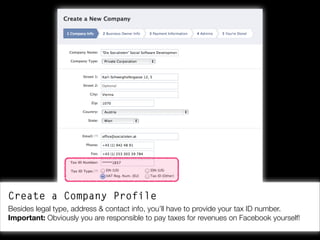
When starting with Facebook Payments first, you’ll have to create in-depth company profile.
Create a Company Profile
Besides legal type, address & contact info, you’ll have to provide your tax ID number.
Important: Obviously you are responsible to pay taxes for revenues on Facebook yourself!
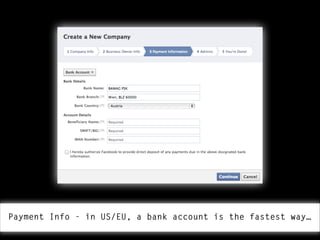
Payment Info - in US/EU, a bank account is the fastest way…
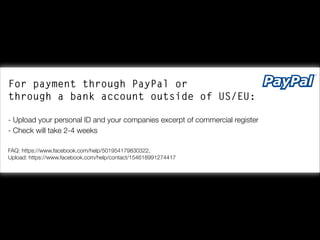
For payment through PayPal or

through a bank account outside of US/EU:


- Upload your personal ID and your companies excerpt of commercial register
- Check will take 2-4 weeks
!
FAQ: https://www.facebook.com/help/501954179830322,

Upload: https://www.facebook.com/help/contact/154618991274417
Defining Products…
product-1.html

…as Open Graph Objects with og:type = “product”!


- As usual, provide title, image, description & URL…
- More importantly: provide the price at which your product should be sold.
- There’s two ways to set the price…
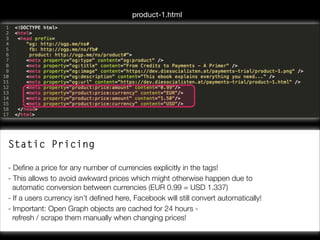
product-1.html

Static Pricing


- Define a price for any number of currencies explicitly in the tags!
- This allows to avoid awkward prices which might otherwise happen due to 

automatic conversion between currencies (EUR 0.99 = USD 1.337)
- If a users currency isn’t defined here, Facebook will still convert automatically!
- Important: Open Graph objects are cached for 24 hours - 

refresh / scrape them manually when changing prices!
Test & scrape products with the Open Graph Object Debugger!

Link: https://developers.facebook.com/tools/debug
product-1.html

Dynamic Pricing


- Prices are not given in the Open Graph tags!
- When a user wants to buy our product, Facebook is polling the actual price 

from a Callback-URL of our application!
- Might be a bit slower, but enables flexible pricing (useful for A/B-tests…)
Using the Payment Dialog…
Calling the Payment Dialogs with FB.ui() is easy!
Calling the Payment Dialogs
Just pass the URL of the product’s Open Graph object in the “product”-parameter, so
Facebook actually knows what item should be sold!
Testing the Payment Dialog on Canvas!
It works! Facebook fetches the product info from the given Open Graph object and displays
the payment-dialog accordingly - including, title, image, prize etc…
Ergebnis des Callbacks:

If the transaction is successful, A JavaScript-Callback returns
the Payment-ID - But be aware…
Ergebnis des Callbacks:

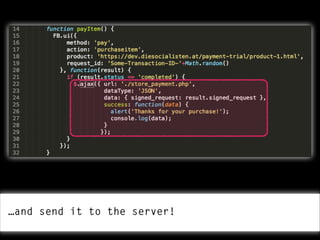
…for security reasons, never process the transaction client-side!

Instead, use the returned Signed Request…
…and send it to the server!
Inhalt des Signed Requests:

On the server-side, decode the Signed Request as usual, check if the
Payment-ID is valid and process the transaction!
Payments also work on Mobile! :)
Unfortunately, Payments won’t work on standalone websites/webapps
outside the Canvas right now :(
Facebook Payments work on
App-/Tab-Canvas & Web-/Native-Mobile!
!
It won’t work on stand-alone websites/web-apps! :(
Using Facebook Payments…
Facebook Payments might be a viable micropayment
solution for most digital goods:


- Games, Games, Games - in-game currencies, virtual goods etc.
- eBook-/mp3-Downloads
- Paid access for Live video-streams
- Paid content on websites or blogs…
Usecase:
!
Selling content on your Wordpress Blog with Facebook Payments!
wp-content/plugins/paygate/paygate_backend.php

Add Custom Fields to the Wordpress backend…
Paygate active (Yes/No), Price, Currency
wp-content/plugins/paygate/paygate_backend.php

Save Custom Fields with post…
Paygate active (Yes/No), Price, Currency
wp-content/plugins/paygate/paygate_backend.php

Settings dialog for the plugin…
App-ID, App-Secret, Namespace (for Canvas-Redirect)
wp-content/plugins/paygate/paygate_frontend.php

Frontend - Insert the “Buy”-button…
wp-content/plugins/paygate/paygate_frontend.php

Frontend - Insert the “Buy”-button…
wp-content/plugins/paygate/paygate_frontend.php

Frontend - Insert the “Buy”-button…
wp-content /plugins/paygate/index.php (Canvas)

On Canvas: Lets’s open the Payment Dialog - if the
transaction is completed, redirect back to the blog!
wp-content/plugins/paygate/paygate_frontend.php

Back on the blog: if a Payment-ID is passed, we check the ID
against the API - if everything is fine, we display the whole post!
Don’t Only try this at home!
!


Code: https://github.com/DieSocialisten/Paygate-Wordpress
Demo: http://dev.diesocialisten.at/paidcontent
Slides: http://www.slideshare.net/socialisten
Try out Swat.io - Our Enterprise Social Media Management Suite! (http://swat.io)

die.socialisten.at
social network development
Michael Kamleitner
Die Socialisten
Let’s connect!

!
michael.kamleitner@socialisten.at
http://facebook.com/michael.kamleitner
http://twitter.com/_subnet


Facebook Payments for Developers

  • 1.
    Facebook Payments forDevelopers An Introduction to Facebook’s Micropayment Platform
 November 6th, 2013 - AllFacebook DevCon Berlin http://die.socialisten.at
 Michael Kamleitner, Die Socialisten
  • 2.
    "Die Socialisten" isa Vienna-based social-software agency focussing on the design & implementation of apps and marketing-solutions on social web platforms like Facebook, Twitter & Google+. To date, we have successfully built more than 100 brand-pages, applications and websites. Our clients include Red Bull, Axel Springer/Bild.de, Bertelsmann, FTD, Krone Multimedia, ATV and Hitradio Ö3. "Die Socialisten" are Austria's first agency listed in the official 
 "Facebook Preferred Marketing Developer"-program. http://die.socialisten.at | http://facebook.com/diesocialisten

  • 3.
    Try out Swat.io- Our Enterprise Social Media Management Suite! (http://swat.io) die.socialisten.at social network development
  • 4.
  • 5.
    Facebook Credits isDead!
 2009 - September 2013 http://die.socialisten.at
 Social Software Development
  • 6.
    While Facebook Creditshas been discontinued for months, there are still misconceptions on its whereabouts or its successor, Local Currency Payments, as this recent scam shows… 
 Link: http://allfacebook.com/facebook-credits-generator-scam_b126559
  • 7.
    From Credits toLocal Currency Payments - Other than with Credits, users don’t maintain a separate balance on Facebook anymore -
 no more “charging” your Account with credits etc. - Instead, a users payment-method (creditcard, PayPal…) is charged 
 for each transaction immediately - No more virtual currency, transactions are done directly in a users local currency
  • 8.
    Facebook Credits Facebook Credits BuyCredits! 10 USD Hoarding you Credits on fb.com… 110 Credits …Use & Pay! 320 Farm Coins Facebook Local Currency Payments Facebook Local Currency Payments Buy directly! 10 USD …Use! 320 Farm Coins
  • 9.
    Facebook Local CurrencyPayments Facebook charges developers a processing fee of 30% for each transaction!
  • 10.
    Facebook Local CurrencyPayments 
 55 Currencies https://developers.facebook.com/docs/concepts/payments/currencies/ ! 80 Payment Methods Creditcards, PayPal, Gift Cards and a plethora of locally relevant payment instruments: https://www.facebook.com/help/203680236341574 ! PaySafeCard, Bank Transfer, ClickandBuy, DaoPay, Ukash, Giropay DaoPay, PaySafeCard, EPS, Online Banking, Bank Transfer, Ukash, Maestro, Moneybookers PaySafeCard, DaoPay, Ukash, Bank Transfer, Moneybookers
  • 11.
    Getting to knowFacebook Payments…
  • 12.
    Create a FacebookCanvas-App! Pick a Namespace and enter Canva- & Secure Canvas-URLs…
  • 13.
    Activate Payments foryour App! When starting with Facebook Payments first, you’ll have to create in-depth company profile.
  • 14.
    Create a CompanyProfile Besides legal type, address & contact info, you’ll have to provide your tax ID number. Important: Obviously you are responsible to pay taxes for revenues on Facebook yourself!
  • 15.
    Payment Info -in US/EU, a bank account is the fastest way…
  • 16.
    For payment throughPayPal or
 through a bank account outside of US/EU: 
 - Upload your personal ID and your companies excerpt of commercial register - Check will take 2-4 weeks ! FAQ: https://www.facebook.com/help/501954179830322,
 Upload: https://www.facebook.com/help/contact/154618991274417
  • 17.
  • 18.
    product-1.html …as Open GraphObjects with og:type = “product”! 
 - As usual, provide title, image, description & URL… - More importantly: provide the price at which your product should be sold. - There’s two ways to set the price…
  • 19.
    product-1.html Static Pricing 
 - Definea price for any number of currencies explicitly in the tags! - This allows to avoid awkward prices which might otherwise happen due to 
 automatic conversion between currencies (EUR 0.99 = USD 1.337) - If a users currency isn’t defined here, Facebook will still convert automatically! - Important: Open Graph objects are cached for 24 hours - 
 refresh / scrape them manually when changing prices!
  • 20.
    Test & scrapeproducts with the Open Graph Object Debugger!
 Link: https://developers.facebook.com/tools/debug
  • 21.
    product-1.html Dynamic Pricing 
 - Pricesare not given in the Open Graph tags! - When a user wants to buy our product, Facebook is polling the actual price 
 from a Callback-URL of our application! - Might be a bit slower, but enables flexible pricing (useful for A/B-tests…)
  • 22.
  • 23.
    Calling the PaymentDialogs with FB.ui() is easy!
  • 24.
    Calling the PaymentDialogs Just pass the URL of the product’s Open Graph object in the “product”-parameter, so Facebook actually knows what item should be sold!
  • 25.
    Testing the PaymentDialog on Canvas! It works! Facebook fetches the product info from the given Open Graph object and displays the payment-dialog accordingly - including, title, image, prize etc…
  • 26.
    Ergebnis des Callbacks: Ifthe transaction is successful, A JavaScript-Callback returns the Payment-ID - But be aware…
  • 27.
    Ergebnis des Callbacks: …forsecurity reasons, never process the transaction client-side!
 Instead, use the returned Signed Request…
  • 28.
    …and send itto the server!
  • 29.
    Inhalt des SignedRequests: On the server-side, decode the Signed Request as usual, check if the Payment-ID is valid and process the transaction!
  • 30.
    Payments also workon Mobile! :)
  • 31.
    Unfortunately, Payments won’twork on standalone websites/webapps outside the Canvas right now :(
  • 32.
    Facebook Payments workon App-/Tab-Canvas & Web-/Native-Mobile! ! It won’t work on stand-alone websites/web-apps! :(
  • 33.
  • 34.
    Facebook Payments mightbe a viable micropayment solution for most digital goods: 
 - Games, Games, Games - in-game currencies, virtual goods etc. - eBook-/mp3-Downloads - Paid access for Live video-streams - Paid content on websites or blogs…
  • 35.
    Usecase: ! Selling content onyour Wordpress Blog with Facebook Payments!
  • 38.
    wp-content/plugins/paygate/paygate_backend.php Add Custom Fieldsto the Wordpress backend… Paygate active (Yes/No), Price, Currency
  • 39.
    wp-content/plugins/paygate/paygate_backend.php Save Custom Fieldswith post… Paygate active (Yes/No), Price, Currency
  • 41.
    wp-content/plugins/paygate/paygate_backend.php Settings dialog forthe plugin… App-ID, App-Secret, Namespace (for Canvas-Redirect)
  • 43.
  • 44.
  • 45.
  • 48.
    wp-content /plugins/paygate/index.php (Canvas) OnCanvas: Lets’s open the Payment Dialog - if the transaction is completed, redirect back to the blog!
  • 49.
    wp-content/plugins/paygate/paygate_frontend.php Back on theblog: if a Payment-ID is passed, we check the ID against the API - if everything is fine, we display the whole post!
  • 51.
    Don’t Only trythis at home! ! Code: https://github.com/DieSocialisten/Paygate-Wordpress Demo: http://dev.diesocialisten.at/paidcontent Slides: http://www.slideshare.net/socialisten
  • 52.
    Try out Swat.io- Our Enterprise Social Media Management Suite! (http://swat.io) die.socialisten.at social network development
  • 53.
    Michael Kamleitner Die Socialisten Let’sconnect! ! michael.kamleitner@socialisten.at http://facebook.com/michael.kamleitner http://twitter.com/_subnet