
Extending the Enterprise
with MEF
Building extensibility into your enterprise apps with
the Managed Extensibility Framework


Brian Ritchie                          Jason Gerard
Chief Architect                        Director of Product Development
PaySpan, Inc.                          PaySpan, Inc.

Twitter: @brian_ritchie                Twitter: @thejasongerard
Email: brian.ritchie@gmail.com         Email: jason.gerard@gmail.com
Blog: http://weblog.asp.net/britchie   Blog: http://jasongerard.wordpress.com
Web: http://www.dotnetpowered.com
Who are we?

Brian Ritchie               Jason Gerard
» Chief Architect           » Director of Development
» Nearly 20 years of        » Nearly 15 years of
  development experience      development experience
» Developing on .NET        » Only fault is that he is only
  since 1.0 Beta 1.           one man
  Contributor to Mono and
  other open source
  projects
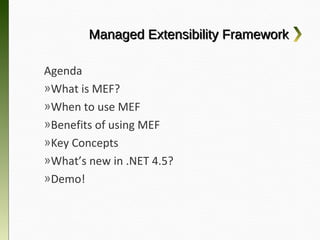
Managed Extensibility Framework

Agenda
»What is MEF?
»When to use MEF
»Benefits of using MEF
»Key Concepts
»What’s new in .NET 4.5?
»Demo!
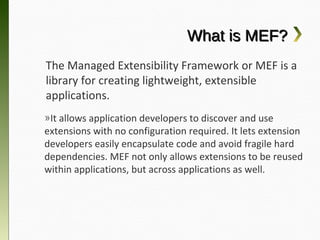
What is MEF?
The Managed Extensibility Framework or MEF
is a library for creating lightweight, extensible
applications.
»It allows application developers to discover and use
extensions with no configuration required. It lets
extension developers easily encapsulate code and
avoid fragile hard dependencies. MEF not only allows
extensions to be reused within applications, but across
applications as well.
When to use MEF?


And when not to...
When to use MEF?
» You are planning to star in a zombie movie
» You weren’t born in Britain but want British
  teeth.
                          NO!


            We’re talking about MEF not METH!!
When to use MEF?
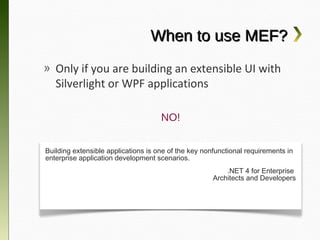
» Only if you are building an extensible UI
  with Silverlight or WPF applications

                                     NO!


Building extensible applications is one of the key nonfunctional requirements in
enterprise application development scenarios.
                                                          .NET 4 for Enterprise
                                                      Architects and Developers
When to use MEF?
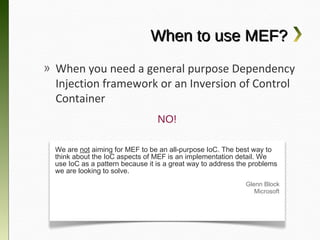
» When you need a general purpose
  Dependency Injection framework or an
  Inversion of Control Container
                                 NO!

 We are not aiming for MEF to be an all-purpose IoC. The best way to
 think about the IoC aspects of MEF is an implementation detail. We
 use IoC as a pattern because it is a great way to address the problems
 we are looking to solve.
                                                             Glenn Block
                                                                Microsoft
When to use MEF?
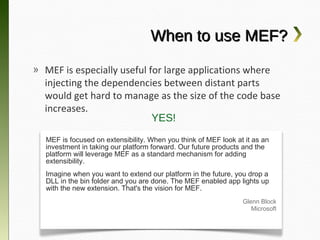
» MEF is especially useful for large applications
  where injecting the dependencies between distant
  parts would get hard to manage as the size of the
  code base increases.
                         YES!
  MEF is focused on extensibility. When you think of MEF look at it as an
  investment in taking our platform forward. Our future products and the
  platform will leverage MEF as a standard mechanism for adding
  extensibility.
  Imagine when you want to extend our platform in the future, you drop a
  DLL in the bin folder and you are done. The MEF enabled app lights up
  with the new extension. That's the vision for MEF.
                                                                Glenn Block
                                                                   Microsoft
Benefits of being a MEF user

» Decomposes large systems into building
  blocks
» Allows extensibility across teams
» Turns your app into a platform
MEF Key Concepts


Ready to get hooked
           on MEF?
MEF Key Concepts
Exports & Imports
»Exports expose contracts for functionality
that can be replaced at runtime. Exports are
defined in your plugin libraries.
»Imports are properties that consume
Exported instances. Imports are defined in
your host application.
MEF Key Concepts
» Exports
  Decorating a class with the Export attribute

       [Export(typeof(IPlugin)]
        [Export(typeof(IPlugin)]
       public class MyPlugin :: IPlugin
        public class MyPlugin    IPlugin
       {{


       }}


 The interface (IPlugin) should be in Contract Assembly that can be
   shared between the importer (host application) and the exporter
                                (plugin).
MEF Key Concepts
» Imports
  Decorating the host class with an
  ImportMany attribute

         public class Host
          public class Host
         {{
            [ImportMany(typeof(IPlugin))]
             [ImportMany(typeof(IPlugin))]
            public IEnumberable<IPlugin> Plugins {{ get; set; }}
             public IEnumberable<IPlugin> Plugins    get; set;

              ...
               ...
         }}


The interface (IPlugin) should be in Contract Assembly that can be
 shared between the importer (host application) and the exporter
                             (plugin).
MEF Key Concepts
» Imports
  Exports can also define imports. For
  example, a plugin maybe dependent on a
  service from the host.

      [Export(typeof(IPlugin)]
       [Export(typeof(IPlugin)]
      public class MyPlugin :: IPlugin
       public class MyPlugin    IPlugin
      {{
      [Import]
       [Import]
      IService Dependency {{ get; set; }}
       IService Dependency    get; set;

      }}
MEF Key Concepts
Composition
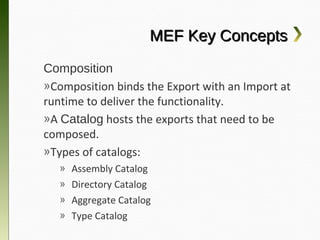
»Composition binds the Export with an Import
at runtime to deliver the functionality.
»A Catalog hosts the exports that need to be
composed.
»Types of catalogs:
  »   Assembly Catalog
  »   Directory Catalog
  »   Aggregate Catalog
  »   Type Catalog
MEF Key Concepts
Composition
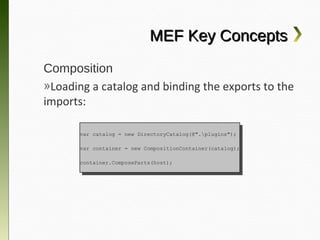
»Loading a catalog and binding the exports to
the imports:

      var catalog == new DirectoryCatalog(@".plugins");
       var catalog    new DirectoryCatalog(@".plugins");

      var container == new CompositionContainer(catalog);
       var container    new CompositionContainer(catalog);

      container.ComposeParts(host);
       container.ComposeParts(host);
MEF Key Concepts
Composition
»The Plugins collection now contains
instances of all the exported types.

      public class Host
       public class Host
      {{
         [ImportMany(typeof(IPlugin))]
          [ImportMany(typeof(IPlugin))]
         public IEnumberable<IPlugin> Plugins {{ get; set; }}
          public IEnumberable<IPlugin> Plugins    get; set;

           ...
            ...
      }}
MEF Key Concepts
Metadata
»Custom metadata can be attached to your
exported types to provide information to the
importer.
»Simply add an ExportMetadata attribute
which accepts a key and a value:
      [ExportMetadata(“ID”, 1)]
       [ExportMetadata(“ID”, 1)]
      [Export(typeof(IPlugin)]
       [Export(typeof(IPlugin)]
      public class MyPlugin :: IPlugin
       public class MyPlugin    IPlugin
      {{


      }}
MEF Key Concepts
Metadata
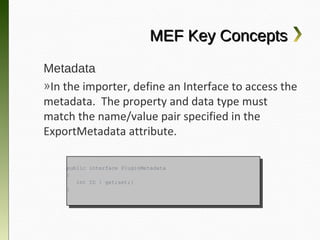
»In the importer, define an Interface to access
the metadata. The property and data type
must match the name/value pair specified in
the ExportMetadata attribute.

    public interface PluginMetadata
     public interface PluginMetadata
    {{
       int ID {{ get;set;}
        int ID    get;set;}
    }}
MEF Key Concepts
Metadata
»Next, define the import to also load the metadata.
Access both via .NET lazy load class.

    public class Host
     public class Host
    {{
       [ImportMany]
        [ImportMany]
       public IEnumerable<Lazy<IPlugin, IPluginMetadata>> Plugins {{ get; set; }}
        public IEnumerable<Lazy<IPlugin, IPluginMetadata>> Plugins    get; set;

         void UsePlugins()
          void UsePlugins()
         {{
            foreach (var pp in Plugins)
             foreach (var    in Plugins)
            {{
                var id == p.Metadata.ID;
                 var id    p.Metadata.ID;
                var plugin == p.Value;
                 var plugin    p.Value;
            }}
         }}
    }}
What’s new in .NET 4.5?

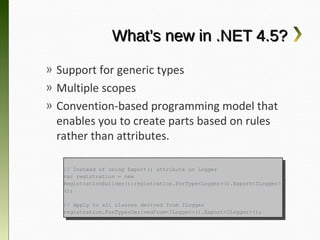
» Support for generic types
» Multiple scopes
» Convention-based programming model that
  enables you to create parts based on rules
  rather than attributes.

   // Instead of using Export() attribute on Logger
    // Instead of using Export() attribute on Logger
   var registration == new
    var registration    new
   RegistrationBuilder();registration.ForType<Logger>().Export<ILogger>
    RegistrationBuilder();registration.ForType<Logger>().Export<ILogger>
   ();
    ();

   // Apply to all classes derived from ILogger
    // Apply to all classes derived from ILogger
   registration.ForTypesDerivedFrom<ILogger>().Export<ILogger>();
    registration.ForTypesDerivedFrom<ILogger>().Export<ILogger>();
Demo!


Give me some MEF!


     https://github.com/jasongerard/MefExample
Extending the Enterprise with MEF


    Thanks for Coming!

Brian Ritchie                          Jason Gerard
Chief Architect                        Director of Product Development
PaySpan, Inc.                          PaySpan, Inc.

Twitter: @brian_ritchie                Twitter: @thejasongerard
Email: brian.ritchie@gmail.com         Email: jason.gerard@gmail.com
Blog: http://weblog.asp.net/britchie   Blog: http://jasongerard.wordpress.com
Web: http://www.dotnetpowered.com

Extending the Enterprise with MEF

  • 1.
    Extending the Enterprise withMEF Building extensibility into your enterprise apps with the Managed Extensibility Framework Brian Ritchie Jason Gerard Chief Architect Director of Product Development PaySpan, Inc. PaySpan, Inc. Twitter: @brian_ritchie Twitter: @thejasongerard Email: brian.ritchie@gmail.com Email: jason.gerard@gmail.com Blog: http://weblog.asp.net/britchie Blog: http://jasongerard.wordpress.com Web: http://www.dotnetpowered.com
  • 2.
    Who are we? BrianRitchie Jason Gerard » Chief Architect » Director of Development » Nearly 20 years of » Nearly 15 years of development experience development experience » Developing on .NET » Only fault is that he is only since 1.0 Beta 1. one man Contributor to Mono and other open source projects
  • 3.
    Managed Extensibility Framework Agenda »Whatis MEF? »When to use MEF »Benefits of using MEF »Key Concepts »What’s new in .NET 4.5? »Demo!
  • 4.
    What is MEF? TheManaged Extensibility Framework or MEF is a library for creating lightweight, extensible applications. »It allows application developers to discover and use extensions with no configuration required. It lets extension developers easily encapsulate code and avoid fragile hard dependencies. MEF not only allows extensions to be reused within applications, but across applications as well.
  • 5.
    When to useMEF? And when not to...
  • 6.
    When to useMEF? » You are planning to star in a zombie movie » You weren’t born in Britain but want British teeth. NO! We’re talking about MEF not METH!!
  • 7.
    When to useMEF? » Only if you are building an extensible UI with Silverlight or WPF applications NO! Building extensible applications is one of the key nonfunctional requirements in enterprise application development scenarios. .NET 4 for Enterprise Architects and Developers
  • 8.
    When to useMEF? » When you need a general purpose Dependency Injection framework or an Inversion of Control Container NO! We are not aiming for MEF to be an all-purpose IoC. The best way to think about the IoC aspects of MEF is an implementation detail. We use IoC as a pattern because it is a great way to address the problems we are looking to solve. Glenn Block Microsoft
  • 9.
    When to useMEF? » MEF is especially useful for large applications where injecting the dependencies between distant parts would get hard to manage as the size of the code base increases. YES! MEF is focused on extensibility. When you think of MEF look at it as an investment in taking our platform forward. Our future products and the platform will leverage MEF as a standard mechanism for adding extensibility. Imagine when you want to extend our platform in the future, you drop a DLL in the bin folder and you are done. The MEF enabled app lights up with the new extension. That's the vision for MEF. Glenn Block Microsoft
  • 10.
    Benefits of beinga MEF user » Decomposes large systems into building blocks » Allows extensibility across teams » Turns your app into a platform
  • 11.
    MEF Key Concepts Readyto get hooked on MEF?
  • 12.
    MEF Key Concepts Exports& Imports »Exports expose contracts for functionality that can be replaced at runtime. Exports are defined in your plugin libraries. »Imports are properties that consume Exported instances. Imports are defined in your host application.
  • 13.
    MEF Key Concepts »Exports Decorating a class with the Export attribute [Export(typeof(IPlugin)] [Export(typeof(IPlugin)] public class MyPlugin :: IPlugin public class MyPlugin IPlugin {{ }} The interface (IPlugin) should be in Contract Assembly that can be shared between the importer (host application) and the exporter (plugin).
  • 14.
    MEF Key Concepts »Imports Decorating the host class with an ImportMany attribute public class Host public class Host {{ [ImportMany(typeof(IPlugin))] [ImportMany(typeof(IPlugin))] public IEnumberable<IPlugin> Plugins {{ get; set; }} public IEnumberable<IPlugin> Plugins get; set; ... ... }} The interface (IPlugin) should be in Contract Assembly that can be shared between the importer (host application) and the exporter (plugin).
  • 15.
    MEF Key Concepts »Imports Exports can also define imports. For example, a plugin maybe dependent on a service from the host. [Export(typeof(IPlugin)] [Export(typeof(IPlugin)] public class MyPlugin :: IPlugin public class MyPlugin IPlugin {{ [Import] [Import] IService Dependency {{ get; set; }} IService Dependency get; set; }}
  • 16.
    MEF Key Concepts Composition »Compositionbinds the Export with an Import at runtime to deliver the functionality. »A Catalog hosts the exports that need to be composed. »Types of catalogs: » Assembly Catalog » Directory Catalog » Aggregate Catalog » Type Catalog
  • 17.
    MEF Key Concepts Composition »Loadinga catalog and binding the exports to the imports: var catalog == new DirectoryCatalog(@".plugins"); var catalog new DirectoryCatalog(@".plugins"); var container == new CompositionContainer(catalog); var container new CompositionContainer(catalog); container.ComposeParts(host); container.ComposeParts(host);
  • 18.
    MEF Key Concepts Composition »ThePlugins collection now contains instances of all the exported types. public class Host public class Host {{ [ImportMany(typeof(IPlugin))] [ImportMany(typeof(IPlugin))] public IEnumberable<IPlugin> Plugins {{ get; set; }} public IEnumberable<IPlugin> Plugins get; set; ... ... }}
  • 19.
    MEF Key Concepts Metadata »Custommetadata can be attached to your exported types to provide information to the importer. »Simply add an ExportMetadata attribute which accepts a key and a value: [ExportMetadata(“ID”, 1)] [ExportMetadata(“ID”, 1)] [Export(typeof(IPlugin)] [Export(typeof(IPlugin)] public class MyPlugin :: IPlugin public class MyPlugin IPlugin {{ }}
  • 20.
    MEF Key Concepts Metadata »Inthe importer, define an Interface to access the metadata. The property and data type must match the name/value pair specified in the ExportMetadata attribute. public interface PluginMetadata public interface PluginMetadata {{ int ID {{ get;set;} int ID get;set;} }}
  • 21.
    MEF Key Concepts Metadata »Next,define the import to also load the metadata. Access both via .NET lazy load class. public class Host public class Host {{ [ImportMany] [ImportMany] public IEnumerable<Lazy<IPlugin, IPluginMetadata>> Plugins {{ get; set; }} public IEnumerable<Lazy<IPlugin, IPluginMetadata>> Plugins get; set; void UsePlugins() void UsePlugins() {{ foreach (var pp in Plugins) foreach (var in Plugins) {{ var id == p.Metadata.ID; var id p.Metadata.ID; var plugin == p.Value; var plugin p.Value; }} }} }}
  • 22.
    What’s new in.NET 4.5? » Support for generic types » Multiple scopes » Convention-based programming model that enables you to create parts based on rules rather than attributes. // Instead of using Export() attribute on Logger // Instead of using Export() attribute on Logger var registration == new var registration new RegistrationBuilder();registration.ForType<Logger>().Export<ILogger> RegistrationBuilder();registration.ForType<Logger>().Export<ILogger> (); (); // Apply to all classes derived from ILogger // Apply to all classes derived from ILogger registration.ForTypesDerivedFrom<ILogger>().Export<ILogger>(); registration.ForTypesDerivedFrom<ILogger>().Export<ILogger>();
  • 23.
    Demo! Give me someMEF! https://github.com/jasongerard/MefExample
  • 24.
    Extending the Enterprisewith MEF Thanks for Coming! Brian Ritchie Jason Gerard Chief Architect Director of Product Development PaySpan, Inc. PaySpan, Inc. Twitter: @brian_ritchie Twitter: @thejasongerard Email: brian.ritchie@gmail.com Email: jason.gerard@gmail.com Blog: http://weblog.asp.net/britchie Blog: http://jasongerard.wordpress.com Web: http://www.dotnetpowered.com