© 2019 Sencha
Introducing ExtAngular
Adding Powerful Sencha Components toAngularApps
Sandeep Adwankar, Marc Gusmano
© 2019 Sencha
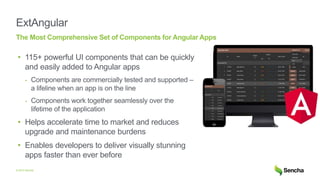
ExtAngular
• 115+ powerful UI components that can be quickly
and easily added to Angular apps
- Components are commercially tested and supported –
a lifeline when an app is on the line
- Components work together seamlessly over the
lifetime of the application
• Helps accelerate time to market and reduces
upgrade and maintenance burdens
• Enables developers to deliver visually stunning
apps faster than ever before
The Most Comprehensive Set of Components for Angular Apps
© 2019 Sencha
Existing Angular Components ExtAngular Provides
No complete component libraries available for
Angular
115+ commercially tested and supported
components
Dependency fatigue Single Dependency
Form without function Sophisticated components with plugins, events,
layouts and theming variables
Non-enterprise
Components designed for data driven enterprise
apps
3
© 2019 Sencha
ExtAngular Packaging
ExtAngular
Components
Buttons, Panels, Tabs
Toolbars, Tooltips, Windows
Forms, Menus, Buttons
Trees
Calendar
Grid
Exporter
Tree Grid
Pivot Grid
Sencha Charts
D3 Visualization
Tools
Cmd
Themer
Support
© 2019 Sencha
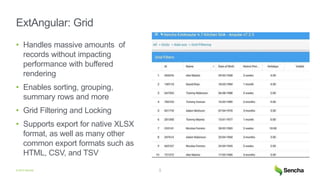
ExtAngular: Grid
• Handles massive amounts of
records without impacting
performance with buffered
rendering
• Enables sorting, grouping,
summary rows and more
• Grid Filtering and Locking
• Supports export for native XLSX
format, as well as many other
common export formats such as
HTML, CSV, and TSV
5
© 2019 Sencha
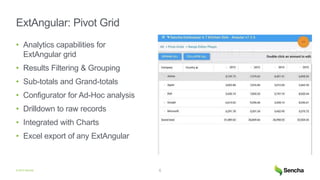
ExtAngular: Pivot Grid
• Analytics capabilities for
ExtAngular grid
• Results Filtering & Grouping
• Sub-totals and Grand-totals
• Configurator for Ad-Hoc analysis
• Drilldown to raw records
• Integrated with Charts
• Excel export of any ExtAngular
6
© 2019 Sencha
ExtAngular: Calendar
• Provides building blocks to
include calendar in ExtAngular
apps
• Day, Week, & Month views
• Store to define events
• Time zone support
• Drag, Resize & Validation
• Sample Google Calendar API
integration
7
© 2019 Sencha
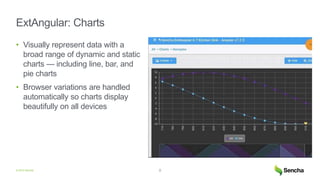
ExtAngular: Charts
• Visually represent data with a
broad range of dynamic and static
charts — including line, bar, and
pie charts
• Browser variations are handled
automatically so charts display
beautifully on all devices
8
© 2019 Sencha
ExtAngular: D3 Components
• SVG or Canvas rendering to
ExtAngular containers
• Managed as any other
ExtAngular component
• Integration with data stores to
update the visualizations as data
changes
- Data Store for regular data
- Tree Store for hierarchical data
• Pan/zoom interaction
9
© 2019 Sencha
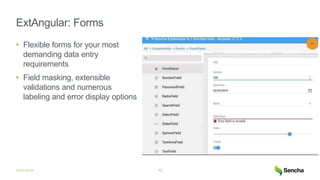
ExtAngular: Forms
• Flexible forms for your most
demanding data entry
requirements
• Field masking, extensible
validations and numerous
labeling and error display options
10
© 2019 Sencha
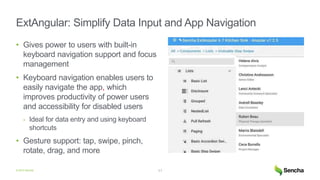
ExtAngular: Simplify Data Input and App Navigation
• Gives power to users with built-in
keyboard navigation support and focus
management
• Keyboard navigation enables users to
easily navigate the app, which
improves productivity of power users
and accessibility for disabled users
- Ideal for data entry and using keyboard
shortcuts
• Gesture support: tap, swipe, pinch,
rotate, drag, and more
11
© 2019 Sencha
ExtAngular: Simplify Cross-Platform Layout
• Build immersive user engagement using
layouts, adaptive and responsive design
features
• Handles the sizing and positioning of every
component in the app across different form
factors and device types
• Eliminates the need to micromanage CSS
settings
© 2019 Sencha
ExtAngular: Built-in Cross-platform support
• Support multiple device form factors
using Adaptive Layouts
• Support multiple screen sizes using
Responsive Layouts
13
<container
[layout]="Ext.platformTags.phone ?
'vbox' : 'hbox'">
...
<panel
[responsiveConfig[="{
'width >= 600': {
title: 'Manufacturing Summary'
},
'width < 600': {
title: 'Mfg Summary'
}
...
© 2019 Sencha
ExtAngular: Sophisticated Data Package Improves
Productivity
• Efficiently handles any size and source of
remote data with ease - across device types
• Connects to any back-end data source and
seamlessly handles flow of data to components,
making consuming data in trees, lists and grids
simple
• Sorting, filtering, grouping of data is all
automatic - without manual intervention by the
developer
• Extensible validation system with numerous
built-in validators:
- currency, date, email, exclusion, inclusion, format,
IP address, length, number, phone, time
© 2019 Sencha
ExtAngular Components are Themable
• Each can be extended using SASS or Sencha Themer
Triton Material iOS
© 2019 Sencha
ExtAngular: Theming Made Easy
• Built-in material design provides
ready to use polished
components
- Switch to other Sencha provided
themes with a one-line change
• Modify, extend or build your own
theme with ease via Sencha
Themer or theme APIs
• Visually design themes without
writing a single line of code
- Change fonts, colors, padding to
make components fit app motif
16
Material Design Sencha Themer
© 2019 Sencha
ExtAngular: Testing Made Easy
• End to End Automated testing of
ExtAngular apps
- Write unit and end-to-end functional
tests in JavaScript using Jasmine
- Leverage a powerful set of APIs in
Sencha Test to easily and
consistently reference ExtAngular
components
- Make use of features like screenshot
comparison to detect visual
differences between test runs
17
Sencha Test
© 2019 Sencha
Sencha ExtAngular
18
• 115+ UI Components
• Themer
• Cmd
• Ext Angular: component bridge
• Webpack: Build
• App Generator
• Examples
• Docs
© 2019 Sencha
Summary ExtAngular
• The most complete set of professionally tested and supported components for
Angular applications
• Accelerates time to market, minimizes integration and upgrade burdens, and
reduces business risk
• Delivers optimized web app performance
• Backed by a team of experts: developers can count on support and resources
when their app is on the line
© 2019 Sencha
ExtAngular: Getting Set Up
https://docs.sencha.com/extangular/
© 2019 Sencha
Questions?
© 2019 Sencha
Thank You!
Free Trial
https://www.sencha.com/products/extangular/evaluate/
Docs
https://docs.sencha.com/extangular
Ext angular Launch webinar

Ext angular Launch webinar

  • 1.
    © 2019 Sencha IntroducingExtAngular Adding Powerful Sencha Components toAngularApps Sandeep Adwankar, Marc Gusmano
  • 2.
    © 2019 Sencha ExtAngular •115+ powerful UI components that can be quickly and easily added to Angular apps - Components are commercially tested and supported – a lifeline when an app is on the line - Components work together seamlessly over the lifetime of the application • Helps accelerate time to market and reduces upgrade and maintenance burdens • Enables developers to deliver visually stunning apps faster than ever before The Most Comprehensive Set of Components for Angular Apps
  • 3.
    © 2019 Sencha ExistingAngular Components ExtAngular Provides No complete component libraries available for Angular 115+ commercially tested and supported components Dependency fatigue Single Dependency Form without function Sophisticated components with plugins, events, layouts and theming variables Non-enterprise Components designed for data driven enterprise apps 3
  • 4.
    © 2019 Sencha ExtAngularPackaging ExtAngular Components Buttons, Panels, Tabs Toolbars, Tooltips, Windows Forms, Menus, Buttons Trees Calendar Grid Exporter Tree Grid Pivot Grid Sencha Charts D3 Visualization Tools Cmd Themer Support
  • 5.
    © 2019 Sencha ExtAngular:Grid • Handles massive amounts of records without impacting performance with buffered rendering • Enables sorting, grouping, summary rows and more • Grid Filtering and Locking • Supports export for native XLSX format, as well as many other common export formats such as HTML, CSV, and TSV 5
  • 6.
    © 2019 Sencha ExtAngular:Pivot Grid • Analytics capabilities for ExtAngular grid • Results Filtering & Grouping • Sub-totals and Grand-totals • Configurator for Ad-Hoc analysis • Drilldown to raw records • Integrated with Charts • Excel export of any ExtAngular 6
  • 7.
    © 2019 Sencha ExtAngular:Calendar • Provides building blocks to include calendar in ExtAngular apps • Day, Week, & Month views • Store to define events • Time zone support • Drag, Resize & Validation • Sample Google Calendar API integration 7
  • 8.
    © 2019 Sencha ExtAngular:Charts • Visually represent data with a broad range of dynamic and static charts — including line, bar, and pie charts • Browser variations are handled automatically so charts display beautifully on all devices 8
  • 9.
    © 2019 Sencha ExtAngular:D3 Components • SVG or Canvas rendering to ExtAngular containers • Managed as any other ExtAngular component • Integration with data stores to update the visualizations as data changes - Data Store for regular data - Tree Store for hierarchical data • Pan/zoom interaction 9
  • 10.
    © 2019 Sencha ExtAngular:Forms • Flexible forms for your most demanding data entry requirements • Field masking, extensible validations and numerous labeling and error display options 10
  • 11.
    © 2019 Sencha ExtAngular:Simplify Data Input and App Navigation • Gives power to users with built-in keyboard navigation support and focus management • Keyboard navigation enables users to easily navigate the app, which improves productivity of power users and accessibility for disabled users - Ideal for data entry and using keyboard shortcuts • Gesture support: tap, swipe, pinch, rotate, drag, and more 11
  • 12.
    © 2019 Sencha ExtAngular:Simplify Cross-Platform Layout • Build immersive user engagement using layouts, adaptive and responsive design features • Handles the sizing and positioning of every component in the app across different form factors and device types • Eliminates the need to micromanage CSS settings
  • 13.
    © 2019 Sencha ExtAngular:Built-in Cross-platform support • Support multiple device form factors using Adaptive Layouts • Support multiple screen sizes using Responsive Layouts 13 <container [layout]="Ext.platformTags.phone ? 'vbox' : 'hbox'"> ... <panel [responsiveConfig[="{ 'width >= 600': { title: 'Manufacturing Summary' }, 'width < 600': { title: 'Mfg Summary' } ...
  • 14.
    © 2019 Sencha ExtAngular:Sophisticated Data Package Improves Productivity • Efficiently handles any size and source of remote data with ease - across device types • Connects to any back-end data source and seamlessly handles flow of data to components, making consuming data in trees, lists and grids simple • Sorting, filtering, grouping of data is all automatic - without manual intervention by the developer • Extensible validation system with numerous built-in validators: - currency, date, email, exclusion, inclusion, format, IP address, length, number, phone, time
  • 15.
    © 2019 Sencha ExtAngularComponents are Themable • Each can be extended using SASS or Sencha Themer Triton Material iOS
  • 16.
    © 2019 Sencha ExtAngular:Theming Made Easy • Built-in material design provides ready to use polished components - Switch to other Sencha provided themes with a one-line change • Modify, extend or build your own theme with ease via Sencha Themer or theme APIs • Visually design themes without writing a single line of code - Change fonts, colors, padding to make components fit app motif 16 Material Design Sencha Themer
  • 17.
    © 2019 Sencha ExtAngular:Testing Made Easy • End to End Automated testing of ExtAngular apps - Write unit and end-to-end functional tests in JavaScript using Jasmine - Leverage a powerful set of APIs in Sencha Test to easily and consistently reference ExtAngular components - Make use of features like screenshot comparison to detect visual differences between test runs 17 Sencha Test
  • 18.
    © 2019 Sencha SenchaExtAngular 18 • 115+ UI Components • Themer • Cmd • Ext Angular: component bridge • Webpack: Build • App Generator • Examples • Docs
  • 19.
    © 2019 Sencha SummaryExtAngular • The most complete set of professionally tested and supported components for Angular applications • Accelerates time to market, minimizes integration and upgrade burdens, and reduces business risk • Delivers optimized web app performance • Backed by a team of experts: developers can count on support and resources when their app is on the line
  • 20.
    © 2019 Sencha ExtAngular:Getting Set Up https://docs.sencha.com/extangular/
  • 21.
  • 22.
    © 2019 Sencha ThankYou! Free Trial https://www.sencha.com/products/extangular/evaluate/ Docs https://docs.sencha.com/extangular