Okis Chuang
Experiences sharing about
Lambda, Kinesis, and
Postgresql
Agenda
● Use Case and Architecture
● The rugged road we want to get better
○ Enhancement we’ve tried and error
■Bulk insert/update
■Kinesis stream tuning
■Lambda tuning
■Postgresql partition
Batch Processing?
Streaming Processing?
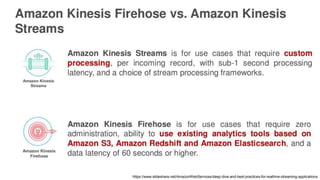
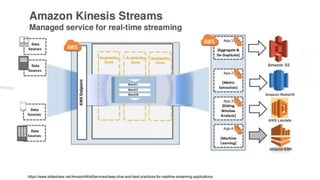
AWS Kinesis Family
https://www.slideshare.net/AmazonWebServices/deep-dive-and-best-practices-for-realtime-streaming-applications
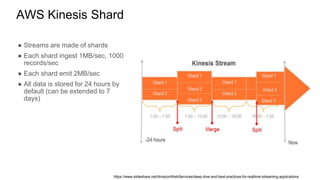
AWS Kinesis Shard
● Streams are made of shards
● Each shard ingest 1MB/sec, 1000
records/sec
● Each shard emit 2MB/sec
● All data is stored for 24 hours by
default (can be extended to 7
days)
https://www.slideshare.net/AmazonWebServices/deep-dive-and-best-practices-for-realtime-streaming-applications
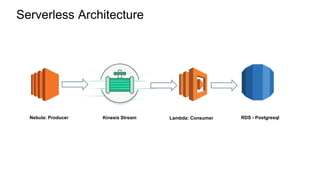
Serverless Architecture
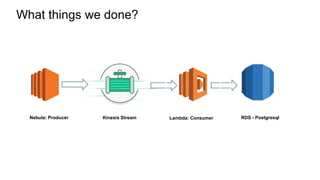
Nebula: Producer Kinesis Stream Lambda: Consumer RDS - Postgresql
What things we done?
Nebula: Producer Kinesis Stream Lambda: Consumer RDS - Postgresql
What things we did?
RDS - PostgreSQL
Batch Upsert
● Upsert for every single event at first
● We combine several methods to achieve better performance and reduce
times of query
○ Batch insert to postgresql temp table (memory table, per session) for caching all data
■Almost the same table structure with destination table except unique constraint
○ Use CTE to bulk update and delete updated row from temp table
■Use WITH clause combining RETURNING clause
○ Insert remaining data into destination table from temp table
■We faced conflict issue – misunderstanding of concurrency of lambda
■Catch duplicated error code for retrying UPDATE again
● Using SAVEPOINT to rollback to specific data point (like snapshot)
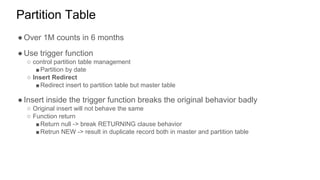
Partition Table
● Over 1M counts in 6 months
● Use trigger function
○ control partition table management
■Partition by date
○ Insert Redirect
■Redirect insert to partition table but master table
● Insert inside the trigger function breaks the original behavior badly
○ Original insert will not behave the same
○ Function return
■Return null -> break RETURNING clause behavior
■Retrun NEW -> result in duplicate record both in master and partition table
What things we did?
AWS Kinesis Stream
AWS Kinesis Lesson Learned
● Evaluate your shard needs
○ Ingestion style: FIFO, FILO…etc
○ For ingress, how much data would come into stream every day
○ For egress, how fast is your consumer? How many consumers will consume the same
stream simutaneously?
● Pre-batch your events before puts
○ In producer
○ In consumer
○ Fluentd as collector https://github.com/awslabs/aws-fluent-plugin-kinesis
● Make sure your backend would not be influenced due to high throughput
○ e.g. persists your aggregated events in database
What things we did?
AWS Lambda
AWS Lambda Lesson Learned
● Evaluate lambda resource
○ Memory will decide the whole performance level including CPU, memory…etc
● Scaling behavior - Concurrent?
○ Mistake & misunderstanding
■context.callbackWaitsForEmptyEventLoop=false
■Different level of granularity between data from insert and inside the database
■Use savepoint to retry batch update
○ Event-based/stream-based event-source (doc - Scaling Behavior)
■Stream-based: kinesis/dynamoDB
● Concurrency is the number of shards
■Non-stream based
● S3 event, API GW
● The number of events (or requests) these event sources publish influences the concurrency

Experiences sharing about Lambda, Kinesis, and Postgresql

  • 1.
    Okis Chuang Experiences sharingabout Lambda, Kinesis, and Postgresql
  • 2.
    Agenda ● Use Caseand Architecture ● The rugged road we want to get better ○ Enhancement we’ve tried and error ■Bulk insert/update ■Kinesis stream tuning ■Lambda tuning ■Postgresql partition
  • 3.
  • 4.
  • 5.
  • 6.
  • 7.
    AWS Kinesis Shard ●Streams are made of shards ● Each shard ingest 1MB/sec, 1000 records/sec ● Each shard emit 2MB/sec ● All data is stored for 24 hours by default (can be extended to 7 days) https://www.slideshare.net/AmazonWebServices/deep-dive-and-best-practices-for-realtime-streaming-applications
  • 8.
  • 9.
    Serverless Architecture Nebula: ProducerKinesis Stream Lambda: Consumer RDS - Postgresql
  • 10.
    What things wedone? Nebula: Producer Kinesis Stream Lambda: Consumer RDS - Postgresql
  • 11.
    What things wedid? RDS - PostgreSQL
  • 12.
    Batch Upsert ● Upsertfor every single event at first ● We combine several methods to achieve better performance and reduce times of query ○ Batch insert to postgresql temp table (memory table, per session) for caching all data ■Almost the same table structure with destination table except unique constraint ○ Use CTE to bulk update and delete updated row from temp table ■Use WITH clause combining RETURNING clause ○ Insert remaining data into destination table from temp table ■We faced conflict issue – misunderstanding of concurrency of lambda ■Catch duplicated error code for retrying UPDATE again ● Using SAVEPOINT to rollback to specific data point (like snapshot)
  • 13.
    Partition Table ● Over1M counts in 6 months ● Use trigger function ○ control partition table management ■Partition by date ○ Insert Redirect ■Redirect insert to partition table but master table ● Insert inside the trigger function breaks the original behavior badly ○ Original insert will not behave the same ○ Function return ■Return null -> break RETURNING clause behavior ■Retrun NEW -> result in duplicate record both in master and partition table
  • 14.
    What things wedid? AWS Kinesis Stream
  • 15.
    AWS Kinesis LessonLearned ● Evaluate your shard needs ○ Ingestion style: FIFO, FILO…etc ○ For ingress, how much data would come into stream every day ○ For egress, how fast is your consumer? How many consumers will consume the same stream simutaneously? ● Pre-batch your events before puts ○ In producer ○ In consumer ○ Fluentd as collector https://github.com/awslabs/aws-fluent-plugin-kinesis ● Make sure your backend would not be influenced due to high throughput ○ e.g. persists your aggregated events in database
  • 16.
    What things wedid? AWS Lambda
  • 17.
    AWS Lambda LessonLearned ● Evaluate lambda resource ○ Memory will decide the whole performance level including CPU, memory…etc ● Scaling behavior - Concurrent? ○ Mistake & misunderstanding ■context.callbackWaitsForEmptyEventLoop=false ■Different level of granularity between data from insert and inside the database ■Use savepoint to retry batch update ○ Event-based/stream-based event-source (doc - Scaling Behavior) ■Stream-based: kinesis/dynamoDB ● Concurrency is the number of shards ■Non-stream based ● S3 event, API GW ● The number of events (or requests) these event sources publish influences the concurrency