Evolving your API Architecture
with the Strangler (Fig) Pattern
Tom Hallam - Freshnode NZ
Limited
August 2020
Who I am
● Full stack engineer and AWS Certified Solution
Architect
● Previously Technical Lead @ Dyson - Smart
Home & IoT
● Stack: Node.js (TS), React, React Native, C#,
Golang
● Moved to NZ in November & in CHCH since
lockdown! :)
What Freshnode does
● Solution Architecture
● IoT Consultancy
● Full-Stack Development
● Contract Tech Leadership
● Coaching
https://freshnode.co.nz
What I am talking about today
● Different architectural patterns, and how you’re probably using one of them
● Why you might consider each pattern
● How to start migrating
● The “Strangler (Fig) Pattern”
What is the “Strangler (Fig) Pattern”?
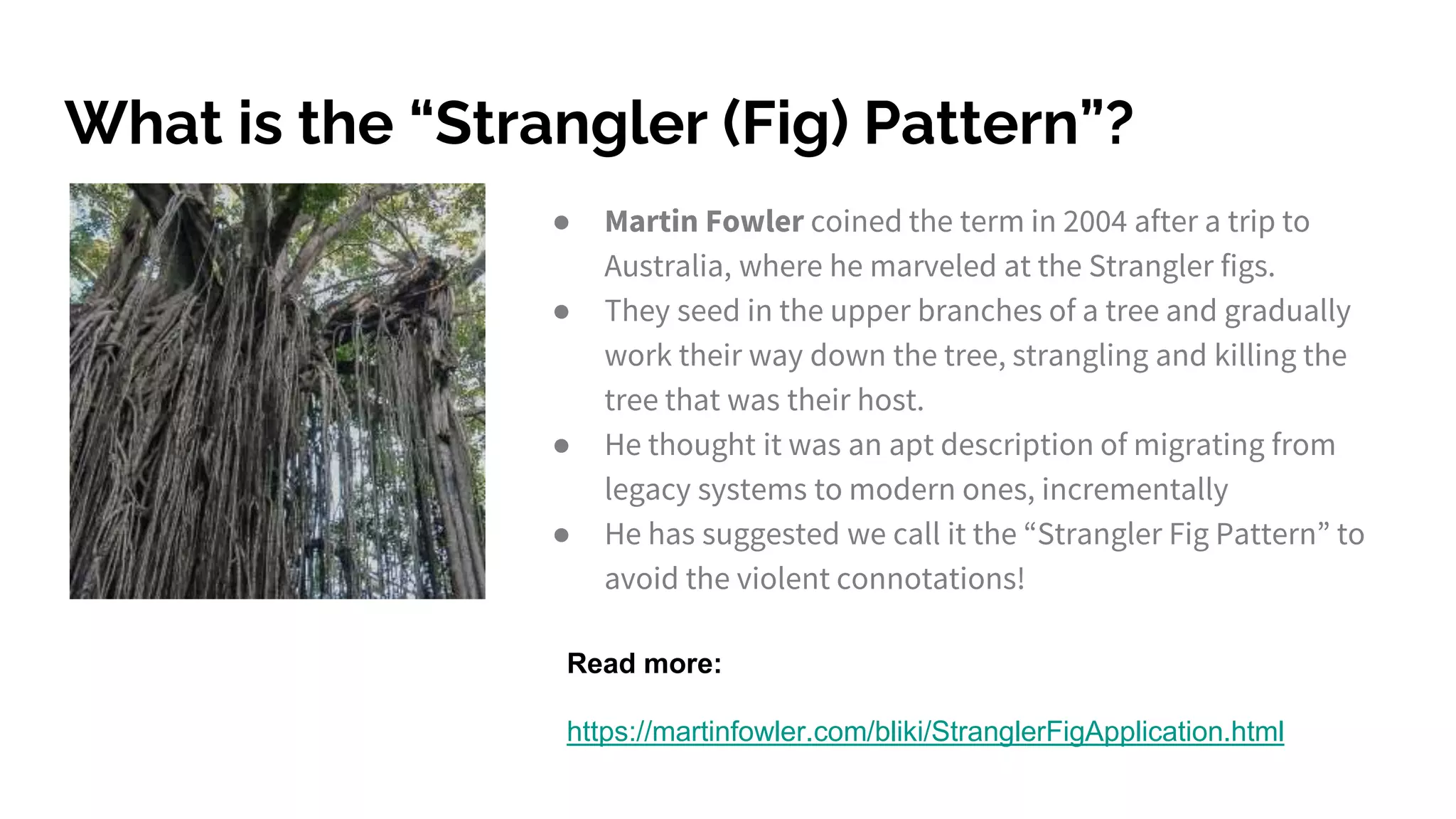
● Martin Fowler coined the term in 2004 after a trip to
Australia, where he marveled at the Strangler figs.
● They seed in the upper branches of a tree and gradually
work their way down the tree, strangling and killing the
tree that was their host.
● He thought it was an apt description of migrating from
legacy systems to modern ones, incrementally
● He has suggested we call it the “Strangler Fig Pattern” to
avoid the violent connotations!
Read more:
https://martinfowler.com/bliki/StranglerFigApplication.html
Let’s talk
architectural
patterns
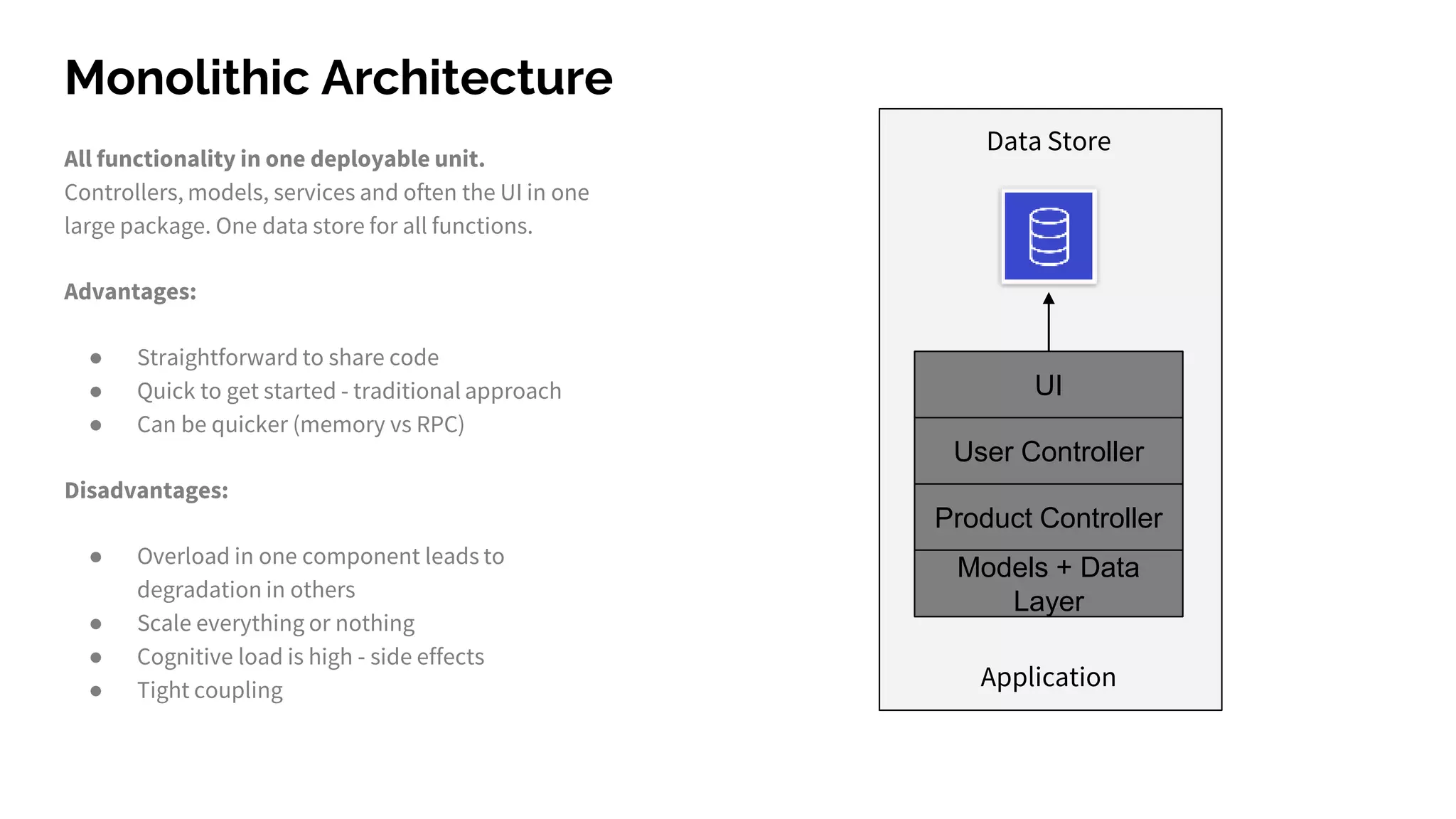
Monolithic Architecture
All functionality in one deployable unit.
Controllers, models, services and often the UI in one
large package. One data store for all functions.
Advantages:
● Straightforward to share code
● Quick to get started - traditional approach
● Can be quicker (memory vs RPC)
Disadvantages:
● Overload in one component leads to
degradation in others
● Scale everything or nothing
● Cognitive load is high - side effects
● Tight coupling
Models + Data
Layer
Product Controller
User Controller
UI
Application
Data Store
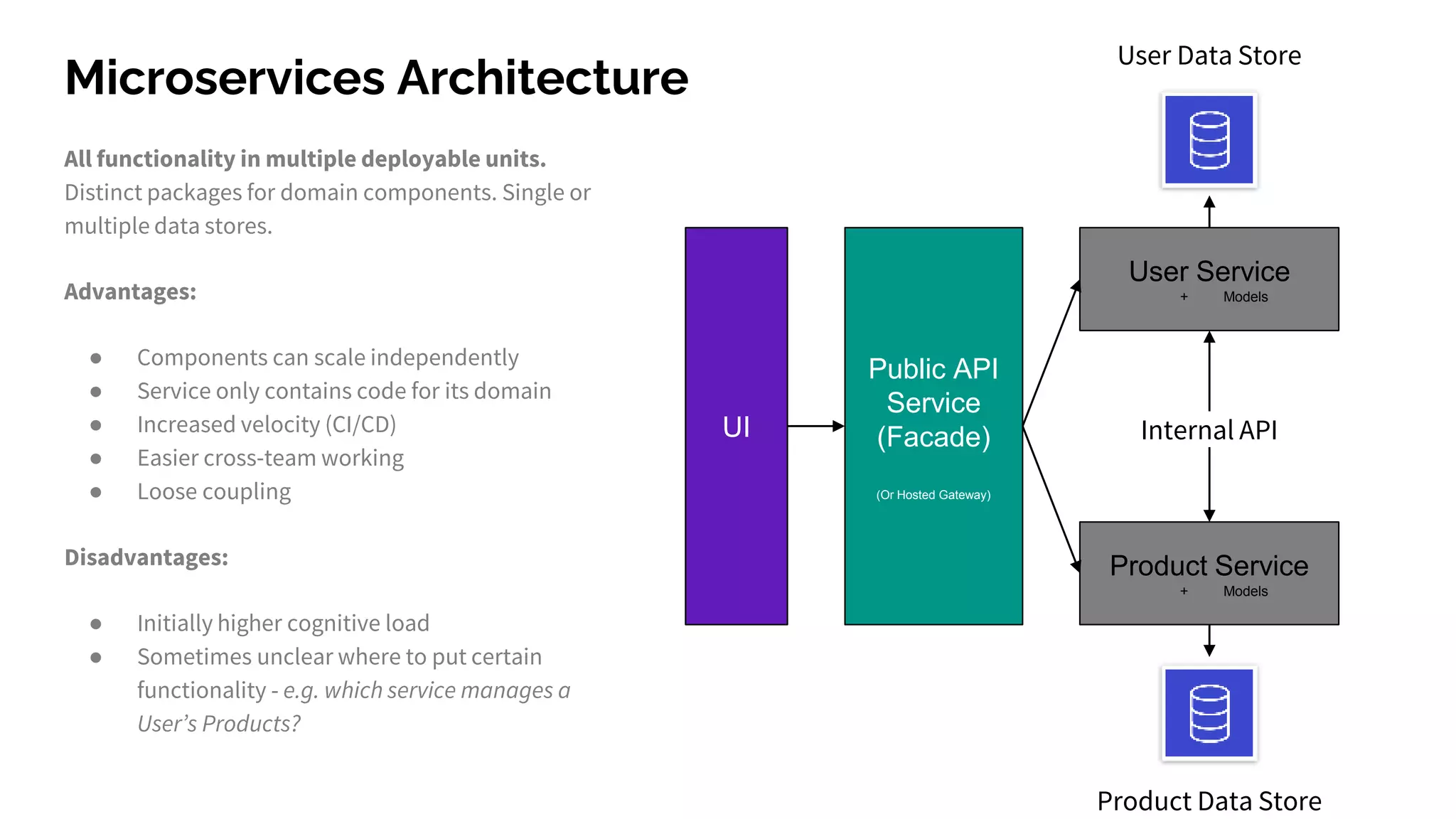
Microservices Architecture
All functionality in multiple deployable units.
Distinct packages for domain components. Single or
multiple data stores.
Advantages:
● Components can scale independently
● Service only contains code for its domain
● Increased velocity (CI/CD)
● Easier cross-team working
● Loose coupling
Disadvantages:
● Initially higher cognitive load
● Sometimes unclear where to put certain
functionality - e.g. which service manages a
User’s Products?
User Service
+ Models
Product Service
+ Models
Public API
Service
(Facade)
(Or Hosted Gateway)
UI
User Data Store
Product Data Store
Internal API
Why would I migrate?
● You can scale features independently
● Improve utilisation (+cost) - size the underlying resources for each use case
● Improved security - a breach of one service doesn’t hand the attacker the keys to
the rest (if you’ve architected your services correctly)
● Easier cross team working - distinct, known responsibilities improves velocity
● Easier to test single features locally
But Tom … Migrating the whole system sounds hard..
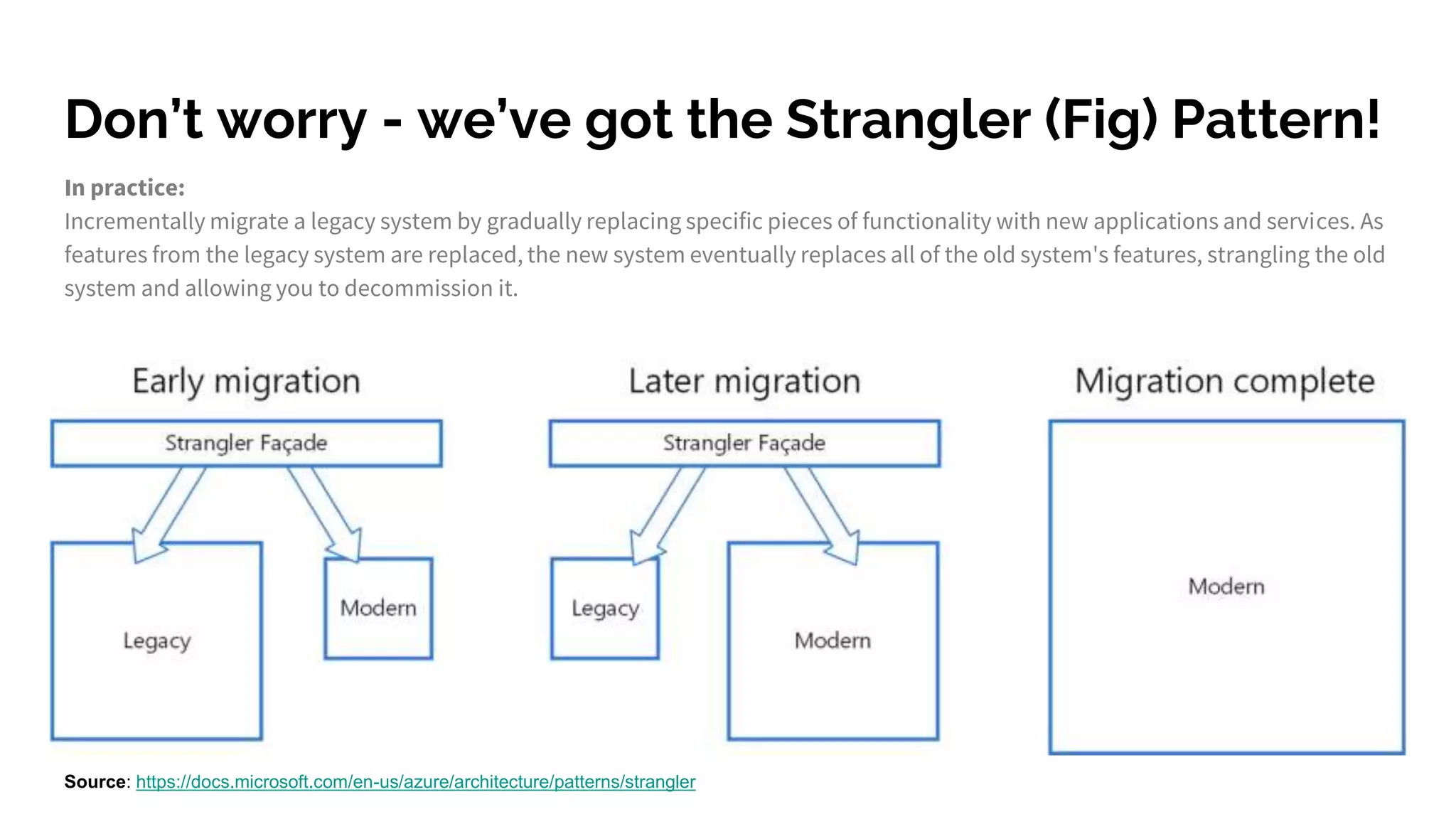
Don’t worry - we’ve got the Strangler (Fig) Pattern!
In practice:
Incrementally migrate a legacy system by gradually replacing specific pieces of functionality with new applications and services. As
features from the legacy system are replaced, the new system eventually replaces all of the old system's features, strangling the old
system and allowing you to decommission it.
Source: https://docs.microsoft.com/en-us/azure/architecture/patterns/strangler
It’s ok - you
probably use this
pattern every day!
But inside your services, rather than around them!
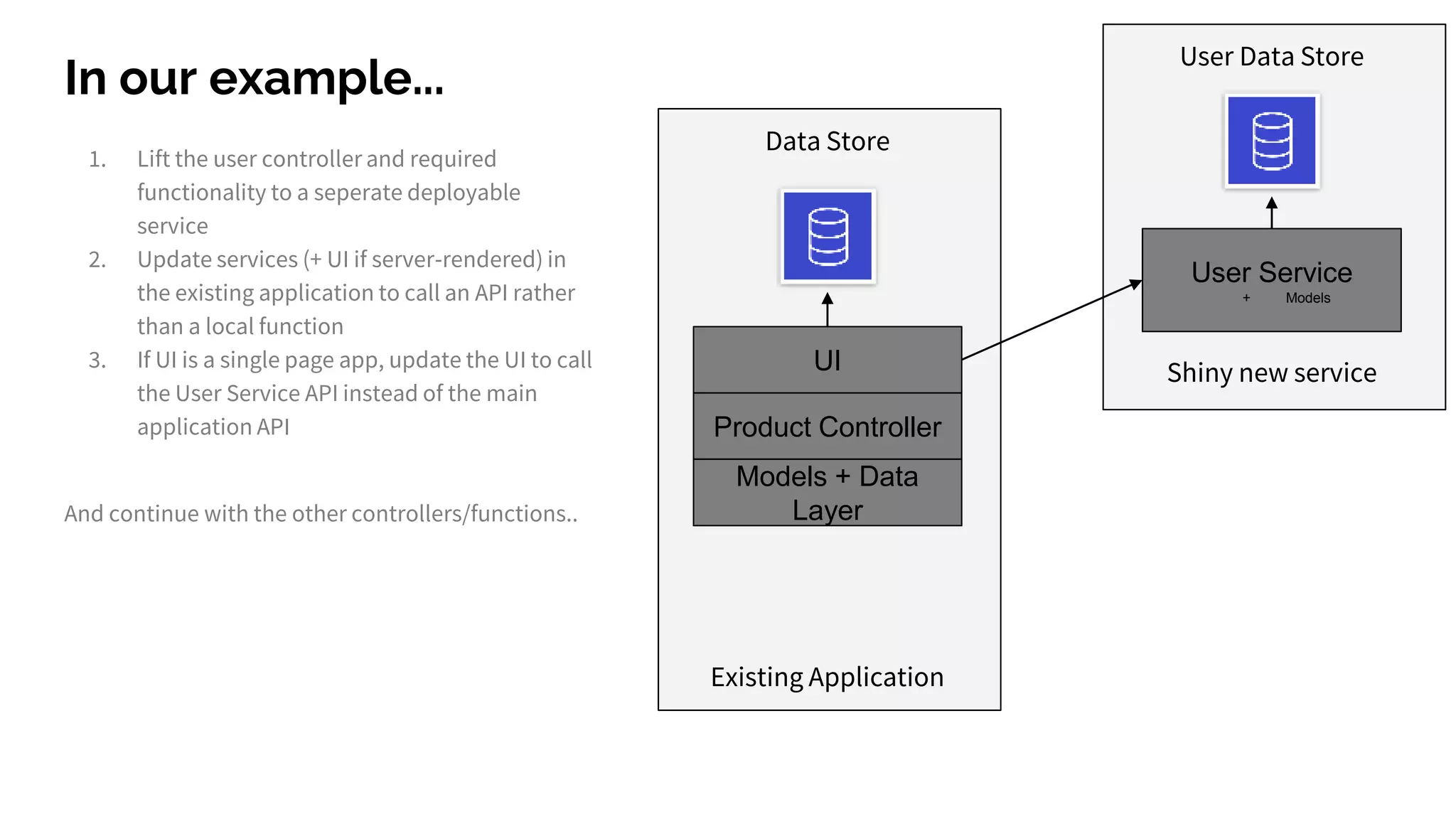
In our example...
1. Lift the user controller and required
functionality to a seperate deployable
service
2. Update services (+ UI if server-rendered) in
the existing application to call an API rather
than a local function
3. If UI is a single page app, update the UI to call
the User Service API instead of the main
application API
Models + Data
Layer
Product Controller
UI
Existing Application
Data Store
User Service
+ Models
User Data Store
Shiny new service
And continue with the other controllers/functions..
In our example...
UI
Existing Application
Data Store
User Service
+ Models
User Data Store
Shiny new service
Product Service
+ Models
Product Data Store
Another new service
1. Lift the user controller and required
functionality to a seperate deployable
service
2. Update services (+ UI if server-rendered) in
the existing application to call an API rather
than a local function
3. If UI is a single page app, update the UI to call
the User Service API instead of the main
application API
And continue with the other controllers/functions..
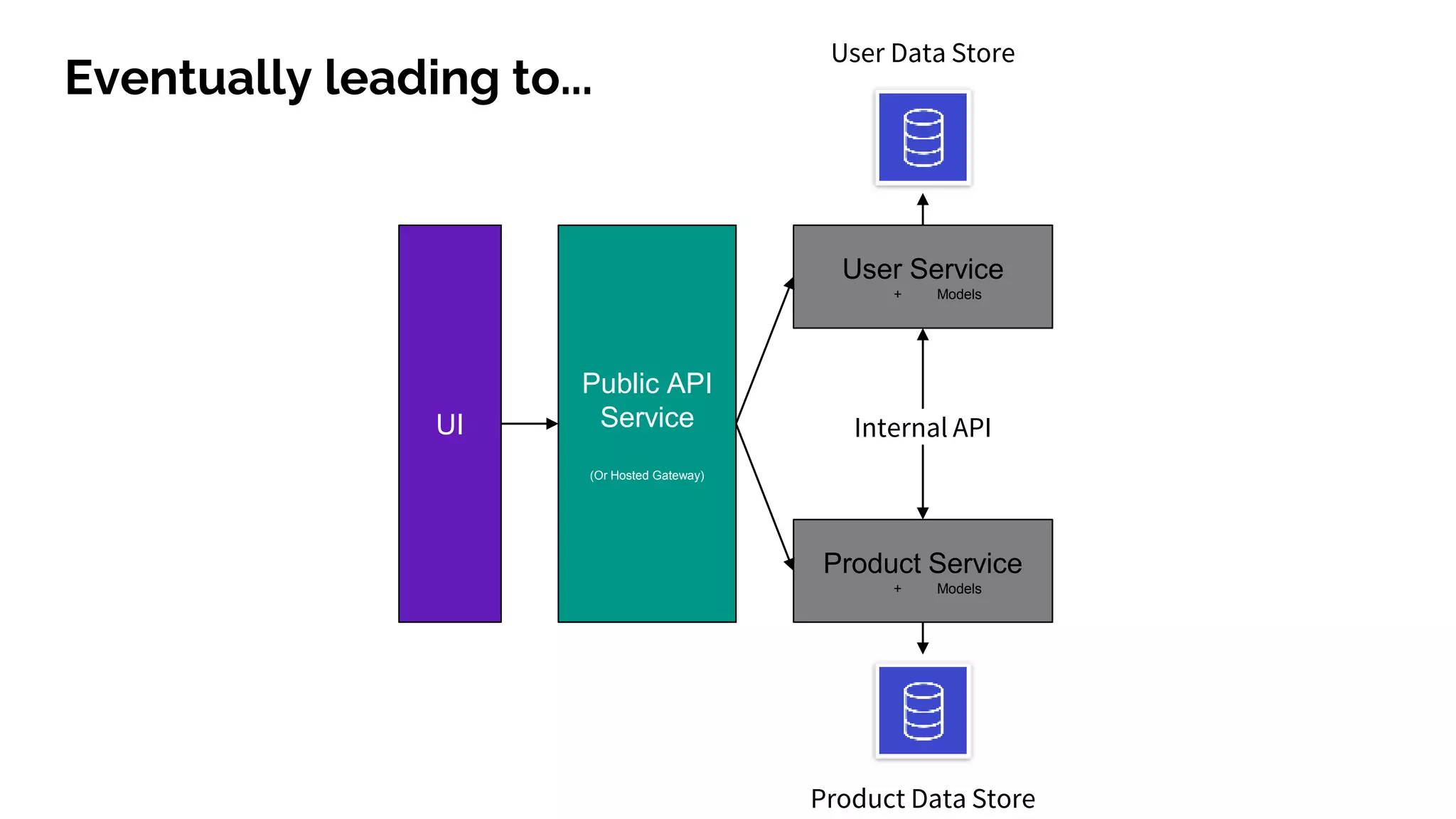
Eventually leading to...
User Service
+ Models
Product Service
+ Models
Public API
Service
(Or Hosted Gateway)
UI
User Data Store
Product Data Store
Internal API
Demo
(uh oh!)
Questions?

Evolving your api architecture with the strangler pattern

  • 1.
    Evolving your APIArchitecture with the Strangler (Fig) Pattern Tom Hallam - Freshnode NZ Limited August 2020
  • 2.
    Who I am ●Full stack engineer and AWS Certified Solution Architect ● Previously Technical Lead @ Dyson - Smart Home & IoT ● Stack: Node.js (TS), React, React Native, C#, Golang ● Moved to NZ in November & in CHCH since lockdown! :)
  • 3.
    What Freshnode does ●Solution Architecture ● IoT Consultancy ● Full-Stack Development ● Contract Tech Leadership ● Coaching https://freshnode.co.nz
  • 4.
    What I amtalking about today ● Different architectural patterns, and how you’re probably using one of them ● Why you might consider each pattern ● How to start migrating ● The “Strangler (Fig) Pattern”
  • 5.
    What is the“Strangler (Fig) Pattern”? ● Martin Fowler coined the term in 2004 after a trip to Australia, where he marveled at the Strangler figs. ● They seed in the upper branches of a tree and gradually work their way down the tree, strangling and killing the tree that was their host. ● He thought it was an apt description of migrating from legacy systems to modern ones, incrementally ● He has suggested we call it the “Strangler Fig Pattern” to avoid the violent connotations! Read more: https://martinfowler.com/bliki/StranglerFigApplication.html
  • 6.
  • 7.
    Monolithic Architecture All functionalityin one deployable unit. Controllers, models, services and often the UI in one large package. One data store for all functions. Advantages: ● Straightforward to share code ● Quick to get started - traditional approach ● Can be quicker (memory vs RPC) Disadvantages: ● Overload in one component leads to degradation in others ● Scale everything or nothing ● Cognitive load is high - side effects ● Tight coupling Models + Data Layer Product Controller User Controller UI Application Data Store
  • 8.
    Microservices Architecture All functionalityin multiple deployable units. Distinct packages for domain components. Single or multiple data stores. Advantages: ● Components can scale independently ● Service only contains code for its domain ● Increased velocity (CI/CD) ● Easier cross-team working ● Loose coupling Disadvantages: ● Initially higher cognitive load ● Sometimes unclear where to put certain functionality - e.g. which service manages a User’s Products? User Service + Models Product Service + Models Public API Service (Facade) (Or Hosted Gateway) UI User Data Store Product Data Store Internal API
  • 9.
    Why would Imigrate? ● You can scale features independently ● Improve utilisation (+cost) - size the underlying resources for each use case ● Improved security - a breach of one service doesn’t hand the attacker the keys to the rest (if you’ve architected your services correctly) ● Easier cross team working - distinct, known responsibilities improves velocity ● Easier to test single features locally
  • 10.
    But Tom …Migrating the whole system sounds hard..
  • 11.
    Don’t worry -we’ve got the Strangler (Fig) Pattern! In practice: Incrementally migrate a legacy system by gradually replacing specific pieces of functionality with new applications and services. As features from the legacy system are replaced, the new system eventually replaces all of the old system's features, strangling the old system and allowing you to decommission it. Source: https://docs.microsoft.com/en-us/azure/architecture/patterns/strangler
  • 12.
    It’s ok -you probably use this pattern every day! But inside your services, rather than around them!
  • 13.
    In our example... 1.Lift the user controller and required functionality to a seperate deployable service 2. Update services (+ UI if server-rendered) in the existing application to call an API rather than a local function 3. If UI is a single page app, update the UI to call the User Service API instead of the main application API Models + Data Layer Product Controller UI Existing Application Data Store User Service + Models User Data Store Shiny new service And continue with the other controllers/functions..
  • 14.
    In our example... UI ExistingApplication Data Store User Service + Models User Data Store Shiny new service Product Service + Models Product Data Store Another new service 1. Lift the user controller and required functionality to a seperate deployable service 2. Update services (+ UI if server-rendered) in the existing application to call an API rather than a local function 3. If UI is a single page app, update the UI to call the User Service API instead of the main application API And continue with the other controllers/functions..
  • 15.
    Eventually leading to... UserService + Models Product Service + Models Public API Service (Or Hosted Gateway) UI User Data Store Product Data Store Internal API
  • 17.
  • 18.