Evidence of Poster Construction
Courtney Buabeng
Using Photoshop
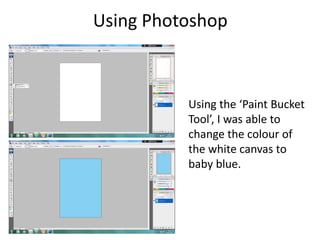
Using the ‘Paint Bucket
Tool’, I was able to
change the colour of
the white canvas to
baby blue.
Using Photoshop
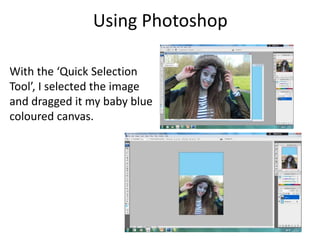
With the ‘Quick Selection
Tool’, I selected the image
and dragged it my baby blue
coloured canvas.
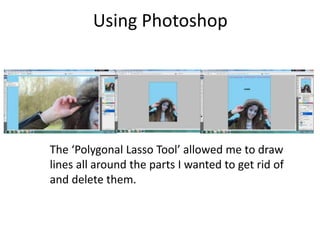
Using Photoshop
The ‘Polygonal Lasso Tool’ allowed me to draw
lines all around the parts I wanted to get rid of
and delete them.
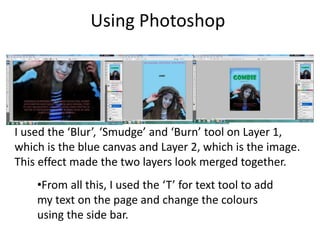
Using Photoshop
•From all this, I used the ‘T’ for text tool to add
my text on the page and change the colours
using the side bar.
I used the ‘Blur’, ‘Smudge’ and ‘Burn’ tool on Layer 1,
which is the blue canvas and Layer 2, which is the image.
This effect made the two layers look merged together.

Evidence of poster construction

  • 1.
    Evidence of PosterConstruction Courtney Buabeng
  • 2.
    Using Photoshop Using the‘Paint Bucket Tool’, I was able to change the colour of the white canvas to baby blue.
  • 3.
    Using Photoshop With the‘Quick Selection Tool’, I selected the image and dragged it my baby blue coloured canvas.
  • 4.
    Using Photoshop The ‘PolygonalLasso Tool’ allowed me to draw lines all around the parts I wanted to get rid of and delete them.
  • 5.
    Using Photoshop •From allthis, I used the ‘T’ for text tool to add my text on the page and change the colours using the side bar. I used the ‘Blur’, ‘Smudge’ and ‘Burn’ tool on Layer 1, which is the blue canvas and Layer 2, which is the image. This effect made the two layers look merged together.