MODULE 5
POINTERS
Basics of Pointer: declaring pointers, accessing data though
pointers, NULL pointer, array access
using pointers, pass by reference effect
File Operations: open, close, read, write, append
Sequential access and random access to files:
In built file handling functions (rewind() ,fseek(),
ftell(),feof(), fread(), fwrite()).
6/30/2020 NIMMY RAJU,AP, VKCET, TVM 1
• Pointers
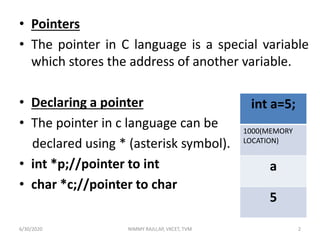
• The pointer in C language is a special variable
which stores the address of another variable.
• Declaring a pointer
• The pointer in c language can be
declared using * (asterisk symbol).
• int *p;//pointer to int
• char *c;//pointer to char
int a=5;
1000(MEMORY
LOCATION)
a
5
6/30/2020 NIMMY RAJU,AP, VKCET, TVM 2
• Assigning addresses to Pointers
• Let's take an example.
int* p, a;
a = 5;
p = &a;
• Here, 5 is assigned to the a variable. And, the
address of a is assigned to the p pointer.
6/30/2020 NIMMY RAJU,AP, VKCET, TVM 3
• Accessing Data through Pointers
• To get the value of the thing pointed by the
pointers, we use the * operator.
• For example:
int* p, c;
c = 5;
p = &c;
• printf("%d", *p); // Output: 5
• Here,the address of c is assigned to
the p pointer. To get the value stored in that
address, we used *p.
6/30/2020 NIMMY RAJU,AP, VKCET, TVM 4
#include<stdio.h>
void main()
{
int n = 10;
int *p;
p = &n;
printf("Address of n=%un",&n);
printf("Value of n=%dn",n);
printf("Address of p=%un",&p);
printf("Value of p=%un",p);
printf("Value of *p=%dn",*p); // *p = value of n;
}
Output
Address of n=6487628
Value of n=10
Address of p=6487616
Value of p=6487628
Value of *p=10
6/30/2020 NIMMY RAJU,AP, VKCET, TVM 5
• NULL Pointer
• A pointer that is not assigned any value but
NULL is known as the NULL pointer.
• If you don't have any address to be specified
in the pointer at the time of declaration, you
can assign NULL value.
• It will provide a better approach.
int *p=NULL;
6/30/2020 NIMMY RAJU,AP, VKCET, TVM 6
Array Access using Pointers
Write a program to display the content of an array using pointer.
#include<stdio.h>
void main()
{
int A[]={10,20,30,40,50};
int i;
int *p = A;
//Variable p of type pointer is pointing to the address of an integer array A.
printf("Array Contentn");
for(i=0;i<5;i++)
{
printf("%dt",*(p+i));
}
}
Output
Array Content
10 20 30 40 50
6/30/2020 NIMMY RAJU,AP, VKCET, TVM 7
• Pass By Reference
 In C programming, it is also possible to pass
addresses as arguments to functions.
 To accept these addresses in the function
definition, we can use pointers.
 In this method, the address of the actual
parameters is passed to formal parameters.
 So any change in formal parameters will be
reflected in the actual parameters.
6/30/2020 NIMMY RAJU,AP, VKCET, TVM 8
#include<stdio.h>
int swap(int *a,int *b)
{
int temp=*a;
*a= *b;
*b=temp;
}
void main()
{
int x,y;
printf("Enter the numbers:");
scanf("%d%d",&x,&y);
printf("Before swapping : x=%dty=%dn",x,y);
swap(&x,&y);
printf("After swapping : x=%dty=%d",x,y);
}
Output
Enter the numbers:10 20
Before swapping : x=10 y=20
After swapping : x=20 y=106/30/2020 NIMMY RAJU,AP, VKCET, TVM 9
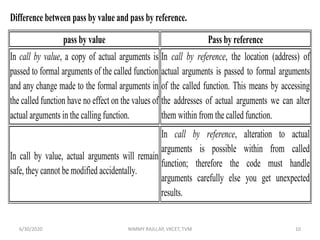
Difference between pass by value and pass by reference.
pass by value Pass by reference
In call by value, a copy of actual arguments is
passed to formal arguments of the called function
and any change made to the formal arguments in
the called function have no effect on the values of
actual arguments in the calling function.
In call by reference, the location (address) of
actual arguments is passed to formal arguments
of the called function. This means by accessing
the addresses of actual arguments we can alter
them within from the called function.
In call by value, actual arguments will remain
safe, they cannot be modified accidentally.
In call by reference, alteration to actual
arguments is possible within from called
function; therefore the code must handle
arguments carefully else you get unexpected
results.
6/30/2020 NIMMY RAJU,AP, VKCET, TVM 10
File
 A file represents a sequence of bytes, regardless of it
being a text file or a binary file.
 When working with files, you need to declare a pointer
of type file. This declaration is needed for
communication between the file and the program.
• FILE *fp; // *fp – file pointer variable
NIMMY RAJU,AP, VKCET, TVM 116/30/2020
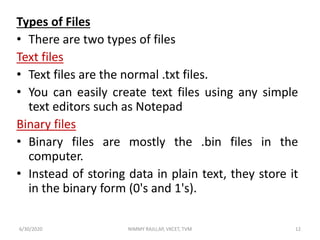
Types of Files
• There are two types of files
Text files
• Text files are the normal .txt files.
• You can easily create text files using any simple
text editors such as Notepad
Binary files
• Binary files are mostly the .bin files in the
computer.
• Instead of storing data in plain text, they store it
in the binary form (0's and 1's).
NIMMY RAJU,AP, VKCET, TVM 126/30/2020
File Operations
1)Opening a file:
• Opening a file is performed using the fopen()
function defined in the stdio.h header file.
• The syntax for opening a file in standard I/O is:
FILE *fp;
fp = fopen("filename","mode");
NIMMY RAJU,AP, VKCET, TVM 136/30/2020
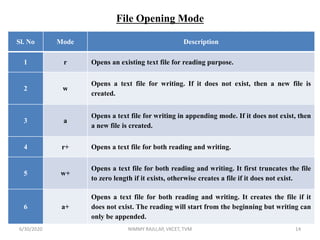
File Opening Mode
Sl. No Mode Description
1 r Opens an existing text file for reading purpose.
2 w
Opens a text file for writing. If it does not exist, then a new file is
created.
3 a
Opens a text file for writing in appending mode. If it does not exist, then
a new file is created.
4 r+ Opens a text file for both reading and writing.
5 w+
Opens a text file for both reading and writing. It first truncates the file
to zero length if it exists, otherwise creates a file if it does not exist.
6 a+
Opens a text file for both reading and writing. It creates the file if it
does not exist. The reading will start from the beginning but writing can
only be appended.
NIMMY RAJU,AP, VKCET, TVM 146/30/2020
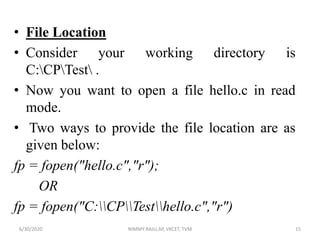
• File Location
• Consider your working directory is
C:CPTest .
• Now you want to open a file hello.c in read
mode.
• Two ways to provide the file location are as
given below:
fp = fopen("hello.c","r");
OR
fp = fopen("C:CPTesthello.c","r")
NIMMY RAJU,AP, VKCET, TVM 156/30/2020
• 2. Closing a file
• The file (both text and binary) should be closed
after reading/writing. Closing a file is performed
using the fclose() function.
fclose(fp);
• Here, fp is a file pointer associated with the file to
be closed.
NIMMY RAJU,AP, VKCET, TVM 166/30/2020
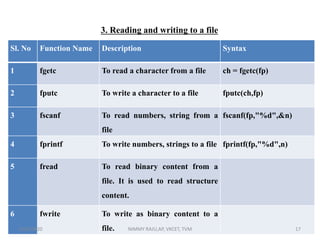
Sl. No Function Name Description Syntax
1 fgetc To read a character from a file ch = fgetc(fp)
2 fputc To write a character to a file fputc(ch,fp)
3 fscanf To read numbers, string from a
file
fscanf(fp,"%d",&n)
4 fprintf To write numbers, strings to a file fprintf(fp,"%d",n)
5 fread To read binary content from a
file. It is used to read structure
content.
6 fwrite To write as binary content to a
file. NIMMY RAJU,AP, VKCET, TVM 17
3. Reading and writing to a file
6/30/2020
NIMMY RAJU,AP, VKCET, TVM 18
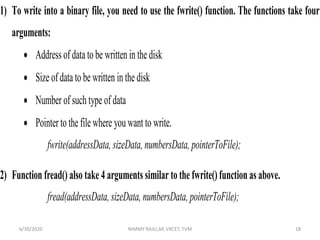
1) To write into a binary file, you need to use the fwrite() function. The functions take four
arguments:
 Address of data to be written in the disk
 Size of data to be written in the disk
 Number of such type of data
 Pointer to the file where you want to write.
fwrite(addressData, sizeData, numbersData, pointerToFile);
2) Function fread() also take 4 arguments similar to the fwrite() function as above.
fread(addressData, sizeData, numbersData, pointerToFile);
6/30/2020
feof()
 The C library function feof() function is a file
handling function in C programming language
which is used to find the end of a file.
 The prototype of this function is int feof(FILE*
filename);
 It returns the value zero when end of the file has
not occurred, otherwise it returns 1.
NIMMY RAJU,AP, VKCET, TVM 196/30/2020
Difference between sequential and random access.
• In Sequential file access ,is the method employed in
tape drives where the files are access in a sequential
manner. So if you have to get a file in the end of the tape
you have to start from the beginning till it reaches the
beginning of the file.
• Random access files are similar to the one in Hard
Disks and Optical drives, wherever the files is placed it
will go to that particular place and retrieve it.
NIMMY RAJU,AP, VKCET, TVM 206/30/2020
Random Access to a file
rewind()
• The rewind() function sets the file pointer at
the beginning of the stream. It is useful if you
have to use stream many times.
• Syntax: rewind(file pointer)
NIMMY RAJU,AP, VKCET, TVM 216/30/2020
fseek()
• If you have many records inside a file and need to access a record at a
specific position, you need to loop through all the records before it to get
the record.
• This will waste a lot of memory and operation time.
• An easier way to get to the required data can be achieved using fseek().
fseek(FILE * stream, long int offset, int pos);
 The first parameter stream is the pointer to the file.
 The second parameter is the no of bytes of offset to be added to the
position, and
 the third parameter specifies the position where the offset gets added.
NIMMY RAJU,AP, VKCET, TVM 226/30/2020
Different positions in fseek()
• Position Meaning
• SEEK_SET Starts the offset from the beginning of
the file.
• SEEK_END Starts the offset from the end of the
file.
• SEEK_CUR Starts the offset from the current
location of the cursor in the file.
NIMMY RAJU,AP, VKCET, TVM 236/30/2020
ftell()
• ftell() in C is used to find out the position of
file pointer in the file with respect to starting
of the file.
• Syntax of ftell() is:
ftell(FILE *pointer)
NIMMY RAJU,AP, VKCET, TVM 246/30/2020
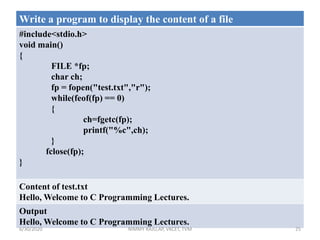
Write a program to display the content of a file
#include<stdio.h>
void main()
{
FILE *fp;
char ch;
fp = fopen("test.txt","r");
while(feof(fp) == 0)
{
ch=fgetc(fp);
printf("%c",ch);
}
fclose(fp);
}
Content of test.txt
Hello, Welcome to C Programming Lectures.
Output
Hello, Welcome to C Programming Lectures.
NIMMY RAJU,AP, VKCET, TVM 256/30/2020
NIMMY RAJU,AP, VKCET, TVM 26
Write a program to count numbers of vowels in a given file.
#include<stdio.h>
void main()
{
FILE *fp;
char ch;
int countV=0;
fp = fopen("test.txt","r");
while(feof(fp) == 0)
{
ch=fgetc(fp);
if(ch == 'a' || ch == 'A' || ch=='e'
ch=='E' || ch == 'I' || ch == 'i' ||
ch == 'O' || ch=='o' || ch == 'U' ||
ch == 'u')
{
countV++;
}
}
printf("Count of Vowels=%d",countV);
fclose(fp);
}
Output
Count of Vowels=12
6/30/2020
NIMMY RAJU,AP, VKCET, TVM 27
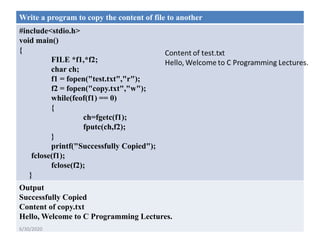
Write a program to copy the content of file to another
#include<stdio.h>
void main()
{
FILE *f1,*f2;
char ch;
f1 = fopen("test.txt","r");
f2 = fopen("copy.txt","w");
while(feof(f1) == 0)
{
ch=fgetc(f1);
fputc(ch,f2);
}
printf("Successfully Copied");
fclose(f1);
fclose(f2);
}
Output
Successfully Copied
Content of copy.txt
Hello, Welcome to C Programming Lectures.
6/30/2020
NIMMY RAJU,AP, VKCET, TVM 28
Write a program to merge the content of two files.
#include<stdio.h>
void main()
{
FILE *f1,*f2,*f3;
char ch;
f1 = fopen("file1.txt","r");
f2 = fopen("file2.txt","r");
f3 = fopen("merge.txt","w");
while(feof(f1) == 0)
{
ch=fgetc(f1);
fputc(ch,f3);
}
while(feof(f2) == 0)
{
ch=fgetc(f2);
fputc(ch,f3);
}
printf("Successfully Merged");
}
Output
Successfully Merged
Content of merge.txt
Hello, Welcome to C Programming
Lectures. C is very easy to learn.
Content of file1.txt
Hello, Welcome to C Programming Lectures.
Content of file2.txt
C is very easy to learn.
6/30/2020
NIMMY RAJU,AP, VKCET, TVM 29
Write a program to read numbers from a file and display the largest number.
#include<stdio.h>
void main()
{
FILE *f1;
int large,num;
f1 = fopen("number.txt","r");
fscanf(f1,"%d",&large); //
setting first element as largest element
while(feof(f1) == 0)
{
fscanf(f1,"%d",&num);
if(large<num)
{
large= num;
}
}
fclose(f1);
printf("Largest element = %d",large);
}
Content of number.txt
15 21 7 29 36 78 67 56 10
Output
Largest element = 78
6/30/2020

EST 102 Programming in C-MODULE 5

  • 1.
    MODULE 5 POINTERS Basics ofPointer: declaring pointers, accessing data though pointers, NULL pointer, array access using pointers, pass by reference effect File Operations: open, close, read, write, append Sequential access and random access to files: In built file handling functions (rewind() ,fseek(), ftell(),feof(), fread(), fwrite()). 6/30/2020 NIMMY RAJU,AP, VKCET, TVM 1
  • 2.
    • Pointers • Thepointer in C language is a special variable which stores the address of another variable. • Declaring a pointer • The pointer in c language can be declared using * (asterisk symbol). • int *p;//pointer to int • char *c;//pointer to char int a=5; 1000(MEMORY LOCATION) a 5 6/30/2020 NIMMY RAJU,AP, VKCET, TVM 2
  • 3.
    • Assigning addressesto Pointers • Let's take an example. int* p, a; a = 5; p = &a; • Here, 5 is assigned to the a variable. And, the address of a is assigned to the p pointer. 6/30/2020 NIMMY RAJU,AP, VKCET, TVM 3
  • 4.
    • Accessing Datathrough Pointers • To get the value of the thing pointed by the pointers, we use the * operator. • For example: int* p, c; c = 5; p = &c; • printf("%d", *p); // Output: 5 • Here,the address of c is assigned to the p pointer. To get the value stored in that address, we used *p. 6/30/2020 NIMMY RAJU,AP, VKCET, TVM 4
  • 5.
    #include<stdio.h> void main() { int n= 10; int *p; p = &n; printf("Address of n=%un",&n); printf("Value of n=%dn",n); printf("Address of p=%un",&p); printf("Value of p=%un",p); printf("Value of *p=%dn",*p); // *p = value of n; } Output Address of n=6487628 Value of n=10 Address of p=6487616 Value of p=6487628 Value of *p=10 6/30/2020 NIMMY RAJU,AP, VKCET, TVM 5
  • 6.
    • NULL Pointer •A pointer that is not assigned any value but NULL is known as the NULL pointer. • If you don't have any address to be specified in the pointer at the time of declaration, you can assign NULL value. • It will provide a better approach. int *p=NULL; 6/30/2020 NIMMY RAJU,AP, VKCET, TVM 6
  • 7.
    Array Access usingPointers Write a program to display the content of an array using pointer. #include<stdio.h> void main() { int A[]={10,20,30,40,50}; int i; int *p = A; //Variable p of type pointer is pointing to the address of an integer array A. printf("Array Contentn"); for(i=0;i<5;i++) { printf("%dt",*(p+i)); } } Output Array Content 10 20 30 40 50 6/30/2020 NIMMY RAJU,AP, VKCET, TVM 7
  • 8.
    • Pass ByReference  In C programming, it is also possible to pass addresses as arguments to functions.  To accept these addresses in the function definition, we can use pointers.  In this method, the address of the actual parameters is passed to formal parameters.  So any change in formal parameters will be reflected in the actual parameters. 6/30/2020 NIMMY RAJU,AP, VKCET, TVM 8
  • 9.
    #include<stdio.h> int swap(int *a,int*b) { int temp=*a; *a= *b; *b=temp; } void main() { int x,y; printf("Enter the numbers:"); scanf("%d%d",&x,&y); printf("Before swapping : x=%dty=%dn",x,y); swap(&x,&y); printf("After swapping : x=%dty=%d",x,y); } Output Enter the numbers:10 20 Before swapping : x=10 y=20 After swapping : x=20 y=106/30/2020 NIMMY RAJU,AP, VKCET, TVM 9
  • 10.
    Difference between passby value and pass by reference. pass by value Pass by reference In call by value, a copy of actual arguments is passed to formal arguments of the called function and any change made to the formal arguments in the called function have no effect on the values of actual arguments in the calling function. In call by reference, the location (address) of actual arguments is passed to formal arguments of the called function. This means by accessing the addresses of actual arguments we can alter them within from the called function. In call by value, actual arguments will remain safe, they cannot be modified accidentally. In call by reference, alteration to actual arguments is possible within from called function; therefore the code must handle arguments carefully else you get unexpected results. 6/30/2020 NIMMY RAJU,AP, VKCET, TVM 10
  • 11.
    File  A filerepresents a sequence of bytes, regardless of it being a text file or a binary file.  When working with files, you need to declare a pointer of type file. This declaration is needed for communication between the file and the program. • FILE *fp; // *fp – file pointer variable NIMMY RAJU,AP, VKCET, TVM 116/30/2020
  • 12.
    Types of Files •There are two types of files Text files • Text files are the normal .txt files. • You can easily create text files using any simple text editors such as Notepad Binary files • Binary files are mostly the .bin files in the computer. • Instead of storing data in plain text, they store it in the binary form (0's and 1's). NIMMY RAJU,AP, VKCET, TVM 126/30/2020
  • 13.
    File Operations 1)Opening afile: • Opening a file is performed using the fopen() function defined in the stdio.h header file. • The syntax for opening a file in standard I/O is: FILE *fp; fp = fopen("filename","mode"); NIMMY RAJU,AP, VKCET, TVM 136/30/2020
  • 14.
    File Opening Mode Sl.No Mode Description 1 r Opens an existing text file for reading purpose. 2 w Opens a text file for writing. If it does not exist, then a new file is created. 3 a Opens a text file for writing in appending mode. If it does not exist, then a new file is created. 4 r+ Opens a text file for both reading and writing. 5 w+ Opens a text file for both reading and writing. It first truncates the file to zero length if it exists, otherwise creates a file if it does not exist. 6 a+ Opens a text file for both reading and writing. It creates the file if it does not exist. The reading will start from the beginning but writing can only be appended. NIMMY RAJU,AP, VKCET, TVM 146/30/2020
  • 15.
    • File Location •Consider your working directory is C:CPTest . • Now you want to open a file hello.c in read mode. • Two ways to provide the file location are as given below: fp = fopen("hello.c","r"); OR fp = fopen("C:CPTesthello.c","r") NIMMY RAJU,AP, VKCET, TVM 156/30/2020
  • 16.
    • 2. Closinga file • The file (both text and binary) should be closed after reading/writing. Closing a file is performed using the fclose() function. fclose(fp); • Here, fp is a file pointer associated with the file to be closed. NIMMY RAJU,AP, VKCET, TVM 166/30/2020
  • 17.
    Sl. No FunctionName Description Syntax 1 fgetc To read a character from a file ch = fgetc(fp) 2 fputc To write a character to a file fputc(ch,fp) 3 fscanf To read numbers, string from a file fscanf(fp,"%d",&n) 4 fprintf To write numbers, strings to a file fprintf(fp,"%d",n) 5 fread To read binary content from a file. It is used to read structure content. 6 fwrite To write as binary content to a file. NIMMY RAJU,AP, VKCET, TVM 17 3. Reading and writing to a file 6/30/2020
  • 18.
    NIMMY RAJU,AP, VKCET,TVM 18 1) To write into a binary file, you need to use the fwrite() function. The functions take four arguments:  Address of data to be written in the disk  Size of data to be written in the disk  Number of such type of data  Pointer to the file where you want to write. fwrite(addressData, sizeData, numbersData, pointerToFile); 2) Function fread() also take 4 arguments similar to the fwrite() function as above. fread(addressData, sizeData, numbersData, pointerToFile); 6/30/2020
  • 19.
    feof()  The Clibrary function feof() function is a file handling function in C programming language which is used to find the end of a file.  The prototype of this function is int feof(FILE* filename);  It returns the value zero when end of the file has not occurred, otherwise it returns 1. NIMMY RAJU,AP, VKCET, TVM 196/30/2020
  • 20.
    Difference between sequentialand random access. • In Sequential file access ,is the method employed in tape drives where the files are access in a sequential manner. So if you have to get a file in the end of the tape you have to start from the beginning till it reaches the beginning of the file. • Random access files are similar to the one in Hard Disks and Optical drives, wherever the files is placed it will go to that particular place and retrieve it. NIMMY RAJU,AP, VKCET, TVM 206/30/2020
  • 21.
    Random Access toa file rewind() • The rewind() function sets the file pointer at the beginning of the stream. It is useful if you have to use stream many times. • Syntax: rewind(file pointer) NIMMY RAJU,AP, VKCET, TVM 216/30/2020
  • 22.
    fseek() • If youhave many records inside a file and need to access a record at a specific position, you need to loop through all the records before it to get the record. • This will waste a lot of memory and operation time. • An easier way to get to the required data can be achieved using fseek(). fseek(FILE * stream, long int offset, int pos);  The first parameter stream is the pointer to the file.  The second parameter is the no of bytes of offset to be added to the position, and  the third parameter specifies the position where the offset gets added. NIMMY RAJU,AP, VKCET, TVM 226/30/2020
  • 23.
    Different positions infseek() • Position Meaning • SEEK_SET Starts the offset from the beginning of the file. • SEEK_END Starts the offset from the end of the file. • SEEK_CUR Starts the offset from the current location of the cursor in the file. NIMMY RAJU,AP, VKCET, TVM 236/30/2020
  • 24.
    ftell() • ftell() inC is used to find out the position of file pointer in the file with respect to starting of the file. • Syntax of ftell() is: ftell(FILE *pointer) NIMMY RAJU,AP, VKCET, TVM 246/30/2020
  • 25.
    Write a programto display the content of a file #include<stdio.h> void main() { FILE *fp; char ch; fp = fopen("test.txt","r"); while(feof(fp) == 0) { ch=fgetc(fp); printf("%c",ch); } fclose(fp); } Content of test.txt Hello, Welcome to C Programming Lectures. Output Hello, Welcome to C Programming Lectures. NIMMY RAJU,AP, VKCET, TVM 256/30/2020
  • 26.
    NIMMY RAJU,AP, VKCET,TVM 26 Write a program to count numbers of vowels in a given file. #include<stdio.h> void main() { FILE *fp; char ch; int countV=0; fp = fopen("test.txt","r"); while(feof(fp) == 0) { ch=fgetc(fp); if(ch == 'a' || ch == 'A' || ch=='e' ch=='E' || ch == 'I' || ch == 'i' || ch == 'O' || ch=='o' || ch == 'U' || ch == 'u') { countV++; } } printf("Count of Vowels=%d",countV); fclose(fp); } Output Count of Vowels=12 6/30/2020
  • 27.
    NIMMY RAJU,AP, VKCET,TVM 27 Write a program to copy the content of file to another #include<stdio.h> void main() { FILE *f1,*f2; char ch; f1 = fopen("test.txt","r"); f2 = fopen("copy.txt","w"); while(feof(f1) == 0) { ch=fgetc(f1); fputc(ch,f2); } printf("Successfully Copied"); fclose(f1); fclose(f2); } Output Successfully Copied Content of copy.txt Hello, Welcome to C Programming Lectures. 6/30/2020
  • 28.
    NIMMY RAJU,AP, VKCET,TVM 28 Write a program to merge the content of two files. #include<stdio.h> void main() { FILE *f1,*f2,*f3; char ch; f1 = fopen("file1.txt","r"); f2 = fopen("file2.txt","r"); f3 = fopen("merge.txt","w"); while(feof(f1) == 0) { ch=fgetc(f1); fputc(ch,f3); } while(feof(f2) == 0) { ch=fgetc(f2); fputc(ch,f3); } printf("Successfully Merged"); } Output Successfully Merged Content of merge.txt Hello, Welcome to C Programming Lectures. C is very easy to learn. Content of file1.txt Hello, Welcome to C Programming Lectures. Content of file2.txt C is very easy to learn. 6/30/2020
  • 29.
    NIMMY RAJU,AP, VKCET,TVM 29 Write a program to read numbers from a file and display the largest number. #include<stdio.h> void main() { FILE *f1; int large,num; f1 = fopen("number.txt","r"); fscanf(f1,"%d",&large); // setting first element as largest element while(feof(f1) == 0) { fscanf(f1,"%d",&num); if(large<num) { large= num; } } fclose(f1); printf("Largest element = %d",large); } Content of number.txt 15 21 7 29 36 78 67 56 10 Output Largest element = 78 6/30/2020