Network Monitoring
for ArcSight ESM 5.5
March 1, 2013
Standard Content Guide
Standard Content Guide - Network Monitoring
Copyright © 2013 Hewlett-Packard Development Company, L.P.
Confidential computer software. Valid license from HP required for possession, use or copying. Consistent
with FAR 12.211 and 12.212, Commercial Computer Software, Computer Software Documentation, and
Technical Data for Commercial Items are licensed to the U.S. Government under vendor's standard
commercial license.
The information contained herein is subject to change without notice. The only warranties for HP products
and services are set forth in the express warranty statements accompanying such products and services.
Nothing herein should be construed as constituting an additional warranty. HP shall not be liable for
technical or editorial errors or omissions contained herein.
Follow this link to see a complete statement of copyrights and acknowledgements:
http://www.arcsight.com/copyrightnotice
The network information used in the examples in this document (including IP addresses and hostnames) is
for illustration purposes only.
This document is confidential.
Revision History
Document template version: 2.1
Contact Information
Date Product Version Description
03/01/2013 Network Monitoring 5.5 Final revision for release.
Phone 1-866-535-3285 (North America)
+44 (0)870 141 7487 (EMEA)
Support Web Site http://support.openview.hp.com
Protect 724 Community https://protect724.arcsight.com
Confidential Standard Content Guide 3
Contents
Chapter 1: Network Monitoring Overview ........................................................................... 5
What is Standard Content? ............................................................................................... 5
Standard Content Packages .............................................................................................. 6
Network Monitoring Content ............................................................................................. 7
Supported Devices .................................................................................................... 7
Calculating Bytes In and Bytes Out .............................................................................. 8
Chapter 2: Installation and Configuration ......................................................................... 11
Installing the Network Monitoring Package ........................................................................ 11
Configuring Network Monitoring Content ........................................................................... 12
Configuring the SmartConnector to Aggregate Events .................................................. 12
Modeling the Network .............................................................................................. 13
Categorizing Assets ................................................................................................. 13
Enabling Rules ........................................................................................................ 14
Configuring Filters ................................................................................................... 14
Ensuring Filters Capture Relevant Data ...................................................................... 16
Configuring Notification Destinations .......................................................................... 17
Configuring Notifications and Cases ........................................................................... 17
Scheduling Reports ................................................................................................. 17
Configuring Trends .................................................................................................. 17
Chapter 3: Network Monitoring Content ............................................................................ 19
Bandwidth Usage .......................................................................................................... 20
Devices ................................................................................................................. 20
Resources .............................................................................................................. 20
Device Activity ............................................................................................................. 27
Devices ................................................................................................................. 27
Resources .............................................................................................................. 27
Hosts and Protocols ....................................................................................................... 34
Devices ................................................................................................................. 34
Configuration ......................................................................................................... 34
Resources .............................................................................................................. 34
SANS Top 5 Reports ...................................................................................................... 40
Devices ................................................................................................................. 40
4 Standard Content Guide Confidential
Resources .............................................................................................................. 40
Traffic Overview ............................................................................................................ 46
Devices ................................................................................................................. 46
Resources .............................................................................................................. 46
Appendix A: Upgrading Standard Content ......................................................................... 59
Preparing Existing Content for Upgrade ............................................................................ 59
Configurations Preserved During Upgrade ................................................................... 59
Configurations that Require Restoration After Upgrade ................................................. 59
Backing Up Existing Resources Before Upgrade ........................................................... 60
Performing the Upgrade ................................................................................................. 60
Checking and Restoring Content After Upgrade ................................................................. 60
Verifying and Reapplying Configurations ..................................................................... 61
Verifying Customized Content ................................................................................... 61
Fixing Invalid Resources .......................................................................................... 61
Index ...................................................................................................................................................... 63
Confidential Standard Content Guide 5
Chapter 1
Network Monitoring Overview
This chapter discusses the following topics.
What is Standard Content?
Standard content is a series of coordinated resources (filters, rules, dashboards, reports,
and so on) that address common security and management tasks. Standard content is
designed to give you comprehensive correlation, monitoring, reporting, alerting, and case
management out of the box with minimal configuration. The content provides a full
spectrum of security, network, and configuration monitoring tasks, as well as a
comprehensive set of tasks that monitor the health of the system.
The standard content is installed using a series of packages, some of which are installed
automatically with the Manager to provide essential system health and status operations.
The remaining packages are presented as install-time options organized by category.
Standard content consists of the following:
 ArcSight System content is installed automatically with the Manager and consists of
resources required for basic security processing functions, such as threat escalation
and priority calculations, as well as basic throughput channels required for
out-of-the-box functionality.
 ArcSight Administration content is installed automatically with the Manager, and
provides statistics about the health and performance of ArcSight products. ArcSight
Administration is essential for managing and tuning the performance of content and
components.
 ArcSight Foundations content (such as Configuration Monitoring, Intrusion
Monitoring, Network Monitoring, NetFlow Monitoring, and Workflow) are presented as
install-time options and provide a coordinated system of resources with real-time
monitoring capabilities for a specific area of focus, as well as after-the-fact analysis in
the form of reports and trends. You can extend these foundations with additional
resources specific to your needs or you can use them as a template for building your
own resources and tasks.
 Shared Libraries - ArcSight Administration and several of the ArcSight Foundations
rely on a series of common resources that provide core functionality for common
“What is Standard Content?” on page 5
“Standard Content Packages” on page 6
“Network Monitoring Content” on page 7
1 Network Monitoring Overview
6 Standard Content Guide Confidential
security scenarios. Dependencies between these resources and the packages they
support are managed by the Package resource.
 Anti-Virus content is a set of filters, reports, and report queries used by ArcSight
Foundations, such as Configuration Monitoring and Intrusion Monitoring.
 Conditional Variable Filters are a library of filters used by variables in standard
content report queries, filters, and rule definitions. The Conditional Variable Filters
are used by ArcSight Administration and certain ArcSight Foundations, such as
Configuration Monitoring, Intrusion Monitoring, Network Monitoring, and
Workflow.
 Global Variables are a set of variables used to create other resources and to
provide event-based fields that cover common event information, asset, host, and
user information, and commonly used timestamp formats. The Global Variables
are used by ArcSight Administration and certain ArcSight Foundations.
 Network filters are a set of filters required by ArcSight Administration and certain
ArcSight Foundations, such as Intrusion Monitoring and Network Monitoring.
Standard Content Packages
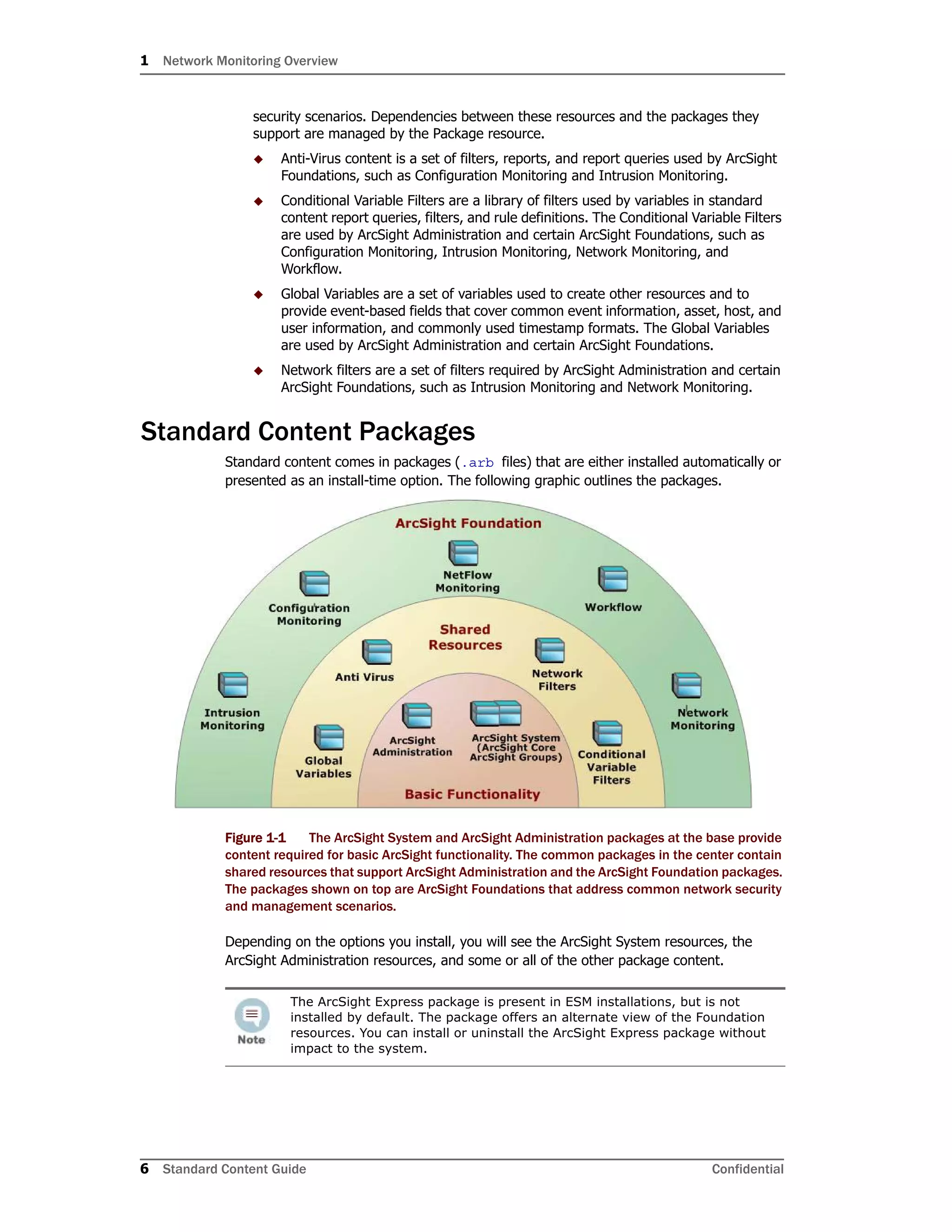
Standard content comes in packages (.arb files) that are either installed automatically or
presented as an install-time option. The following graphic outlines the packages.
Figure 1-1 The ArcSight System and ArcSight Administration packages at the base provide
content required for basic ArcSight functionality. The common packages in the center contain
shared resources that support ArcSight Administration and the ArcSight Foundation packages.
The packages shown on top are ArcSight Foundations that address common network security
and management scenarios.
Depending on the options you install, you will see the ArcSight System resources, the
ArcSight Administration resources, and some or all of the other package content.
The ArcSight Express package is present in ESM installations, but is not
installed by default. The package offers an alternate view of the Foundation
resources. You can install or uninstall the ArcSight Express package without
impact to the system.
1 Network Monitoring Overview
Confidential Standard Content Guide 7
Network Monitoring Content
The Network Monitoring content monitors the status of network throughput and network
infrastructure. This content provides statistics about traffic patterns and bandwidth usage
that helps you identify anomalies and areas of the network that need attention. The
Network Monitoring content can help you:
 Keep the network up and running
 Ensure maximum availability of mission-critical server applications and vital network
resources
 Validate the existence and availability of any network object
 Observe and detect any object in error state
 Monitor common and custom TCP/IP ports
 Evaluate network productivity and utilization of network resources
 Assess impact of changes to the network
 Track network anomaly and security vulnerabilities
Supported Devices
The Network Monitoring content is built around feeds from the ArcSight SmartConnector
that collects events from Qosient Argus, which is a real-time flow monitor. It monitors all
network transactions seen in a data network traffic stream. For more information about
Qosient Argus, see http://www.qosient.com/argus/.
The Argus device detects a transaction from point A to point B and stores the information
in the following Argus-specific fields:
When creating your own packages, you can explicitly include or exclude system
resources in the package. Exercise caution if you delete packages that might
have system resources; for example, zones. Make sure the system resources
either belong to a locked group or are themselves locked. For more information
about packages, refer to the ArcSight Console User’s Guide.
Argus event field Description
lasttime record last time
srcaddr source IP address
dstaddr destination IP address
sport source port number
dport destination port number
bytes total transaction bytes
srcbytes source-to-destination transaction bytes
dstbytes destination-to-source transaction bytes
1 Network Monitoring Overview
8 Standard Content Guide Confidential
The ArcSight Argus SmartConnector maps this information to the correct fields in the Arc-
Sight event schema, for example:
Calculating Bytes In and Bytes Out
One of the goals of the Network Monitoring content is to analyze how much traffic volume
is coming into and going out of the network. Calculating this bandwidth usage involves
keeping track of bytes in and bytes out of the network, from what sources, and at what
rates.
Argus counts any request as “bytes in” and any response as “bytes out” regardless of
where the requestor is located in relation to your protected network. For example, in the
illustration below, Point A initiates the request to Point B, and Point C initiates the request
to Point A. Both are considered by Argus to be “bytes in.”
But as a network administrator, you are also interested in traffic volume outbound from and
inbound to your protected network, illustrated by the blue and red arrows in the example
below.
Figure 1-1 ArcSight variables ensure that Argus byte counts for “bytes in” and “bytes out”
correspond with the network notion of inbound traffic and outbound traffic.
To make sure that the byte counts for Argus “bytes in” and “bytes out” correspond with
your network's notion of outbound traffic and inbound traffic, ArcSight has constructed a
system of variables and filters that translate Argus “bytes in” and “bytes out” to traffic
inbound to and outbound from your network.
The ArcSight IncomingBytes and OutgoingBytes variables take the Argus byte count
of activity on the way out of the protected network and counts it as outbound traffic, and
Argus event field ArcSight event field
srcaddr Attacker Address
dstaddr Target Address
srcbytes Bytes in
dstbytes Bytes out
1 Network Monitoring Overview
Confidential Standard Content Guide 9
activity coming into the protected network as inbound traffic. In the A-to-B case, it consid-
ers the byte count for Argus “bytes in” to be outbound traffic and considers the byte count
for Argus “bytes out” to be inbound traffic. The A-to-C case matches: bytes in are counted
as inbound traffic, and bytes out are counted as outbound traffic.
In the example, if you add the total bytes out from the network's perspective (after the val-
ues have been normalized by the ArcSight variables), you add the byte counts for the two
red arrows, in this case, 8 + 3, or 11. And the byte total for the inbound traffic is the sum
of the two blue arrows: 4 + 5, or 9.
1 Network Monitoring Overview
10 Standard Content Guide Confidential
Confidential Standard Content Guide 11
Chapter 2
Installation and Configuration
This chapter discusses the following topics:
For information about upgrading standard content, see Appendix A‚ Upgrading Standard
Content‚ on page 59.
Installing the Network Monitoring Package
The Network Monitoring Foundation is one of the standard content packages that are
presented as install-time options. If you selected all the standard content packages to be
installed at installation time, the packages and their resources will be installed in the
ArcSight database and available in the Navigator panel resource tree. The package icon in
the Navigator panel package view will appear blue.
If you opted to exclude any packages at installation time, the package is imported into the
ESM package view in the Navigator panel, but is not available in the resource view. The
package icon in the package view will appear grey.
If you do not want the package to be available in any form, you can delete the package.
To install a package that is imported, but not installed:
1 In the Navigator panel Package view, navigate to the package you want to install.
2 Right-click the package and select Install Package.
3 In the Install Package dialog, click OK.
4 When the installation is complete, review the summary report and click OK.
The package resources are fully installed to the ArcSight database, the resources are
fully enabled and operational, and available in the Navigator panel resource tree.
To uninstall a package that is installed:
1 In the Navigator Panel Package view, navigate to the package you want to uninstall.
2 Right-click the package and select Uninstall Package.
3 In the Uninstall Package dialog, click OK.
The progress of the uninstall displays in the Progress tab of the Uninstalling Packages
dialog. If a message displays indicating that there is a conflict, select an option in the
Resolution Options area and click OK.
“Installing the Network Monitoring Package” on page 11
“Configuring Network Monitoring Content” on page 12
2 Installation and Configuration
12 Standard Content Guide Confidential
4 When uninstall is complete, review the summary and click OK.
The package is removed from the ArcSight database and the Navigator panel resource
tree, but remains available in the Navigator panel package view, and can be re-
installed at another time.
To delete a package and remove it from the Console and the database:
1 In the Navigator Panel Package view, navigate to the package you want to delete.
2 Right-click the package and select Delete Package.
3 When prompted for confirmation of the delete, click Delete.
The package is removed from the Navigator panel package view.
Configuring Network Monitoring Content
The list below shows the general tasks you need to complete to configure Network
Monitoring content with values specific to your environment.
 “Configuring the SmartConnector to Aggregate Events” on page 12
 “Modeling the Network” on page 13
 “Categorizing Assets” on page 13
 “Enabling Rules” on page 14
 “Configuring Filters” on page 14
 “Ensuring Filters Capture Relevant Data” on page 16
 “Configuring Notification Destinations” on page 17
 “Configuring Notifications and Cases” on page 17
 “Scheduling Reports” on page 17
 “Configuring Trends” on page 17
Configuring the SmartConnector to Aggregate Events
The Network Monitoring content is built around feeds from the ArcSight SmartConnector
that collects events from Qosient Argus, which is a real-time flow monitor. It monitors all
network transactions seen in a data network traffic stream.
To reduce the number of raw events that are sent from your network monitoring device to
ArcSight, you can aggregate groups of events with the same characteristics using the
group by option on the SmartConnector. You can perform this configuration from the
ArcSight Console in the Connectors portion of the navigator panel.
For example, the attacker port (Argus srcPort) is often less interesting than the target
port (destPort). If there are many events with the same target port and different
attacker ports, you can aggregate the events, which combines the values that are the
same, and nulls out the values that are different.
In the example below, the attacker ports are different, but the target ports, attacker IPs,
and target IPs are the same for each event. In this case, the value in the attacker port
column is null, and the values in the Bytes in column are summed.
Attacker port Target port Attacker IP Target IP Bytes in
3331 80 1.1.1.1 2.2.2.2 2
2 Installation and Configuration
Confidential Standard Content Guide 13
This reduces the number of individual events that the system has to process, which
improves performance and efficiency.
Modeling the Network
A network model keeps track of the network nodes participating in the event traffic.
Modeling your network and categorizing critical assets using the standard asset categories
is what activates some of the standard content and makes it effective.
There are several ways to model your network. For information about populating the
network model, refer to the ArcSight Console User’s Guide or the ESM online Help. To learn
more about the architecture of the ESM network modeling tools, refer to the ESM 101
guide.
Categorizing Assets
After you have populated your network model with assets, apply the standard asset
categories to activate most of the standard content that uses these categories.
 Categorize all assets (or the zones to which the assets belong) that are internal to the
network with the /All Asset Categories/Site Asset Categories/
Address Spaces/Protected category.
Internal Assets are assets inside the company network. Assets that are not categorized
as internal to the network are considered to be external. Make sure that you also
categorize assets that have public addresses but are controlled by the organization
(such as web servers) as Protected.
 Categorize all assets that are considered critical to protect (including assets that host
proprietary content, financial data, cardholder data, top secret data, or perform
functions critical to basic operations) with the /All Asset Categories/System
Asset Categories/Criticality/High or Very High category.
The asset categories most essential to basic event processing are those used by the
Priority Formula to calculate the criticality of an event. Asset criticality is one of the
four factors used by the Priority Formula to generate an overall event priority rating.
For more about the Priority Formula and how it leverages these asset categories to
help assign priorities to events, refer to the ArcSight Console User’s Guide or the ESM
101 guide.
3332 80 1.1.1.1 2.2.2.2 3
3333 80 1.1.1.1 2.2.2.2 15
3334 80 1.1.1.1 2.2.2.2 9
NULL 80 1.1.1.1 2.2.2.2 29
The Argus administrator can perform this aggregation on the Argus device
itself using a RAGATOR script and a configuration file that specifies the fields
you want to aggregate, those you want to nullify, and those you want to sum.
Assets with a private IP address (such as 192.168.0.0) are considered
Protected by the system, even if they are not categorized as such.
Attacker port Target port Attacker IP Target IP Bytes in
2 Installation and Configuration
14 Standard Content Guide Confidential
 If you have created your own asset categories that are relevant to the top traffic
dashboards, you can add those asset categories to the corresponding filter in All
Filters/ArcSight Foundation/Network Monitoring/Application
Filters).
Asset categories can be assigned to assets, zones, asset groups, or zone groups. If
assigned to a group, all resources under that group inherit the categories.
You can assign asset categories individually using the Asset editor or in a batch using the
Network Modeling wizard. For information about how to assign asset categories using the
Console tools, refer to the ArcSight Console User’s Guide or the online Help.
Enabling Rules
ESM rules trigger only if they are deployed in the Real-Time Rules group and are
enabled. All of the Network Monitoring rules are deployed by default in the Real-Time
Rules group and are also enabled.
To disable a rule:
1 In the Navigator panel, go to Rules and navigate to the Real-time Rules group.
2 Navigate to the rule you want to disable.
3 Right-click the rule and select Disable Rule.
Configuring Filters
The events that trigger the Network Monitoring content are controlled by the filters in the
Connector Filters group (All FiltersArcSight FoundationNetwork
MonitoringConnector Filters).
If you use a real-time flow monitoring device other than Argus, that device must also
report Attacker, Target, Ports, Bytes in and Bytes out. You can then configure the
SmartConnector filters to operate on events from that device.
This procedure creates a new filter based on the Qosient Argus filter for each reporting
device relevant to your network environment.
1 Copy the Qosient Argus filter: click and drag the filter into the same group; when
prompted “Do you want to make a copy of this resource?” select Yes.
2 Modify the copy to reflect your network monitoring device and vendor.
a Open the copy in the Inspect/Edit panel. On the Attributes tab, rename the copy
to indicate the name of your network reporting device; for example, Cisco
NetFlow.
If you use only Argus, you do not need to perform this procedure.
If you have multiple network reporting devices, verify that any overlapping
address spaces are defined through their own ArcSight network.
2 Installation and Configuration
Confidential Standard Content Guide 15
b On the Filter tab in the Event conditions window, double-click the condition
Device Product = Argus [ignore case]. Delete Argus and type in the
name of your device as your device reports it to the ArcSight SmartConnector; for
example, NetFlow. Click OK.
c In the Event conditions window, double-click the condition Device Vendor =
Qosient [ignore case]. Delete Qosient and type in the name of your
device as your device reports it to the ArcSight SmartConnector; for example,
Cisco. Click OK in the condition. An example is shown below.
d Repeat Step a through Step c for each of your network monitoring devices.
e Click OK to apply changes and close the filter editor.
3 Modify the Network Traffic Reporting Devices filter to point to the filter(s) you created
in Step 2.
a Open the Network Traffic Reporting Devices filter in the Inspect/Edit panel.
b On the Filter tab in the Event conditions window, select event1 and click the OR
operator ( ).
c Select the first condition, MatchesFilter(“/All Filters/ArcSight
Foundation/Network Monitoring/Connector Filters/Qosient
Argus”), and select Copy from the Edit menu.
d Select the OR operator and select Paste from the Edit menu.
e Double-click the second condition, MatchesFilter(“/All
Filters/ArcSight Foundation/Network Monitoring/Connector
Depending on how you want to organize your content, you can also
express all your network reporting devices in a single filter. When
adding vendors and products to the expression, add an OR clause to
the event1 base.
2 Installation and Configuration
16 Standard Content Guide Confidential
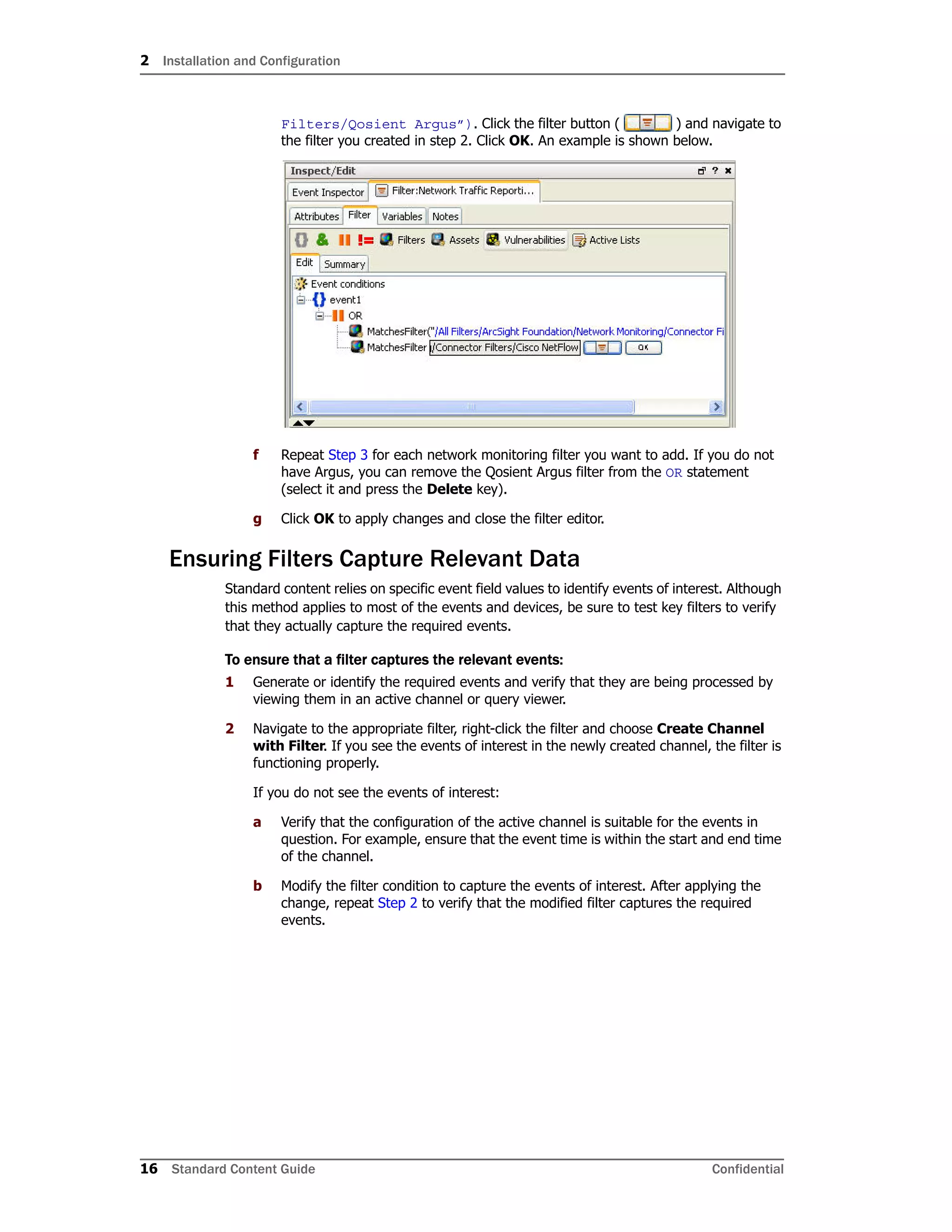
Filters/Qosient Argus”). Click the filter button ( ) and navigate to
the filter you created in step 2. Click OK. An example is shown below.
f Repeat Step 3 for each network monitoring filter you want to add. If you do not
have Argus, you can remove the Qosient Argus filter from the OR statement
(select it and press the Delete key).
g Click OK to apply changes and close the filter editor.
Ensuring Filters Capture Relevant Data
Standard content relies on specific event field values to identify events of interest. Although
this method applies to most of the events and devices, be sure to test key filters to verify
that they actually capture the required events.
To ensure that a filter captures the relevant events:
1 Generate or identify the required events and verify that they are being processed by
viewing them in an active channel or query viewer.
2 Navigate to the appropriate filter, right-click the filter and choose Create Channel
with Filter. If you see the events of interest in the newly created channel, the filter is
functioning properly.
If you do not see the events of interest:
a Verify that the configuration of the active channel is suitable for the events in
question. For example, ensure that the event time is within the start and end time
of the channel.
b Modify the filter condition to capture the events of interest. After applying the
change, repeat Step 2 to verify that the modified filter captures the required
events.
2 Installation and Configuration
Confidential Standard Content Guide 17
Configuring Notification Destinations
Configure notification destinations if you want to be notified when some of the standard
content rules are triggered. By default, notifications are disabled in the standard content
rules, so the admin user needs to configure the destinations and enable the notification in
the rules. For details about enabling the notifications in rules, see “Configuring Notifications
and Cases” on page 17.
Network Monitoring rules reference the notification group CERT Team. Add new
destinations for notification levels 1, 2, and 3 as appropriate to the personnel in your
security operations center. Refer to the ArcSight Console User’s Guide or the ESM online
Help for information on how to configure notification destinations.
Configuring Notifications and Cases
ESM content depends on rules to send notifications and open cases when conditions are
met. Notifications and cases are how users can track and resolve the security issues that
the content is designed to find.
By default, the notifications and create case actions are disabled in the standard content
rules that send notifications about security-related events to the Cert Team notification
group.
To enable rules to send notifications and open cases, first configure notification
destinations as described in Configuring Notification Destinations above, then enable the
notification and case actions in the rules.
For more information about working with rule actions in the Rules Editor, refer to the
ArcSight Console User’s Guide or the ESM online Help.
Scheduling Reports
You can run reports on demand, automatically on a regular schedule, or both. By default,
reports are not scheduled to run automatically.
Evaluate the reports that come with Network Monitoring, and schedule the reports that are
of interest to your organization and business objectives. For instructions about how to
schedule reports, refer to the ArcSight Console User’s Guide or the ESM online Help.
Configuring Trends
Trends are a type of resource that can gather data over longer periods of time, which can
be leveraged for reports. Trends streamline data gathering to the specific pieces of data
you want to track over a long range, and breaks the data gathering up into periodic
updates. For long-range queries, such as end-of-month summaries, trends greatly reduce
the burden on system resources. Trends can also provide a snapshot of which devices
report on the network over a series of days.
Network Monitoring content includes several trends, which are disabled by default. These
disabled trends are scheduled to run on an alternating schedule between the hours of
midnight and 7:00 a.m., when network traffic is usually less busy than during peak daytime
business hours. These schedules can be customized to suit your needs using the Trend
scheduler in the ArcSight Console.
2 Installation and Configuration
18 Standard Content Guide Confidential
To enable a trend, go to the Navigator panel, right-click the trend you want to enable and
select Enable Trend.
For more information about trends, refer to the the ArcSight Console User’s Guide or the
ESM online Help.
To enable a disabled trend, you must first change the default start date in
the Trend editor.
If the start date is not changed, the trend takes the default start date
(derived from when the trend was first installed), and backfills the data from
that time. For example, if you enable the trend six months after the first
install, these trends try to get all the data for the last six months, which
might cause performance problems, overwhelm system resources, or cause
the trend to fail if that event data is not available.
Confidential Standard Content Guide 19
Chapter 3
Network Monitoring Content
In this section, the Network Monitoring resources are grouped together based on the
functionality they provide. The Network Monitoring resource groups are listed in the table
below.
Resource Group Purpose
“Bandwidth Usage” on page 20 The Bandwidth Usage resources provide information about
bandwidth utilization.
“Device Activity” on page 27 The Device Activity resources provide information about
firewall, network, and VPN connection activity.
“Hosts and Protocols” on page 34 The Hosts and Protocols resources provide information about
the network traffic to the mail and web server by host and
application protocol.
“SANS Top 5 Reports” on
page 40
The SANS Top 5 Reports resources provide information about
suspicious or unauthorized network traffic patterns.
“Traffic Overview” on page 46 The Traffic Overview resources provide an overview of network
traffic.
3 Network Monitoring Content
20 Standard Content Guide Confidential
Bandwidth Usage
The Bandwidth Usage resources provide information about bandwidth utilization.
Devices
The following device types can supply events that apply to the Bandwidth Usage resource
group:
 Qosient Argus and network devices such as routers, firewalls, and VPNs
Resources
The following table lists all the resources in this resource group and any dependant
resources.
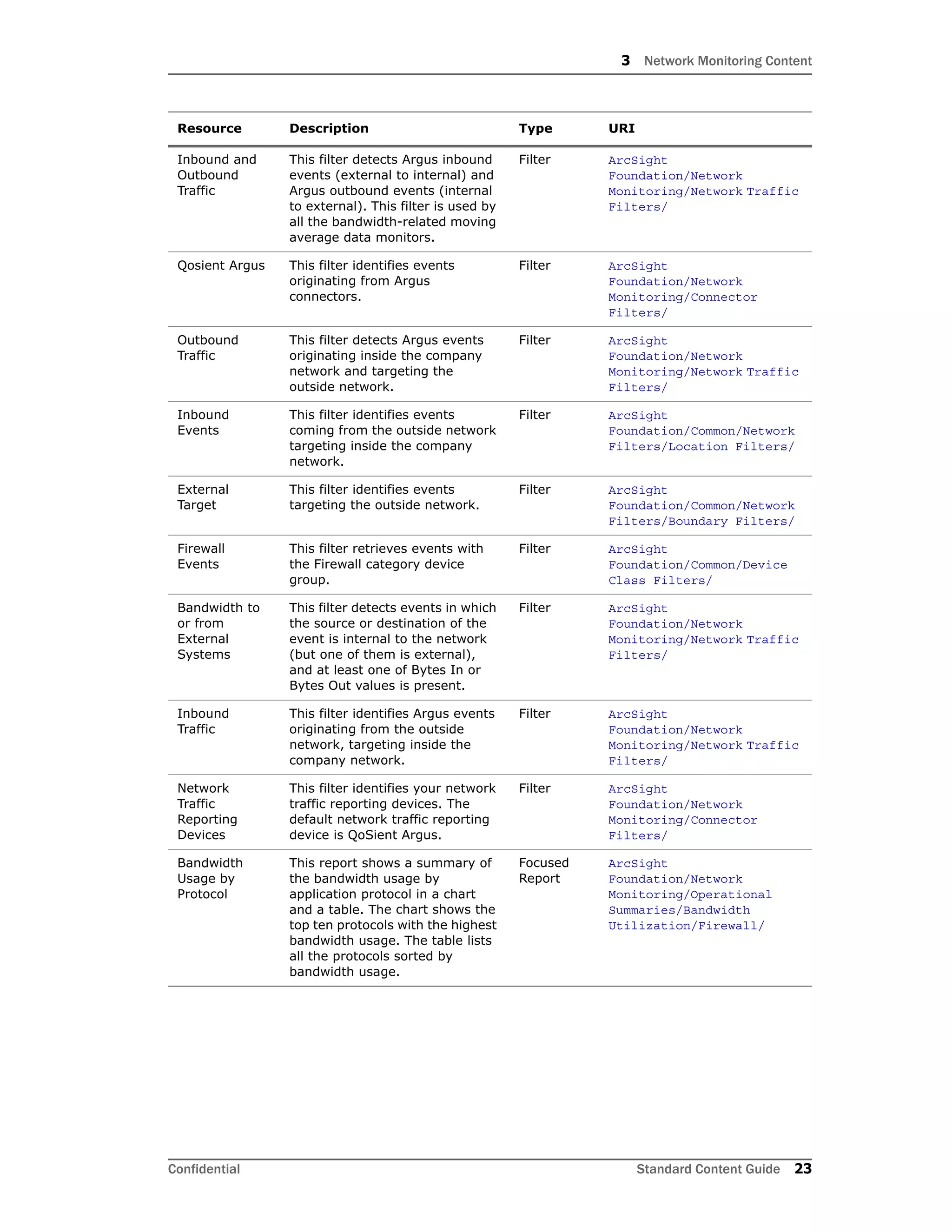
Table 3-1 Resources that Support the Bandwidth Usage Group
Resource Description Type URI
Monitor Resources
Argus Events This active channel shows all the
events from Argus
SmartConnectors within the past
eight hours.
Active
Channel
ArcSight
Foundation/Network
Monitoring/
Inbound
Bandwidth
This dashboard shows an
overview of the inbound
bandwidth and contains three
data monitors: Inbound
Bandwidth - Last 10 Minutes,
Inbound Bandwidth - Last Hour,
and Inbound Bandwidth - Last
Minute.
Dashboard ArcSight
Foundation/Network
Monitoring/Bandwidth
Usage/
Current
Bandwidth
This dashboard shows an
overview of the current
bandwidth usage and contains
two data monitors: Inbound
Bandwidth - Last Minute and
Outbound Bandwidth - Last
Minute.
Dashboard ArcSight
Foundation/Network
Monitoring/Bandwidth
Usage/
Outbound
Bandwidth
This dashboard shows an
overview of the outbound
bandwidth and contains three
data monitors: Outbound
Bandwidth - Last 10 Minutes,
Outbound Bandwidth - Last Hour,
and Outbound Bandwidth - Last
Minute.
Dashboard ArcSight
Foundation/Network
Monitoring/Bandwidth
Usage/
Top Bandwidth
Hosts
This report shows a summary of
the bandwidth usage by the top
hosts in a chart. The chart shows
the average bandwidth usage by
host for the previous day (by
default). Use this report to find
hosts with the highest bandwidth.
Report ArcSight
Foundation/Network
Monitoring/Operational
Summaries/Bandwidth
Utilization/ Cross-Device/
3 Network Monitoring Content
Confidential Standard Content Guide 21
Bandwidth
Utilization -
Last Hour
This report shows the bandwidth
utilization for the last hour. The
chart has two sets of values. The
first set shows the number of
bytes per second for the inbound
traffic and the second set shows
the number of bytes per second
for the outbound traffic.
Report ArcSight
Foundation/Network
Monitoring/Operational
Summaries/Bandwidth
Utilization/
Bandwidth
Usage by
Protocol
This report displays the
applications that are consuming
the most bandwidth in a chart
and a table. The chart shows the
top ten protocols with the highest
bandwidth usage. The table lists
all the protocols sorted by
bandwidth usage.
Report ArcSight
Foundation/Network
Monitoring/Operational
Summaries/Bandwidth
Utilization/ Cross-Device/
Bandwidth
Usage by Hour
This report shows a summary of
the bandwidth usage per hour in
a chart. The chart shows the
average bandwidth usage per
hour for the past 24 hours (by
default). Use this report to find
high bandwidth usage hours
during the day.
Report ArcSight
Foundation/Network
Monitoring/Operational
Summaries/Bandwidth
Utilization/ Cross-Device/
Bandwidth
Utilization -
Business
Hours
This report shows the average
bandwidth utilization during
business hours. The first chart
shows the average bytes per
second for the incoming traffic
and the second chart shows the
average bytes per second for the
outgoing traffic.
Report ArcSight
Foundation/Network
Monitoring/Operational
Summaries/Bandwidth
Utilization/
Bandwidth
Utilization -
Last 24 Hours
This report displays the
bandwidth utilization for the last
24 hours. The first chart shows
the number of bytes per second
for the inbound traffic and the
second chart shows the number
of bytes per second for the
outbound traffic.
Report ArcSight
Foundation/Network
Monitoring/Operational
Summaries/Bandwidth
Utilization/
Library Resources
Protected This is a site asset category. Asset
Category
Site Asset
Categories/Address Spaces
Outbound
Bandwidth -
Last Minute
This data monitor shows the
outbound bandwidth (bytes/sec)
for the last minute. The
bandwidth values are updated
every five seconds.
Data
Monitor
ArcSight
Foundation/Network
Monitoring/Bandwidth
Usage/Current Bandwidth/
Outbound
Bandwidth -
Last Hour
This data monitor shows the
average outbound bandwidth
(bytes/sec) for the last hour. The
values are updated every five
minutes.
Data
Monitor
ArcSight
Foundation/Network
Monitoring/Bandwidth
Usage/Outbound Bandwidth/
Resource Description Type URI
3 Network Monitoring Content
22 Standard Content Guide Confidential
Inbound
Bandwidth -
Last Minute
This data monitor shows the
inbound bandwidth (bytes/sec)
for the last minute. The
bandwidth values are updated
every five seconds.
Data
Monitor
ArcSight
Foundation/Network
Monitoring/Bandwidth
Usage/Current Bandwidth/
Inbound
Bandwidth -
Last 10
Minutes
This data monitor shows the
average inbound bandwidth
(bytes/sec) for the last ten
minutes. The values are updated
every 30 seconds.
Data
Monitor
ArcSight
Foundation/Network
Monitoring/Bandwidth
Usage/Inbound Bandwidth/
Outbound
Bandwidth -
Last 10
Minutes
This data monitor shows the
average outbound bandwidth
(bytes/sec) for the last ten
minutes. The values are updated
every 30 seconds.
Data
Monitor
ArcSight
Foundation/Network
Monitoring/Bandwidth
Usage/Outbound Bandwidth/
Inbound
Bandwidth -
Last Hour
This data monitor shows the
average inbound bandwidth
(bytes/sec) for the last hour. The
values are updated every five
minutes.
Data
Monitor
ArcSight
Foundation/Network
Monitoring/Bandwidth
Usage/Inbound Bandwidth/
Argus This field set shows a summary of
the attacker and target hosts.
This is the default field set for the
Argus Events active channel.
Field Set ArcSight
Foundation/Network
Monitoring/
Network
Events
This filter identifies events with
the category object starts with
Network or the category device
group starts with Network
Equipment.
Filter ArcSight
Foundation/Common/Device
Class Filters/
VPN Events This filter identifies events with
the category device group of
VPN.
Filter ArcSight
Foundation/Common/Device
Class Filters/
External
Source
This filter identifies events
originating from outside the
company network.
Filter ArcSight
Foundation/Common/Network
Filters/Boundary Filters/
Application
Protocol is
NULL
This filter identifies if the event
target has an application protocol
associated with it.
Filter ArcSight
Foundation/Common/Conditio
nal Variable
Filters/Protocol/
Outbound
Events
This filter identifies events
originating from inside the
company network, targeting the
outside network.
Filter ArcSight
Foundation/Common/Network
Filters/Location Filters/
Internal
Source
This filter identifies events
coming from inside the company
network.
Filter ArcSight
Foundation/Common/Network
Filters/Boundary Filters/
All Events Filter that matches all events. Filter ArcSight System/Core
Internal Target This filter identifies events
targeting inside the company
network.
Filter ArcSight
Foundation/Common/Network
Filters/Boundary Filters/
Resource Description Type URI
3 Network Monitoring Content
Confidential Standard Content Guide 23
Inbound and
Outbound
Traffic
This filter detects Argus inbound
events (external to internal) and
Argus outbound events (internal
to external). This filter is used by
all the bandwidth-related moving
average data monitors.
Filter ArcSight
Foundation/Network
Monitoring/Network Traffic
Filters/
Qosient Argus This filter identifies events
originating from Argus
connectors.
Filter ArcSight
Foundation/Network
Monitoring/Connector
Filters/
Outbound
Traffic
This filter detects Argus events
originating inside the company
network and targeting the
outside network.
Filter ArcSight
Foundation/Network
Monitoring/Network Traffic
Filters/
Inbound
Events
This filter identifies events
coming from the outside network
targeting inside the company
network.
Filter ArcSight
Foundation/Common/Network
Filters/Location Filters/
External
Target
This filter identifies events
targeting the outside network.
Filter ArcSight
Foundation/Common/Network
Filters/Boundary Filters/
Firewall
Events
This filter retrieves events with
the Firewall category device
group.
Filter ArcSight
Foundation/Common/Device
Class Filters/
Bandwidth to
or from
External
Systems
This filter detects events in which
the source or destination of the
event is internal to the network
(but one of them is external),
and at least one of Bytes In or
Bytes Out values is present.
Filter ArcSight
Foundation/Network
Monitoring/Network Traffic
Filters/
Inbound
Traffic
This filter identifies Argus events
originating from the outside
network, targeting inside the
company network.
Filter ArcSight
Foundation/Network
Monitoring/Network Traffic
Filters/
Network
Traffic
Reporting
Devices
This filter identifies your network
traffic reporting devices. The
default network traffic reporting
device is QoSient Argus.
Filter ArcSight
Foundation/Network
Monitoring/Connector
Filters/
Bandwidth
Usage by
Protocol
This report shows a summary of
the bandwidth usage by
application protocol in a chart
and a table. The chart shows the
top ten protocols with the highest
bandwidth usage. The table lists
all the protocols sorted by
bandwidth usage.
Focused
Report
ArcSight
Foundation/Network
Monitoring/Operational
Summaries/Bandwidth
Utilization/Firewall/
Resource Description Type URI
3 Network Monitoring Content
24 Standard Content Guide Confidential
Bandwidth
Usage per
Hour
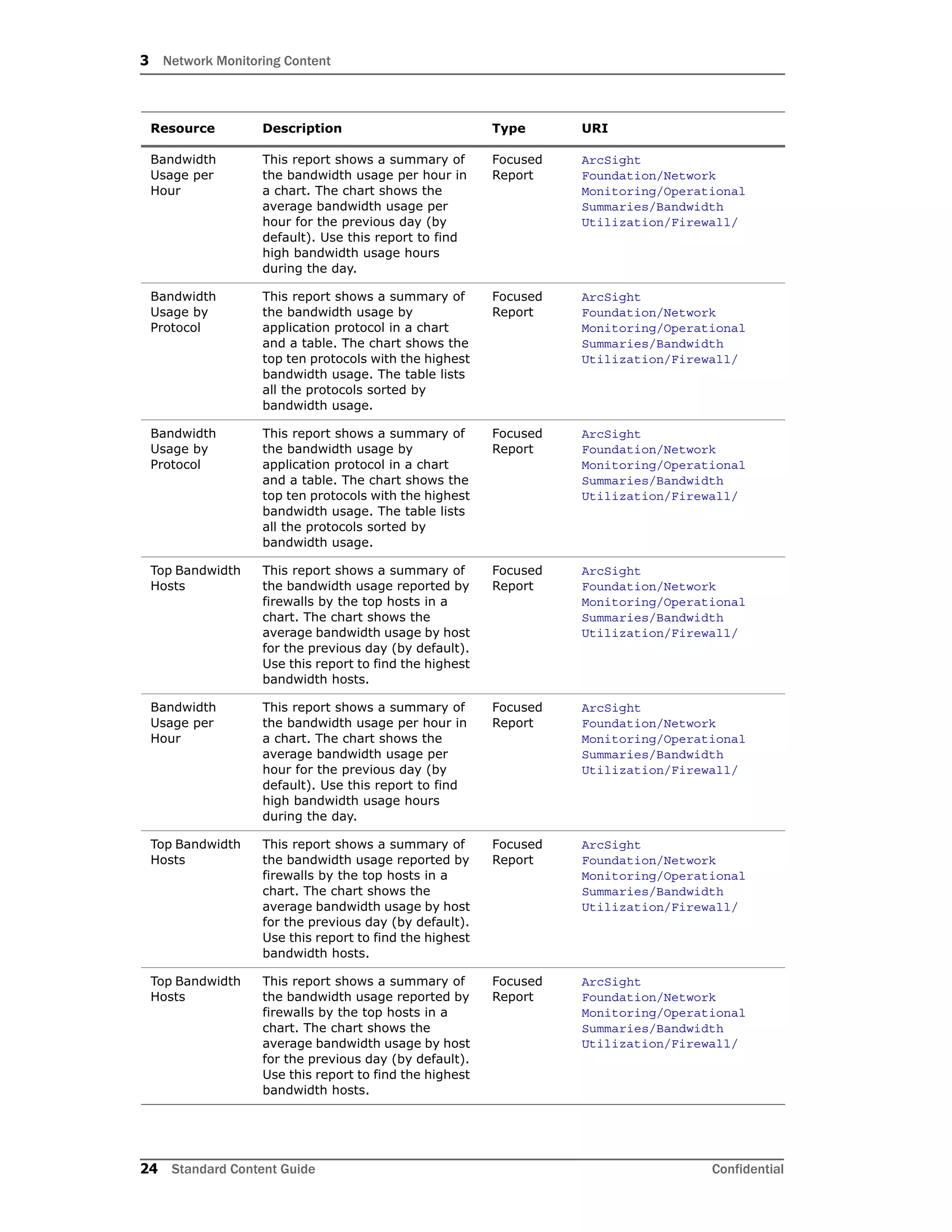
This report shows a summary of
the bandwidth usage per hour in
a chart. The chart shows the
average bandwidth usage per
hour for the previous day (by
default). Use this report to find
high bandwidth usage hours
during the day.
Focused
Report
ArcSight
Foundation/Network
Monitoring/Operational
Summaries/Bandwidth
Utilization/Firewall/
Bandwidth
Usage by
Protocol
This report shows a summary of
the bandwidth usage by
application protocol in a chart
and a table. The chart shows the
top ten protocols with the highest
bandwidth usage. The table lists
all the protocols sorted by
bandwidth usage.
Focused
Report
ArcSight
Foundation/Network
Monitoring/Operational
Summaries/Bandwidth
Utilization/Firewall/
Bandwidth
Usage by
Protocol
This report shows a summary of
the bandwidth usage by
application protocol in a chart
and a table. The chart shows the
top ten protocols with the highest
bandwidth usage. The table lists
all the protocols sorted by
bandwidth usage.
Focused
Report
ArcSight
Foundation/Network
Monitoring/Operational
Summaries/Bandwidth
Utilization/Firewall/
Top Bandwidth
Hosts
This report shows a summary of
the bandwidth usage reported by
firewalls by the top hosts in a
chart. The chart shows the
average bandwidth usage by host
for the previous day (by default).
Use this report to find the highest
bandwidth hosts.
Focused
Report
ArcSight
Foundation/Network
Monitoring/Operational
Summaries/Bandwidth
Utilization/Firewall/
Bandwidth
Usage per
Hour
This report shows a summary of
the bandwidth usage per hour in
a chart. The chart shows the
average bandwidth usage per
hour for the previous day (by
default). Use this report to find
high bandwidth usage hours
during the day.
Focused
Report
ArcSight
Foundation/Network
Monitoring/Operational
Summaries/Bandwidth
Utilization/Firewall/
Top Bandwidth
Hosts
This report shows a summary of
the bandwidth usage reported by
firewalls by the top hosts in a
chart. The chart shows the
average bandwidth usage by host
for the previous day (by default).
Use this report to find the highest
bandwidth hosts.
Focused
Report
ArcSight
Foundation/Network
Monitoring/Operational
Summaries/Bandwidth
Utilization/Firewall/
Top Bandwidth
Hosts
This report shows a summary of
the bandwidth usage reported by
firewalls by the top hosts in a
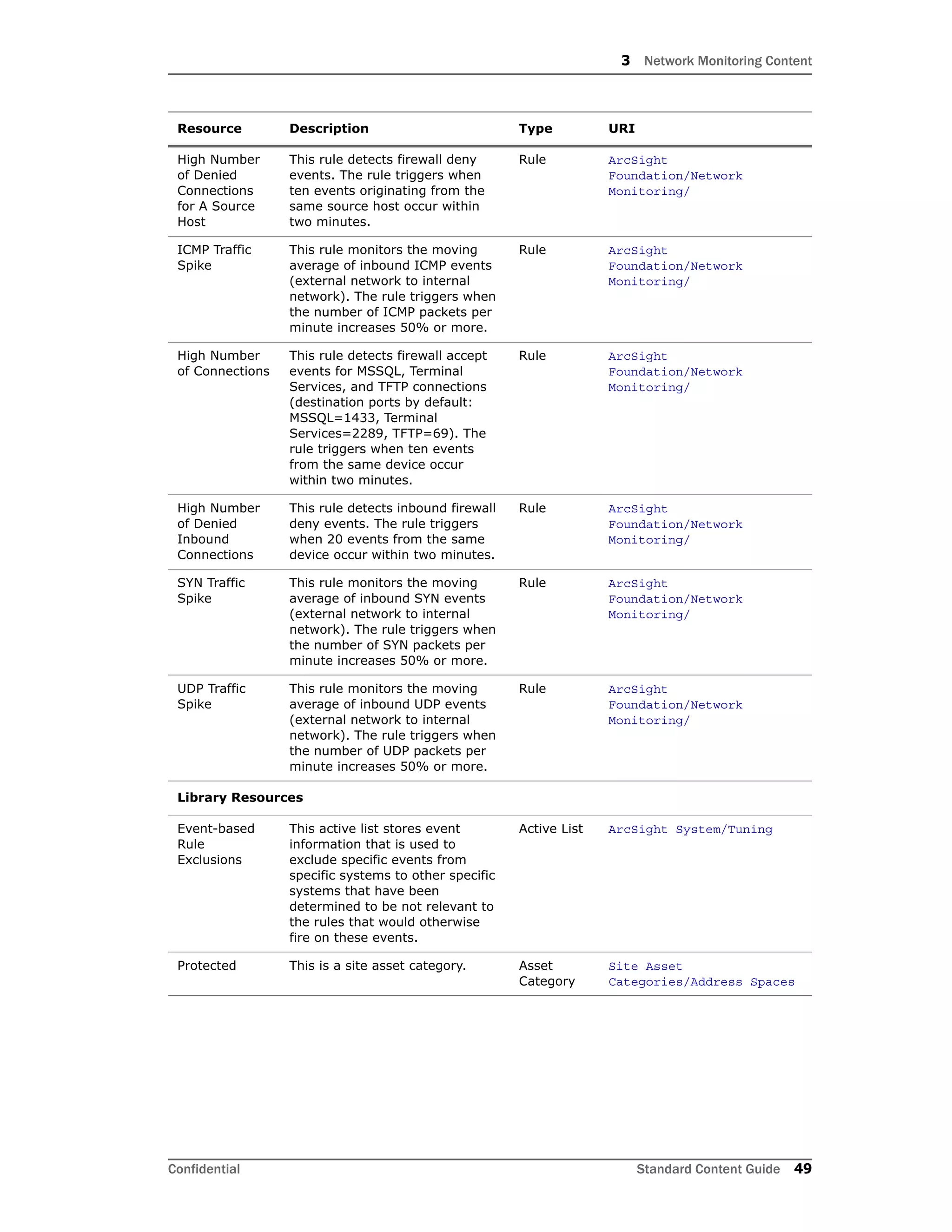
chart. The chart shows the
average bandwidth usage by host
for the previous day (by default).
Use this report to find the highest
bandwidth hosts.
Focused
Report
ArcSight
Foundation/Network
Monitoring/Operational
Summaries/Bandwidth
Utilization/Firewall/
Resource Description Type URI
3 Network Monitoring Content
Confidential Standard Content Guide 25
Bandwidth
Usage per
Hour
This report shows a summary of
the bandwidth usage per hour in
a chart. The chart shows the
average bandwidth usage per
hour for the previous day (by
default). Use this report to find
high bandwidth usage hours
during the day.
Focused
Report
ArcSight
Foundation/Network
Monitoring/Operational
Summaries/Bandwidth
Utilization/Firewall/
Top Bandwidth
Hosts
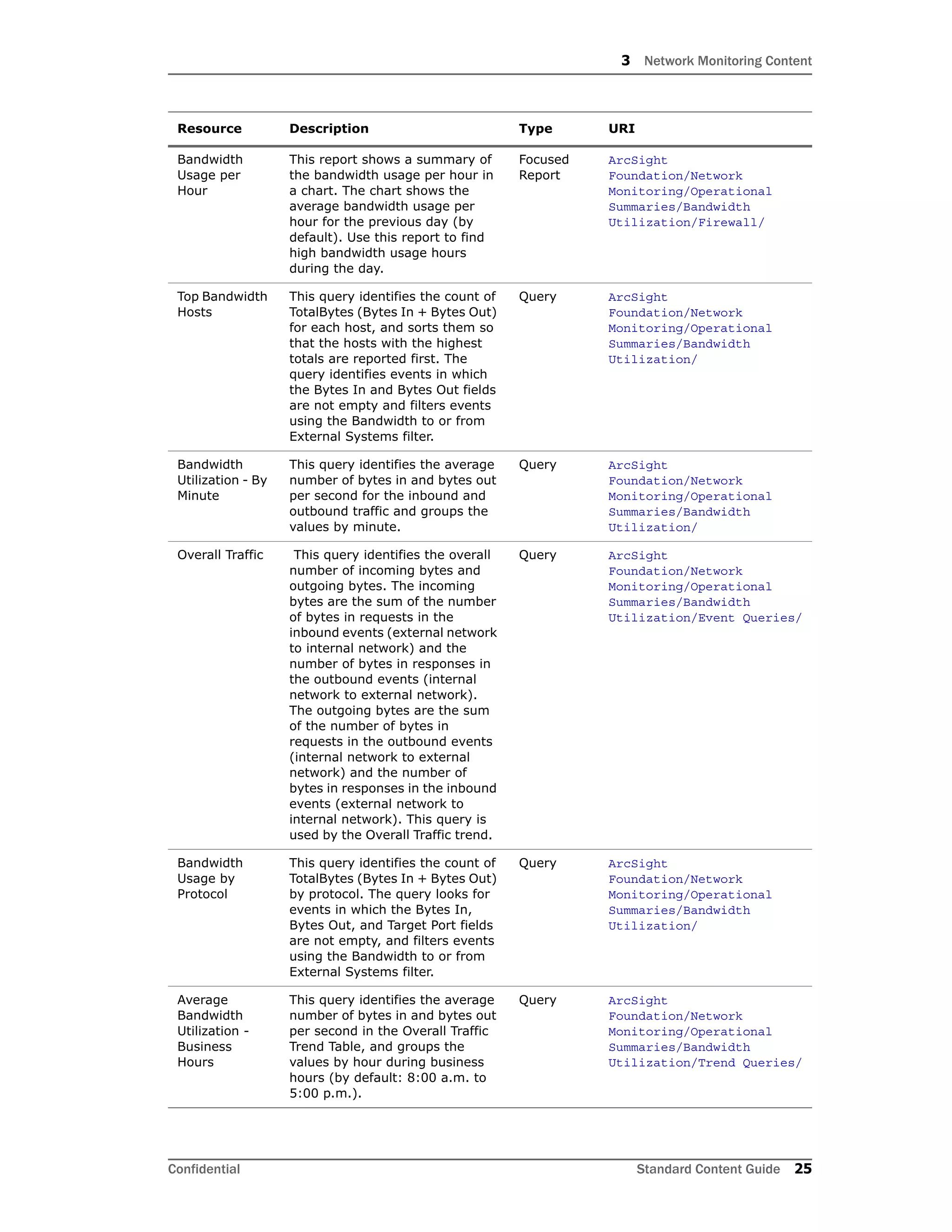
This query identifies the count of
TotalBytes (Bytes In + Bytes Out)
for each host, and sorts them so
that the hosts with the highest
totals are reported first. The
query identifies events in which
the Bytes In and Bytes Out fields
are not empty and filters events
using the Bandwidth to or from
External Systems filter.
Query ArcSight
Foundation/Network
Monitoring/Operational
Summaries/Bandwidth
Utilization/
Bandwidth
Utilization - By
Minute
This query identifies the average
number of bytes in and bytes out
per second for the inbound and
outbound traffic and groups the
values by minute.
Query ArcSight
Foundation/Network
Monitoring/Operational
Summaries/Bandwidth
Utilization/
Overall Traffic This query identifies the overall
number of incoming bytes and
outgoing bytes. The incoming
bytes are the sum of the number
of bytes in requests in the
inbound events (external network
to internal network) and the
number of bytes in responses in
the outbound events (internal
network to external network).
The outgoing bytes are the sum
of the number of bytes in
requests in the outbound events
(internal network to external
network) and the number of
bytes in responses in the inbound
events (external network to
internal network). This query is
used by the Overall Traffic trend.
Query ArcSight
Foundation/Network
Monitoring/Operational
Summaries/Bandwidth
Utilization/Event Queries/
Bandwidth
Usage by
Protocol
This query identifies the count of
TotalBytes (Bytes In + Bytes Out)
by protocol. The query looks for
events in which the Bytes In,
Bytes Out, and Target Port fields
are not empty, and filters events
using the Bandwidth to or from
External Systems filter.
Query ArcSight
Foundation/Network
Monitoring/Operational
Summaries/Bandwidth
Utilization/
Average
Bandwidth
Utilization -
Business
Hours
This query identifies the average
number of bytes in and bytes out
per second in the Overall Traffic
Trend Table, and groups the
values by hour during business
hours (by default: 8:00 a.m. to
5:00 p.m.).
Query ArcSight
Foundation/Network
Monitoring/Operational
Summaries/Bandwidth
Utilization/Trend Queries/
Resource Description Type URI
3 Network Monitoring Content
26 Standard Content Guide Confidential
Bandwidth
Usage per
Hour
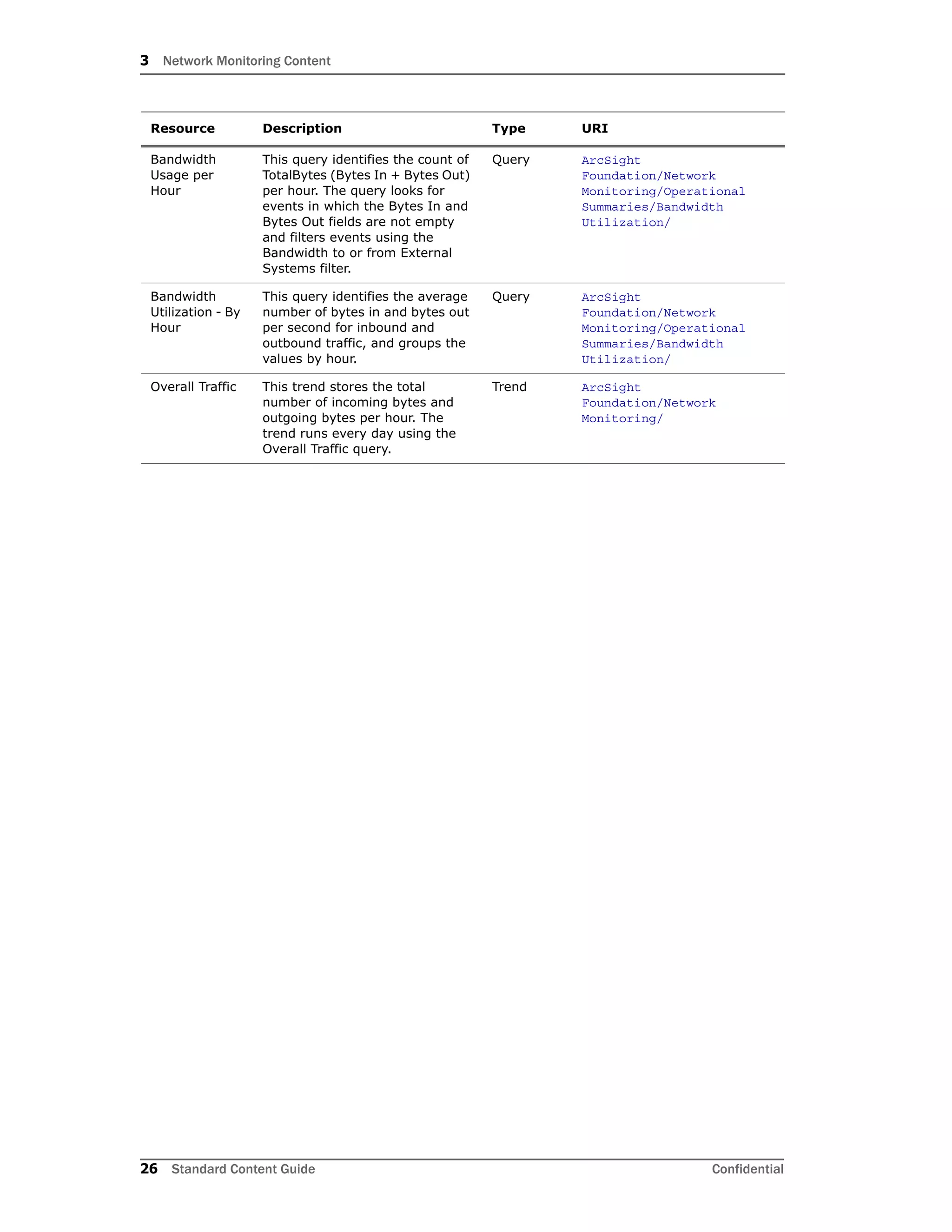
This query identifies the count of
TotalBytes (Bytes In + Bytes Out)
per hour. The query looks for
events in which the Bytes In and
Bytes Out fields are not empty
and filters events using the
Bandwidth to or from External
Systems filter.
Query ArcSight
Foundation/Network
Monitoring/Operational
Summaries/Bandwidth
Utilization/
Bandwidth
Utilization - By
Hour
This query identifies the average
number of bytes in and bytes out
per second for inbound and
outbound traffic, and groups the
values by hour.
Query ArcSight
Foundation/Network
Monitoring/Operational
Summaries/Bandwidth
Utilization/
Overall Traffic This trend stores the total
number of incoming bytes and
outgoing bytes per hour. The
trend runs every day using the
Overall Traffic query.
Trend ArcSight
Foundation/Network
Monitoring/
Resource Description Type URI
3 Network Monitoring Content
Confidential Standard Content Guide 27
Device Activity
The Device Activity resources provide information about firewall, network, and VPN
connection activity.
Devices
The following device types can supply events that apply to the Device Activity resource
group:
 Network devices such as routers, firewalls, and VPNs
Resources
The following table lists all the resources in the Device Activity resource group and any
dependant resources.
Table 3-2 Resources that Support the Device Activity Group
Resource Description Type URI
Monitor Resources
Firewall
Connection
Overview
This dashboard shows an
overview of all the denied
connection events originating
from firewalls. The dashboard
displays the Top 10 denied Ports
(Inbound), Top 10 Denied Ports
(Outbound), Top 10 Hosts With
Denied Inbound Connections, and
Top 10 Hosts With Denied
Outbound Connections data
monitors.
Dashboard ArcSight
Foundation/Network
Monitoring/Device
Activity/
VPN
Connection
Statistics
This dashboard displays data
monitors related to VPN Servers,
including connection status
counts and authentication errors.
Dashboard ArcSight
Foundation/Network
Monitoring/Device
Activity/
Network
Status
Overview
This dashboard displays data
monitors related to network
device errors, network interfaces,
and critical network events.
Dashboard ArcSight
Foundation/Network
Monitoring/Device
Activity/
Connections
Denied by
Address
This report shows denied VPN
connection data. A chart
summarizes the top VPN device
addresses with denied
connections. A table shows
details of the denied connections.
Report ArcSight
Foundation/Network
Monitoring/Details/Device
Activity/VPN/
Connections
Denied by
Hour
This report shows denied VPN
connection data. A chart
summarizes the number of
denied connections for each hour.
A table shows details of the
denied connections by hour.
Report ArcSight
Foundation/Network
Monitoring/Details/Device
Activity/VPN/
3 Network Monitoring Content
28 Standard Content Guide Confidential
Device
Interface
Down
Notifications
This report shows a table
displaying the network devices
that report a down link.
Report ArcSight
Foundation/Network
Monitoring/Details/Device
Activity/Network/
Top VPN Event
Sources
This report displays a table
showing event information
reported by VPN devices,
excluding modification events.
Report ArcSight
Foundation/Network
Monitoring/Details/Device
Activity/VPN/
Top VPN Event
Destinations
This report displays a table
showing event information
reported by VPN devices,
excluding modification events.
Report ArcSight
Foundation/Network
Monitoring/Details/Device
Activity/VPN/
Device
Interface
Status
Messages
This report shows the network
devices reporting link status
changes.
Report ArcSight
Foundation/Network
Monitoring/Details/Device
Activity/Network/
Top VPN
Access by User
This report displays information
about VPN access, authorization
or authentication events.
Report ArcSight
Foundation/Network
Monitoring/Details/Device
Activity/VPN/
VPN
Connection
Failures
This report displays information
about VPN access where
authorization or authentication
failed.
Report ArcSight
Foundation/Network
Monitoring/Details/Device
Activity/VPN/
Authentication
Errors
This report shows errors
generated by a VPN connection
attempt. The address is the IP
address of the VPN connection
source. Use this report to see
which users are having difficulties
using or setting up their VPN
clients.
Report ArcSight
Foundation/Network
Monitoring/Details/Device
Activity/VPN/
Top VPN
Events
This report displays event
information reported by VPN
devices, excluding modification
events.
Report ArcSight
Foundation/Network
Monitoring/Details/Device
Activity/VPN/
Device Events This report shows information
about events on network devices.
Report ArcSight
Foundation/Network
Monitoring/Details/Device
Activity/Network/
Connections
Accepted by
Address
This report shows successful VPN
connection data. A chart
summarizes the top VPN device
addresses with successful
connections. A table shows
details of the successful
connections.
Report ArcSight
Foundation/Network
Monitoring/Details/Device
Activity/VPN/
Device Errors This report shows information
about system errors on network
devices. These events might be
an indication of hardware
failures, resource exhaustion,
configuration issues or attacks.
Report ArcSight
Foundation/Network
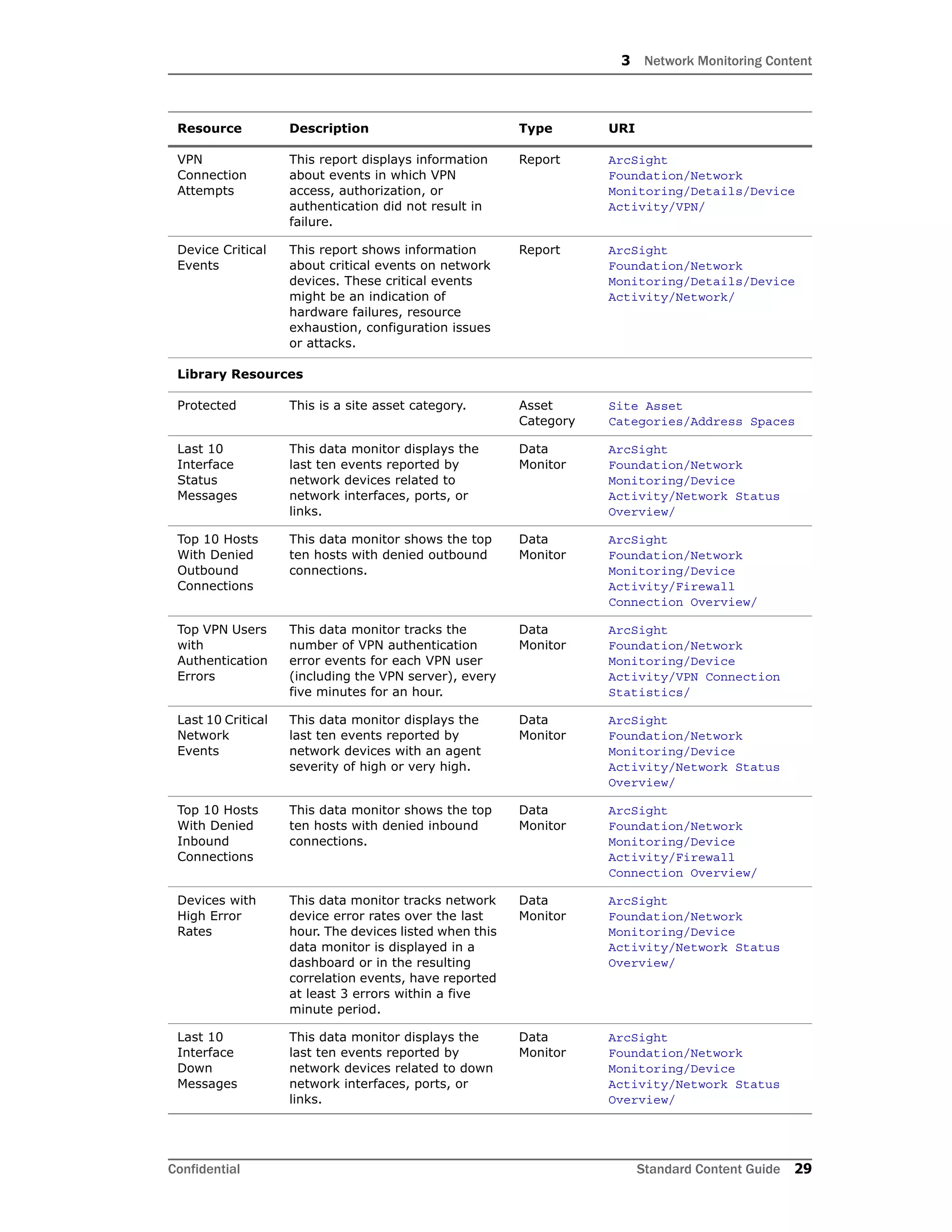
Monitoring/Details/Device
Activity/Network/
Resource Description Type URI
3 Network Monitoring Content
Confidential Standard Content Guide 29
VPN
Connection
Attempts
This report displays information
about events in which VPN
access, authorization, or
authentication did not result in
failure.
Report ArcSight
Foundation/Network
Monitoring/Details/Device
Activity/VPN/
Device Critical
Events
This report shows information
about critical events on network
devices. These critical events
might be an indication of
hardware failures, resource
exhaustion, configuration issues
or attacks.
Report ArcSight
Foundation/Network
Monitoring/Details/Device
Activity/Network/
Library Resources
Protected This is a site asset category. Asset
Category
Site Asset
Categories/Address Spaces
Last 10
Interface
Status
Messages
This data monitor displays the
last ten events reported by
network devices related to
network interfaces, ports, or
links.
Data
Monitor
ArcSight
Foundation/Network
Monitoring/Device
Activity/Network Status
Overview/
Top 10 Hosts
With Denied
Outbound
Connections
This data monitor shows the top
ten hosts with denied outbound
connections.
Data
Monitor
ArcSight
Foundation/Network
Monitoring/Device
Activity/Firewall
Connection Overview/
Top VPN Users
with
Authentication
Errors
This data monitor tracks the
number of VPN authentication
error events for each VPN user
(including the VPN server), every
five minutes for an hour.
Data
Monitor
ArcSight
Foundation/Network
Monitoring/Device
Activity/VPN Connection
Statistics/
Last 10 Critical
Network
Events
This data monitor displays the
last ten events reported by
network devices with an agent
severity of high or very high.
Data
Monitor
ArcSight
Foundation/Network
Monitoring/Device
Activity/Network Status
Overview/
Top 10 Hosts
With Denied
Inbound
Connections
This data monitor shows the top
ten hosts with denied inbound
connections.
Data
Monitor
ArcSight
Foundation/Network
Monitoring/Device
Activity/Firewall
Connection Overview/
Devices with
High Error
Rates
This data monitor tracks network
device error rates over the last
hour. The devices listed when this
data monitor is displayed in a
dashboard or in the resulting
correlation events, have reported
at least 3 errors within a five
minute period.
Data
Monitor
ArcSight
Foundation/Network
Monitoring/Device
Activity/Network Status
Overview/
Last 10
Interface
Down
Messages
This data monitor displays the
last ten events reported by
network devices related to down
network interfaces, ports, or
links.
Data
Monitor
ArcSight
Foundation/Network
Monitoring/Device
Activity/Network Status
Overview/
Resource Description Type URI
3 Network Monitoring Content
30 Standard Content Guide Confidential
Top 10 Denied
Ports
(Outbound)
This data monitor shows the top
ten ports with denied outbound
connections.
Data
Monitor
ArcSight
Foundation/Network
Monitoring/Device
Activity/Firewall
Connection Overview/
Top VPN
Servers with
Denied
Connections
This data monitor tracks the
number of failed VPN connection
events for each VPN server every
five minutes for an hour.
Data
Monitor
ArcSight
Foundation/Network
Monitoring/Device
Activity/VPN Connection
Statistics/
Top VPN
Servers with
Authentication
Errors
This data monitor tracks the
number of VPN authentication
error events for each VPN server
every five minutes for an hour.
Data
Monitor
ArcSight
Foundation/Network
Monitoring/Device
Activity/VPN Connection
Statistics/
Top 10 Denied
Ports
(Inbound)
This data monitor shows the top
ten ports with denied inbound
connections.
Data
Monitor
ArcSight
Foundation/Network
Monitoring/Device
Activity/Firewall
Connection Overview/
Top VPN
Servers with
Successful
Connections
This data monitor tracks the
number of successful VPN
connection events for each VPN
server every five minutes for an
hour.
Data
Monitor
ArcSight
Foundation/Network
Monitoring/Device
Activity/VPN Connection
Statistics/
Denied
Outbound
Connections
This filter identifies firewall
events with the category
behavior of /Access and category
outcome of /Failure. The filter
looks for outbound events.
Filter ArcSight
Foundation/Network
Monitoring/Device
Activity/Firewall/
Target User ID
is NULL
This filter is designed for
conditional expression variables.
The filter identifies events in
which the Target User ID is NULL.
Filter ArcSight
Foundation/Common/Conditio
nal Variable Filters/User/
External
Source
This filter identifies events
originating from outside the
company network.
Filter ArcSight
Foundation/Common/Network
Filters/Boundary Filters/
Failed VPN
Connection
Events
This filter identifies unsuccessful
VPN events where the behavior is
/Access/Start.
Filter ArcSight
Foundation/Network
Monitoring/Device
Activity/VPN/
Outbound
Events
This filter identifies events
originating from inside the
company network, targeting the
outside network.
Filter ArcSight
Foundation/Common/Network
Filters/Location Filters/
Denied
Inbound
Connections
This filter identifies firewall
events with the category
behavior of /Access and category
outcome of /Failure. The filter
looks for inbound events.
Filter ArcSight
Foundation/Network
Monitoring/Device
Activity/Firewall/
Internal
Source
This filter identifies events
coming from inside the company
network.
Filter ArcSight
Foundation/Common/Network
Filters/Boundary Filters/
Resource Description Type URI
3 Network Monitoring Content
Confidential Standard Content Guide 31
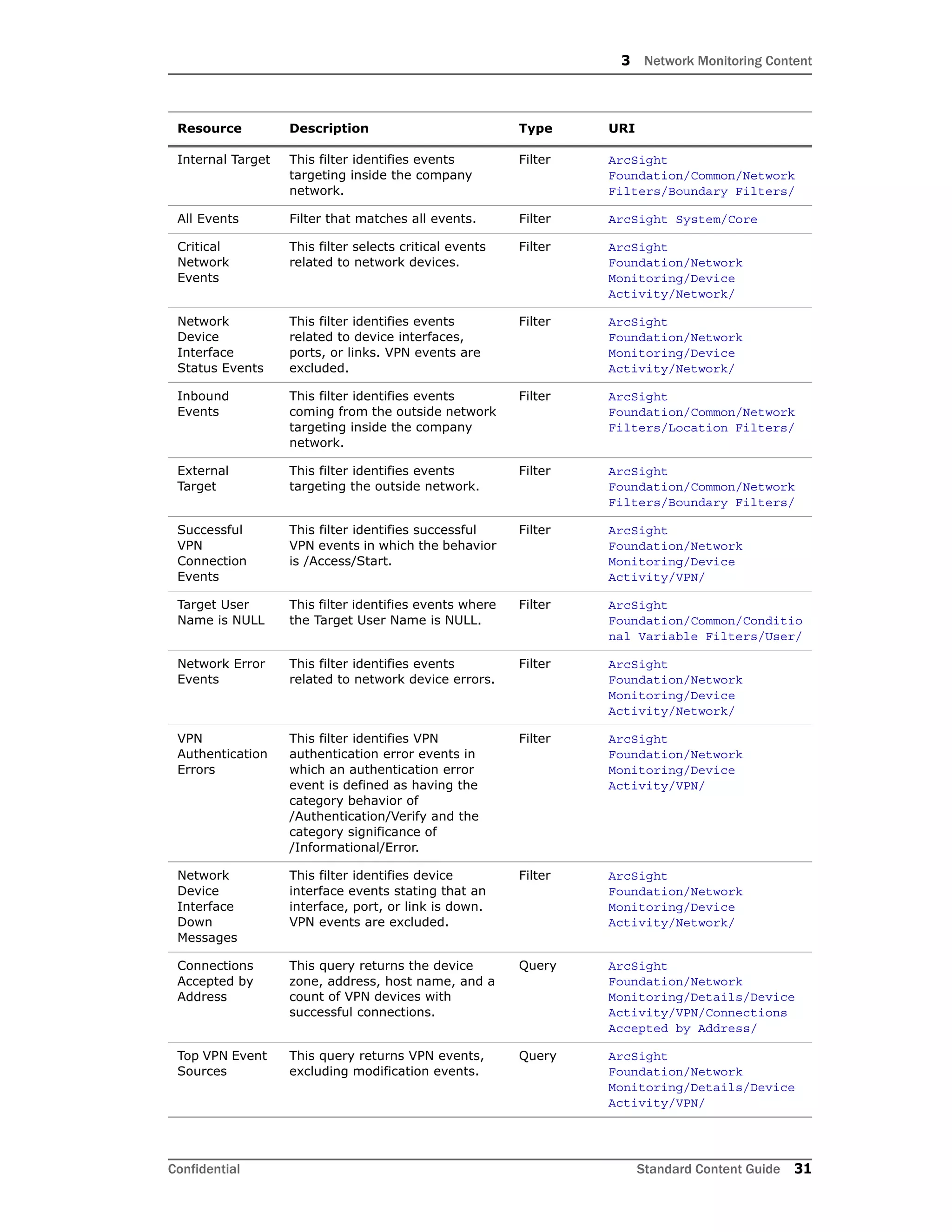
Internal Target This filter identifies events
targeting inside the company
network.
Filter ArcSight
Foundation/Common/Network
Filters/Boundary Filters/
All Events Filter that matches all events. Filter ArcSight System/Core
Critical
Network
Events
This filter selects critical events
related to network devices.
Filter ArcSight
Foundation/Network
Monitoring/Device
Activity/Network/
Network
Device
Interface
Status Events
This filter identifies events
related to device interfaces,
ports, or links. VPN events are
excluded.
Filter ArcSight
Foundation/Network
Monitoring/Device
Activity/Network/
Inbound
Events
This filter identifies events
coming from the outside network
targeting inside the company
network.
Filter ArcSight
Foundation/Common/Network
Filters/Location Filters/
External
Target
This filter identifies events
targeting the outside network.
Filter ArcSight
Foundation/Common/Network
Filters/Boundary Filters/
Successful
VPN
Connection
Events
This filter identifies successful
VPN events in which the behavior
is /Access/Start.
Filter ArcSight
Foundation/Network
Monitoring/Device
Activity/VPN/
Target User
Name is NULL
This filter identifies events where
the Target User Name is NULL.
Filter ArcSight
Foundation/Common/Conditio
nal Variable Filters/User/
Network Error
Events
This filter identifies events
related to network device errors.
Filter ArcSight
Foundation/Network
Monitoring/Device
Activity/Network/
VPN
Authentication
Errors
This filter identifies VPN
authentication error events in
which an authentication error
event is defined as having the
category behavior of
/Authentication/Verify and the
category significance of
/Informational/Error.
Filter ArcSight
Foundation/Network
Monitoring/Device
Activity/VPN/
Network
Device
Interface
Down
Messages
This filter identifies device
interface events stating that an
interface, port, or link is down.
VPN events are excluded.
Filter ArcSight
Foundation/Network
Monitoring/Device
Activity/Network/
Connections
Accepted by
Address
This query returns the device
zone, address, host name, and a
count of VPN devices with
successful connections.
Query ArcSight
Foundation/Network
Monitoring/Details/Device
Activity/VPN/Connections
Accepted by Address/
Top VPN Event
Sources
This query returns VPN events,
excluding modification events.
Query ArcSight
Foundation/Network
Monitoring/Details/Device
Activity/VPN/
Resource Description Type URI
3 Network Monitoring Content
32 Standard Content Guide Confidential
Device
Interface
Down
Notifications
This query returns device
information from network device
events for network interfaces
that are not VPN interfaces,
where a link has been reported to
be down and the inbound or
outbound interface is defined.
Query ArcSight
Foundation/Network
Monitoring/Details/Device
Activity/Network/
Device Errors This query returns base error
events in which the device group
is Network Equipment or
Operating System, and the object
starts with Network.
Query ArcSight
Foundation/Network
Monitoring/Details/Device
Activity/Network/
VPN
Connection
Attempts
This query returns events where
the VPN access, authorization or
authentication event did not
result in failure.
Query ArcSight
Foundation/Network
Monitoring/Details/Device
Activity/VPN/
Top VPN Event
Destinations
This query returns VPN events,
excluding modification events.
Query ArcSight
Foundation/Network
Monitoring/Details/Device
Activity/VPN/
Top
Connections
Denied by
Address
This query returns the device
zone, address, and a count to
show the top VPN devices with
denied connections.
Query ArcSight
Foundation/Network
Monitoring/Details/Device
Activity/VPN/Connections
Denied by Address/
Authentication
Errors
This query returns VPN
authentication events in which
there has been an error. The
query returns the user
information, the host
information, the error, the time
(within an hour), and the number
of times the error occurred within
the hour.
Query ArcSight
Foundation/Network
Monitoring/Details/Device
Activity/VPN/
Device Events This query returns base events in
which the device group is
Network Equipment or Operating
System, and the object starts
with Network.
Query ArcSight
Foundation/Network
Monitoring/Details/Device
Activity/Network/
VPN
Connection
Failures
This query returns VPN events in
which there is a VPN access,
authorization, or authentication
failure.
Query ArcSight
Foundation/Network
Monitoring/Details/Device
Activity/VPN/
Device Critical
Events
This query returns critical base
events where the device group is
Network Equipment or Operating
System, and the object starts
with Network.
Query ArcSight
Foundation/Network
Monitoring/Details/Device
Activity/Network/
Top VPN
Events
This query returns all events
reported by VPN devices,
excluding modification events.
Query ArcSight
Foundation/Network
Monitoring/Details/Device
Activity/VPN/
Resource Description Type URI
3 Network Monitoring Content
Confidential Standard Content Guide 33
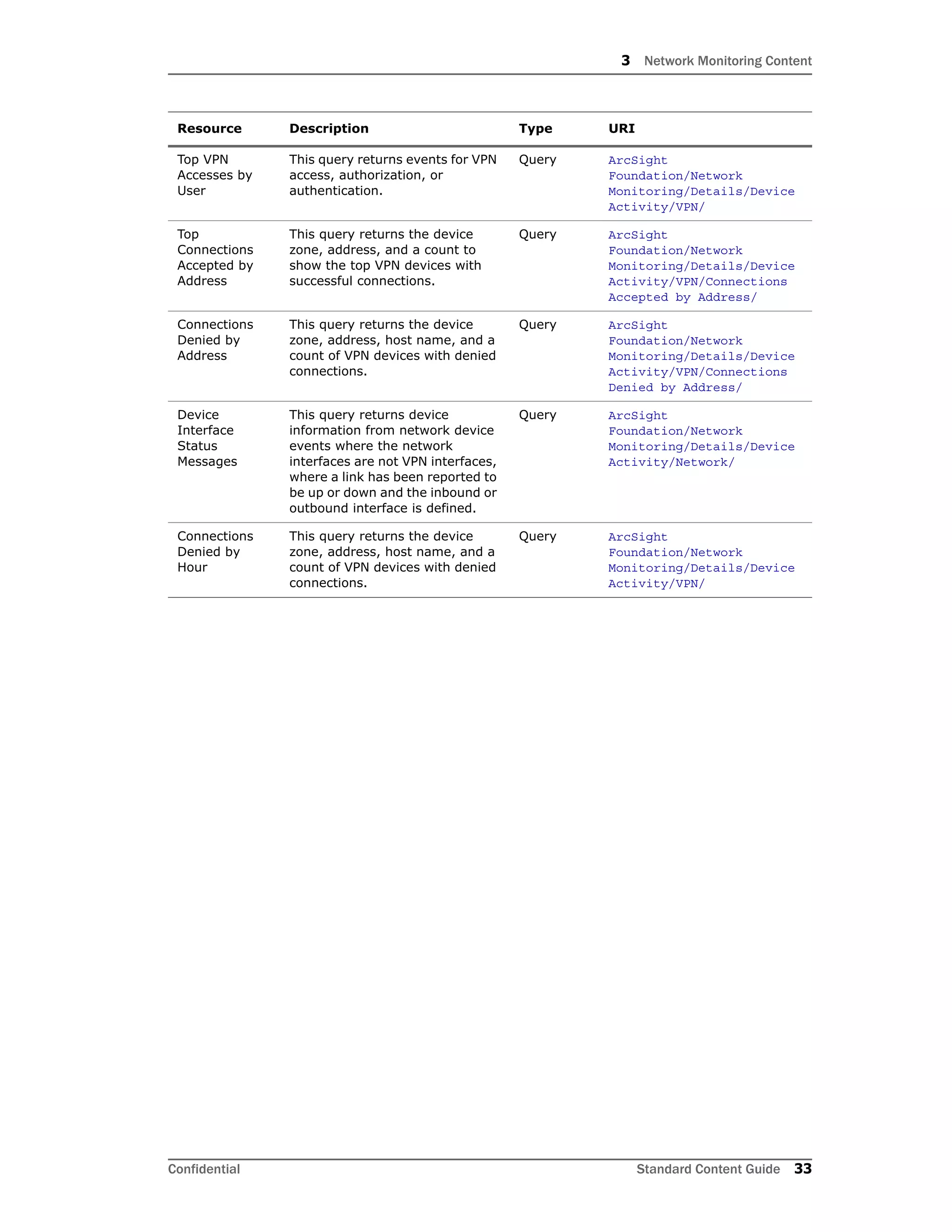
Top VPN
Accesses by
User
This query returns events for VPN
access, authorization, or
authentication.
Query ArcSight
Foundation/Network
Monitoring/Details/Device
Activity/VPN/
Top
Connections
Accepted by
Address
This query returns the device
zone, address, and a count to
show the top VPN devices with
successful connections.
Query ArcSight
Foundation/Network
Monitoring/Details/Device
Activity/VPN/Connections
Accepted by Address/
Connections
Denied by
Address
This query returns the device
zone, address, host name, and a
count of VPN devices with denied
connections.
Query ArcSight
Foundation/Network
Monitoring/Details/Device
Activity/VPN/Connections
Denied by Address/
Device
Interface
Status
Messages
This query returns device
information from network device
events where the network
interfaces are not VPN interfaces,
where a link has been reported to
be up or down and the inbound or
outbound interface is defined.
Query ArcSight
Foundation/Network
Monitoring/Details/Device
Activity/Network/
Connections
Denied by
Hour
This query returns the device
zone, address, host name, and a
count of VPN devices with denied
connections.
Query ArcSight
Foundation/Network
Monitoring/Details/Device
Activity/VPN/
Resource Description Type URI
3 Network Monitoring Content
34 Standard Content Guide Confidential
Hosts and Protocols
The Hosts and Protocols resources provide information about the network traffic to the mail
and web server by host and application protocol.
Devices
The following device types can supply events that apply to the Hosts and Protocols
resource group:
 Qosient Argus and network devices such as routers, firewalls, and VPNs
Configuration
The Hosts and Protocols resource group requires the following configuration for your
environment.
 To activate content that references email and web servers, categorize your email
servers with the Email asset category, and your web servers with the Web Server
asset category.
Resources
The following table lists all the resources in the Hosts and Protocols resource group and
any dependant resources.
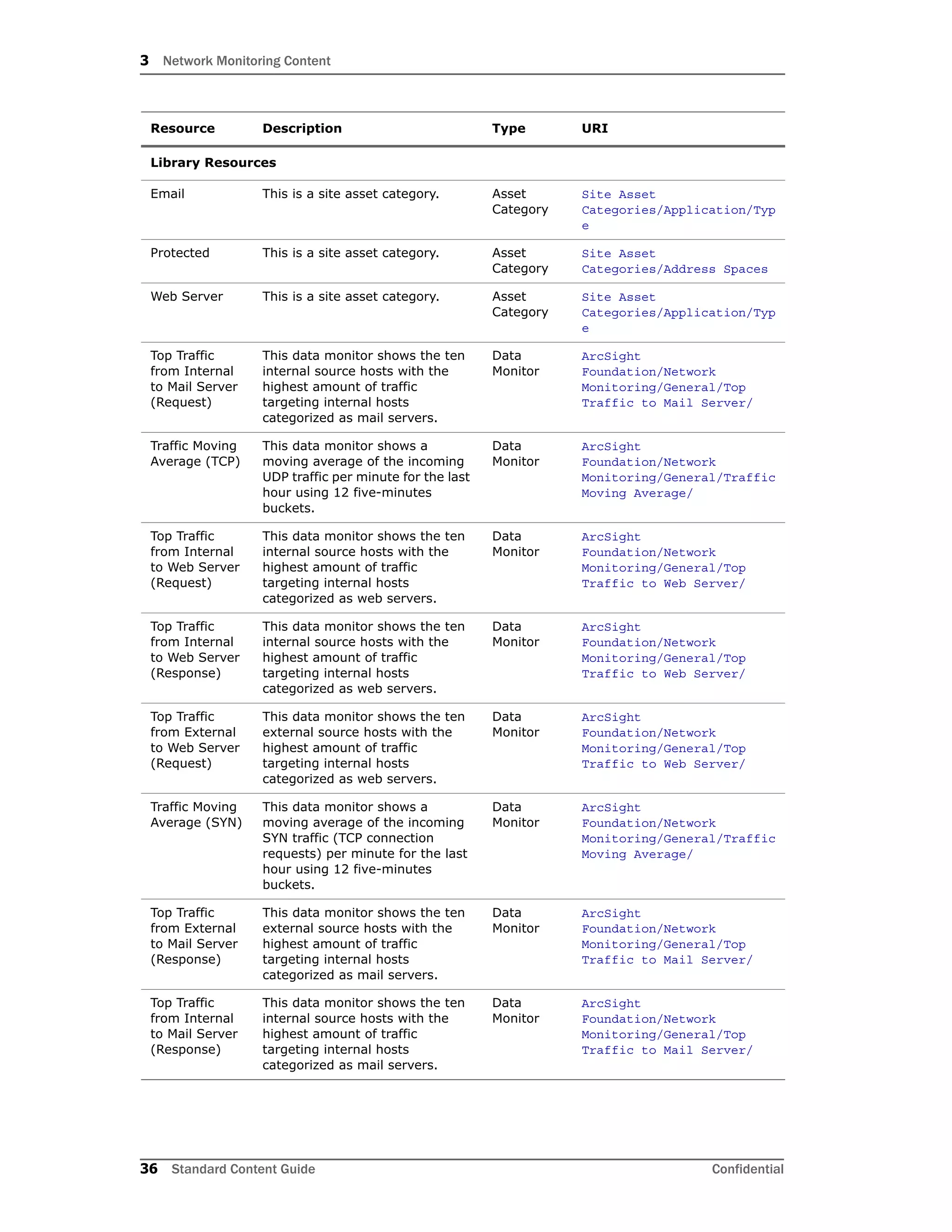
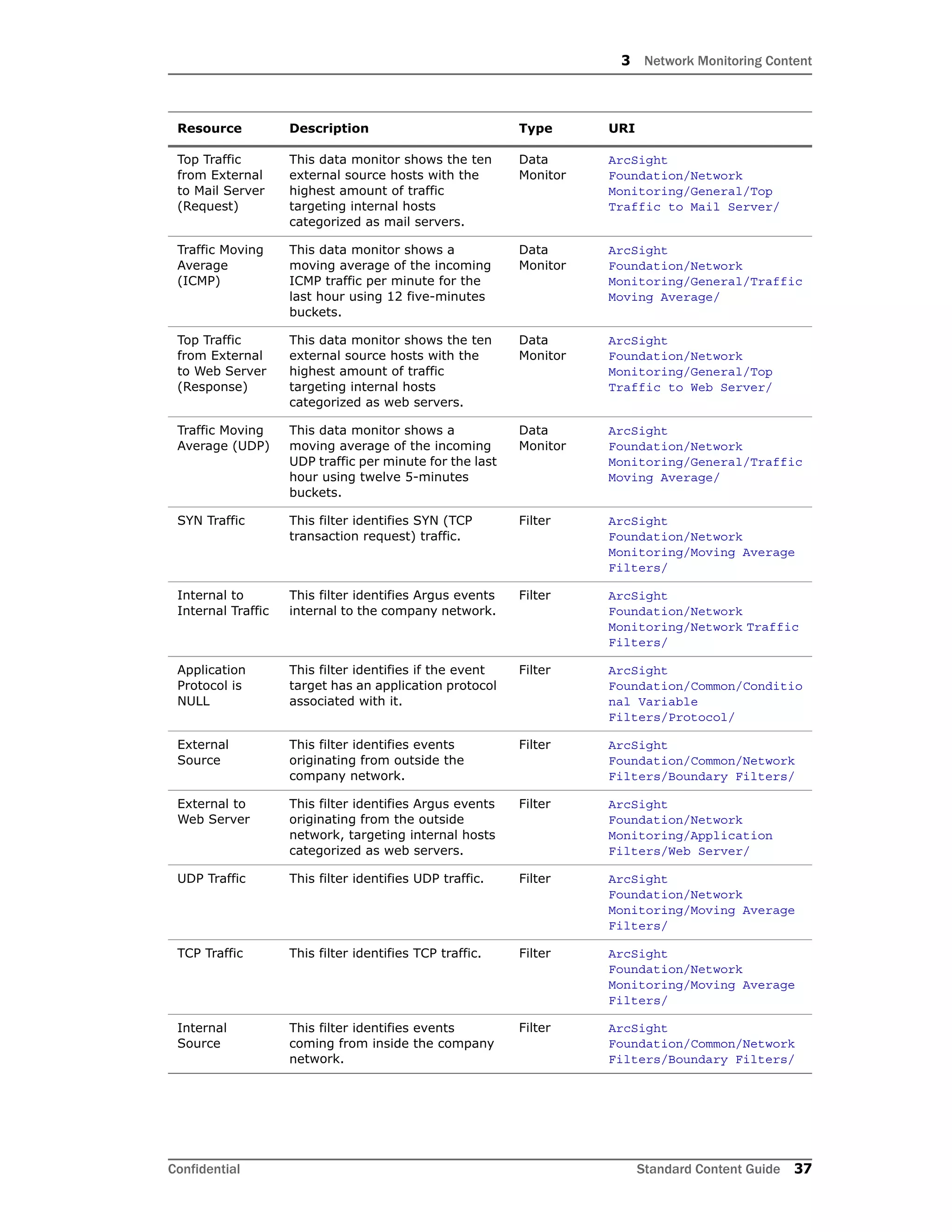
Table 3-3 Resources that Support the Hosts and Protocols Group
Resource Description Type URI
Monitor Resources
Top Traffic to
Mail Server
This dashboard shows an
overview of the traffic targeting
internal hosts categorized as mail
servers. This dashboard contains
four data monitors: Top Traffic
from External to Mail Server
(Request), Top Traffic from
External to Mail Server
(Response), Top Traffic from
Internal to Mail Server (Request),
and Top Traffic from Internal to
Mail Server (Response).
Dashboard ArcSight
Foundation/Network
Monitoring/General/
Traffic Moving
Average
This dashboard shows a moving
average of the ICMP, SYN, and
UDP traffic. The dashboard
contains three data monitors:
Traffic Moving Average (ICMP),
Traffic Moving Average (SYN),
and Traffic Moving Average
(UDP).
Dashboard ArcSight
Foundation/Network
Monitoring/General/
3 Network Monitoring Content
Confidential Standard Content Guide 35
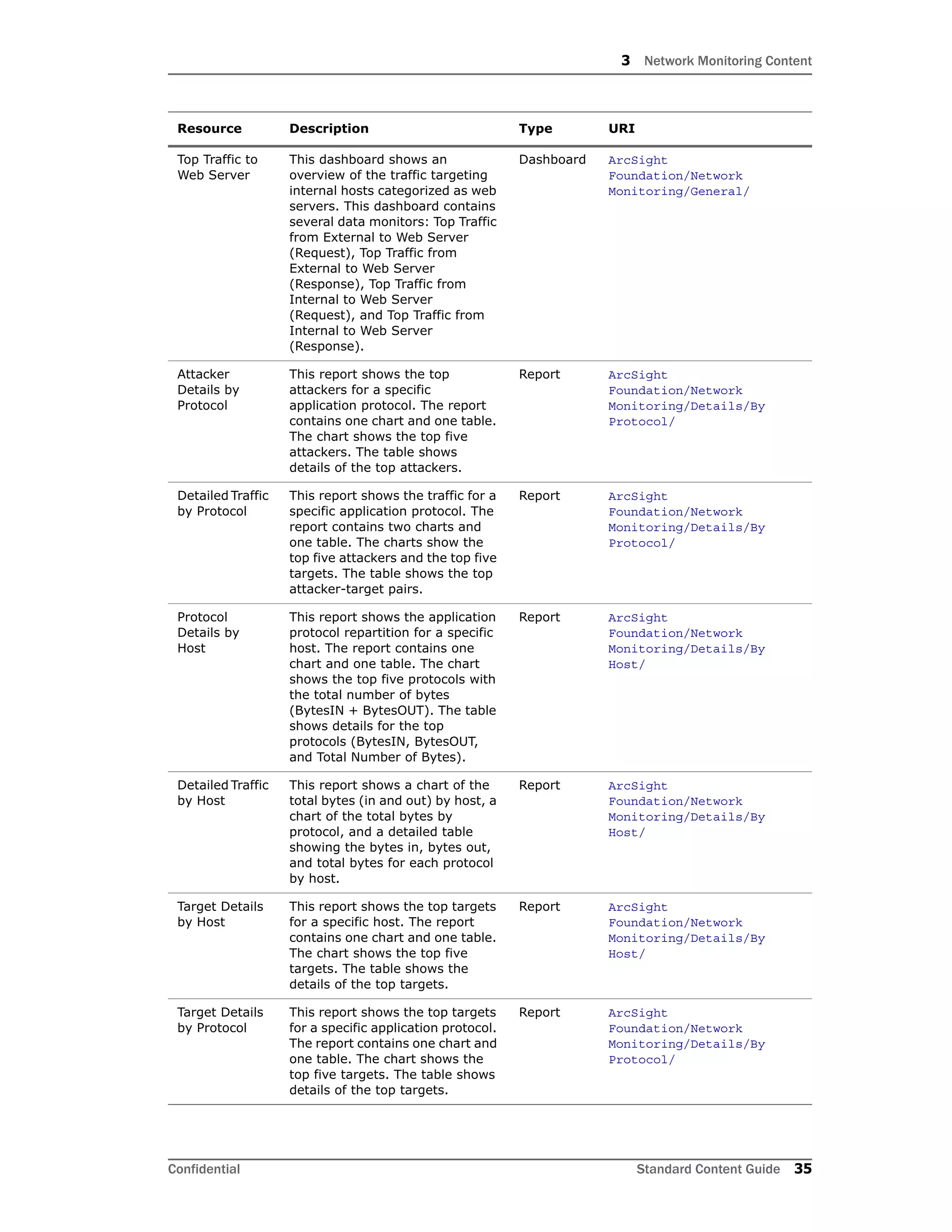
Top Traffic to
Web Server
This dashboard shows an
overview of the traffic targeting
internal hosts categorized as web
servers. This dashboard contains
several data monitors: Top Traffic
from External to Web Server
(Request), Top Traffic from
External to Web Server
(Response), Top Traffic from
Internal to Web Server
(Request), and Top Traffic from
Internal to Web Server
(Response).
Dashboard ArcSight
Foundation/Network
Monitoring/General/
Attacker
Details by
Protocol
This report shows the top
attackers for a specific
application protocol. The report
contains one chart and one table.
The chart shows the top five
attackers. The table shows
details of the top attackers.
Report ArcSight
Foundation/Network
Monitoring/Details/By
Protocol/
Detailed Traffic
by Protocol
This report shows the traffic for a
specific application protocol. The
report contains two charts and
one table. The charts show the
top five attackers and the top five
targets. The table shows the top
attacker-target pairs.
Report ArcSight
Foundation/Network
Monitoring/Details/By
Protocol/
Protocol
Details by
Host
This report shows the application
protocol repartition for a specific
host. The report contains one
chart and one table. The chart
shows the top five protocols with
the total number of bytes
(BytesIN + BytesOUT). The table
shows details for the top
protocols (BytesIN, BytesOUT,
and Total Number of Bytes).
Report ArcSight
Foundation/Network
Monitoring/Details/By
Host/
Detailed Traffic
by Host
This report shows a chart of the
total bytes (in and out) by host, a
chart of the total bytes by
protocol, and a detailed table
showing the bytes in, bytes out,
and total bytes for each protocol
by host.
Report ArcSight
Foundation/Network
Monitoring/Details/By
Host/
Target Details
by Host
This report shows the top targets
for a specific host. The report
contains one chart and one table.
The chart shows the top five
targets. The table shows the
details of the top targets.
Report ArcSight
Foundation/Network
Monitoring/Details/By
Host/
Target Details
by Protocol
This report shows the top targets
for a specific application protocol.
The report contains one chart and
one table. The chart shows the
top five targets. The table shows
details of the top targets.
Report ArcSight
Foundation/Network
Monitoring/Details/By
Protocol/
Resource Description Type URI
3 Network Monitoring Content
36 Standard Content Guide Confidential
Library Resources
Email This is a site asset category. Asset
Category
Site Asset
Categories/Application/Typ
e
Protected This is a site asset category. Asset
Category
Site Asset
Categories/Address Spaces
Web Server This is a site asset category. Asset
Category
Site Asset
Categories/Application/Typ
e
Top Traffic
from Internal
to Mail Server
(Request)
This data monitor shows the ten
internal source hosts with the
highest amount of traffic
targeting internal hosts
categorized as mail servers.
Data
Monitor
ArcSight
Foundation/Network
Monitoring/General/Top
Traffic to Mail Server/
Traffic Moving
Average (TCP)
This data monitor shows a
moving average of the incoming
UDP traffic per minute for the last
hour using 12 five-minutes
buckets.
Data
Monitor
ArcSight
Foundation/Network
Monitoring/General/Traffic
Moving Average/
Top Traffic
from Internal
to Web Server
(Request)
This data monitor shows the ten
internal source hosts with the
highest amount of traffic
targeting internal hosts
categorized as web servers.
Data
Monitor
ArcSight
Foundation/Network
Monitoring/General/Top
Traffic to Web Server/
Top Traffic
from Internal
to Web Server
(Response)
This data monitor shows the ten
internal source hosts with the
highest amount of traffic
targeting internal hosts
categorized as web servers.
Data
Monitor
ArcSight
Foundation/Network
Monitoring/General/Top
Traffic to Web Server/
Top Traffic
from External
to Web Server
(Request)
This data monitor shows the ten
external source hosts with the
highest amount of traffic
targeting internal hosts
categorized as web servers.
Data
Monitor
ArcSight
Foundation/Network
Monitoring/General/Top
Traffic to Web Server/
Traffic Moving
Average (SYN)
This data monitor shows a
moving average of the incoming
SYN traffic (TCP connection
requests) per minute for the last
hour using 12 five-minutes
buckets.
Data
Monitor
ArcSight
Foundation/Network
Monitoring/General/Traffic
Moving Average/
Top Traffic
from External
to Mail Server
(Response)
This data monitor shows the ten
external source hosts with the
highest amount of traffic
targeting internal hosts
categorized as mail servers.
Data
Monitor
ArcSight
Foundation/Network
Monitoring/General/Top
Traffic to Mail Server/
Top Traffic
from Internal
to Mail Server
(Response)
This data monitor shows the ten
internal source hosts with the
highest amount of traffic
targeting internal hosts
categorized as mail servers.
Data
Monitor
ArcSight
Foundation/Network
Monitoring/General/Top
Traffic to Mail Server/
Resource Description Type URI
3 Network Monitoring Content
Confidential Standard Content Guide 37
Top Traffic
from External
to Mail Server
(Request)
This data monitor shows the ten
external source hosts with the
highest amount of traffic
targeting internal hosts
categorized as mail servers.
Data
Monitor
ArcSight
Foundation/Network
Monitoring/General/Top
Traffic to Mail Server/
Traffic Moving
Average
(ICMP)
This data monitor shows a
moving average of the incoming
ICMP traffic per minute for the
last hour using 12 five-minutes
buckets.
Data
Monitor
ArcSight
Foundation/Network
Monitoring/General/Traffic
Moving Average/
Top Traffic
from External
to Web Server
(Response)
This data monitor shows the ten
external source hosts with the
highest amount of traffic
targeting internal hosts
categorized as web servers.
Data
Monitor
ArcSight
Foundation/Network
Monitoring/General/Top
Traffic to Web Server/
Traffic Moving
Average (UDP)
This data monitor shows a
moving average of the incoming
UDP traffic per minute for the last
hour using twelve 5-minutes
buckets.
Data
Monitor
ArcSight
Foundation/Network
Monitoring/General/Traffic
Moving Average/
SYN Traffic This filter identifies SYN (TCP
transaction request) traffic.
Filter ArcSight
Foundation/Network
Monitoring/Moving Average
Filters/
Internal to
Internal Traffic
This filter identifies Argus events
internal to the company network.
Filter ArcSight
Foundation/Network
Monitoring/Network Traffic
Filters/
Application
Protocol is
NULL
This filter identifies if the event
target has an application protocol
associated with it.
Filter ArcSight
Foundation/Common/Conditio
nal Variable
Filters/Protocol/
External
Source
This filter identifies events
originating from outside the
company network.
Filter ArcSight
Foundation/Common/Network
Filters/Boundary Filters/
External to
Web Server
This filter identifies Argus events
originating from the outside
network, targeting internal hosts
categorized as web servers.
Filter ArcSight
Foundation/Network
Monitoring/Application
Filters/Web Server/
UDP Traffic This filter identifies UDP traffic. Filter ArcSight
Foundation/Network
Monitoring/Moving Average
Filters/
TCP Traffic This filter identifies TCP traffic. Filter ArcSight
Foundation/Network
Monitoring/Moving Average
Filters/
Internal
Source
This filter identifies events
coming from inside the company
network.
Filter ArcSight
Foundation/Common/Network
Filters/Boundary Filters/
Resource Description Type URI
3 Network Monitoring Content
38 Standard Content Guide Confidential
Internal to
Web Server
This filter identifies Argus events
originating from inside the
company network, targeting
internal hosts categorized as web
servers.
Filter ArcSight
Foundation/Network
Monitoring/Application
Filters/Web Server/
Internal Target This filter identifies events
targeting inside the company
network.
Filter ArcSight
Foundation/Common/Network
Filters/Boundary Filters/
External to
Mail Server
This filter identifies Argus events
originating from the outside
network, targeting internal hosts
categorized as mail servers.
Filter ArcSight
Foundation/Network
Monitoring/Application
Filters/Mail Server/
Internal to
Mail Server
This filter identifies Argus events
originating from inside the
company network, targeting
internal hosts categorized as mail
servers.
Filter ArcSight
Foundation/Network
Monitoring/Application
Filters/Mail Server/
Qosient Argus This filter identifies events
originating from Argus
connectors.
Filter ArcSight
Foundation/Network
Monitoring/Connector
Filters/
Internal to
Internal
Events
This filter retrieves events
internal to the company network.
Filter ArcSight
Foundation/Common/Network
Filters/Location Filters/
Inbound
Events
This filter identifies events
coming from the outside network
targeting inside the company
network.
Filter ArcSight
Foundation/Common/Network
Filters/Location Filters/
Network
Traffic
Reporting
Devices
This filter identifies your network
traffic reporting devices. The
default network traffic reporting
device is QoSient Argus.
Filter ArcSight
Foundation/Network
Monitoring/Connector
Filters/
Inbound
Traffic
This filter identifies Argus events
originating from the outside
network, targeting inside the
company network.
Filter ArcSight
Foundation/Network
Monitoring/Network Traffic
Filters/
ICMP Traffic This filter identifies ICMP traffic. Filter ArcSight
Foundation/Network
Monitoring/Moving Average
Filters/
Top Attacker-
Target Pairs by
Protocol
This query returns the attacker-
target pairs with the highest
number of total bytes (Bytes In +
Bytes Out) for a specific
application protocol and groups
them by attacker address,
attacker zone, target address and
target zone.
Query ArcSight
Foundation/Network
Monitoring/Details/By
Protocol/
Resource Description Type URI
3 Network Monitoring Content
Confidential Standard Content Guide 39
Attacker
Details by
Protocol
This query returns the number of
Bytes In, Bytes Out, and Total
Bytes (Bytes In + Bytes Out) for
a specific application protocol and
groups them by attacker address
and attacker zone.
Query ArcSight
Foundation/Network
Monitoring/Details/By
Protocol/
Top Attackers
by Protocol
This query returns the
attacker/zone with the highest
number of total bytes (Bytes In +
Bytes Out) for a specific
application protocol.
Query ArcSight
Foundation/Network
Monitoring/Details/By
Protocol/
Target Details
by Protocol
This query returns the number of
bytes in, bytes out, and total
bytes (Bytes In + Bytes Out) for
a specific application protocol and
groups them by target address
and target zone.
Query ArcSight
Foundation/Network
Monitoring/Details/By
Protocol/
Protocol
Details by
Host
This query returns the number of
bytes in, bytes out, and total
bytes (Bytes In + Bytes Out) for
a specific attacker address/zone
and groups the values by
protocol, target address, and
target zone.
Query ArcSight
Foundation/Network
Monitoring/Details/By
Host/
Top Protocols
by Host
This query returns the protocols
with the highest number of total
bytes (Bytes In + Bytes Out) for
a specific attacker address/zone.
Query ArcSight
Foundation/Network
Monitoring/Details/By
Host/
Top Targets by
Protocol
This query returns the
target/zone with the highest
number of total bytes (Bytes In +
Bytes Out) for a specific
application protocol.
Query ArcSight
Foundation/Network
Monitoring/Details/By
Protocol/
Target Details
by Host
This query returns the number of
bytes in, bytes out, and total
bytes (Bytes In + Bytes Out) for
a specific attacker address/zone,
and groups the values by target
address and target zone.
Query ArcSight
Foundation/Network
Monitoring/Details/By
Host/
Top Targets by
Host
This query returns the target
address/zone with the highest
number of total bytes (Bytes In +
Bytes Out) for a specific attacker
address/zone.
Query ArcSight
Foundation/Network
Monitoring/Details/By
Host/
Resource Description Type URI
3 Network Monitoring Content
40 Standard Content Guide Confidential
SANS Top 5 Reports
The SANS Top 5 Reports resources provide information about suspicious or unauthorized
network traffic patterns.
Devices
The following device types can supply events that apply to the SANS Top 5 Reports
resource group:
 Network devices such as routers, firewalls, and VPNs
Resources
The following table lists all the resources in the SANS Top 5 Reports resource group and
any dependant resources.
Table 3-4 Resources that Support the SANS Top 5 Reports Group
Resource Description Type URI
Monitor Resources
Top Alerts
from IDS and
IPS
This report shows the top alerts
coming from Intrusion Detection
Systems (IDS) and Intrusion
Prevention Systems (IPS).
Report ArcSight
Foundation/Intrusion
Monitoring/SANS Top 5
Reports/5 - Suspicious or
Unauthorized Network
Traffic Patterns/
Top 10
Vulnerable
Systems -
Today
This report shows the top ten
current vulnerable systems.
Report ArcSight
Foundation/Intrusion
Monitoring/SANS Top 5
Reports/4 - Systems Most
Vulnerable to Attack/
Top 5 IDS
Signatures per
Day
This report shows the Top five
IDS signatures per day. You can
focus this report by device
vendor and product.
Report ArcSight
Foundation/Intrusion
Monitoring/SANS Top 5
Reports/5 - Suspicious or
Unauthorized Network
Traffic Patterns/
Top 5 Users
with Failed
Logins - Today
This report shows the top five
users with the biggest number of
failed logins attempts.
Report ArcSight
Foundation/Intrusion
Monitoring/SANS Top 5
Reports/1 - Attempts to
Gain Access Through
Existing Accounts/
Total Number
of Vulnerable
Systems -
Yearly
This report shows the total
number of vulnerable systems by
week for a given year.
Report ArcSight
Foundation/Intrusion
Monitoring/SANS Top 5
Reports/4 - Systems Most
Vulnerable to Attack/Trend
Reports/
3 Network Monitoring Content
Confidential Standard Content Guide 41
Total Number
of Vulnerable
Systems -
Monthly
This report shows the total
number of vulnerable systems by
week for a given month.
Report ArcSight
Foundation/Intrusion
Monitoring/SANS Top 5
Reports/4 - Systems Most
Vulnerable to Attack/Trend
Reports/
Top 5 IDS
Signature
Destinations
per Day
This report shows the top five
IDS signature destinations per
day.
Report ArcSight
Foundation/Intrusion
Monitoring/SANS Top 5
Reports/5 - Suspicious or
Unauthorized Network
Traffic Patterns/
Top 5 IDS
Signature
Sources per
Day
This report shows the Top five
IDS signature sources per day.
Report ArcSight
Foundation/Intrusion
Monitoring/SANS Top 5
Reports/5 - Suspicious or
Unauthorized Network
Traffic Patterns/
Number of
Failed Logins -
Weekly
This report shows the number of
failed logins per day for a given
week.
Report ArcSight
Foundation/Intrusion
Monitoring/SANS Top 5
Reports/1 - Attempts to
Gain Access Through
Existing Accounts/Trend
Reports/
Vulnerability
Scanner Logs -
by Host
This report shows vulnerability
scanner logs grouped by zone
and host IP address. You can
focus this report by device
vendor and device product. The
report defaults to the McAfee
FoundScan device.
Report ArcSight
Foundation/Intrusion
Monitoring/SANS Top 5
Reports/4 - Systems Most
Vulnerable to Attack/
Top 10 Talkers This report shows the Top ten
talkers and a detailed list of the
top talkers.
Report ArcSight
Foundation/Intrusion
Monitoring/SANS Top 5
Reports/5 - Suspicious or
Unauthorized Network
Traffic Patterns/
Number of
Failed Logins -
Daily
This report shows the number of
failed logins per hour for a given
day.
Report ArcSight
Foundation/Intrusion
Monitoring/SANS Top 5
Reports/1 - Attempts to
Gain Access Through
Existing Accounts/Trend
Reports/
Top 5 Users
with Failed
Logins -
Weekly
This report shows the top five
users with the biggest number of
failed login attempts for a given
week.
Report ArcSight
Foundation/Intrusion
Monitoring/SANS Top 5
Reports/1 - Attempts to
Gain Access Through
Existing Accounts/Trend
Reports/
Resource Description Type URI
3 Network Monitoring Content
42 Standard Content Guide Confidential
Top Target IPs This report shows the top ten
target IP addresses with a
detailed list of the top targets.
Report ArcSight
Foundation/Intrusion
Monitoring/SANS Top 5
Reports/5 - Suspicious or
Unauthorized Network
Traffic Patterns/
Vulnerability
Scanner Logs -
by
Vulnerability
This report shows vulnerability
scanner logs grouped by
vulnerability IDs and names. You
can focus this report by device
vendor and device product. The
report defaults to the McAfee
FoundScan device.
Report ArcSight
Foundation/Intrusion
Monitoring/SANS Top 5
Reports/4 - Systems Most
Vulnerable to Attack/
Top 5 Users
with Failed
Logins - Daily
This report shows the top five
users with the biggest number of
failed login attempts for a given
day.
Report ArcSight
Foundation/Intrusion
Monitoring/SANS Top 5
Reports/1 - Attempts to
Gain Access Through
Existing Accounts/Trend
Reports/
Number of
Failed Logins -
Today
This report shows the number of
failed logins per hour for the last
day.
Report ArcSight
Foundation/Intrusion
Monitoring/SANS Top 5
Reports/1 - Attempts to
Gain Access Through
Existing Accounts/
Top 10
Vulnerable
Systems -
Weekly
This report shows the top ten
vulnerable systems for a given
week.
Report ArcSight
Foundation/Intrusion
Monitoring/SANS Top 5
Reports/4 - Systems Most
Vulnerable to Attack/Trend
Reports/
Library Resources
IDS -IPS
Events
This filter identifies Intrusion
Detection System (IDS) and
Intrusion Prevention System
(IPS) events.
Filter ArcSight
Foundation/Intrusion
Monitoring/Attack
Monitoring/
Attack Events This filter identifies events where
the category significance starts
with Compromise or Hostile.
Filter ArcSight
Foundation/Intrusion
Monitoring/Attack
Monitoring/
Scanner
Events
This filter identifies events from
network vulnerability scanners,
where the events are defined as:
Category Behavior =
/Found/Vulnerable Category
Device Group = /Assessment
Tools Category Technique
StartsWith /Scan Category
Technique Contains vulnerability
This filter is used by the
Vulnerability Scanner Events
active channel.
Filter ArcSight
Foundation/Intrusion
Monitoring/Vulnerability
View/
All Events Filter that matches all events. Filter ArcSight System/Core
Resource Description Type URI
3 Network Monitoring Content
Confidential Standard Content Guide 43
Top 5 IDS
Signatures per
Day (Snort-
Snort)
This report shows the top five
Snort signatures per day in a
chart.
Focused
Report
ArcSight
Foundation/Intrusion
Monitoring/SANS Top 5
Reports/5 - Suspicious or
Unauthorized Network
Traffic Patterns/Focused
Reports/
Top 5
Signatures per
Day (CISCO-
CiscoSecureID
S)
This report shows the top five
Cisco Secure IDS signatures per
day in a chart.
Focused
Report
ArcSight
Foundation/Intrusion
Monitoring/SANS Top 5
Reports/5 - Suspicious or
Unauthorized Network
Traffic Patterns/Focused
Reports/
Top Users with
Failed Logins
per Day
This query returns the day, the
target user name, and the
number of occurrences for failed
authentication verifications.
Query ArcSight
Foundation/Intrusion
Monitoring/SANS Top 5
Reports/1 - Attempts to
Gain Access Through
Existing Accounts/Top
Users with Failed
Logins/Event Queries/
Failed Logins
per Hour
This query returns the hour and
the number of occurrences for
failed authentication
verifications.
Query ArcSight
Foundation/Intrusion
Monitoring/SANS Top 5
Reports/1 - Attempts to
Gain Access Through
Existing Accounts/Number
of Failed Logins/Event
Queries/
Top 10 Targets This query returns the target
zone name, target address, and
the sum of the aggregated event
count for events matching the
Attack Events filter used in the
following reports: Top N Targets,
Top N Targets (3D Pie Chart), Top
N Targets (Bar Chart), Top N
Targets (Inverted Bar Chart), Top
N Targets (Pie Chart), Top N
Targets (Table and Chart), and
Top N Targets (Table).
Query ArcSight
Foundation/Intrusion
Monitoring/Detail/Attack
Monitoring/Targets/Top and
Bottom 10/
Failed Logins
per Hour
This query returns the hour and
the number of occurrences for
failed authentication
verifications.
Query ArcSight
Foundation/Intrusion
Monitoring/SANS Top 5
Reports/1 - Attempts to
Gain Access Through
Existing Accounts/Number
of Failed Logins/Event
Queries/
Resource Description Type URI
3 Network Monitoring Content
44 Standard Content Guide Confidential
Top Users with
Failed Logins
per Week
This query on the Top Users with
Failed Logins per Day trend
returns the sum of the number of
failed logins for each username
within the week.
Query ArcSight
Foundation/Intrusion
Monitoring/SANS Top 5
Reports/1 - Attempts to
Gain Access Through
Existing Accounts/Top
Users with Failed
Logins/Trend Queries/
Top IDS
Signatures by
IDS Product
This query on base /IDS/Network
events for the device product and
vendor Snort, returns the device
event class ID and the count
based on the end time. Snort is
the default setting. You can select
a different device vendor when
running the report.
Query ArcSight
Foundation/Intrusion
Monitoring/SANS Top 5
Reports/5 - Suspicious or
Unauthorized Network
Traffic Patterns/Top 5 IDS
Signatures per Day/
Top Vulnerable
Systems per
Week
This query on the Number of
Vulnerabilities per Asset trend
returns the asset name, IP
address, host name, and device
zone name and averages the
number of vulnerabilities
associated with that device per
week.
Query ArcSight
Foundation/Intrusion
Monitoring/SANS Top 5
Reports/4 - Systems Most
Vulnerable to Attack/Top
Vulnerable Systems/Trend
Queries/
Top IDS
Signature
Sources per
Day
This query over base
IDS/Network events returns the
attacker address, attacker zone
name, device vendor, device
product, and the count of the
events within the query
timeframe.
Query ArcSight
Foundation/Intrusion
Monitoring/SANS Top 5
Reports/5 - Suspicious or
Unauthorized Network
Traffic Patterns/Top 5 IDS
Signature Sources per Day/
Top 10 Talkers This query returns the attacker
zone name, attacker address
,and the count of events in which
the category significance starts
with Compromise or Hostile. The
query uses the sum of the
aggregated event count instead
of counting the EventID so that
attackers are not split by the
event name.
Query ArcSight
Foundation/Intrusion
Monitoring/SANS Top 5
Reports/5 - Suspicious or
Unauthorized Network
Traffic Patterns/Top 10
Talkers/
Top IDS and
IPS Alerts
This query returns IDS and IPS
alert events, selecting the device
event class ID, event name,
device vendor, device product,
and a count on the end time of
the event.
Query ArcSight
Foundation/Intrusion
Monitoring/SANS Top 5
Reports/5 - Suspicious or
Unauthorized Network
Traffic Patterns/Top
Alerts from IDS/
Number of
Vulnerabilities
per Asset
This query on assets returns the
asset name, IP address, host
name, and device zone name and
counts the number of
vulnerabilities associated with
that device.
Query ArcSight
Foundation/Intrusion
Monitoring/SANS Top 5
Reports/4 - Systems Most
Vulnerable to Attack/Top
Vulnerable Systems/Asset
Queries/
Resource Description Type URI
3 Network Monitoring Content
Confidential Standard Content Guide 45
Top IDS
Signature
Destinations
per Day
This query over base
IDS/Network events returns the
target address, target zone
name, device vendor, device
product, and the count of the
events within the query
timeframe.
Query ArcSight
Foundation/Intrusion
Monitoring/SANS Top 5
Reports/5 - Suspicious or
Unauthorized Network
Traffic Patterns/Top 5 IDS
Signature Destinations per
Day/
Number of
Vulnerabilities
per Week
This query on the Number of
Vulnerabilities per Asset trend
returns the asset name, IP
address, host name, and device
zone name and averages the
number of vulnerabilities
associated with that device per
week.
Query ArcSight
Foundation/Intrusion
Monitoring/SANS Top 5
Reports/4 - Systems Most
Vulnerable to Attack/Total
Number of Vulnerable
Systems/Trend Queries/
Failed Logins
per Day
This query on the Top Users with
Failed Logins per Hour trend
returns the sum of the number of
failed logins for the day.
Query ArcSight
Foundation/Intrusion
Monitoring/SANS Top 5
Reports/1 - Attempts to
Gain Access Through
Existing Accounts/Number
of Failed Logins/Trend
Queries/
Vulnerability
Scanner Logs
This query retrieves events for
scanner events (defaulting to the
McAfee FoundScan scanner) and
returns the target address, the
target zone name, the device
event class ID, and the event
(vulnerability) name.
Query ArcSight
Foundation/Intrusion
Monitoring/SANS Top 5
Reports/4 - Systems Most
Vulnerable to
Attack/Vulnerability
Scanner Logs - by Host/
Top Users with
Failed Logins
per Day
This query returns the day, the
target user name, and the
number of occurrences for failed
authentication verifications.
Query ArcSight
Foundation/Intrusion
Monitoring/SANS Top 5
Reports/1 - Attempts to
Gain Access Through
Existing Accounts/Top
Users with Failed
Logins/Event Queries/
Top Users with
Failed Logins
per Day
This trend stores the top 1000
users with the highest number of
failed logins per day.
Trend ArcSight
Foundation/Intrusion
Monitoring/SANS Top 5
Reports/1 - Attempts to
Gain Access Through
Existing Accounts/
Number of
Vulnerabilities
per Asset
This trend stores the number of
vulnerabilities associated to an
asset on a weekly basis.
Trend ArcSight
Foundation/Intrusion
Monitoring/SANS Top 5
Reports/4 - Systems Most
Vulnerable to Attack/
Failed Logins
per Hour
This trend stores the number of
failed logins per hour and is
scheduled for a daily run.
Trend ArcSight
Foundation/Intrusion
Monitoring/SANS Top 5
Reports/1 - Attempts to
Gain Access Through
Existing Accounts/
Resource Description Type URI
3 Network Monitoring Content
46 Standard Content Guide Confidential
Traffic Overview
The Traffic Overview resources provide an overview of network traffic.
Devices
The following device types can supply events that apply to the Traffic Overview resource
group:
 Qosient Argus and network devices such as routers, firewalls, and VPNs
Resources
The following table lists all the resources in the Traffic Overview resource group and any
dependant resources.
Table 3-5 Resources that Support the Traffic Overview Group
Resource Description Type URI
Monitor Resources
Top Inbound
Traffic by Host
This dashboard shows an
overview of the inbound traffic
(external network to internal
network) by source host. This
dashboard contains the Top
Inbound Traffic by Host (Request)
and Top Inbound Traffic by Host
(Response) data monitors.
Dashboard ArcSight
Foundation/Network
Monitoring/Inbound
Traffic/
Top Outbound
Traffic by
Application
Protocol
This dashboard shows an
overview of the outbound traffic
(internal network to external
network) by application protocol.
This dashboard contains the Top
Outbound Traffic by Application
Protocol (Request) and Top
Outbound Traffic by Application
Protocol (Response) data
monitors.
Dashboard ArcSight
Foundation/Network
Monitoring/Outbound
Traffic/
Outbound
Traffic Moving
Average
This dashboard shows a moving
average of the outbound traffic
(internal network to external
network) for the last hour. This
dashboard contains the Outbound
Traffic Moving Average (Request)
and Outbound Traffic Moving
Average (Response) data
monitors.
Dashboard ArcSight
Foundation/Network
Monitoring/Outbound
Traffic/
Inbound
Traffic Moving
Average
This dashboard shows a moving
average of the inbound traffic
(external network to internal
network) for the last hour. This
dashboard contains the Inbound
Traffic Moving Average (Request)
and Inbound Traffic Moving
Average (Response) data
monitors.
Dashboard ArcSight
Foundation/Network
Monitoring/Inbound
Traffic/
3 Network Monitoring Content
Confidential Standard Content Guide 47
Top Inbound
Traffic by
Application
Protocol
This dashboard shows an
overview of the inbound traffic
(external network to internal
network) by application protocol.
This dashboard contains the Top
Inbound Traffic by Application
Protocol (Request) and Top
Inbound Traffic by Application
Protocol (Response) data
monitors.
Dashboard ArcSight
Foundation/Network
Monitoring/Inbound
Traffic/
Top Outbound
Traffic by Host
This dashboard shows an
overview of the outbound traffic
(internal network to external
network) by source host. This
dashboard contains the Top
Outbound Traffic by Host
(Request) and Top Outbound
Traffic by Host (Response) data
monitors.
Dashboard ArcSight
Foundation/Network
Monitoring/Outbound
Traffic/
Traffic
Statistics
This report displays the bytes in
and out by hour, and bytes in and
out by device. A table shows the
hour, firewall zone and address,
the transport protocol and the
bytes in and out.
Report ArcSight
Foundation/Network
Monitoring/Operational
Summaries/
Outbound
Traffic by
Protocol -
Weekly
Summary
This report shows an operational
summary of the outbound traffic
usage for the last week. You can
specify the application protocol
on which you want to focus.
Report ArcSight
Foundation/Network
Monitoring/Operational
Summaries/Outbound
Traffic/Summaries/
Daily Traffic
Summary
This report shows a daily traffic
summary.
Report ArcSight
Foundation/Network
Monitoring/Executive
Summaries/
Inbound
Traffic - Top
Protocols
This report shows an operational
summary of the inbound traffic
usage by protocol.
Report ArcSight
Foundation/Network
Monitoring/Operational
Summaries/Inbound Traffic/
Quarterly
Traffic
Summary
This report shows an executive
summary of the traffic for the last
quarter, grouped by week.
Report ArcSight
Foundation/Network
Monitoring/Executive
Summaries/
Weekly Traffic
Summary
This report shows an executive
summary of the traffic for the last
week, grouped by day.
Report ArcSight
Foundation/Network
Monitoring/Executive
Summaries/
Outbound
Traffic -
Weekly
Summary
This report shows an operational
summary of the outbound traffic
usage for the last week.
Report ArcSight
Foundation/Network
Monitoring/Operational
Summaries/Outbound
Traffic/Summaries/
Resource Description Type URI
3 Network Monitoring Content
48 Standard Content Guide Confidential
Outbound
Traffic - Daily
Summary
This report shows an operational
summary of the outbound traffic
usage for the last day.
Report ArcSight
Foundation/Network
Monitoring/Operational
Summaries/Outbound
Traffic/Summaries/
Inbound
Traffic - Daily
Summary
This report shows an operational
summary of the inbound traffic
usage for the last day.
Report ArcSight
Foundation/Network
Monitoring/Operational
Summaries/Inbound
Traffic/Summaries/
Traffic
Snapshot
This report shows the top ten
protocols, top ten attackers, and
top ten targets.
Report ArcSight
Foundation/Network
Monitoring/Operational
Summaries/
Inbound
Traffic -
Weekly
Summary
This report shows an operational
summary of the inbound traffic
usage for the last week.
Report ArcSight
Foundation/Network
Monitoring/Operational
Summaries/Inbound
Traffic/Summaries/
Inbound
Traffic - Top
Source Hosts
This report shows an operational
summary of the inbound traffic
usage by source hosts.
Report ArcSight
Foundation/Network
Monitoring/Operational
Summaries/Inbound Traffic/
Outbound
Traffic - Top
Source Hosts
This report shows an operational
summary of the outbound traffic
usage by source hosts.
Report ArcSight
Foundation/Network
Monitoring/Operational
Summaries/Outbound
Traffic/
Outbound
Traffic - Top
Protocols
This report shows an operational
summary of the outbound traffic
usage by protocol.
Report ArcSight
Foundation/Network
Monitoring/Operational
Summaries/Outbound
Traffic/
Inbound
Traffic by
Protocol -
Weekly
Summary
This report shows an operational
summary of the inbound traffic
usage for the last week. You can
specify the application protocol
on which you want to focus.
Report ArcSight
Foundation/Network
Monitoring/Operational
Summaries/Inbound
Traffic/Summaries/
Monthly Traffic
Summary
This report shows an executive
summary of the traffic for the last
month.
Report ArcSight
Foundation/Network
Monitoring/Executive
Summaries/
Library - Correlation Resources
TCP Traffic
Spike
This rule monitors the moving
average of inbound TCP events
(external network to internal
network). The rule triggers when
the number of TCP packets per
minute increases 50% or more.
Rule ArcSight
Foundation/Network
Monitoring/
Resource Description Type URI
3 Network Monitoring Content
Confidential Standard Content Guide 49
High Number
of Denied
Connections
for A Source
Host
This rule detects firewall deny
events. The rule triggers when
ten events originating from the
same source host occur within
two minutes.
Rule ArcSight
Foundation/Network
Monitoring/
ICMP Traffic
Spike
This rule monitors the moving
average of inbound ICMP events
(external network to internal
network). The rule triggers when
the number of ICMP packets per
minute increases 50% or more.
Rule ArcSight
Foundation/Network
Monitoring/
High Number
of Connections
This rule detects firewall accept
events for MSSQL, Terminal
Services, and TFTP connections
(destination ports by default:
MSSQL=1433, Terminal
Services=2289, TFTP=69). The
rule triggers when ten events
from the same device occur
within two minutes.
Rule ArcSight
Foundation/Network
Monitoring/
High Number
of Denied
Inbound
Connections
This rule detects inbound firewall
deny events. The rule triggers
when 20 events from the same
device occur within two minutes.
Rule ArcSight
Foundation/Network
Monitoring/
SYN Traffic
Spike
This rule monitors the moving
average of inbound SYN events
(external network to internal
network). The rule triggers when
the number of SYN packets per
minute increases 50% or more.
Rule ArcSight
Foundation/Network
Monitoring/
UDP Traffic
Spike
This rule monitors the moving
average of inbound UDP events
(external network to internal
network). The rule triggers when
the number of UDP packets per
minute increases 50% or more.
Rule ArcSight
Foundation/Network
Monitoring/
Library Resources
Event-based
Rule
Exclusions
This active list stores event
information that is used to
exclude specific events from
specific systems to other specific
systems that have been
determined to be not relevant to
the rules that would otherwise
fire on these events.
Active List ArcSight System/Tuning
Protected This is a site asset category. Asset
Category
Site Asset
Categories/Address Spaces
Resource Description Type URI
3 Network Monitoring Content
50 Standard Content Guide Confidential
Outbound
Traffic Moving
Average
(Response)
This data monitor shows a
moving average of the outbound
traffic (internal network to
external network). This data
monitor focuses on the bytes
contained in the responses the
internal hosts get from the
external hosts. This data monitor
shows the average amount of
bytes/sec for the last hour using
12 five-minutes buckets.
Data
Monitor
ArcSight
Foundation/Network
Monitoring/Outbound
Traffic/Outbound Traffic
Moving Average/
Top Outbound
Traffic by
Application
Protocol
(Request)
This data monitor shows the ten
application protocols with the
highest amount of outbound
traffic (internal network to
external network). This data
monitor focuses on the total
number of bytes by application
protocol contained in the
requests the internal hosts are
sending to the external hosts.
Data
Monitor
ArcSight
Foundation/Network
Monitoring/Outbound
Traffic/Top Outbound
Traffic by Application
Protocol/
Top Inbound
Traffic by Host
(Request)
This data monitor shows the ten
source hosts with the highest
amount of inbound traffic
(external network to internal
network). This data monitor
focuses on the total number of
bytes contained in the requests
the host is sending to the internal
network.
Data
Monitor
ArcSight
Foundation/Network
Monitoring/Inbound
Traffic/Top Inbound
Traffic by Host/
Top Outbound
Traffic by
Application
Protocol
(Response)
This data monitor shows the ten
application protocols with the
highest amount of outbound
traffic (internal network to
external network). This data
monitor focuses on the total
number of bytes by application
protocol contained in the
responses the internal hosts get
from the external hosts.
Data
Monitor
ArcSight
Foundation/Network
Monitoring/Outbound
Traffic/Top Outbound
Traffic by Application
Protocol/
Top Outbound
Traffic by Host
(Request)
This data monitor shows the ten
source hosts with the highest
amount of outbound traffic
(internal network to external
network). This data monitor
focuses on the total number of
bytes contained in the requests
the internal host is sending to the
external network.
Data
Monitor
ArcSight
Foundation/Network
Monitoring/Outbound
Traffic/Top Outbound
Traffic by Host/
Resource Description Type URI
3 Network Monitoring Content
Confidential Standard Content Guide 51
Top Inbound
Traffic by
Application
Protocol
(Request)
This data monitor shows the ten
application protocols with the
highest amount of inbound traffic
(external network to internal
network). This data monitor
focuses on the total number of
bytes by application protocol
contained in the requests the
external hosts are sending to the
internal hosts.
Data
Monitor
ArcSight
Foundation/Network
Monitoring/Inbound
Traffic/Top Inbound
Traffic by Application
Protocol/
Top Inbound
Traffic by Host
(Response)
This data monitor shows the ten
source hosts with the highest
amount of inbound traffic
(external network to internal
network). This data monitor
focuses on the total number of
bytes contained in the responses
the host gets from the external
network.
Data
Monitor
ArcSight
Foundation/Network
Monitoring/Inbound
Traffic/Top Inbound
Traffic by Host/
Top Inbound
Traffic by
Application
Protocol
(Response)
This data monitor shows the ten
application protocols with the
highest amount of inbound traffic
(external network to internal
network). This data monitor
focuses on the total number of
bytes by application protocol
contained in the responses the
external hosts get from the
internal hosts.
Data
Monitor
ArcSight
Foundation/Network
Monitoring/Inbound
Traffic/Top Inbound
Traffic by Application
Protocol/
Inbound
Traffic Moving
Average
(Response)
This data monitor shows a
moving average of the inbound
traffic (external network to
internal network). This data
monitor focuses on the bytes
contained in the responses the
external hosts get from the
internal hosts. This data monitor
shows the average amount of
bytes/sec for the last hour using
12 five-minutes buckets.
Data
Monitor
ArcSight
Foundation/Network
Monitoring/Inbound
Traffic/Inbound Traffic
Moving Average/
Top Outbound
Traffic by Host
(Response)
This data monitor shows the ten
source hosts with the highest
amount of outbound traffic
(internal network to external
network). This data monitor
focuses on the total number of
bytes contained in the responses
the internal host gets from the
external network.
Data
Monitor
ArcSight
Foundation/Network
Monitoring/Outbound
Traffic/Top Outbound
Traffic by Host/
Resource Description Type URI
3 Network Monitoring Content
52 Standard Content Guide Confidential
Inbound
Traffic Moving
Average
(Request)
This data monitor shows a
moving average of the inbound
traffic (external network to
internal network). This data
monitor focuses on the bytes
contained in the requests the
external hosts are sending to the
internal hosts. This data monitor
shows the average amount of
bytes/sec for the last hour using
12 five-minutes buckets.
Data
Monitor
ArcSight
Foundation/Network
Monitoring/Inbound
Traffic/Inbound Traffic
Moving Average/
Outbound
Traffic Moving
Average
(Request)
This data monitor shows a
moving average of the outbound
traffic (internal network to
external network). This data
monitor focuses on the bytes
contained in the requests the
internal hosts are sending to the
external hosts. This data monitor
shows the average amount of
bytes/sec for the last hour using
12 five-minutes buckets.
Data
Monitor
ArcSight
Foundation/Network
Monitoring/Outbound
Traffic/Outbound Traffic
Moving Average/
Target Port is
NULL
This filter identifies events in
which the target port field is
NULL.
Filter ArcSight
Foundation/Common/Conditio
nal Variable Filters/Host/
Application
Protocol is
NULL
This filter identifies if the event
target has an application protocol
associated with it.
Filter ArcSight
Foundation/Common/Conditio
nal Variable
Filters/Protocol/
External
Source
This filter identifies events
originating from outside the
company network.
Filter ArcSight
Foundation/Common/Network
Filters/Boundary Filters/
Qosient Argus This filter identifies events
originating from Argus
connectors.
Filter ArcSight
Foundation/Network
Monitoring/Connector
Filters/
Outbound
Traffic
This filter detects Argus events
originating inside the company
network and targeting the
outside network.
Filter ArcSight
Foundation/Network
Monitoring/Network Traffic
Filters/
External
Target
This filter identifies events
targeting the outside network.
Filter ArcSight
Foundation/Common/Network
Filters/Boundary Filters/
Outbound
Events
This filter identifies events
originating from inside the
company network, targeting the
outside network.
Filter ArcSight
Foundation/Common/Network
Filters/Location Filters/
Inbound
Events
This filter identifies events
coming from the outside network
targeting inside the company
network.
Filter ArcSight
Foundation/Common/Network
Filters/Location Filters/
Resource Description Type URI
3 Network Monitoring Content
Confidential Standard Content Guide 53
Internal
Source
This filter identifies events
coming from inside the company
network.
Filter ArcSight
Foundation/Common/Network
Filters/Boundary Filters/
Internal Target This filter identifies events
targeting inside the company
network.
Filter ArcSight
Foundation/Common/Network
Filters/Boundary Filters/
Inbound
Traffic
This filter identifies Argus events
originating from the outside
network, targeting inside the
company network.
Filter ArcSight
Foundation/Network
Monitoring/Network Traffic
Filters/
Network
Traffic
Reporting
Devices
This filter identifies your network
traffic reporting devices. The
default network traffic reporting
device is QoSient Argus.
Filter ArcSight
Foundation/Network
Monitoring/Connector
Filters/
Inbound http
Traffic -
Weekly
Summary
This report shows an operational
summary of the inbound http
traffic usage for the last week.
This is a focused report that
depends on the Inbound Traffic
by Protocol - Weekly Summary
report.
Focused
Report
ArcSight
Foundation/Network
Monitoring/Operational
Summaries/Inbound
Traffic/Summaries/Focused
Reports/
Outbound http
Traffic -
Weekly
Summary
This report shows an operational
summary of the outbound http
traffic usage for the last week.
This is a focused report that
depends on the Outbound Traffic
by Protocol - Weekly Summary
report.
Focused
Report
ArcSight
Foundation/Network
Monitoring/Operational
Summaries/Outbound
Traffic/Summaries/Focused
Reports/
Top Protocols This query retrieves the protocol
with the highest number of total
bytes (Bytes In + Bytes Out)
within the last hour.
Query ArcSight
Foundation/Network
Monitoring/SANS Top 5
Reports/5 - Suspicious or
Unauthorized Network
Traffic Patterns/Protocol
Distribution Report/
Outbound
Traffic by
Source Host
This query retrieves outbound
events (internal network to
external network) and groups
them by attacker address and
attacker zone. The query returns
the attacker address, the
attacker zone name, and the
corresponding sums of Bytes In
and Bytes Out.
Query ArcSight
Foundation/Network
Monitoring/Operational
Summaries/Outbound
Traffic/
Outbound
Traffic by
Transport
Protocol
This query retrieves outbound
events (internal network to
external network) and groups
them by transport protocol. The
query returns the transport
protocol and the corresponding
sums of Bytes In and Bytes Out.
Query ArcSight
Foundation/Network
Monitoring/Operational
Summaries/Outbound
Traffic/
Resource Description Type URI
3 Network Monitoring Content
54 Standard Content Guide Confidential
Inbound
Traffic - Hourly
This query retrieves the
information stored in the Inbound
Traffic by Application Protocol
trend table. The query returns
the sums of Bytes In and Bytes
Out and groups them by hour.
Query ArcSight
Foundation/Network
Monitoring/Operational
Summaries/Inbound
Traffic/Trend Queries/
Outbound
Traffic by
Application
Protocol -
Daily
This query retrieves the
information stored in the
Outbound Traffic by Application
Protocol trend table. The query
returns the sums of Bytes In and
Bytes Out and groups them by
day. You can choose a specific
application protocol to create a
focused report, such as the
Outbound http Traffic - Weekly
Summary report.
Query ArcSight
Foundation/Network
Monitoring/Operational
Summaries/Outbound
Traffic/Trend Queries/
Inbound
Traffic by
Transport
Protocol
This query retrieves inbound
events (external network to
internal network) and groups
them by transport protocol. The
query returns the transport
protocol and the corresponding
sums of Bytes In and Bytes Out.
Query ArcSight
Foundation/Network
Monitoring/Operational
Summaries/Inbound Traffic/
Inbound
Traffic by
Application
Protocol
This query retrieves inbound
events (external network to
internal network) and groups
them by application protocol. The
query returns the application
protocol and the corresponding
sums of Bytes In and Bytes Out.
Query ArcSight
Foundation/Network
Monitoring/Operational
Summaries/Inbound Traffic/
Outbound
Traffic - Daily
This query retrieves the
information stored in the
Outbound Traffic by Application
Protocol trend table. The query
returns the sums of Bytes In and
Bytes Out grouped by day.
Query ArcSight
Foundation/Network
Monitoring/Operational
Summaries/Outbound
Traffic/Trend Queries/
Inbound
Traffic by
Application
Protocol -
Daily
This query retrieves the
information stored in the Inbound
Traffic by Application Protocol
Trend Table. The query returns
the sums of Bytes In and Bytes
Out and groups them by day.
You can choose a specific
application protocol to create a
focused report, such as the
Inbound http Traffic - Weekly
Summary report.
Query ArcSight
Foundation/Network
Monitoring/Operational
Summaries/Inbound
Traffic/Trend Queries/
Overall Traffic
- By Day
This query retrieves the number
of incoming bytes, outgoing
bytes, and total bytes (Incoming
Bytes + Outgoing Bytes) in the
Overall Traffic trend table and
groups the values by day.
Query ArcSight
Foundation/Network
Monitoring/Executive
Summaries/Trend Queries/
Resource Description Type URI
3 Network Monitoring Content
Confidential Standard Content Guide 55
Top Attackers This query retrieves the attacker
or zone with the highest number
of total bytes (Bytes In + Bytes
Out) within the last hour.
Query ArcSight
Foundation/Network
Monitoring/SANS Top 5
Reports/5 - Suspicious or
Unauthorized Network
Traffic Patterns/Top 10
Talkers/
Outbound
Traffic
This query retrieves outbound
events (internal network to
external network) and returns
the sums of Bytes In and Bytes
Out grouped by target port,
application protocol, and hour.
This query is used by the
Outbound Traffic by Application
Protocol trend.
Query ArcSight
Foundation/Network
Monitoring/Operational
Summaries/Outbound
Traffic/Event Queries/
Top Targets This query retrieves the target
ports with the highest number of
total bytes (Bytes In + Bytes
Out) within the last hour.
Query ArcSight
Foundation/Network
Monitoring/SANS Top 5
Reports/5 - Suspicious or
Unauthorized Network
Traffic Patterns/Top
Target IPs/
Inbound
Traffic
This query retrieves inbound
events (external network to
internal network) and returns the
sums of Bytes In and Bytes Out
grouped by target port,
application protocol, and hour.
This query is used by the
Inbound Traffic by Application
Protocol Trend.
Query ArcSight
Foundation/Network
Monitoring/Operational
Summaries/Inbound
Traffic/Event Queries/
Overall Traffic
- By Month
This query retrieves the number
of incoming bytes, outgoing
bytes, and total bytes (Incoming
Bytes + Outgoing Bytes) in the
Overall Traffic trend table and
groups the values by month.
Query ArcSight
Foundation/Network
Monitoring/Executive
Summaries/Trend Queries/
Inbound
Traffic - Daily
This query retrieves the
information stored in the Inbound
Traffic by Application Protocol
trend table. The query returns
the sums of Bytes In and Bytes
Out and groups them by day.
Query ArcSight
Foundation/Network
Monitoring/Operational
Summaries/Inbound
Traffic/Trend Queries/
Inbound
Traffic by
Source Host
This query retrieves inbound
events (external network to
internal network) and groups
them by attacker address and
attacker zone. The query returns
the attacker address, the
attacker zone, and the
corresponding sums of Bytes In
and Bytes Out.
Query ArcSight
Foundation/Network
Monitoring/Operational
Summaries/Inbound Traffic/
Resource Description Type URI
3 Network Monitoring Content
56 Standard Content Guide Confidential
Firewall
Bandwidth
Usage by Hour
This query retrieves firewall
events.
Query ArcSight
Foundation/Network
Monitoring/Operational
Summaries/Traffic
Statistics/
Bandwidth
Usage by
Firewall
Address
This query returns firewall
events.
Query ArcSight
Foundation/Network
Monitoring/Operational
Summaries/Traffic
Statistics/
Firewall
Bandwith
Usage per
Hour
This query returns firewall
events.
Query ArcSight
Foundation/Network
Monitoring/Operational
Summaries/Traffic
Statistics/
Overall Traffic This query identifies the overall
number of incoming bytes and
outgoing bytes. The incoming
bytes are the sum of the number
of bytes in requests in the
inbound events (external network
to internal network) and the
number of bytes in responses in
the outbound events (internal
network to external network).
The outgoing bytes are the sum
of the number of bytes in
requests in the outbound events
(internal network to external
network) and the number of
bytes in responses in the inbound
events (external network to
internal network). This query is
used by the Overall Traffic trend.
Query ArcSight
Foundation/Network
Monitoring/Operational
Summaries/Bandwidth
Utilization/Event Queries/
Outbound
Traffic - Hourly
This query retrieves the
information stored in the
Outbound Traffic by Application
Protocol trend table and returns
the sums of Bytes In and Bytes
Out and groups them by hour.
Query ArcSight
Foundation/Network
Monitoring/Operational
Summaries/Outbound
Traffic/Trend Queries/
Overall Traffic
- By Hour
This query returns the number of
incoming bytes, outgoing bytes,
and total bytes (Incoming Bytes
+ Outgoing Bytes) in the Overall
Traffic trend table and groups the
values by hour.
Query ArcSight
Foundation/Network
Monitoring/Executive
Summaries/Trend Queries/
Outbound
Traffic by
Application
Protocol
This query retrieves outbound
events (internal network to
external network) and groups
them by application protocol. The
query returns the application
protocol and the corresponding
sums of Bytes In and Bytes Out.
Query ArcSight
Foundation/Network
Monitoring/Operational
Summaries/Outbound
Traffic/
Resource Description Type URI
3 Network Monitoring Content
Confidential Standard Content Guide 57
Outbound
Traffic by
Application
Protocol
This trend runs every hour using
the Outbound Traffic query. The
trend table stores the total
number of bytes contained in the
requests and responses and
group them by application
protocol, target port, and hour.
Trend ArcSight
Foundation/Network
Monitoring/
Inbound
Traffic by
Application
Protocol
This trend runs every hour using
the Inbound Traffic query. The
trend table stores the total
number of bytes contained in the
requests and responses and
group them by application
protocol, target port, and hour.
Trend ArcSight
Foundation/Network
Monitoring/
Overall Traffic This trend stores the total
number of incoming bytes and
outgoing bytes per hour. The
trend runs every day using the
Overall Traffic query.
Trend ArcSight
Foundation/Network
Monitoring/
Resource Description Type URI
3 Network Monitoring Content
58 Standard Content Guide Confidential
Confidential Standard Content Guide 59
Appendix A
Upgrading Standard Content
This appendix discusses the following topics.
Preparing Existing Content for Upgrade
The majority of standard content does not need configuration and does not require special
preparation for upgrade. Upgrade preparation is recommended only for content that has
been configured and for which configuration is not preserved after the upgrade.
Configurations Preserved During Upgrade
The following resource configurations are preserved during the upgrade process. No
restoration is required for these resources after the upgrade.
 Asset modeling for network assets, including:
 Assets, and asset groups and their settings
 Asset categories applied to assets and asset groups
 Vulnerabilities applied to assets
 Custom zones
 SmartConnectors
 Users and user groups
 Report schedules
 Notification destinations and priority settings
 Cases
Configurations that Require Restoration After Upgrade
The following resource configurations require restoration after upgrade.
 Any standard content resource that you have modified, including active lists
 Any custom content or special modifications not already described in this document
(including customizations performed by ArcSight Professional Services)
“Preparing Existing Content for Upgrade” on page 59
“Performing the Upgrade” on page 60
“Checking and Restoring Content After Upgrade” on page 60
A Upgrading Standard Content
60 Standard Content Guide Confidential
Backing Up Existing Resources Before Upgrade
To help the process of reconfiguring resources that require restoration after upgrade, back
up the resources you identify in “Configurations that Require Restoration After Upgrade” on
page 59 and export them in a package. After upgrade, you can re-import the package and
use the existing resources as a reference for restoring the configurations to the upgraded
environment.
To create a backup of the resources that require restoration after upgrade:
1 For each resource type (filter, rule, active list), create a new group under your personal
group. Provide a name that identifies the contents.
 Right-click your group name and select New Group.
2 Copy the resources into the new group. Repeat this process for every resource type
you want to back up.
 Select the resources you want to back up and drag them into the backup folder
you created in Step 1. In the Drag & Drop Options dialog box, select Copy.
3 Export the backup groups in a package.
 In the Navigator panel Packages tab, right-click your group name and select New
Package. In the Packages editor in the Inspect/Edit panel, name the package to
identify the contents.
Performing the Upgrade
After exporting a copy of the configured resources in a backup package, you are ready to
perform the upgrade the process. Refer to the ESM upgrade documentation for upgrade
procedures.
Checking and Restoring Content After Upgrade
After the upgrade is complete, perform the following checks to verify that all your content
has been transferred to the new environment successfully.
Before you back up existing resources, run the resource validator
(resvalidate.bat) located on the ESM Manager in
<ARCSIGHT_HOME>binscripts to check that the resources are working
correctly before the upgrade. This prevents you from attributing broken
resources with the upgrade.
During the upgrade process, the content is run through a resource validator
automatically (see “Fixing Invalid Resources” on page 61).
Copy and paste configurations from the old resources to the new
Instead of overwriting the new resources with backup copies of the old ones,
copy and paste configurations from the old resources one by one into the new
ones. This procedure ensures that you preserve your configurations without
overwriting any improvements provided in the upgrade.
A Upgrading Standard Content
Confidential Standard Content Guide 61
Verifying and Reapplying Configurations
Verify and restore standard content after upgrade.
1 Verify that your configured resources listed in the section “Configurations Preserved
During Upgrade” on page 59 retained their configurations as expected.
2 Reconfigure the resources that require restoration.
a Re-import the package you created in “Backing Up Existing Resources Before
Upgrade” on page 60.
b One resource at a time, copy and paste the configurations preserved in the
package of copied resources into the new resources installed with the upgrade.
Copying your configurations one resource at a time instead of overwriting the new
resources with the old ensures that you retain your configurations without
overwriting any improvements provided with the upgraded content.
Verifying Customized Content
It is possible during upgrade that updates to the standard content cause resources you
created to work in a way that is not intended. For example, a rule might trigger too often
or not at all if it uses a filter in which conditions have been changed.
To verify that the resources you rely upon work as expected, check the following:
 Trigger events. Send events that you know trigger the content through the system
using the Replay with Rules feature. For more about this feature, refer to the ArcSight
Console User’s Guide or the ESM online Help.
 Check Live Events. Check the Live or All Events active channel to verify if the
correlation event is triggered. Check that the data monitors you created are returning
the expected output based on the test events you send through.
 Verify notification destinations. Verify that notifications are sent to the recipients
in your notification destinations as expected.
 Verify active lists. Check that any active lists you have created to support your
content are gathering the replay with rules data as expected.
 Repair any invalid resources. During the upgrade process, the resource validator
identifies any resources that are rendered invalid (conditions that no longer work)
during the upgrade. Find invalid resources and fix their conditions as appropriate. For
more about invalid resources, see Fixing Invalid Resources, below.
Fixing Invalid Resources
During the upgrade process, the content is run through a resource validator, which
verifies that the values expressed in the resource condition statement still apply to
the resource in its new format, and that any resources upon which it depends are
still present and also valid. The resource validator runs on any resource that contains a
condition statement or populates the asset model, such as:
 Active channels
 Filters
 Data Monitors
 Rules
 Report queries and schedules
 Assets and Asset ranges
A Upgrading Standard Content
62 Standard Content Guide Confidential
 Zones
It is possible that during upgrade, the condition statement for a resource you created or
modified becomes invalid. For example, if the schema of an ArcSight-supplied active list
changes from one release to another and a resource you created reads entries from this
list, the condition statement in the created resource no longer matches the schema of the
active list, and the logic is invalid.
When the installer performs the resource validation check and finds an invalid resource, it
identifies why the resource is invalid in the report it generates at the end of the upgrade.
The upgrade installer also lets you choose to save the reason the resource is invalid in the
database (Persist conflicts to the database=TRUE). If you choose this option, the
upgrade installer:
 Saves the reason the resource is found to be invalid in the database so you can
generate a list of invalid resources that you can use later to repair the problems
manually.
 Disables the resource so it does not try to evaluate live events in its invalid state.
If you choose not to save the reasons the resource is invalid in the database (Persist
conflicts to the database=FALSE), the resources remain enabled, which means they try
to evaluate the event stream in their invalid state.
If you choose not to persist conflicts to the database and disable invalid
resources, the Manager might throw exceptions when the invalid resources
try to evaluate live events.
Confidential Standard Content Guide 63
Index
A
active channels
Argus Events 20
active lists
Event-based Rule Exclusions 49
general configuration 17
All Events filter 22, 31, 42
Application Protocol is NULL filter 22, 37, 52
ArcSight Administration
overview 5
ArcSight Foundations overview 5
ArcSight System
overview 5
Argus Events active channel 20
Argus field set 22
asset categories
Email 36
Protected 21, 29, 36, 49
Web Server 36
Attack Events filter 42
Attacker Details by Protocol query 39
Attacker Details by Protocol report 35
Authentication Errors query 32
Authentication Errors report 28
Average Bandwidth Utilization - Business Hours query 25
B
Bandwidth to or from External Systems filter 23
Bandwidth Usage by Firewall Address query 56
Bandwidth Usage by Hour report 21
Bandwidth Usage by Protocol focused report 23, 24
Bandwidth Usage by Protocol query 25
Bandwidth Usage by Protocol report 21
Bandwidth Usage per Hour focused report 24, 25
Bandwidth Usage per Hour query 26
Bandwidth Usage reource group 20
Bandwidth Utilization - Business Hours report 21
Bandwidth Utilization - By Hour query 26
Bandwidth Utilization - By Minute query 25
Bandwidth Utilization - Last 24 Hours report 21
Bandwidth Utilization - Last Hour report 21
C
configuration
active lists 17
Connections Accepted by Address query 31
Connections Accepted by Address report 28
Connections Denied by Address query 33
Connections Denied by Address report 27
Connections Denied by Hour query 33
Connections Denied by Hour report 27
content packages 6
Critical Network Events filter 31
Current Bandwidth dashboard 20
D
Daily Traffic Summary report 47
dashboards
Current Bandwidth 20
Firewall Connection Overview 27
Inbound Bandwidth 20
Inbound Traffic Moving Average 46
Network Status Overview 27
Outbound Bandwidth 20
Outbound Traffic Moving Average 46
Top Inbound Traffic by Application Protocol 47
Top Inbound Traffic by Host 46
Top Outbound Traffic by Application Protocol 46
Top Outbound Traffic by Host 47
Top Traffic to Mail Server 34
Top Traffic to Web Server 35
Traffic Moving Average 34
VPN Connection Statistics 27
data monitors
Devices with High Error Rates 29
Inbound Bandwidth - Last 10 Minutes 22
Inbound Bandwidth - Last Hour 22
Inbound Bandwidth - Last Minute 22
Inbound Traffic Moving Average (Request) 52
Inbound Traffic Moving Average (Response) 51
Last 10 Critical Network Events 29
Last 10 Interface Down Messages 29
Last 10 Interface Status Messages 29
Outbound Bandwidth - Last 10 Minutes 22
Outbound Bandwidth - Last Hour 21
Outbound Bandwidth - Last Minute 21
Outbound Traffic Moving Average (Request) 52
Outbound Traffic Moving Average (Response) 50
Top 10 Denied Ports (Inbound) 30
Top 10 Denied Ports (Outbound) 30
Top 10 Hosts With Denied Inbound Connections 29
Top 10 Hosts With Denied Outbound Connections
29
Top Inbound Traffic by Application Protocol (Re-
quest) 51
Top Inbound Traffic by Application Protocol (Re-
sponse) 51
Top Inbound Traffic by Host (Request) 50
Top Inbound Traffic by Host (Response) 51
Top Outbound Traffic by Application Protocol (Re-
Index
64 Standard Content Guide Confidential
quest) 50
Top Outbound Traffic by Application Protocol (Re-
sponse) 50
Top Outbound Traffic by Host (Request) 50
Top Outbound Traffic by Host (Response) 51
Top Traffic from External to Mail Server (Request)
37
Top Traffic from External to Mail Server (Response)
36
Top Traffic from External to Web Server (Request)
36
Top Traffic from External to Web Server (Response)
37
Top Traffic from Internal to Mail Server (Request)
36
Top Traffic from Internal to Mail Server (Response)
36
Top Traffic from Internal to Web Server (Request)
36
Top Traffic from Internal to Web Server (Response)
36
Top VPN Servers with Authentication Errors 30
Top VPN Servers with Denied Connections 30
Top VPN Servers with Successful Connections 30
Top VPN Users with Authentication Errors 29
Traffic Moving Average (ICMP) 37
Traffic Moving Average (SYN) 36
Traffic Moving Average (TCP) 36
Traffic Moving Average (UDP) 37
Denied Inbound Connections filter 30
Denied Outbound Connections filter 30
Detailed Traffic by Host report 35
Detailed Traffic by Protocol report 35
Device Activity reource group 27
Device Critical Events query 32
Device Critical Events report 29
Device Errors query 32
Device Errors report 28
Device Events query 32
Device Events report 28
Device Interface Down Notifications query 32
Device Interface Down Notifications report 28
Device Interface Status Messages query 33
Device Interface Status Messages report 28
Devices with High Error Rates data monitor 29
E
Email asset category 36
Event-based Rule Exclusions active list 49
External Source filter 22, 30, 37, 52
External Target filter 23, 31, 52
External to Mail Server filter 38
External to Web Server filter 37
F
Failed Logins per Day query 45
Failed Logins per Hour query 43
Failed Logins per Hour trend 45
Failed VPN Connection Events filter 30
field sets
Argus 22
filters
All Events 22, 31, 42
Application Protocol is NULL 22, 37, 52
Attack Events 42
Bandwidth to or from External Systems 23
Critical Network Events 31
Denied Inbound Connections 30
Denied Outbound Connections 30
External Source 22, 30, 37, 52
External Target 23, 31, 52
External to Mail Server 38
External to Web Server 37
Failed VPN Connection Events 30
Firewall Events 23
ICMP Traffic 38
IDS -IPS Events 42
Inbound and Outbound Traffic 23
Inbound Events 23, 31, 38, 52
Inbound Traffic 23, 38, 53
Internal Source 22, 30, 37, 53
Internal Target 22, 31, 38, 53
Internal to Internal Events 38
Internal to Internal Traffic 37
Internal to Mail Server 38
Internal to Web Server 38
Network Device Interface Down Messages 31
Network Device Interface Status Events 31
Network Error Events 31
Network Events 22
Network Traffic Reporting Devices 23, 38, 53
Outbound Events 22, 30, 52
Outbound Traffic 23, 52
Qosient Argus 23, 38, 52
Scanner Events 42
Successful VPN Connection Events 31
SYN Traffic 37
Target Port is NULL 52
Target User ID is NULL 30
Target User Name is NULL 31
TCP Traffic 37
UDP Traffic 37
VPN Authentication Errors 31
VPN Events 22
Firewall Bandwidth Usage by Hour query 56
Firewall Bandwith Usage per Hour query 56
Firewall Connection Overview dashboard 27
Firewall Events filter 23
focused reports
Bandwidth Usage by Protocol 23, 24
Bandwidth Usage per Hour 24, 25
Inbound http Traffic - Weekly Summary 53
Outbound http Traffic - Weekly Summary 53
Top 5 IDS Signatures per Day (Snort-Snort) 43
Top 5 Signatures per Day (CISCO-CiscoSecureIDS)
43
Top Bandwidth Hosts 24
H
High Number of Connections rule 49
High Number of Denied Connections for A Source Host
rule 49
High Number of Denied Inbound Connections rule 49
Hosts and Protocols reource group 34
Index
Confidential Standard Content Guide 65
I
ICMP Traffic filter 38
ICMP Traffic Spike rule 49
IDS -IPS Events filter 42
Inbound and Outbound Traffic filter 23
Inbound Bandwidth - Last 10 Minutes data monitor 22
Inbound Bandwidth - Last Hour data monitor 22
Inbound Bandwidth - Last Minute data monitor 22
Inbound Bandwidth dashboard 20
Inbound Events filter 23, 31, 38, 52
Inbound http Traffic - Weekly Summary focused report
53
Inbound Traffic - Daily query 55
Inbound Traffic - Daily Summary report 48
Inbound Traffic - Hourly query 54
Inbound Traffic - Top Protocols report 47
Inbound Traffic - Top Source Hosts report 48
Inbound Traffic - Weekly Summary report 48
Inbound Traffic by Application Protocol - Daily query 54
Inbound Traffic by Application Protocol query 54
Inbound Traffic by Application Protocol trend 57
Inbound Traffic by Protocol - Weekly Summary report 48
Inbound Traffic by Source Host query 55
Inbound Traffic by Transport Protocol query 54
Inbound Traffic filter 23, 38, 53
Inbound Traffic Moving Average (Request) data monitor
52
Inbound Traffic Moving Average (Response) data moni-
tor 51
Inbound Traffic Moving Average dashboard 46
Inbound Traffic query 55
Internal Source filter 22, 30, 37, 53
Internal Target filter 22, 31, 38, 53
Internal to Internal Events filter 38
Internal to Internal Traffic filter 37
Internal to Mail Server filter 38
Internal to Web Server filter 38
invalid resources 61
L
Last 10 Critical Network Events data monitor 29
Last 10 Interface Down Messages data monitor 29
Last 10 Interface Status Messages data monitor 29
M
Monthly Traffic Summary report 48
N
Network Device Interface Down Messages filter 31
Network Device Interface Status Events filter 31
Network Error Events filter 31
Network Events filter 22
Network Monitoring Foundation
Supported Devices 7
Network Status Overview dashboard 27
Network Traffic Reporting Devices filter 23, 38, 53
Number of Failed Logins - Daily report 41
Number of Failed Logins - Today report 42
Number of Failed Logins - Weekly report 41
Number of Vulnerabilities per Asset query 44
Number of Vulnerabilities per Asset trend 45
Number of Vulnerabilities per Week query 45
O
Outbound Bandwidth - Last 10 Minutes data monitor 22
Outbound Bandwidth - Last Hour data monitor 21
Outbound Bandwidth - Last Minute data monitor 21
Outbound Bandwidth dashboard 20
Outbound Events filter 22, 30, 52
Outbound http Traffic - Weekly Summary focused report
53
Outbound Traffic - Daily query 54
Outbound Traffic - Daily Summary report 48
Outbound Traffic - Hourly query 56
Outbound Traffic - Top Protocols report 48
Outbound Traffic - Top Source Hosts report 48
Outbound Traffic - Weekly Summary report 47
Outbound Traffic by Application Protocol - Daily query 54
Outbound Traffic by Application Protocol query 56
Outbound Traffic by Application Protocol trend 57
Outbound Traffic by Protocol - Weekly Summary report
47
Outbound Traffic by Source Host query 53
Outbound Traffic by Transport Protocol query 53
Outbound Traffic filter 23, 52
Outbound Traffic Moving Average (Request) data moni-
tor 52
Outbound Traffic Moving Average (Response) data mon-
itor 50
Outbound Traffic Moving Average dashboard 46
Outbound Traffic query 55
Overall Traffic - By Day query 54
Overall Traffic - By Hour query 56
Overall Traffic - By Month query 55
Overall Traffic query 25, 56
Overall Traffic trend 26, 57
P
packages
deleting 12
installing 11
uninstalling 11
Protected asset category 21, 29, 36, 49
Protocol Details by Host query 39
Protocol Details by Host report 35
Q
Qosient Argus filter 23, 38, 52
Quarterly Traffic Summary report 47
queries
Attacker Details by Protocol 39
Authentication Errors 32
Average Bandwidth Utilization - Business Hours 25
Bandwidth Usage by Firewall Address 56
Bandwidth Usage by Protocol 25
Bandwidth Usage per Hour 26
Bandwidth Utilization - By Hour 26
Bandwidth Utilization - By Minute 25
Connections Accepted by Address 31
Connections Denied by Address 33
Connections Denied by Hour 33
Device Critical Events 32
Device Errors 32
Device Events 32
Device Interface Down Notifications 32
Device Interface Status Messages 33
Index
66 Standard Content Guide Confidential
Failed Logins per Day 45
Failed Logins per Hour 43
Firewall Bandwidth Usage by Hour 56
Firewall Bandwith Usage per Hour 56
Inbound Traffic 55
Inbound Traffic - Daily 55
Inbound Traffic - Hourly 54
Inbound Traffic by Application Protocol 54
Inbound Traffic by Application Protocol - Daily 54
Inbound Traffic by Source Host 55
Inbound Traffic by Transport Protocol 54
Number of Vulnerabilities per Asset 44
Number of Vulnerabilities per Week 45
Outbound Traffic 55
Outbound Traffic - Daily 54
Outbound Traffic - Hourly 56
Outbound Traffic by Application Protocol 56
Outbound Traffic by Application Protocol - Daily 54
Outbound Traffic by Source Host 53
Outbound Traffic by Transport Protocol 53
Overall Traffic 25, 56
Overall Traffic - By Day 54
Overall Traffic - By Hour 56
Overall Traffic - By Month 55
Protocol Details by Host 39
Target Details by Host 39
Target Details by Protocol 39
Top 10 Talkers 44
Top 10 Targets 43
Top Attackers 55
Top Attackers by Protocol 39
Top Attacker-Target Pairs by Protocol 38
Top Bandwidth Hosts 25
Top Connections Accepted by Address 33
Top Connections Denied by Address 32
Top IDS and IPS Alerts 44
Top IDS Signature Destinations per Day 45
Top IDS Signature Sources per Day 44
Top IDS Signatures by IDS Product 44
Top Protocols 53
Top Protocols by Host 39
Top Targets 55
Top Targets by Host 39
Top Targets by Protocol 39
Top Users with Failed Logins per Day 43, 45
Top Users with Failed Logins per Week 44
Top VPN Accesses by User 33
Top VPN Event Destinations 32
Top VPN Event Sources 31
Top VPN Events 32
Top Vulnerable Systems per Week 44
VPN Connection Attempts 32
VPN Connection Failures 32
Vulnerability Scanner Logs 45
R
reource group
Bandwidth Usage 20
Device Activity 27
Hosts and Protocols 34
SANS Top 5 Reports 40
Traffic Overview 46
reports
Attacker Details by Protocol 35
Authentication Errors 28
Bandwidth Usage by Hour 21
Bandwidth Usage by Protocol 21
Bandwidth Utilization - Business Hours 21
Bandwidth Utilization - Last 24 Hours 21
Bandwidth Utilization - Last Hour 21
Connections Accepted by Address 28
Connections Denied by Address 27
Connections Denied by Hour 27
Daily Traffic Summary 47
Detailed Traffic by Host 35
Detailed Traffic by Protocol 35
Device Critical Events 29
Device Errors 28
Device Events 28
Device Interface Down Notifications 28
Device Interface Status Messages 28
Inbound Traffic - Daily Summary 48
Inbound Traffic - Top Protocols 47
Inbound Traffic - Top Source Hosts 48
Inbound Traffic - Weekly Summary 48
Inbound Traffic by Protocol - Weekly Summary 48
Monthly Traffic Summary 48
Number of Failed Logins - Daily 41
Number of Failed Logins - Today 42
Number of Failed Logins - Weekly 41
Outbound Traffic - Daily Summary 48
Outbound Traffic - Top Protocols 48
Outbound Traffic - Top Source Hosts 48
Outbound Traffic - Weekly Summary 47
Outbound Traffic by Protocol - Weekly Summary 47
Protocol Details by Host 35
Quarterly Traffic Summary 47
Target Details by Host 35
Target Details by Protocol 35
Top 10 Talkers 41
Top 10 Vulnerable Systems - Today 40
Top 10 Vulnerable Systems - Weekly 42
Top 5 IDS Signature Destinations per Day 41
Top 5 IDS Signature Sources per Day 41
Top 5 IDS Signatures per Day 40
Top 5 Users with Failed Logins - Daily 42
Top 5 Users with Failed Logins - Today 40
Top 5 Users with Failed Logins - Weekly 41
Top Alerts from IDS and IPS 40
Top Bandwidth Hosts 20
Top Target IPs 42
Top VPN Access by User 28
Top VPN Event Destinations 28
Top VPN Event Sources 28
Top VPN Events 28
Total Number of Vulnerable Systems - Monthly 41
Total Number of Vulnerable Systems - Yearly 40
Traffic Snapshot 48
Traffic Statistics 47
VPN Connection Attempts 29
VPN Connection Failures 28
Vulnerability Scanner Logs - by Host 41
Vulnerability Scanner Logs - by Vulnerability 42
Weekly Traffic Summary 47
rules
High Number of Connections 49
High Number of Denied Connections for A Source
Host 49
High Number of Denied Inbound Connections 49
Index
Confidential Standard Content Guide 67
ICMP Traffic Spike 49
SYN Traffic Spike 49
TCP Traffic Spike 48
UDP Traffic Spike 49
S
SANS Top 5 Reports reource group 40
Scanner Events filter 42
shared libraries 5
Successful VPN Connection Events filter 31
SYN Traffic filter 37
SYN Traffic Spike rule 49
T
Target Details by Host query 39
Target Details by Host report 35
Target Details by Protocol query 39
Target Details by Protocol report 35
Target Port is NULL filter 52
Target User ID is NULL filter 30
Target User Name is NULL filter 31
TCP Traffic filter 37
TCP Traffic Spike rule 48
Top 10 Denied Ports (Inbound) data monitor 30
Top 10 Denied Ports (Outbound) data monitor 30
Top 10 Hosts With Denied Inbound Connections data
monitor 29
Top 10 Hosts With Denied Outbound Connections data
monitor 29
Top 10 Talkers query 44
Top 10 Talkers report 41
Top 10 Targets query 43
Top 10 Vulnerable Systems - Today report 40
Top 10 Vulnerable Systems - Weekly report 42
Top 5 IDS Signature Destinations per Day report 41
Top 5 IDS Signature Sources per Day report 41
Top 5 IDS Signatures per Day (Snort-Snort) focused re-
port 43
Top 5 IDS Signatures per Day report 40
Top 5 Signatures per Day (CISCO-CiscoSecureIDS) fo-
cused report 43
Top 5 Users with Failed Logins - Daily report 42
Top 5 Users with Failed Logins - Today report 40
Top 5 Users with Failed Logins - Weekly report 41
Top Alerts from IDS and IPS report 40
Top Attackers by Protocol query 39
Top Attackers query 55
Top Attacker-Target Pairs by Protocol query 38
Top Bandwidth Hosts focused report 24
Top Bandwidth Hosts query 25
Top Bandwidth Hosts report 20
Top Connections Accepted by Address query 33
Top Connections Denied by Address query 32
Top IDS and IPS Alerts query 44
Top IDS Signature Destinations per Day query 45
Top IDS Signature Sources per Day query 44
Top IDS Signatures by IDS Product query 44
Top Inbound Traffic by Application Protocol (Request)
data monitor 51
Top Inbound Traffic by Application Protocol (Response)
data monitor 51
Top Inbound Traffic by Application Protocol dashboard
47
Top Inbound Traffic by Host (Request) data monitor 50
Top Inbound Traffic by Host (Response) data monitor 51
Top Inbound Traffic by Host dashboard 46
Top Outbound Traffic by Application Protocol (Request)
data monitor 50
Top Outbound Traffic by Application Protocol (Response)
data monitor 50
Top Outbound Traffic by Application Protocol dashboard
46
Top Outbound Traffic by Host (Request) data monitor 50
Top Outbound Traffic by Host (Response) data monitor
51
Top Outbound Traffic by Host dashboard 47
Top Protocols by Host query 39
Top Protocols query 53
Top Target IPs report 42
Top Targets by Host query 39
Top Targets by Protocol query 39
Top Targets query 55
Top Traffic from External to Mail Server (Request) data
monitor 37
Top Traffic from External to Mail Server (Response) data
monitor 36
Top Traffic from External to Web Server (Request) data
monitor 36
Top Traffic from External to Web Server (Response) data
monitor 37
Top Traffic from Internal to Mail Server (Request) data
monitor 36
Top Traffic from Internal to Mail Server (Response) data
monitor 36
Top Traffic from Internal to Web Server (Request) data
monitor 36
Top Traffic from Internal to Web Server (Response) data
monitor 36
Top Traffic to Mail Server dashboard 34
Top Traffic to Web Server dashboard 35
Top Users with Failed Logins per Day query 43, 45
Top Users with Failed Logins per Day trend 45
Top Users with Failed Logins per Week query 44
Top VPN Access by User report 28
Top VPN Accesses by User query 33
Top VPN Event Destinations query 32
Top VPN Event Destinations report 28
Top VPN Event Sources query 31
Top VPN Event Sources report 28
Top VPN Events query 32
Top VPN Events report 28
Top VPN Servers with Authentication Errors data monitor
30
Top VPN Servers with Denied Connections data monitor
30
Top VPN Servers with Successful Connections data mon-
itor 30
Top VPN Users with Authentication Errors data monitor
29
Top Vulnerable Systems per Week query 44
Total Number of Vulnerable Systems - Monthly report 41
Total Number of Vulnerable Systems - Yearly report 40
Traffic Moving Average (ICMP) data monitor 37
Traffic Moving Average (SYN) data monitor 36
Traffic Moving Average (TCP) data monitor 36
Traffic Moving Average (UDP) data monitor 37
Traffic Moving Average dashboard 34
Traffic Overview reource group 46
Index
68 Standard Content Guide Confidential
Traffic Snapshot report 48
Traffic Statistics report 47
trends
Failed Logins per Hour 45
Inbound Traffic by Application Protocol 57
Number of Vulnerabilities per Asset 45
Outbound Traffic by Application Protocol 57
Overall Traffic 26, 57
Top Users with Failed Logins per Day 45
U
UDP Traffic filter 37
UDP Traffic Spike rule 49
upgrade
invalid resources 61
preparing for upgrade 59
restoring content 60
verify customer content 61
V
VPN Authentication Errors filter 31
VPN Connection Attempts query 32
VPN Connection Attempts report 29
VPN Connection Failures query 32
VPN Connection Failures report 28
VPN Connection Statistics dashboard 27
VPN Events filter 22
Vulnerability Scanner Logs - by Host report 41
Vulnerability Scanner Logs - by Vulnerability report 42
Vulnerability Scanner Logs query 45
W
Web Server asset category 36
Weekly Traffic Summary report 47

Esm5.5 scg network (1)

  • 1.
    Network Monitoring for ArcSightESM 5.5 March 1, 2013 Standard Content Guide
  • 2.
    Standard Content Guide- Network Monitoring Copyright © 2013 Hewlett-Packard Development Company, L.P. Confidential computer software. Valid license from HP required for possession, use or copying. Consistent with FAR 12.211 and 12.212, Commercial Computer Software, Computer Software Documentation, and Technical Data for Commercial Items are licensed to the U.S. Government under vendor's standard commercial license. The information contained herein is subject to change without notice. The only warranties for HP products and services are set forth in the express warranty statements accompanying such products and services. Nothing herein should be construed as constituting an additional warranty. HP shall not be liable for technical or editorial errors or omissions contained herein. Follow this link to see a complete statement of copyrights and acknowledgements: http://www.arcsight.com/copyrightnotice The network information used in the examples in this document (including IP addresses and hostnames) is for illustration purposes only. This document is confidential. Revision History Document template version: 2.1 Contact Information Date Product Version Description 03/01/2013 Network Monitoring 5.5 Final revision for release. Phone 1-866-535-3285 (North America) +44 (0)870 141 7487 (EMEA) Support Web Site http://support.openview.hp.com Protect 724 Community https://protect724.arcsight.com
  • 3.
    Confidential Standard ContentGuide 3 Contents Chapter 1: Network Monitoring Overview ........................................................................... 5 What is Standard Content? ............................................................................................... 5 Standard Content Packages .............................................................................................. 6 Network Monitoring Content ............................................................................................. 7 Supported Devices .................................................................................................... 7 Calculating Bytes In and Bytes Out .............................................................................. 8 Chapter 2: Installation and Configuration ......................................................................... 11 Installing the Network Monitoring Package ........................................................................ 11 Configuring Network Monitoring Content ........................................................................... 12 Configuring the SmartConnector to Aggregate Events .................................................. 12 Modeling the Network .............................................................................................. 13 Categorizing Assets ................................................................................................. 13 Enabling Rules ........................................................................................................ 14 Configuring Filters ................................................................................................... 14 Ensuring Filters Capture Relevant Data ...................................................................... 16 Configuring Notification Destinations .......................................................................... 17 Configuring Notifications and Cases ........................................................................... 17 Scheduling Reports ................................................................................................. 17 Configuring Trends .................................................................................................. 17 Chapter 3: Network Monitoring Content ............................................................................ 19 Bandwidth Usage .......................................................................................................... 20 Devices ................................................................................................................. 20 Resources .............................................................................................................. 20 Device Activity ............................................................................................................. 27 Devices ................................................................................................................. 27 Resources .............................................................................................................. 27 Hosts and Protocols ....................................................................................................... 34 Devices ................................................................................................................. 34 Configuration ......................................................................................................... 34 Resources .............................................................................................................. 34 SANS Top 5 Reports ...................................................................................................... 40 Devices ................................................................................................................. 40
  • 4.
    4 Standard ContentGuide Confidential Resources .............................................................................................................. 40 Traffic Overview ............................................................................................................ 46 Devices ................................................................................................................. 46 Resources .............................................................................................................. 46 Appendix A: Upgrading Standard Content ......................................................................... 59 Preparing Existing Content for Upgrade ............................................................................ 59 Configurations Preserved During Upgrade ................................................................... 59 Configurations that Require Restoration After Upgrade ................................................. 59 Backing Up Existing Resources Before Upgrade ........................................................... 60 Performing the Upgrade ................................................................................................. 60 Checking and Restoring Content After Upgrade ................................................................. 60 Verifying and Reapplying Configurations ..................................................................... 61 Verifying Customized Content ................................................................................... 61 Fixing Invalid Resources .......................................................................................... 61 Index ...................................................................................................................................................... 63
  • 5.
    Confidential Standard ContentGuide 5 Chapter 1 Network Monitoring Overview This chapter discusses the following topics. What is Standard Content? Standard content is a series of coordinated resources (filters, rules, dashboards, reports, and so on) that address common security and management tasks. Standard content is designed to give you comprehensive correlation, monitoring, reporting, alerting, and case management out of the box with minimal configuration. The content provides a full spectrum of security, network, and configuration monitoring tasks, as well as a comprehensive set of tasks that monitor the health of the system. The standard content is installed using a series of packages, some of which are installed automatically with the Manager to provide essential system health and status operations. The remaining packages are presented as install-time options organized by category. Standard content consists of the following:  ArcSight System content is installed automatically with the Manager and consists of resources required for basic security processing functions, such as threat escalation and priority calculations, as well as basic throughput channels required for out-of-the-box functionality.  ArcSight Administration content is installed automatically with the Manager, and provides statistics about the health and performance of ArcSight products. ArcSight Administration is essential for managing and tuning the performance of content and components.  ArcSight Foundations content (such as Configuration Monitoring, Intrusion Monitoring, Network Monitoring, NetFlow Monitoring, and Workflow) are presented as install-time options and provide a coordinated system of resources with real-time monitoring capabilities for a specific area of focus, as well as after-the-fact analysis in the form of reports and trends. You can extend these foundations with additional resources specific to your needs or you can use them as a template for building your own resources and tasks.  Shared Libraries - ArcSight Administration and several of the ArcSight Foundations rely on a series of common resources that provide core functionality for common “What is Standard Content?” on page 5 “Standard Content Packages” on page 6 “Network Monitoring Content” on page 7
  • 6.
    1 Network MonitoringOverview 6 Standard Content Guide Confidential security scenarios. Dependencies between these resources and the packages they support are managed by the Package resource.  Anti-Virus content is a set of filters, reports, and report queries used by ArcSight Foundations, such as Configuration Monitoring and Intrusion Monitoring.  Conditional Variable Filters are a library of filters used by variables in standard content report queries, filters, and rule definitions. The Conditional Variable Filters are used by ArcSight Administration and certain ArcSight Foundations, such as Configuration Monitoring, Intrusion Monitoring, Network Monitoring, and Workflow.  Global Variables are a set of variables used to create other resources and to provide event-based fields that cover common event information, asset, host, and user information, and commonly used timestamp formats. The Global Variables are used by ArcSight Administration and certain ArcSight Foundations.  Network filters are a set of filters required by ArcSight Administration and certain ArcSight Foundations, such as Intrusion Monitoring and Network Monitoring. Standard Content Packages Standard content comes in packages (.arb files) that are either installed automatically or presented as an install-time option. The following graphic outlines the packages. Figure 1-1 The ArcSight System and ArcSight Administration packages at the base provide content required for basic ArcSight functionality. The common packages in the center contain shared resources that support ArcSight Administration and the ArcSight Foundation packages. The packages shown on top are ArcSight Foundations that address common network security and management scenarios. Depending on the options you install, you will see the ArcSight System resources, the ArcSight Administration resources, and some or all of the other package content. The ArcSight Express package is present in ESM installations, but is not installed by default. The package offers an alternate view of the Foundation resources. You can install or uninstall the ArcSight Express package without impact to the system.
  • 7.
    1 Network MonitoringOverview Confidential Standard Content Guide 7 Network Monitoring Content The Network Monitoring content monitors the status of network throughput and network infrastructure. This content provides statistics about traffic patterns and bandwidth usage that helps you identify anomalies and areas of the network that need attention. The Network Monitoring content can help you:  Keep the network up and running  Ensure maximum availability of mission-critical server applications and vital network resources  Validate the existence and availability of any network object  Observe and detect any object in error state  Monitor common and custom TCP/IP ports  Evaluate network productivity and utilization of network resources  Assess impact of changes to the network  Track network anomaly and security vulnerabilities Supported Devices The Network Monitoring content is built around feeds from the ArcSight SmartConnector that collects events from Qosient Argus, which is a real-time flow monitor. It monitors all network transactions seen in a data network traffic stream. For more information about Qosient Argus, see http://www.qosient.com/argus/. The Argus device detects a transaction from point A to point B and stores the information in the following Argus-specific fields: When creating your own packages, you can explicitly include or exclude system resources in the package. Exercise caution if you delete packages that might have system resources; for example, zones. Make sure the system resources either belong to a locked group or are themselves locked. For more information about packages, refer to the ArcSight Console User’s Guide. Argus event field Description lasttime record last time srcaddr source IP address dstaddr destination IP address sport source port number dport destination port number bytes total transaction bytes srcbytes source-to-destination transaction bytes dstbytes destination-to-source transaction bytes
  • 8.
    1 Network MonitoringOverview 8 Standard Content Guide Confidential The ArcSight Argus SmartConnector maps this information to the correct fields in the Arc- Sight event schema, for example: Calculating Bytes In and Bytes Out One of the goals of the Network Monitoring content is to analyze how much traffic volume is coming into and going out of the network. Calculating this bandwidth usage involves keeping track of bytes in and bytes out of the network, from what sources, and at what rates. Argus counts any request as “bytes in” and any response as “bytes out” regardless of where the requestor is located in relation to your protected network. For example, in the illustration below, Point A initiates the request to Point B, and Point C initiates the request to Point A. Both are considered by Argus to be “bytes in.” But as a network administrator, you are also interested in traffic volume outbound from and inbound to your protected network, illustrated by the blue and red arrows in the example below. Figure 1-1 ArcSight variables ensure that Argus byte counts for “bytes in” and “bytes out” correspond with the network notion of inbound traffic and outbound traffic. To make sure that the byte counts for Argus “bytes in” and “bytes out” correspond with your network's notion of outbound traffic and inbound traffic, ArcSight has constructed a system of variables and filters that translate Argus “bytes in” and “bytes out” to traffic inbound to and outbound from your network. The ArcSight IncomingBytes and OutgoingBytes variables take the Argus byte count of activity on the way out of the protected network and counts it as outbound traffic, and Argus event field ArcSight event field srcaddr Attacker Address dstaddr Target Address srcbytes Bytes in dstbytes Bytes out
  • 9.
    1 Network MonitoringOverview Confidential Standard Content Guide 9 activity coming into the protected network as inbound traffic. In the A-to-B case, it consid- ers the byte count for Argus “bytes in” to be outbound traffic and considers the byte count for Argus “bytes out” to be inbound traffic. The A-to-C case matches: bytes in are counted as inbound traffic, and bytes out are counted as outbound traffic. In the example, if you add the total bytes out from the network's perspective (after the val- ues have been normalized by the ArcSight variables), you add the byte counts for the two red arrows, in this case, 8 + 3, or 11. And the byte total for the inbound traffic is the sum of the two blue arrows: 4 + 5, or 9.
  • 10.
    1 Network MonitoringOverview 10 Standard Content Guide Confidential
  • 11.
    Confidential Standard ContentGuide 11 Chapter 2 Installation and Configuration This chapter discusses the following topics: For information about upgrading standard content, see Appendix A‚ Upgrading Standard Content‚ on page 59. Installing the Network Monitoring Package The Network Monitoring Foundation is one of the standard content packages that are presented as install-time options. If you selected all the standard content packages to be installed at installation time, the packages and their resources will be installed in the ArcSight database and available in the Navigator panel resource tree. The package icon in the Navigator panel package view will appear blue. If you opted to exclude any packages at installation time, the package is imported into the ESM package view in the Navigator panel, but is not available in the resource view. The package icon in the package view will appear grey. If you do not want the package to be available in any form, you can delete the package. To install a package that is imported, but not installed: 1 In the Navigator panel Package view, navigate to the package you want to install. 2 Right-click the package and select Install Package. 3 In the Install Package dialog, click OK. 4 When the installation is complete, review the summary report and click OK. The package resources are fully installed to the ArcSight database, the resources are fully enabled and operational, and available in the Navigator panel resource tree. To uninstall a package that is installed: 1 In the Navigator Panel Package view, navigate to the package you want to uninstall. 2 Right-click the package and select Uninstall Package. 3 In the Uninstall Package dialog, click OK. The progress of the uninstall displays in the Progress tab of the Uninstalling Packages dialog. If a message displays indicating that there is a conflict, select an option in the Resolution Options area and click OK. “Installing the Network Monitoring Package” on page 11 “Configuring Network Monitoring Content” on page 12
  • 12.
    2 Installation andConfiguration 12 Standard Content Guide Confidential 4 When uninstall is complete, review the summary and click OK. The package is removed from the ArcSight database and the Navigator panel resource tree, but remains available in the Navigator panel package view, and can be re- installed at another time. To delete a package and remove it from the Console and the database: 1 In the Navigator Panel Package view, navigate to the package you want to delete. 2 Right-click the package and select Delete Package. 3 When prompted for confirmation of the delete, click Delete. The package is removed from the Navigator panel package view. Configuring Network Monitoring Content The list below shows the general tasks you need to complete to configure Network Monitoring content with values specific to your environment.  “Configuring the SmartConnector to Aggregate Events” on page 12  “Modeling the Network” on page 13  “Categorizing Assets” on page 13  “Enabling Rules” on page 14  “Configuring Filters” on page 14  “Ensuring Filters Capture Relevant Data” on page 16  “Configuring Notification Destinations” on page 17  “Configuring Notifications and Cases” on page 17  “Scheduling Reports” on page 17  “Configuring Trends” on page 17 Configuring the SmartConnector to Aggregate Events The Network Monitoring content is built around feeds from the ArcSight SmartConnector that collects events from Qosient Argus, which is a real-time flow monitor. It monitors all network transactions seen in a data network traffic stream. To reduce the number of raw events that are sent from your network monitoring device to ArcSight, you can aggregate groups of events with the same characteristics using the group by option on the SmartConnector. You can perform this configuration from the ArcSight Console in the Connectors portion of the navigator panel. For example, the attacker port (Argus srcPort) is often less interesting than the target port (destPort). If there are many events with the same target port and different attacker ports, you can aggregate the events, which combines the values that are the same, and nulls out the values that are different. In the example below, the attacker ports are different, but the target ports, attacker IPs, and target IPs are the same for each event. In this case, the value in the attacker port column is null, and the values in the Bytes in column are summed. Attacker port Target port Attacker IP Target IP Bytes in 3331 80 1.1.1.1 2.2.2.2 2
  • 13.
    2 Installation andConfiguration Confidential Standard Content Guide 13 This reduces the number of individual events that the system has to process, which improves performance and efficiency. Modeling the Network A network model keeps track of the network nodes participating in the event traffic. Modeling your network and categorizing critical assets using the standard asset categories is what activates some of the standard content and makes it effective. There are several ways to model your network. For information about populating the network model, refer to the ArcSight Console User’s Guide or the ESM online Help. To learn more about the architecture of the ESM network modeling tools, refer to the ESM 101 guide. Categorizing Assets After you have populated your network model with assets, apply the standard asset categories to activate most of the standard content that uses these categories.  Categorize all assets (or the zones to which the assets belong) that are internal to the network with the /All Asset Categories/Site Asset Categories/ Address Spaces/Protected category. Internal Assets are assets inside the company network. Assets that are not categorized as internal to the network are considered to be external. Make sure that you also categorize assets that have public addresses but are controlled by the organization (such as web servers) as Protected.  Categorize all assets that are considered critical to protect (including assets that host proprietary content, financial data, cardholder data, top secret data, or perform functions critical to basic operations) with the /All Asset Categories/System Asset Categories/Criticality/High or Very High category. The asset categories most essential to basic event processing are those used by the Priority Formula to calculate the criticality of an event. Asset criticality is one of the four factors used by the Priority Formula to generate an overall event priority rating. For more about the Priority Formula and how it leverages these asset categories to help assign priorities to events, refer to the ArcSight Console User’s Guide or the ESM 101 guide. 3332 80 1.1.1.1 2.2.2.2 3 3333 80 1.1.1.1 2.2.2.2 15 3334 80 1.1.1.1 2.2.2.2 9 NULL 80 1.1.1.1 2.2.2.2 29 The Argus administrator can perform this aggregation on the Argus device itself using a RAGATOR script and a configuration file that specifies the fields you want to aggregate, those you want to nullify, and those you want to sum. Assets with a private IP address (such as 192.168.0.0) are considered Protected by the system, even if they are not categorized as such. Attacker port Target port Attacker IP Target IP Bytes in
  • 14.
    2 Installation andConfiguration 14 Standard Content Guide Confidential  If you have created your own asset categories that are relevant to the top traffic dashboards, you can add those asset categories to the corresponding filter in All Filters/ArcSight Foundation/Network Monitoring/Application Filters). Asset categories can be assigned to assets, zones, asset groups, or zone groups. If assigned to a group, all resources under that group inherit the categories. You can assign asset categories individually using the Asset editor or in a batch using the Network Modeling wizard. For information about how to assign asset categories using the Console tools, refer to the ArcSight Console User’s Guide or the online Help. Enabling Rules ESM rules trigger only if they are deployed in the Real-Time Rules group and are enabled. All of the Network Monitoring rules are deployed by default in the Real-Time Rules group and are also enabled. To disable a rule: 1 In the Navigator panel, go to Rules and navigate to the Real-time Rules group. 2 Navigate to the rule you want to disable. 3 Right-click the rule and select Disable Rule. Configuring Filters The events that trigger the Network Monitoring content are controlled by the filters in the Connector Filters group (All FiltersArcSight FoundationNetwork MonitoringConnector Filters). If you use a real-time flow monitoring device other than Argus, that device must also report Attacker, Target, Ports, Bytes in and Bytes out. You can then configure the SmartConnector filters to operate on events from that device. This procedure creates a new filter based on the Qosient Argus filter for each reporting device relevant to your network environment. 1 Copy the Qosient Argus filter: click and drag the filter into the same group; when prompted “Do you want to make a copy of this resource?” select Yes. 2 Modify the copy to reflect your network monitoring device and vendor. a Open the copy in the Inspect/Edit panel. On the Attributes tab, rename the copy to indicate the name of your network reporting device; for example, Cisco NetFlow. If you use only Argus, you do not need to perform this procedure. If you have multiple network reporting devices, verify that any overlapping address spaces are defined through their own ArcSight network.
  • 15.
    2 Installation andConfiguration Confidential Standard Content Guide 15 b On the Filter tab in the Event conditions window, double-click the condition Device Product = Argus [ignore case]. Delete Argus and type in the name of your device as your device reports it to the ArcSight SmartConnector; for example, NetFlow. Click OK. c In the Event conditions window, double-click the condition Device Vendor = Qosient [ignore case]. Delete Qosient and type in the name of your device as your device reports it to the ArcSight SmartConnector; for example, Cisco. Click OK in the condition. An example is shown below. d Repeat Step a through Step c for each of your network monitoring devices. e Click OK to apply changes and close the filter editor. 3 Modify the Network Traffic Reporting Devices filter to point to the filter(s) you created in Step 2. a Open the Network Traffic Reporting Devices filter in the Inspect/Edit panel. b On the Filter tab in the Event conditions window, select event1 and click the OR operator ( ). c Select the first condition, MatchesFilter(“/All Filters/ArcSight Foundation/Network Monitoring/Connector Filters/Qosient Argus”), and select Copy from the Edit menu. d Select the OR operator and select Paste from the Edit menu. e Double-click the second condition, MatchesFilter(“/All Filters/ArcSight Foundation/Network Monitoring/Connector Depending on how you want to organize your content, you can also express all your network reporting devices in a single filter. When adding vendors and products to the expression, add an OR clause to the event1 base.
  • 16.
    2 Installation andConfiguration 16 Standard Content Guide Confidential Filters/Qosient Argus”). Click the filter button ( ) and navigate to the filter you created in step 2. Click OK. An example is shown below. f Repeat Step 3 for each network monitoring filter you want to add. If you do not have Argus, you can remove the Qosient Argus filter from the OR statement (select it and press the Delete key). g Click OK to apply changes and close the filter editor. Ensuring Filters Capture Relevant Data Standard content relies on specific event field values to identify events of interest. Although this method applies to most of the events and devices, be sure to test key filters to verify that they actually capture the required events. To ensure that a filter captures the relevant events: 1 Generate or identify the required events and verify that they are being processed by viewing them in an active channel or query viewer. 2 Navigate to the appropriate filter, right-click the filter and choose Create Channel with Filter. If you see the events of interest in the newly created channel, the filter is functioning properly. If you do not see the events of interest: a Verify that the configuration of the active channel is suitable for the events in question. For example, ensure that the event time is within the start and end time of the channel. b Modify the filter condition to capture the events of interest. After applying the change, repeat Step 2 to verify that the modified filter captures the required events.
  • 17.
    2 Installation andConfiguration Confidential Standard Content Guide 17 Configuring Notification Destinations Configure notification destinations if you want to be notified when some of the standard content rules are triggered. By default, notifications are disabled in the standard content rules, so the admin user needs to configure the destinations and enable the notification in the rules. For details about enabling the notifications in rules, see “Configuring Notifications and Cases” on page 17. Network Monitoring rules reference the notification group CERT Team. Add new destinations for notification levels 1, 2, and 3 as appropriate to the personnel in your security operations center. Refer to the ArcSight Console User’s Guide or the ESM online Help for information on how to configure notification destinations. Configuring Notifications and Cases ESM content depends on rules to send notifications and open cases when conditions are met. Notifications and cases are how users can track and resolve the security issues that the content is designed to find. By default, the notifications and create case actions are disabled in the standard content rules that send notifications about security-related events to the Cert Team notification group. To enable rules to send notifications and open cases, first configure notification destinations as described in Configuring Notification Destinations above, then enable the notification and case actions in the rules. For more information about working with rule actions in the Rules Editor, refer to the ArcSight Console User’s Guide or the ESM online Help. Scheduling Reports You can run reports on demand, automatically on a regular schedule, or both. By default, reports are not scheduled to run automatically. Evaluate the reports that come with Network Monitoring, and schedule the reports that are of interest to your organization and business objectives. For instructions about how to schedule reports, refer to the ArcSight Console User’s Guide or the ESM online Help. Configuring Trends Trends are a type of resource that can gather data over longer periods of time, which can be leveraged for reports. Trends streamline data gathering to the specific pieces of data you want to track over a long range, and breaks the data gathering up into periodic updates. For long-range queries, such as end-of-month summaries, trends greatly reduce the burden on system resources. Trends can also provide a snapshot of which devices report on the network over a series of days. Network Monitoring content includes several trends, which are disabled by default. These disabled trends are scheduled to run on an alternating schedule between the hours of midnight and 7:00 a.m., when network traffic is usually less busy than during peak daytime business hours. These schedules can be customized to suit your needs using the Trend scheduler in the ArcSight Console.
  • 18.
    2 Installation andConfiguration 18 Standard Content Guide Confidential To enable a trend, go to the Navigator panel, right-click the trend you want to enable and select Enable Trend. For more information about trends, refer to the the ArcSight Console User’s Guide or the ESM online Help. To enable a disabled trend, you must first change the default start date in the Trend editor. If the start date is not changed, the trend takes the default start date (derived from when the trend was first installed), and backfills the data from that time. For example, if you enable the trend six months after the first install, these trends try to get all the data for the last six months, which might cause performance problems, overwhelm system resources, or cause the trend to fail if that event data is not available.
  • 19.
    Confidential Standard ContentGuide 19 Chapter 3 Network Monitoring Content In this section, the Network Monitoring resources are grouped together based on the functionality they provide. The Network Monitoring resource groups are listed in the table below. Resource Group Purpose “Bandwidth Usage” on page 20 The Bandwidth Usage resources provide information about bandwidth utilization. “Device Activity” on page 27 The Device Activity resources provide information about firewall, network, and VPN connection activity. “Hosts and Protocols” on page 34 The Hosts and Protocols resources provide information about the network traffic to the mail and web server by host and application protocol. “SANS Top 5 Reports” on page 40 The SANS Top 5 Reports resources provide information about suspicious or unauthorized network traffic patterns. “Traffic Overview” on page 46 The Traffic Overview resources provide an overview of network traffic.
  • 20.
    3 Network MonitoringContent 20 Standard Content Guide Confidential Bandwidth Usage The Bandwidth Usage resources provide information about bandwidth utilization. Devices The following device types can supply events that apply to the Bandwidth Usage resource group:  Qosient Argus and network devices such as routers, firewalls, and VPNs Resources The following table lists all the resources in this resource group and any dependant resources. Table 3-1 Resources that Support the Bandwidth Usage Group Resource Description Type URI Monitor Resources Argus Events This active channel shows all the events from Argus SmartConnectors within the past eight hours. Active Channel ArcSight Foundation/Network Monitoring/ Inbound Bandwidth This dashboard shows an overview of the inbound bandwidth and contains three data monitors: Inbound Bandwidth - Last 10 Minutes, Inbound Bandwidth - Last Hour, and Inbound Bandwidth - Last Minute. Dashboard ArcSight Foundation/Network Monitoring/Bandwidth Usage/ Current Bandwidth This dashboard shows an overview of the current bandwidth usage and contains two data monitors: Inbound Bandwidth - Last Minute and Outbound Bandwidth - Last Minute. Dashboard ArcSight Foundation/Network Monitoring/Bandwidth Usage/ Outbound Bandwidth This dashboard shows an overview of the outbound bandwidth and contains three data monitors: Outbound Bandwidth - Last 10 Minutes, Outbound Bandwidth - Last Hour, and Outbound Bandwidth - Last Minute. Dashboard ArcSight Foundation/Network Monitoring/Bandwidth Usage/ Top Bandwidth Hosts This report shows a summary of the bandwidth usage by the top hosts in a chart. The chart shows the average bandwidth usage by host for the previous day (by default). Use this report to find hosts with the highest bandwidth. Report ArcSight Foundation/Network Monitoring/Operational Summaries/Bandwidth Utilization/ Cross-Device/
  • 21.
    3 Network MonitoringContent Confidential Standard Content Guide 21 Bandwidth Utilization - Last Hour This report shows the bandwidth utilization for the last hour. The chart has two sets of values. The first set shows the number of bytes per second for the inbound traffic and the second set shows the number of bytes per second for the outbound traffic. Report ArcSight Foundation/Network Monitoring/Operational Summaries/Bandwidth Utilization/ Bandwidth Usage by Protocol This report displays the applications that are consuming the most bandwidth in a chart and a table. The chart shows the top ten protocols with the highest bandwidth usage. The table lists all the protocols sorted by bandwidth usage. Report ArcSight Foundation/Network Monitoring/Operational Summaries/Bandwidth Utilization/ Cross-Device/ Bandwidth Usage by Hour This report shows a summary of the bandwidth usage per hour in a chart. The chart shows the average bandwidth usage per hour for the past 24 hours (by default). Use this report to find high bandwidth usage hours during the day. Report ArcSight Foundation/Network Monitoring/Operational Summaries/Bandwidth Utilization/ Cross-Device/ Bandwidth Utilization - Business Hours This report shows the average bandwidth utilization during business hours. The first chart shows the average bytes per second for the incoming traffic and the second chart shows the average bytes per second for the outgoing traffic. Report ArcSight Foundation/Network Monitoring/Operational Summaries/Bandwidth Utilization/ Bandwidth Utilization - Last 24 Hours This report displays the bandwidth utilization for the last 24 hours. The first chart shows the number of bytes per second for the inbound traffic and the second chart shows the number of bytes per second for the outbound traffic. Report ArcSight Foundation/Network Monitoring/Operational Summaries/Bandwidth Utilization/ Library Resources Protected This is a site asset category. Asset Category Site Asset Categories/Address Spaces Outbound Bandwidth - Last Minute This data monitor shows the outbound bandwidth (bytes/sec) for the last minute. The bandwidth values are updated every five seconds. Data Monitor ArcSight Foundation/Network Monitoring/Bandwidth Usage/Current Bandwidth/ Outbound Bandwidth - Last Hour This data monitor shows the average outbound bandwidth (bytes/sec) for the last hour. The values are updated every five minutes. Data Monitor ArcSight Foundation/Network Monitoring/Bandwidth Usage/Outbound Bandwidth/ Resource Description Type URI
  • 22.
    3 Network MonitoringContent 22 Standard Content Guide Confidential Inbound Bandwidth - Last Minute This data monitor shows the inbound bandwidth (bytes/sec) for the last minute. The bandwidth values are updated every five seconds. Data Monitor ArcSight Foundation/Network Monitoring/Bandwidth Usage/Current Bandwidth/ Inbound Bandwidth - Last 10 Minutes This data monitor shows the average inbound bandwidth (bytes/sec) for the last ten minutes. The values are updated every 30 seconds. Data Monitor ArcSight Foundation/Network Monitoring/Bandwidth Usage/Inbound Bandwidth/ Outbound Bandwidth - Last 10 Minutes This data monitor shows the average outbound bandwidth (bytes/sec) for the last ten minutes. The values are updated every 30 seconds. Data Monitor ArcSight Foundation/Network Monitoring/Bandwidth Usage/Outbound Bandwidth/ Inbound Bandwidth - Last Hour This data monitor shows the average inbound bandwidth (bytes/sec) for the last hour. The values are updated every five minutes. Data Monitor ArcSight Foundation/Network Monitoring/Bandwidth Usage/Inbound Bandwidth/ Argus This field set shows a summary of the attacker and target hosts. This is the default field set for the Argus Events active channel. Field Set ArcSight Foundation/Network Monitoring/ Network Events This filter identifies events with the category object starts with Network or the category device group starts with Network Equipment. Filter ArcSight Foundation/Common/Device Class Filters/ VPN Events This filter identifies events with the category device group of VPN. Filter ArcSight Foundation/Common/Device Class Filters/ External Source This filter identifies events originating from outside the company network. Filter ArcSight Foundation/Common/Network Filters/Boundary Filters/ Application Protocol is NULL This filter identifies if the event target has an application protocol associated with it. Filter ArcSight Foundation/Common/Conditio nal Variable Filters/Protocol/ Outbound Events This filter identifies events originating from inside the company network, targeting the outside network. Filter ArcSight Foundation/Common/Network Filters/Location Filters/ Internal Source This filter identifies events coming from inside the company network. Filter ArcSight Foundation/Common/Network Filters/Boundary Filters/ All Events Filter that matches all events. Filter ArcSight System/Core Internal Target This filter identifies events targeting inside the company network. Filter ArcSight Foundation/Common/Network Filters/Boundary Filters/ Resource Description Type URI
  • 23.
    3 Network MonitoringContent Confidential Standard Content Guide 23 Inbound and Outbound Traffic This filter detects Argus inbound events (external to internal) and Argus outbound events (internal to external). This filter is used by all the bandwidth-related moving average data monitors. Filter ArcSight Foundation/Network Monitoring/Network Traffic Filters/ Qosient Argus This filter identifies events originating from Argus connectors. Filter ArcSight Foundation/Network Monitoring/Connector Filters/ Outbound Traffic This filter detects Argus events originating inside the company network and targeting the outside network. Filter ArcSight Foundation/Network Monitoring/Network Traffic Filters/ Inbound Events This filter identifies events coming from the outside network targeting inside the company network. Filter ArcSight Foundation/Common/Network Filters/Location Filters/ External Target This filter identifies events targeting the outside network. Filter ArcSight Foundation/Common/Network Filters/Boundary Filters/ Firewall Events This filter retrieves events with the Firewall category device group. Filter ArcSight Foundation/Common/Device Class Filters/ Bandwidth to or from External Systems This filter detects events in which the source or destination of the event is internal to the network (but one of them is external), and at least one of Bytes In or Bytes Out values is present. Filter ArcSight Foundation/Network Monitoring/Network Traffic Filters/ Inbound Traffic This filter identifies Argus events originating from the outside network, targeting inside the company network. Filter ArcSight Foundation/Network Monitoring/Network Traffic Filters/ Network Traffic Reporting Devices This filter identifies your network traffic reporting devices. The default network traffic reporting device is QoSient Argus. Filter ArcSight Foundation/Network Monitoring/Connector Filters/ Bandwidth Usage by Protocol This report shows a summary of the bandwidth usage by application protocol in a chart and a table. The chart shows the top ten protocols with the highest bandwidth usage. The table lists all the protocols sorted by bandwidth usage. Focused Report ArcSight Foundation/Network Monitoring/Operational Summaries/Bandwidth Utilization/Firewall/ Resource Description Type URI
  • 24.
    3 Network MonitoringContent 24 Standard Content Guide Confidential Bandwidth Usage per Hour This report shows a summary of the bandwidth usage per hour in a chart. The chart shows the average bandwidth usage per hour for the previous day (by default). Use this report to find high bandwidth usage hours during the day. Focused Report ArcSight Foundation/Network Monitoring/Operational Summaries/Bandwidth Utilization/Firewall/ Bandwidth Usage by Protocol This report shows a summary of the bandwidth usage by application protocol in a chart and a table. The chart shows the top ten protocols with the highest bandwidth usage. The table lists all the protocols sorted by bandwidth usage. Focused Report ArcSight Foundation/Network Monitoring/Operational Summaries/Bandwidth Utilization/Firewall/ Bandwidth Usage by Protocol This report shows a summary of the bandwidth usage by application protocol in a chart and a table. The chart shows the top ten protocols with the highest bandwidth usage. The table lists all the protocols sorted by bandwidth usage. Focused Report ArcSight Foundation/Network Monitoring/Operational Summaries/Bandwidth Utilization/Firewall/ Top Bandwidth Hosts This report shows a summary of the bandwidth usage reported by firewalls by the top hosts in a chart. The chart shows the average bandwidth usage by host for the previous day (by default). Use this report to find the highest bandwidth hosts. Focused Report ArcSight Foundation/Network Monitoring/Operational Summaries/Bandwidth Utilization/Firewall/ Bandwidth Usage per Hour This report shows a summary of the bandwidth usage per hour in a chart. The chart shows the average bandwidth usage per hour for the previous day (by default). Use this report to find high bandwidth usage hours during the day. Focused Report ArcSight Foundation/Network Monitoring/Operational Summaries/Bandwidth Utilization/Firewall/ Top Bandwidth Hosts This report shows a summary of the bandwidth usage reported by firewalls by the top hosts in a chart. The chart shows the average bandwidth usage by host for the previous day (by default). Use this report to find the highest bandwidth hosts. Focused Report ArcSight Foundation/Network Monitoring/Operational Summaries/Bandwidth Utilization/Firewall/ Top Bandwidth Hosts This report shows a summary of the bandwidth usage reported by firewalls by the top hosts in a chart. The chart shows the average bandwidth usage by host for the previous day (by default). Use this report to find the highest bandwidth hosts. Focused Report ArcSight Foundation/Network Monitoring/Operational Summaries/Bandwidth Utilization/Firewall/ Resource Description Type URI
  • 25.
    3 Network MonitoringContent Confidential Standard Content Guide 25 Bandwidth Usage per Hour This report shows a summary of the bandwidth usage per hour in a chart. The chart shows the average bandwidth usage per hour for the previous day (by default). Use this report to find high bandwidth usage hours during the day. Focused Report ArcSight Foundation/Network Monitoring/Operational Summaries/Bandwidth Utilization/Firewall/ Top Bandwidth Hosts This query identifies the count of TotalBytes (Bytes In + Bytes Out) for each host, and sorts them so that the hosts with the highest totals are reported first. The query identifies events in which the Bytes In and Bytes Out fields are not empty and filters events using the Bandwidth to or from External Systems filter. Query ArcSight Foundation/Network Monitoring/Operational Summaries/Bandwidth Utilization/ Bandwidth Utilization - By Minute This query identifies the average number of bytes in and bytes out per second for the inbound and outbound traffic and groups the values by minute. Query ArcSight Foundation/Network Monitoring/Operational Summaries/Bandwidth Utilization/ Overall Traffic This query identifies the overall number of incoming bytes and outgoing bytes. The incoming bytes are the sum of the number of bytes in requests in the inbound events (external network to internal network) and the number of bytes in responses in the outbound events (internal network to external network). The outgoing bytes are the sum of the number of bytes in requests in the outbound events (internal network to external network) and the number of bytes in responses in the inbound events (external network to internal network). This query is used by the Overall Traffic trend. Query ArcSight Foundation/Network Monitoring/Operational Summaries/Bandwidth Utilization/Event Queries/ Bandwidth Usage by Protocol This query identifies the count of TotalBytes (Bytes In + Bytes Out) by protocol. The query looks for events in which the Bytes In, Bytes Out, and Target Port fields are not empty, and filters events using the Bandwidth to or from External Systems filter. Query ArcSight Foundation/Network Monitoring/Operational Summaries/Bandwidth Utilization/ Average Bandwidth Utilization - Business Hours This query identifies the average number of bytes in and bytes out per second in the Overall Traffic Trend Table, and groups the values by hour during business hours (by default: 8:00 a.m. to 5:00 p.m.). Query ArcSight Foundation/Network Monitoring/Operational Summaries/Bandwidth Utilization/Trend Queries/ Resource Description Type URI
  • 26.
    3 Network MonitoringContent 26 Standard Content Guide Confidential Bandwidth Usage per Hour This query identifies the count of TotalBytes (Bytes In + Bytes Out) per hour. The query looks for events in which the Bytes In and Bytes Out fields are not empty and filters events using the Bandwidth to or from External Systems filter. Query ArcSight Foundation/Network Monitoring/Operational Summaries/Bandwidth Utilization/ Bandwidth Utilization - By Hour This query identifies the average number of bytes in and bytes out per second for inbound and outbound traffic, and groups the values by hour. Query ArcSight Foundation/Network Monitoring/Operational Summaries/Bandwidth Utilization/ Overall Traffic This trend stores the total number of incoming bytes and outgoing bytes per hour. The trend runs every day using the Overall Traffic query. Trend ArcSight Foundation/Network Monitoring/ Resource Description Type URI
  • 27.
    3 Network MonitoringContent Confidential Standard Content Guide 27 Device Activity The Device Activity resources provide information about firewall, network, and VPN connection activity. Devices The following device types can supply events that apply to the Device Activity resource group:  Network devices such as routers, firewalls, and VPNs Resources The following table lists all the resources in the Device Activity resource group and any dependant resources. Table 3-2 Resources that Support the Device Activity Group Resource Description Type URI Monitor Resources Firewall Connection Overview This dashboard shows an overview of all the denied connection events originating from firewalls. The dashboard displays the Top 10 denied Ports (Inbound), Top 10 Denied Ports (Outbound), Top 10 Hosts With Denied Inbound Connections, and Top 10 Hosts With Denied Outbound Connections data monitors. Dashboard ArcSight Foundation/Network Monitoring/Device Activity/ VPN Connection Statistics This dashboard displays data monitors related to VPN Servers, including connection status counts and authentication errors. Dashboard ArcSight Foundation/Network Monitoring/Device Activity/ Network Status Overview This dashboard displays data monitors related to network device errors, network interfaces, and critical network events. Dashboard ArcSight Foundation/Network Monitoring/Device Activity/ Connections Denied by Address This report shows denied VPN connection data. A chart summarizes the top VPN device addresses with denied connections. A table shows details of the denied connections. Report ArcSight Foundation/Network Monitoring/Details/Device Activity/VPN/ Connections Denied by Hour This report shows denied VPN connection data. A chart summarizes the number of denied connections for each hour. A table shows details of the denied connections by hour. Report ArcSight Foundation/Network Monitoring/Details/Device Activity/VPN/
  • 28.
    3 Network MonitoringContent 28 Standard Content Guide Confidential Device Interface Down Notifications This report shows a table displaying the network devices that report a down link. Report ArcSight Foundation/Network Monitoring/Details/Device Activity/Network/ Top VPN Event Sources This report displays a table showing event information reported by VPN devices, excluding modification events. Report ArcSight Foundation/Network Monitoring/Details/Device Activity/VPN/ Top VPN Event Destinations This report displays a table showing event information reported by VPN devices, excluding modification events. Report ArcSight Foundation/Network Monitoring/Details/Device Activity/VPN/ Device Interface Status Messages This report shows the network devices reporting link status changes. Report ArcSight Foundation/Network Monitoring/Details/Device Activity/Network/ Top VPN Access by User This report displays information about VPN access, authorization or authentication events. Report ArcSight Foundation/Network Monitoring/Details/Device Activity/VPN/ VPN Connection Failures This report displays information about VPN access where authorization or authentication failed. Report ArcSight Foundation/Network Monitoring/Details/Device Activity/VPN/ Authentication Errors This report shows errors generated by a VPN connection attempt. The address is the IP address of the VPN connection source. Use this report to see which users are having difficulties using or setting up their VPN clients. Report ArcSight Foundation/Network Monitoring/Details/Device Activity/VPN/ Top VPN Events This report displays event information reported by VPN devices, excluding modification events. Report ArcSight Foundation/Network Monitoring/Details/Device Activity/VPN/ Device Events This report shows information about events on network devices. Report ArcSight Foundation/Network Monitoring/Details/Device Activity/Network/ Connections Accepted by Address This report shows successful VPN connection data. A chart summarizes the top VPN device addresses with successful connections. A table shows details of the successful connections. Report ArcSight Foundation/Network Monitoring/Details/Device Activity/VPN/ Device Errors This report shows information about system errors on network devices. These events might be an indication of hardware failures, resource exhaustion, configuration issues or attacks. Report ArcSight Foundation/Network Monitoring/Details/Device Activity/Network/ Resource Description Type URI
  • 29.
    3 Network MonitoringContent Confidential Standard Content Guide 29 VPN Connection Attempts This report displays information about events in which VPN access, authorization, or authentication did not result in failure. Report ArcSight Foundation/Network Monitoring/Details/Device Activity/VPN/ Device Critical Events This report shows information about critical events on network devices. These critical events might be an indication of hardware failures, resource exhaustion, configuration issues or attacks. Report ArcSight Foundation/Network Monitoring/Details/Device Activity/Network/ Library Resources Protected This is a site asset category. Asset Category Site Asset Categories/Address Spaces Last 10 Interface Status Messages This data monitor displays the last ten events reported by network devices related to network interfaces, ports, or links. Data Monitor ArcSight Foundation/Network Monitoring/Device Activity/Network Status Overview/ Top 10 Hosts With Denied Outbound Connections This data monitor shows the top ten hosts with denied outbound connections. Data Monitor ArcSight Foundation/Network Monitoring/Device Activity/Firewall Connection Overview/ Top VPN Users with Authentication Errors This data monitor tracks the number of VPN authentication error events for each VPN user (including the VPN server), every five minutes for an hour. Data Monitor ArcSight Foundation/Network Monitoring/Device Activity/VPN Connection Statistics/ Last 10 Critical Network Events This data monitor displays the last ten events reported by network devices with an agent severity of high or very high. Data Monitor ArcSight Foundation/Network Monitoring/Device Activity/Network Status Overview/ Top 10 Hosts With Denied Inbound Connections This data monitor shows the top ten hosts with denied inbound connections. Data Monitor ArcSight Foundation/Network Monitoring/Device Activity/Firewall Connection Overview/ Devices with High Error Rates This data monitor tracks network device error rates over the last hour. The devices listed when this data monitor is displayed in a dashboard or in the resulting correlation events, have reported at least 3 errors within a five minute period. Data Monitor ArcSight Foundation/Network Monitoring/Device Activity/Network Status Overview/ Last 10 Interface Down Messages This data monitor displays the last ten events reported by network devices related to down network interfaces, ports, or links. Data Monitor ArcSight Foundation/Network Monitoring/Device Activity/Network Status Overview/ Resource Description Type URI
  • 30.
    3 Network MonitoringContent 30 Standard Content Guide Confidential Top 10 Denied Ports (Outbound) This data monitor shows the top ten ports with denied outbound connections. Data Monitor ArcSight Foundation/Network Monitoring/Device Activity/Firewall Connection Overview/ Top VPN Servers with Denied Connections This data monitor tracks the number of failed VPN connection events for each VPN server every five minutes for an hour. Data Monitor ArcSight Foundation/Network Monitoring/Device Activity/VPN Connection Statistics/ Top VPN Servers with Authentication Errors This data monitor tracks the number of VPN authentication error events for each VPN server every five minutes for an hour. Data Monitor ArcSight Foundation/Network Monitoring/Device Activity/VPN Connection Statistics/ Top 10 Denied Ports (Inbound) This data monitor shows the top ten ports with denied inbound connections. Data Monitor ArcSight Foundation/Network Monitoring/Device Activity/Firewall Connection Overview/ Top VPN Servers with Successful Connections This data monitor tracks the number of successful VPN connection events for each VPN server every five minutes for an hour. Data Monitor ArcSight Foundation/Network Monitoring/Device Activity/VPN Connection Statistics/ Denied Outbound Connections This filter identifies firewall events with the category behavior of /Access and category outcome of /Failure. The filter looks for outbound events. Filter ArcSight Foundation/Network Monitoring/Device Activity/Firewall/ Target User ID is NULL This filter is designed for conditional expression variables. The filter identifies events in which the Target User ID is NULL. Filter ArcSight Foundation/Common/Conditio nal Variable Filters/User/ External Source This filter identifies events originating from outside the company network. Filter ArcSight Foundation/Common/Network Filters/Boundary Filters/ Failed VPN Connection Events This filter identifies unsuccessful VPN events where the behavior is /Access/Start. Filter ArcSight Foundation/Network Monitoring/Device Activity/VPN/ Outbound Events This filter identifies events originating from inside the company network, targeting the outside network. Filter ArcSight Foundation/Common/Network Filters/Location Filters/ Denied Inbound Connections This filter identifies firewall events with the category behavior of /Access and category outcome of /Failure. The filter looks for inbound events. Filter ArcSight Foundation/Network Monitoring/Device Activity/Firewall/ Internal Source This filter identifies events coming from inside the company network. Filter ArcSight Foundation/Common/Network Filters/Boundary Filters/ Resource Description Type URI
  • 31.
    3 Network MonitoringContent Confidential Standard Content Guide 31 Internal Target This filter identifies events targeting inside the company network. Filter ArcSight Foundation/Common/Network Filters/Boundary Filters/ All Events Filter that matches all events. Filter ArcSight System/Core Critical Network Events This filter selects critical events related to network devices. Filter ArcSight Foundation/Network Monitoring/Device Activity/Network/ Network Device Interface Status Events This filter identifies events related to device interfaces, ports, or links. VPN events are excluded. Filter ArcSight Foundation/Network Monitoring/Device Activity/Network/ Inbound Events This filter identifies events coming from the outside network targeting inside the company network. Filter ArcSight Foundation/Common/Network Filters/Location Filters/ External Target This filter identifies events targeting the outside network. Filter ArcSight Foundation/Common/Network Filters/Boundary Filters/ Successful VPN Connection Events This filter identifies successful VPN events in which the behavior is /Access/Start. Filter ArcSight Foundation/Network Monitoring/Device Activity/VPN/ Target User Name is NULL This filter identifies events where the Target User Name is NULL. Filter ArcSight Foundation/Common/Conditio nal Variable Filters/User/ Network Error Events This filter identifies events related to network device errors. Filter ArcSight Foundation/Network Monitoring/Device Activity/Network/ VPN Authentication Errors This filter identifies VPN authentication error events in which an authentication error event is defined as having the category behavior of /Authentication/Verify and the category significance of /Informational/Error. Filter ArcSight Foundation/Network Monitoring/Device Activity/VPN/ Network Device Interface Down Messages This filter identifies device interface events stating that an interface, port, or link is down. VPN events are excluded. Filter ArcSight Foundation/Network Monitoring/Device Activity/Network/ Connections Accepted by Address This query returns the device zone, address, host name, and a count of VPN devices with successful connections. Query ArcSight Foundation/Network Monitoring/Details/Device Activity/VPN/Connections Accepted by Address/ Top VPN Event Sources This query returns VPN events, excluding modification events. Query ArcSight Foundation/Network Monitoring/Details/Device Activity/VPN/ Resource Description Type URI
  • 32.
    3 Network MonitoringContent 32 Standard Content Guide Confidential Device Interface Down Notifications This query returns device information from network device events for network interfaces that are not VPN interfaces, where a link has been reported to be down and the inbound or outbound interface is defined. Query ArcSight Foundation/Network Monitoring/Details/Device Activity/Network/ Device Errors This query returns base error events in which the device group is Network Equipment or Operating System, and the object starts with Network. Query ArcSight Foundation/Network Monitoring/Details/Device Activity/Network/ VPN Connection Attempts This query returns events where the VPN access, authorization or authentication event did not result in failure. Query ArcSight Foundation/Network Monitoring/Details/Device Activity/VPN/ Top VPN Event Destinations This query returns VPN events, excluding modification events. Query ArcSight Foundation/Network Monitoring/Details/Device Activity/VPN/ Top Connections Denied by Address This query returns the device zone, address, and a count to show the top VPN devices with denied connections. Query ArcSight Foundation/Network Monitoring/Details/Device Activity/VPN/Connections Denied by Address/ Authentication Errors This query returns VPN authentication events in which there has been an error. The query returns the user information, the host information, the error, the time (within an hour), and the number of times the error occurred within the hour. Query ArcSight Foundation/Network Monitoring/Details/Device Activity/VPN/ Device Events This query returns base events in which the device group is Network Equipment or Operating System, and the object starts with Network. Query ArcSight Foundation/Network Monitoring/Details/Device Activity/Network/ VPN Connection Failures This query returns VPN events in which there is a VPN access, authorization, or authentication failure. Query ArcSight Foundation/Network Monitoring/Details/Device Activity/VPN/ Device Critical Events This query returns critical base events where the device group is Network Equipment or Operating System, and the object starts with Network. Query ArcSight Foundation/Network Monitoring/Details/Device Activity/Network/ Top VPN Events This query returns all events reported by VPN devices, excluding modification events. Query ArcSight Foundation/Network Monitoring/Details/Device Activity/VPN/ Resource Description Type URI
  • 33.
    3 Network MonitoringContent Confidential Standard Content Guide 33 Top VPN Accesses by User This query returns events for VPN access, authorization, or authentication. Query ArcSight Foundation/Network Monitoring/Details/Device Activity/VPN/ Top Connections Accepted by Address This query returns the device zone, address, and a count to show the top VPN devices with successful connections. Query ArcSight Foundation/Network Monitoring/Details/Device Activity/VPN/Connections Accepted by Address/ Connections Denied by Address This query returns the device zone, address, host name, and a count of VPN devices with denied connections. Query ArcSight Foundation/Network Monitoring/Details/Device Activity/VPN/Connections Denied by Address/ Device Interface Status Messages This query returns device information from network device events where the network interfaces are not VPN interfaces, where a link has been reported to be up or down and the inbound or outbound interface is defined. Query ArcSight Foundation/Network Monitoring/Details/Device Activity/Network/ Connections Denied by Hour This query returns the device zone, address, host name, and a count of VPN devices with denied connections. Query ArcSight Foundation/Network Monitoring/Details/Device Activity/VPN/ Resource Description Type URI
  • 34.
    3 Network MonitoringContent 34 Standard Content Guide Confidential Hosts and Protocols The Hosts and Protocols resources provide information about the network traffic to the mail and web server by host and application protocol. Devices The following device types can supply events that apply to the Hosts and Protocols resource group:  Qosient Argus and network devices such as routers, firewalls, and VPNs Configuration The Hosts and Protocols resource group requires the following configuration for your environment.  To activate content that references email and web servers, categorize your email servers with the Email asset category, and your web servers with the Web Server asset category. Resources The following table lists all the resources in the Hosts and Protocols resource group and any dependant resources. Table 3-3 Resources that Support the Hosts and Protocols Group Resource Description Type URI Monitor Resources Top Traffic to Mail Server This dashboard shows an overview of the traffic targeting internal hosts categorized as mail servers. This dashboard contains four data monitors: Top Traffic from External to Mail Server (Request), Top Traffic from External to Mail Server (Response), Top Traffic from Internal to Mail Server (Request), and Top Traffic from Internal to Mail Server (Response). Dashboard ArcSight Foundation/Network Monitoring/General/ Traffic Moving Average This dashboard shows a moving average of the ICMP, SYN, and UDP traffic. The dashboard contains three data monitors: Traffic Moving Average (ICMP), Traffic Moving Average (SYN), and Traffic Moving Average (UDP). Dashboard ArcSight Foundation/Network Monitoring/General/
  • 35.
    3 Network MonitoringContent Confidential Standard Content Guide 35 Top Traffic to Web Server This dashboard shows an overview of the traffic targeting internal hosts categorized as web servers. This dashboard contains several data monitors: Top Traffic from External to Web Server (Request), Top Traffic from External to Web Server (Response), Top Traffic from Internal to Web Server (Request), and Top Traffic from Internal to Web Server (Response). Dashboard ArcSight Foundation/Network Monitoring/General/ Attacker Details by Protocol This report shows the top attackers for a specific application protocol. The report contains one chart and one table. The chart shows the top five attackers. The table shows details of the top attackers. Report ArcSight Foundation/Network Monitoring/Details/By Protocol/ Detailed Traffic by Protocol This report shows the traffic for a specific application protocol. The report contains two charts and one table. The charts show the top five attackers and the top five targets. The table shows the top attacker-target pairs. Report ArcSight Foundation/Network Monitoring/Details/By Protocol/ Protocol Details by Host This report shows the application protocol repartition for a specific host. The report contains one chart and one table. The chart shows the top five protocols with the total number of bytes (BytesIN + BytesOUT). The table shows details for the top protocols (BytesIN, BytesOUT, and Total Number of Bytes). Report ArcSight Foundation/Network Monitoring/Details/By Host/ Detailed Traffic by Host This report shows a chart of the total bytes (in and out) by host, a chart of the total bytes by protocol, and a detailed table showing the bytes in, bytes out, and total bytes for each protocol by host. Report ArcSight Foundation/Network Monitoring/Details/By Host/ Target Details by Host This report shows the top targets for a specific host. The report contains one chart and one table. The chart shows the top five targets. The table shows the details of the top targets. Report ArcSight Foundation/Network Monitoring/Details/By Host/ Target Details by Protocol This report shows the top targets for a specific application protocol. The report contains one chart and one table. The chart shows the top five targets. The table shows details of the top targets. Report ArcSight Foundation/Network Monitoring/Details/By Protocol/ Resource Description Type URI
  • 36.
    3 Network MonitoringContent 36 Standard Content Guide Confidential Library Resources Email This is a site asset category. Asset Category Site Asset Categories/Application/Typ e Protected This is a site asset category. Asset Category Site Asset Categories/Address Spaces Web Server This is a site asset category. Asset Category Site Asset Categories/Application/Typ e Top Traffic from Internal to Mail Server (Request) This data monitor shows the ten internal source hosts with the highest amount of traffic targeting internal hosts categorized as mail servers. Data Monitor ArcSight Foundation/Network Monitoring/General/Top Traffic to Mail Server/ Traffic Moving Average (TCP) This data monitor shows a moving average of the incoming UDP traffic per minute for the last hour using 12 five-minutes buckets. Data Monitor ArcSight Foundation/Network Monitoring/General/Traffic Moving Average/ Top Traffic from Internal to Web Server (Request) This data monitor shows the ten internal source hosts with the highest amount of traffic targeting internal hosts categorized as web servers. Data Monitor ArcSight Foundation/Network Monitoring/General/Top Traffic to Web Server/ Top Traffic from Internal to Web Server (Response) This data monitor shows the ten internal source hosts with the highest amount of traffic targeting internal hosts categorized as web servers. Data Monitor ArcSight Foundation/Network Monitoring/General/Top Traffic to Web Server/ Top Traffic from External to Web Server (Request) This data monitor shows the ten external source hosts with the highest amount of traffic targeting internal hosts categorized as web servers. Data Monitor ArcSight Foundation/Network Monitoring/General/Top Traffic to Web Server/ Traffic Moving Average (SYN) This data monitor shows a moving average of the incoming SYN traffic (TCP connection requests) per minute for the last hour using 12 five-minutes buckets. Data Monitor ArcSight Foundation/Network Monitoring/General/Traffic Moving Average/ Top Traffic from External to Mail Server (Response) This data monitor shows the ten external source hosts with the highest amount of traffic targeting internal hosts categorized as mail servers. Data Monitor ArcSight Foundation/Network Monitoring/General/Top Traffic to Mail Server/ Top Traffic from Internal to Mail Server (Response) This data monitor shows the ten internal source hosts with the highest amount of traffic targeting internal hosts categorized as mail servers. Data Monitor ArcSight Foundation/Network Monitoring/General/Top Traffic to Mail Server/ Resource Description Type URI
  • 37.
    3 Network MonitoringContent Confidential Standard Content Guide 37 Top Traffic from External to Mail Server (Request) This data monitor shows the ten external source hosts with the highest amount of traffic targeting internal hosts categorized as mail servers. Data Monitor ArcSight Foundation/Network Monitoring/General/Top Traffic to Mail Server/ Traffic Moving Average (ICMP) This data monitor shows a moving average of the incoming ICMP traffic per minute for the last hour using 12 five-minutes buckets. Data Monitor ArcSight Foundation/Network Monitoring/General/Traffic Moving Average/ Top Traffic from External to Web Server (Response) This data monitor shows the ten external source hosts with the highest amount of traffic targeting internal hosts categorized as web servers. Data Monitor ArcSight Foundation/Network Monitoring/General/Top Traffic to Web Server/ Traffic Moving Average (UDP) This data monitor shows a moving average of the incoming UDP traffic per minute for the last hour using twelve 5-minutes buckets. Data Monitor ArcSight Foundation/Network Monitoring/General/Traffic Moving Average/ SYN Traffic This filter identifies SYN (TCP transaction request) traffic. Filter ArcSight Foundation/Network Monitoring/Moving Average Filters/ Internal to Internal Traffic This filter identifies Argus events internal to the company network. Filter ArcSight Foundation/Network Monitoring/Network Traffic Filters/ Application Protocol is NULL This filter identifies if the event target has an application protocol associated with it. Filter ArcSight Foundation/Common/Conditio nal Variable Filters/Protocol/ External Source This filter identifies events originating from outside the company network. Filter ArcSight Foundation/Common/Network Filters/Boundary Filters/ External to Web Server This filter identifies Argus events originating from the outside network, targeting internal hosts categorized as web servers. Filter ArcSight Foundation/Network Monitoring/Application Filters/Web Server/ UDP Traffic This filter identifies UDP traffic. Filter ArcSight Foundation/Network Monitoring/Moving Average Filters/ TCP Traffic This filter identifies TCP traffic. Filter ArcSight Foundation/Network Monitoring/Moving Average Filters/ Internal Source This filter identifies events coming from inside the company network. Filter ArcSight Foundation/Common/Network Filters/Boundary Filters/ Resource Description Type URI
  • 38.
    3 Network MonitoringContent 38 Standard Content Guide Confidential Internal to Web Server This filter identifies Argus events originating from inside the company network, targeting internal hosts categorized as web servers. Filter ArcSight Foundation/Network Monitoring/Application Filters/Web Server/ Internal Target This filter identifies events targeting inside the company network. Filter ArcSight Foundation/Common/Network Filters/Boundary Filters/ External to Mail Server This filter identifies Argus events originating from the outside network, targeting internal hosts categorized as mail servers. Filter ArcSight Foundation/Network Monitoring/Application Filters/Mail Server/ Internal to Mail Server This filter identifies Argus events originating from inside the company network, targeting internal hosts categorized as mail servers. Filter ArcSight Foundation/Network Monitoring/Application Filters/Mail Server/ Qosient Argus This filter identifies events originating from Argus connectors. Filter ArcSight Foundation/Network Monitoring/Connector Filters/ Internal to Internal Events This filter retrieves events internal to the company network. Filter ArcSight Foundation/Common/Network Filters/Location Filters/ Inbound Events This filter identifies events coming from the outside network targeting inside the company network. Filter ArcSight Foundation/Common/Network Filters/Location Filters/ Network Traffic Reporting Devices This filter identifies your network traffic reporting devices. The default network traffic reporting device is QoSient Argus. Filter ArcSight Foundation/Network Monitoring/Connector Filters/ Inbound Traffic This filter identifies Argus events originating from the outside network, targeting inside the company network. Filter ArcSight Foundation/Network Monitoring/Network Traffic Filters/ ICMP Traffic This filter identifies ICMP traffic. Filter ArcSight Foundation/Network Monitoring/Moving Average Filters/ Top Attacker- Target Pairs by Protocol This query returns the attacker- target pairs with the highest number of total bytes (Bytes In + Bytes Out) for a specific application protocol and groups them by attacker address, attacker zone, target address and target zone. Query ArcSight Foundation/Network Monitoring/Details/By Protocol/ Resource Description Type URI
  • 39.
    3 Network MonitoringContent Confidential Standard Content Guide 39 Attacker Details by Protocol This query returns the number of Bytes In, Bytes Out, and Total Bytes (Bytes In + Bytes Out) for a specific application protocol and groups them by attacker address and attacker zone. Query ArcSight Foundation/Network Monitoring/Details/By Protocol/ Top Attackers by Protocol This query returns the attacker/zone with the highest number of total bytes (Bytes In + Bytes Out) for a specific application protocol. Query ArcSight Foundation/Network Monitoring/Details/By Protocol/ Target Details by Protocol This query returns the number of bytes in, bytes out, and total bytes (Bytes In + Bytes Out) for a specific application protocol and groups them by target address and target zone. Query ArcSight Foundation/Network Monitoring/Details/By Protocol/ Protocol Details by Host This query returns the number of bytes in, bytes out, and total bytes (Bytes In + Bytes Out) for a specific attacker address/zone and groups the values by protocol, target address, and target zone. Query ArcSight Foundation/Network Monitoring/Details/By Host/ Top Protocols by Host This query returns the protocols with the highest number of total bytes (Bytes In + Bytes Out) for a specific attacker address/zone. Query ArcSight Foundation/Network Monitoring/Details/By Host/ Top Targets by Protocol This query returns the target/zone with the highest number of total bytes (Bytes In + Bytes Out) for a specific application protocol. Query ArcSight Foundation/Network Monitoring/Details/By Protocol/ Target Details by Host This query returns the number of bytes in, bytes out, and total bytes (Bytes In + Bytes Out) for a specific attacker address/zone, and groups the values by target address and target zone. Query ArcSight Foundation/Network Monitoring/Details/By Host/ Top Targets by Host This query returns the target address/zone with the highest number of total bytes (Bytes In + Bytes Out) for a specific attacker address/zone. Query ArcSight Foundation/Network Monitoring/Details/By Host/ Resource Description Type URI
  • 40.
    3 Network MonitoringContent 40 Standard Content Guide Confidential SANS Top 5 Reports The SANS Top 5 Reports resources provide information about suspicious or unauthorized network traffic patterns. Devices The following device types can supply events that apply to the SANS Top 5 Reports resource group:  Network devices such as routers, firewalls, and VPNs Resources The following table lists all the resources in the SANS Top 5 Reports resource group and any dependant resources. Table 3-4 Resources that Support the SANS Top 5 Reports Group Resource Description Type URI Monitor Resources Top Alerts from IDS and IPS This report shows the top alerts coming from Intrusion Detection Systems (IDS) and Intrusion Prevention Systems (IPS). Report ArcSight Foundation/Intrusion Monitoring/SANS Top 5 Reports/5 - Suspicious or Unauthorized Network Traffic Patterns/ Top 10 Vulnerable Systems - Today This report shows the top ten current vulnerable systems. Report ArcSight Foundation/Intrusion Monitoring/SANS Top 5 Reports/4 - Systems Most Vulnerable to Attack/ Top 5 IDS Signatures per Day This report shows the Top five IDS signatures per day. You can focus this report by device vendor and product. Report ArcSight Foundation/Intrusion Monitoring/SANS Top 5 Reports/5 - Suspicious or Unauthorized Network Traffic Patterns/ Top 5 Users with Failed Logins - Today This report shows the top five users with the biggest number of failed logins attempts. Report ArcSight Foundation/Intrusion Monitoring/SANS Top 5 Reports/1 - Attempts to Gain Access Through Existing Accounts/ Total Number of Vulnerable Systems - Yearly This report shows the total number of vulnerable systems by week for a given year. Report ArcSight Foundation/Intrusion Monitoring/SANS Top 5 Reports/4 - Systems Most Vulnerable to Attack/Trend Reports/
  • 41.
    3 Network MonitoringContent Confidential Standard Content Guide 41 Total Number of Vulnerable Systems - Monthly This report shows the total number of vulnerable systems by week for a given month. Report ArcSight Foundation/Intrusion Monitoring/SANS Top 5 Reports/4 - Systems Most Vulnerable to Attack/Trend Reports/ Top 5 IDS Signature Destinations per Day This report shows the top five IDS signature destinations per day. Report ArcSight Foundation/Intrusion Monitoring/SANS Top 5 Reports/5 - Suspicious or Unauthorized Network Traffic Patterns/ Top 5 IDS Signature Sources per Day This report shows the Top five IDS signature sources per day. Report ArcSight Foundation/Intrusion Monitoring/SANS Top 5 Reports/5 - Suspicious or Unauthorized Network Traffic Patterns/ Number of Failed Logins - Weekly This report shows the number of failed logins per day for a given week. Report ArcSight Foundation/Intrusion Monitoring/SANS Top 5 Reports/1 - Attempts to Gain Access Through Existing Accounts/Trend Reports/ Vulnerability Scanner Logs - by Host This report shows vulnerability scanner logs grouped by zone and host IP address. You can focus this report by device vendor and device product. The report defaults to the McAfee FoundScan device. Report ArcSight Foundation/Intrusion Monitoring/SANS Top 5 Reports/4 - Systems Most Vulnerable to Attack/ Top 10 Talkers This report shows the Top ten talkers and a detailed list of the top talkers. Report ArcSight Foundation/Intrusion Monitoring/SANS Top 5 Reports/5 - Suspicious or Unauthorized Network Traffic Patterns/ Number of Failed Logins - Daily This report shows the number of failed logins per hour for a given day. Report ArcSight Foundation/Intrusion Monitoring/SANS Top 5 Reports/1 - Attempts to Gain Access Through Existing Accounts/Trend Reports/ Top 5 Users with Failed Logins - Weekly This report shows the top five users with the biggest number of failed login attempts for a given week. Report ArcSight Foundation/Intrusion Monitoring/SANS Top 5 Reports/1 - Attempts to Gain Access Through Existing Accounts/Trend Reports/ Resource Description Type URI
  • 42.
    3 Network MonitoringContent 42 Standard Content Guide Confidential Top Target IPs This report shows the top ten target IP addresses with a detailed list of the top targets. Report ArcSight Foundation/Intrusion Monitoring/SANS Top 5 Reports/5 - Suspicious or Unauthorized Network Traffic Patterns/ Vulnerability Scanner Logs - by Vulnerability This report shows vulnerability scanner logs grouped by vulnerability IDs and names. You can focus this report by device vendor and device product. The report defaults to the McAfee FoundScan device. Report ArcSight Foundation/Intrusion Monitoring/SANS Top 5 Reports/4 - Systems Most Vulnerable to Attack/ Top 5 Users with Failed Logins - Daily This report shows the top five users with the biggest number of failed login attempts for a given day. Report ArcSight Foundation/Intrusion Monitoring/SANS Top 5 Reports/1 - Attempts to Gain Access Through Existing Accounts/Trend Reports/ Number of Failed Logins - Today This report shows the number of failed logins per hour for the last day. Report ArcSight Foundation/Intrusion Monitoring/SANS Top 5 Reports/1 - Attempts to Gain Access Through Existing Accounts/ Top 10 Vulnerable Systems - Weekly This report shows the top ten vulnerable systems for a given week. Report ArcSight Foundation/Intrusion Monitoring/SANS Top 5 Reports/4 - Systems Most Vulnerable to Attack/Trend Reports/ Library Resources IDS -IPS Events This filter identifies Intrusion Detection System (IDS) and Intrusion Prevention System (IPS) events. Filter ArcSight Foundation/Intrusion Monitoring/Attack Monitoring/ Attack Events This filter identifies events where the category significance starts with Compromise or Hostile. Filter ArcSight Foundation/Intrusion Monitoring/Attack Monitoring/ Scanner Events This filter identifies events from network vulnerability scanners, where the events are defined as: Category Behavior = /Found/Vulnerable Category Device Group = /Assessment Tools Category Technique StartsWith /Scan Category Technique Contains vulnerability This filter is used by the Vulnerability Scanner Events active channel. Filter ArcSight Foundation/Intrusion Monitoring/Vulnerability View/ All Events Filter that matches all events. Filter ArcSight System/Core Resource Description Type URI
  • 43.
    3 Network MonitoringContent Confidential Standard Content Guide 43 Top 5 IDS Signatures per Day (Snort- Snort) This report shows the top five Snort signatures per day in a chart. Focused Report ArcSight Foundation/Intrusion Monitoring/SANS Top 5 Reports/5 - Suspicious or Unauthorized Network Traffic Patterns/Focused Reports/ Top 5 Signatures per Day (CISCO- CiscoSecureID S) This report shows the top five Cisco Secure IDS signatures per day in a chart. Focused Report ArcSight Foundation/Intrusion Monitoring/SANS Top 5 Reports/5 - Suspicious or Unauthorized Network Traffic Patterns/Focused Reports/ Top Users with Failed Logins per Day This query returns the day, the target user name, and the number of occurrences for failed authentication verifications. Query ArcSight Foundation/Intrusion Monitoring/SANS Top 5 Reports/1 - Attempts to Gain Access Through Existing Accounts/Top Users with Failed Logins/Event Queries/ Failed Logins per Hour This query returns the hour and the number of occurrences for failed authentication verifications. Query ArcSight Foundation/Intrusion Monitoring/SANS Top 5 Reports/1 - Attempts to Gain Access Through Existing Accounts/Number of Failed Logins/Event Queries/ Top 10 Targets This query returns the target zone name, target address, and the sum of the aggregated event count for events matching the Attack Events filter used in the following reports: Top N Targets, Top N Targets (3D Pie Chart), Top N Targets (Bar Chart), Top N Targets (Inverted Bar Chart), Top N Targets (Pie Chart), Top N Targets (Table and Chart), and Top N Targets (Table). Query ArcSight Foundation/Intrusion Monitoring/Detail/Attack Monitoring/Targets/Top and Bottom 10/ Failed Logins per Hour This query returns the hour and the number of occurrences for failed authentication verifications. Query ArcSight Foundation/Intrusion Monitoring/SANS Top 5 Reports/1 - Attempts to Gain Access Through Existing Accounts/Number of Failed Logins/Event Queries/ Resource Description Type URI
  • 44.
    3 Network MonitoringContent 44 Standard Content Guide Confidential Top Users with Failed Logins per Week This query on the Top Users with Failed Logins per Day trend returns the sum of the number of failed logins for each username within the week. Query ArcSight Foundation/Intrusion Monitoring/SANS Top 5 Reports/1 - Attempts to Gain Access Through Existing Accounts/Top Users with Failed Logins/Trend Queries/ Top IDS Signatures by IDS Product This query on base /IDS/Network events for the device product and vendor Snort, returns the device event class ID and the count based on the end time. Snort is the default setting. You can select a different device vendor when running the report. Query ArcSight Foundation/Intrusion Monitoring/SANS Top 5 Reports/5 - Suspicious or Unauthorized Network Traffic Patterns/Top 5 IDS Signatures per Day/ Top Vulnerable Systems per Week This query on the Number of Vulnerabilities per Asset trend returns the asset name, IP address, host name, and device zone name and averages the number of vulnerabilities associated with that device per week. Query ArcSight Foundation/Intrusion Monitoring/SANS Top 5 Reports/4 - Systems Most Vulnerable to Attack/Top Vulnerable Systems/Trend Queries/ Top IDS Signature Sources per Day This query over base IDS/Network events returns the attacker address, attacker zone name, device vendor, device product, and the count of the events within the query timeframe. Query ArcSight Foundation/Intrusion Monitoring/SANS Top 5 Reports/5 - Suspicious or Unauthorized Network Traffic Patterns/Top 5 IDS Signature Sources per Day/ Top 10 Talkers This query returns the attacker zone name, attacker address ,and the count of events in which the category significance starts with Compromise or Hostile. The query uses the sum of the aggregated event count instead of counting the EventID so that attackers are not split by the event name. Query ArcSight Foundation/Intrusion Monitoring/SANS Top 5 Reports/5 - Suspicious or Unauthorized Network Traffic Patterns/Top 10 Talkers/ Top IDS and IPS Alerts This query returns IDS and IPS alert events, selecting the device event class ID, event name, device vendor, device product, and a count on the end time of the event. Query ArcSight Foundation/Intrusion Monitoring/SANS Top 5 Reports/5 - Suspicious or Unauthorized Network Traffic Patterns/Top Alerts from IDS/ Number of Vulnerabilities per Asset This query on assets returns the asset name, IP address, host name, and device zone name and counts the number of vulnerabilities associated with that device. Query ArcSight Foundation/Intrusion Monitoring/SANS Top 5 Reports/4 - Systems Most Vulnerable to Attack/Top Vulnerable Systems/Asset Queries/ Resource Description Type URI
  • 45.
    3 Network MonitoringContent Confidential Standard Content Guide 45 Top IDS Signature Destinations per Day This query over base IDS/Network events returns the target address, target zone name, device vendor, device product, and the count of the events within the query timeframe. Query ArcSight Foundation/Intrusion Monitoring/SANS Top 5 Reports/5 - Suspicious or Unauthorized Network Traffic Patterns/Top 5 IDS Signature Destinations per Day/ Number of Vulnerabilities per Week This query on the Number of Vulnerabilities per Asset trend returns the asset name, IP address, host name, and device zone name and averages the number of vulnerabilities associated with that device per week. Query ArcSight Foundation/Intrusion Monitoring/SANS Top 5 Reports/4 - Systems Most Vulnerable to Attack/Total Number of Vulnerable Systems/Trend Queries/ Failed Logins per Day This query on the Top Users with Failed Logins per Hour trend returns the sum of the number of failed logins for the day. Query ArcSight Foundation/Intrusion Monitoring/SANS Top 5 Reports/1 - Attempts to Gain Access Through Existing Accounts/Number of Failed Logins/Trend Queries/ Vulnerability Scanner Logs This query retrieves events for scanner events (defaulting to the McAfee FoundScan scanner) and returns the target address, the target zone name, the device event class ID, and the event (vulnerability) name. Query ArcSight Foundation/Intrusion Monitoring/SANS Top 5 Reports/4 - Systems Most Vulnerable to Attack/Vulnerability Scanner Logs - by Host/ Top Users with Failed Logins per Day This query returns the day, the target user name, and the number of occurrences for failed authentication verifications. Query ArcSight Foundation/Intrusion Monitoring/SANS Top 5 Reports/1 - Attempts to Gain Access Through Existing Accounts/Top Users with Failed Logins/Event Queries/ Top Users with Failed Logins per Day This trend stores the top 1000 users with the highest number of failed logins per day. Trend ArcSight Foundation/Intrusion Monitoring/SANS Top 5 Reports/1 - Attempts to Gain Access Through Existing Accounts/ Number of Vulnerabilities per Asset This trend stores the number of vulnerabilities associated to an asset on a weekly basis. Trend ArcSight Foundation/Intrusion Monitoring/SANS Top 5 Reports/4 - Systems Most Vulnerable to Attack/ Failed Logins per Hour This trend stores the number of failed logins per hour and is scheduled for a daily run. Trend ArcSight Foundation/Intrusion Monitoring/SANS Top 5 Reports/1 - Attempts to Gain Access Through Existing Accounts/ Resource Description Type URI
  • 46.
    3 Network MonitoringContent 46 Standard Content Guide Confidential Traffic Overview The Traffic Overview resources provide an overview of network traffic. Devices The following device types can supply events that apply to the Traffic Overview resource group:  Qosient Argus and network devices such as routers, firewalls, and VPNs Resources The following table lists all the resources in the Traffic Overview resource group and any dependant resources. Table 3-5 Resources that Support the Traffic Overview Group Resource Description Type URI Monitor Resources Top Inbound Traffic by Host This dashboard shows an overview of the inbound traffic (external network to internal network) by source host. This dashboard contains the Top Inbound Traffic by Host (Request) and Top Inbound Traffic by Host (Response) data monitors. Dashboard ArcSight Foundation/Network Monitoring/Inbound Traffic/ Top Outbound Traffic by Application Protocol This dashboard shows an overview of the outbound traffic (internal network to external network) by application protocol. This dashboard contains the Top Outbound Traffic by Application Protocol (Request) and Top Outbound Traffic by Application Protocol (Response) data monitors. Dashboard ArcSight Foundation/Network Monitoring/Outbound Traffic/ Outbound Traffic Moving Average This dashboard shows a moving average of the outbound traffic (internal network to external network) for the last hour. This dashboard contains the Outbound Traffic Moving Average (Request) and Outbound Traffic Moving Average (Response) data monitors. Dashboard ArcSight Foundation/Network Monitoring/Outbound Traffic/ Inbound Traffic Moving Average This dashboard shows a moving average of the inbound traffic (external network to internal network) for the last hour. This dashboard contains the Inbound Traffic Moving Average (Request) and Inbound Traffic Moving Average (Response) data monitors. Dashboard ArcSight Foundation/Network Monitoring/Inbound Traffic/
  • 47.
    3 Network MonitoringContent Confidential Standard Content Guide 47 Top Inbound Traffic by Application Protocol This dashboard shows an overview of the inbound traffic (external network to internal network) by application protocol. This dashboard contains the Top Inbound Traffic by Application Protocol (Request) and Top Inbound Traffic by Application Protocol (Response) data monitors. Dashboard ArcSight Foundation/Network Monitoring/Inbound Traffic/ Top Outbound Traffic by Host This dashboard shows an overview of the outbound traffic (internal network to external network) by source host. This dashboard contains the Top Outbound Traffic by Host (Request) and Top Outbound Traffic by Host (Response) data monitors. Dashboard ArcSight Foundation/Network Monitoring/Outbound Traffic/ Traffic Statistics This report displays the bytes in and out by hour, and bytes in and out by device. A table shows the hour, firewall zone and address, the transport protocol and the bytes in and out. Report ArcSight Foundation/Network Monitoring/Operational Summaries/ Outbound Traffic by Protocol - Weekly Summary This report shows an operational summary of the outbound traffic usage for the last week. You can specify the application protocol on which you want to focus. Report ArcSight Foundation/Network Monitoring/Operational Summaries/Outbound Traffic/Summaries/ Daily Traffic Summary This report shows a daily traffic summary. Report ArcSight Foundation/Network Monitoring/Executive Summaries/ Inbound Traffic - Top Protocols This report shows an operational summary of the inbound traffic usage by protocol. Report ArcSight Foundation/Network Monitoring/Operational Summaries/Inbound Traffic/ Quarterly Traffic Summary This report shows an executive summary of the traffic for the last quarter, grouped by week. Report ArcSight Foundation/Network Monitoring/Executive Summaries/ Weekly Traffic Summary This report shows an executive summary of the traffic for the last week, grouped by day. Report ArcSight Foundation/Network Monitoring/Executive Summaries/ Outbound Traffic - Weekly Summary This report shows an operational summary of the outbound traffic usage for the last week. Report ArcSight Foundation/Network Monitoring/Operational Summaries/Outbound Traffic/Summaries/ Resource Description Type URI
  • 48.
    3 Network MonitoringContent 48 Standard Content Guide Confidential Outbound Traffic - Daily Summary This report shows an operational summary of the outbound traffic usage for the last day. Report ArcSight Foundation/Network Monitoring/Operational Summaries/Outbound Traffic/Summaries/ Inbound Traffic - Daily Summary This report shows an operational summary of the inbound traffic usage for the last day. Report ArcSight Foundation/Network Monitoring/Operational Summaries/Inbound Traffic/Summaries/ Traffic Snapshot This report shows the top ten protocols, top ten attackers, and top ten targets. Report ArcSight Foundation/Network Monitoring/Operational Summaries/ Inbound Traffic - Weekly Summary This report shows an operational summary of the inbound traffic usage for the last week. Report ArcSight Foundation/Network Monitoring/Operational Summaries/Inbound Traffic/Summaries/ Inbound Traffic - Top Source Hosts This report shows an operational summary of the inbound traffic usage by source hosts. Report ArcSight Foundation/Network Monitoring/Operational Summaries/Inbound Traffic/ Outbound Traffic - Top Source Hosts This report shows an operational summary of the outbound traffic usage by source hosts. Report ArcSight Foundation/Network Monitoring/Operational Summaries/Outbound Traffic/ Outbound Traffic - Top Protocols This report shows an operational summary of the outbound traffic usage by protocol. Report ArcSight Foundation/Network Monitoring/Operational Summaries/Outbound Traffic/ Inbound Traffic by Protocol - Weekly Summary This report shows an operational summary of the inbound traffic usage for the last week. You can specify the application protocol on which you want to focus. Report ArcSight Foundation/Network Monitoring/Operational Summaries/Inbound Traffic/Summaries/ Monthly Traffic Summary This report shows an executive summary of the traffic for the last month. Report ArcSight Foundation/Network Monitoring/Executive Summaries/ Library - Correlation Resources TCP Traffic Spike This rule monitors the moving average of inbound TCP events (external network to internal network). The rule triggers when the number of TCP packets per minute increases 50% or more. Rule ArcSight Foundation/Network Monitoring/ Resource Description Type URI
  • 49.
    3 Network MonitoringContent Confidential Standard Content Guide 49 High Number of Denied Connections for A Source Host This rule detects firewall deny events. The rule triggers when ten events originating from the same source host occur within two minutes. Rule ArcSight Foundation/Network Monitoring/ ICMP Traffic Spike This rule monitors the moving average of inbound ICMP events (external network to internal network). The rule triggers when the number of ICMP packets per minute increases 50% or more. Rule ArcSight Foundation/Network Monitoring/ High Number of Connections This rule detects firewall accept events for MSSQL, Terminal Services, and TFTP connections (destination ports by default: MSSQL=1433, Terminal Services=2289, TFTP=69). The rule triggers when ten events from the same device occur within two minutes. Rule ArcSight Foundation/Network Monitoring/ High Number of Denied Inbound Connections This rule detects inbound firewall deny events. The rule triggers when 20 events from the same device occur within two minutes. Rule ArcSight Foundation/Network Monitoring/ SYN Traffic Spike This rule monitors the moving average of inbound SYN events (external network to internal network). The rule triggers when the number of SYN packets per minute increases 50% or more. Rule ArcSight Foundation/Network Monitoring/ UDP Traffic Spike This rule monitors the moving average of inbound UDP events (external network to internal network). The rule triggers when the number of UDP packets per minute increases 50% or more. Rule ArcSight Foundation/Network Monitoring/ Library Resources Event-based Rule Exclusions This active list stores event information that is used to exclude specific events from specific systems to other specific systems that have been determined to be not relevant to the rules that would otherwise fire on these events. Active List ArcSight System/Tuning Protected This is a site asset category. Asset Category Site Asset Categories/Address Spaces Resource Description Type URI
  • 50.
    3 Network MonitoringContent 50 Standard Content Guide Confidential Outbound Traffic Moving Average (Response) This data monitor shows a moving average of the outbound traffic (internal network to external network). This data monitor focuses on the bytes contained in the responses the internal hosts get from the external hosts. This data monitor shows the average amount of bytes/sec for the last hour using 12 five-minutes buckets. Data Monitor ArcSight Foundation/Network Monitoring/Outbound Traffic/Outbound Traffic Moving Average/ Top Outbound Traffic by Application Protocol (Request) This data monitor shows the ten application protocols with the highest amount of outbound traffic (internal network to external network). This data monitor focuses on the total number of bytes by application protocol contained in the requests the internal hosts are sending to the external hosts. Data Monitor ArcSight Foundation/Network Monitoring/Outbound Traffic/Top Outbound Traffic by Application Protocol/ Top Inbound Traffic by Host (Request) This data monitor shows the ten source hosts with the highest amount of inbound traffic (external network to internal network). This data monitor focuses on the total number of bytes contained in the requests the host is sending to the internal network. Data Monitor ArcSight Foundation/Network Monitoring/Inbound Traffic/Top Inbound Traffic by Host/ Top Outbound Traffic by Application Protocol (Response) This data monitor shows the ten application protocols with the highest amount of outbound traffic (internal network to external network). This data monitor focuses on the total number of bytes by application protocol contained in the responses the internal hosts get from the external hosts. Data Monitor ArcSight Foundation/Network Monitoring/Outbound Traffic/Top Outbound Traffic by Application Protocol/ Top Outbound Traffic by Host (Request) This data monitor shows the ten source hosts with the highest amount of outbound traffic (internal network to external network). This data monitor focuses on the total number of bytes contained in the requests the internal host is sending to the external network. Data Monitor ArcSight Foundation/Network Monitoring/Outbound Traffic/Top Outbound Traffic by Host/ Resource Description Type URI
  • 51.
    3 Network MonitoringContent Confidential Standard Content Guide 51 Top Inbound Traffic by Application Protocol (Request) This data monitor shows the ten application protocols with the highest amount of inbound traffic (external network to internal network). This data monitor focuses on the total number of bytes by application protocol contained in the requests the external hosts are sending to the internal hosts. Data Monitor ArcSight Foundation/Network Monitoring/Inbound Traffic/Top Inbound Traffic by Application Protocol/ Top Inbound Traffic by Host (Response) This data monitor shows the ten source hosts with the highest amount of inbound traffic (external network to internal network). This data monitor focuses on the total number of bytes contained in the responses the host gets from the external network. Data Monitor ArcSight Foundation/Network Monitoring/Inbound Traffic/Top Inbound Traffic by Host/ Top Inbound Traffic by Application Protocol (Response) This data monitor shows the ten application protocols with the highest amount of inbound traffic (external network to internal network). This data monitor focuses on the total number of bytes by application protocol contained in the responses the external hosts get from the internal hosts. Data Monitor ArcSight Foundation/Network Monitoring/Inbound Traffic/Top Inbound Traffic by Application Protocol/ Inbound Traffic Moving Average (Response) This data monitor shows a moving average of the inbound traffic (external network to internal network). This data monitor focuses on the bytes contained in the responses the external hosts get from the internal hosts. This data monitor shows the average amount of bytes/sec for the last hour using 12 five-minutes buckets. Data Monitor ArcSight Foundation/Network Monitoring/Inbound Traffic/Inbound Traffic Moving Average/ Top Outbound Traffic by Host (Response) This data monitor shows the ten source hosts with the highest amount of outbound traffic (internal network to external network). This data monitor focuses on the total number of bytes contained in the responses the internal host gets from the external network. Data Monitor ArcSight Foundation/Network Monitoring/Outbound Traffic/Top Outbound Traffic by Host/ Resource Description Type URI
  • 52.
    3 Network MonitoringContent 52 Standard Content Guide Confidential Inbound Traffic Moving Average (Request) This data monitor shows a moving average of the inbound traffic (external network to internal network). This data monitor focuses on the bytes contained in the requests the external hosts are sending to the internal hosts. This data monitor shows the average amount of bytes/sec for the last hour using 12 five-minutes buckets. Data Monitor ArcSight Foundation/Network Monitoring/Inbound Traffic/Inbound Traffic Moving Average/ Outbound Traffic Moving Average (Request) This data monitor shows a moving average of the outbound traffic (internal network to external network). This data monitor focuses on the bytes contained in the requests the internal hosts are sending to the external hosts. This data monitor shows the average amount of bytes/sec for the last hour using 12 five-minutes buckets. Data Monitor ArcSight Foundation/Network Monitoring/Outbound Traffic/Outbound Traffic Moving Average/ Target Port is NULL This filter identifies events in which the target port field is NULL. Filter ArcSight Foundation/Common/Conditio nal Variable Filters/Host/ Application Protocol is NULL This filter identifies if the event target has an application protocol associated with it. Filter ArcSight Foundation/Common/Conditio nal Variable Filters/Protocol/ External Source This filter identifies events originating from outside the company network. Filter ArcSight Foundation/Common/Network Filters/Boundary Filters/ Qosient Argus This filter identifies events originating from Argus connectors. Filter ArcSight Foundation/Network Monitoring/Connector Filters/ Outbound Traffic This filter detects Argus events originating inside the company network and targeting the outside network. Filter ArcSight Foundation/Network Monitoring/Network Traffic Filters/ External Target This filter identifies events targeting the outside network. Filter ArcSight Foundation/Common/Network Filters/Boundary Filters/ Outbound Events This filter identifies events originating from inside the company network, targeting the outside network. Filter ArcSight Foundation/Common/Network Filters/Location Filters/ Inbound Events This filter identifies events coming from the outside network targeting inside the company network. Filter ArcSight Foundation/Common/Network Filters/Location Filters/ Resource Description Type URI
  • 53.
    3 Network MonitoringContent Confidential Standard Content Guide 53 Internal Source This filter identifies events coming from inside the company network. Filter ArcSight Foundation/Common/Network Filters/Boundary Filters/ Internal Target This filter identifies events targeting inside the company network. Filter ArcSight Foundation/Common/Network Filters/Boundary Filters/ Inbound Traffic This filter identifies Argus events originating from the outside network, targeting inside the company network. Filter ArcSight Foundation/Network Monitoring/Network Traffic Filters/ Network Traffic Reporting Devices This filter identifies your network traffic reporting devices. The default network traffic reporting device is QoSient Argus. Filter ArcSight Foundation/Network Monitoring/Connector Filters/ Inbound http Traffic - Weekly Summary This report shows an operational summary of the inbound http traffic usage for the last week. This is a focused report that depends on the Inbound Traffic by Protocol - Weekly Summary report. Focused Report ArcSight Foundation/Network Monitoring/Operational Summaries/Inbound Traffic/Summaries/Focused Reports/ Outbound http Traffic - Weekly Summary This report shows an operational summary of the outbound http traffic usage for the last week. This is a focused report that depends on the Outbound Traffic by Protocol - Weekly Summary report. Focused Report ArcSight Foundation/Network Monitoring/Operational Summaries/Outbound Traffic/Summaries/Focused Reports/ Top Protocols This query retrieves the protocol with the highest number of total bytes (Bytes In + Bytes Out) within the last hour. Query ArcSight Foundation/Network Monitoring/SANS Top 5 Reports/5 - Suspicious or Unauthorized Network Traffic Patterns/Protocol Distribution Report/ Outbound Traffic by Source Host This query retrieves outbound events (internal network to external network) and groups them by attacker address and attacker zone. The query returns the attacker address, the attacker zone name, and the corresponding sums of Bytes In and Bytes Out. Query ArcSight Foundation/Network Monitoring/Operational Summaries/Outbound Traffic/ Outbound Traffic by Transport Protocol This query retrieves outbound events (internal network to external network) and groups them by transport protocol. The query returns the transport protocol and the corresponding sums of Bytes In and Bytes Out. Query ArcSight Foundation/Network Monitoring/Operational Summaries/Outbound Traffic/ Resource Description Type URI
  • 54.
    3 Network MonitoringContent 54 Standard Content Guide Confidential Inbound Traffic - Hourly This query retrieves the information stored in the Inbound Traffic by Application Protocol trend table. The query returns the sums of Bytes In and Bytes Out and groups them by hour. Query ArcSight Foundation/Network Monitoring/Operational Summaries/Inbound Traffic/Trend Queries/ Outbound Traffic by Application Protocol - Daily This query retrieves the information stored in the Outbound Traffic by Application Protocol trend table. The query returns the sums of Bytes In and Bytes Out and groups them by day. You can choose a specific application protocol to create a focused report, such as the Outbound http Traffic - Weekly Summary report. Query ArcSight Foundation/Network Monitoring/Operational Summaries/Outbound Traffic/Trend Queries/ Inbound Traffic by Transport Protocol This query retrieves inbound events (external network to internal network) and groups them by transport protocol. The query returns the transport protocol and the corresponding sums of Bytes In and Bytes Out. Query ArcSight Foundation/Network Monitoring/Operational Summaries/Inbound Traffic/ Inbound Traffic by Application Protocol This query retrieves inbound events (external network to internal network) and groups them by application protocol. The query returns the application protocol and the corresponding sums of Bytes In and Bytes Out. Query ArcSight Foundation/Network Monitoring/Operational Summaries/Inbound Traffic/ Outbound Traffic - Daily This query retrieves the information stored in the Outbound Traffic by Application Protocol trend table. The query returns the sums of Bytes In and Bytes Out grouped by day. Query ArcSight Foundation/Network Monitoring/Operational Summaries/Outbound Traffic/Trend Queries/ Inbound Traffic by Application Protocol - Daily This query retrieves the information stored in the Inbound Traffic by Application Protocol Trend Table. The query returns the sums of Bytes In and Bytes Out and groups them by day. You can choose a specific application protocol to create a focused report, such as the Inbound http Traffic - Weekly Summary report. Query ArcSight Foundation/Network Monitoring/Operational Summaries/Inbound Traffic/Trend Queries/ Overall Traffic - By Day This query retrieves the number of incoming bytes, outgoing bytes, and total bytes (Incoming Bytes + Outgoing Bytes) in the Overall Traffic trend table and groups the values by day. Query ArcSight Foundation/Network Monitoring/Executive Summaries/Trend Queries/ Resource Description Type URI
  • 55.
    3 Network MonitoringContent Confidential Standard Content Guide 55 Top Attackers This query retrieves the attacker or zone with the highest number of total bytes (Bytes In + Bytes Out) within the last hour. Query ArcSight Foundation/Network Monitoring/SANS Top 5 Reports/5 - Suspicious or Unauthorized Network Traffic Patterns/Top 10 Talkers/ Outbound Traffic This query retrieves outbound events (internal network to external network) and returns the sums of Bytes In and Bytes Out grouped by target port, application protocol, and hour. This query is used by the Outbound Traffic by Application Protocol trend. Query ArcSight Foundation/Network Monitoring/Operational Summaries/Outbound Traffic/Event Queries/ Top Targets This query retrieves the target ports with the highest number of total bytes (Bytes In + Bytes Out) within the last hour. Query ArcSight Foundation/Network Monitoring/SANS Top 5 Reports/5 - Suspicious or Unauthorized Network Traffic Patterns/Top Target IPs/ Inbound Traffic This query retrieves inbound events (external network to internal network) and returns the sums of Bytes In and Bytes Out grouped by target port, application protocol, and hour. This query is used by the Inbound Traffic by Application Protocol Trend. Query ArcSight Foundation/Network Monitoring/Operational Summaries/Inbound Traffic/Event Queries/ Overall Traffic - By Month This query retrieves the number of incoming bytes, outgoing bytes, and total bytes (Incoming Bytes + Outgoing Bytes) in the Overall Traffic trend table and groups the values by month. Query ArcSight Foundation/Network Monitoring/Executive Summaries/Trend Queries/ Inbound Traffic - Daily This query retrieves the information stored in the Inbound Traffic by Application Protocol trend table. The query returns the sums of Bytes In and Bytes Out and groups them by day. Query ArcSight Foundation/Network Monitoring/Operational Summaries/Inbound Traffic/Trend Queries/ Inbound Traffic by Source Host This query retrieves inbound events (external network to internal network) and groups them by attacker address and attacker zone. The query returns the attacker address, the attacker zone, and the corresponding sums of Bytes In and Bytes Out. Query ArcSight Foundation/Network Monitoring/Operational Summaries/Inbound Traffic/ Resource Description Type URI
  • 56.
    3 Network MonitoringContent 56 Standard Content Guide Confidential Firewall Bandwidth Usage by Hour This query retrieves firewall events. Query ArcSight Foundation/Network Monitoring/Operational Summaries/Traffic Statistics/ Bandwidth Usage by Firewall Address This query returns firewall events. Query ArcSight Foundation/Network Monitoring/Operational Summaries/Traffic Statistics/ Firewall Bandwith Usage per Hour This query returns firewall events. Query ArcSight Foundation/Network Monitoring/Operational Summaries/Traffic Statistics/ Overall Traffic This query identifies the overall number of incoming bytes and outgoing bytes. The incoming bytes are the sum of the number of bytes in requests in the inbound events (external network to internal network) and the number of bytes in responses in the outbound events (internal network to external network). The outgoing bytes are the sum of the number of bytes in requests in the outbound events (internal network to external network) and the number of bytes in responses in the inbound events (external network to internal network). This query is used by the Overall Traffic trend. Query ArcSight Foundation/Network Monitoring/Operational Summaries/Bandwidth Utilization/Event Queries/ Outbound Traffic - Hourly This query retrieves the information stored in the Outbound Traffic by Application Protocol trend table and returns the sums of Bytes In and Bytes Out and groups them by hour. Query ArcSight Foundation/Network Monitoring/Operational Summaries/Outbound Traffic/Trend Queries/ Overall Traffic - By Hour This query returns the number of incoming bytes, outgoing bytes, and total bytes (Incoming Bytes + Outgoing Bytes) in the Overall Traffic trend table and groups the values by hour. Query ArcSight Foundation/Network Monitoring/Executive Summaries/Trend Queries/ Outbound Traffic by Application Protocol This query retrieves outbound events (internal network to external network) and groups them by application protocol. The query returns the application protocol and the corresponding sums of Bytes In and Bytes Out. Query ArcSight Foundation/Network Monitoring/Operational Summaries/Outbound Traffic/ Resource Description Type URI
  • 57.
    3 Network MonitoringContent Confidential Standard Content Guide 57 Outbound Traffic by Application Protocol This trend runs every hour using the Outbound Traffic query. The trend table stores the total number of bytes contained in the requests and responses and group them by application protocol, target port, and hour. Trend ArcSight Foundation/Network Monitoring/ Inbound Traffic by Application Protocol This trend runs every hour using the Inbound Traffic query. The trend table stores the total number of bytes contained in the requests and responses and group them by application protocol, target port, and hour. Trend ArcSight Foundation/Network Monitoring/ Overall Traffic This trend stores the total number of incoming bytes and outgoing bytes per hour. The trend runs every day using the Overall Traffic query. Trend ArcSight Foundation/Network Monitoring/ Resource Description Type URI
  • 58.
    3 Network MonitoringContent 58 Standard Content Guide Confidential
  • 59.
    Confidential Standard ContentGuide 59 Appendix A Upgrading Standard Content This appendix discusses the following topics. Preparing Existing Content for Upgrade The majority of standard content does not need configuration and does not require special preparation for upgrade. Upgrade preparation is recommended only for content that has been configured and for which configuration is not preserved after the upgrade. Configurations Preserved During Upgrade The following resource configurations are preserved during the upgrade process. No restoration is required for these resources after the upgrade.  Asset modeling for network assets, including:  Assets, and asset groups and their settings  Asset categories applied to assets and asset groups  Vulnerabilities applied to assets  Custom zones  SmartConnectors  Users and user groups  Report schedules  Notification destinations and priority settings  Cases Configurations that Require Restoration After Upgrade The following resource configurations require restoration after upgrade.  Any standard content resource that you have modified, including active lists  Any custom content or special modifications not already described in this document (including customizations performed by ArcSight Professional Services) “Preparing Existing Content for Upgrade” on page 59 “Performing the Upgrade” on page 60 “Checking and Restoring Content After Upgrade” on page 60
  • 60.
    A Upgrading StandardContent 60 Standard Content Guide Confidential Backing Up Existing Resources Before Upgrade To help the process of reconfiguring resources that require restoration after upgrade, back up the resources you identify in “Configurations that Require Restoration After Upgrade” on page 59 and export them in a package. After upgrade, you can re-import the package and use the existing resources as a reference for restoring the configurations to the upgraded environment. To create a backup of the resources that require restoration after upgrade: 1 For each resource type (filter, rule, active list), create a new group under your personal group. Provide a name that identifies the contents.  Right-click your group name and select New Group. 2 Copy the resources into the new group. Repeat this process for every resource type you want to back up.  Select the resources you want to back up and drag them into the backup folder you created in Step 1. In the Drag & Drop Options dialog box, select Copy. 3 Export the backup groups in a package.  In the Navigator panel Packages tab, right-click your group name and select New Package. In the Packages editor in the Inspect/Edit panel, name the package to identify the contents. Performing the Upgrade After exporting a copy of the configured resources in a backup package, you are ready to perform the upgrade the process. Refer to the ESM upgrade documentation for upgrade procedures. Checking and Restoring Content After Upgrade After the upgrade is complete, perform the following checks to verify that all your content has been transferred to the new environment successfully. Before you back up existing resources, run the resource validator (resvalidate.bat) located on the ESM Manager in <ARCSIGHT_HOME>binscripts to check that the resources are working correctly before the upgrade. This prevents you from attributing broken resources with the upgrade. During the upgrade process, the content is run through a resource validator automatically (see “Fixing Invalid Resources” on page 61). Copy and paste configurations from the old resources to the new Instead of overwriting the new resources with backup copies of the old ones, copy and paste configurations from the old resources one by one into the new ones. This procedure ensures that you preserve your configurations without overwriting any improvements provided in the upgrade.
  • 61.
    A Upgrading StandardContent Confidential Standard Content Guide 61 Verifying and Reapplying Configurations Verify and restore standard content after upgrade. 1 Verify that your configured resources listed in the section “Configurations Preserved During Upgrade” on page 59 retained their configurations as expected. 2 Reconfigure the resources that require restoration. a Re-import the package you created in “Backing Up Existing Resources Before Upgrade” on page 60. b One resource at a time, copy and paste the configurations preserved in the package of copied resources into the new resources installed with the upgrade. Copying your configurations one resource at a time instead of overwriting the new resources with the old ensures that you retain your configurations without overwriting any improvements provided with the upgraded content. Verifying Customized Content It is possible during upgrade that updates to the standard content cause resources you created to work in a way that is not intended. For example, a rule might trigger too often or not at all if it uses a filter in which conditions have been changed. To verify that the resources you rely upon work as expected, check the following:  Trigger events. Send events that you know trigger the content through the system using the Replay with Rules feature. For more about this feature, refer to the ArcSight Console User’s Guide or the ESM online Help.  Check Live Events. Check the Live or All Events active channel to verify if the correlation event is triggered. Check that the data monitors you created are returning the expected output based on the test events you send through.  Verify notification destinations. Verify that notifications are sent to the recipients in your notification destinations as expected.  Verify active lists. Check that any active lists you have created to support your content are gathering the replay with rules data as expected.  Repair any invalid resources. During the upgrade process, the resource validator identifies any resources that are rendered invalid (conditions that no longer work) during the upgrade. Find invalid resources and fix their conditions as appropriate. For more about invalid resources, see Fixing Invalid Resources, below. Fixing Invalid Resources During the upgrade process, the content is run through a resource validator, which verifies that the values expressed in the resource condition statement still apply to the resource in its new format, and that any resources upon which it depends are still present and also valid. The resource validator runs on any resource that contains a condition statement or populates the asset model, such as:  Active channels  Filters  Data Monitors  Rules  Report queries and schedules  Assets and Asset ranges
  • 62.
    A Upgrading StandardContent 62 Standard Content Guide Confidential  Zones It is possible that during upgrade, the condition statement for a resource you created or modified becomes invalid. For example, if the schema of an ArcSight-supplied active list changes from one release to another and a resource you created reads entries from this list, the condition statement in the created resource no longer matches the schema of the active list, and the logic is invalid. When the installer performs the resource validation check and finds an invalid resource, it identifies why the resource is invalid in the report it generates at the end of the upgrade. The upgrade installer also lets you choose to save the reason the resource is invalid in the database (Persist conflicts to the database=TRUE). If you choose this option, the upgrade installer:  Saves the reason the resource is found to be invalid in the database so you can generate a list of invalid resources that you can use later to repair the problems manually.  Disables the resource so it does not try to evaluate live events in its invalid state. If you choose not to save the reasons the resource is invalid in the database (Persist conflicts to the database=FALSE), the resources remain enabled, which means they try to evaluate the event stream in their invalid state. If you choose not to persist conflicts to the database and disable invalid resources, the Manager might throw exceptions when the invalid resources try to evaluate live events.
  • 63.
    Confidential Standard ContentGuide 63 Index A active channels Argus Events 20 active lists Event-based Rule Exclusions 49 general configuration 17 All Events filter 22, 31, 42 Application Protocol is NULL filter 22, 37, 52 ArcSight Administration overview 5 ArcSight Foundations overview 5 ArcSight System overview 5 Argus Events active channel 20 Argus field set 22 asset categories Email 36 Protected 21, 29, 36, 49 Web Server 36 Attack Events filter 42 Attacker Details by Protocol query 39 Attacker Details by Protocol report 35 Authentication Errors query 32 Authentication Errors report 28 Average Bandwidth Utilization - Business Hours query 25 B Bandwidth to or from External Systems filter 23 Bandwidth Usage by Firewall Address query 56 Bandwidth Usage by Hour report 21 Bandwidth Usage by Protocol focused report 23, 24 Bandwidth Usage by Protocol query 25 Bandwidth Usage by Protocol report 21 Bandwidth Usage per Hour focused report 24, 25 Bandwidth Usage per Hour query 26 Bandwidth Usage reource group 20 Bandwidth Utilization - Business Hours report 21 Bandwidth Utilization - By Hour query 26 Bandwidth Utilization - By Minute query 25 Bandwidth Utilization - Last 24 Hours report 21 Bandwidth Utilization - Last Hour report 21 C configuration active lists 17 Connections Accepted by Address query 31 Connections Accepted by Address report 28 Connections Denied by Address query 33 Connections Denied by Address report 27 Connections Denied by Hour query 33 Connections Denied by Hour report 27 content packages 6 Critical Network Events filter 31 Current Bandwidth dashboard 20 D Daily Traffic Summary report 47 dashboards Current Bandwidth 20 Firewall Connection Overview 27 Inbound Bandwidth 20 Inbound Traffic Moving Average 46 Network Status Overview 27 Outbound Bandwidth 20 Outbound Traffic Moving Average 46 Top Inbound Traffic by Application Protocol 47 Top Inbound Traffic by Host 46 Top Outbound Traffic by Application Protocol 46 Top Outbound Traffic by Host 47 Top Traffic to Mail Server 34 Top Traffic to Web Server 35 Traffic Moving Average 34 VPN Connection Statistics 27 data monitors Devices with High Error Rates 29 Inbound Bandwidth - Last 10 Minutes 22 Inbound Bandwidth - Last Hour 22 Inbound Bandwidth - Last Minute 22 Inbound Traffic Moving Average (Request) 52 Inbound Traffic Moving Average (Response) 51 Last 10 Critical Network Events 29 Last 10 Interface Down Messages 29 Last 10 Interface Status Messages 29 Outbound Bandwidth - Last 10 Minutes 22 Outbound Bandwidth - Last Hour 21 Outbound Bandwidth - Last Minute 21 Outbound Traffic Moving Average (Request) 52 Outbound Traffic Moving Average (Response) 50 Top 10 Denied Ports (Inbound) 30 Top 10 Denied Ports (Outbound) 30 Top 10 Hosts With Denied Inbound Connections 29 Top 10 Hosts With Denied Outbound Connections 29 Top Inbound Traffic by Application Protocol (Re- quest) 51 Top Inbound Traffic by Application Protocol (Re- sponse) 51 Top Inbound Traffic by Host (Request) 50 Top Inbound Traffic by Host (Response) 51 Top Outbound Traffic by Application Protocol (Re-
  • 64.
    Index 64 Standard ContentGuide Confidential quest) 50 Top Outbound Traffic by Application Protocol (Re- sponse) 50 Top Outbound Traffic by Host (Request) 50 Top Outbound Traffic by Host (Response) 51 Top Traffic from External to Mail Server (Request) 37 Top Traffic from External to Mail Server (Response) 36 Top Traffic from External to Web Server (Request) 36 Top Traffic from External to Web Server (Response) 37 Top Traffic from Internal to Mail Server (Request) 36 Top Traffic from Internal to Mail Server (Response) 36 Top Traffic from Internal to Web Server (Request) 36 Top Traffic from Internal to Web Server (Response) 36 Top VPN Servers with Authentication Errors 30 Top VPN Servers with Denied Connections 30 Top VPN Servers with Successful Connections 30 Top VPN Users with Authentication Errors 29 Traffic Moving Average (ICMP) 37 Traffic Moving Average (SYN) 36 Traffic Moving Average (TCP) 36 Traffic Moving Average (UDP) 37 Denied Inbound Connections filter 30 Denied Outbound Connections filter 30 Detailed Traffic by Host report 35 Detailed Traffic by Protocol report 35 Device Activity reource group 27 Device Critical Events query 32 Device Critical Events report 29 Device Errors query 32 Device Errors report 28 Device Events query 32 Device Events report 28 Device Interface Down Notifications query 32 Device Interface Down Notifications report 28 Device Interface Status Messages query 33 Device Interface Status Messages report 28 Devices with High Error Rates data monitor 29 E Email asset category 36 Event-based Rule Exclusions active list 49 External Source filter 22, 30, 37, 52 External Target filter 23, 31, 52 External to Mail Server filter 38 External to Web Server filter 37 F Failed Logins per Day query 45 Failed Logins per Hour query 43 Failed Logins per Hour trend 45 Failed VPN Connection Events filter 30 field sets Argus 22 filters All Events 22, 31, 42 Application Protocol is NULL 22, 37, 52 Attack Events 42 Bandwidth to or from External Systems 23 Critical Network Events 31 Denied Inbound Connections 30 Denied Outbound Connections 30 External Source 22, 30, 37, 52 External Target 23, 31, 52 External to Mail Server 38 External to Web Server 37 Failed VPN Connection Events 30 Firewall Events 23 ICMP Traffic 38 IDS -IPS Events 42 Inbound and Outbound Traffic 23 Inbound Events 23, 31, 38, 52 Inbound Traffic 23, 38, 53 Internal Source 22, 30, 37, 53 Internal Target 22, 31, 38, 53 Internal to Internal Events 38 Internal to Internal Traffic 37 Internal to Mail Server 38 Internal to Web Server 38 Network Device Interface Down Messages 31 Network Device Interface Status Events 31 Network Error Events 31 Network Events 22 Network Traffic Reporting Devices 23, 38, 53 Outbound Events 22, 30, 52 Outbound Traffic 23, 52 Qosient Argus 23, 38, 52 Scanner Events 42 Successful VPN Connection Events 31 SYN Traffic 37 Target Port is NULL 52 Target User ID is NULL 30 Target User Name is NULL 31 TCP Traffic 37 UDP Traffic 37 VPN Authentication Errors 31 VPN Events 22 Firewall Bandwidth Usage by Hour query 56 Firewall Bandwith Usage per Hour query 56 Firewall Connection Overview dashboard 27 Firewall Events filter 23 focused reports Bandwidth Usage by Protocol 23, 24 Bandwidth Usage per Hour 24, 25 Inbound http Traffic - Weekly Summary 53 Outbound http Traffic - Weekly Summary 53 Top 5 IDS Signatures per Day (Snort-Snort) 43 Top 5 Signatures per Day (CISCO-CiscoSecureIDS) 43 Top Bandwidth Hosts 24 H High Number of Connections rule 49 High Number of Denied Connections for A Source Host rule 49 High Number of Denied Inbound Connections rule 49 Hosts and Protocols reource group 34
  • 65.
    Index Confidential Standard ContentGuide 65 I ICMP Traffic filter 38 ICMP Traffic Spike rule 49 IDS -IPS Events filter 42 Inbound and Outbound Traffic filter 23 Inbound Bandwidth - Last 10 Minutes data monitor 22 Inbound Bandwidth - Last Hour data monitor 22 Inbound Bandwidth - Last Minute data monitor 22 Inbound Bandwidth dashboard 20 Inbound Events filter 23, 31, 38, 52 Inbound http Traffic - Weekly Summary focused report 53 Inbound Traffic - Daily query 55 Inbound Traffic - Daily Summary report 48 Inbound Traffic - Hourly query 54 Inbound Traffic - Top Protocols report 47 Inbound Traffic - Top Source Hosts report 48 Inbound Traffic - Weekly Summary report 48 Inbound Traffic by Application Protocol - Daily query 54 Inbound Traffic by Application Protocol query 54 Inbound Traffic by Application Protocol trend 57 Inbound Traffic by Protocol - Weekly Summary report 48 Inbound Traffic by Source Host query 55 Inbound Traffic by Transport Protocol query 54 Inbound Traffic filter 23, 38, 53 Inbound Traffic Moving Average (Request) data monitor 52 Inbound Traffic Moving Average (Response) data moni- tor 51 Inbound Traffic Moving Average dashboard 46 Inbound Traffic query 55 Internal Source filter 22, 30, 37, 53 Internal Target filter 22, 31, 38, 53 Internal to Internal Events filter 38 Internal to Internal Traffic filter 37 Internal to Mail Server filter 38 Internal to Web Server filter 38 invalid resources 61 L Last 10 Critical Network Events data monitor 29 Last 10 Interface Down Messages data monitor 29 Last 10 Interface Status Messages data monitor 29 M Monthly Traffic Summary report 48 N Network Device Interface Down Messages filter 31 Network Device Interface Status Events filter 31 Network Error Events filter 31 Network Events filter 22 Network Monitoring Foundation Supported Devices 7 Network Status Overview dashboard 27 Network Traffic Reporting Devices filter 23, 38, 53 Number of Failed Logins - Daily report 41 Number of Failed Logins - Today report 42 Number of Failed Logins - Weekly report 41 Number of Vulnerabilities per Asset query 44 Number of Vulnerabilities per Asset trend 45 Number of Vulnerabilities per Week query 45 O Outbound Bandwidth - Last 10 Minutes data monitor 22 Outbound Bandwidth - Last Hour data monitor 21 Outbound Bandwidth - Last Minute data monitor 21 Outbound Bandwidth dashboard 20 Outbound Events filter 22, 30, 52 Outbound http Traffic - Weekly Summary focused report 53 Outbound Traffic - Daily query 54 Outbound Traffic - Daily Summary report 48 Outbound Traffic - Hourly query 56 Outbound Traffic - Top Protocols report 48 Outbound Traffic - Top Source Hosts report 48 Outbound Traffic - Weekly Summary report 47 Outbound Traffic by Application Protocol - Daily query 54 Outbound Traffic by Application Protocol query 56 Outbound Traffic by Application Protocol trend 57 Outbound Traffic by Protocol - Weekly Summary report 47 Outbound Traffic by Source Host query 53 Outbound Traffic by Transport Protocol query 53 Outbound Traffic filter 23, 52 Outbound Traffic Moving Average (Request) data moni- tor 52 Outbound Traffic Moving Average (Response) data mon- itor 50 Outbound Traffic Moving Average dashboard 46 Outbound Traffic query 55 Overall Traffic - By Day query 54 Overall Traffic - By Hour query 56 Overall Traffic - By Month query 55 Overall Traffic query 25, 56 Overall Traffic trend 26, 57 P packages deleting 12 installing 11 uninstalling 11 Protected asset category 21, 29, 36, 49 Protocol Details by Host query 39 Protocol Details by Host report 35 Q Qosient Argus filter 23, 38, 52 Quarterly Traffic Summary report 47 queries Attacker Details by Protocol 39 Authentication Errors 32 Average Bandwidth Utilization - Business Hours 25 Bandwidth Usage by Firewall Address 56 Bandwidth Usage by Protocol 25 Bandwidth Usage per Hour 26 Bandwidth Utilization - By Hour 26 Bandwidth Utilization - By Minute 25 Connections Accepted by Address 31 Connections Denied by Address 33 Connections Denied by Hour 33 Device Critical Events 32 Device Errors 32 Device Events 32 Device Interface Down Notifications 32 Device Interface Status Messages 33
  • 66.
    Index 66 Standard ContentGuide Confidential Failed Logins per Day 45 Failed Logins per Hour 43 Firewall Bandwidth Usage by Hour 56 Firewall Bandwith Usage per Hour 56 Inbound Traffic 55 Inbound Traffic - Daily 55 Inbound Traffic - Hourly 54 Inbound Traffic by Application Protocol 54 Inbound Traffic by Application Protocol - Daily 54 Inbound Traffic by Source Host 55 Inbound Traffic by Transport Protocol 54 Number of Vulnerabilities per Asset 44 Number of Vulnerabilities per Week 45 Outbound Traffic 55 Outbound Traffic - Daily 54 Outbound Traffic - Hourly 56 Outbound Traffic by Application Protocol 56 Outbound Traffic by Application Protocol - Daily 54 Outbound Traffic by Source Host 53 Outbound Traffic by Transport Protocol 53 Overall Traffic 25, 56 Overall Traffic - By Day 54 Overall Traffic - By Hour 56 Overall Traffic - By Month 55 Protocol Details by Host 39 Target Details by Host 39 Target Details by Protocol 39 Top 10 Talkers 44 Top 10 Targets 43 Top Attackers 55 Top Attackers by Protocol 39 Top Attacker-Target Pairs by Protocol 38 Top Bandwidth Hosts 25 Top Connections Accepted by Address 33 Top Connections Denied by Address 32 Top IDS and IPS Alerts 44 Top IDS Signature Destinations per Day 45 Top IDS Signature Sources per Day 44 Top IDS Signatures by IDS Product 44 Top Protocols 53 Top Protocols by Host 39 Top Targets 55 Top Targets by Host 39 Top Targets by Protocol 39 Top Users with Failed Logins per Day 43, 45 Top Users with Failed Logins per Week 44 Top VPN Accesses by User 33 Top VPN Event Destinations 32 Top VPN Event Sources 31 Top VPN Events 32 Top Vulnerable Systems per Week 44 VPN Connection Attempts 32 VPN Connection Failures 32 Vulnerability Scanner Logs 45 R reource group Bandwidth Usage 20 Device Activity 27 Hosts and Protocols 34 SANS Top 5 Reports 40 Traffic Overview 46 reports Attacker Details by Protocol 35 Authentication Errors 28 Bandwidth Usage by Hour 21 Bandwidth Usage by Protocol 21 Bandwidth Utilization - Business Hours 21 Bandwidth Utilization - Last 24 Hours 21 Bandwidth Utilization - Last Hour 21 Connections Accepted by Address 28 Connections Denied by Address 27 Connections Denied by Hour 27 Daily Traffic Summary 47 Detailed Traffic by Host 35 Detailed Traffic by Protocol 35 Device Critical Events 29 Device Errors 28 Device Events 28 Device Interface Down Notifications 28 Device Interface Status Messages 28 Inbound Traffic - Daily Summary 48 Inbound Traffic - Top Protocols 47 Inbound Traffic - Top Source Hosts 48 Inbound Traffic - Weekly Summary 48 Inbound Traffic by Protocol - Weekly Summary 48 Monthly Traffic Summary 48 Number of Failed Logins - Daily 41 Number of Failed Logins - Today 42 Number of Failed Logins - Weekly 41 Outbound Traffic - Daily Summary 48 Outbound Traffic - Top Protocols 48 Outbound Traffic - Top Source Hosts 48 Outbound Traffic - Weekly Summary 47 Outbound Traffic by Protocol - Weekly Summary 47 Protocol Details by Host 35 Quarterly Traffic Summary 47 Target Details by Host 35 Target Details by Protocol 35 Top 10 Talkers 41 Top 10 Vulnerable Systems - Today 40 Top 10 Vulnerable Systems - Weekly 42 Top 5 IDS Signature Destinations per Day 41 Top 5 IDS Signature Sources per Day 41 Top 5 IDS Signatures per Day 40 Top 5 Users with Failed Logins - Daily 42 Top 5 Users with Failed Logins - Today 40 Top 5 Users with Failed Logins - Weekly 41 Top Alerts from IDS and IPS 40 Top Bandwidth Hosts 20 Top Target IPs 42 Top VPN Access by User 28 Top VPN Event Destinations 28 Top VPN Event Sources 28 Top VPN Events 28 Total Number of Vulnerable Systems - Monthly 41 Total Number of Vulnerable Systems - Yearly 40 Traffic Snapshot 48 Traffic Statistics 47 VPN Connection Attempts 29 VPN Connection Failures 28 Vulnerability Scanner Logs - by Host 41 Vulnerability Scanner Logs - by Vulnerability 42 Weekly Traffic Summary 47 rules High Number of Connections 49 High Number of Denied Connections for A Source Host 49 High Number of Denied Inbound Connections 49
  • 67.
    Index Confidential Standard ContentGuide 67 ICMP Traffic Spike 49 SYN Traffic Spike 49 TCP Traffic Spike 48 UDP Traffic Spike 49 S SANS Top 5 Reports reource group 40 Scanner Events filter 42 shared libraries 5 Successful VPN Connection Events filter 31 SYN Traffic filter 37 SYN Traffic Spike rule 49 T Target Details by Host query 39 Target Details by Host report 35 Target Details by Protocol query 39 Target Details by Protocol report 35 Target Port is NULL filter 52 Target User ID is NULL filter 30 Target User Name is NULL filter 31 TCP Traffic filter 37 TCP Traffic Spike rule 48 Top 10 Denied Ports (Inbound) data monitor 30 Top 10 Denied Ports (Outbound) data monitor 30 Top 10 Hosts With Denied Inbound Connections data monitor 29 Top 10 Hosts With Denied Outbound Connections data monitor 29 Top 10 Talkers query 44 Top 10 Talkers report 41 Top 10 Targets query 43 Top 10 Vulnerable Systems - Today report 40 Top 10 Vulnerable Systems - Weekly report 42 Top 5 IDS Signature Destinations per Day report 41 Top 5 IDS Signature Sources per Day report 41 Top 5 IDS Signatures per Day (Snort-Snort) focused re- port 43 Top 5 IDS Signatures per Day report 40 Top 5 Signatures per Day (CISCO-CiscoSecureIDS) fo- cused report 43 Top 5 Users with Failed Logins - Daily report 42 Top 5 Users with Failed Logins - Today report 40 Top 5 Users with Failed Logins - Weekly report 41 Top Alerts from IDS and IPS report 40 Top Attackers by Protocol query 39 Top Attackers query 55 Top Attacker-Target Pairs by Protocol query 38 Top Bandwidth Hosts focused report 24 Top Bandwidth Hosts query 25 Top Bandwidth Hosts report 20 Top Connections Accepted by Address query 33 Top Connections Denied by Address query 32 Top IDS and IPS Alerts query 44 Top IDS Signature Destinations per Day query 45 Top IDS Signature Sources per Day query 44 Top IDS Signatures by IDS Product query 44 Top Inbound Traffic by Application Protocol (Request) data monitor 51 Top Inbound Traffic by Application Protocol (Response) data monitor 51 Top Inbound Traffic by Application Protocol dashboard 47 Top Inbound Traffic by Host (Request) data monitor 50 Top Inbound Traffic by Host (Response) data monitor 51 Top Inbound Traffic by Host dashboard 46 Top Outbound Traffic by Application Protocol (Request) data monitor 50 Top Outbound Traffic by Application Protocol (Response) data monitor 50 Top Outbound Traffic by Application Protocol dashboard 46 Top Outbound Traffic by Host (Request) data monitor 50 Top Outbound Traffic by Host (Response) data monitor 51 Top Outbound Traffic by Host dashboard 47 Top Protocols by Host query 39 Top Protocols query 53 Top Target IPs report 42 Top Targets by Host query 39 Top Targets by Protocol query 39 Top Targets query 55 Top Traffic from External to Mail Server (Request) data monitor 37 Top Traffic from External to Mail Server (Response) data monitor 36 Top Traffic from External to Web Server (Request) data monitor 36 Top Traffic from External to Web Server (Response) data monitor 37 Top Traffic from Internal to Mail Server (Request) data monitor 36 Top Traffic from Internal to Mail Server (Response) data monitor 36 Top Traffic from Internal to Web Server (Request) data monitor 36 Top Traffic from Internal to Web Server (Response) data monitor 36 Top Traffic to Mail Server dashboard 34 Top Traffic to Web Server dashboard 35 Top Users with Failed Logins per Day query 43, 45 Top Users with Failed Logins per Day trend 45 Top Users with Failed Logins per Week query 44 Top VPN Access by User report 28 Top VPN Accesses by User query 33 Top VPN Event Destinations query 32 Top VPN Event Destinations report 28 Top VPN Event Sources query 31 Top VPN Event Sources report 28 Top VPN Events query 32 Top VPN Events report 28 Top VPN Servers with Authentication Errors data monitor 30 Top VPN Servers with Denied Connections data monitor 30 Top VPN Servers with Successful Connections data mon- itor 30 Top VPN Users with Authentication Errors data monitor 29 Top Vulnerable Systems per Week query 44 Total Number of Vulnerable Systems - Monthly report 41 Total Number of Vulnerable Systems - Yearly report 40 Traffic Moving Average (ICMP) data monitor 37 Traffic Moving Average (SYN) data monitor 36 Traffic Moving Average (TCP) data monitor 36 Traffic Moving Average (UDP) data monitor 37 Traffic Moving Average dashboard 34 Traffic Overview reource group 46
  • 68.
    Index 68 Standard ContentGuide Confidential Traffic Snapshot report 48 Traffic Statistics report 47 trends Failed Logins per Hour 45 Inbound Traffic by Application Protocol 57 Number of Vulnerabilities per Asset 45 Outbound Traffic by Application Protocol 57 Overall Traffic 26, 57 Top Users with Failed Logins per Day 45 U UDP Traffic filter 37 UDP Traffic Spike rule 49 upgrade invalid resources 61 preparing for upgrade 59 restoring content 60 verify customer content 61 V VPN Authentication Errors filter 31 VPN Connection Attempts query 32 VPN Connection Attempts report 29 VPN Connection Failures query 32 VPN Connection Failures report 28 VPN Connection Statistics dashboard 27 VPN Events filter 22 Vulnerability Scanner Logs - by Host report 41 Vulnerability Scanner Logs - by Vulnerability report 42 Vulnerability Scanner Logs query 45 W Web Server asset category 36 Weekly Traffic Summary report 47