At the Moment of Need:   Directly Supporting Doing, Learning, Referencing and Collaborating   and   Building a  Performance Support Architecture Moving Beyond Pilots Gloria Gery Gery Associates Tolland MA 01034 413 258 4693 www.gloriagery.com [email_address]
Defining Performance Support An integrated environment providing Task structuring support for workflow Filtered, relevant and best-represented Knowledge and Learning Resources Data Tools Communications and collaboration
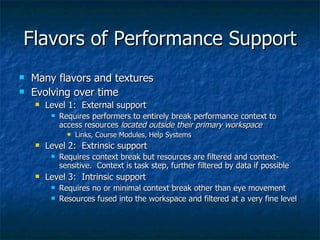
Flavors of Performance Support Many flavors and textures Evolving over time Level 1:  External support Requires performers to entirely break performance context to access resources  located outside their primary workspace Links, Course Modules, Help Systems Level 2:  Extrinsic support Requires context break but resources are filtered and context-sensitive.  Context is task step, further filtered by data if possible Level 3:  Intrinsic support Requires no or minimal context break other than eye movement Resources fused into the workspace and filtered at a very fine level
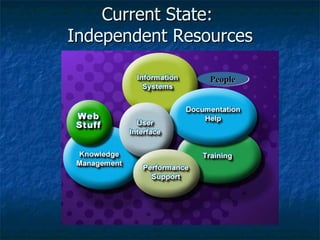
Current State:  Independent Resources People
Performance is in the  Weave The problem or task is defined  All relevant variables are:  Surfaced Integrated Properly sequenced The metaphorical area when things come together When people get it and are self-sufficient Where response is exactly right
The Current Condition Idiosyncratic design Architecture around the artifacts Redundant content in each artifact Growing use of templates and style sheets for each resource type Limited filters – excluding workflow Content not separated from its use or searchable
Problem Each organizational unit develops artifacts based on its history.  We present them as  threads  to performers and make them do the weaving Training Documentation Software applications Websites Tools
Performance Development Defaults Training is the primary  default  for performance development Out of context Content rich; limited application Too much too soon; too little too late Spray and pray Ineffective Inefficient Expensive
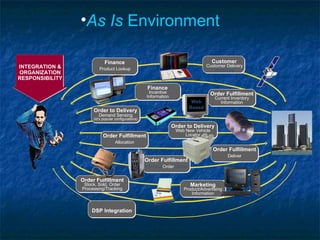
As Is  Environment Customer Customer   Delivery  Reporting Order   Fulfillment On-Line  Order  Guide Order to Delivery Demand Sensing (id’s popular configurations) Finance Incentive   Information Order   Fulfillment Deliver Order   Fulfillment Current Inventory   Information Order   Fulfillment Allocation Order Fulfillment Stock, Sold, Order Processing/Tracking Order to   Delivery Web New Vehicle Locator Finance Product   Lookup Marketing Product/Advertising Information DSP   Integration INTEGRATION & ORGANIZATION RESPONSIBILITY Web Based Server Based
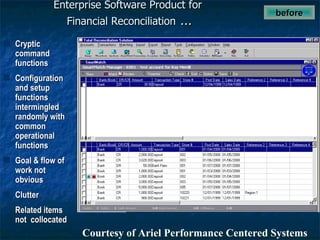
Enterprise Software Product for  Financial Reconciliation  … Cryptic command functions Configuration and setup functions intermingled randomly with common operational functions Goal & flow of work not obvious Clutter Related items not  collocated before  Courtesy of Ariel Performance Centered Systems
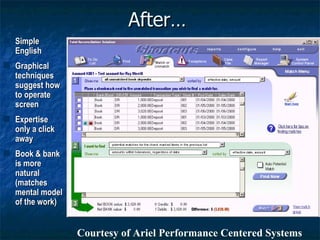
After… Simple English Graphical techniques suggest how to operate screen Expertise only a click away Book & bank is more natural (matches mental model of the work) Courtesy of Ariel Performance Centered Systems
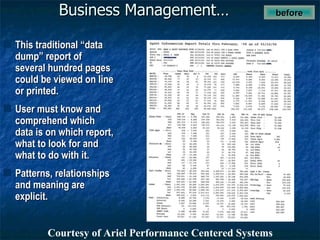
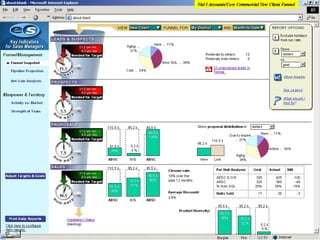
Business Management… before  This traditional “data dump” report of several hundred pages could be viewed on line or printed. User must know and comprehend which data is on which report, what to look for and what to do with it. Patterns, relationships and meaning are explicit. Courtesy of Ariel Performance Centered Systems
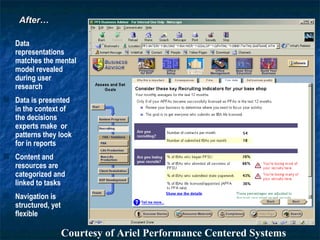
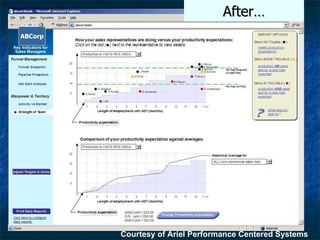
After… Data representations matches the mental model revealed during user research Data is presented in the context of the decisions experts make  or patterns they look for in reports Content and resources are categorized and linked to tasks Navigation is structured, yet flexible After… Courtesy of Ariel Performance Centered Systems
After… Courtesy of Ariel Performance Centered Systems ABCorp
 
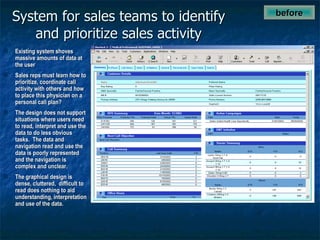
System for sales teams to identify and prioritize sales activity before  Existing system shoves massive amounts of data at the user Sales reps must learn how to prioritize, coordinate call activity with others and how to place this physician on a personal call plan? The design does not support situations where users need to read, interpret and use the data to do less obvious tasks.  The data and navigation read and use the data is poorly represented and the navigation is complex and unclear. The graphical design is dense, cluttered,  difficult to read does nothing to aid understanding, interpretation and use of the data.
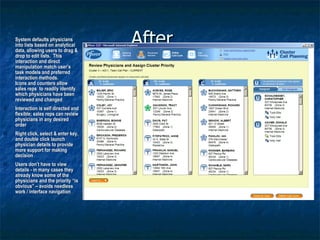
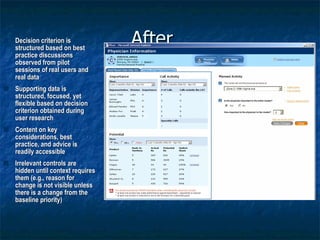
After… System defaults physicians into lists based on analytical data, allowing users to drag & drop to edit lists.  This interaction and direct manipulation match user’s task models and preferred interaction methods. Icons and counters allow sales reps  to readily identify which physicians have been reviewed and changed Interaction is self directed and flexible; sales reps can review physicians in any desired order Right click, select & enter key, and double click launch physician details to provide more support for making decision Users don’t have to view details - in many cases they already know some of the physicians and the priority “is obvious” – avoids needless work / interface navigation
After… Decision criterion is structured based on best practice discussions observed from pilot sessions of real users and real data Supporting data is structured, focused, yet flexible based on decision criterion obtained during user research Content on key considerations, best practice, and advice is readily accessible Irrelevant controls are hidden until context requires them (e.g., reason for change is not visible unless there is a change from the baseline priority)
 
 
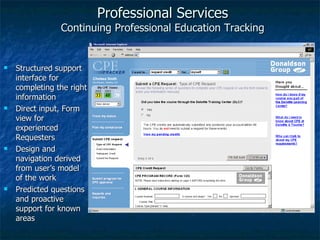
Professional Services Continuing Professional Education Tracking Personalized, web-based entry of CPE requests Quick reference for critical measures Robust query and reporting feature for complete visibility of all history and status Common, familiar “CPE Credit Request” metaphor for visual display of information
Professional Services Continuing Professional Education Tracking Structured support interface for completing the right information Direct input, Form view for experienced Requesters Design and navigation derived from user’s model of the work Predicted questions and proactive support for known areas
Current Deliverables Growing more sophisticated Artisan to craftsman phase Sophisticated designers “ Pulling” the technology together to make it happen” Not easily replicated for large scale production Expensive if not impossible to maintain other than “by hand”
Performance Development Problems Integration is left to the performer using Inquiry Coaching Observation and Modeling Trial and Error with feedback Inconsistent outcomes It takes  forever   in the current state
What’s Necessary An integrating viewpoint Advocacy Business case True cost of performance development Consequences of failure Payoffs of new alternatives
Failures Tactical view Unable to get sufficient sponsorship Inability to integrate efforts of multiple organizations Dominance of IT Lack of credibility of Interface Designers, Trainers and others with IT
What’s Necessary? A Performance Support Architecture Object Design and Standards Base Level Compiled Aggregated Metadata tagging schema Web-services production and delivery environment
Performance Support Object A small, reusable digital component that can be selectively applied – alone or in combination – to meet individual needs for on-the-job support. Database Driven Metadata tagged
Requirements for the System  Aggregate, Structure and Present Content Keep content separate from context
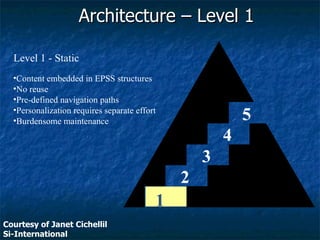
1 2 3 4 5 Level 1 - Static Content embedded in EPSS structures No reuse Pre-defined navigation paths Personalization requires separate effort Burdensome maintenance Architecture – Level 1 Courtesy of Janet Cichellil Si-International
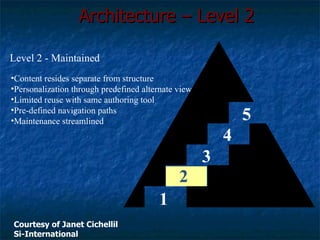
1 2 3 4 5 Level 2 - Maintained Content resides separate from structure Personalization through predefined alternate view Limited reuse with same authoring tool Pre-defined navigation paths Maintenance streamlined Architecture – Level 2 Courtesy of Janet Cichellil Si-International
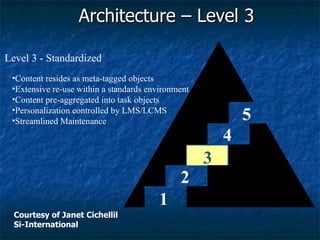
1 2 3 4 5 Level 3 - Standardized Content resides as meta-tagged objects Extensive re-use within a standards environment Content pre-aggregated into task objects Personalization controlled by LMS/LCMS Streamlined Maintenance Architecture – Level 3 Courtesy of Janet Cichellil Si-International
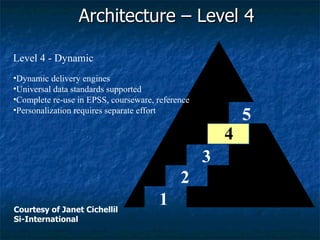
1 2 3 4 5 Level 4 - Dynamic Dynamic delivery engines Universal data standards supported Complete re-use in EPSS, courseware, reference Personalization requires separate effort Architecture – Level 4 Courtesy of Janet Cichellil Si-International
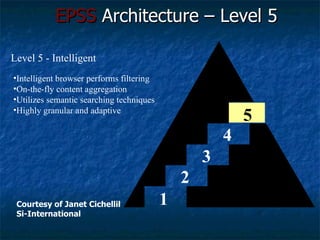
1 2 3 4 5 Level 5 - Intelligent Intelligent browser performs filtering On-the-fly content aggregation Utilizes semantic searching techniques Highly granular and adaptive EPSS  Architecture – Level 5 Courtesy of Janet Cichellil Si-International
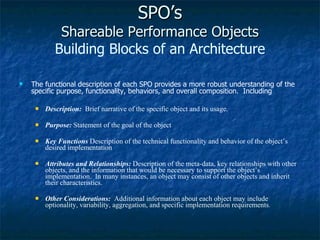
SPO’s Shareable Performance Objects Building Blocks of an Architecture The functional description of each SPO provides a more robust understanding of the specific purpose, functionality, behaviors, and overall composition.  Including Description:   Brief narrative of the specific object and its usage. Purpose:  Statement of the goal of the object Key Functions   Description of the technical functionality and behavior of the object’s desired implementation Attributes and Relationships:   Description of the meta-data, key relationships with other objects, and the information that would be necessary to support the object’s implementation.  In many instances, an object may consist of other objects and inherit their characteristics. Other Considerations:  Additional information about each object may include optionality, variability, aggregation, and specific implementation requirements .
Example Activity SPO Description An activity is used to classify, group, and organize specific work or efforts that a user needs to perform.  The activities group tasks, decisions, alerts, references, and other objects into logical units of work to be completed.  Purpose Activities organize groups of related tasks, decisions, choices, and other related items into a logical unit of work.  Key Functions Provides primary focus for the tasks, decisions, and choices. Groups the work into logical stages and milestones. Navigated from the Table of Content, Index, Checklists, or related links. Attributes and Relationships May contain a graphical representation that would be associated with the activity [Activity_Icon, Graphic] Text description of the Activity [Activity_Name, Char, 40] May contain a section or division designation, like IMF vs. BMF [Organization, Char, 5] Revision date of the information related to this activity [Activity_Revise_Date, Date]  Other Considerations None    Gery Associates & Ariel Performance Centerd Systems for the Internal Revenue Service.
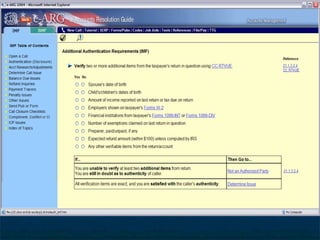
Description The TASK object provides a specific goal and action that is required to satisfactorily complete a step in an activity.  Related tasks are grouped into activities that represent some valid, logical unit of work.  Tasks may have many options and various representations associated with them.  Tasks incorporate actions, alerts, references, actions, decisions, and other SPOs to complete their operation or function Purpose Tasks provide specific direction and execution of a required or optional step within a logical unit of work.  Key Functions Provides specific actions to be taken and establishes a goal. Decomposes complex tasks into simpler, direct sub-tasks, checklists, or selections. Provides access to references, guidance, explanation, information/data, and tools  that assist in the successful completion by the user . Attributes and Relationships Indicator for task progression and current task focus [Task_Icon, Graphic] May support showing task status [Task_ Complete, Checkbox] List of tasks may have a sequence number [Task_ No, Number, 3] Text description of the task or specific action(s) [Task_ Description, Char, 40] May contain related links to other systems, such as IDRS Command Codes, IRM citations, etc.  [Reference_ Name, Char, 25] May contain related sub-tasks, checklists, selections, decisions, decision tables, and other objects [Related_ Task_Sub, Number, 5] Other Considerations None   Example 2:  TASK Object
 
A list of Shareable Performance Objects (to be expanded) Action Explanation Reference Activity Illustration Selection Alert Index Table of Contents Checklist Information  Task Decision Instruction Toolbar Decision Table Navigation Frequently Asked Question
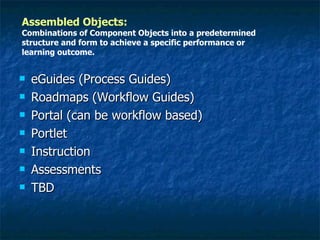
Assembled Objects:   Combinations of Component Objects into a predetermined structure and form to achieve a specific performance or learning outcome. Portal Large-scale Work process Resource Center TBD
eGuides (Process Guides) Roadmaps (Workflow Guides) Portal (can be workflow based) Portlet Instruction Assessments TBD Assembled Objects:   Combinations of Component Objects into a predetermined structure and form to achieve a specific performance or learning outcome.
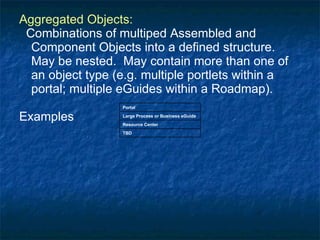
Aggregated Objects: Combinations of multiped Assembled and Component Objects into a defined structure.  May be nested.  May contain more than one of an object type (e.g. multiple portlets within a portal; multiple eGuides within a Roadmap). Examples Portal Large Process or Business eGuide  Resource Center TBD
Steps (not necessarily in order!) Define the objects Design the Objects and related style sheets Pilot how they will be assembled or aggregated into even larger objects Establish metadata tagging  Identify and test a repository Identify and test a creation tool
Issues The Usual Sponsorship Collaboration among groups IT Instruction Knowledge Mgt. Content Providers Business Models Skills Money Tools
Architecture Necessary to... Scale efforts Make a large-scale impact on performance Leverage scarce design and development expertise
What are the Issues? Leadership Where does this belong? Who is sufficiently credible? Integration Functional Silos Artifacts Fusion Significantly different

Epsstempo astd

  • 1.
    At the Momentof Need: Directly Supporting Doing, Learning, Referencing and Collaborating and Building a Performance Support Architecture Moving Beyond Pilots Gloria Gery Gery Associates Tolland MA 01034 413 258 4693 www.gloriagery.com [email_address]
  • 2.
    Defining Performance SupportAn integrated environment providing Task structuring support for workflow Filtered, relevant and best-represented Knowledge and Learning Resources Data Tools Communications and collaboration
  • 3.
    Flavors of PerformanceSupport Many flavors and textures Evolving over time Level 1: External support Requires performers to entirely break performance context to access resources located outside their primary workspace Links, Course Modules, Help Systems Level 2: Extrinsic support Requires context break but resources are filtered and context-sensitive. Context is task step, further filtered by data if possible Level 3: Intrinsic support Requires no or minimal context break other than eye movement Resources fused into the workspace and filtered at a very fine level
  • 4.
    Current State: Independent Resources People
  • 5.
    Performance is inthe Weave The problem or task is defined All relevant variables are: Surfaced Integrated Properly sequenced The metaphorical area when things come together When people get it and are self-sufficient Where response is exactly right
  • 6.
    The Current ConditionIdiosyncratic design Architecture around the artifacts Redundant content in each artifact Growing use of templates and style sheets for each resource type Limited filters – excluding workflow Content not separated from its use or searchable
  • 7.
    Problem Each organizationalunit develops artifacts based on its history. We present them as threads to performers and make them do the weaving Training Documentation Software applications Websites Tools
  • 8.
    Performance Development DefaultsTraining is the primary default for performance development Out of context Content rich; limited application Too much too soon; too little too late Spray and pray Ineffective Inefficient Expensive
  • 9.
    As Is Environment Customer Customer Delivery Reporting Order Fulfillment On-Line Order Guide Order to Delivery Demand Sensing (id’s popular configurations) Finance Incentive Information Order Fulfillment Deliver Order Fulfillment Current Inventory Information Order Fulfillment Allocation Order Fulfillment Stock, Sold, Order Processing/Tracking Order to Delivery Web New Vehicle Locator Finance Product Lookup Marketing Product/Advertising Information DSP Integration INTEGRATION & ORGANIZATION RESPONSIBILITY Web Based Server Based
  • 10.
    Enterprise Software Productfor Financial Reconciliation … Cryptic command functions Configuration and setup functions intermingled randomly with common operational functions Goal & flow of work not obvious Clutter Related items not collocated before Courtesy of Ariel Performance Centered Systems
  • 11.
    After… Simple EnglishGraphical techniques suggest how to operate screen Expertise only a click away Book & bank is more natural (matches mental model of the work) Courtesy of Ariel Performance Centered Systems
  • 12.
    Business Management… before This traditional “data dump” report of several hundred pages could be viewed on line or printed. User must know and comprehend which data is on which report, what to look for and what to do with it. Patterns, relationships and meaning are explicit. Courtesy of Ariel Performance Centered Systems
  • 13.
    After… Data representationsmatches the mental model revealed during user research Data is presented in the context of the decisions experts make or patterns they look for in reports Content and resources are categorized and linked to tasks Navigation is structured, yet flexible After… Courtesy of Ariel Performance Centered Systems
  • 14.
    After… Courtesy ofAriel Performance Centered Systems ABCorp
  • 15.
  • 16.
    System for salesteams to identify and prioritize sales activity before Existing system shoves massive amounts of data at the user Sales reps must learn how to prioritize, coordinate call activity with others and how to place this physician on a personal call plan? The design does not support situations where users need to read, interpret and use the data to do less obvious tasks. The data and navigation read and use the data is poorly represented and the navigation is complex and unclear. The graphical design is dense, cluttered, difficult to read does nothing to aid understanding, interpretation and use of the data.
  • 17.
    After… System defaultsphysicians into lists based on analytical data, allowing users to drag & drop to edit lists. This interaction and direct manipulation match user’s task models and preferred interaction methods. Icons and counters allow sales reps to readily identify which physicians have been reviewed and changed Interaction is self directed and flexible; sales reps can review physicians in any desired order Right click, select & enter key, and double click launch physician details to provide more support for making decision Users don’t have to view details - in many cases they already know some of the physicians and the priority “is obvious” – avoids needless work / interface navigation
  • 18.
    After… Decision criterionis structured based on best practice discussions observed from pilot sessions of real users and real data Supporting data is structured, focused, yet flexible based on decision criterion obtained during user research Content on key considerations, best practice, and advice is readily accessible Irrelevant controls are hidden until context requires them (e.g., reason for change is not visible unless there is a change from the baseline priority)
  • 19.
  • 20.
  • 21.
    Professional Services ContinuingProfessional Education Tracking Personalized, web-based entry of CPE requests Quick reference for critical measures Robust query and reporting feature for complete visibility of all history and status Common, familiar “CPE Credit Request” metaphor for visual display of information
  • 22.
    Professional Services ContinuingProfessional Education Tracking Structured support interface for completing the right information Direct input, Form view for experienced Requesters Design and navigation derived from user’s model of the work Predicted questions and proactive support for known areas
  • 23.
    Current Deliverables Growingmore sophisticated Artisan to craftsman phase Sophisticated designers “ Pulling” the technology together to make it happen” Not easily replicated for large scale production Expensive if not impossible to maintain other than “by hand”
  • 24.
    Performance Development ProblemsIntegration is left to the performer using Inquiry Coaching Observation and Modeling Trial and Error with feedback Inconsistent outcomes It takes forever in the current state
  • 25.
    What’s Necessary Anintegrating viewpoint Advocacy Business case True cost of performance development Consequences of failure Payoffs of new alternatives
  • 26.
    Failures Tactical viewUnable to get sufficient sponsorship Inability to integrate efforts of multiple organizations Dominance of IT Lack of credibility of Interface Designers, Trainers and others with IT
  • 27.
    What’s Necessary? APerformance Support Architecture Object Design and Standards Base Level Compiled Aggregated Metadata tagging schema Web-services production and delivery environment
  • 28.
    Performance Support ObjectA small, reusable digital component that can be selectively applied – alone or in combination – to meet individual needs for on-the-job support. Database Driven Metadata tagged
  • 29.
    Requirements for theSystem Aggregate, Structure and Present Content Keep content separate from context
  • 30.
    1 2 34 5 Level 1 - Static Content embedded in EPSS structures No reuse Pre-defined navigation paths Personalization requires separate effort Burdensome maintenance Architecture – Level 1 Courtesy of Janet Cichellil Si-International
  • 31.
    1 2 34 5 Level 2 - Maintained Content resides separate from structure Personalization through predefined alternate view Limited reuse with same authoring tool Pre-defined navigation paths Maintenance streamlined Architecture – Level 2 Courtesy of Janet Cichellil Si-International
  • 32.
    1 2 34 5 Level 3 - Standardized Content resides as meta-tagged objects Extensive re-use within a standards environment Content pre-aggregated into task objects Personalization controlled by LMS/LCMS Streamlined Maintenance Architecture – Level 3 Courtesy of Janet Cichellil Si-International
  • 33.
    1 2 34 5 Level 4 - Dynamic Dynamic delivery engines Universal data standards supported Complete re-use in EPSS, courseware, reference Personalization requires separate effort Architecture – Level 4 Courtesy of Janet Cichellil Si-International
  • 34.
    1 2 34 5 Level 5 - Intelligent Intelligent browser performs filtering On-the-fly content aggregation Utilizes semantic searching techniques Highly granular and adaptive EPSS Architecture – Level 5 Courtesy of Janet Cichellil Si-International
  • 35.
    SPO’s Shareable PerformanceObjects Building Blocks of an Architecture The functional description of each SPO provides a more robust understanding of the specific purpose, functionality, behaviors, and overall composition. Including Description: Brief narrative of the specific object and its usage. Purpose: Statement of the goal of the object Key Functions Description of the technical functionality and behavior of the object’s desired implementation Attributes and Relationships: Description of the meta-data, key relationships with other objects, and the information that would be necessary to support the object’s implementation. In many instances, an object may consist of other objects and inherit their characteristics. Other Considerations: Additional information about each object may include optionality, variability, aggregation, and specific implementation requirements .
  • 36.
    Example Activity SPODescription An activity is used to classify, group, and organize specific work or efforts that a user needs to perform. The activities group tasks, decisions, alerts, references, and other objects into logical units of work to be completed. Purpose Activities organize groups of related tasks, decisions, choices, and other related items into a logical unit of work. Key Functions Provides primary focus for the tasks, decisions, and choices. Groups the work into logical stages and milestones. Navigated from the Table of Content, Index, Checklists, or related links. Attributes and Relationships May contain a graphical representation that would be associated with the activity [Activity_Icon, Graphic] Text description of the Activity [Activity_Name, Char, 40] May contain a section or division designation, like IMF vs. BMF [Organization, Char, 5] Revision date of the information related to this activity [Activity_Revise_Date, Date] Other Considerations None Gery Associates & Ariel Performance Centerd Systems for the Internal Revenue Service.
  • 37.
    Description The TASKobject provides a specific goal and action that is required to satisfactorily complete a step in an activity. Related tasks are grouped into activities that represent some valid, logical unit of work. Tasks may have many options and various representations associated with them. Tasks incorporate actions, alerts, references, actions, decisions, and other SPOs to complete their operation or function Purpose Tasks provide specific direction and execution of a required or optional step within a logical unit of work. Key Functions Provides specific actions to be taken and establishes a goal. Decomposes complex tasks into simpler, direct sub-tasks, checklists, or selections. Provides access to references, guidance, explanation, information/data, and tools that assist in the successful completion by the user . Attributes and Relationships Indicator for task progression and current task focus [Task_Icon, Graphic] May support showing task status [Task_ Complete, Checkbox] List of tasks may have a sequence number [Task_ No, Number, 3] Text description of the task or specific action(s) [Task_ Description, Char, 40] May contain related links to other systems, such as IDRS Command Codes, IRM citations, etc. [Reference_ Name, Char, 25] May contain related sub-tasks, checklists, selections, decisions, decision tables, and other objects [Related_ Task_Sub, Number, 5] Other Considerations None Example 2: TASK Object
  • 38.
  • 39.
    A list ofShareable Performance Objects (to be expanded) Action Explanation Reference Activity Illustration Selection Alert Index Table of Contents Checklist Information Task Decision Instruction Toolbar Decision Table Navigation Frequently Asked Question
  • 40.
    Assembled Objects: Combinations of Component Objects into a predetermined structure and form to achieve a specific performance or learning outcome. Portal Large-scale Work process Resource Center TBD
  • 41.
    eGuides (Process Guides)Roadmaps (Workflow Guides) Portal (can be workflow based) Portlet Instruction Assessments TBD Assembled Objects: Combinations of Component Objects into a predetermined structure and form to achieve a specific performance or learning outcome.
  • 42.
    Aggregated Objects: Combinationsof multiped Assembled and Component Objects into a defined structure. May be nested. May contain more than one of an object type (e.g. multiple portlets within a portal; multiple eGuides within a Roadmap). Examples Portal Large Process or Business eGuide Resource Center TBD
  • 43.
    Steps (not necessarilyin order!) Define the objects Design the Objects and related style sheets Pilot how they will be assembled or aggregated into even larger objects Establish metadata tagging Identify and test a repository Identify and test a creation tool
  • 44.
    Issues The UsualSponsorship Collaboration among groups IT Instruction Knowledge Mgt. Content Providers Business Models Skills Money Tools
  • 45.
    Architecture Necessary to...Scale efforts Make a large-scale impact on performance Leverage scarce design and development expertise
  • 46.
    What are theIssues? Leadership Where does this belong? Who is sufficiently credible? Integration Functional Silos Artifacts Fusion Significantly different

Editor's Notes

  • #13 I changed second bullet and added a third.
  • #14 Minor word changes in text
  • #16 Fast Facts Company: ADT Security Services, a division of Tyco Location: Boca Raton, FL Business: Residential, Corporate, and Government Security Systems Challenges: Extensive training of field sales organization Many disparate systems not linked to the work Heavy reliance on reports and data interpretation Too much time required to analyze without diagnosing situations Results: Visual representation of Sales Pipeline methodology Intuitive, immediate interpretation of key metrics and indicators Integrated advice and coaching on planning and corrective activities Exception conditions represented that allows “one-click” resolutions
  • #17 Ray... The two points made following the ellipses are less clear to me. I have modified them, but am not confident that what I am saying is correct.
  • #19 Edited text
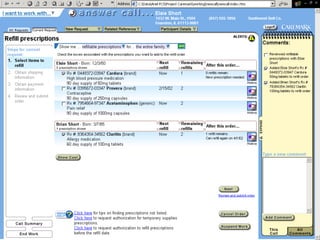
  • #20 Fast Facts Company: Caremark Location: San Antonio, TX Business: Prescription Drug Insurance and Fulfillment Services Service Center Application Challenges: Excessive “surfing” between applications Inconsistent use of call logging / comments Cumbersome reference system Error-prone manual date and currency calculations Results: Integrates several underlying applications Presents the information and data using natural language, anticipating “next questions” Structures tasks and business processes Auto generates suggested comments
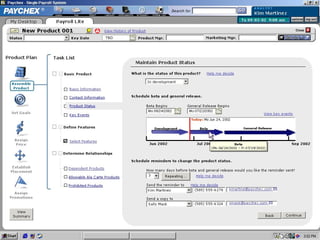
  • #21 Fast Facts Company: Paychex, Inc. Location: Rochester, NY Business: Payroll and Human Resources Services Challenges: Extensive, traditional training of Payroll Specialists and field organization Many disparate systems for various market segments and customer types Heavy reliance on reports and data interpretation Dynamic environment where mistakes or errors have steep financial consequences Results: Single view of payroll process that scales well for all types of customers Intuitive, immediate process knowledge with less reliance on training Integrated advice and coaching on best practices and expert advice Exception conditions represented that allows “one-click” resolutions and corrective actions
  • #22 Fast Facts, continued Company: Deloitte & Touche LLP Location: Wilton, CT Business: Assurance and Advisory Professional Services
  • #23 Fast Facts, continued Company: Deloitte & Touche LLP Location: Wilton, CT Business: Assurance and Advisory Professional Services