ALL INDIA SENIOR SCHOOL
CERTIFICATE EXAMINATION (2019-20)
Gandhi Public School, Gunupur
A PROJECT OF COMPUTER
SCIENCE ON
EMPLOYEE MANAGEMENT SYSTEM
NAME :
CLASS : 12th
ROLL NO:
GUIDED BY: Mr. Gurucharan Mahapatro
CONTENTS
TOPIC Pg. No
 Certificate 1
 Acknowledgment 2
 Introduction 3
 Software and hardware 4
requirements
 Module 5
 Source code 6-31
 Sample output 32-34
 Conclusion 35
 Bibliography 36
Certificate
This is to certify that Master/Miss ………………………………….
Roll no…..…. studying in class…..…. Studying in Gandhi Public
School, has satisfactorily completed in Computer Science
with the title “EMPLOYEE MANAGEMENT SYSTEM” as a part
of course completion in pursuance of AISSCE during the
academic year 2018-19.
The project is original conceptualization and has been
executed by him under the guidance of Mr. Gurucharan
Mahapatro.
SIGNATURE OF THE TEACHER SIGNATURE OF THE PRINCIPAL
SIGNATURE OF THE EXAMINER SCHOOL STAMP
Acknowledgement
I would like to express my special thanks of gratitude to my
teacher Mr.Gurucharan Mahapatro as well as our principal
Mr.Prasanta Kumar Panda who gave me this golden
opportunity to do this wonderful project on the topic
“employee management system”, which also helped me in
doing a lot of research and I came to know about so many
new things.
I am really thankful to them.
Secondly I would also like to thank my parents and friends
who helped me a lot in finishing this project within the
limited time.
I am making this project not only for marks but also to
increase my knowledge.
Signature of the student
INTRODUCTION
Employee Managementsystem is an application that enables
users to create and store Employee Records. It also helps to
maintain the data of existing employees. It also helps to
know the number of employees in different departments by
the help of piechart and graph. This application is helpful to
department of the organization which maintains data of
employees related to an organization.
It is simple to understand and can be used by anyone who is
not even familiar with simple employees system. It is user
friendly and just asks the user to follow step by step
operations by giving him few options. It is fast and can
perform many operations of a company.
This software package has been developed using the
powerful coding tools of PYTHON. The software is very user
friendly. The package contains different modules like
Employee details. This version of the software has multi-user
approach. For further enhancement or development of the
package, user feedback will be considered.
SOFTWARE & HARDWARE
REQUIREMENTS
Software:
 Operating system:DOS/WINDOWS/LINUX
 Python compiler: IDLE PYTHON
Hardware:
 Processor: Intel 80385 compatible and above
 R.A.M: 512 MB and above
 V.D.U.V.G.A/S.V.G/T.F.T
MODULE
 Malplotlib
This library offers many functions and tools to produce
quality output in variety of formats such as plots, charts,
graphs etc.
Matplotlib is an amazing visualization library in Python
for 2D plots of arrays. Matplotlib is a multi-platform
data visualization library built on NumPy arrays and
designed to work with the broader SciPy stack. It was
introduced by John Hunter in the year 2002.
One of the greatest benefits of visualization is that it
allows us visual access to huge amounts of data in easily
digestible visuals. Matplotlib consists of several plots
like line, bar, scatter, histogram etc.
Matplotlib is a plotting library for the Python
programming language and its numerical mathematics
extension NumPy. It provides an object-oriented API for
embedding plots into applications using general-
purpose GUI toolkits like Tkinter, wxPython, Qt, or GTK+.
There is also a procedural "pylab" interface based on a
state machine (like OpenGL), designed to closely
resemble that of MATLAB, though its use is discouraged.
SciPy makes use of Matplotlib.
SOURCE CODE
company1():
def search():
a='y'
while a=='y':
n=input("Enter the id of employee:")
f=open('C:/Users/student/Desktop/employment
management system/new folder/emp1.txt','r').readlines()
for lines in f:
if n==lines[0]:
print(lines)
a=input("Press y for search again or press any key
to go back:" )
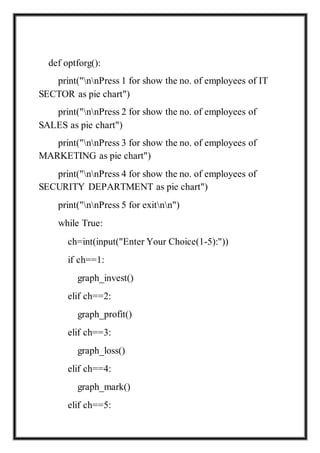
def optforg():
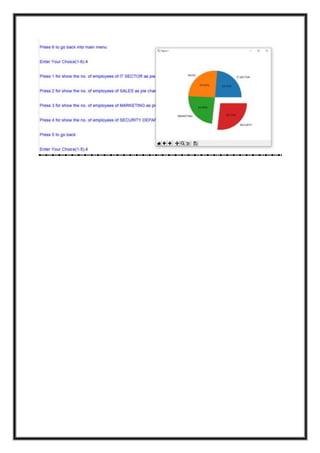
print("nnPress 1 for show the no. of employees of IT
SECTOR as pie chart")
print("nnPress 2 for show the no. of employees of
SALES as pie chart")
print("nnPress 3 for show the no. of employees of
MARKETING as pie chart")
print("nnPress 4 for show the no. of employees of
SECURITY DEPARTMENT as pie chart")
print("nnPress 5 to go backnn")
while True:
ch=int(input("Enter Your Choice(1-5):"))
if ch==1:
graph_invest()
elif ch==2:
graph_profit()
elif ch==3:
graph_loss()
elif ch==4:
graph_mark()
elif ch==5:
break
else:
print("invalid choice!")
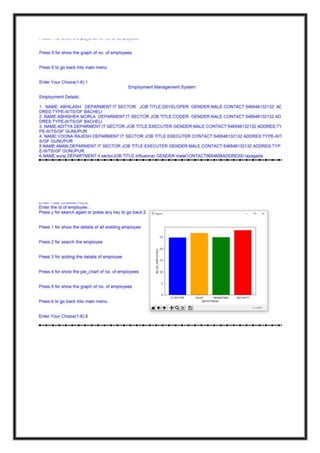
def graph():
import matplotlib.pyplot as plt
DEPARTMENT=['IT
SECTOR','SALES','MARKETING','SECURITY']
NO_OF_EMPLOYEES=[24.8,26.8,25,28]
plt.xlabel('DEPARTMENT')
plt.ylabel('NO_OF_EMPLOYEES')
plt.bar(DEPARTMENT,NO_OF_EMPLOYEES,color=['blue',
'orange','green','red'])
plt.show()
def opn():
f=open('C:/Users/student/Desktop/employment
management system/new folder/emp1.txt',"r+")
s=f.read()
print(s)
f.close()
def edt():
f=open('C:/Users/student/Desktop/employment
management system/new folder/emp1.txt','r')
s=f.read()
print(s)
f.close()
def graph_invest():
import matplotlib.pyplot as plt
con=[24.8,26.8,25,28]
zones=['IT
SECTOR','SALES','MARKETING','SECURITY']
plt.axis("equal")
plt.pie(con,labels=zones,explode=[0.3,0,0,0],autopct="%1.2f
%%")
plt.show()
def graph_profit():
import matplotlib.pyplot as plt
con=[24.8,26.8,25,28]
zones=['IT
SECTOR','SALES','MARKETING','SECURITY']
plt.axis("equal")
plt.pie(con,labels=zones,explode=[0,0.3,0,0],autopct="%1.2f
%%")
plt.show()
def graph_loss():
import matplotlib.pyplot as plt
con=[24.8,26.8,25,28]
zones=['IT
SECTOR','SALES','MARKETING','SECURITY']
plt.axis("equal")
plt.pie(con,labels=zones,explode=[0,0,0.3,0],autopct="%1.2f
%%")
plt.show()
def graph_mark():
import matplotlib.pyplot as plt
con=[24.8,26.8,25,28]
zones=['IT
SECTOR','SALES','MARKETING','SECURITY']
plt.axis("equal")
plt.pie(con,labels=zones,explode=[0,0,0,0.3],autopct="%1.2f
%%")
plt.show()
def edetails():
f=open("emp1.txt","a")
n=int(input("nnHow many employees name you want
to enter?"))
for i in range(n):
name=input("Enter The Name of employees:")
i_d=int(input("Enter the id of the employees:"))
dept=input("Enter the department of the employees:")
j=input("Enter the job title of employees:")
g=input("Enter the gender of employees:")
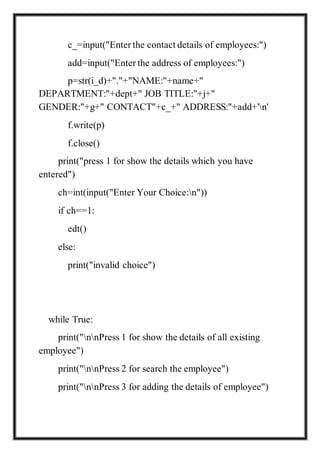
c_=input("Enter the contact details of employees:")
add=input("Enter the address of employees:")
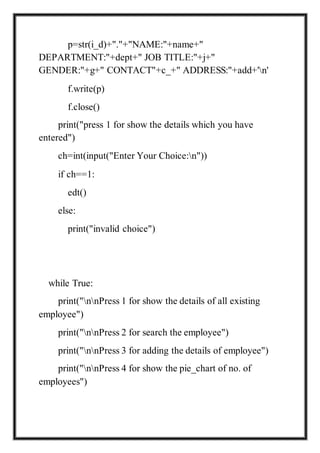
p=str(i_d)+"."+"NAME:"+name+"
DEPARTMENT:"+dept+" JOB TITLE:"+j+"
GENDER:"+g+" CONTACT"+c_+" ADDRESS:"+add+'n'
f.write(p)
f.close()
print("press 1 for show the details which you have
entered")
ch=int(input("Enter Your Choice:n"))
if ch==1:
edt()
else:
print("invalid choice")
while True:
print("nnPress 1 for show the details of all existing
employee")
print("nnPress 2 for search the employee")
print("nnPress 3 for adding the details of employee")
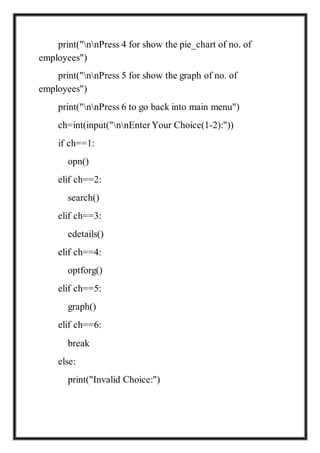
print("nnPress 4 for show the pie_chart of no. of
employees")
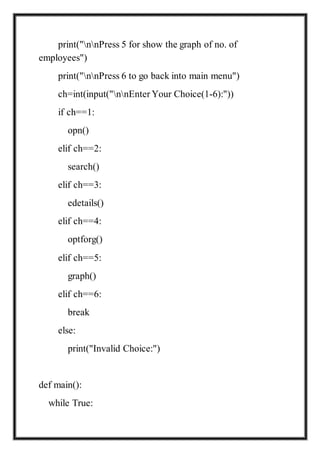
print("nnPress 5 for show the graph of no. of
employees")
print("nnPress 6 to go back into main menu")
ch=int(input("nnEnter Your Choice(1-6):"))
if ch==1:
opn()
elif ch==2:
search()
elif ch==3:
edetails()
elif ch==4:
optforg()
elif ch==5:
graph()
elif ch==6:
break
else:
print("Invalid Choice:")
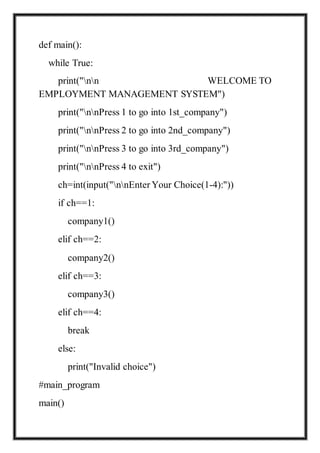
def main():
while True:
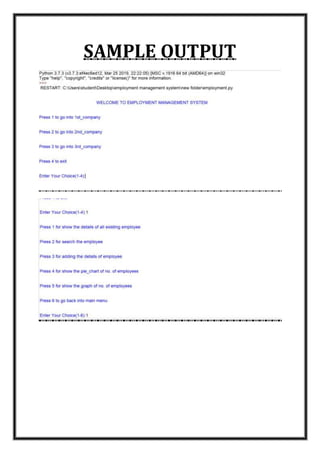
print("nnPress 1 to go into 1st_company")
print("nnPress 2 to go into 1st_company")
print("nnPress 3 to go into 1st_company")
print("nnPress 4 to exit")
ch=int(input("nnEnter Your Choice(1-4):"))
if ch==1:
company1()
elif ch==2:
company2()
elif ch==3:
company3()
elif ch==4:
break
else:
print("Invalid choice")
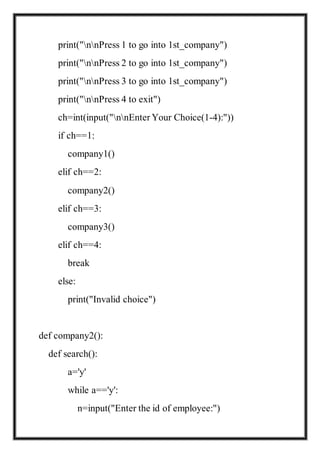
def company2():
def search():
a='y'
while a=='y':
n=input("Enter the id of employee:")
f=open('C:/Users/student/Desktop/employment
management system/new folder/emp2.txt','r').readlines()
for lines in f:
if n==lines[0]:
print(lines)
a=input("Press y for search again or press any key
to go back:" )
def optforg():
print("nnPress 1 for show the no. of employees of IT
SECTOR as pie chart")
print("nnPress 2 for show the no. of employees of
SALES as pie chart")
print("nnPress 3 for show the no. of employees of
MARKETING as pie chart")
print("nnPress 4 for show the no. of employees of
SECURITY DEPARTMENT as pie chart")
print("nnPress 5 for exitnn")
while True:
ch=int(input("Enter Your Choice(1-5):"))
if ch==1:
graph_invest()
elif ch==2:
graph_profit()
elif ch==3:
graph_loss()
elif ch==4:
graph_mark()
elif ch==5:
break
else:
print("invalid choice!")
def graph():
import matplotlib.pyplot as plt
DEPARTMENT=['IT
SECTOR','SALES','MARKETING','SECURITY']
NO_OF_EMPLOYEES=[24.8,26.8,25,28]
plt.xlabel('DEPARTMENT')
plt.ylabel('NO_OF_EMPLOYEES')
plt.bar(DEPARTMENT,NO_OF_EMPLOYEES,color=['blue',
'orange','green','red'])
plt.show()
def opn():
f=open('C:/Users/student/Desktop/employment
management system/new folder/emp2.txt',"r+")
s=f.read()
print(s)
f.close()
def edt():
f=open('C:/Users/student/Desktop/employment
management system/new folder/emp2.txt','r')
s=f.read()
print(s)
f.close()
def graph_invest():
import matplotlib.pyplot as plt
con=[24.8,26.8,25,28]
zones=['IT
SECTOR','SALES','MARKETING','SECURITY']
plt.axis("equal")
plt.pie(con,labels=zones,explode=[0.3,0,0,0],autopct="%1.2f
%%")
plt.show()
def graph_profit():
import matplotlib.pyplot as plt
con=[24.8,26.8,25,28]
zones=['IT
SECTOR','SALES','MARKETING','SECURITY']
plt.axis("equal")
plt.pie(con,labels=zones,explode=[0,0.3,0,0],autopct="%1.2f
%%")
plt.show()
def graph_loss():
import matplotlib.pyplot as plt
con=[24.8,26.8,25,28]
zones=['IT
SECTOR','SALES','MARKETING','SECURITY']
plt.axis("equal")
plt.pie(con,labels=zones,explode=[0,0,0.3,0],autopct="%1.2f
%%")
plt.show()
def graph_mark():
import matplotlib.pyplot as plt
con=[24.8,26.8,25,28]
zones=['IT
SECTOR','SALES','MARKETING','SECURITY']
plt.axis("equal")
plt.pie(con,labels=zones,explode=[0,0,0,0.3],autopct="%1.2f
%%")
plt.show()
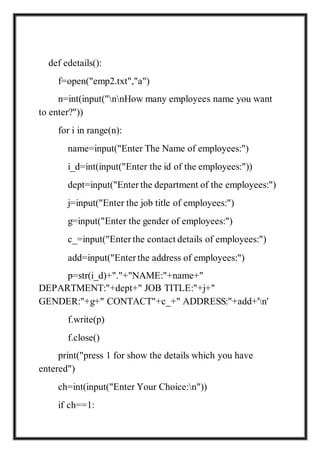
def edetails():
f=open("emp2.txt","a")
n=int(input("nnHow many employees name you want
to enter?"))
for i in range(n):
name=input("Enter The Name of employees:")
i_d=int(input("Enter the id of the employees:"))
dept=input("Enter the department of the employees:")
j=input("Enter the job title of employees:")
g=input("Enter the gender of employees:")
c_=input("Enter the contact details of employees:")
add=input("Enter the address of employees:")
p=str(i_d)+"."+"NAME:"+name+"
DEPARTMENT:"+dept+" JOB TITLE:"+j+"
GENDER:"+g+" CONTACT"+c_+" ADDRESS:"+add+'n'
f.write(p)
f.close()
print("press 1 for show the details which you have
entered")
ch=int(input("Enter Your Choice:n"))
if ch==1:
edt()
else:
print("invalid choice")
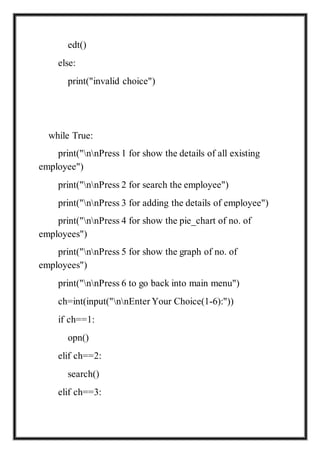
while True:
print("nnPress 1 for show the details of all existing
employee")
print("nnPress 2 for search the employee")
print("nnPress 3 for adding the details of employee")
print("nnPress 4 for show the pie_chart of no. of
employees")
print("nnPress 5 for show the graph of no. of
employees")
print("nnPress 6 to go back into main menu")
ch=int(input("nnEnter Your Choice(1-6):"))
if ch==1:
opn()
elif ch==2:
search()
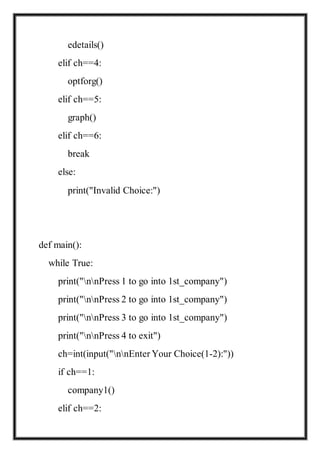
elif ch==3:
edetails()
elif ch==4:
optforg()
elif ch==5:
graph()
elif ch==6:
break
else:
print("Invalid Choice:")
def main():
while True:
print("nnPress 1 to go into 1st_company")
print("nnPress 2 to go into 1st_company")
print("nnPress 3 to go into 1st_company")
print("nnPress 4 to exit")
ch=int(input("nnEnter Your Choice(1-2):"))
if ch==1:
company1()
elif ch==2:
company2()
elif ch==3:
company3()
elif ch==4:
break
else:
print("Invalid choice")
def company3():
def search():
a='y'
while a=='y':
n=input("Enter the id of employee:")
f=open('C:/Users/student/Desktop/employment
management system/new folder/emp3.txt','r').readlines()
for lines in f:
if n==lines[0]:
print(lines)
a=input("Press y for search again or press any key
to go back:" )
def optforg():
print("nnPress 1 for show the no. of employees of IT
SECTOR as pie chart")
print("nnPress 2 for show the no. of employees of
SALES as pie chart")
print("nnPress 3 for show the no. of employees of
MARKETING as pie chart")
print("nnPress 4 for show the no. of employees of
SECURITY DEPARTMENT as pie chart")
print("nnPress 5 for exitnn")
while True:
ch=int(input("Enter Your Choice(1-5):"))
if ch==1:
graph_invest()
elif ch==2:
graph_profit()
elif ch==3:
graph_loss()
elif ch==4:
graph_mark()
elif ch==5:
break
else:
print("invalid choice!")
def graph():
import matplotlib.pyplot as plt
DEPARTMENT=['IT
SECTOR','SALES','MARKETING','SECURITY']
NO_OF_EMPLOYEES=[24.8,26.8,25,28]
plt.xlabel('DEPARTMENT')
plt.ylabel('NO_OF_EMPLOYEES')
plt.bar(DEPARTMENT,NO_OF_EMPLOYEES,color=['blue',
'orange','green','red'])
plt.show()
def opn():
f=open('C:/Users/student/Desktop/employment
management system/new folder/emp3.txt',"r+")
s=f.read()
print(s)
f.close()
def edt():
f=open('C:/Users/student/Desktop/employment
management system/new folder/emp3.txt','r')
s=f.read()
print(s)
f.close()
def graph_invest():
import matplotlib.pyplot as plt
con=[24.8,26.8,25,28]
zones=['IT
SECTOR','SALES','MARKETING','SECURITY']
plt.axis("equal")
plt.pie(con,labels=zones,explode=[0.3,0,0,0],autopct="%1.2f
%%")
plt.show()
def graph_profit():
import matplotlib.pyplot as plt
con=[24.8,26.8,25,28]
zones=['IT
SECTOR','SALES','MARKETING','SECURITY']
plt.axis("equal")
plt.pie(con,labels=zones,explode=[0,0.3,0,0],autopct="%1.2f
%%")
plt.show()
def graph_loss():
import matplotlib.pyplot as plt
con=[24.8,26.8,25,28]
zones=['IT
SECTOR','SALES','MARKETING','SECURITY']
plt.axis("equal")
plt.pie(con,labels=zones,explode=[0,0,0.3,0],autopct="%1.2f
%%")
plt.show()
def graph_mark():
import matplotlib.pyplot as plt
con=[24.8,26.8,25,28]
zones=['IT
SECTOR','SALES','MARKETING','SECURITY']
plt.axis("equal")
plt.pie(con,labels=zones,explode=[0,0,0,0.3],autopct="%1.2f
%%")
plt.show()
def edetails():
f=open("emp3.txt","a")
n=int(input("nnHow many employees name you want
to enter?"))
for i in range(n):
name=input("Enter The Name of employees:")
i_d=int(input("Enter the id of the employees:"))
dept=input("Enter the department of the employees:")
j=input("Enter the job title of employees:")
g=input("Enter the gender of employees:")
c_=input("Enter the contact details of employees:")
add=input("Enter the address of employees:")
p=str(i_d)+"."+"NAME:"+name+"
DEPARTMENT:"+dept+" JOB TITLE:"+j+"
GENDER:"+g+" CONTACT"+c_+" ADDRESS:"+add+'n'
f.write(p)
f.close()
print("press 1 for show the details which you have
entered")
ch=int(input("Enter Your Choice:n"))
if ch==1:
edt()
else:
print("invalid choice")
while True:
print("nnPress 1 for show the details of all existing
employee")
print("nnPress 2 for search the employee")
print("nnPress 3 for adding the details of employee")
print("nnPress 4 for show the pie_chart of no. of
employees")
print("nnPress 5 for show the graph of no. of
employees")
print("nnPress 6 to go back into main menu")
ch=int(input("nnEnter Your Choice(1-2):"))
if ch==1:
opn()
elif ch==2:
search()
elif ch==3:
edetails()
elif ch==4:
optforg()
elif ch==5:
graph()
elif ch==6:
break
else:
print("Invalid Choice:")
def main():
while True:
print("nn WELCOME TO
EMPLOYMENT MANAGEMENT SYSTEM")
print("nnPress 1 to go into 1st_company")
print("nnPress 2 to go into 2nd_company")
print("nnPress 3 to go into 3rd_company")
print("nnPress 4 to exit")
ch=int(input("nnEnter Your Choice(1-4):"))
if ch==1:
company1()
elif ch==2:
company2()
elif ch==3:
company3()
elif ch==4:
break
else:
print("Invalid choice")
#main_program
main()
SAMPLE OUTPUT
CONCLUSION
We need employee management system because we can
able to search into different employee details by using their
“id” within seconds. We can also able to add details of the
employment easily and we can also able to see the pie chart
as well as graphs of number of employee in that particular
company.
BIBLIOGRAPHY
www.cplusplus.com
https://www.daniweb.com/programming/soft
ware-development/threads/473459/unit-
conversion-wit-c
http://cppprojectcode.blogspot.com/2010/09
/unit-conversion-software.html
https://www.codeproject.com/Articles/10882
93/Units-and-measures-for-Cplusplus

class 12th computer science project Employee Management System In Python

  • 1.
    ALL INDIA SENIORSCHOOL CERTIFICATE EXAMINATION (2019-20) Gandhi Public School, Gunupur A PROJECT OF COMPUTER SCIENCE ON EMPLOYEE MANAGEMENT SYSTEM NAME : CLASS : 12th ROLL NO: GUIDED BY: Mr. Gurucharan Mahapatro CONTENTS
  • 2.
    TOPIC Pg. No Certificate 1  Acknowledgment 2  Introduction 3  Software and hardware 4 requirements  Module 5  Source code 6-31  Sample output 32-34  Conclusion 35  Bibliography 36
  • 3.
    Certificate This is tocertify that Master/Miss …………………………………. Roll no…..…. studying in class…..…. Studying in Gandhi Public School, has satisfactorily completed in Computer Science with the title “EMPLOYEE MANAGEMENT SYSTEM” as a part of course completion in pursuance of AISSCE during the academic year 2018-19. The project is original conceptualization and has been executed by him under the guidance of Mr. Gurucharan Mahapatro. SIGNATURE OF THE TEACHER SIGNATURE OF THE PRINCIPAL SIGNATURE OF THE EXAMINER SCHOOL STAMP
  • 4.
    Acknowledgement I would liketo express my special thanks of gratitude to my teacher Mr.Gurucharan Mahapatro as well as our principal Mr.Prasanta Kumar Panda who gave me this golden opportunity to do this wonderful project on the topic “employee management system”, which also helped me in doing a lot of research and I came to know about so many new things. I am really thankful to them. Secondly I would also like to thank my parents and friends who helped me a lot in finishing this project within the limited time. I am making this project not only for marks but also to increase my knowledge. Signature of the student
  • 5.
    INTRODUCTION Employee Managementsystem isan application that enables users to create and store Employee Records. It also helps to maintain the data of existing employees. It also helps to know the number of employees in different departments by the help of piechart and graph. This application is helpful to department of the organization which maintains data of employees related to an organization. It is simple to understand and can be used by anyone who is not even familiar with simple employees system. It is user friendly and just asks the user to follow step by step operations by giving him few options. It is fast and can perform many operations of a company. This software package has been developed using the powerful coding tools of PYTHON. The software is very user friendly. The package contains different modules like Employee details. This version of the software has multi-user approach. For further enhancement or development of the package, user feedback will be considered.
  • 6.
    SOFTWARE & HARDWARE REQUIREMENTS Software: Operating system:DOS/WINDOWS/LINUX  Python compiler: IDLE PYTHON Hardware:  Processor: Intel 80385 compatible and above  R.A.M: 512 MB and above  V.D.U.V.G.A/S.V.G/T.F.T
  • 7.
    MODULE  Malplotlib This libraryoffers many functions and tools to produce quality output in variety of formats such as plots, charts, graphs etc. Matplotlib is an amazing visualization library in Python for 2D plots of arrays. Matplotlib is a multi-platform data visualization library built on NumPy arrays and designed to work with the broader SciPy stack. It was introduced by John Hunter in the year 2002. One of the greatest benefits of visualization is that it allows us visual access to huge amounts of data in easily digestible visuals. Matplotlib consists of several plots like line, bar, scatter, histogram etc. Matplotlib is a plotting library for the Python programming language and its numerical mathematics extension NumPy. It provides an object-oriented API for embedding plots into applications using general- purpose GUI toolkits like Tkinter, wxPython, Qt, or GTK+. There is also a procedural "pylab" interface based on a state machine (like OpenGL), designed to closely resemble that of MATLAB, though its use is discouraged. SciPy makes use of Matplotlib.
  • 8.
    SOURCE CODE company1(): def search(): a='y' whilea=='y': n=input("Enter the id of employee:") f=open('C:/Users/student/Desktop/employment management system/new folder/emp1.txt','r').readlines() for lines in f: if n==lines[0]: print(lines) a=input("Press y for search again or press any key to go back:" ) def optforg(): print("nnPress 1 for show the no. of employees of IT SECTOR as pie chart") print("nnPress 2 for show the no. of employees of SALES as pie chart")
  • 9.
    print("nnPress 3 forshow the no. of employees of MARKETING as pie chart") print("nnPress 4 for show the no. of employees of SECURITY DEPARTMENT as pie chart") print("nnPress 5 to go backnn") while True: ch=int(input("Enter Your Choice(1-5):")) if ch==1: graph_invest() elif ch==2: graph_profit() elif ch==3: graph_loss() elif ch==4: graph_mark() elif ch==5: break else: print("invalid choice!") def graph():
  • 10.
    import matplotlib.pyplot asplt DEPARTMENT=['IT SECTOR','SALES','MARKETING','SECURITY'] NO_OF_EMPLOYEES=[24.8,26.8,25,28] plt.xlabel('DEPARTMENT') plt.ylabel('NO_OF_EMPLOYEES') plt.bar(DEPARTMENT,NO_OF_EMPLOYEES,color=['blue', 'orange','green','red']) plt.show() def opn(): f=open('C:/Users/student/Desktop/employment management system/new folder/emp1.txt',"r+") s=f.read() print(s) f.close() def edt():
  • 11.
    f=open('C:/Users/student/Desktop/employment management system/new folder/emp1.txt','r') s=f.read() print(s) f.close() defgraph_invest(): import matplotlib.pyplot as plt con=[24.8,26.8,25,28] zones=['IT SECTOR','SALES','MARKETING','SECURITY'] plt.axis("equal") plt.pie(con,labels=zones,explode=[0.3,0,0,0],autopct="%1.2f %%") plt.show() def graph_profit(): import matplotlib.pyplot as plt con=[24.8,26.8,25,28] zones=['IT SECTOR','SALES','MARKETING','SECURITY']
  • 12.
    plt.axis("equal") plt.pie(con,labels=zones,explode=[0,0.3,0,0],autopct="%1.2f %%") plt.show() def graph_loss(): import matplotlib.pyplotas plt con=[24.8,26.8,25,28] zones=['IT SECTOR','SALES','MARKETING','SECURITY'] plt.axis("equal") plt.pie(con,labels=zones,explode=[0,0,0.3,0],autopct="%1.2f %%") plt.show() def graph_mark(): import matplotlib.pyplot as plt con=[24.8,26.8,25,28] zones=['IT SECTOR','SALES','MARKETING','SECURITY']
  • 13.
    plt.axis("equal") plt.pie(con,labels=zones,explode=[0,0,0,0.3],autopct="%1.2f %%") plt.show() def edetails(): f=open("emp1.txt","a") n=int(input("nnHow manyemployees name you want to enter?")) for i in range(n): name=input("Enter The Name of employees:") i_d=int(input("Enter the id of the employees:")) dept=input("Enter the department of the employees:") j=input("Enter the job title of employees:") g=input("Enter the gender of employees:") c_=input("Enter the contact details of employees:") add=input("Enter the address of employees:")
  • 14.
    p=str(i_d)+"."+"NAME:"+name+" DEPARTMENT:"+dept+" JOB TITLE:"+j+" GENDER:"+g+"CONTACT"+c_+" ADDRESS:"+add+'n' f.write(p) f.close() print("press 1 for show the details which you have entered") ch=int(input("Enter Your Choice:n")) if ch==1: edt() else: print("invalid choice") while True: print("nnPress 1 for show the details of all existing employee") print("nnPress 2 for search the employee") print("nnPress 3 for adding the details of employee") print("nnPress 4 for show the pie_chart of no. of employees")
  • 15.
    print("nnPress 5 forshow the graph of no. of employees") print("nnPress 6 to go back into main menu") ch=int(input("nnEnter Your Choice(1-6):")) if ch==1: opn() elif ch==2: search() elif ch==3: edetails() elif ch==4: optforg() elif ch==5: graph() elif ch==6: break else: print("Invalid Choice:") def main(): while True:
  • 16.
    print("nnPress 1 togo into 1st_company") print("nnPress 2 to go into 1st_company") print("nnPress 3 to go into 1st_company") print("nnPress 4 to exit") ch=int(input("nnEnter Your Choice(1-4):")) if ch==1: company1() elif ch==2: company2() elif ch==3: company3() elif ch==4: break else: print("Invalid choice") def company2(): def search(): a='y' while a=='y': n=input("Enter the id of employee:")
  • 17.
    f=open('C:/Users/student/Desktop/employment management system/new folder/emp2.txt','r').readlines() forlines in f: if n==lines[0]: print(lines) a=input("Press y for search again or press any key to go back:" ) def optforg(): print("nnPress 1 for show the no. of employees of IT SECTOR as pie chart") print("nnPress 2 for show the no. of employees of SALES as pie chart") print("nnPress 3 for show the no. of employees of MARKETING as pie chart") print("nnPress 4 for show the no. of employees of SECURITY DEPARTMENT as pie chart") print("nnPress 5 for exitnn") while True: ch=int(input("Enter Your Choice(1-5):")) if ch==1:
  • 18.
    graph_invest() elif ch==2: graph_profit() elif ch==3: graph_loss() elifch==4: graph_mark() elif ch==5: break else: print("invalid choice!") def graph(): import matplotlib.pyplot as plt DEPARTMENT=['IT SECTOR','SALES','MARKETING','SECURITY'] NO_OF_EMPLOYEES=[24.8,26.8,25,28] plt.xlabel('DEPARTMENT') plt.ylabel('NO_OF_EMPLOYEES')
  • 19.
    plt.bar(DEPARTMENT,NO_OF_EMPLOYEES,color=['blue', 'orange','green','red']) plt.show() def opn(): f=open('C:/Users/student/Desktop/employment management system/newfolder/emp2.txt',"r+") s=f.read() print(s) f.close() def edt(): f=open('C:/Users/student/Desktop/employment management system/new folder/emp2.txt','r') s=f.read() print(s) f.close() def graph_invest():
  • 20.
    import matplotlib.pyplot asplt con=[24.8,26.8,25,28] zones=['IT SECTOR','SALES','MARKETING','SECURITY'] plt.axis("equal") plt.pie(con,labels=zones,explode=[0.3,0,0,0],autopct="%1.2f %%") plt.show() def graph_profit(): import matplotlib.pyplot as plt con=[24.8,26.8,25,28] zones=['IT SECTOR','SALES','MARKETING','SECURITY'] plt.axis("equal") plt.pie(con,labels=zones,explode=[0,0.3,0,0],autopct="%1.2f %%") plt.show() def graph_loss():
  • 21.
    import matplotlib.pyplot asplt con=[24.8,26.8,25,28] zones=['IT SECTOR','SALES','MARKETING','SECURITY'] plt.axis("equal") plt.pie(con,labels=zones,explode=[0,0,0.3,0],autopct="%1.2f %%") plt.show() def graph_mark(): import matplotlib.pyplot as plt con=[24.8,26.8,25,28] zones=['IT SECTOR','SALES','MARKETING','SECURITY'] plt.axis("equal") plt.pie(con,labels=zones,explode=[0,0,0,0.3],autopct="%1.2f %%") plt.show()
  • 22.
    def edetails(): f=open("emp2.txt","a") n=int(input("nnHow manyemployees name you want to enter?")) for i in range(n): name=input("Enter The Name of employees:") i_d=int(input("Enter the id of the employees:")) dept=input("Enter the department of the employees:") j=input("Enter the job title of employees:") g=input("Enter the gender of employees:") c_=input("Enter the contact details of employees:") add=input("Enter the address of employees:") p=str(i_d)+"."+"NAME:"+name+" DEPARTMENT:"+dept+" JOB TITLE:"+j+" GENDER:"+g+" CONTACT"+c_+" ADDRESS:"+add+'n' f.write(p) f.close() print("press 1 for show the details which you have entered") ch=int(input("Enter Your Choice:n")) if ch==1:
  • 23.
    edt() else: print("invalid choice") while True: print("nnPress1 for show the details of all existing employee") print("nnPress 2 for search the employee") print("nnPress 3 for adding the details of employee") print("nnPress 4 for show the pie_chart of no. of employees") print("nnPress 5 for show the graph of no. of employees") print("nnPress 6 to go back into main menu") ch=int(input("nnEnter Your Choice(1-6):")) if ch==1: opn() elif ch==2: search() elif ch==3:
  • 24.
    edetails() elif ch==4: optforg() elif ch==5: graph() elifch==6: break else: print("Invalid Choice:") def main(): while True: print("nnPress 1 to go into 1st_company") print("nnPress 2 to go into 1st_company") print("nnPress 3 to go into 1st_company") print("nnPress 4 to exit") ch=int(input("nnEnter Your Choice(1-2):")) if ch==1: company1() elif ch==2:
  • 25.
    company2() elif ch==3: company3() elif ch==4: break else: print("Invalidchoice") def company3(): def search(): a='y' while a=='y': n=input("Enter the id of employee:") f=open('C:/Users/student/Desktop/employment management system/new folder/emp3.txt','r').readlines() for lines in f: if n==lines[0]: print(lines) a=input("Press y for search again or press any key to go back:" )
  • 26.
    def optforg(): print("nnPress 1for show the no. of employees of IT SECTOR as pie chart") print("nnPress 2 for show the no. of employees of SALES as pie chart") print("nnPress 3 for show the no. of employees of MARKETING as pie chart") print("nnPress 4 for show the no. of employees of SECURITY DEPARTMENT as pie chart") print("nnPress 5 for exitnn") while True: ch=int(input("Enter Your Choice(1-5):")) if ch==1: graph_invest() elif ch==2: graph_profit() elif ch==3: graph_loss() elif ch==4: graph_mark() elif ch==5:
  • 27.
    break else: print("invalid choice!") def graph(): importmatplotlib.pyplot as plt DEPARTMENT=['IT SECTOR','SALES','MARKETING','SECURITY'] NO_OF_EMPLOYEES=[24.8,26.8,25,28] plt.xlabel('DEPARTMENT') plt.ylabel('NO_OF_EMPLOYEES') plt.bar(DEPARTMENT,NO_OF_EMPLOYEES,color=['blue', 'orange','green','red']) plt.show() def opn(): f=open('C:/Users/student/Desktop/employment management system/new folder/emp3.txt',"r+") s=f.read()
  • 28.
    print(s) f.close() def edt(): f=open('C:/Users/student/Desktop/employment management system/newfolder/emp3.txt','r') s=f.read() print(s) f.close() def graph_invest(): import matplotlib.pyplot as plt con=[24.8,26.8,25,28] zones=['IT SECTOR','SALES','MARKETING','SECURITY'] plt.axis("equal") plt.pie(con,labels=zones,explode=[0.3,0,0,0],autopct="%1.2f %%") plt.show() def graph_profit():
  • 29.
    import matplotlib.pyplot asplt con=[24.8,26.8,25,28] zones=['IT SECTOR','SALES','MARKETING','SECURITY'] plt.axis("equal") plt.pie(con,labels=zones,explode=[0,0.3,0,0],autopct="%1.2f %%") plt.show() def graph_loss(): import matplotlib.pyplot as plt con=[24.8,26.8,25,28] zones=['IT SECTOR','SALES','MARKETING','SECURITY'] plt.axis("equal") plt.pie(con,labels=zones,explode=[0,0,0.3,0],autopct="%1.2f %%") plt.show() def graph_mark():
  • 30.
    import matplotlib.pyplot asplt con=[24.8,26.8,25,28] zones=['IT SECTOR','SALES','MARKETING','SECURITY'] plt.axis("equal") plt.pie(con,labels=zones,explode=[0,0,0,0.3],autopct="%1.2f %%") plt.show() def edetails(): f=open("emp3.txt","a") n=int(input("nnHow many employees name you want to enter?")) for i in range(n): name=input("Enter The Name of employees:") i_d=int(input("Enter the id of the employees:")) dept=input("Enter the department of the employees:") j=input("Enter the job title of employees:") g=input("Enter the gender of employees:")
  • 31.
    c_=input("Enter the contactdetails of employees:") add=input("Enter the address of employees:") p=str(i_d)+"."+"NAME:"+name+" DEPARTMENT:"+dept+" JOB TITLE:"+j+" GENDER:"+g+" CONTACT"+c_+" ADDRESS:"+add+'n' f.write(p) f.close() print("press 1 for show the details which you have entered") ch=int(input("Enter Your Choice:n")) if ch==1: edt() else: print("invalid choice") while True: print("nnPress 1 for show the details of all existing employee") print("nnPress 2 for search the employee") print("nnPress 3 for adding the details of employee")
  • 32.
    print("nnPress 4 forshow the pie_chart of no. of employees") print("nnPress 5 for show the graph of no. of employees") print("nnPress 6 to go back into main menu") ch=int(input("nnEnter Your Choice(1-2):")) if ch==1: opn() elif ch==2: search() elif ch==3: edetails() elif ch==4: optforg() elif ch==5: graph() elif ch==6: break else: print("Invalid Choice:")
  • 33.
    def main(): while True: print("nnWELCOME TO EMPLOYMENT MANAGEMENT SYSTEM") print("nnPress 1 to go into 1st_company") print("nnPress 2 to go into 2nd_company") print("nnPress 3 to go into 3rd_company") print("nnPress 4 to exit") ch=int(input("nnEnter Your Choice(1-4):")) if ch==1: company1() elif ch==2: company2() elif ch==3: company3() elif ch==4: break else: print("Invalid choice") #main_program main()
  • 34.
  • 37.
    CONCLUSION We need employeemanagement system because we can able to search into different employee details by using their “id” within seconds. We can also able to add details of the employment easily and we can also able to see the pie chart as well as graphs of number of employee in that particular company.
  • 38.