Orientation Manual
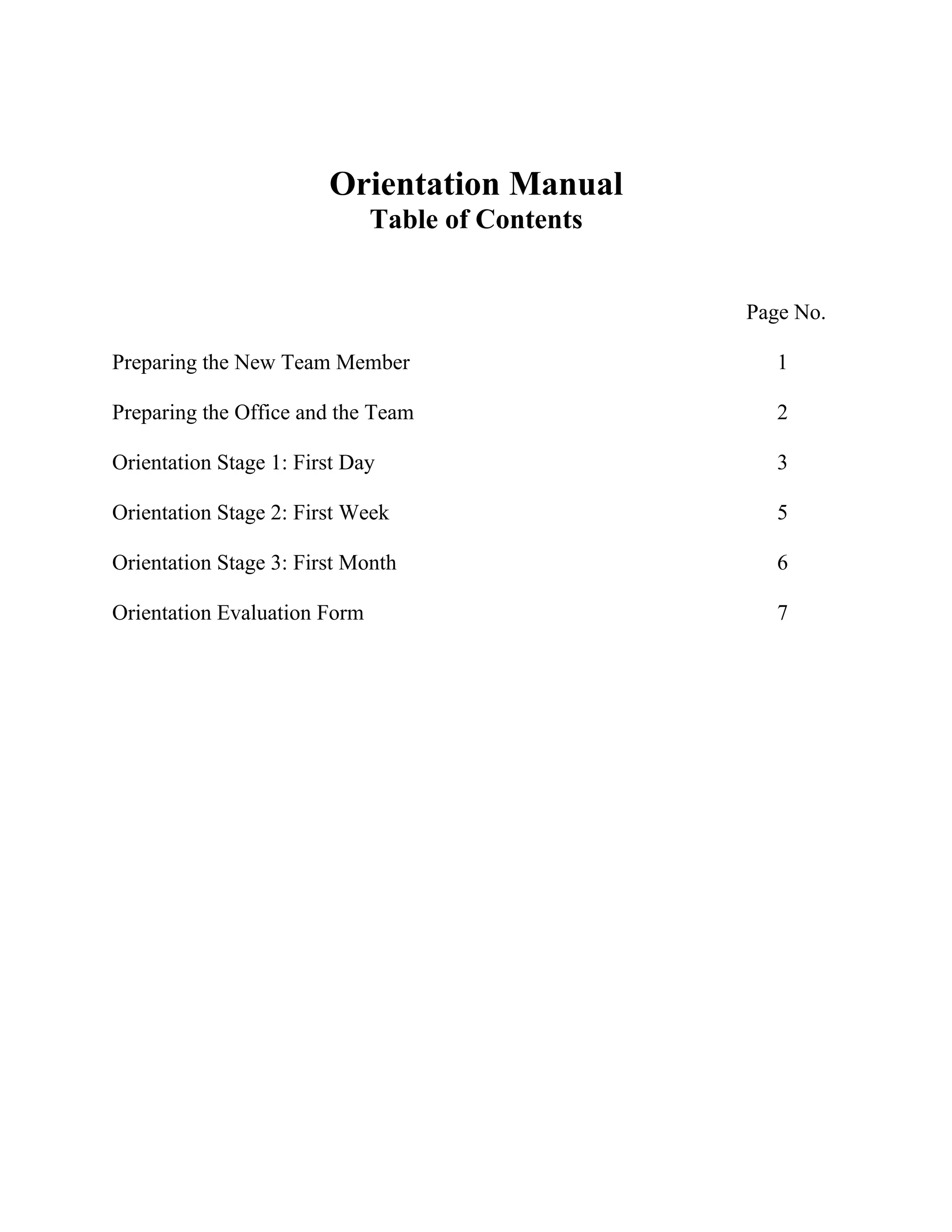
Table of Contents
Page No.
Preparing the New Team Member 1
Preparing the Office and the Team 2
Orientation Stage 1: First Day 3
Orientation Stage 2: First Week 5
Orientation Stage 3: First Month 6
Orientation Evaluation Form 7
3.
Preparing the NewTeam Member
Stage Task Completed by Date
1.1 Employee handbook
1.2 Business card information
1.3 Employment forms – Personal details, insurance
application, 401(k) packet, W-4, I-9, garage access form
1.4 Order new employee plant
1.5 Welcome gift bag
THE OFFICE ENVIRONMENT
Office location and contact details
Address: [Street Address]
[City, State Zip Code]
Phone #: XXX-XXX-XXXX or 1-800-XXX-XXXX
Fax #: XXX-XXX-XXXX or 1-800-XXX-XXXX
Backdoor #: XXX-XXX-XXXX ext. _________
Website: [Web Address]
Email: @[Firm Email Address]
Title:
1
4.
Preparing the Officeand the Team
Task Completed By Date
Stag
e
2.1 Organize workstation or office area allocation
2.2 Set up in Practice Solutions; enter rates; set time defaults;
access to MAIN office client listing only
2.3 Security cards/access arranged/office key(s).
2.4 Telephone connected with allocated extension and voice mail
2.5 Computer or laptop allocated and set up with email address,
passwords, and all applicable software; all other stations
updated with new employee’s calendar & e-mail address.
Create passwords:
Network
[Time & Billing Software]
[Marketing Software]
Voicemail
[Tax Software]
2.6 Business cards ordered 1 week ahead of start date; new team
member added to appropriate mailing lists/team lists/phone
lists/Outlook (update other team member’s outlook with new
employee’s address) Announcement message to inform team
members
2.7 Day One orientation arranged with meetings
scheduled in Outlook
2.8 Week one orientation arranged with meeting in
Outlook, rooms booked, etc.
2.9 Organize lunch with new team member and their manager or
team
2
5.
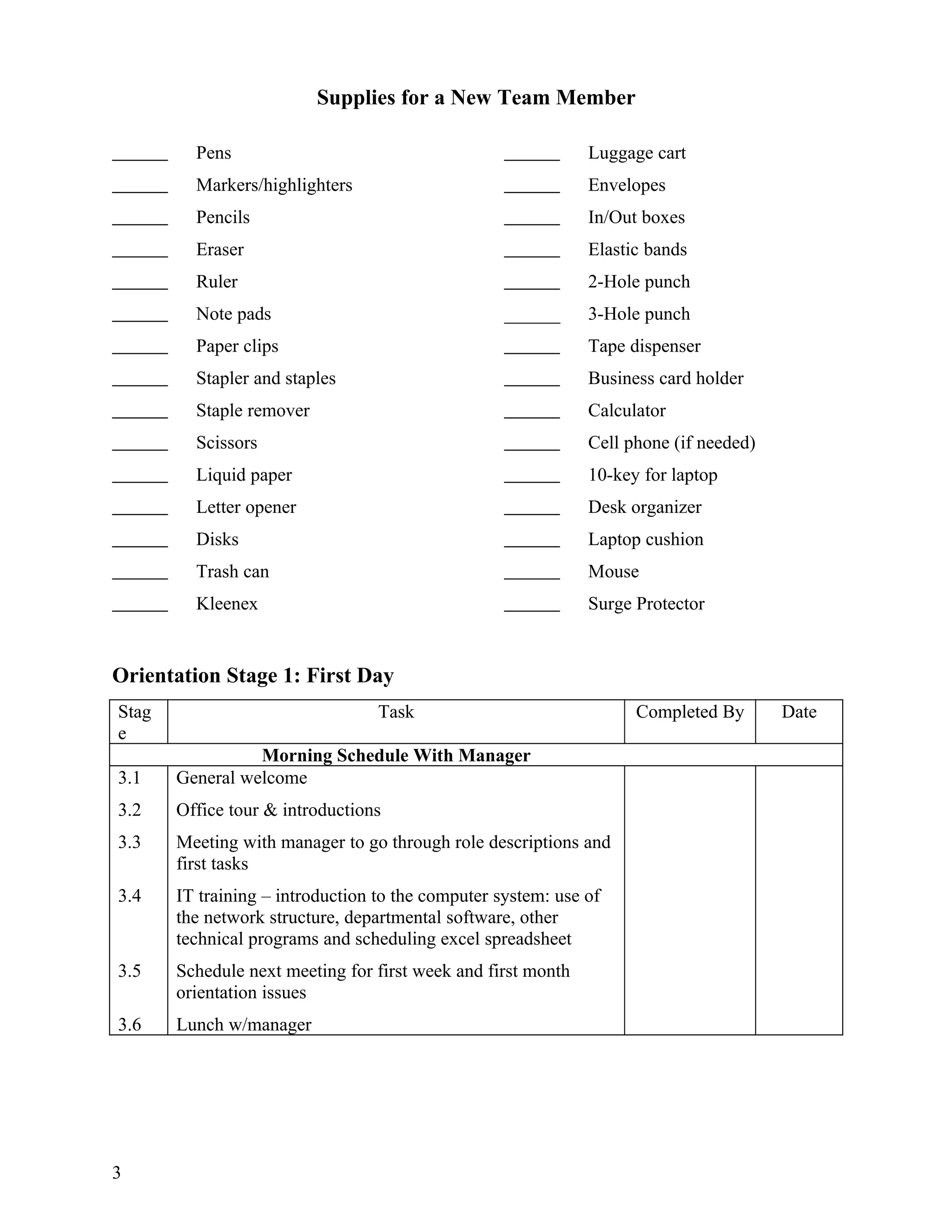
Supplies for aNew Team Member
Pens Luggage cart
Markers/highlighters Envelopes
Pencils In/Out boxes
Eraser Elastic bands
Ruler 2-Hole punch
Note pads ______ 3-Hole punch
Paper clips Tape dispenser
Stapler and staples Business card holder
Staple remover Calculator
Scissors Cell phone (if needed)
Liquid paper 10-key for laptop
Letter opener Desk organizer
Disks Laptop cushion
Trash can Mouse
Kleenex Surge Protector
Orientation Stage 1: First Day
Stag Task Completed By Date
e
Morning Schedule With Manager
3.1 General welcome
3.2 Office tour & introductions
3.3 Meeting with manager to go through role descriptions and
first tasks
3.4 IT training – introduction to the computer system: use of
the network structure, departmental software, other
technical programs and scheduling excel spreadsheet
3.5 Schedule next meeting for first week and first month
orientation issues
3.6 Lunch w/manager
3
6.
Office Tour
Reception Storage facilities
Meeting rooms Water cooler
Overview of network structure Printer / scanner / fax/ copier
Meal / kitchen area Restrooms
Office & paper supplies File rooms
Mail drop and times
Stage Task Completed By Date
Afternoon Schedule With Administrator
3.7 Security swipes and access keys to building handed over
and use explained
3.8 Protocols for telephones – answering and receiving calls;
script and phone usage
3.9 Employment contract—return by 2nd day of employment
3.10 Expenses claim policies explained; Excel template shown
3.11 IT training – introduction & use of [Time & Billing
Software] & [Marketing Software]
Location and use of our color letterhead
3.12
Place desktop document icons on desktop
3.13
Check access to the applicable network drives
3.14
Office supplies and order procedures
3.15
Explain the filing system – color coding, label format
3.16
Office procedures - deliveries, mail, fax, forms, etc.
3.17
Pay periods explained (if hourly, turning in timesheets)
3.18
Direct deposit information received
3.19
401(k) matching program explained
3.20
Offer fitness program
3.21
Discuss payment of dues and license renewal
3.22
Deborah to set up tasks on Richard’s outlook for the three
3.23
sign-off dates.
Manager/Partner to sign-off on first day orientation
3.24
4
7.
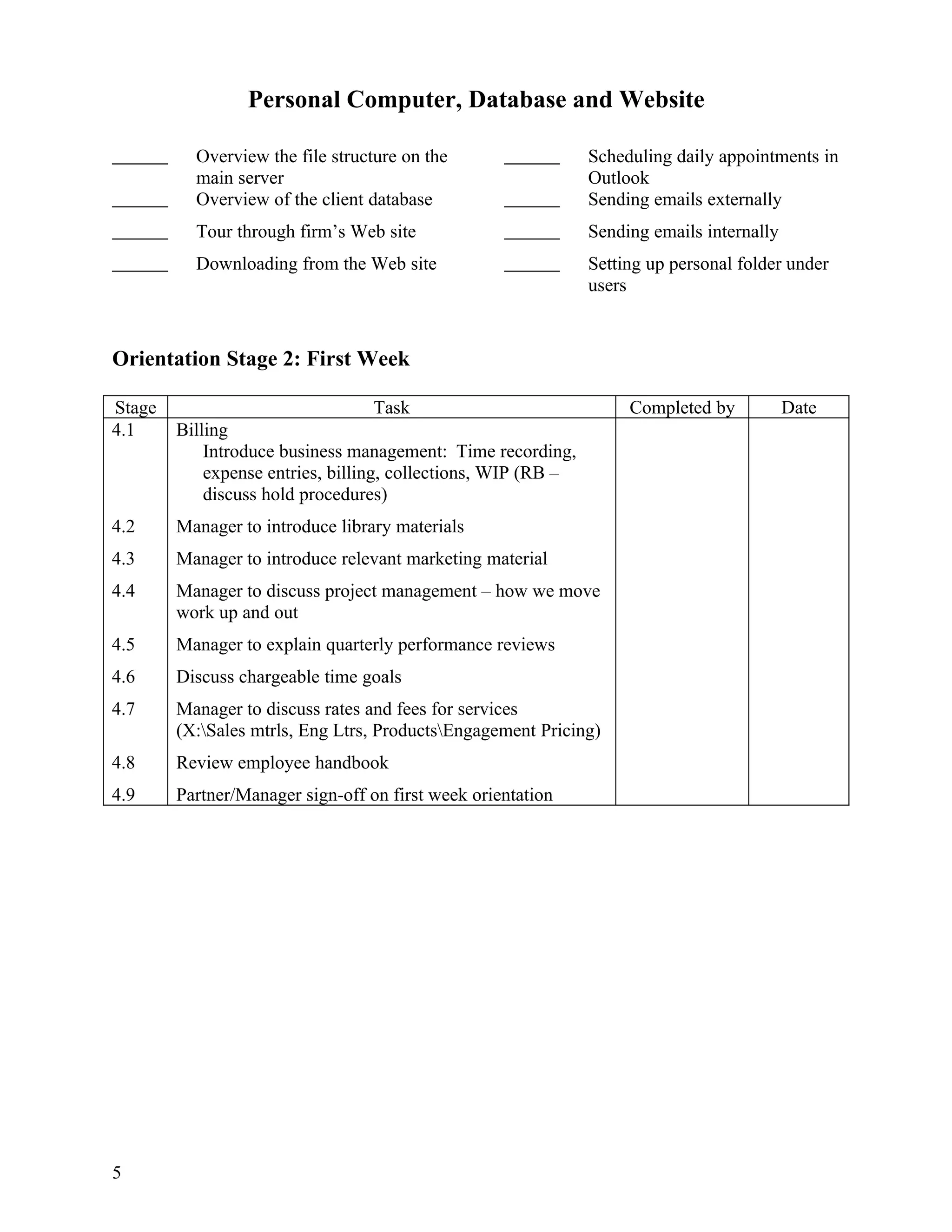
Personal Computer, Databaseand Website
Overview the file structure on the Scheduling daily appointments in
main server Outlook
Overview of the client database Sending emails externally
Tour through firm’s Web site Sending emails internally
Downloading from the Web site Setting up personal folder under
users
Orientation Stage 2: First Week
Stage Task Completed by Date
4.1 Billing
Introduce business management: Time recording,
expense entries, billing, collections, WIP (RB –
discuss hold procedures)
4.2 Manager to introduce library materials
4.3 Manager to introduce relevant marketing material
4.4 Manager to discuss project management – how we move
work up and out
4.5 Manager to explain quarterly performance reviews
4.6 Discuss chargeable time goals
4.7 Manager to discuss rates and fees for services
(X:Sales mtrls, Eng Ltrs, ProductsEngagement Pricing)
4.8 Review employee handbook
4.9 Partner/Manager sign-off on first week orientation
5
8.
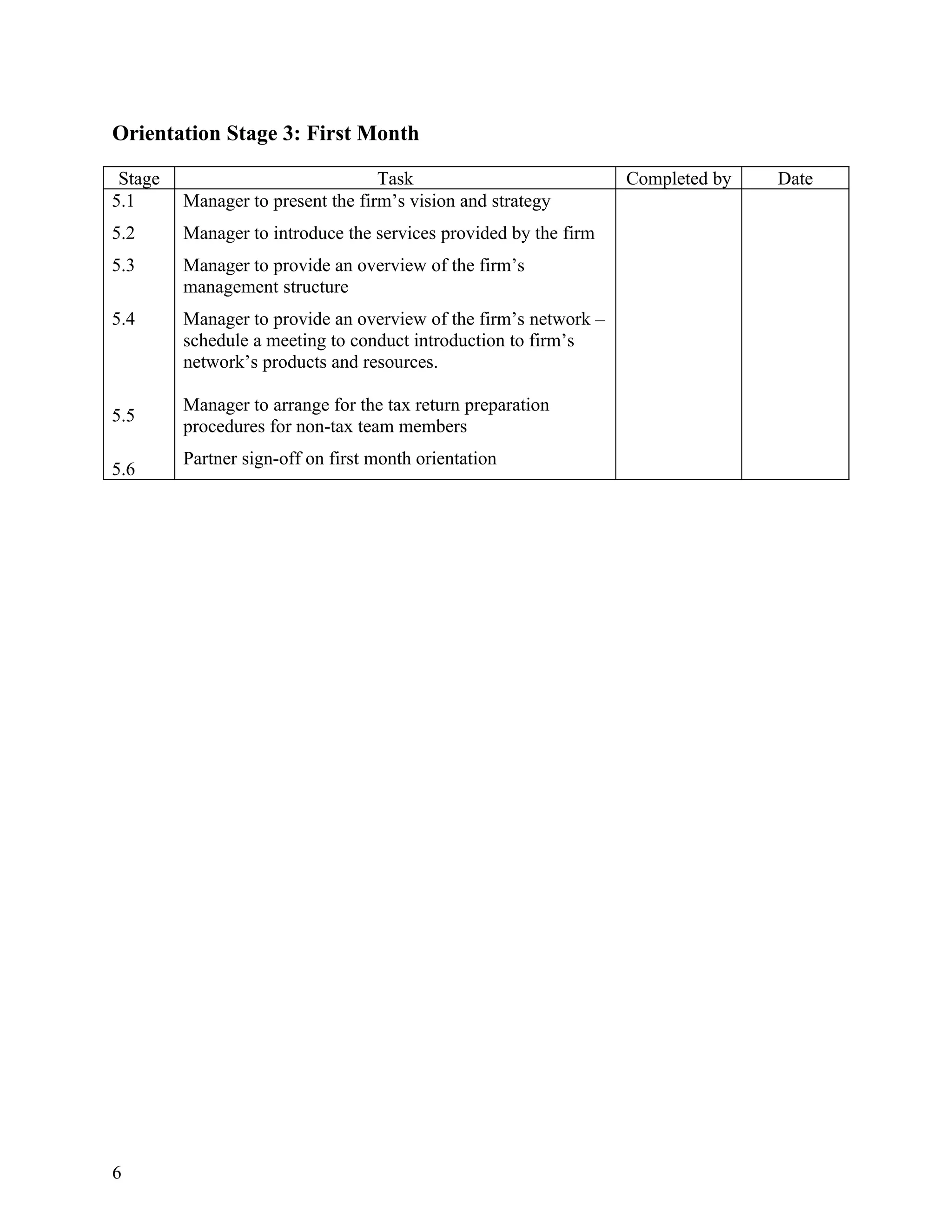
Orientation Stage 3:First Month
Stage Task Completed by Date
5.1 Manager to present the firm’s vision and strategy
5.2 Manager to introduce the services provided by the firm
5.3 Manager to provide an overview of the firm’s
management structure
5.4 Manager to provide an overview of the firm’s network –
schedule a meeting to conduct introduction to firm’s
network’s products and resources.
Manager to arrange for the tax return preparation
5.5
procedures for non-tax team members
Partner sign-off on first month orientation
5.6
6
9.
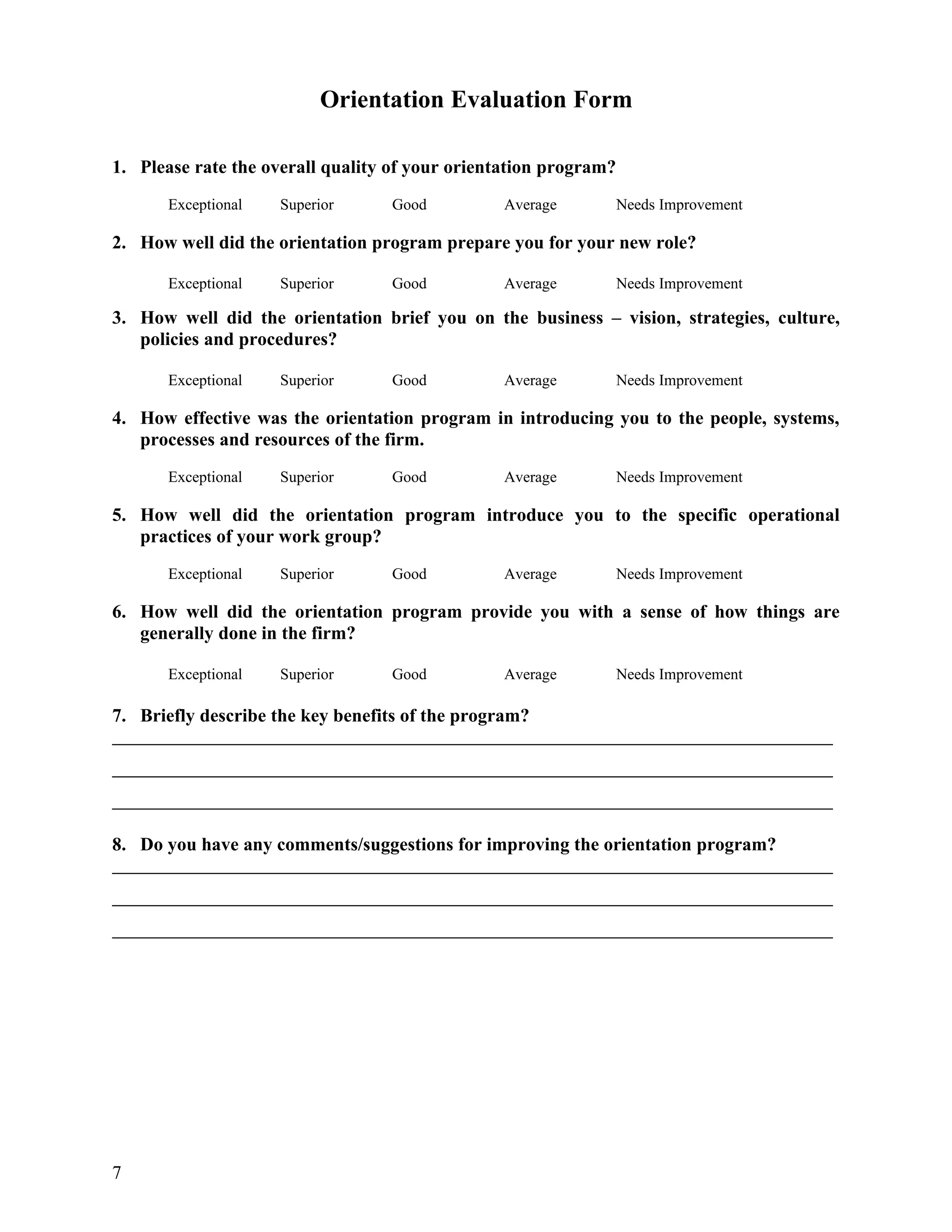
Orientation Evaluation Form
1.Please rate the overall quality of your orientation program?
Exceptional Superior Good Average Needs Improvement
2. How well did the orientation program prepare you for your new role?
Exceptional Superior Good Average Needs Improvement
3. How well did the orientation brief you on the business – vision, strategies, culture,
policies and procedures?
Exceptional Superior Good Average Needs Improvement
4. How effective was the orientation program in introducing you to the people, systems,
processes and resources of the firm.
Exceptional Superior Good Average Needs Improvement
5. How well did the orientation program introduce you to the specific operational
practices of your work group?
Exceptional Superior Good Average Needs Improvement
6. How well did the orientation program provide you with a sense of how things are
generally done in the firm?
Exceptional Superior Good Average Needs Improvement
7. Briefly describe the key benefits of the program?
8. Do you have any comments/suggestions for improving the orientation program?
7
![[Firm Name]
Employee Orientation Manual
Employee Name:
Start Date:](https://image.slidesharecdn.com/employeeorientationmanual-12631889151851-phpapp01/75/Employee-Orientation-Manual-1-2048.jpg)
![Preparing the New Team Member
Stage Task Completed by Date
1.1 Employee handbook
1.2 Business card information
1.3 Employment forms – Personal details, insurance
application, 401(k) packet, W-4, I-9, garage access form
1.4 Order new employee plant
1.5 Welcome gift bag
THE OFFICE ENVIRONMENT
Office location and contact details
Address: [Street Address]
[City, State Zip Code]
Phone #: XXX-XXX-XXXX or 1-800-XXX-XXXX
Fax #: XXX-XXX-XXXX or 1-800-XXX-XXXX
Backdoor #: XXX-XXX-XXXX ext. _________
Website: [Web Address]
Email: @[Firm Email Address]
Title:
1](https://image.slidesharecdn.com/employeeorientationmanual-12631889151851-phpapp01/75/Employee-Orientation-Manual-3-2048.jpg)
![Preparing the Office and the Team
Task Completed By Date
Stag
e
2.1 Organize workstation or office area allocation
2.2 Set up in Practice Solutions; enter rates; set time defaults;
access to MAIN office client listing only
2.3 Security cards/access arranged/office key(s).
2.4 Telephone connected with allocated extension and voice mail
2.5 Computer or laptop allocated and set up with email address,
passwords, and all applicable software; all other stations
updated with new employee’s calendar & e-mail address.
Create passwords:
Network
[Time & Billing Software]
[Marketing Software]
Voicemail
[Tax Software]
2.6 Business cards ordered 1 week ahead of start date; new team
member added to appropriate mailing lists/team lists/phone
lists/Outlook (update other team member’s outlook with new
employee’s address) Announcement message to inform team
members
2.7 Day One orientation arranged with meetings
scheduled in Outlook
2.8 Week one orientation arranged with meeting in
Outlook, rooms booked, etc.
2.9 Organize lunch with new team member and their manager or
team
2](https://image.slidesharecdn.com/employeeorientationmanual-12631889151851-phpapp01/75/Employee-Orientation-Manual-4-2048.jpg)
![Office Tour
Reception Storage facilities
Meeting rooms Water cooler
Overview of network structure Printer / scanner / fax/ copier
Meal / kitchen area Restrooms
Office & paper supplies File rooms
Mail drop and times
Stage Task Completed By Date
Afternoon Schedule With Administrator
3.7 Security swipes and access keys to building handed over
and use explained
3.8 Protocols for telephones – answering and receiving calls;
script and phone usage
3.9 Employment contract—return by 2nd day of employment
3.10 Expenses claim policies explained; Excel template shown
3.11 IT training – introduction & use of [Time & Billing
Software] & [Marketing Software]
Location and use of our color letterhead
3.12
Place desktop document icons on desktop
3.13
Check access to the applicable network drives
3.14
Office supplies and order procedures
3.15
Explain the filing system – color coding, label format
3.16
Office procedures - deliveries, mail, fax, forms, etc.
3.17
Pay periods explained (if hourly, turning in timesheets)
3.18
Direct deposit information received
3.19
401(k) matching program explained
3.20
Offer fitness program
3.21
Discuss payment of dues and license renewal
3.22
Deborah to set up tasks on Richard’s outlook for the three
3.23
sign-off dates.
Manager/Partner to sign-off on first day orientation
3.24
4](https://image.slidesharecdn.com/employeeorientationmanual-12631889151851-phpapp01/75/Employee-Orientation-Manual-6-2048.jpg)