Dynamic SA/Reports:
Analyzing Current Project and HTS Data by
Interactive Selection of Frequently-occurring Scaffolds
Deepak Bandyopadhyay
Development help: Chris Louer, Ceara Rea, Jerome Verlin, Alain Deschenes, Nels
Thorsteinson, Guido Kirsten, Bernd Wiswedel
Project testing: Ami Lakdawala, Chaya Duraiswami, Guanglei Cui, Kaushik Raha,
Kristin Brown, Neysa Nevins, Xuan Hong, Constantine Kreatsoulas
Star
cast:
Find viable chemical series from project HTS data
or other large/diverse datasets
–Ideally, from single-shot data: 
–Pragmatically, full-curve data: ∫∫∫∫∫∫∫∫∫∫ …↗
∫∫∫∫∫∫∫∫∫∫∫∫
Usually: scaffold-agnostic (clustering) analysis
–But clusters do not map 1:1 to chemotypes
Our goal: R-group analysis of HTS data
–Provide SAR in a more user-friendly format
Tool of choice: MOE SA/Report
Problem statement
Outline
SA/Report Background
–Problem with out-of-box analysis of HTS data
 Frequent fragment scaffold selection
– Automated and interactive solutions
 Customizations for project data delivery
– Custom units to visualize arbitrary data types
– KNIME workflows for automated generation
Case studies (project and public datasets)
Conclusion
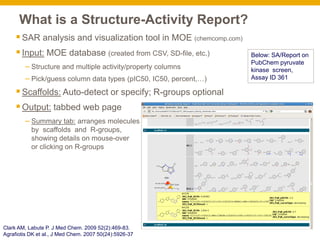
What is a Structure-Activity Report?
SAR analysis and visualization tool in MOE (chemcomp.com)
Input: MOE database (created from CSV, SD-file, etc.)
– Structure and multiple activity/property columns
– Pick/guess column data types (pIC50, IC50, percent,…)
Scaffolds: Auto-detect or specify; R-groups optional
Output: tabbed web page
– Summary tab: arranges molecules
by scaffolds and R-groups,
showing details on mouse-over
or clicking on R-groups
Clark AM, Labute P. J Med Chem. 2009 52(2):469-83.
Agrafiotis DK et al., J Med Chem. 2007 50(24):5926-37
Below: SA/Report on
PubChem pyruvate
kinase screen,
Assay ID 361
What is a Structure-Activity Report?
SAR analysis and visualization tool in MOE (chemcomp.com)
Input: MOE database (created from CSV, SD-file, etc.)
– Structure and multiple activity/property columns
– Pick/guess column data types (pIC50, IC50, percent,…)
Scaffolds: Auto-detect or specify
Output: tabbed web page
– Summary tab: arranges molecules
by scaffolds and R-groups,
showing details on mouse-over
or clicking on R-groups
– Activity tab: grid, R1 vs. R2
or scaffold vs. R1.
– Multiple activities visualized
simultaneously as color bars or
concentric pie charts (“cartwheels”)
Clark AM, Labute P. J Med Chem. 2009 52(2):469-83.
Agrafiotis DK et al., J Med Chem. 2007 50(24):5926-37
Below: SA/Report on
PubChem pyruvate
kinase screen,
Assay ID 361
SA/Report: auto-detect on HTS data
Auto-detect does not find all frequently-occurring series in diverse
datasets (eg. HTS hits, >4000 compds, >10 series)
–Eg. PubChem AssayID 361, 4265 Pyruvate Kinase inhibitor hits
– Two scaffolds found; known series with more exemplars missed
What to do?:
–Specify manually OR
–Use automated or interactive method to find scaffolds
Clark AM, Labute P. J Med Chem. 2009 52(2):469-83.
Outline
SA/Report Background
–Problem with out-of-box analysis of HTS data
 Frequent fragment scaffold selection
– Automated and interactive solutions
 Customizations for project data delivery
– Custom units to visualize arbitrary data types
– KNIME workflows for automated generation
Case studies (project and public datasets)
Conclusion
Scaffolds from Fragment Decomposition
Use frequent fragments as scaffolds
–Schuffenhauer hierarchical decomposition 
–Compounds sorted by frequency of fragment
at each level.
A. Schuffenhauer et al., J. Chem. Inf. Modeling 47:47-58, 2007
Interactive scaffold picking
Users prefer scaffold suggestions, not full automation
– Exclude known nuisance or cross-target-active fragments
– Exclude scaffolds that don’t make chemical sense
– Prefer one among overlapping or multiple scaffolds in a molecule
– Want to analyze a subset of the scaffolds found
Interactive “common fragment selection” GUI
–“Analyze…” button next to “Browse…” on patched version of SA/Report
cmnfrag.svl
(A. Clark/A. Deschenes, CCG;
*available* on SVL exchange)
Interactive scaffold picking, step 1
Top 12 best frequent fragments presented to the user to choose from
–Rank= frequency heavy atom count (1+ (similarity to existing scaffolds))
–↓ User picks #2:
PubChem
dataset:
AID 893,
HSD17B4,
hydroxysteroid
(17-beta)
dehydrogenase 4
Frequent scaffold picking, iterative step
1. Add picked fragment
to scaffold list
2. Remove molecules
that map to it from
consideration
3. Re-analyze remaining
molecules for frequent
scaffolds
4. Repeat until satisfied
Frequent scaffold picking, final iteration
1. Add picked fragment
to scaffold list
2. Remove molecules
that map to it from
consideration
3. Re-analyze remaining
molecules for frequent
scaffolds
4. Repeat until satisfied
Run SA/Report with
scaffolds picked from
frequent fragment
hierarchy,
automatically or
interactively
HTS SAR analysis
Outline
SA/Report Background
–Problem with out-of-box analysis of HTS data
 Frequent fragment scaffold selection
– Automated and interactive solutions
 Customizations for project data delivery
– Custom units to visualize arbitrary data types
– KNIME workflows for automated generation
Case studies (project and public datasets)
Conclusion
Customization 1: units for visualization
SA/Report built to visualize activity
(pIC50/pKi, IC50/Ki, percent, fractions)
New applications:
–visualize data where weak actives are
significant
–optimize compound properties,
along with activity
Solution:
–Define custom units for all commonly
measured/calculated properties in a GUI
– Examples:
–CLogP(5/3/1)
–Permeability: 0/100/300
–Solubility(uM): 0/100/300
…SAReport_custom_units.svl,
A. Deschenes, *available*
from SVL exchange
6 pie sectors = 6 cpds
with these R-groups
Scaffold R6 pIC50 cLogP permeability
Customization 2: Dynamic SA/Reports
SA/Reports need to be regenerated in MOE whenever new
compounds are synthesized
– In an active project, this happens relatively frequently…
One solution to stay current: automated workflow
– KNIME, an open source workflow tool, with comp chem nodes
available from multiple vendors
Automating SA/Report production
SA/Report KNIME node
–Inputs: data (port 0), scaffolds (optional, port 1)
–Activity fields can be configured
–Custom units can be defined and incorporated
Example KNIME workflow for SA/Report
 Many aspects can be customized
Generate
SA/Report
Save URL
(Cron job to
run this nightly
or weekly)
Input scaffolds
Input
molecule
data
Filter by
scaffold /
properties
Data manipulation
Outline
SA/Report Background
–Problem with out-of-box analysis of HTS data
 Frequent fragment scaffold selection
– Automated and interactive solutions
 Customizations for project data delivery
– Custom units to visualize arbitrary data types
– KNIME workflows for automated generation
Case studies (project and public datasets)
Conclusion
GSK project example 1: HTS data analysis
28 scaffolds found in data by interactive scaffold analysis
– prioritized for follow-up based on aggregate properties, believable SAR trends
–

Color patterns: spot good R-group combinations
–Example inference for benzothiophene scaffold:
R6=OMe favored over H R8=NH2 active with >½ other substituents
Combine to fill SAR holes…
> > >
GSK project example 2: Mitigating hERG
Lead series has hERG liability
–Find R-groups that reduce hERG, maintain activity, selectivity
selectivity hERG
activity
R3R10       
↓
H
CH3
Cl
NH2
PubChem example: Pyruvate Kinase screen
Primary assay: AID 361: Pyruvate kinase (PyK, 4265 inhibitors)
Five secondary assays:
–2 orthologs: AID 1631 (human muscle isoform 2 PyK), 1721 (L. Mexicana PyK)
–2 assays to eliminate false positive hits (luciferase, cytotoxicity)
–1 selectivity cross-target (MT1-MMP)
 Interactive scaffold selection
– Chose 25, covering >50% cpds 
 Final report:
– 6 pIC50s (listed above)
– several calculated properties with
custom units: MolWt, ClogP, LogD,
predicted solubility/permeability
PubChem SAR trend elucidation
Biaryl amide
scaffold:
R6=H, Me, OMe, OEt
often hit luciferase/cytotoxicity
cross-screens, are false positives
R6=Et, F do not hit these assays
361_PyK_pIC50 411_lucif_pIC50 924_p53cyTox_pIC50
PubChem example: SAR trend elucidation
SAR trends across similar scaffolds:
–Active/selective R-groups on one scaffold (e.g. R10=OMe on benzothiazole)
used to suggest analogs with the same R-group on related scaffolds.
?
?
?
?
Conclusions
 MOE SA/Reports can be intuitive and valuable for project SAR analysis:
–Extensions to find scaffolds
–Visualize physicochemical properties
–Automated generation using project data
 Interactive scaffold analysis enables:
–Quick identification of interesting series among HTS hits
–Understanding any SAR
–Comparing them to existing series from other hit ID methods, the literature and
public datasets.
 Automated generation of SA/Reports from current data greatly enhances
their appeal as a user-friendly SAR analysis tool
Backup
Semi-automated frequent fragment scaffold picking
Plot scalar fields “freq_1”, “freq_2” etc.
–Pick a compd in each freq plateau above a threshold (eg. 50 out of 4000)
–Choose largest fragment size i with freq_i > threshold as scaffold
freq_1
freq_2
freq_3
freq_4

Dynamic SA/Reports - ACS Philadelphia 2012

  • 1.
    Dynamic SA/Reports: Analyzing CurrentProject and HTS Data by Interactive Selection of Frequently-occurring Scaffolds Deepak Bandyopadhyay Development help: Chris Louer, Ceara Rea, Jerome Verlin, Alain Deschenes, Nels Thorsteinson, Guido Kirsten, Bernd Wiswedel Project testing: Ami Lakdawala, Chaya Duraiswami, Guanglei Cui, Kaushik Raha, Kristin Brown, Neysa Nevins, Xuan Hong, Constantine Kreatsoulas Star cast:
  • 2.
    Find viable chemicalseries from project HTS data or other large/diverse datasets –Ideally, from single-shot data:  –Pragmatically, full-curve data: ∫∫∫∫∫∫∫∫∫∫ …↗ ∫∫∫∫∫∫∫∫∫∫∫∫ Usually: scaffold-agnostic (clustering) analysis –But clusters do not map 1:1 to chemotypes Our goal: R-group analysis of HTS data –Provide SAR in a more user-friendly format Tool of choice: MOE SA/Report Problem statement
  • 3.
    Outline SA/Report Background –Problem without-of-box analysis of HTS data  Frequent fragment scaffold selection – Automated and interactive solutions  Customizations for project data delivery – Custom units to visualize arbitrary data types – KNIME workflows for automated generation Case studies (project and public datasets) Conclusion
  • 4.
    What is aStructure-Activity Report? SAR analysis and visualization tool in MOE (chemcomp.com) Input: MOE database (created from CSV, SD-file, etc.) – Structure and multiple activity/property columns – Pick/guess column data types (pIC50, IC50, percent,…) Scaffolds: Auto-detect or specify; R-groups optional Output: tabbed web page – Summary tab: arranges molecules by scaffolds and R-groups, showing details on mouse-over or clicking on R-groups Clark AM, Labute P. J Med Chem. 2009 52(2):469-83. Agrafiotis DK et al., J Med Chem. 2007 50(24):5926-37 Below: SA/Report on PubChem pyruvate kinase screen, Assay ID 361
  • 5.
    What is aStructure-Activity Report? SAR analysis and visualization tool in MOE (chemcomp.com) Input: MOE database (created from CSV, SD-file, etc.) – Structure and multiple activity/property columns – Pick/guess column data types (pIC50, IC50, percent,…) Scaffolds: Auto-detect or specify Output: tabbed web page – Summary tab: arranges molecules by scaffolds and R-groups, showing details on mouse-over or clicking on R-groups – Activity tab: grid, R1 vs. R2 or scaffold vs. R1. – Multiple activities visualized simultaneously as color bars or concentric pie charts (“cartwheels”) Clark AM, Labute P. J Med Chem. 2009 52(2):469-83. Agrafiotis DK et al., J Med Chem. 2007 50(24):5926-37 Below: SA/Report on PubChem pyruvate kinase screen, Assay ID 361
  • 6.
    SA/Report: auto-detect onHTS data Auto-detect does not find all frequently-occurring series in diverse datasets (eg. HTS hits, >4000 compds, >10 series) –Eg. PubChem AssayID 361, 4265 Pyruvate Kinase inhibitor hits – Two scaffolds found; known series with more exemplars missed What to do?: –Specify manually OR –Use automated or interactive method to find scaffolds Clark AM, Labute P. J Med Chem. 2009 52(2):469-83.
  • 7.
    Outline SA/Report Background –Problem without-of-box analysis of HTS data  Frequent fragment scaffold selection – Automated and interactive solutions  Customizations for project data delivery – Custom units to visualize arbitrary data types – KNIME workflows for automated generation Case studies (project and public datasets) Conclusion
  • 8.
    Scaffolds from FragmentDecomposition Use frequent fragments as scaffolds –Schuffenhauer hierarchical decomposition  –Compounds sorted by frequency of fragment at each level. A. Schuffenhauer et al., J. Chem. Inf. Modeling 47:47-58, 2007
  • 9.
    Interactive scaffold picking Usersprefer scaffold suggestions, not full automation – Exclude known nuisance or cross-target-active fragments – Exclude scaffolds that don’t make chemical sense – Prefer one among overlapping or multiple scaffolds in a molecule – Want to analyze a subset of the scaffolds found Interactive “common fragment selection” GUI –“Analyze…” button next to “Browse…” on patched version of SA/Report cmnfrag.svl (A. Clark/A. Deschenes, CCG; *available* on SVL exchange)
  • 10.
    Interactive scaffold picking,step 1 Top 12 best frequent fragments presented to the user to choose from –Rank= frequency heavy atom count (1+ (similarity to existing scaffolds)) –↓ User picks #2: PubChem dataset: AID 893, HSD17B4, hydroxysteroid (17-beta) dehydrogenase 4
  • 11.
    Frequent scaffold picking,iterative step 1. Add picked fragment to scaffold list 2. Remove molecules that map to it from consideration 3. Re-analyze remaining molecules for frequent scaffolds 4. Repeat until satisfied
  • 12.
    Frequent scaffold picking,final iteration 1. Add picked fragment to scaffold list 2. Remove molecules that map to it from consideration 3. Re-analyze remaining molecules for frequent scaffolds 4. Repeat until satisfied
  • 13.
    Run SA/Report with scaffoldspicked from frequent fragment hierarchy, automatically or interactively HTS SAR analysis
  • 14.
    Outline SA/Report Background –Problem without-of-box analysis of HTS data  Frequent fragment scaffold selection – Automated and interactive solutions  Customizations for project data delivery – Custom units to visualize arbitrary data types – KNIME workflows for automated generation Case studies (project and public datasets) Conclusion
  • 15.
    Customization 1: unitsfor visualization SA/Report built to visualize activity (pIC50/pKi, IC50/Ki, percent, fractions) New applications: –visualize data where weak actives are significant –optimize compound properties, along with activity Solution: –Define custom units for all commonly measured/calculated properties in a GUI – Examples: –CLogP(5/3/1) –Permeability: 0/100/300 –Solubility(uM): 0/100/300 …SAReport_custom_units.svl, A. Deschenes, *available* from SVL exchange 6 pie sectors = 6 cpds with these R-groups Scaffold R6 pIC50 cLogP permeability
  • 16.
    Customization 2: DynamicSA/Reports SA/Reports need to be regenerated in MOE whenever new compounds are synthesized – In an active project, this happens relatively frequently… One solution to stay current: automated workflow – KNIME, an open source workflow tool, with comp chem nodes available from multiple vendors
  • 17.
    Automating SA/Report production SA/ReportKNIME node –Inputs: data (port 0), scaffolds (optional, port 1) –Activity fields can be configured –Custom units can be defined and incorporated
  • 18.
    Example KNIME workflowfor SA/Report  Many aspects can be customized Generate SA/Report Save URL (Cron job to run this nightly or weekly) Input scaffolds Input molecule data Filter by scaffold / properties Data manipulation
  • 19.
    Outline SA/Report Background –Problem without-of-box analysis of HTS data  Frequent fragment scaffold selection – Automated and interactive solutions  Customizations for project data delivery – Custom units to visualize arbitrary data types – KNIME workflows for automated generation Case studies (project and public datasets) Conclusion
  • 20.
    GSK project example1: HTS data analysis 28 scaffolds found in data by interactive scaffold analysis – prioritized for follow-up based on aggregate properties, believable SAR trends –  Color patterns: spot good R-group combinations –Example inference for benzothiophene scaffold: R6=OMe favored over H R8=NH2 active with >½ other substituents Combine to fill SAR holes… > > >
  • 21.
    GSK project example2: Mitigating hERG Lead series has hERG liability –Find R-groups that reduce hERG, maintain activity, selectivity selectivity hERG activity R3R10        ↓ H CH3 Cl NH2
  • 22.
    PubChem example: PyruvateKinase screen Primary assay: AID 361: Pyruvate kinase (PyK, 4265 inhibitors) Five secondary assays: –2 orthologs: AID 1631 (human muscle isoform 2 PyK), 1721 (L. Mexicana PyK) –2 assays to eliminate false positive hits (luciferase, cytotoxicity) –1 selectivity cross-target (MT1-MMP)  Interactive scaffold selection – Chose 25, covering >50% cpds   Final report: – 6 pIC50s (listed above) – several calculated properties with custom units: MolWt, ClogP, LogD, predicted solubility/permeability
  • 23.
    PubChem SAR trendelucidation Biaryl amide scaffold: R6=H, Me, OMe, OEt often hit luciferase/cytotoxicity cross-screens, are false positives R6=Et, F do not hit these assays 361_PyK_pIC50 411_lucif_pIC50 924_p53cyTox_pIC50
  • 24.
    PubChem example: SARtrend elucidation SAR trends across similar scaffolds: –Active/selective R-groups on one scaffold (e.g. R10=OMe on benzothiazole) used to suggest analogs with the same R-group on related scaffolds. ? ? ? ?
  • 25.
    Conclusions  MOE SA/Reportscan be intuitive and valuable for project SAR analysis: –Extensions to find scaffolds –Visualize physicochemical properties –Automated generation using project data  Interactive scaffold analysis enables: –Quick identification of interesting series among HTS hits –Understanding any SAR –Comparing them to existing series from other hit ID methods, the literature and public datasets.  Automated generation of SA/Reports from current data greatly enhances their appeal as a user-friendly SAR analysis tool
  • 26.
  • 27.
    Semi-automated frequent fragmentscaffold picking Plot scalar fields “freq_1”, “freq_2” etc. –Pick a compd in each freq plateau above a threshold (eg. 50 out of 4000) –Choose largest fragment size i with freq_i > threshold as scaffold freq_1 freq_2 freq_3 freq_4