design it ∙ build it ∙ run it ∙ design it ∙ build it ∙ run it ∙ design it ∙ build it ∙ run it ∙ design it ∙ build it ∙ run it ∙ design it

               DSAuditor
DATASHEET
            build it ∙ run it ∙ design it ∙ build it ∙ run it ∙ design it ∙ build it ∙ run it ∙ design it ∙ build it ∙ run it ∙ design it ∙ build it
            run it ∙ design it ∙ build it ∙ run it ∙ design it ∙ build it ∙ run it ∙ design it ∙ build it ∙ run it ∙ design it ∙ build it ∙ run it
            design it ∙ build it ∙ run it ∙ design it ∙ build it ∙ run it ∙ design it ∙ build it ∙ run it ∙ design it ∙ build it ∙ run it ∙ design it
               Performance Optimization and Regulatory Compliance
            build it ∙ run it ∙ design it ∙ build it ∙ run it ∙ design it ∙ build it ∙ run it ∙ design it ∙ build it ∙ run it ∙ design it ∙ build it
            run it ∙ design it ∙ build it ∙ run it ∙ design it ∙ build it ∙ run it ∙ design it ∙ build it ∙ run it ∙ design it ∙ build it ∙ run it


          Embarcadero¼ DSAuditorℱ, a leading database auditing solution, helps identify
          performance issues, secure critical data, and ensure data privacy by monitoring                                                                  Related Products
          all database access and activity. DSAuditor’s network-based approach enables                                                                     DBArtisan¼
reporting on performance- and security-related events without impacting server                                                                             The leading cross-platform
performance, while its ability to alert on performance issues or suspicious behavior in                                                                    database administration
                                                                                                                                                           solution helps DBAs
real time minimizes the threat of downtime, tampering, or data theft.                                                                                      maximize performance,
‱ Understand how your business uses its databases                                                                                                          availability, and security.
‱ Improve overall system performance                                                                                                                       ER/Studio¼
‱ Assure data security and privacy                                                                                                                         A model-driven data
                                                                                                                                                           architecture and database
‱ Provide scalable database monitoring                                                                                                                     design solution.

UNDERSTAND HOW YOUR BUSINESS USES ITS DATABASES                                                                                                            Embarcadero
                                                                                                                                                           Change Managerℱ
In today’s world, where the only constant is change, you need a comprehensive view of how your business                                                    A complete set of schema,
uses its data. You need real-time and historical insight                                                                                                   data, and configuration
into who is using the data, when, where, how and                                                                                                           tools to manage the
for how long. You need to take actions necessary to                                                                                                        change management
manage the usage of your data. And you need to                                                                                                             lifecycle.
make regular improvements that will ensure peak
performance of your database and mission-critical
applications across the enterprise.

IMPROVE OVERALL SYSTEM PERFORMANCE

By understanding how each database is being used,
you can greatly improve the system performance
without adding new hardware. With DSAuditor you
can easily find dormant or redundant data; track which
applications are being used, when, and for how long;
and know when to develop new summary tables and
indexes. These reports are particularly helpful in a
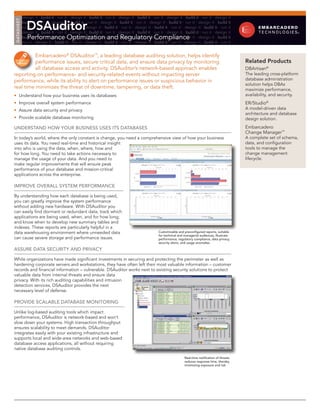
data warehousing environment where unneeded data                                                     Customizable and preconfigured reports, suitable
                                                                                                     for technical and managerial audiences, illustrate
can cause severe storage and performance issues.                                                     performance, regulatory compliance, data privacy,
                                                                                                     security alerts, and usage anomalies

ASSURE DATA SECURITY AND PRIVACY

While organizations have made significant investments in securing and protecting the perimeter as well as
hardening corporate servers and workstations, they have often left their most valuable information – customer
records and financial information – vulnerable. DSAuditor works next to existing security solutions to protect
valuable data from internal threats and ensure data
privacy. With its rich auditing capabilities and intrusion
detection services, DSAuditor provides the next
necessary level of defense.

PROVIDE SCALABLE DATABASE MONITORING

Unlike log-based auditing tools which impact
performance, DSAuditor is network-based and won’t
slow down your systems. High transaction throughput
ensures scalability to meet demands. DSAuditor
integrates easily with your existing infrastructure and
supports local and wide-area networks and web-based
database access applications, all without requiring
native database auditing controls.
                                                                                                                       Real-time notification of threats
                                                                                                                       reduces response time, thereby
                                                                                                                       minimizing exposure and risk
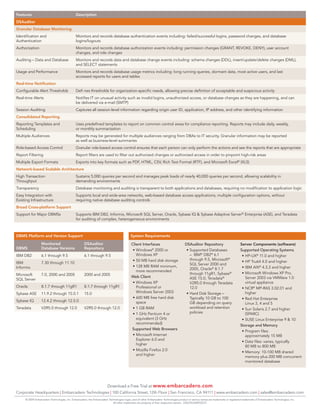
Features                                      Description
DSAuditor
Granular Database Monitoring
Identification and                            Monitors and records database authentication events including: failed/successful logins, password changes, and database
Authentication                                logins/logouts
Authorization                                 Monitors and records database authorization events including: permission changes (GRANT, REVOKE, DENY), user account
                                              changes, and role changes
Auditing – Data and Database                  Monitors and records data and database change events including: schema changes (DDL), insert/update/delete changes (DML),
                                              and SELECT statements
Usage and Performance                         Monitors and records database usage metrics including: long running queries, dormant data, most active users, and last
                                              accessed reports for users and tables
Real-time Notification
Configurable Alert Thresholds                 Defi nes thresholds for organization-specific needs, allowing precise definition of acceptable and suspicious activity
Real-time Alerts                              Notifies IT on unusual activity such as invalid logins, unauthorized access, or database changes as they are happening, and can
                                              be delivered via e-mail (SMTP)
Session Auditing                              Captures all session-level information regarding origin user ID, application, IP address, and other identifying information
Consolidated Reporting
Reporting Templates and                       Uses predefined templates to report on common control areas for compliance reporting. Reports may include daily, weekly,
Scheduling                                    or monthly summarization
Multiple Audiences                            Reports may be generated for multiple audiences ranging from DBAs to IT security. Granular information may be reported
                                              as well as business-level summaries
Role-based Access Control                     Granular role-based access control ensures that each person can only perform the actions and see the reports that are appropriate
Report Filtering                              Report filters are used to filter out authorized changes or authorized access in order to pinpoint high-risk areas
Multiple Export Formats                       Exports into key formats such as PDF, HTML, CSV, Rich Text Format (RTF), and Microsoft ExcelÂź (XLS)
Network-based Scalable Architecture
High Transaction                              Sustains 5,000 queries per second and manages peak loads of nearly 40,000 queries per second, allowing scalability in
Throughput                                    demanding environments
Transparency                                  Database monitoring and auditing is transparent to both applications and databases, requiring no modification to application logic
Easy Integration with                         Supports local and wide-area networks, web-based database access applications, multiple configuration options, without
Existing Infrastructure                       requiring native database auditing controls
Broad Cross-platform Support
Support for Major DBMSs                       Supports IBM DB2, Informix, Microsoft SQL Server, Oracle, Sybase IQ & Sybase Adaptive ServerÂź Enterprise (ASE), and Teradata
                                              for auditing of complex, heterogeneous environments


DBMS Platform and Version Support                                                           System Requirements

                  Monitored                          DSAuditor                               Client Interfaces                           DSAuditor Repository                          Server Components (software)
DBMS              Database Versions                  Repository                               ‱ Windows¼ 2000 or                          ‱ Supported Databases                        Supported Operating Systems
IBM DB2           6.1 through 9.5                    6.1 through 9.5                            Windows XP                                  – IBM¼ DB2¼ 6.1                             ‱ HP-UX¼ 11.0 and higher
                                                                                              ‱ 50 MB hard disk storage                     through 9.5, Microsoft¼
IBM               7.30 through 11.10                                                                                                                                                    ‱ HP Tru64 4.0 and higher
                                                                                                                                            SQL Server 2000 and
Informix                                                                                      ‱ 128 MB RAM minimum,                                                                     ‱ IBM AIX¼ 4.3.2 and higher
                                                                                                                                            2005, OracleÂź 8.1.7
                                                                                                more recommended
Microsoft         7.0, 2000 and 2005                 2000 and 2005                                                                          through 11gR1, Sybase¼                      ‱ Microsoft Windows XP Pro,
                                                                                             Web Client                                     ASE 15.0, TeradataÂź                           Server 2003 via VMWare 1.0
SQL Server
                                                                                              ‱ Windows XP                                  V2R5.0 through Teradata                       virtual appliance
Oracle            8.1.7 through 11gR1                8.1.7 through 11gR1                        Professional or                             12.0                                        ‱ NCR¼ MP-RAS 3.02.01 and
Sybase ASE        11.9.2 through 15.0.1              15.0                                       Windows Server 2003                       ‱ Hard Disk Storage –                           higher
                                                                                              ‱ 600 MB free hard disk                       Typically 10 GB to 100                      ‱ Red Hat Enterprise
Sybase IQ         12.4.2 through 12.5.0                                                         space                                       GB depending on query                         Linux 3, 4 and 5
Teradata          V2R5.0 through 12.0                V2R5.0 through 12.0                      ‱ 1 GB RAM                                    workload and retention                      ‱ Sun Solaris 2.7 and higher
                                                                                              ‱ 1 GHz Pentium 4 or                          policies                                      (SPARC)
                                                                                                equivalent (3 GHz                                                                       ‱ SUSE Linux Enterprise 9 & 10
                                                                                                recommended)
                                                                                                                                                                                       Storage and Memory
                                                                                             Supported Web Browsers
                                                                                                                                                                                        ‱ Program files:
                                                                                              ‱ Microsoft Internet                                                                        approximately 15 MB
                                                                                                Explorer 6.0 and
                                                                                                                                                                                        ‱ Data files: varies, typically
                                                                                                higher
                                                                                                                                                                                          80 MB to 800 MB
                                                                                              ‱ Mozilla Firefox 2.0
                                                                                                                                                                                        ‱ Memory: 10-100 MB shared
                                                                                                and higher
                                                                                                                                                                                          memory plus 200 MB concurrent
                                                                                                                                                                                          monitored database


                                                                         Download a Free Trial at www.embarcadero.com
Corporate Headquarters | Embarcadero Technologies | 100 California Street, 12th Floor | San Francisco, CA 94111 | www.embarcadero.com | sales@embarcadero.com
     © 2009 Embarcadero Technologies, Inc. Embarcadero, the Embarcadero Technologies logos, and all other Embarcadero Technologies product or service names are trademarks or registered trademarks of Embarcadero Technologies, Inc.
                                                                           All other trademarks are property of their respective owners. DSA/DS/2009/02/27

DS Auditor Datasheet

  • 1.
    design it ∙build it ∙ run it ∙ design it ∙ build it ∙ run it ∙ design it ∙ build it ∙ run it ∙ design it ∙ build it ∙ run it ∙ design it DSAuditor DATASHEET build it ∙ run it ∙ design it ∙ build it ∙ run it ∙ design it ∙ build it ∙ run it ∙ design it ∙ build it ∙ run it ∙ design it ∙ build it run it ∙ design it ∙ build it ∙ run it ∙ design it ∙ build it ∙ run it ∙ design it ∙ build it ∙ run it ∙ design it ∙ build it ∙ run it design it ∙ build it ∙ run it ∙ design it ∙ build it ∙ run it ∙ design it ∙ build it ∙ run it ∙ design it ∙ build it ∙ run it ∙ design it Performance Optimization and Regulatory Compliance build it ∙ run it ∙ design it ∙ build it ∙ run it ∙ design it ∙ build it ∙ run it ∙ design it ∙ build it ∙ run it ∙ design it ∙ build it run it ∙ design it ∙ build it ∙ run it ∙ design it ∙ build it ∙ run it ∙ design it ∙ build it ∙ run it ∙ design it ∙ build it ∙ run it Embarcadero¼ DSAuditorℱ, a leading database auditing solution, helps identify performance issues, secure critical data, and ensure data privacy by monitoring Related Products all database access and activity. DSAuditor’s network-based approach enables DBArtisan¼ reporting on performance- and security-related events without impacting server The leading cross-platform performance, while its ability to alert on performance issues or suspicious behavior in database administration solution helps DBAs real time minimizes the threat of downtime, tampering, or data theft. maximize performance, ‱ Understand how your business uses its databases availability, and security. ‱ Improve overall system performance ER/Studio¼ ‱ Assure data security and privacy A model-driven data architecture and database ‱ Provide scalable database monitoring design solution. UNDERSTAND HOW YOUR BUSINESS USES ITS DATABASES Embarcadero Change Managerℱ In today’s world, where the only constant is change, you need a comprehensive view of how your business A complete set of schema, uses its data. You need real-time and historical insight data, and configuration into who is using the data, when, where, how and tools to manage the for how long. You need to take actions necessary to change management manage the usage of your data. And you need to lifecycle. make regular improvements that will ensure peak performance of your database and mission-critical applications across the enterprise. IMPROVE OVERALL SYSTEM PERFORMANCE By understanding how each database is being used, you can greatly improve the system performance without adding new hardware. With DSAuditor you can easily find dormant or redundant data; track which applications are being used, when, and for how long; and know when to develop new summary tables and indexes. These reports are particularly helpful in a data warehousing environment where unneeded data Customizable and preconfigured reports, suitable for technical and managerial audiences, illustrate can cause severe storage and performance issues. performance, regulatory compliance, data privacy, security alerts, and usage anomalies ASSURE DATA SECURITY AND PRIVACY While organizations have made significant investments in securing and protecting the perimeter as well as hardening corporate servers and workstations, they have often left their most valuable information – customer records and financial information – vulnerable. DSAuditor works next to existing security solutions to protect valuable data from internal threats and ensure data privacy. With its rich auditing capabilities and intrusion detection services, DSAuditor provides the next necessary level of defense. PROVIDE SCALABLE DATABASE MONITORING Unlike log-based auditing tools which impact performance, DSAuditor is network-based and won’t slow down your systems. High transaction throughput ensures scalability to meet demands. DSAuditor integrates easily with your existing infrastructure and supports local and wide-area networks and web-based database access applications, all without requiring native database auditing controls. Real-time notification of threats reduces response time, thereby minimizing exposure and risk
  • 2.
    Features Description DSAuditor Granular Database Monitoring Identification and Monitors and records database authentication events including: failed/successful logins, password changes, and database Authentication logins/logouts Authorization Monitors and records database authorization events including: permission changes (GRANT, REVOKE, DENY), user account changes, and role changes Auditing – Data and Database Monitors and records data and database change events including: schema changes (DDL), insert/update/delete changes (DML), and SELECT statements Usage and Performance Monitors and records database usage metrics including: long running queries, dormant data, most active users, and last accessed reports for users and tables Real-time Notification Configurable Alert Thresholds Defi nes thresholds for organization-specific needs, allowing precise definition of acceptable and suspicious activity Real-time Alerts Notifies IT on unusual activity such as invalid logins, unauthorized access, or database changes as they are happening, and can be delivered via e-mail (SMTP) Session Auditing Captures all session-level information regarding origin user ID, application, IP address, and other identifying information Consolidated Reporting Reporting Templates and Uses predefined templates to report on common control areas for compliance reporting. Reports may include daily, weekly, Scheduling or monthly summarization Multiple Audiences Reports may be generated for multiple audiences ranging from DBAs to IT security. Granular information may be reported as well as business-level summaries Role-based Access Control Granular role-based access control ensures that each person can only perform the actions and see the reports that are appropriate Report Filtering Report filters are used to filter out authorized changes or authorized access in order to pinpoint high-risk areas Multiple Export Formats Exports into key formats such as PDF, HTML, CSV, Rich Text Format (RTF), and Microsoft ExcelÂź (XLS) Network-based Scalable Architecture High Transaction Sustains 5,000 queries per second and manages peak loads of nearly 40,000 queries per second, allowing scalability in Throughput demanding environments Transparency Database monitoring and auditing is transparent to both applications and databases, requiring no modification to application logic Easy Integration with Supports local and wide-area networks, web-based database access applications, multiple configuration options, without Existing Infrastructure requiring native database auditing controls Broad Cross-platform Support Support for Major DBMSs Supports IBM DB2, Informix, Microsoft SQL Server, Oracle, Sybase IQ & Sybase Adaptive ServerÂź Enterprise (ASE), and Teradata for auditing of complex, heterogeneous environments DBMS Platform and Version Support System Requirements Monitored DSAuditor Client Interfaces DSAuditor Repository Server Components (software) DBMS Database Versions Repository ‱ WindowsÂź 2000 or ‱ Supported Databases Supported Operating Systems IBM DB2 6.1 through 9.5 6.1 through 9.5 Windows XP – IBMÂź DB2Âź 6.1 ‱ HP-UXÂź 11.0 and higher ‱ 50 MB hard disk storage through 9.5, MicrosoftÂź IBM 7.30 through 11.10 ‱ HP Tru64 4.0 and higher SQL Server 2000 and Informix ‱ 128 MB RAM minimum, ‱ IBM AIXÂź 4.3.2 and higher 2005, OracleÂź 8.1.7 more recommended Microsoft 7.0, 2000 and 2005 2000 and 2005 through 11gR1, SybaseÂź ‱ Microsoft Windows XP Pro, Web Client ASE 15.0, TeradataÂź Server 2003 via VMWare 1.0 SQL Server ‱ Windows XP V2R5.0 through Teradata virtual appliance Oracle 8.1.7 through 11gR1 8.1.7 through 11gR1 Professional or 12.0 ‱ NCRÂź MP-RAS 3.02.01 and Sybase ASE 11.9.2 through 15.0.1 15.0 Windows Server 2003 ‱ Hard Disk Storage – higher ‱ 600 MB free hard disk Typically 10 GB to 100 ‱ Red Hat Enterprise Sybase IQ 12.4.2 through 12.5.0 space GB depending on query Linux 3, 4 and 5 Teradata V2R5.0 through 12.0 V2R5.0 through 12.0 ‱ 1 GB RAM workload and retention ‱ Sun Solaris 2.7 and higher ‱ 1 GHz Pentium 4 or policies (SPARC) equivalent (3 GHz ‱ SUSE Linux Enterprise 9 & 10 recommended) Storage and Memory Supported Web Browsers ‱ Program files: ‱ Microsoft Internet approximately 15 MB Explorer 6.0 and ‱ Data files: varies, typically higher 80 MB to 800 MB ‱ Mozilla Firefox 2.0 ‱ Memory: 10-100 MB shared and higher memory plus 200 MB concurrent monitored database Download a Free Trial at www.embarcadero.com Corporate Headquarters | Embarcadero Technologies | 100 California Street, 12th Floor | San Francisco, CA 94111 | www.embarcadero.com | sales@embarcadero.com © 2009 Embarcadero Technologies, Inc. Embarcadero, the Embarcadero Technologies logos, and all other Embarcadero Technologies product or service names are trademarks or registered trademarks of Embarcadero Technologies, Inc. All other trademarks are property of their respective owners. DSA/DS/2009/02/27