Download to read offline

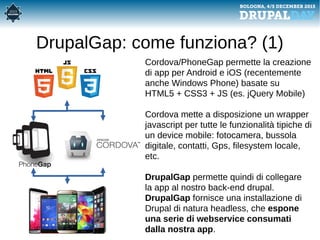
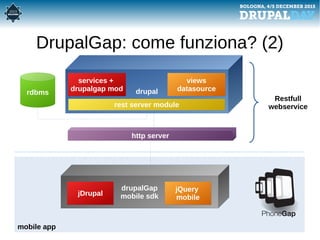
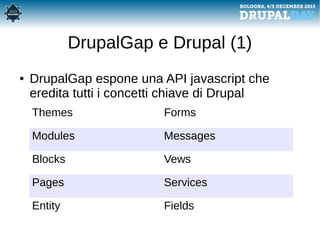
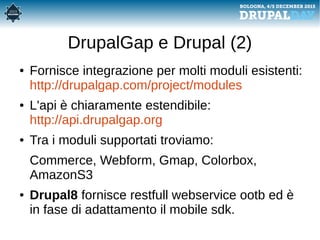
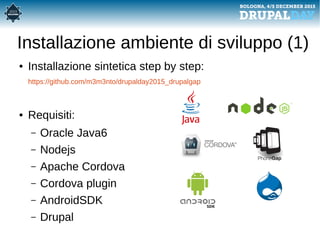
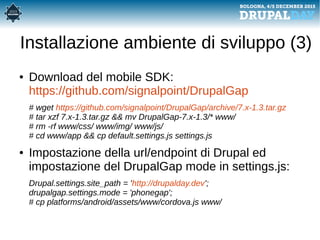
![Installazione ambiente di sviluppo (2)
● Creazione dell'app con Apache Cordova:
# cordova create drupaldayapp com.drupalday "DrupalDay App"
# cd drupaldayapp
# cordova platform add android
# cordova plugin add … [v. drupalgap_environment_installation]
● Installazione dei moduli Drupal necessari:
# drush dl drupalgap services libraries views_datasource
# drush en drupalgap field_ui image list menu number path services
views_datasource views_ui locale -y](https://image.slidesharecdn.com/dday2015-drupalgap-151215112153/85/DrupalGap-crea-una-app-Android-ed-iOS-con-Drupal-Drupalgap-ed-Apache-Cordova-10-320.jpg)
![DrupalGap: DrupalDay demo app
● Repository delle slide [slide]
● Istruzioni installazione [drupalgap_install.txt]
● Codice del progetto demo [drupaldayapp]
https://github.com/m3m3nto/drupalday2015_drupalgap
http://bit.ly/1IAvqkC
● Apk per l'installazione
http://drupalday.iotdb.it/sites/default/files/drupaldaydemo.apk](https://image.slidesharecdn.com/dday2015-drupalgap-151215112153/85/DrupalGap-crea-una-app-Android-ed-iOS-con-Drupal-Drupalgap-ed-Apache-Cordova-12-320.jpg)
![DrupalGap API (1)
● Esempio di hook_menu():
function drupalday_menu() {
try {
var items = {};
items['drupaldaydashboard'] = {
title: 'Drupalday 2015',
page_callback: 'drupalday_dashboard_page'
};
items['gallery'] = {
title: 'Gallery',
page_callback: 'drupalday_gallery_page',
options:{
reloadPage:true
}
};
return items;
}
catch (error) { console.log('drupalday_menu - ' + error); }
}](https://image.slidesharecdn.com/dday2015-drupalgap-151215112153/85/DrupalGap-crea-una-app-Android-ed-iOS-con-Drupal-Drupalgap-ed-Apache-Cordova-13-320.jpg)
![DrupalGap: API (2)
● page_callback implementation:
function drupalday_dashboard_page() {
try {
var content = {};
content.site_info = { markup: '<h4 style="text-align: center;">' + Drupal.settings.site_path + '</h4>' };
content.welcome = { markup: '<h2 style="text-align: center;">' + t('Benvenuto al DrupalDay') + '</h2>'
+ '<p style="text-align: center;">' +
t('DrupalGap: crea una app Android (ed iOS) con Drupal , Drupalgap ed Apache Cordova') + '</p>'
};
if (drupalgap.settings.logo) {
content.logo = { markup: '<center>' + theme('image', {path: drupalgap.settings.logo}) + '</center>'
};
}
content.get_started = {
theme: 'button_link',
text: t('Guida dev environment'),
path: 'https://github.com/m3m3nto/drupalday2015_drupalgap',
options: {InAppBrowser: true}
};
[...]
return content;
}
catch (error) { console.log('drupalday_dashboard_page - ' + error); }
}](https://image.slidesharecdn.com/dday2015-drupalgap-151215112153/85/DrupalGap-crea-una-app-Android-ed-iOS-con-Drupal-Drupalgap-ed-Apache-Cordova-14-320.jpg)
![DrupalGap: API (3)
● Attivazione del modulo
in settings.js:
// App Front Page
drupalgap.settings.front =
'drupalday-dashboard';
Drupal.modules.custom['drupalday'] = {};
● Build della app android:
# cordova run android](https://image.slidesharecdn.com/dday2015-drupalgap-151215112153/85/DrupalGap-crea-una-app-Android-ed-iOS-con-Drupal-Drupalgap-ed-Apache-Cordova-15-320.jpg)
![DrupalGap Cordova API
● Apache Cordova permette di accedere alle
funzionalità tipiche dei device mobili:
# cordova plugin list
[...] "Battery"
[...] "Contacts"
[...] "Device Motion"
[...] "Device Orientation"
[...] "Vibration"
[...] "Whitelist"
[...] "Camera"
[...] "Console"
[...] "Device"
[...] "Notification"
[...] "File"
[...] "Geolocation"
[...] "InAppBrowser"
[...] "Network Information"](https://image.slidesharecdn.com/dday2015-drupalgap-151215112153/85/DrupalGap-crea-una-app-Android-ed-iOS-con-Drupal-Drupalgap-ed-Apache-Cordova-16-320.jpg)

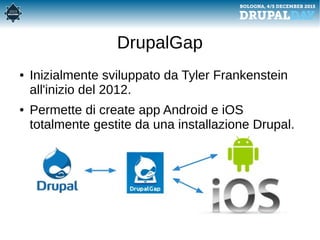
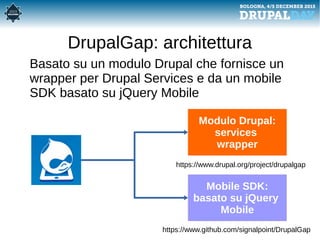
Drupalgap è un framework che consente di sviluppare app Android e iOS totalmente gestite da un'installazione Drupal, utilizzando Apache Cordova e jQuery Mobile. Fornisce un'architettura headless in cui i servizi Drupal vengono esposti tramite API, permettendo di integrare vari moduli esistenti. Il documento include anche istruzioni per l'installazione e la creazione di un ambiente di sviluppo per queste app.


![[drupalday2017] - DevOps: strumenti di automazione per Drupal8](https://cdn.slidesharecdn.com/ss_thumbnails/lucacraccorobomoderntaskrunnerforphp-170315150926-thumbnail.jpg?width=640&height=640&fit=bounds)
![[drupalday2017] - Devel - D8 release party](https://cdn.slidesharecdn.com/ss_thumbnails/luca-lussodday2017-170315152155-thumbnail.jpg?width=640&height=640&fit=bounds)
![[drupalday2017] - Async navigation with a lightweight ES6 framework](https://cdn.slidesharecdn.com/ss_thumbnails/edoardodusiemarcellotestigoat-talkdd2017-170306113808-170315152319-thumbnail.jpg?width=640&height=640&fit=bounds)
![[drupalday2017] - Drupal 4 Stakeholders](https://cdn.slidesharecdn.com/ss_thumbnails/claudia-astazidrupal4stakeholder-170315153316-thumbnail.jpg?width=640&height=640&fit=bounds)
![[drupalday 2017] - Accessibilità Web: Finalità, metodologie e strumenti.](https://cdn.slidesharecdn.com/ss_thumbnails/presentazionedrupalday2017schiavone-170316114757-thumbnail.jpg?width=640&height=640&fit=bounds)
![[drupalday2017 - KEYNOTE] - Saving the world one Open Source project at a time](https://cdn.slidesharecdn.com/ss_thumbnails/eduardo-garciadrupalday-keynote-170315152538-thumbnail.jpg?width=640&height=640&fit=bounds)
![[drupalday2017] - DevOps: strumenti di automazione per Drupal8](https://cdn.slidesharecdn.com/ss_thumbnails/marco-capobussidrupaldayzaratanroma-170315150947-thumbnail.jpg?width=640&height=640&fit=bounds)
![[drupalday2017] - Behat per Drupal: test automatici e molto di più](https://cdn.slidesharecdn.com/ss_thumbnails/pescetti-behat-for-drupal-170315153419-thumbnail.jpg?width=640&height=640&fit=bounds)
![[drupalday2017] - Contenuti educativi digitali aperti, creare contenuti e dis...](https://cdn.slidesharecdn.com/ss_thumbnails/drupalday2017paolini-170315150551-thumbnail.jpg?width=640&height=640&fit=bounds)


![[drupalday2017] - Cloud e integrazione per la PA: la sfida dell'Open Source t...](https://cdn.slidesharecdn.com/ss_thumbnails/ideapapresentazionedrupaldaypavoletti-melchionda-170315154051-thumbnail.jpg?width=640&height=640&fit=bounds)
![[drupalday2017] - Drupal come frontend che consuma servizi: HTTP Client Manager](https://cdn.slidesharecdn.com/ss_thumbnails/httpclientmanageradriano-cori-170315153939-thumbnail.jpg?width=640&height=640&fit=bounds)
![[drupalday2017] - Drupal & Patternlab: un nuovo approccio al theming](https://cdn.slidesharecdn.com/ss_thumbnails/gianmariomereudrupalpatternlabunnuovoapproccioaltheming-170315153824-thumbnail.jpg?width=640&height=640&fit=bounds)
![[drupalday2017] - Decoupled frontend con Drupal 8 e OpenUI 5](https://cdn.slidesharecdn.com/ss_thumbnails/donato-rotunnodrupal8andopenui5-170315153655-thumbnail.jpg?width=640&height=640&fit=bounds)
![[drupalday2017] - Open Data con Drupal nella PA: considerazioni su licensing ...](https://cdn.slidesharecdn.com/ss_thumbnails/drupaltrasparenzaeprivacyandreadori-170315153609-thumbnail.jpg?width=640&height=640&fit=bounds)
![[drupalday2017] - DRUPAL per la PA: il modello della Trasparenza di Sapienza](https://cdn.slidesharecdn.com/ss_thumbnails/drupalday3mar2017barcellonasouviron-170315153209-thumbnail.jpg?width=640&height=640&fit=bounds)
![[drupalday2017] - Venezia & Drupal. Venezia è Drupal!](https://cdn.slidesharecdn.com/ss_thumbnails/dday2017paolo-cotti-cometti-170315152927-thumbnail.jpg?width=640&height=640&fit=bounds)
![[drupalday2017] - Quando l’informazione è un servizio](https://cdn.slidesharecdn.com/ss_thumbnails/ddayroma17marangoninote-170315152815-thumbnail.jpg?width=640&height=640&fit=bounds)
![[drupalday2017] - Cosa significa convertire un modulo da D7 a D8](https://cdn.slidesharecdn.com/ss_thumbnails/roberto-peruzzoporting-iubenda-integration-170315152724-thumbnail.jpg?width=640&height=640&fit=bounds)
![[drupalday2017] - Speed-up your Drupal instance!](https://cdn.slidesharecdn.com/ss_thumbnails/daniele-piaggesispeedupyourdrupalinstance-170315152019-thumbnail.jpg?width=640&height=640&fit=bounds)
![[drupalday2017] - REST in pieces](https://cdn.slidesharecdn.com/ss_thumbnails/paolo-pustorinorestinpieces-170306112824-170315150716-thumbnail.jpg?width=640&height=640&fit=bounds)