











Drupal Performance
   Gabi Lee, Sergata
 gabi.lee@sergata.com
   +972-54-5444542
Agenda
•   About
•   What is “Performance”
•   Measuring performance
•   Recipes
    – User
    – Server
    – Framework
    – Application
About Sergata
• Innovative Software Development

• Focus: Innovation | Startups | Entrepreneurs

• From 0 to 100 in 3 months

• Large scale projects of over 4 years

• R&D Dream Team of 55 full time developers

• Over 150 innovative projects world wide since 2006
Drupal Sites
“Performance”?
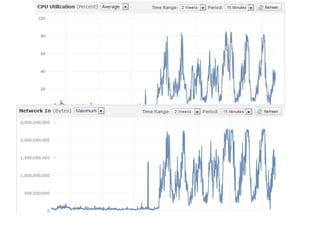
• IT doesn’t matter
• Single user
  – Total server time (App + DB)
  – Time for page to load (render)
  – Perceived performance
• Concurrent users
  – Impact of multiple users on the single user
    experience
• Analysis
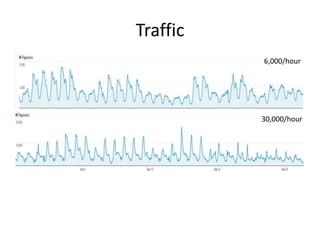
Traffic
          6,000/hour


          30,000/hour
Measuring
• User
  – Browsing the page…
  – Your (non-IE) browser
  – YSlow for FF
  – http://www.webpagetest.org
• Load testing
  – ab
  – JMeter
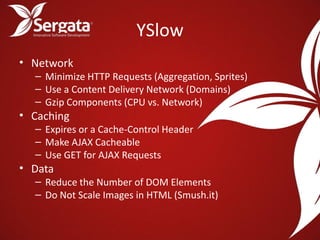
YSlow
• Network
  – Minimize HTTP Requests (Aggregation, Sprites)
  – Use a Content Delivery Network (Domains)
  – Gzip Components (CPU vs. Network)
• Caching
  – Expires or a Cache-Control Header
  – Make AJAX Cacheable
  – Use GET for AJAX Requests
• Data
  – Reduce the Number of DOM Elements
  – Do Not Scale Images in HTML (Smush.it)
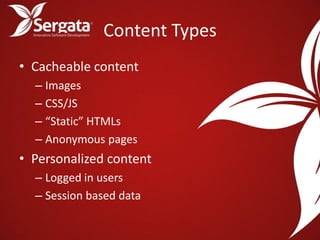
Content Types
• Cacheable content
  – Images
  – CSS/JS
  – “Static” HTMLs
  – Anonymous pages
• Personalized content
  – Logged in users
  – Session based data
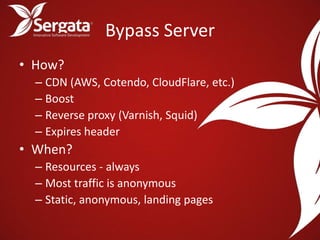
Bypass Server
• How?
  – CDN (AWS, Cotendo, CloudFlare, etc.)
  – Boost
  – Reverse proxy (Varnish, Squid)
  – Expires header
• When?
  – Resources - always
  – Most traffic is anonymous
  – Static, anonymous, landing pages
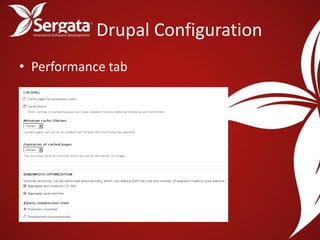
Drupal Configuration
• Performance tab
Modules
• Data access
   – APC
   – Memcache
• Caching
   – Boost
   – Block Cache Alter
   – Varnish HTTP Accelerator Integration
• CDN
   – Login Cookie
   – CDN
• Others
   – “ImageCache”
Application Optimization

•   Use what you need
•   Ajax
•   Batch processing (e.g. analytics)
•   SQL optimization
    – Analysis
    – Indexing
    – No PHP<->DB loops (use DAL / Entity API)
    – Configuration
IT Level
• Bigger servers
• More servers
  – ELB on AWS
  – Requires shared drive
• Opcode caching (APC)
• Apache config
  – KeepAlive, modules, Expires, GZip
Bottom Line
•   Analyze
•
•   Use external tools
•   Invest in configuration
•   Don’t write code
Thank You!

      Questions?
gabi.lee@sergata.com
References
• http://www.vmirgorod.name/blog/tuning-
  drupal-performance
• http://fuseinteractive.ca/blog/drupal-
  performance-tuning-0
• http://www.practicalclouds.com/content/guid
  e/accelerate-your-drupal-website-vital-
  performance-tuning
• http://developer.yahoo.com/yslow/
mail@sergata.com
+972-77-2103003
28 Baruch Hirsch St.
Bnei-Brak, 51202, Israel
http://www.sergata.com/en

Drupal performance

  • 1.
    Drupal Performance Gabi Lee, Sergata gabi.lee@sergata.com +972-54-5444542
  • 2.
    Agenda • About • What is “Performance” • Measuring performance • Recipes – User – Server – Framework – Application
  • 3.
    About Sergata • InnovativeSoftware Development • Focus: Innovation | Startups | Entrepreneurs • From 0 to 100 in 3 months • Large scale projects of over 4 years • R&D Dream Team of 55 full time developers • Over 150 innovative projects world wide since 2006
  • 4.
  • 6.
    “Performance”? • IT doesn’tmatter • Single user – Total server time (App + DB) – Time for page to load (render) – Perceived performance • Concurrent users – Impact of multiple users on the single user experience • Analysis
  • 8.
    Traffic 6,000/hour 30,000/hour
  • 10.
    Measuring • User – Browsing the page… – Your (non-IE) browser – YSlow for FF – http://www.webpagetest.org • Load testing – ab – JMeter
  • 11.
    YSlow • Network – Minimize HTTP Requests (Aggregation, Sprites) – Use a Content Delivery Network (Domains) – Gzip Components (CPU vs. Network) • Caching – Expires or a Cache-Control Header – Make AJAX Cacheable – Use GET for AJAX Requests • Data – Reduce the Number of DOM Elements – Do Not Scale Images in HTML (Smush.it)
  • 12.
    Content Types • Cacheablecontent – Images – CSS/JS – “Static” HTMLs – Anonymous pages • Personalized content – Logged in users – Session based data
  • 13.
    Bypass Server • How? – CDN (AWS, Cotendo, CloudFlare, etc.) – Boost – Reverse proxy (Varnish, Squid) – Expires header • When? – Resources - always – Most traffic is anonymous – Static, anonymous, landing pages
  • 15.
  • 16.
    Modules • Data access – APC – Memcache • Caching – Boost – Block Cache Alter – Varnish HTTP Accelerator Integration • CDN – Login Cookie – CDN • Others – “ImageCache”
  • 17.
    Application Optimization • Use what you need • Ajax • Batch processing (e.g. analytics) • SQL optimization – Analysis – Indexing – No PHP<->DB loops (use DAL / Entity API) – Configuration
  • 18.
    IT Level • Biggerservers • More servers – ELB on AWS – Requires shared drive • Opcode caching (APC) • Apache config – KeepAlive, modules, Expires, GZip
  • 19.
    Bottom Line • Analyze • • Use external tools • Invest in configuration • Don’t write code
  • 20.
    Thank You! Questions? gabi.lee@sergata.com
  • 21.
    References • http://www.vmirgorod.name/blog/tuning- drupal-performance • http://fuseinteractive.ca/blog/drupal- performance-tuning-0 • http://www.practicalclouds.com/content/guid e/accelerate-your-drupal-website-vital- performance-tuning • http://developer.yahoo.com/yslow/
  • 22.
    mail@sergata.com +972-77-2103003 28 Baruch HirschSt. Bnei-Brak, 51202, Israel http://www.sergata.com/en