fillapplicationdetailsdl
USER MANNUAL SARATHI4: - NEW DRIVING LICENSE - WORK FLOW BY THE APPLICANT STAGE.
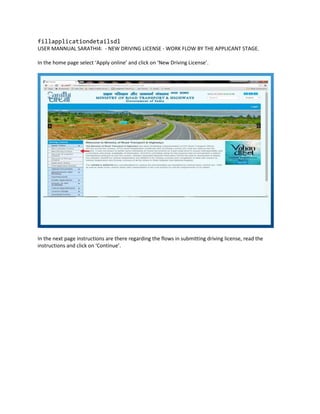
In the home page select ‘Apply online’ and click on ‘New Driving License’.
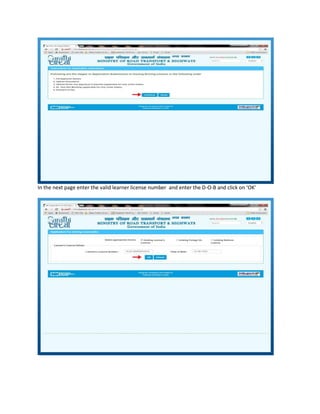
In the next page instructions are there regarding the flows in submitting driving license, read the
instructions and click on ‘Continue’.
In the next page enter the valid learner license number and enter the D-O-B and click on ‘OK’
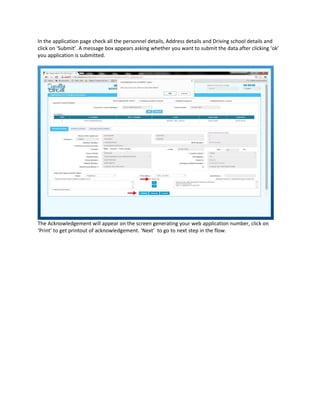
In the application page check all the personnel details, Address details and Driving school details and
click on ‘Submit’. A message box appears asking whether you want to submit the data after clicking ‘ok’
you application is submitted.
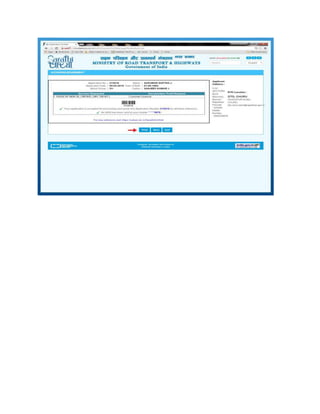
The Acknowledgement will appear on the screen generating your web application number, click on
‘Print’ to get printout of acknowledgement. ‘Next’ to go to next step in the flow.
Driving License form

Driving License form

  • 1.
    fillapplicationdetailsdl USER MANNUAL SARATHI4:- NEW DRIVING LICENSE - WORK FLOW BY THE APPLICANT STAGE. In the home page select ‘Apply online’ and click on ‘New Driving License’. In the next page instructions are there regarding the flows in submitting driving license, read the instructions and click on ‘Continue’.
  • 2.
    In the nextpage enter the valid learner license number and enter the D-O-B and click on ‘OK’
  • 3.
    In the applicationpage check all the personnel details, Address details and Driving school details and click on ‘Submit’. A message box appears asking whether you want to submit the data after clicking ‘ok’ you application is submitted. The Acknowledgement will appear on the screen generating your web application number, click on ‘Print’ to get printout of acknowledgement. ‘Next’ to go to next step in the flow.