Applying New LL :
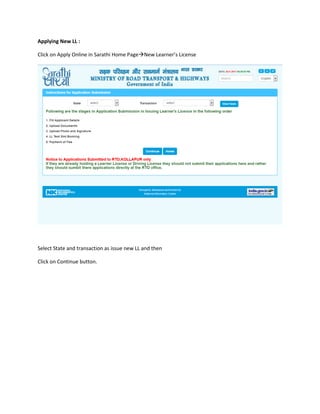
Click on Apply Online in Sarathi Home PageNew Learner’s License
Select State and transaction as issue new LL and then
Click on Continue button.
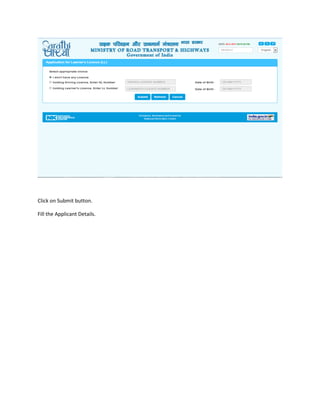
Click on Submit button.
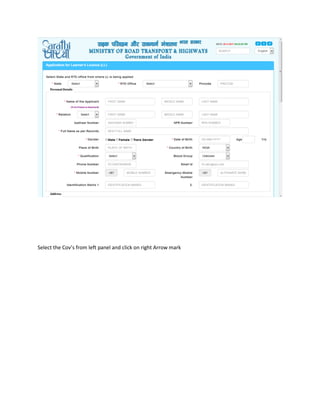
Fill the Applicant Details.
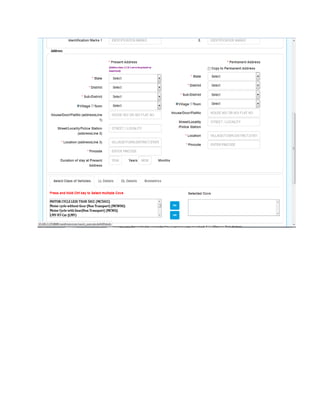
Select the Cov’s from left panel and click on right Arrow mark
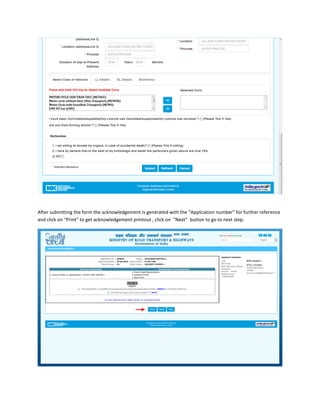
After submitting the form the acknowledgement is generated with the “Application number” for further reference
and click on “Print” to get acknowledgement printout , click on “Next” button to go to next step.

Learning License form

  • 1.
    Applying New LL: Click on Apply Online in Sarathi Home PageNew Learner’s License Select State and transaction as issue new LL and then Click on Continue button.
  • 2.
    Click on Submitbutton. Fill the Applicant Details.
  • 3.
    Select the Cov’sfrom left panel and click on right Arrow mark
  • 5.
    After submitting theform the acknowledgement is generated with the “Application number” for further reference and click on “Print” to get acknowledgement printout , click on “Next” button to go to next step.