Microsoft tools for web applications
and the clientelism in the public sector
in the Republic of Macedonia"
Candidate: Dragana Anceva
Mentor: Doc. D-r Snezana Savoska
• The total activities of the people and the
business in general "moved" to the Internet
• Today all employees, collaborators or
users of products and services can
performed their work anywhere, quickly,
efficiently and on time using web
applications.
For the development of web applications can
be used many tools and platforms.
• .NET platform
• JAVA
• PHP
Concept of clientelism: Relationship between
customers and public companies - specifics and how
to intercept
• The connection between the institutions and citizens
sometimes is not regulated by obligatory relationships.
• Sometimes, it is regulated by agreements of reciprocal
exchange of goods and services based on moral
obligations which in the world is known as clientelism
or "democratic patronage“
• This "democratic patronage" supports administrative
modernization of projects that are mostly relate to the
needs of local governments
ASP.NET
• ASP.NET is a simple model for web
development
• It is integrated with the .NET Framework
• Designed to provide services to create dynamic
web applications and web services
– HTML server controls
– Web server controls
• Label server control
• Literal server control
• TextBox server control
• Button server control
– LINKBUTTON server control
– IMAGEBUTTON server control
• HYPERLINK server control
• DROPDOWNLIST server control
• LISTBOX server control
• CHECKBOX server control
• CHECKBOXLIST server control
• RADIOBUTTON server control
• RADIOBUTTONLIST server control
• IMAGE server control
• TABLE server control
• CALENDAR server control
• ADROTATOR server control
• XML server control
• PANEL server control
• PLACEHOLDER server control
• BULLETEDLIST server control
• FILEUPLOAD server control
• MULTIVIEW and VIEW server
controls
• WIZARD server control
• IMAGEMAP server control
• CHART server control
Working with master pages
• Master pages represent an easy way to
provide a template that can be used by an
unlimited number of pages in ASP.NET
application.
– ASP.NET AJAX and master pages
ADO.NET
• ADO.NET is a family of
technologies that allows to .NET
developers to interact with the
data standard, structured and
primarily casual way
• System.Data namespace includes many
different ADO.NET classes that work together
to provide access to the tabular data.
– DataTable
• DataColumn
• DataRow
– DataRelation
– DataSet
Making the application software
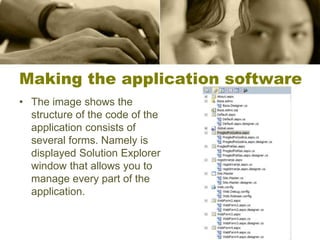
• The image shows the
structure of the code of the
application consists of
several forms. Namely is
displayed Solution Explorer
window that allows you to
manage every part of the
application.
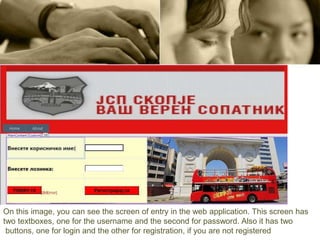
On this image, you can see the screen of entry in the web application. This screen has
two textboxes, one for the username and the second for password. Also it has two
buttons, one for login and the other for registration, if you are not registered
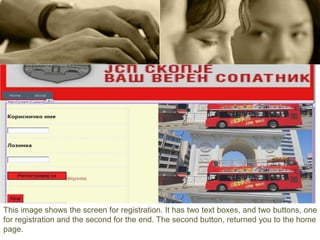
This image shows the screen for registration. It has two text boxes, and two buttons, one
for registration and the second for the end. The second button, returned you to the home
page.
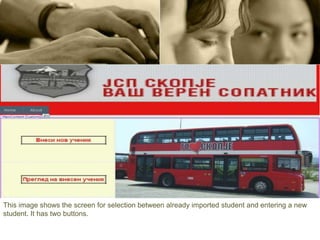
This image shows the screen for selection between already imported student and entering a new
student. It has two buttons.
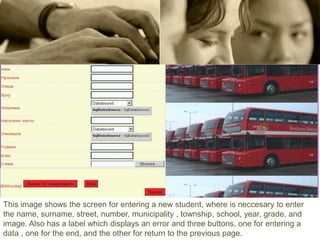
This image shows the screen for entering a new student, where is neccesary to enter
the name, surname, street, number, municipality , township, school, year, grade, and
image. Also has a label which displays an error and three buttons, one for entering a
data , one for the end, and the other for return to the previous page.
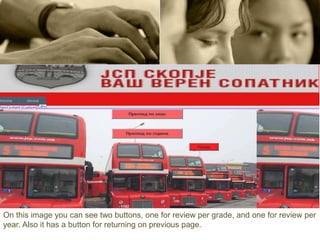
On this image you can see two buttons, one for review per grade, and one for review per
year. Also it has a button for returning on previous page.
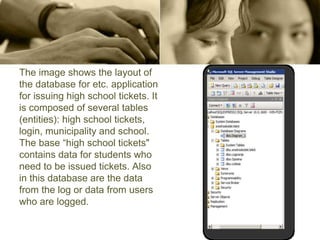
The image shows the layout of
the database for etc. application
for issuing high school tickets. It
is composed of several tables
(entities): high school tickets,
login, municipality and school.
The base “high school tickets"
contains data for students who
need to be issued tickets. Also
in this database are the data
from the log or data from users
who are logged.
CONCLUSION
There is no doubt that the Internet every day changes the world
in which we live. Although, never been easier to get information,
to make contact and share in order to promote something, there
is always an area which could be improved with the use of new
technologies. All this convenience has the ability to make a
symbiosis almost in all areas, and even in this, the use of web
applications in order to improve the clientelism between parts of
the public sector in Republic of Macedonia.
Web application in an easy, fast and simple way allows
completion of the obligation by saving time, money and improve
the satisfaction of users.
Thank you for the attention

Dragana - Presentation

  • 1.
    Microsoft tools forweb applications and the clientelism in the public sector in the Republic of Macedonia" Candidate: Dragana Anceva Mentor: Doc. D-r Snezana Savoska
  • 2.
    • The totalactivities of the people and the business in general "moved" to the Internet • Today all employees, collaborators or users of products and services can performed their work anywhere, quickly, efficiently and on time using web applications.
  • 3.
    For the developmentof web applications can be used many tools and platforms. • .NET platform • JAVA • PHP
  • 4.
    Concept of clientelism:Relationship between customers and public companies - specifics and how to intercept • The connection between the institutions and citizens sometimes is not regulated by obligatory relationships. • Sometimes, it is regulated by agreements of reciprocal exchange of goods and services based on moral obligations which in the world is known as clientelism or "democratic patronage“ • This "democratic patronage" supports administrative modernization of projects that are mostly relate to the needs of local governments
  • 5.
    ASP.NET • ASP.NET isa simple model for web development • It is integrated with the .NET Framework • Designed to provide services to create dynamic web applications and web services – HTML server controls – Web server controls
  • 6.
    • Label servercontrol • Literal server control • TextBox server control • Button server control – LINKBUTTON server control – IMAGEBUTTON server control • HYPERLINK server control • DROPDOWNLIST server control • LISTBOX server control • CHECKBOX server control • CHECKBOXLIST server control • RADIOBUTTON server control • RADIOBUTTONLIST server control • IMAGE server control • TABLE server control • CALENDAR server control • ADROTATOR server control • XML server control • PANEL server control • PLACEHOLDER server control • BULLETEDLIST server control • FILEUPLOAD server control • MULTIVIEW and VIEW server controls • WIZARD server control • IMAGEMAP server control • CHART server control
  • 7.
    Working with masterpages • Master pages represent an easy way to provide a template that can be used by an unlimited number of pages in ASP.NET application. – ASP.NET AJAX and master pages
  • 8.
    ADO.NET • ADO.NET isa family of technologies that allows to .NET developers to interact with the data standard, structured and primarily casual way
  • 9.
    • System.Data namespaceincludes many different ADO.NET classes that work together to provide access to the tabular data. – DataTable • DataColumn • DataRow – DataRelation – DataSet
  • 10.
    Making the applicationsoftware • The image shows the structure of the code of the application consists of several forms. Namely is displayed Solution Explorer window that allows you to manage every part of the application.
  • 11.
    On this image,you can see the screen of entry in the web application. This screen has two textboxes, one for the username and the second for password. Also it has two buttons, one for login and the other for registration, if you are not registered
  • 12.
    This image showsthe screen for registration. It has two text boxes, and two buttons, one for registration and the second for the end. The second button, returned you to the home page.
  • 13.
    This image showsthe screen for selection between already imported student and entering a new student. It has two buttons.
  • 14.
    This image showsthe screen for entering a new student, where is neccesary to enter the name, surname, street, number, municipality , township, school, year, grade, and image. Also has a label which displays an error and three buttons, one for entering a data , one for the end, and the other for return to the previous page.
  • 15.
    On this imageyou can see two buttons, one for review per grade, and one for review per year. Also it has a button for returning on previous page.
  • 16.
    The image showsthe layout of the database for etc. application for issuing high school tickets. It is composed of several tables (entities): high school tickets, login, municipality and school. The base “high school tickets" contains data for students who need to be issued tickets. Also in this database are the data from the log or data from users who are logged.
  • 17.
    CONCLUSION There is nodoubt that the Internet every day changes the world in which we live. Although, never been easier to get information, to make contact and share in order to promote something, there is always an area which could be improved with the use of new technologies. All this convenience has the ability to make a symbiosis almost in all areas, and even in this, the use of web applications in order to improve the clientelism between parts of the public sector in Republic of Macedonia. Web application in an easy, fast and simple way allows completion of the obligation by saving time, money and improve the satisfaction of users.
  • 18.
    Thank you forthe attention