実行
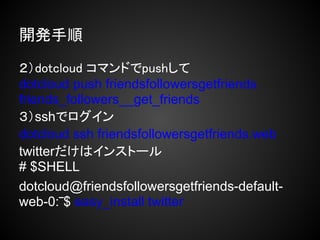
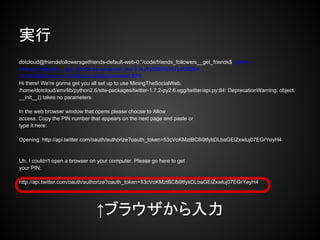
dotcloud@friendsfollowersgetfriends-default-web-0:‾/code/friends_followers__get_friends$ python
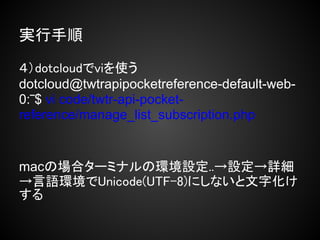
friends_followers__get_friends.py sarasvati_devVJxJYySM6XjJA7ydEB5BA
4SVrl6ABSVmCm51IrdBCqxZudiElsjtWw9MWLBP0
Hi there! We're gonna get you all set up to use MiningTheSocialWeb.
/home/dotcloud/env/lib/python2.6/site-packages/twitter-1.7.2-py2.6.egg/twitter/api.py:84: DeprecationWarning: object.
__init__() takes no parameters
In the web browser window that opens please choose to Allow
access. Copy the PIN number that appears on the next page and paste or
type it here:
Opening: http://api.twitter.com/oauth/authorize?oauth_token=53cVoKMztBC8i9tfykDLbaGEiZxwluj07EGrYeyH4
Uh, I couldn't open a browser on your computer. Please go here to get
your PIN:
http://api.twitter.com/oauth/authorize?oauth_token=53cVoKMztBC8i9tfykDLbaGEiZxwluj07EGrYeyH4
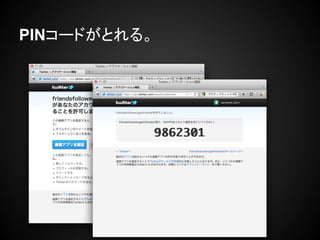
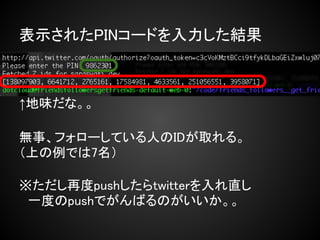
↑ブラウザから入力
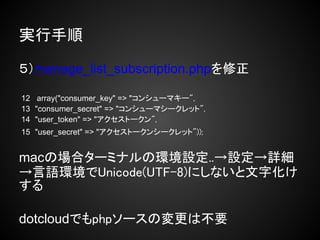
# upload /root/twtr-api-pocket-referencessh://dotcloud@uploader.dotcloud.
com:443/twtrapipocketreference
# rsync
Pseudo-terminal will not be allocated because stdin is not a terminal.
building file list ... done
./
dotcloud.yml
twtr-api-pocket-reference/
twtr-api-pocket-reference/manage_list_subscription.php
sent 1.40K bytes received 56 bytes 265.27 bytes/sec
total size is 2.83K speedup is 1.94
05:13:12 ---> Deploy of "twtrapipocketreference" scheduled for revision rsync-
1335071591826 at 2012-04-22 05:13:12
05:13:12 ---> Building the application...
05:13:12 [web] Build started for revision rsync-1335071591826 (clean build)
05:13:19 [web] Build completed successfully. Compiled image size is 428KB
05:13:19 ---> Initializing new services... (This may take a few minutes)
〜中略〜
Deployment finished. Your application is available at the following URLs
web: http://twtrapipocketreference-3opsr7qp.dotcloud.com/






![開発手順
1)自分の環境でディレクトリとファイルを作る
[root@localhost ‾]# ls -laR friends_followers__get_friends/
friends_followers__get_friends/:
total 16
drwxr-xr-x 3 root root 4096 Apr 14 12:10 .
dr-xr-x---. 5 root root 4096 Apr 14 12:36 ..
-rw-r--r-- 1 root root 62 Apr 14 12:10 dotcloud.yml
drwxr-xr-x 2 root root 4096 Apr 14 16:14 friends_followers__get_friends
friends_followers__get_friends/friends_followers__get_friends:
total 12
drwxr-xr-x 2 root root 4096 Apr 14 16:14 .
drwxr-xr-x 3 root root 4096 Apr 14 12:10 ..
-rw-rw-r-- 1 root root 2341 Mar 29 23:02 friends_followers__get_friends.py
[root@localhost ‾]# cat friends_followers__get_friends/dotcloud.yml
web:
type: python
approot: friends_followers__get_friends](https://image.slidesharecdn.com/dotcloudtwitterwebtwtrhack-120425095022-phpapp02/85/Dotcloud-twitterweb-twtr-hack-17-320.jpg)

![実行手順
1)自分の環境でディレクトリとファイルを作る
[root@localhost ‾]# tree twtr-api-pocket-reference/ ←ディレクトリ
twtr-api-pocket-reference/ ←ディレクトリ
├── dotcloud.yml ←ファイル
└── twtr-api-pocket-reference ←ディレクトリ
├── manage_list_subscription.php ←phpファイル
└── tmhOAuth.php ←phpファイル
1 directory, 3 files
[root@localhost ‾]# cat twtr-api-pocket-reference/dotcloud.yml
web: ←dotcloud.ymlという定義ファイルの中身
type: php
approot: twtr-api-pocket-reference
作るファイルは2ディレクトリと3ファイルだけ](https://image.slidesharecdn.com/dotcloudtwitterwebtwtrhack-120425095022-phpapp02/85/Dotcloud-twitterweb-twtr-hack-24-320.jpg)
![実行手順
2)dotcloud コマンドでcreateしてdotcloudにアプリ
ケーションを作る
[root@localhost ‾]# dotcloud create
twtrapipocketreference
Created application "twtrapipocketreference"
※最初の1回だけ
ハイフン(-)は使えない](https://image.slidesharecdn.com/dotcloudtwitterwebtwtrhack-120425095022-phpapp02/85/Dotcloud-twitterweb-twtr-hack-25-320.jpg)
![実行手順
3)dotcloud コマンドでpushして
[root@localhost ‾]# dotcloud push
twtrapipocketreference /root/twtr-api-pocket-
reference](https://image.slidesharecdn.com/dotcloudtwitterwebtwtrhack-120425095022-phpapp02/85/Dotcloud-twitterweb-twtr-hack-26-320.jpg)
![# upload /root/twtr-api-pocket-reference ssh://dotcloud@uploader.dotcloud.
com:443/twtrapipocketreference
# rsync
Pseudo-terminal will not be allocated because stdin is not a terminal.
building file list ... done
./
dotcloud.yml
twtr-api-pocket-reference/
twtr-api-pocket-reference/manage_list_subscription.php
sent 1.40K bytes received 56 bytes 265.27 bytes/sec
total size is 2.83K speedup is 1.94
05:13:12 ---> Deploy of "twtrapipocketreference" scheduled for revision rsync-
1335071591826 at 2012-04-22 05:13:12
05:13:12 ---> Building the application...
05:13:12 [web] Build started for revision rsync-1335071591826 (clean build)
05:13:19 [web] Build completed successfully. Compiled image size is 428KB
05:13:19 ---> Initializing new services... (This may take a few minutes)
〜中略〜
Deployment finished. Your application is available at the following URLs
web: http://twtrapipocketreference-3opsr7qp.dotcloud.com/](https://image.slidesharecdn.com/dotcloudtwitterwebtwtrhack-120425095022-phpapp02/85/Dotcloud-twitterweb-twtr-hack-27-320.jpg)
![実行手順
3)dotcloud コマンドでsshログイン
コードを直す
[root@localhost]# dotcloud ssh
twtrapipocketreference.web
# $SHELL
dotcloud@twtrapipocketreference-default-web-
0:‾$
アプリケーション名.サービス名でssh](https://image.slidesharecdn.com/dotcloudtwitterwebtwtrhack-120425095022-phpapp02/85/Dotcloud-twitterweb-twtr-hack-28-320.jpg)




![El acceso a_la_información_como_determinante_social_de_la_salud[1]](https://cdn.slidesharecdn.com/ss_thumbnails/elaccesoalainformacincomodeterminantesocialdelasalud1-130926171019-phpapp01-thumbnail.jpg?width=640&height=640&fit=bounds)


![[PS11]ネットワーク第5回](https://cdn.slidesharecdn.com/ss_thumbnails/ps115-131105104151-phpapp02-thumbnail.jpg?width=640&height=640&fit=bounds)


