DOT NET Framework
Unit– 1 Module – 1
Beginning ASP.NET 3.5 in C# 2008
From Novice to Professional
SECoND EDiTioN
Matthew MacDonald
Pages 9 – 16
2.
Introduction
• DOT NETFramework is a software framework developed
by Microsoft that runs primarily on Microsoft Windows.
• It includes the following
• Class library named Framework Class Library (FCL)
• Programs written for .NET Framework execute in a software environment
named Common Language Runtime(CLR), an application that provides
services such as security, memory management, and exception handling.
4.
DOT NET Languages
•Both VB and C# use the .NET class library and are supported by the
CLR. In fact, almost any block of C#code can be translated, line by line,
into an equivalent block of VB code (and vice versa).
• A developer who has learned one .NET language can move quickly
and efficiently to another.
• In short, both VB and C# are elegant, modern languages that are ideal
for creating the next generation of web applications.
5.
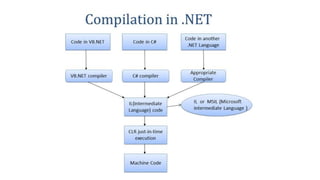
Intermediate Language
• Allthe .NET languages are compiled into another lower-level language before the code is executed. This
lower-level language is the Common Intermediate Language (CIL, or just IL).
• The CLR, the engine of .NET, uses only IL code. Because all .NET languages are designed based on IL,
they all have profound similarities. This is the reason that the VB and C# languages provide essentially
the same features and performance.
• The .NET Framework formalizes this compatibility with something called the Common Language
Specification (CLS). Essentially, the CLS is a contract that, if respected, guarantees that a component
written in one .NET language can be used in all the others. One part of the CLS is the common type
system (CTS), which defines the rules for data types such as strings, numbers, and arrays that are
shared in all .NET languages. The CLS also defines object oriented ingredients such as classes, methods,
events, and quite a bit more.
• For the most part, .NET developers don’t need to think about how the CLS works, even though they
rely on it every day.
• Every EXE or DLL file that you build with a .NET language contains IL code. This is the file you deploy to
other computers.In the case of a web application, you deploy your compiled code to a live web server.
6.
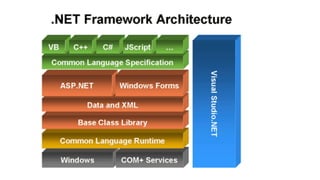
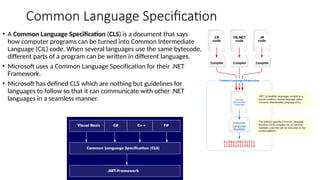
Common Language Specification
•A Common Language Specification (CLS) is a document that says
how computer programs can be turned into Common Intermediate
Language (CIL) code. When several languages use the same bytecode,
different parts of a program can be written in different languages.
• Microsoft uses a Common Language Specification for their .NET
Framework.
• Microsoft has defined CLS which are nothing but guidelines for
languages to follow so that it can communicate with other .NET
languages in a seamless manner.
8.
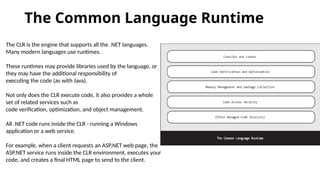
The Common LanguageRuntime
The CLR is the engine that supports all the .NET languages.
Many modern languages use runtimes.
These runtimes may provide libraries used by the language, or
they may have the additional responsibility of
executing the code (as with Java).
Not only does the CLR execute code, it also provides a whole
set of related services such as
code verification, optimization, and object management.
All .NET code runs inside the CLR - running a Windows
application or a web service.
For example, when a client requests an ASP.NET web page, the
ASP.NET service runs inside the CLR environment, executes your
code, and creates a final HTML page to send to the client.
9.
The implications ofthe CLR are wide-ranging:
Deep language integration: VB and C#, like all .NET
languages, compile to IL. This is far more than mere
language compatibility; it’s language integration.
Side-by-side execution: The CLR also has the ability to
load more than one version of a component at a
time. In other words, you can update a component
many times, and the correct version will be loaded
and used for each application. As a side effect,
multiple versions of the .NET Framework can be
installed
Fewer errors: Whole categories of errors are
impossible with the CLR. For example, the CLR
prevents many memory mistakes that are possible
with lower-level languages such as C++.
Performance: A typical ASP.NET application is much
faster than a comparable ASP application, because
ASP.NET code is compiled to machine code before it’s
executed. With high-volume web applications, the
potential bottlenecks are rarely processor-related but
are usually tied to the speed of an external resource
such as a database or the web server’s file system.
Code transparency If you distribute a compiled
application or component, other programmers may
have an easier time determining how your code works.
This isn’t much of an issue for ASP.NET applications,
which aren’t distributed but are hosted on a secure
web server.
Questionable cross-platform support: No one is entirely
sure whether .NET will ever be adopted for use on
other operating systems and platforms. However, .NET
will probably never have the wide reach of a language
such as Java because it incorporates too many
different platform-specific
10.
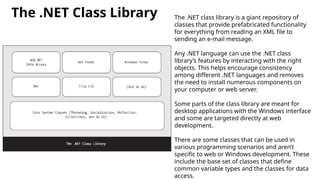
The .NET ClassLibrary The .NET class library is a giant repository of
classes that provide prefabricated functionality
for everything from reading an XML file to
sending an e-mail message.
Any .NET language can use the .NET class
library’s features by interacting with the right
objects. This helps encourage consistency
among different .NET languages and removes
the need to install numerous components on
your computer or web server.
Some parts of the class library are meant for
desktop applications with the Windows interface
and some are targeted directly at web
development.
There are some classes that can be used in
various programming scenarios and aren’t
specific to web or Windows development. These
include the base set of classes that define
common variable types and the classes for data
access.
11.
DOT NET Framework
Assignment– 1
Refer
https://docs.microsoft.com/en-us/dotnet/framework/get-started/overview and
answer the following questions
• Objectives of DOT NET Framework
• Write a note on the following terms
• Class Library
• CLS-Compliant
• Features of CLR
Refer https://docs.microsoft.com/en-us/dotnet/standard/common-type-system
and answer the following questions
• What are the activities do CTS perform ?
• What are the types and categories of data types supported by CTS ?
12.
C# Basics
Unit –1 Module – 2
Beginning ASP.NET 3.5 in C# 2008
From Novice to Professional
SECoND EDiTioN
Matthew MacDonald
Chapter 2 & 3
13.
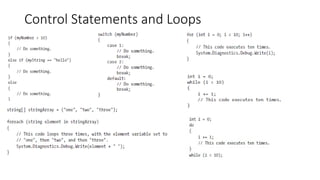
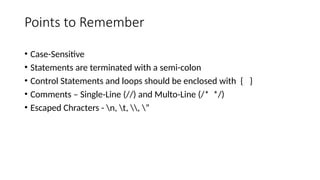
Points to Remember
•Case-Sensitive
• Statements are terminated with a semi-colon
• Control Statements and loops should be enclosed with { }
• Comments – Single-Line (//) and Multo-Line (/* */)
• Escaped Chracters - n, t, , ”
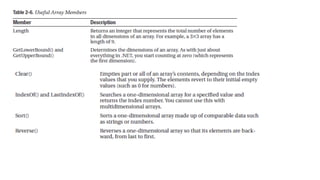
Arrays and ArrayLists
•1D Array – string[] stringArray = new string[4];
string[] stringArray = {"1", "2", "3", "4"};
• 2D Array – int[,] intArray = new int[2, 4];
int[,] intArray = {{1, 2}, {3, 4}, {5, 6}, {7, 8}};
• ArrayList
• C# arrays do not support redimensioning. This means that once you create an array, you can’t change its
size. If you need a dynamic array-like list, you can use one of the collection classes provided to all .NET
languages
• through the .NET class library. One of the simplest collection classes that .NET offers is the ArrayList,
which always allows dynamic resizing. Here’s a snippet of C# code that uses an ArrayList:
• ArrayList dynamicList = new ArrayList();
• // The ArrayList is not strongly typed, so you can add any data type
• dynamicList.Add("one");
• dynamicList.Add("two");
• dynamicList.Add("three");
• // Retrieve the first string. Notice that the object must be converted to a string, because there's no way
for .NET to be certain what it is.
• string item = Convert.ToString(dynamicList[0]);
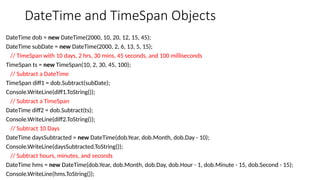
DateTime and TimeSpanObjects
DateTime dob = new DateTime(2000, 10, 20, 12, 15, 45);
DateTime subDate = new DateTime(2000, 2, 6, 13, 5, 15);
// TimeSpan with 10 days, 2 hrs, 30 mins, 45 seconds, and 100 milliseconds
TimeSpan ts = new TimeSpan(10, 2, 30, 45, 100);
// Subtract a DateTime
TimeSpan diff1 = dob.Subtract(subDate);
Console.WriteLine(diff1.ToString());
// Subtract a TimeSpan
DateTime diff2 = dob.Subtract(ts);
Console.WriteLine(diff2.ToString());
// Subtract 10 Days
DateTime daysSubtracted = new DateTime(dob.Year, dob.Month, dob.Day - 10);
Console.WriteLine(daysSubtracted.ToString());
// Subtract hours, minutes, and seconds
DateTime hms = new DateTime(dob.Year, dob.Month, dob.Day, dob.Hour - 1, dob.Minute - 15, dob.Second - 15);
Console.WriteLine(hms.ToString());
22.
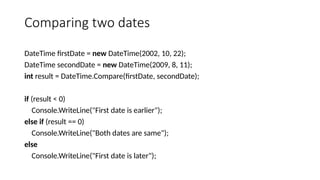
Comparing two dates
DateTimefirstDate = new DateTime(2002, 10, 22);
DateTime secondDate = new DateTime(2009, 8, 11);
int result = DateTime.Compare(firstDate, secondDate);
if (result < 0)
Console.WriteLine("First date is earlier");
else if (result == 0)
Console.WriteLine("Both dates are same");
else
Console.WriteLine("First date is later");
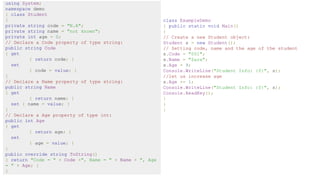
using System;
namespace demo
{class Student
{
private string code = "N.A";
private string name = "not known";
private int age = 0;
// Declare a Code property of type string:
public string Code
{ get
{ return code; }
set
{ code = value; }
}
// Declare a Name property of type string:
public string Name
{ get
{ return name; }
set { name = value; }
}
// Declare a Age property of type int:
public int Age
{ get
{ return age; }
set
{ age = value; }
}
public override string ToString()
{ return "Code = " + Code +", Name = " + Name + ", Age
= " + Age; }
}
class ExampleDemo
{ public static void Main()
{
// Create a new Student object:
Student s = new Student();
// Setting code, name and the age of the student
s.Code = "001";
s.Name = "Zara";
s.Age = 9;
Console.WriteLine("Student Info: {0}", s);
//let us increase age
s.Age += 1;
Console.WriteLine("Student Info: {0}", s);
Console.ReadKey();
}
}
}


![Arrays and ArrayLists
• 1D Array – string[] stringArray = new string[4];
string[] stringArray = {"1", "2", "3", "4"};
• 2D Array – int[,] intArray = new int[2, 4];
int[,] intArray = {{1, 2}, {3, 4}, {5, 6}, {7, 8}};
• ArrayList
• C# arrays do not support redimensioning. This means that once you create an array, you can’t change its
size. If you need a dynamic array-like list, you can use one of the collection classes provided to all .NET
languages
• through the .NET class library. One of the simplest collection classes that .NET offers is the ArrayList,
which always allows dynamic resizing. Here’s a snippet of C# code that uses an ArrayList:
• ArrayList dynamicList = new ArrayList();
• // The ArrayList is not strongly typed, so you can add any data type
• dynamicList.Add("one");
• dynamicList.Add("two");
• dynamicList.Add("three");
• // Retrieve the first string. Notice that the object must be converted to a string, because there's no way
for .NET to be certain what it is.
• string item = Convert.ToString(dynamicList[0]);](https://image.slidesharecdn.com/dotnetframework-250403092634-e7b446f2/85/DOT-NET-Framework-pptxdsfdsfdsfsdfdsfdsfdsf-15-320.jpg)