Alin Voinea
Eau de Web, Romania
Docker & Rancher
Docker Hub, Rancher Catalog
Summary
● Docker
○ Docker Hub
● Rancher
○ Rancher Catalog
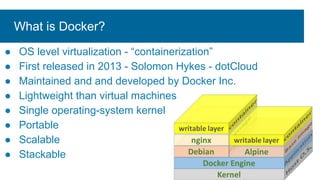
What is Docker?
● OS level virtualization - “containerization”
● First released in 2013 - Solomon Hykes - dotCloud
● Maintained and and developed by Docker Inc.
● Lightweight than virtual machines
● Single operating-system kernel
● Portable
● Scalable
● Stackable
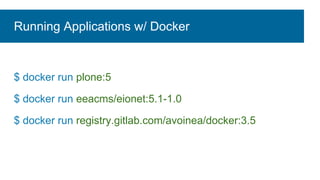
Running Applications w/ Docker
$ docker run plone:5
$ docker run eeacms/eionet:5.1-1.0
$ docker run registry.gitlab.com/avoinea/docker:3.5
Custom Docker Image: Dockerifle
FROM plone:5.1.5
RUN apt-get update 
&& apt-get install -y --no-install-recommends libldap2-dev libssl-dev 
&& rm -rf /var/lib/apt/lists/*
COPY site.cfg /plone/instance/
COPY docker-entrypoint.sh
RUN gosu plone buildout -c site.cfg
HEALTHCHECK --interval=1m --timeout=5s --start-period=1m 
CMD curl -f http://localhost:8080/ || exit 1
ENTRYPOINT [“/plone/instance/docker-entrypoint.sh”]
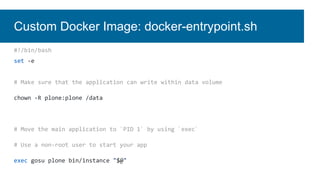
Custom Docker Image: docker-entrypoint.sh
#!/bin/bash
set -e
# Make sure that the application can write within data volume
chown -R plone:plone /data
# Move the main application to `PID 1` by using `exec`
# Use a non-root user to start your app
exec gosu plone bin/instance "$@"
Build Docker Image: devel
$ docker build -t eionet-dev /path/to/Dockerfile
$ docker run -p 8080:8080 eionet-dev
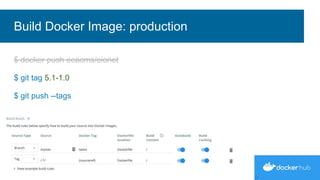
Build Docker Image: production
$ docker push eeacms/eionet
$ git tag 5.1-1.0
$ git push --tags
$ docker-compose up
$ docker-compose down
$ docker-compose down -v
Orchestration: Single host
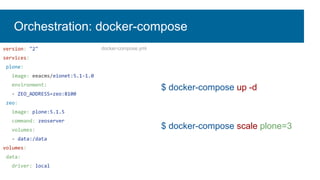
$ docker-compose up -d
$ docker-compose scale plone=3
version: "2"
services:
plone:
image: eeacms/eionet:5.1-1.0
environment:
- ZEO_ADDRESS=zeo:8100
zeo:
image: plone:5.1.5
command: zeoserver
volumes:
- data:/data
volumes:
data:
driver: local
Orchestration: docker-compose
docker-compose.yml
Orchestration: Multiple host
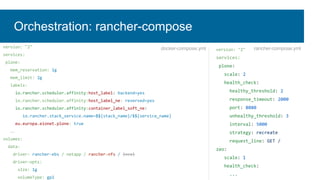
version: "2"
services:
plone:
scale: 2
health_check:
healthy_threshold: 2
response_timeout: 2000
port: 8080
unhealthy_threshold: 3
interval: 5000
strategy: recreate
request_line: GET /
zeo:
scale: 1
health_check:
...
version: "2"
services:
plone:
mem_reservation: 1g
mem_limit: 2g
labels:
io.rancher.scheduler.affinity:host_label: backend=yes
io.rancher.scheduler.affinity:host_label_ne: reserved=yes
io.rancher.scheduler.affinity:container_label_soft_ne:
io.rancher.stack_service.name=$${stack_name}/$${service_name}
eu.europa.eionet.plone: true
…
volumes:
data:
driver: rancher-ebs / netapp / rancher-nfs / local
driver-opts:
size: 1g
volumeType: gp2
docker-compose.yml rancher-compose.yml
Orchestration: rancher-compose
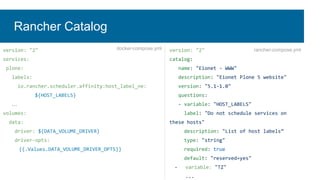
version: "2"
catalog:
name: "Eionet - WWW"
description: "Eionet Plone 5 website"
version: "5.1-1.0"
questions:
- variable: "HOST_LABELS"
label: "Do not schedule services on
these hosts"
description: "List of host labels”
type: "string"
required: true
default: "reserved=yes"
- variable: "TZ"
...
version: "2"
services:
plone:
labels:
io.rancher.scheduler.affinity:host_label_ne:
${HOST_LABELS}
…
volumes:
data:
driver: ${DATA_VOLUME_DRIVER}
driver-opts:
{{.Values.DATA_VOLUME_DRIVER_OPTS}}
docker-compose.yml rancher-compose.yml
Rancher Catalog
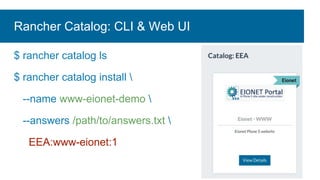
$ rancher catalog ls
$ rancher catalog install 
--name www-eionet-demo 
--answers /path/to/answers.txt 
EEA:www-eionet:1
Rancher Catalog: CLI & Web UI
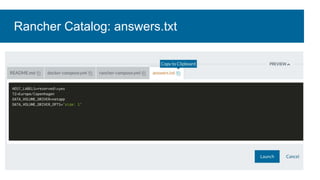
Rancher Catalog: answers.txt
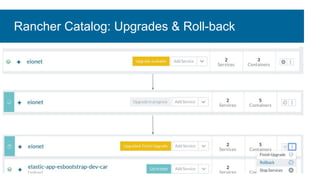
Rancher Catalog: Upgrades & Roll-back
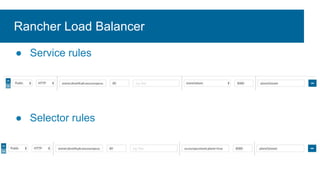
Rancher Load Balancer
● Service rules
● Selector rules
Thank you!
● EEA Rancher Catalog:
○ github.com/eea/eea.rancher.catalog
● Documentation
○ docker.com
○ rancher.com
● Examples
○ github.com/eea?q=docker

Docker & rancher

  • 1.
    Alin Voinea Eau deWeb, Romania Docker & Rancher Docker Hub, Rancher Catalog
  • 2.
    Summary ● Docker ○ DockerHub ● Rancher ○ Rancher Catalog
  • 3.
    What is Docker? ●OS level virtualization - “containerization” ● First released in 2013 - Solomon Hykes - dotCloud ● Maintained and and developed by Docker Inc. ● Lightweight than virtual machines ● Single operating-system kernel ● Portable ● Scalable ● Stackable
  • 4.
    Running Applications w/Docker $ docker run plone:5 $ docker run eeacms/eionet:5.1-1.0 $ docker run registry.gitlab.com/avoinea/docker:3.5
  • 5.
    Custom Docker Image:Dockerifle FROM plone:5.1.5 RUN apt-get update && apt-get install -y --no-install-recommends libldap2-dev libssl-dev && rm -rf /var/lib/apt/lists/* COPY site.cfg /plone/instance/ COPY docker-entrypoint.sh RUN gosu plone buildout -c site.cfg HEALTHCHECK --interval=1m --timeout=5s --start-period=1m CMD curl -f http://localhost:8080/ || exit 1 ENTRYPOINT [“/plone/instance/docker-entrypoint.sh”]
  • 6.
    Custom Docker Image:docker-entrypoint.sh #!/bin/bash set -e # Make sure that the application can write within data volume chown -R plone:plone /data # Move the main application to `PID 1` by using `exec` # Use a non-root user to start your app exec gosu plone bin/instance "$@"
  • 7.
    Build Docker Image:devel $ docker build -t eionet-dev /path/to/Dockerfile $ docker run -p 8080:8080 eionet-dev
  • 8.
    Build Docker Image:production $ docker push eeacms/eionet $ git tag 5.1-1.0 $ git push --tags
  • 9.
    $ docker-compose up $docker-compose down $ docker-compose down -v Orchestration: Single host
  • 10.
    $ docker-compose up-d $ docker-compose scale plone=3 version: "2" services: plone: image: eeacms/eionet:5.1-1.0 environment: - ZEO_ADDRESS=zeo:8100 zeo: image: plone:5.1.5 command: zeoserver volumes: - data:/data volumes: data: driver: local Orchestration: docker-compose docker-compose.yml
  • 11.
  • 12.
    version: "2" services: plone: scale: 2 health_check: healthy_threshold:2 response_timeout: 2000 port: 8080 unhealthy_threshold: 3 interval: 5000 strategy: recreate request_line: GET / zeo: scale: 1 health_check: ... version: "2" services: plone: mem_reservation: 1g mem_limit: 2g labels: io.rancher.scheduler.affinity:host_label: backend=yes io.rancher.scheduler.affinity:host_label_ne: reserved=yes io.rancher.scheduler.affinity:container_label_soft_ne: io.rancher.stack_service.name=$${stack_name}/$${service_name} eu.europa.eionet.plone: true … volumes: data: driver: rancher-ebs / netapp / rancher-nfs / local driver-opts: size: 1g volumeType: gp2 docker-compose.yml rancher-compose.yml Orchestration: rancher-compose
  • 13.
    version: "2" catalog: name: "Eionet- WWW" description: "Eionet Plone 5 website" version: "5.1-1.0" questions: - variable: "HOST_LABELS" label: "Do not schedule services on these hosts" description: "List of host labels” type: "string" required: true default: "reserved=yes" - variable: "TZ" ... version: "2" services: plone: labels: io.rancher.scheduler.affinity:host_label_ne: ${HOST_LABELS} … volumes: data: driver: ${DATA_VOLUME_DRIVER} driver-opts: {{.Values.DATA_VOLUME_DRIVER_OPTS}} docker-compose.yml rancher-compose.yml Rancher Catalog
  • 14.
    $ rancher catalogls $ rancher catalog install --name www-eionet-demo --answers /path/to/answers.txt EEA:www-eionet:1 Rancher Catalog: CLI & Web UI
  • 15.
  • 16.
  • 17.
    Rancher Load Balancer ●Service rules ● Selector rules
  • 18.
    Thank you! ● EEARancher Catalog: ○ github.com/eea/eea.rancher.catalog ● Documentation ○ docker.com ○ rancher.com ● Examples ○ github.com/eea?q=docker