Blog 앱 확장 - 검색 기능
@sokunn
개요
» 다양한 패키지들이 있음
» Django-haystack 패키지가 많이 사용됨
https://github.com/django-haystack/django-haystack
» 간단한 검색은 장고 자체의 Q-객체를 이용하여 구
현 가능
2
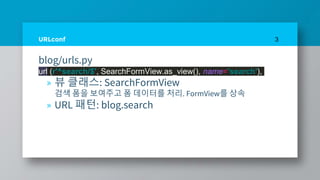
URLconf
blog/urls.py
url (r'^search/$', SearchFormView.as_view(), name='search'),
» 뷰 클래스: SearchFormView
검색 폼을 보여주고 폼 데이터를 처리. FormView를 상속
» URL 패턴: blog.search
3
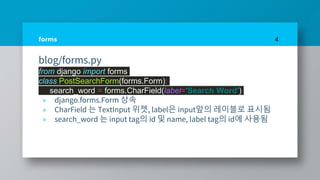
forms
blog/forms.py
from django import forms
class PostSearchForm(forms.Form):
search_word = forms.CharField(label='Search Word')
» django.forms.Form 상속
» CharField 는 TextInput 위젯, label은 input앞의 레이블로 표시됨
» search_word 는 input tag의 id 및 name, label tag의 id에 사용됨
4
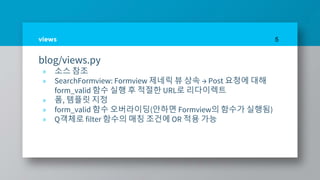
views
blog/views.py
» 소스 참조
» SearchFormview: Formview 제네릭 뷰 상속 → Post 요청에 대해
form_valid 함수 실행 후 적절한 URL로 리다이렉트
» 폼, 템플릿 지정
» form_valid 함수 오버라이딩(안하면 Formview의 함수가 실행됨)
» Q객체로 filter 함수의 매칭 조건에 OR 적용 가능
5

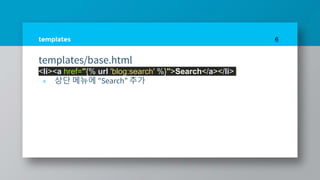
templates
templates/base.html
<li><a href="{% url 'blog:search' %}">Search</a></li>
» 상단 메뉴에 "Search” 추가
6
templates
templates/post_search.html
» 소스 참조
» 검색 폼 출력: csrf 토큰, as_table로 form을 테이블 방식으로 표시,
submit 버튼
» 검색결과 출력: 검색 결과가 있을 경우 순회하며 내용 출력, 검색
결과가 없을 경우 "<검색단어> Not Found" 문장 출력
7
감사합니다
8

Django study part9

  • 1.
    Blog 앱 확장- 검색 기능 @sokunn
  • 2.
    개요 » 다양한 패키지들이있음 » Django-haystack 패키지가 많이 사용됨 https://github.com/django-haystack/django-haystack » 간단한 검색은 장고 자체의 Q-객체를 이용하여 구 현 가능 2
  • 3.
    URLconf blog/urls.py url (r'^search/$', SearchFormView.as_view(),name='search'), » 뷰 클래스: SearchFormView 검색 폼을 보여주고 폼 데이터를 처리. FormView를 상속 » URL 패턴: blog.search 3
  • 4.
    forms blog/forms.py from django importforms class PostSearchForm(forms.Form): search_word = forms.CharField(label='Search Word') » django.forms.Form 상속 » CharField 는 TextInput 위젯, label은 input앞의 레이블로 표시됨 » search_word 는 input tag의 id 및 name, label tag의 id에 사용됨 4
  • 5.
    views blog/views.py » 소스 참조 »SearchFormview: Formview 제네릭 뷰 상속 → Post 요청에 대해 form_valid 함수 실행 후 적절한 URL로 리다이렉트 » 폼, 템플릿 지정 » form_valid 함수 오버라이딩(안하면 Formview의 함수가 실행됨) » Q객체로 filter 함수의 매칭 조건에 OR 적용 가능 5
  • 6.
    templates templates/base.html <li><a href="{% url'blog:search' %}">Search</a></li> » 상단 메뉴에 "Search” 추가 6
  • 7.
    templates templates/post_search.html » 소스 참조 »검색 폼 출력: csrf 토큰, as_table로 form을 테이블 방식으로 표시, submit 버튼 » 검색결과 출력: 검색 결과가 있을 경우 순회하며 내용 출력, 검색 결과가 없을 경우 "<검색단어> Not Found" 문장 출력 7
  • 8.