DISTRIBUTED SYSTEMS
Distributed system:
Name Services
Module Code ITU 07318
Introduction
Name service is a distinct service used by
client processes to obtain attributes (IP
address,Email address, Telephone numbers)
when given their names.
Hold addresses and other details of users,
computers, network domains, services and
remote objects.
To communicate with an object we need to
find the object, the address to the object, its
access methods etc.
Introduction cont..
Name services provide clients with data
about named objects in distributed
systems; and the related concepts of
directory and discovery services, which
provide data about objects that satisfy a
given description.
We begin by examining the fundamental
concepts of names and attributes
Names, Addresses and other
Attributes
Names
In a distributed system, names are used to
refer to a wide variety of resources such as
computers, services, remote objects, and
files as well as users.
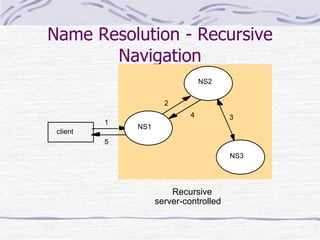
Names are used for identification as well as
for describing attributes.
Names facilitate communication and
resource sharing e.g. processes, users etc.
Names, Addresses and other
Attributes
Addresses
The object’s address is a value that
identifies the location of the object rather
than the object itself.
But sometimes it is not adequate, when
the object is relocated.
Names, Addresses and other
Attributes
Attributes
An attribute is the value of a property
associated with an object.
Is a unique expression in a written format
either by a code, by numbers or by the
combination of both to distinguish
variations from one another among a class
of substances, items, or objects.
Identifiers
For many purposes, names are
preferable to identifiers.
Because the binding of the named
resource to a physical location is
deferred and can be changed.
Because they are more meaningful to
users.
URIs,URLs,URNs
Uniform Resource Identifier (URI): is a string
of characters used to identify a name or a
resource on the Internet. They come in two
kinds:
1. Uniform Resource Locator (URL): Specifies
where a known resource is available and the
mechanism for retrieving it.
 Typed by the protocol field (http, ftp, nfs, etc.)
 Part of the name is service-specific
 Resources cannot be moved between domains
URIs,URLs,URNs
2. Uniform Resource Name (URN): names
resource
 Format: urn: <namespace>: <name-within
namespace>
 Examples
a) urn:ISBN:021-61918-0
b) urn:inf.unibz.it:TR2007-5
Names, Addresses and other
Attributes
Any process that require to access a
specific resource must posses a name or
an identifier for it.
Entities (Internet hosts, routers, file
systems, services) are accessed using
identifiers (numbers)
 IP Address
 File Descriptor
 Port number
Examples of Name Services
File System
 maps file name to file
DNS (Domain Name Service)
 maps domain names to IP addresses
 scalable, can handle change
RMI registry
 binds remote objects to symbolic names
X.500/LDAP directory service
 maps person’s name to email address, phone
number
Name Services and DNS
Name service
We have mentioned bindings before which
are the associations between textual
names and the atributes of the objects, for
example computers, service, users and
remote objects
Name service is a collections of sets of this
kind of bindings
Name Services and DNS
The major function of a name service is to
look up attributes from a given name –
name resolution, and other aspects related
to the bindings.
Name service is a simple technology used
for single machine or in a small network.
When put it in the interconnected
networks area, the problem comes out
that is a much larger name-mapping
problem
Name Services and DNS
With the invention of multi-domain name
services and the development of the
Global Name Service, it needs some
requirement of handling an essentially
arbitrary number of names and to serve
an arbitrary number of administrative
organizations;
A good example is the Internet Domain
Name System
Name Services and DNS
Name Space
A Name Space is the collection of all valid
names recognized by a particular service.
What kind of name is valid?
A name can be looked up by the service, even
though that name may prove not to correspond to
any object – to be unbound.
Name space requires a syntactic definition. For
example, “...” is not acceptable as the DNS
name of a computer.
Name Services and DNS
Naming Domain
A naming domain is a name space for
which there exists a single overall
administrative authority for assigning
names within it.
This authority is in overall control of
which names may be bound within the
domain.
Name Services and DNS
In particular, domains in DNS are
collections of domain names;
syntactically, a domain’s name is the
common suffix of the domain names
within it, but it may not be
distinguished from a computer name.
What’s more, the administration of
domains may be devolved to sub-
domains.
Name Services and DNS
Responsibility for a naming domain
normally goes hand in hand with
responsibility for managing and keeping
up to date the corresponding part of the
database stored in an authoritative name
server and used by the name service.
Naming data belonging to different
naming domains are in general stored by
distinct name servers managed by the
corresponding authorities.
Name Resolution
In general, Resolution is an iterative
process whereby a name is repeatedly
presented to naming context.
To resolve a name, it is first presented to
some initial naming context; resolution
iterates as long as further contexts and
derived names are output.
Name Resolution
Name Servers and Navigation
Any name server, such as DNS, that
stores a very large database and is
used by a large population will not store
all of its naming information on a single
server computer.
Such a server will be a bottleneck and a
critical point of failure.
Name Resolution
Any heavily used name service should use
replication to achieve high availability.
Data belonging to a naming domain is
usually stored by a local name server
managed by the authority responsible for
that domain
But there are also name servers for the
higher domains e.g. yahoo.com; ac.tz
Name Resolution
The partitioning of data implies that the
local name server cannot answer all
enquiries without the help of other
name servers.
The process of locating naming data
from among more than one name
server in order to resolve a name is
called Navigation
Name Resolution
Iterative Navigation
Multicast Navigation
Recursive Navigation
Non-Recursive Server-Controlled Navigation
Recursive Server-Controlled Navigation
Iterative Navigation
In this mode, a client presents the name
to the local name server, which attempts
to resolve it.
If the local name server has the name, it
returns the result immediately.
If it does not, it will suggest another
server that will be able to help.
Iterative Navigation
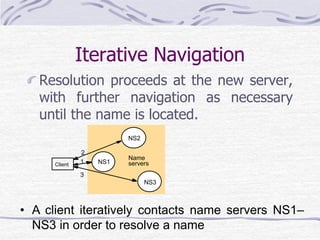
Resolution proceeds at the new server,
with further navigation as necessary
until the name is located.
Client
1
2
3
• A client iteratively contacts name servers NS1–
NS3 in order to resolve a name
NS2
NS1
NS3
Name
servers
Iterative Navigation
Used in:
DNS client presents entire name to
servers, starting at the local server,
NS1.
If NS1 has the requested name, it is
resolved, else NS1 suggests contacting
NS2 (a Server for a domain that
includes the requested name)
Multicast Navigation
A client multicasts the name to be
resolved and the required object type to
the group of name servers.
Only the server that holds the named
attributes responds to the request.
If the name proves to be unbound, then
the request is greeted with silence.
Recursive Navigation
Non-Recursive Server-Controlled Navigation
Recursive Server-Controlled Navigation
A name server NS1 communicates with other
name servers on behalf of a client
DNS offers recursive navigation as an option,
but iterative is the standard technique.
Recursive navigation must be used in
domains that limit client access to their DNS
information for security reasons.
Name Resolution - Recursive
Navigation
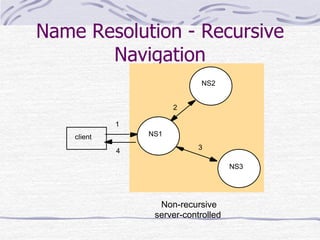
Non-recursive Server-controlled
Navigation
The client may choose any name server
and this server communicates multicast
or iteratively with its peers as we have
mentioned above.
Name Resolution - Recursive
Navigation
1
2
3
4
client
NS2
NS1
NS3
Non-recursive
server-controlled
Name Resolution - Recursive
Navigation
Recursive Server-controlled Navigation
The client once more contacts a single
server.
If it does not store the name, the server
contacts a peer storing a prefix of the
name, which in turn attempts to resolve it.
This procedure continues recursively until
the name is resolved.
Name Resolution - Recursive
Navigation
Recursive
server-controlled
1
2
3
5
4
client
NS2
NS1
NS3
Caching
In DNS and other name services, client
name resolution software and servers
maintain a cache of the results of
previous name resolutions.
When a client request a name lookup,
the name resolution software consults
its cache.
Caching
If it holds a recent result from previous
lookup for the name, it return it to the
client; otherwise, it sets about finding it
from a server.
That server in turn may return data
cached from other servers.
Caching
Caching assists in maintaining availability
of both name services and other services
despite name server crashes.
It facilitate response times by saving
communication with name servers is clear.
Caching can be used to eliminate high-
level name servers-the root servers.
Thank you

Distributed system in information technology

  • 1.
    DISTRIBUTED SYSTEMS Distributed system: NameServices Module Code ITU 07318
  • 2.
    Introduction Name service isa distinct service used by client processes to obtain attributes (IP address,Email address, Telephone numbers) when given their names. Hold addresses and other details of users, computers, network domains, services and remote objects. To communicate with an object we need to find the object, the address to the object, its access methods etc.
  • 3.
    Introduction cont.. Name servicesprovide clients with data about named objects in distributed systems; and the related concepts of directory and discovery services, which provide data about objects that satisfy a given description. We begin by examining the fundamental concepts of names and attributes
  • 4.
    Names, Addresses andother Attributes Names In a distributed system, names are used to refer to a wide variety of resources such as computers, services, remote objects, and files as well as users. Names are used for identification as well as for describing attributes. Names facilitate communication and resource sharing e.g. processes, users etc.
  • 5.
    Names, Addresses andother Attributes Addresses The object’s address is a value that identifies the location of the object rather than the object itself. But sometimes it is not adequate, when the object is relocated.
  • 6.
    Names, Addresses andother Attributes Attributes An attribute is the value of a property associated with an object. Is a unique expression in a written format either by a code, by numbers or by the combination of both to distinguish variations from one another among a class of substances, items, or objects.
  • 7.
    Identifiers For many purposes,names are preferable to identifiers. Because the binding of the named resource to a physical location is deferred and can be changed. Because they are more meaningful to users.
  • 8.
    URIs,URLs,URNs Uniform Resource Identifier(URI): is a string of characters used to identify a name or a resource on the Internet. They come in two kinds: 1. Uniform Resource Locator (URL): Specifies where a known resource is available and the mechanism for retrieving it.  Typed by the protocol field (http, ftp, nfs, etc.)  Part of the name is service-specific  Resources cannot be moved between domains
  • 9.
    URIs,URLs,URNs 2. Uniform ResourceName (URN): names resource  Format: urn: <namespace>: <name-within namespace>  Examples a) urn:ISBN:021-61918-0 b) urn:inf.unibz.it:TR2007-5
  • 10.
    Names, Addresses andother Attributes Any process that require to access a specific resource must posses a name or an identifier for it. Entities (Internet hosts, routers, file systems, services) are accessed using identifiers (numbers)  IP Address  File Descriptor  Port number
  • 11.
    Examples of NameServices File System  maps file name to file DNS (Domain Name Service)  maps domain names to IP addresses  scalable, can handle change RMI registry  binds remote objects to symbolic names X.500/LDAP directory service  maps person’s name to email address, phone number
  • 12.
    Name Services andDNS Name service We have mentioned bindings before which are the associations between textual names and the atributes of the objects, for example computers, service, users and remote objects Name service is a collections of sets of this kind of bindings
  • 13.
    Name Services andDNS The major function of a name service is to look up attributes from a given name – name resolution, and other aspects related to the bindings. Name service is a simple technology used for single machine or in a small network. When put it in the interconnected networks area, the problem comes out that is a much larger name-mapping problem
  • 14.
    Name Services andDNS With the invention of multi-domain name services and the development of the Global Name Service, it needs some requirement of handling an essentially arbitrary number of names and to serve an arbitrary number of administrative organizations; A good example is the Internet Domain Name System
  • 15.
    Name Services andDNS Name Space A Name Space is the collection of all valid names recognized by a particular service. What kind of name is valid? A name can be looked up by the service, even though that name may prove not to correspond to any object – to be unbound. Name space requires a syntactic definition. For example, “...” is not acceptable as the DNS name of a computer.
  • 16.
    Name Services andDNS Naming Domain A naming domain is a name space for which there exists a single overall administrative authority for assigning names within it. This authority is in overall control of which names may be bound within the domain.
  • 17.
    Name Services andDNS In particular, domains in DNS are collections of domain names; syntactically, a domain’s name is the common suffix of the domain names within it, but it may not be distinguished from a computer name. What’s more, the administration of domains may be devolved to sub- domains.
  • 18.
    Name Services andDNS Responsibility for a naming domain normally goes hand in hand with responsibility for managing and keeping up to date the corresponding part of the database stored in an authoritative name server and used by the name service. Naming data belonging to different naming domains are in general stored by distinct name servers managed by the corresponding authorities.
  • 19.
    Name Resolution In general,Resolution is an iterative process whereby a name is repeatedly presented to naming context. To resolve a name, it is first presented to some initial naming context; resolution iterates as long as further contexts and derived names are output.
  • 20.
    Name Resolution Name Serversand Navigation Any name server, such as DNS, that stores a very large database and is used by a large population will not store all of its naming information on a single server computer. Such a server will be a bottleneck and a critical point of failure.
  • 21.
    Name Resolution Any heavilyused name service should use replication to achieve high availability. Data belonging to a naming domain is usually stored by a local name server managed by the authority responsible for that domain But there are also name servers for the higher domains e.g. yahoo.com; ac.tz
  • 22.
    Name Resolution The partitioningof data implies that the local name server cannot answer all enquiries without the help of other name servers. The process of locating naming data from among more than one name server in order to resolve a name is called Navigation
  • 23.
    Name Resolution Iterative Navigation MulticastNavigation Recursive Navigation Non-Recursive Server-Controlled Navigation Recursive Server-Controlled Navigation
  • 24.
    Iterative Navigation In thismode, a client presents the name to the local name server, which attempts to resolve it. If the local name server has the name, it returns the result immediately. If it does not, it will suggest another server that will be able to help.
  • 25.
    Iterative Navigation Resolution proceedsat the new server, with further navigation as necessary until the name is located. Client 1 2 3 • A client iteratively contacts name servers NS1– NS3 in order to resolve a name NS2 NS1 NS3 Name servers
  • 26.
    Iterative Navigation Used in: DNSclient presents entire name to servers, starting at the local server, NS1. If NS1 has the requested name, it is resolved, else NS1 suggests contacting NS2 (a Server for a domain that includes the requested name)
  • 27.
    Multicast Navigation A clientmulticasts the name to be resolved and the required object type to the group of name servers. Only the server that holds the named attributes responds to the request. If the name proves to be unbound, then the request is greeted with silence.
  • 28.
    Recursive Navigation Non-Recursive Server-ControlledNavigation Recursive Server-Controlled Navigation A name server NS1 communicates with other name servers on behalf of a client DNS offers recursive navigation as an option, but iterative is the standard technique. Recursive navigation must be used in domains that limit client access to their DNS information for security reasons.
  • 29.
    Name Resolution -Recursive Navigation Non-recursive Server-controlled Navigation The client may choose any name server and this server communicates multicast or iteratively with its peers as we have mentioned above.
  • 30.
    Name Resolution -Recursive Navigation 1 2 3 4 client NS2 NS1 NS3 Non-recursive server-controlled
  • 31.
    Name Resolution -Recursive Navigation Recursive Server-controlled Navigation The client once more contacts a single server. If it does not store the name, the server contacts a peer storing a prefix of the name, which in turn attempts to resolve it. This procedure continues recursively until the name is resolved.
  • 32.
    Name Resolution -Recursive Navigation Recursive server-controlled 1 2 3 5 4 client NS2 NS1 NS3
  • 33.
    Caching In DNS andother name services, client name resolution software and servers maintain a cache of the results of previous name resolutions. When a client request a name lookup, the name resolution software consults its cache.
  • 34.
    Caching If it holdsa recent result from previous lookup for the name, it return it to the client; otherwise, it sets about finding it from a server. That server in turn may return data cached from other servers.
  • 35.
    Caching Caching assists inmaintaining availability of both name services and other services despite name server crashes. It facilitate response times by saving communication with name servers is clear. Caching can be used to eliminate high- level name servers-the root servers.
  • 36.