Discovery
Tools

January 2012


 Dee Ann Allison
 dallison@unl.edu
What are Discovery Tools?


 A discovery tool provides a single point of access to a range of library
 resources that enables users to search multiple resources with a single
 search.

 Some Examples:
 EBSCO Discovery Service
 Summon service (Serial Solutions)
 AquaBrowser Library (Serial Solutions)
 Encore Discovery (Innovative Interfaces)
 Primo Central (Ex Libris Group )
 Blacklight – open source University of Virginia
Reasons why you might want a discovery tool

1.   Simplify the research process with a single search.
2.   Market locally created databases to your community to increase
     visibility and use.
3.   Provide a more intuitive search interface that encourages discovery.
     No more complex searching that confuses users.
4.   Improve the “depth” of the metadata to index content not included in
     your catalog.
5.   Integrate Web 2.0 options with your search engine, e.g. tagging,
     reviews. Give your searchers a reason to return to your site.
6.   Enhance remote access to your library.
7.   Make searches successful
8.   Promote the library as a quality research source that meets the
     changing expectations of our users.
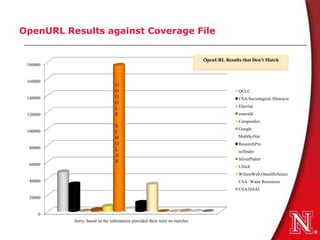
OpenURL Results against Coverage File


                                                                           OpenURL Results that Don't Match
 180000


 160000
                                G
                                O                                                         OCLC
 140000                         O                                                         CSA-Sociological Abstracts
                                G
                                L                                                         Elsevier
 120000                         E                                                         emerald
                                                                                          Compendex
                                S
                                                                                          Google
 100000                         C
                                H                                                         MathSciNet
                                O                                                         ResearchPro
 80000                          L                                                         scifinder
                                A
                                R                                                         SilverPlatter
 60000                                                                                    Ulrich
                                                                                          WilsonWeb:OmnifileSelect
 40000                                                                                    CSA- Water Resources
                                                                                          CSA:DAAI
 20000


     0
          Sorry, based on the information provided there were no matches
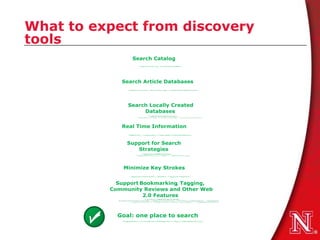
What to expect from discovery
tools
Do your homework
• Who do you expect to use this tool?

• How are you going to build on your catalog?

• What resources to do want to bring together?

• How do you want to integrate with other services and products?
• What are your preferences for integrating the results? For
  authentication?
      for example, with articles – they can be integrated, separated, or faceted.
• Talk to librarians using the system – try to get a login to
  demo
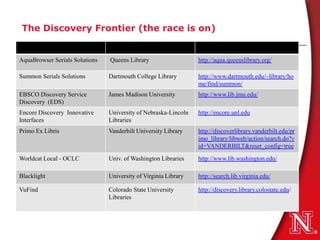
The Discovery Frontier (the race is on)


AquaBrowser Serials Solutions   Queens Library                   http://aqua.queenslibrary.org/

Summon Serials Solutions        Dartmouth College Library        http://www.dartmouth.edu/~library/ho
                                                                 me/find/summon/
EBSCO Discovery Service         James Madison University         http://www.lib.jmu.edu/
Discovery (EDS)
Encore Discovery Innovative     University of Nebraska-Lincoln   http://encore.unl.edu
Interfaces                      Libraries
Primo Ex Libris                 Vanderbilt University Library    http://discoverlibrary.vanderbilt.edu/pr
                                                                 imo_library/libweb/action/search.do?v
                                                                 id=VANDERBILT&reset_config=true

Worldcat Local - OCLC           Univ. of Washington Libraries    http://www.lib.washington.edu/

Blacklight                      University of Virginia Library   http://search.lib.virginia.edu/

VuFind                          Colorado State University        http://discovery.library.colostate.edu/
                                Libraries
Open source alternatives
• Blacklight
   – University of Virginia http://virgobeta.lib.virginia.edu/
   – North Carolina University http://historicalstate.lib.ncsu.edu/
• VuFind
   – Colorado State University Libraries http://discovery.library.colostate.edu
   – Yale University http://yufind.library.yale.edu/yufind
• SOPAC (Social Opac)
       – Ann Arbor District Library http://www.aadl.org/catalog
       – Darien Library http://www.darienlibrary.org
• Scriblio
   –      Hong Kong University of Science & Tech.
        http://catalog.ust.hk/catalog/smartcat
• Fac-Back-OPAC
   −     Paul Smith’s College Book Catalog http://library.paulsmiths.edu/catalog
Differences
 What full-text can be included from vendors?
  These are proprietary beasts and agreements must be reached.
 Technology architecture is different
     Facets for search limiters and expanders
     Results are presented differently (to integrate or not)
     Harvesting, some use OAI
     Real-time issues
     Network issues and response time (hosted or local)
Social networking capabilities
Advance search capabilities
Cost
Aquabrowser the Discovery Layer
• Hosted by Serial Solutions.
• Results are ranked by relevance
• Word Cloud with thesaurus and associative terms, translations and
  spelling suggestions are automatically generated from resources
• Faceted navigation uses locally created mapping
• Real time availability of item status
• ADA compliant interface
• Supports sorting by title, author, publication date
• Web 2.0 features for lists, tags, ratings, reviews
• Library-configurable relevancy ranking
• Integration with a library’s 360 Search (Federated Search Service)
  subscription
• Two additional local data sets/local collections
• No advance search
Summon Web scale discovery
•   Hosted Service
•   Journal and periodicals articles
•   Relevancy-ranked list
•    Incorporates library holdings
•   Export citations to bibliographic management software
•   Scholarship facet
•   Includes abstracts, item location, online full text availability
•   Advanced search
EBSCO Discovery Service (EDS)
• Databases from EBSCOhost, (customer subscribed)
• Databases from non-EBSCOhost databases (customer subscribed)
• OPAC loaded directly; includes real-time availability checks and daily
  updates(and searched along with all other content)
• Supports book jacket images, book records, entertainment
  records, annotations, family keys, subject headings, demand
  information, awards, review citations, etc.
• Institutional archives/repositories directly loaded
• Facet options including subject, source, publication
• Includes alerts
• Includes RSS options
• Image Quick View
• Supports a variety of “widgets” and export portions of EBSCOhost
  functionality onto library web sites
Primo
• Hosted or Local
• Harvests catalog and library has options for configuring metadata
  including relevancy ranking.
• Uses hosted central index for full-text materials including articles, e-
  books, which are delivered by publishers technology.
• “Primo Deep Search” which provides searching for resources not in
  Primo Central but are compliant with an API.
• Ex Libris MetaLib® gateway for other resource linking and links-out
  for other full-text and services.
• Facet options including subject, source, publication.
• Multilingual thesauri.
• webpage harvesting capability.
• Spell check – “did you mean.”
• Social networking, tags, reviews.
• Limited advance search (and)
Worldcat Local
• Resolves full-text through OpenURL
• Facets
• Integration with social bookmaking sites
• Includes catalog and article citations
• Supports citation export
• Single integrated result set
• Integrates with Illiad
• Supports book covers, book reviews, user contributed
  reviews, tagging and recommendations.
• Offers advanced search for expanding and limiting searches
• Supports “and” Boolean searching.
BlackLight – Open Source
• Search items the Library has catalogued, including books,
  journal titles, DVDs, CDs, sheet music, websites, and microfilm,
  and also, digital collections of images and texts;
• Filter results by format, dates, and keywords;
• Sort results by relevancy ranking, date received, author, title or
  call number;
• Save and share searches and results in Delicious, and,
  VIRGObeta, RefWorks and Zotero;
• Generate an RSS feed for search, for notification when the
  Library acquires materials in your subject area.
• Request item
• Article integration
VuFind – Open Source
• Search items the Library has catalogued, website, and
  institutional repository.
• Limit results by collection, format, dates, and keywords.
• Supports limiting to items with illustrations, full-text, or
  stemming (searches work so includes working, works, etc.)
• Sort results by relevancy ranking, date received, author, title or
  call number;
• Supports bookmarking, citation exporting.
• No articles at the present time.
Encore
• Local or hosted
• Searches the catalog and harvested collections (OAI protocol).
  Supports advance searches for “and/or”.
• Facets for limiting and expanding searches. Can do call number
  searches.
• Sort by relevancy, title and date.
• Integration with Millennium Course Reserves, Media & Electronic
  Reserves.
• Integration with Millennium Program Registration Event Calendar
• Library staff ability to promote individual titles in RightResult™
  ranking.
• Expanded local links and branding Integration with Meebo™ online
• OpenURL resolver integration for services
• Inclusion of Google Books™ preview
• Community comments, ratings and tags.
Discovery Tool Checklist
 Hosted or local (implications for staffing requirements and response time)
 Real-time updating from the catalog
 Currency of articles
    Full-text limiting
    Peer review limiting
 Choice of databases for inclusion
 Authentication method
 Options for local databases (OAI or other methods)
 Flexibility to easily expand or limit queries, and support serendipitous
  discovery
 Web 2.0 features
    Tagging ratings, reviews, exporting
 Browser, ADA, and mobile compatibility
 Local control (webpac backup)
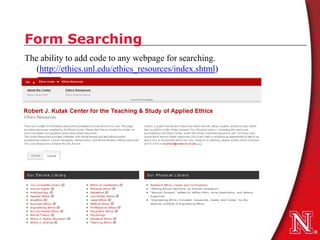
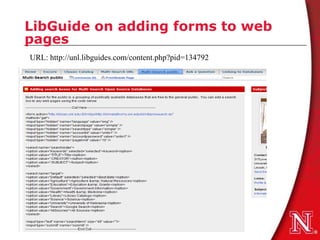
Form Searching
The ability to add code to any webpage for searching.
   (http://ethics.unl.edu/ethics_resources/index.shtml)
LibGuide on adding forms to web
pages
URL: http://unl.libguides.com/content.php?pid=134792
Resources
Evaluating and comparing discovery tools: how close are we
   towards next generation catalog? By Sharon Q. Yang, Library
   Hi Tech, v. 28, no. 4, Apr. 2010, p. 690-709.
Information portals: the next generation catalog, by DeeAnn
   Allison, Journal of Web Librarianship, v. 4, no. 4, Oct.-Dec.
   2010, p. 375-389.

Dee Ann Allison
dallison1@unl.edu
317 Love Library
University of Nebraska-Lincoln
Lincoln, NE 68588-0410
(402)472-3944

Discovery tools? You Can Compete with Google

  • 1.
    Discovery Tools January 2012 DeeAnn Allison dallison@unl.edu
  • 2.
    What are DiscoveryTools? A discovery tool provides a single point of access to a range of library resources that enables users to search multiple resources with a single search. Some Examples: EBSCO Discovery Service Summon service (Serial Solutions) AquaBrowser Library (Serial Solutions) Encore Discovery (Innovative Interfaces) Primo Central (Ex Libris Group ) Blacklight – open source University of Virginia
  • 3.
    Reasons why youmight want a discovery tool 1. Simplify the research process with a single search. 2. Market locally created databases to your community to increase visibility and use. 3. Provide a more intuitive search interface that encourages discovery. No more complex searching that confuses users. 4. Improve the “depth” of the metadata to index content not included in your catalog. 5. Integrate Web 2.0 options with your search engine, e.g. tagging, reviews. Give your searchers a reason to return to your site. 6. Enhance remote access to your library. 7. Make searches successful 8. Promote the library as a quality research source that meets the changing expectations of our users.
  • 4.
    OpenURL Results againstCoverage File OpenURL Results that Don't Match 180000 160000 G O OCLC 140000 O CSA-Sociological Abstracts G L Elsevier 120000 E emerald Compendex S Google 100000 C H MathSciNet O ResearchPro 80000 L scifinder A R SilverPlatter 60000 Ulrich WilsonWeb:OmnifileSelect 40000 CSA- Water Resources CSA:DAAI 20000 0 Sorry, based on the information provided there were no matches
  • 5.
    What to expectfrom discovery tools
  • 6.
    Do your homework •Who do you expect to use this tool? • How are you going to build on your catalog? • What resources to do want to bring together? • How do you want to integrate with other services and products? • What are your preferences for integrating the results? For authentication? for example, with articles – they can be integrated, separated, or faceted. • Talk to librarians using the system – try to get a login to demo
  • 7.
    The Discovery Frontier(the race is on) AquaBrowser Serials Solutions Queens Library http://aqua.queenslibrary.org/ Summon Serials Solutions Dartmouth College Library http://www.dartmouth.edu/~library/ho me/find/summon/ EBSCO Discovery Service James Madison University http://www.lib.jmu.edu/ Discovery (EDS) Encore Discovery Innovative University of Nebraska-Lincoln http://encore.unl.edu Interfaces Libraries Primo Ex Libris Vanderbilt University Library http://discoverlibrary.vanderbilt.edu/pr imo_library/libweb/action/search.do?v id=VANDERBILT&reset_config=true Worldcat Local - OCLC Univ. of Washington Libraries http://www.lib.washington.edu/ Blacklight University of Virginia Library http://search.lib.virginia.edu/ VuFind Colorado State University http://discovery.library.colostate.edu/ Libraries
  • 8.
    Open source alternatives •Blacklight – University of Virginia http://virgobeta.lib.virginia.edu/ – North Carolina University http://historicalstate.lib.ncsu.edu/ • VuFind – Colorado State University Libraries http://discovery.library.colostate.edu – Yale University http://yufind.library.yale.edu/yufind • SOPAC (Social Opac) – Ann Arbor District Library http://www.aadl.org/catalog – Darien Library http://www.darienlibrary.org • Scriblio – Hong Kong University of Science & Tech. http://catalog.ust.hk/catalog/smartcat • Fac-Back-OPAC − Paul Smith’s College Book Catalog http://library.paulsmiths.edu/catalog
  • 9.
    Differences What full-textcan be included from vendors? These are proprietary beasts and agreements must be reached. Technology architecture is different Facets for search limiters and expanders Results are presented differently (to integrate or not) Harvesting, some use OAI Real-time issues Network issues and response time (hosted or local) Social networking capabilities Advance search capabilities Cost
  • 10.
    Aquabrowser the DiscoveryLayer • Hosted by Serial Solutions. • Results are ranked by relevance • Word Cloud with thesaurus and associative terms, translations and spelling suggestions are automatically generated from resources • Faceted navigation uses locally created mapping • Real time availability of item status • ADA compliant interface • Supports sorting by title, author, publication date • Web 2.0 features for lists, tags, ratings, reviews • Library-configurable relevancy ranking • Integration with a library’s 360 Search (Federated Search Service) subscription • Two additional local data sets/local collections • No advance search
  • 11.
    Summon Web scalediscovery • Hosted Service • Journal and periodicals articles • Relevancy-ranked list • Incorporates library holdings • Export citations to bibliographic management software • Scholarship facet • Includes abstracts, item location, online full text availability • Advanced search
  • 12.
    EBSCO Discovery Service(EDS) • Databases from EBSCOhost, (customer subscribed) • Databases from non-EBSCOhost databases (customer subscribed) • OPAC loaded directly; includes real-time availability checks and daily updates(and searched along with all other content) • Supports book jacket images, book records, entertainment records, annotations, family keys, subject headings, demand information, awards, review citations, etc. • Institutional archives/repositories directly loaded • Facet options including subject, source, publication • Includes alerts • Includes RSS options • Image Quick View • Supports a variety of “widgets” and export portions of EBSCOhost functionality onto library web sites
  • 13.
    Primo • Hosted orLocal • Harvests catalog and library has options for configuring metadata including relevancy ranking. • Uses hosted central index for full-text materials including articles, e- books, which are delivered by publishers technology. • “Primo Deep Search” which provides searching for resources not in Primo Central but are compliant with an API. • Ex Libris MetaLib® gateway for other resource linking and links-out for other full-text and services. • Facet options including subject, source, publication. • Multilingual thesauri. • webpage harvesting capability. • Spell check – “did you mean.” • Social networking, tags, reviews. • Limited advance search (and)
  • 14.
    Worldcat Local • Resolvesfull-text through OpenURL • Facets • Integration with social bookmaking sites • Includes catalog and article citations • Supports citation export • Single integrated result set • Integrates with Illiad • Supports book covers, book reviews, user contributed reviews, tagging and recommendations. • Offers advanced search for expanding and limiting searches • Supports “and” Boolean searching.
  • 15.
    BlackLight – OpenSource • Search items the Library has catalogued, including books, journal titles, DVDs, CDs, sheet music, websites, and microfilm, and also, digital collections of images and texts; • Filter results by format, dates, and keywords; • Sort results by relevancy ranking, date received, author, title or call number; • Save and share searches and results in Delicious, and, VIRGObeta, RefWorks and Zotero; • Generate an RSS feed for search, for notification when the Library acquires materials in your subject area. • Request item • Article integration
  • 16.
    VuFind – OpenSource • Search items the Library has catalogued, website, and institutional repository. • Limit results by collection, format, dates, and keywords. • Supports limiting to items with illustrations, full-text, or stemming (searches work so includes working, works, etc.) • Sort results by relevancy ranking, date received, author, title or call number; • Supports bookmarking, citation exporting. • No articles at the present time.
  • 17.
    Encore • Local orhosted • Searches the catalog and harvested collections (OAI protocol). Supports advance searches for “and/or”. • Facets for limiting and expanding searches. Can do call number searches. • Sort by relevancy, title and date. • Integration with Millennium Course Reserves, Media & Electronic Reserves. • Integration with Millennium Program Registration Event Calendar • Library staff ability to promote individual titles in RightResult™ ranking. • Expanded local links and branding Integration with Meebo™ online • OpenURL resolver integration for services • Inclusion of Google Books™ preview • Community comments, ratings and tags.
  • 18.
    Discovery Tool Checklist Hosted or local (implications for staffing requirements and response time)  Real-time updating from the catalog  Currency of articles  Full-text limiting  Peer review limiting  Choice of databases for inclusion  Authentication method  Options for local databases (OAI or other methods)  Flexibility to easily expand or limit queries, and support serendipitous discovery  Web 2.0 features  Tagging ratings, reviews, exporting  Browser, ADA, and mobile compatibility  Local control (webpac backup)
  • 19.
    Form Searching The abilityto add code to any webpage for searching. (http://ethics.unl.edu/ethics_resources/index.shtml)
  • 20.
    LibGuide on addingforms to web pages URL: http://unl.libguides.com/content.php?pid=134792
  • 21.
    Resources Evaluating and comparingdiscovery tools: how close are we towards next generation catalog? By Sharon Q. Yang, Library Hi Tech, v. 28, no. 4, Apr. 2010, p. 690-709. Information portals: the next generation catalog, by DeeAnn Allison, Journal of Web Librarianship, v. 4, no. 4, Oct.-Dec. 2010, p. 375-389. Dee Ann Allison dallison1@unl.edu 317 Love Library University of Nebraska-Lincoln Lincoln, NE 68588-0410 (402)472-3944