Digital Practises  Portfolio By Naomi Sage
Photoshop Clown We went into Photoshop and added the image of the head onto the body and then used different textiles under each other of the sections of clothing to give a the impression of different materials.
Photoshop Montage We found different images that related to our play, which was ‘The Importance of Being Earnest’ We then put these images together to create a montage that related to the play.
Photoshop Set We again found images that related to the play and then decided to create a set that we thought would be used during some of the scenes. We picked a library and played around lighting and furniture to make it look more believable.
3D Studio Max – Table Leg We learnt how to draw around the outside of a photo of a table leg and then see how the program would copy that to create a 3D image.
3D Studio Max - Table We added in four table legs to create a full table and learnt how to move them around to make it look fully 3D and realistic.
3D Studio Max – Table with Bowl After creating the full table we then used the other tools to create boxes to make the stage and walls and made a small fruit bowl to put on the table.
AutoCAD We first learnt how to do small changes such as Fillet and Chamfer to the corners of squares, and how to add the dimensions on. We also created a cross shape using the tools available.
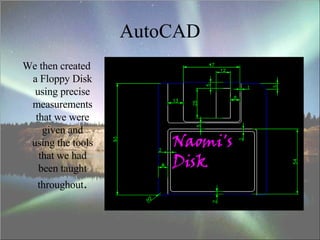
AutoCAD We then created a Floppy Disk using precise measurements that we were given and using the tools that we had been taught throughout .

Digital Practises Portfolio

  • 1.
    Digital Practises Portfolio By Naomi Sage
  • 2.
    Photoshop Clown Wewent into Photoshop and added the image of the head onto the body and then used different textiles under each other of the sections of clothing to give a the impression of different materials.
  • 3.
    Photoshop Montage Wefound different images that related to our play, which was ‘The Importance of Being Earnest’ We then put these images together to create a montage that related to the play.
  • 4.
    Photoshop Set Weagain found images that related to the play and then decided to create a set that we thought would be used during some of the scenes. We picked a library and played around lighting and furniture to make it look more believable.
  • 5.
    3D Studio Max– Table Leg We learnt how to draw around the outside of a photo of a table leg and then see how the program would copy that to create a 3D image.
  • 6.
    3D Studio Max- Table We added in four table legs to create a full table and learnt how to move them around to make it look fully 3D and realistic.
  • 7.
    3D Studio Max– Table with Bowl After creating the full table we then used the other tools to create boxes to make the stage and walls and made a small fruit bowl to put on the table.
  • 8.
    AutoCAD We firstlearnt how to do small changes such as Fillet and Chamfer to the corners of squares, and how to add the dimensions on. We also created a cross shape using the tools available.
  • 9.
    AutoCAD We thencreated a Floppy Disk using precise measurements that we were given and using the tools that we had been taught throughout .