Introduction to Digital
Panel Meters
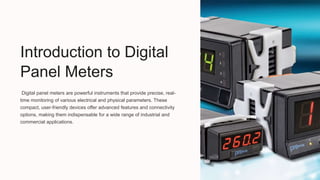
Digital panel meters are powerful instruments that provide precise, real-
time monitoring of various electrical and physical parameters. These
compact, user-friendly devices offer advanced features and connectivity
options, making them indispensable for a wide range of industrial and
commercial applications.
Types of Digital Panel Meters
Voltage Meters
Measure AC or DC voltage
with high accuracy and
resolution.
Current Meters
Monitor current flow in
electrical systems and
circuits.
Multimeters
Combine voltage, current,
and resistance
measurement capabilities in
a single device.
Features and Benefits
1 High Precision
Provide reliable, accurate, and
consistent measurements.
2 Versatile Displays
Offer customizable display options,
including digital, analog, and bargraph
formats.
3 Connectivity
Support various communication
protocols for data logging and remote
monitoring.
4 Programmable Alarms
Allow for the setting of thresholds to
trigger alerts and notifications.
Applications of Digital Panel Meters
Industrial Automation
Monitor and control critical parameters in
manufacturing processes.
Energy Management
Measure and optimize energy
consumption in buildings and facilities.
HVAC Systems
Track temperature, humidity, and pressure
in climate control systems.
Medical Equipment
Provide precise monitoring of vital signs
and treatment parameters.
Installation and Wiring
Panel Mounting
Securely install the meter
in the designated panel
cutout.
Electrical Connections
Carefully wire the meter to
the power source and
measurement points.
Configuration
Set up the meter's
parameters and options for
optimal performance.
Calibration and Maintenance
Calibration
Ensure accurate
readings by
regularly calibrating
the meter.
Cleaning
Keep the meter's
display and
enclosure clean to
maintain visibility.
Firmware Updates
Install the latest
firmware to access
new features and
bug fixes.
Preventive
Maintenance
Implement a regular
maintenance
schedule to extend
the meter's lifespan.
Troubleshooting and Support
Common Issues Possible Causes Troubleshooting Steps
Inaccurate Readings Improper Wiring,
Calibration Error
Check Connections,
Recalibrate the Meter
Display Malfunctions Faulty Display, Power
Supply Issue
Inspect Display, Verify
Power Source
Communication Failures Incorrect Configuration,
Compatibility Problems
Review Settings, Ensure
Protocol Compatibility
Conclusion and Next Steps
1
Optimize Performance
Leverage the advanced features and
connectivity options to enhance efficiency
and productivity.
2
Expand Capabilities
Explore new applications and integrate
digital panel meters into emerging
technologies.
3
Stay Informed
Keep up with industry trends and
developments to make informed decisions
about digital panel meter investments.
Digital Panel Meters Digital Panel Meters

Digital Panel Meters Digital Panel Meters

  • 1.
    Introduction to Digital PanelMeters Digital panel meters are powerful instruments that provide precise, real- time monitoring of various electrical and physical parameters. These compact, user-friendly devices offer advanced features and connectivity options, making them indispensable for a wide range of industrial and commercial applications.
  • 2.
    Types of DigitalPanel Meters Voltage Meters Measure AC or DC voltage with high accuracy and resolution. Current Meters Monitor current flow in electrical systems and circuits. Multimeters Combine voltage, current, and resistance measurement capabilities in a single device.
  • 3.
    Features and Benefits 1High Precision Provide reliable, accurate, and consistent measurements. 2 Versatile Displays Offer customizable display options, including digital, analog, and bargraph formats. 3 Connectivity Support various communication protocols for data logging and remote monitoring. 4 Programmable Alarms Allow for the setting of thresholds to trigger alerts and notifications.
  • 4.
    Applications of DigitalPanel Meters Industrial Automation Monitor and control critical parameters in manufacturing processes. Energy Management Measure and optimize energy consumption in buildings and facilities. HVAC Systems Track temperature, humidity, and pressure in climate control systems. Medical Equipment Provide precise monitoring of vital signs and treatment parameters.
  • 5.
    Installation and Wiring PanelMounting Securely install the meter in the designated panel cutout. Electrical Connections Carefully wire the meter to the power source and measurement points. Configuration Set up the meter's parameters and options for optimal performance.
  • 6.
    Calibration and Maintenance Calibration Ensureaccurate readings by regularly calibrating the meter. Cleaning Keep the meter's display and enclosure clean to maintain visibility. Firmware Updates Install the latest firmware to access new features and bug fixes. Preventive Maintenance Implement a regular maintenance schedule to extend the meter's lifespan.
  • 7.
    Troubleshooting and Support CommonIssues Possible Causes Troubleshooting Steps Inaccurate Readings Improper Wiring, Calibration Error Check Connections, Recalibrate the Meter Display Malfunctions Faulty Display, Power Supply Issue Inspect Display, Verify Power Source Communication Failures Incorrect Configuration, Compatibility Problems Review Settings, Ensure Protocol Compatibility
  • 8.
    Conclusion and NextSteps 1 Optimize Performance Leverage the advanced features and connectivity options to enhance efficiency and productivity. 2 Expand Capabilities Explore new applications and integrate digital panel meters into emerging technologies. 3 Stay Informed Keep up with industry trends and developments to make informed decisions about digital panel meter investments.