Chapter 8: DHCP
1Presentation_ID © 2008 Cisco Systems, Inc. All rights reserved. Cisco Confidential
Routing and Switching Essentials v6.0
Chapter 8 - Sections & Objectives
2Presentation_ID © 2008 Cisco Systems, Inc. All rights reserved. Cisco Confidential
1. DHCPv4
• Explain how DHCPv4 operates in a small- to medium-sized business network.
• Configure a router as a DHCPv4 server.
• Configure a router as a DHCPv4 client.
• Troubleshoot a DHCP configuration for IPv4 in a switched network.
2. DHCPv6
• Explain the operation of DHCPv6.
• Configure stateless DHCPv6 for a small to medium-sized business.
• Configure stateful DHCPv6 for a small to medium-sized business.
• Troubleshoot a DHCP configuration for IPv6 in a switched network.
8.1 DHCPv4
3Presentation_ID © 2008 Cisco Systems, Inc. All rights reserved. Cisco Confidential
DHCPv4 Operation
Introducing DHCPv4
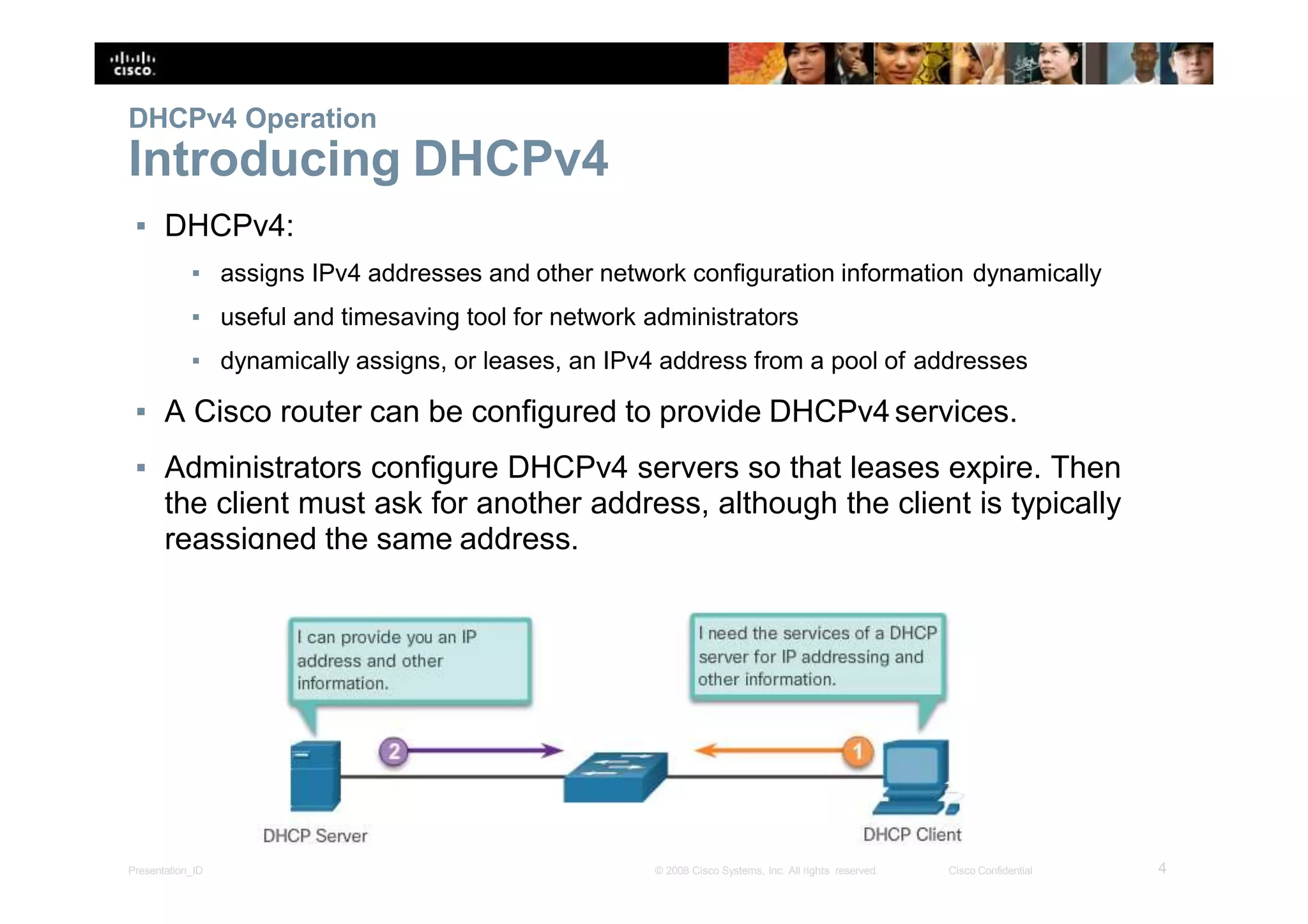
▪ DHCPv4:
▪ assigns IPv4 addresses and other network configuration information dynamically
▪ useful and timesaving tool for network administrators
▪ dynamically assigns, or leases, an IPv4 address from a pool of addresses
▪ A Cisco router can be configured to provide DHCPv4services.
▪ Administrators configure DHCPv4 servers so that leases expire. Then
the client must ask for another address, although the client is typically
reassigned the same address.
4Presentation_ID © 2008 Cisco Systems, Inc. All rights reserved. Cisco Confidential
DHCPv4 Operation
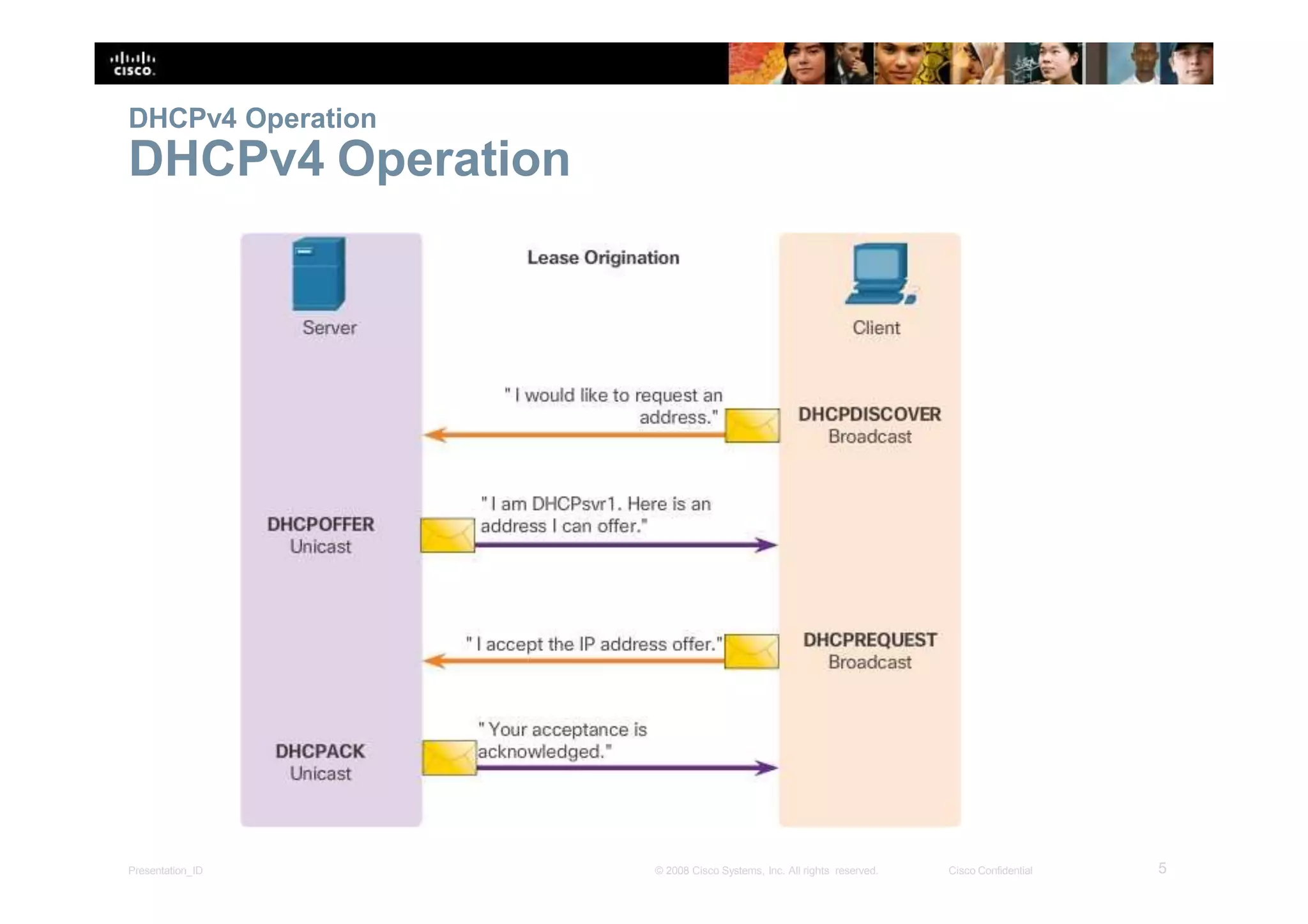
DHCPv4 Operation
5Presentation_ID © 2008 Cisco Systems, Inc. All rights reserved. Cisco Confidential
DHCPv4 Operation
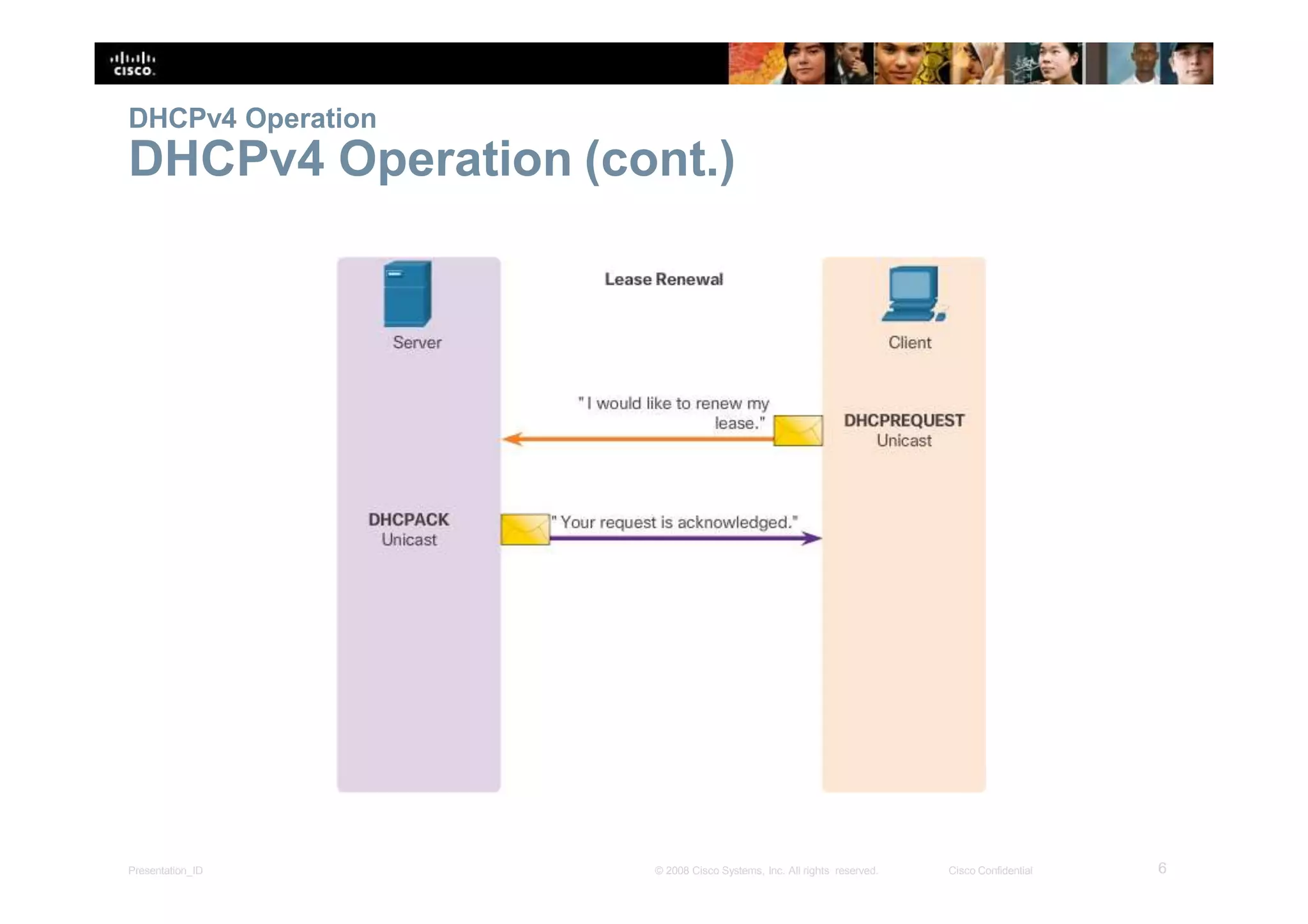
DHCPv4 Operation (cont.)
6Presentation_ID © 2008 Cisco Systems, Inc. All rights reserved. Cisco Confidential
DHCPv4 Operation
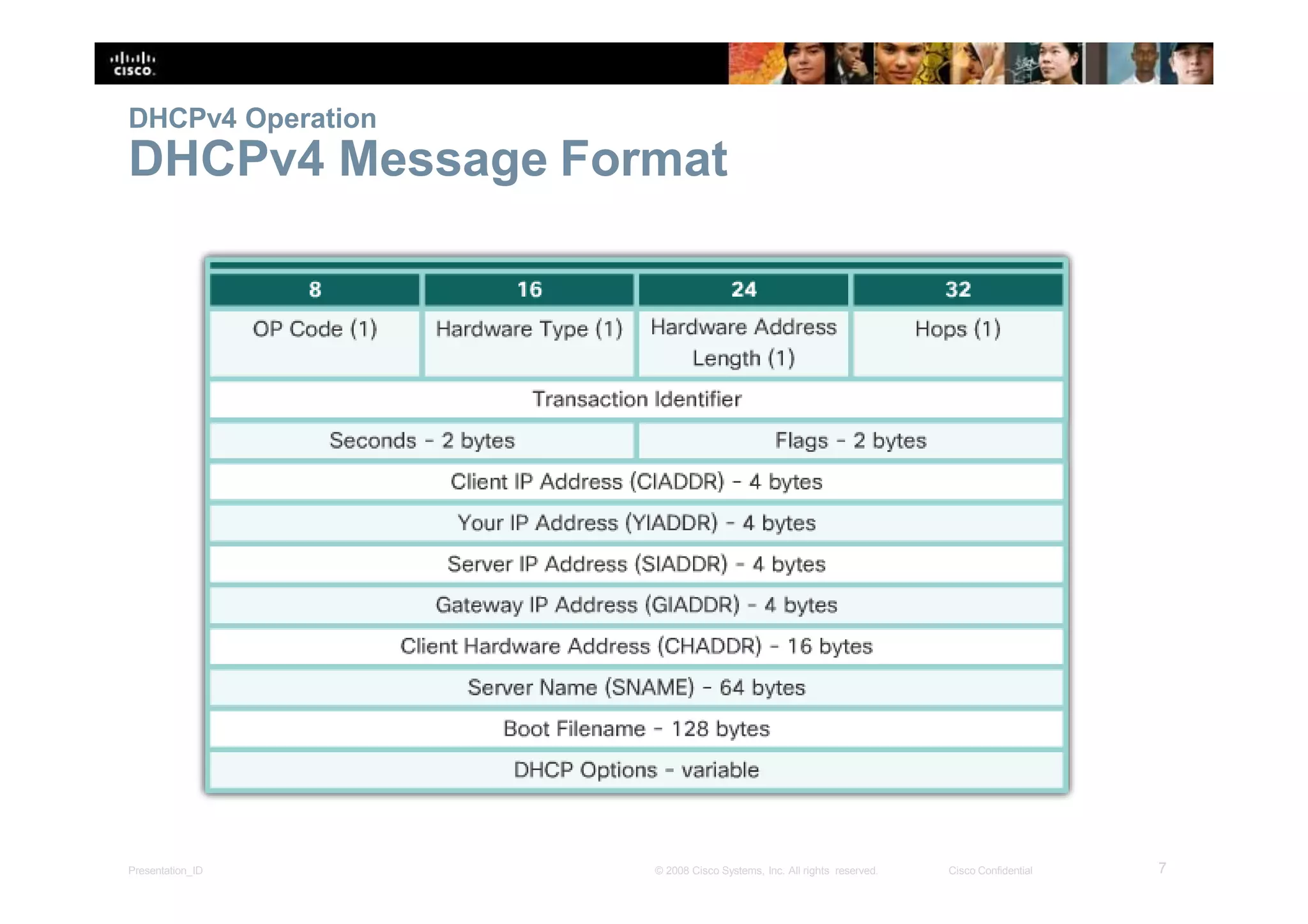
DHCPv4 Message Format
7Presentation_ID © 2008 Cisco Systems, Inc. All rights reserved. Cisco Confidential
DHCPv4 Operation
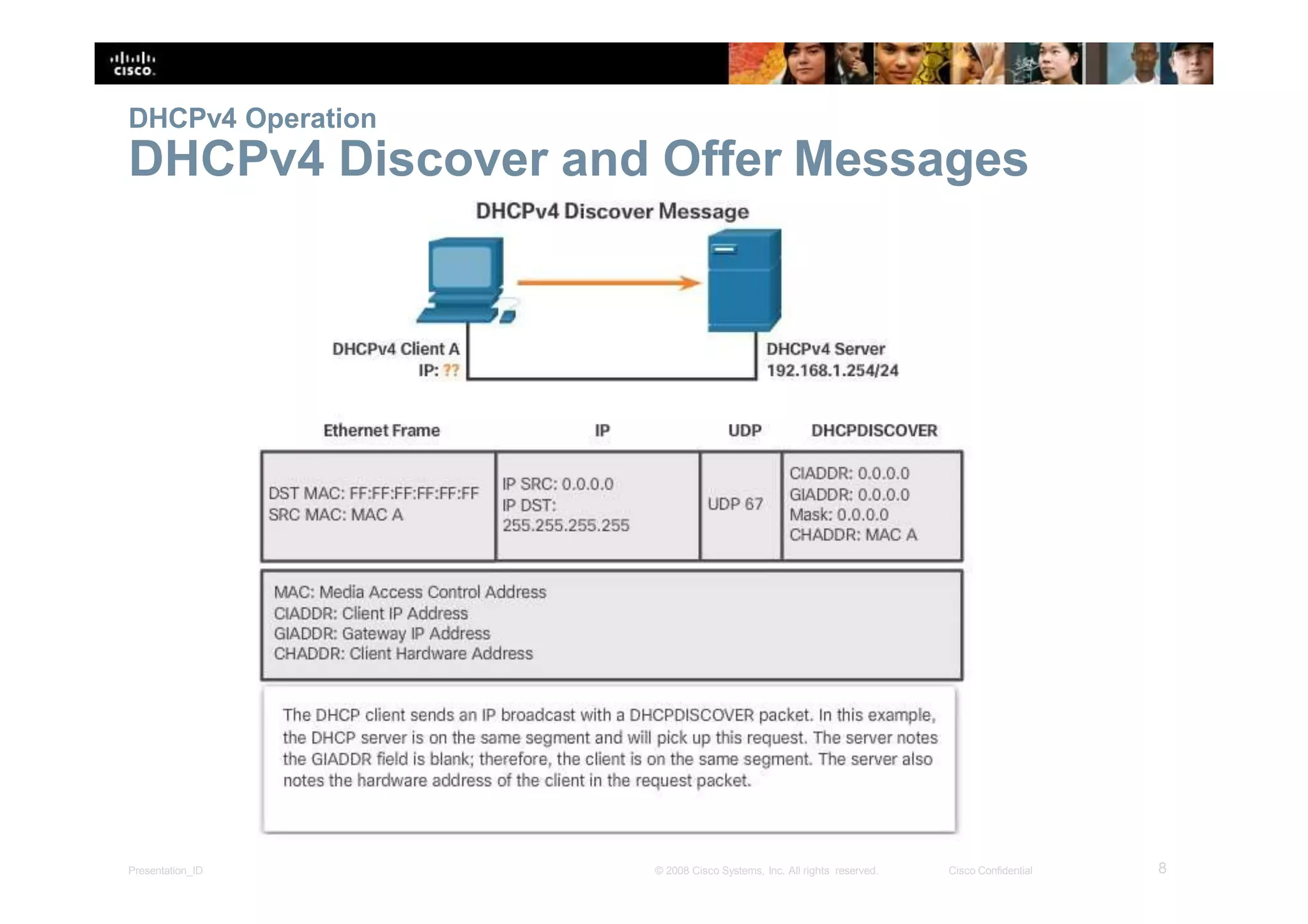
DHCPv4 Discover and Offer Messages
8Presentation_ID © 2008 Cisco Systems, Inc. All rights reserved. Cisco Confidential
DHCPv4 Operation
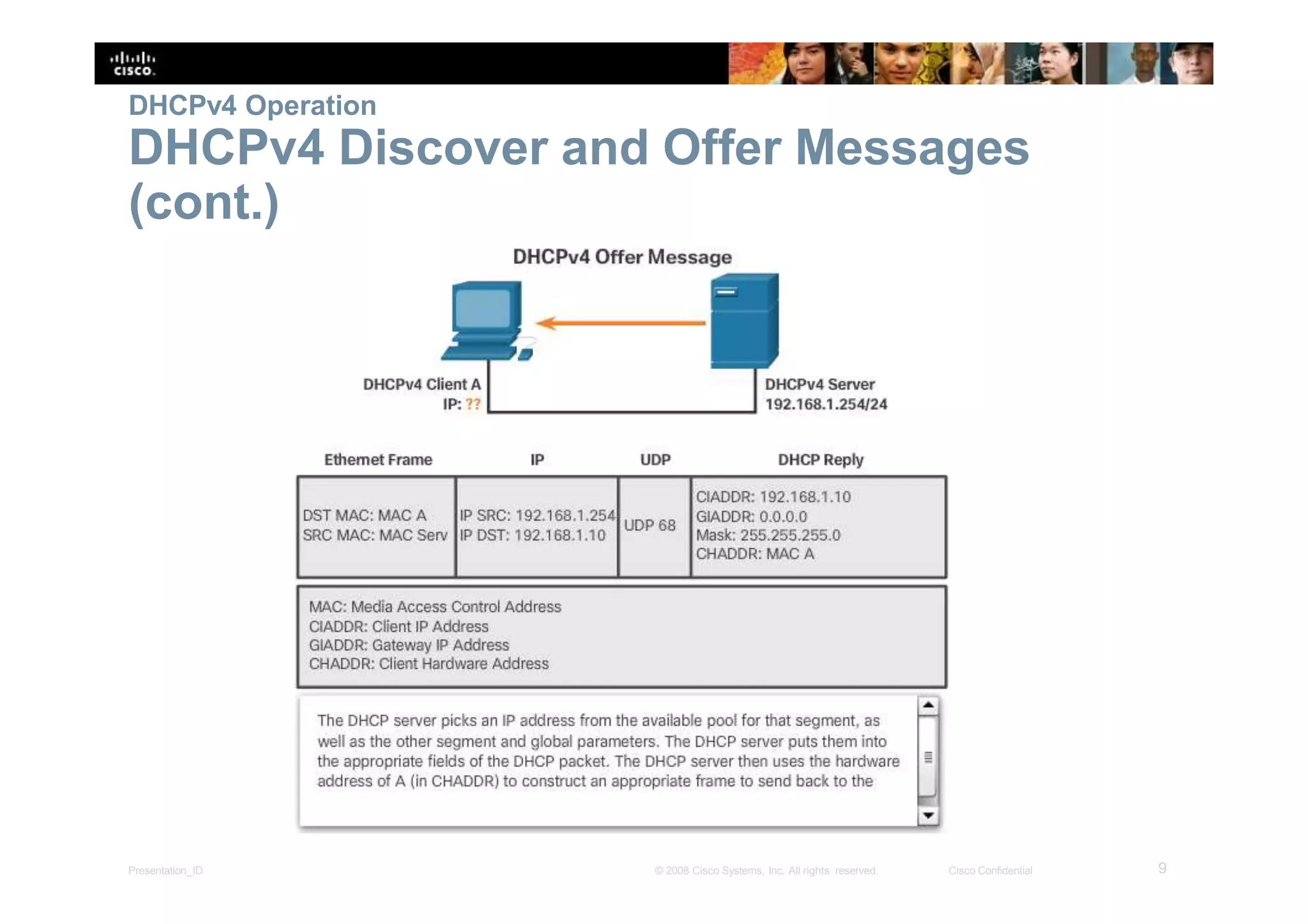
DHCPv4 Discover and Offer Messages
(cont.)
9Presentation_ID © 2008 Cisco Systems, Inc. All rights reserved. Cisco Confidential
Configure DHCPv4 Server
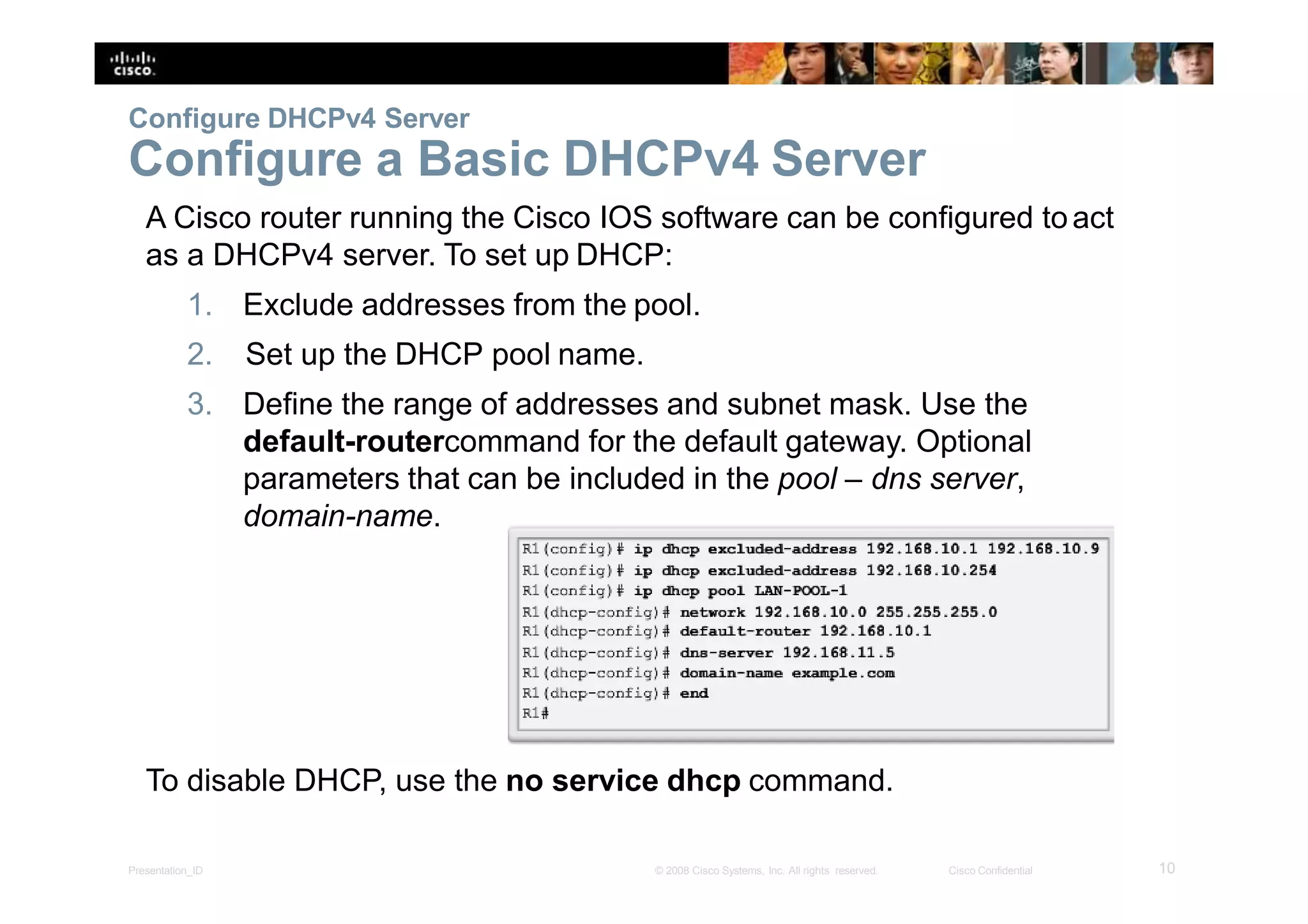
Configure a Basic DHCPv4 Server
A Cisco router running the Cisco IOS software can be configured toact
as a DHCPv4 server. To set up DHCP:
1. Exclude addresses from the pool.
2. Set up the DHCP pool name.
3. Define the range of addresses and subnet mask. Use the
default-routercommand for the default gateway. Optional
parameters that can be included in the pool – dns server,
domain-name.
To disable DHCP, use the no service dhcp command.
10Presentation_ID © 2008 Cisco Systems, Inc. All rights reserved. Cisco Confidential
Configure DHCPv4 Server
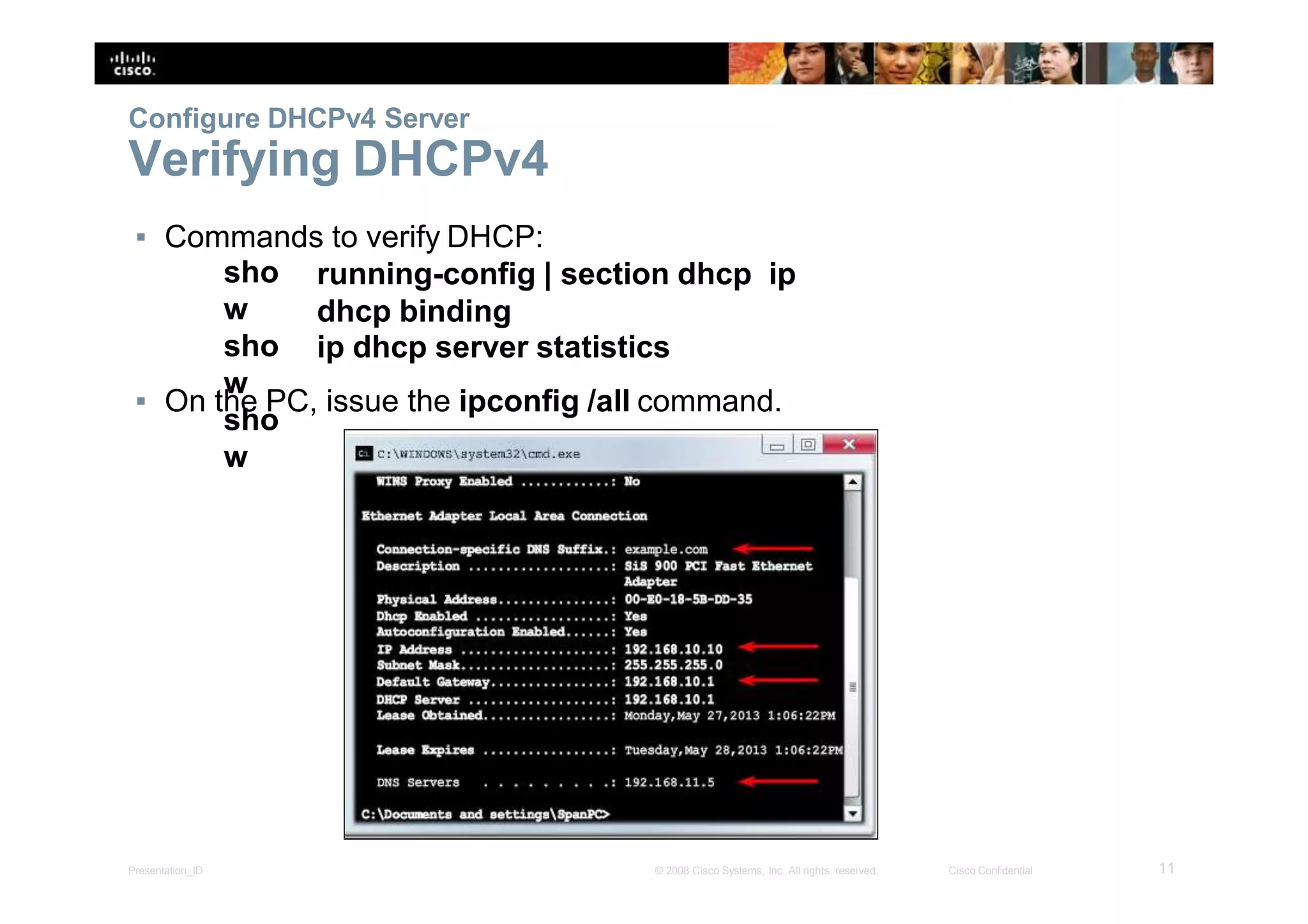
Verifying DHCPv4
▪ Commands to verify DHCP:
sho
w
sho
w
sho
w
running-config | section dhcp ip
dhcp binding
ip dhcp server statistics
▪ On the PC, issue the ipconfig /all command.
11Presentation_ID © 2008 Cisco Systems, Inc. All rights reserved. Cisco Confidential
Configure DHCPv4 Server
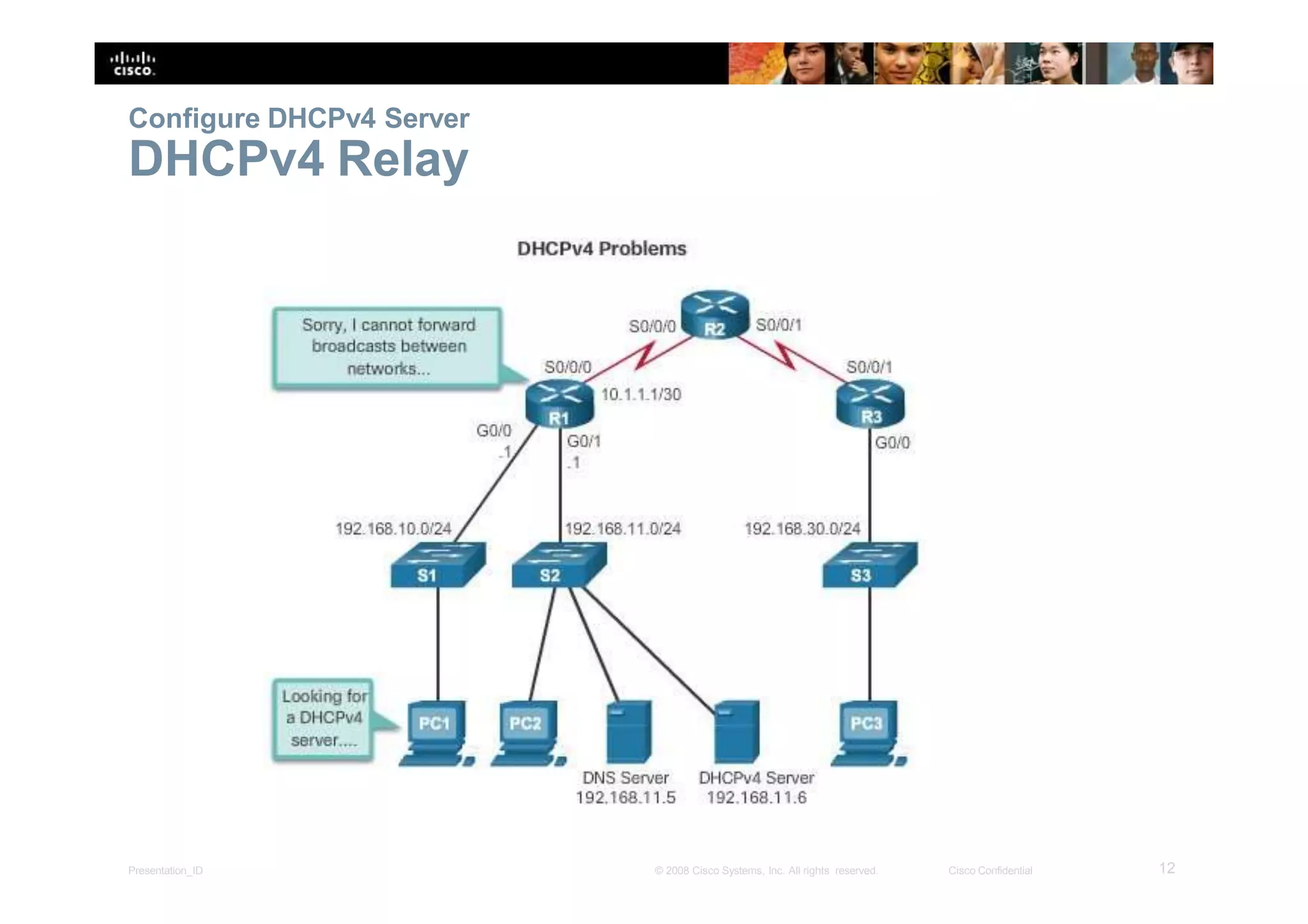
DHCPv4 Relay
12Presentation_ID © 2008 Cisco Systems, Inc. All rights reserved. Cisco Confidential
Configure DHCPv4 Server
DHCPv4 Relay (cont.)
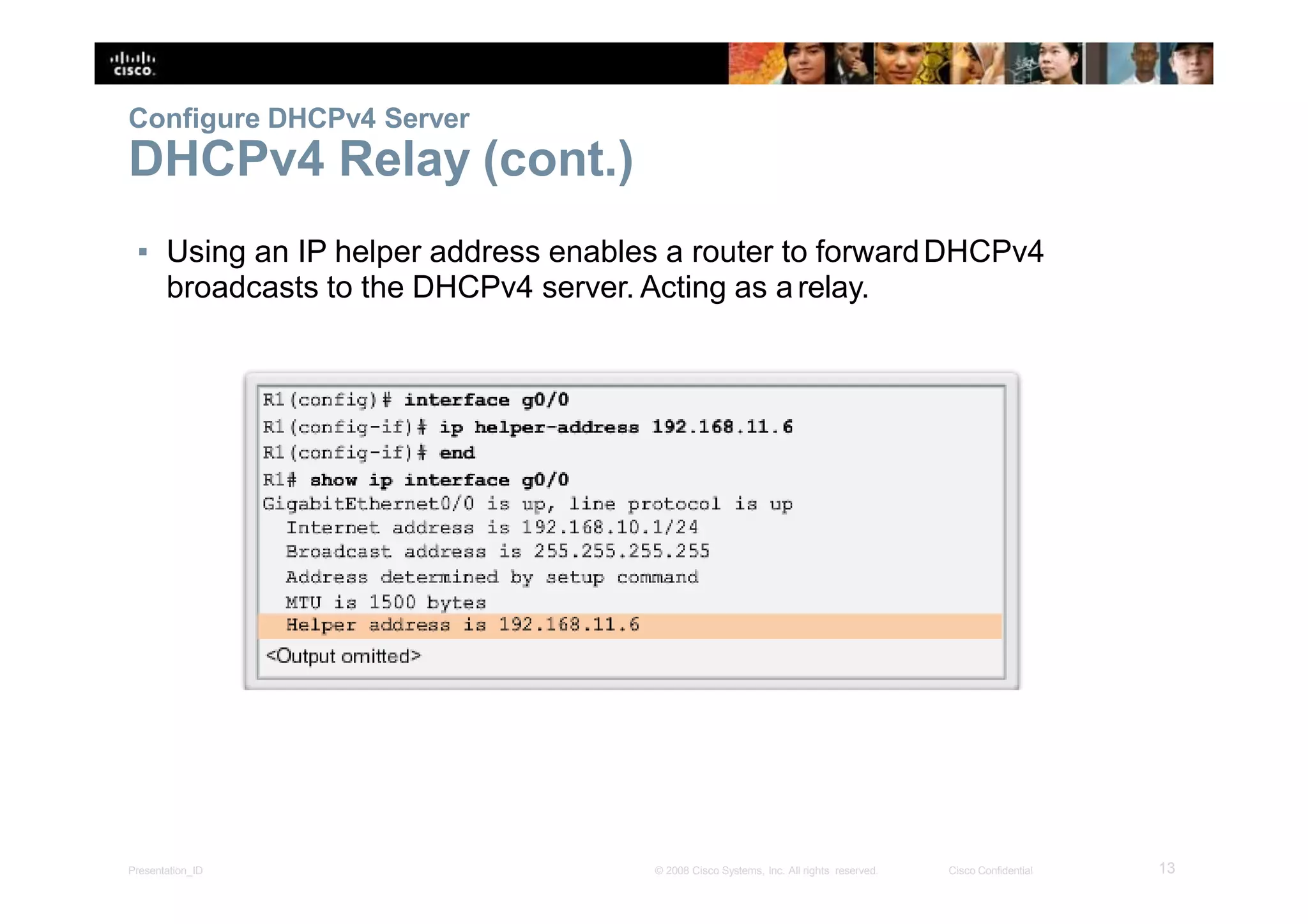
▪ Using an IP helper address enables a router to forwardDHCPv4
broadcasts to the DHCPv4 server. Acting as arelay.
13Presentation_ID © 2008 Cisco Systems, Inc. All rights reserved. Cisco Confidential
Configure DHCPv4 Client
Configuring a Router as a DHCPv4 client
14Presentation_ID © 2008 Cisco Systems, Inc. All rights reserved. Cisco Confidential
Configure DHCPv4 Client
Configuring a Wireless Router as a DHCPv4
Client
15Presentation_ID © 2008 Cisco Systems, Inc. All rights reserved. Cisco Confidential
Troubleshooting DHCPv4
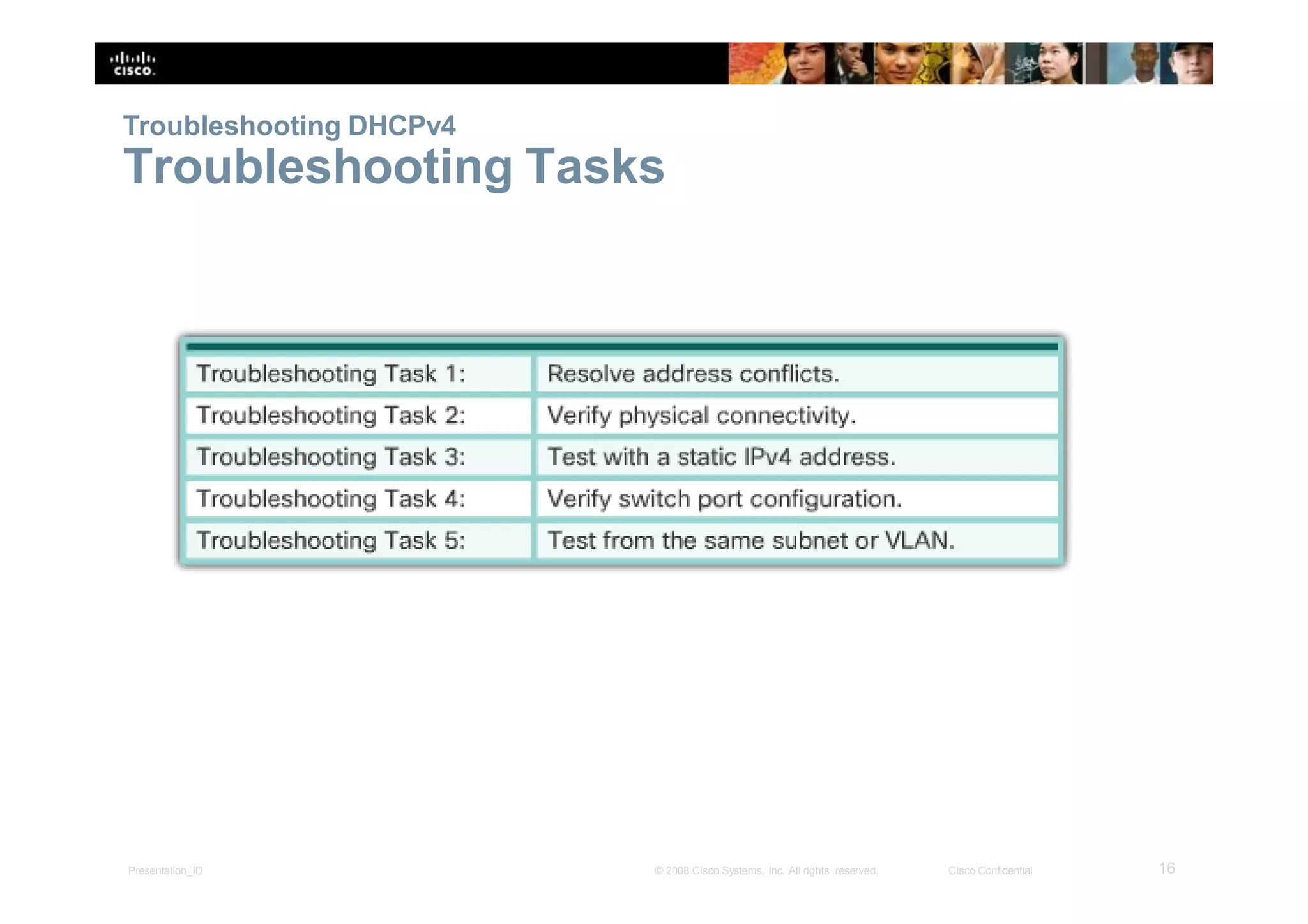
Troubleshooting Tasks
16Presentation_ID © 2008 Cisco Systems, Inc. All rights reserved. Cisco Confidential
Troubleshooting DHCPv4
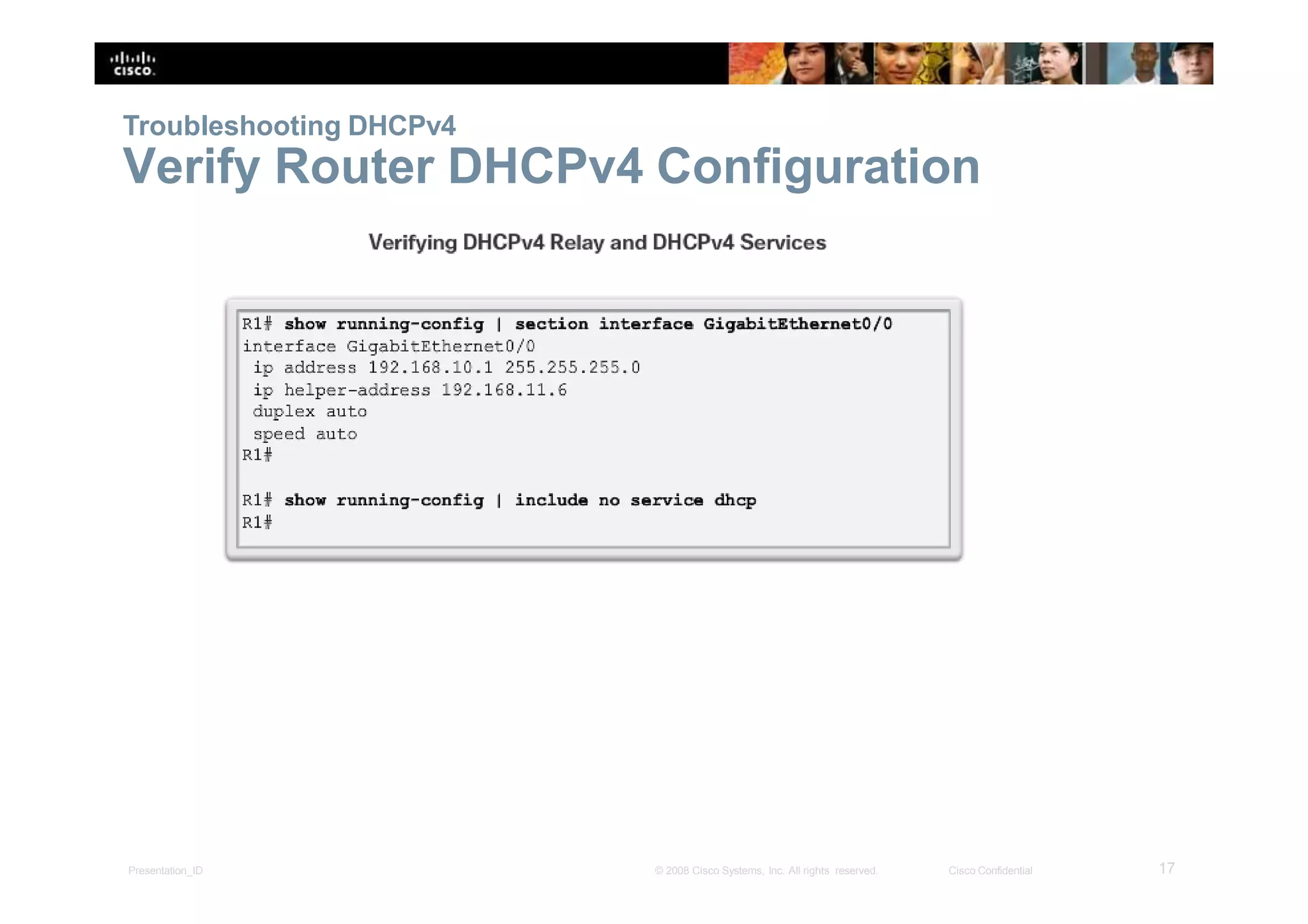
Verify Router DHCPv4 Configuration
17Presentation_ID © 2008 Cisco Systems, Inc. All rights reserved. Cisco Confidential
Troubleshooting DHCPv4
Debugging DHCPv4
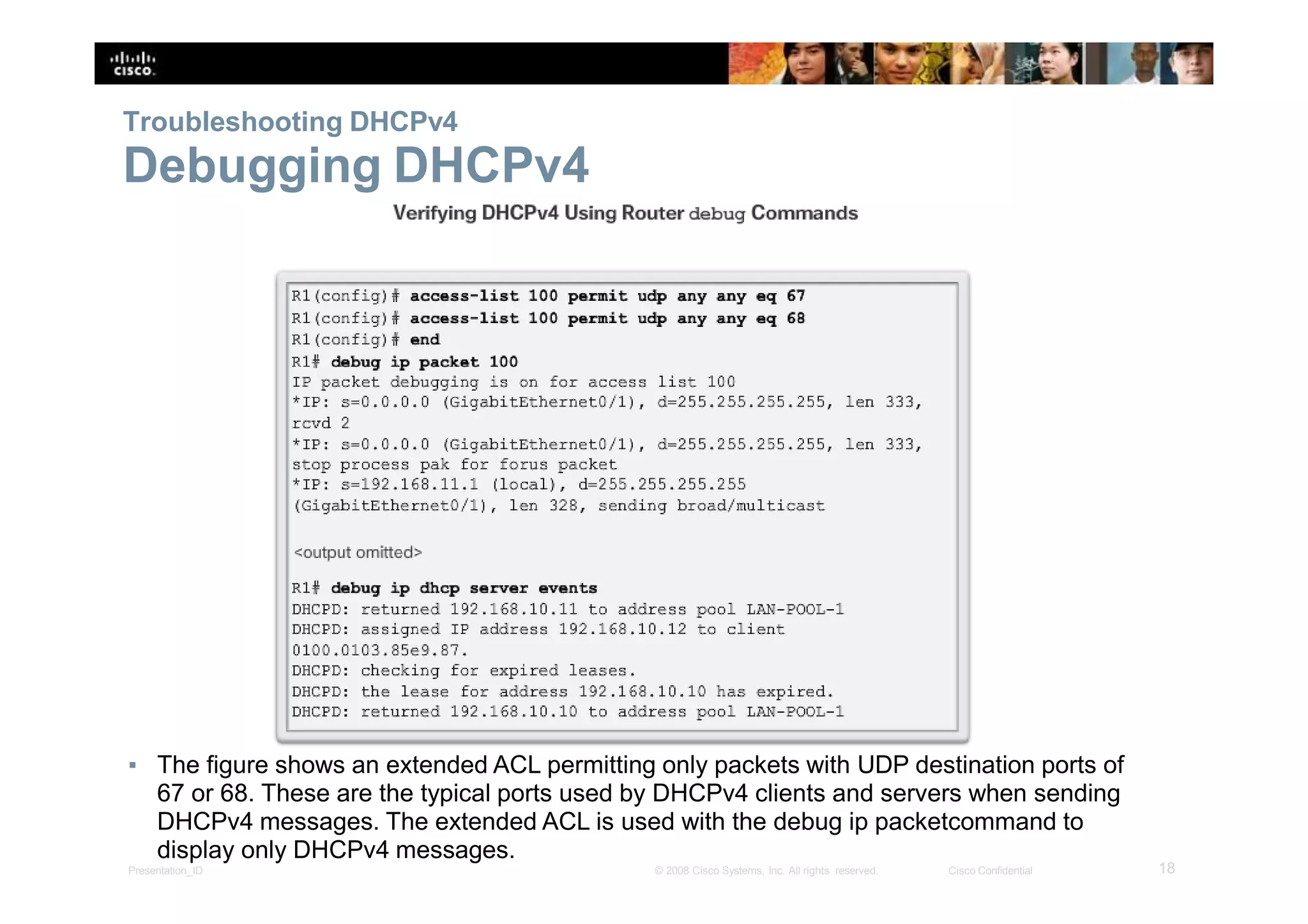
▪ The figure shows an extended ACL permitting only packets with UDP destination ports of
67 or 68. These are the typical ports used by DHCPv4 clients and servers when sending
DHCPv4 messages. The extended ACL is used with the debug ip packetcommand to
display only DHCPv4 messages.
18Presentation_ID © 2008 Cisco Systems, Inc. All rights reserved. Cisco Confidential
8.2 DHCPv6
19Presentation_ID © 2008 Cisco Systems, Inc. All rights reserved. Cisco Confidential
SLAAC and DHCPv6
Stateless Address Autoconfiguration
(SLAAC)
▪ SLAAC uses ICMPv6 Router Solicitation and Router Advertisement
messages to provide addressing and other configuration information that
would normally be provided by a DHCP server:
20Presentation_ID © 2008 Cisco Systems, Inc. All rights reserved. Cisco Confidential
SLAAC and DHCPv6
SLAAC Operation
▪ A router must have IPv6 routing enabled before it can sendRA
messages: Router(config)# ipv6 unicast-routing
21Presentation_ID © 2008 Cisco Systems, Inc. All rights reserved. Cisco Confidential
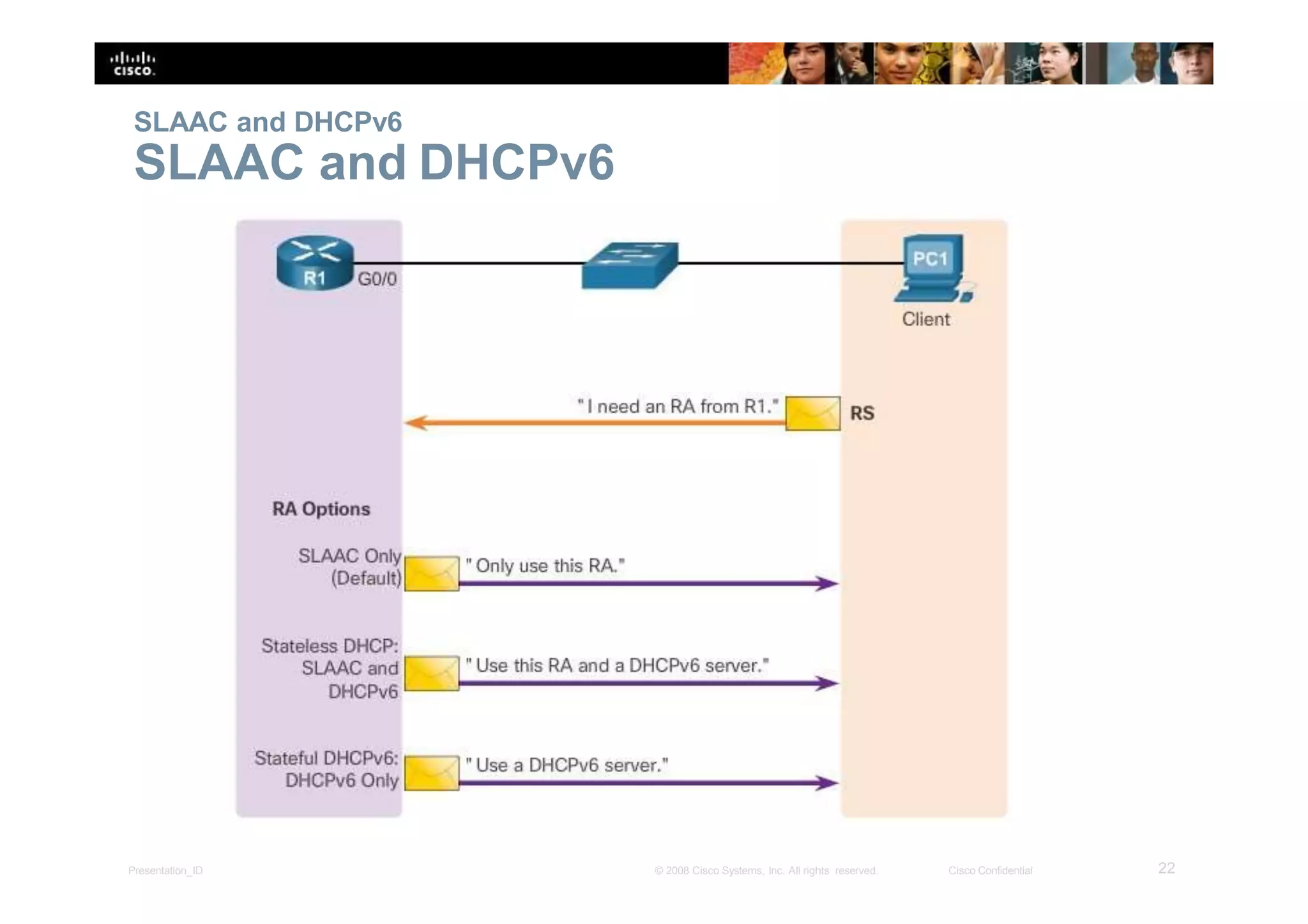
SLAAC and DHCPv6
SLAAC and DHCPv6
22Presentation_ID © 2008 Cisco Systems, Inc. All rights reserved. Cisco Confidential
SLAAC and DHCPv6
SLAAC Option
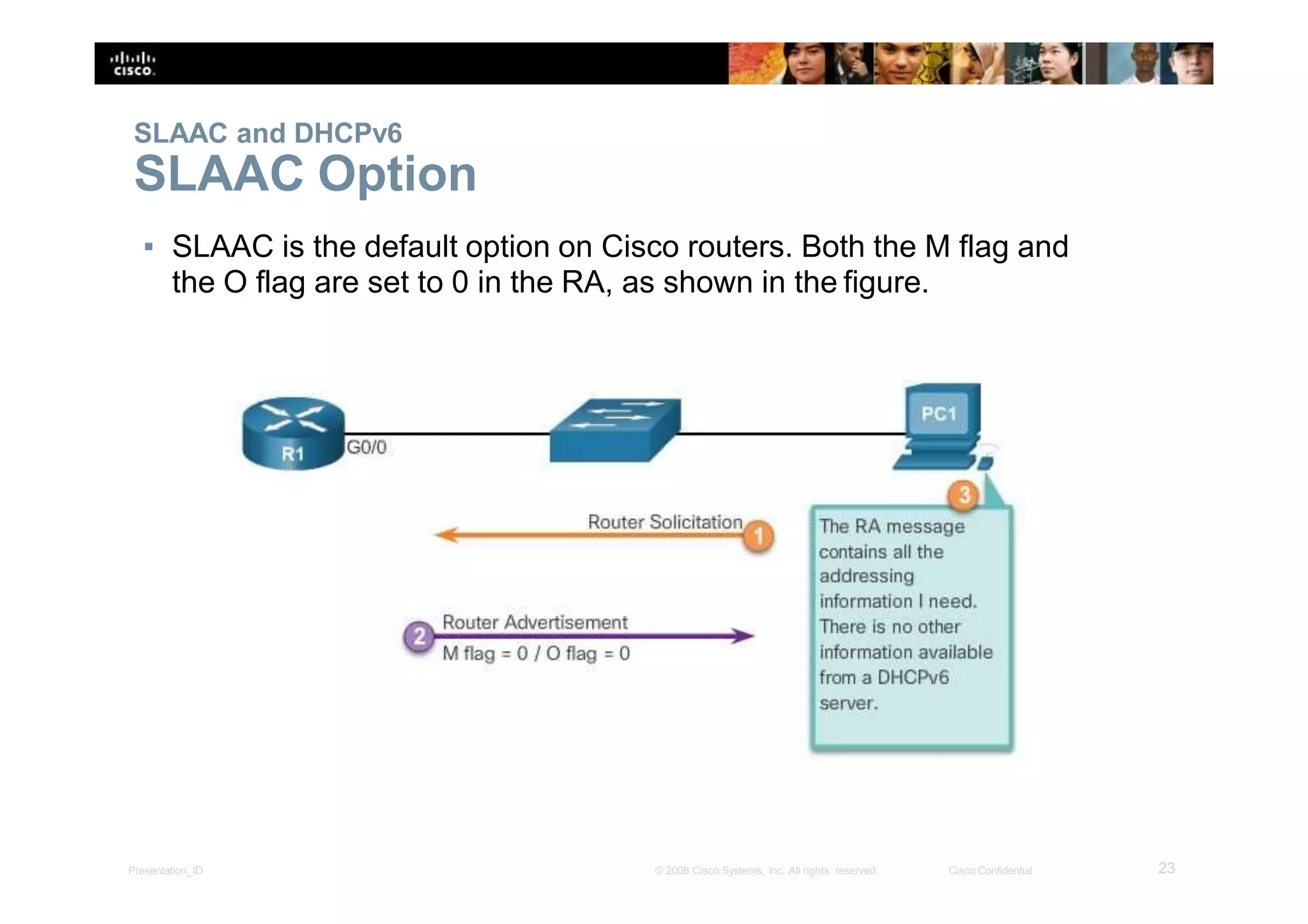
▪ SLAAC is the default option on Cisco routers. Both the M flag and
the O flag are set to 0 in the RA, as shown in the figure.
23Presentation_ID © 2008 Cisco Systems, Inc. All rights reserved. Cisco Confidential
SLAAC and DHCPv6
Stateless DHCPv6 Option
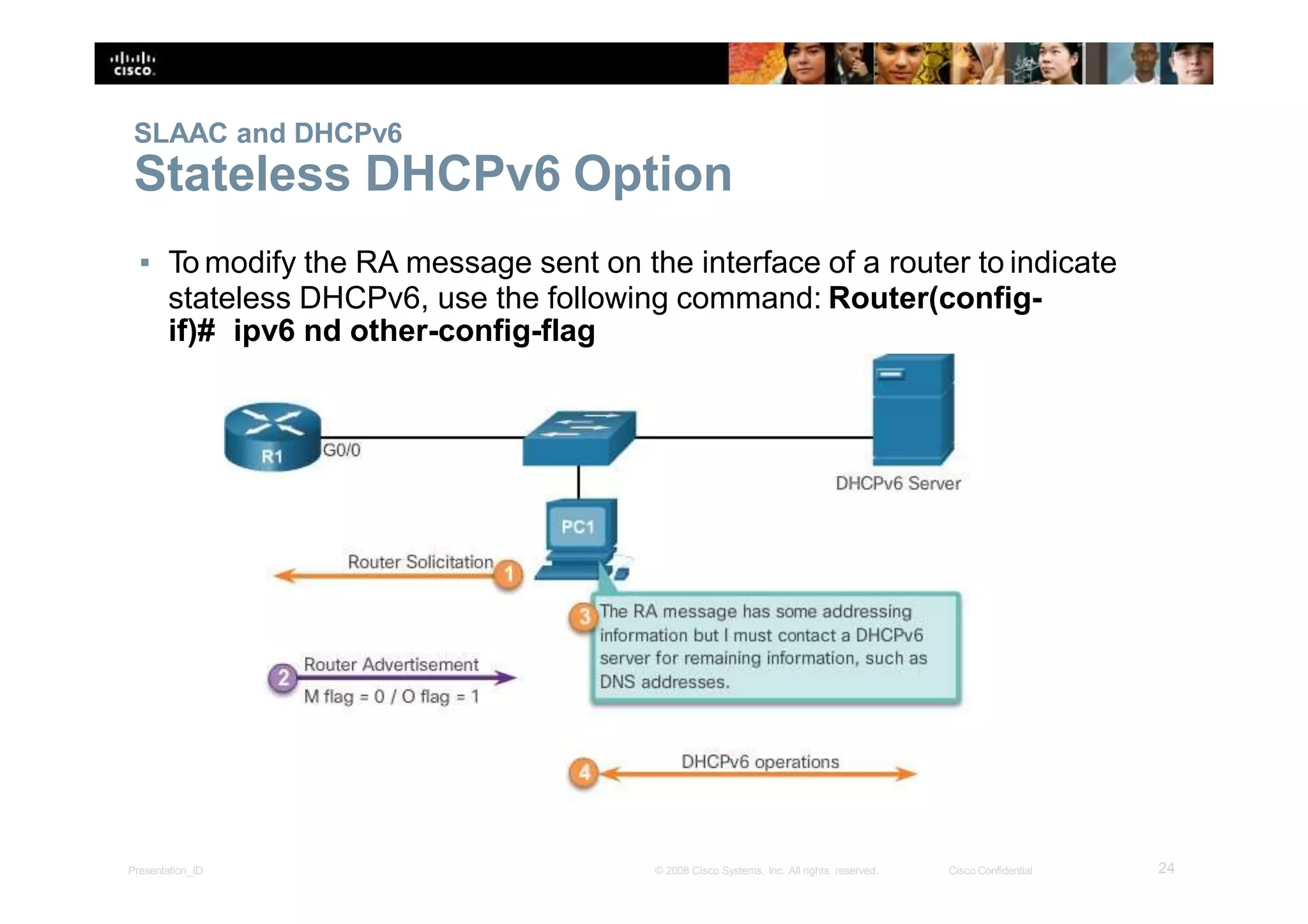
▪ To modify the RA message sent on the interface of a router to indicate
stateless DHCPv6, use the following command: Router(config-
if)# ipv6 nd other-config-flag
24Presentation_ID © 2008 Cisco Systems, Inc. All rights reserved. Cisco Confidential
SLAAC and DHCPv6
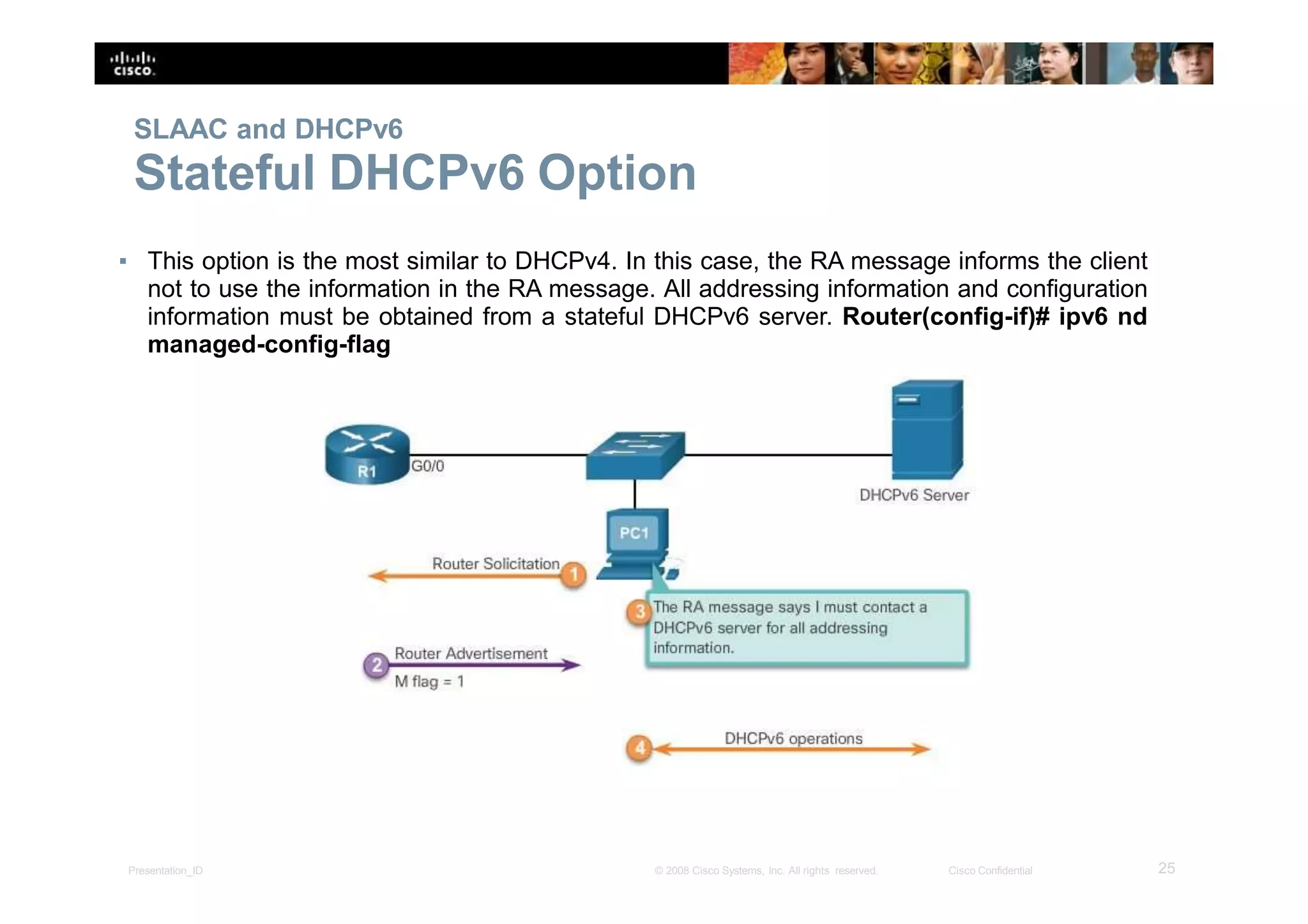
Stateful DHCPv6 Option
▪ This option is the most similar to DHCPv4. In this case, the RA message informs the client
not to use the information in the RA message. All addressing information and configuration
information must be obtained from a stateful DHCPv6 server. Router(config-if)# ipv6 nd
managed-config-flag
25Presentation_ID © 2008 Cisco Systems, Inc. All rights reserved. Cisco Confidential
SLAAC and DHCPv6
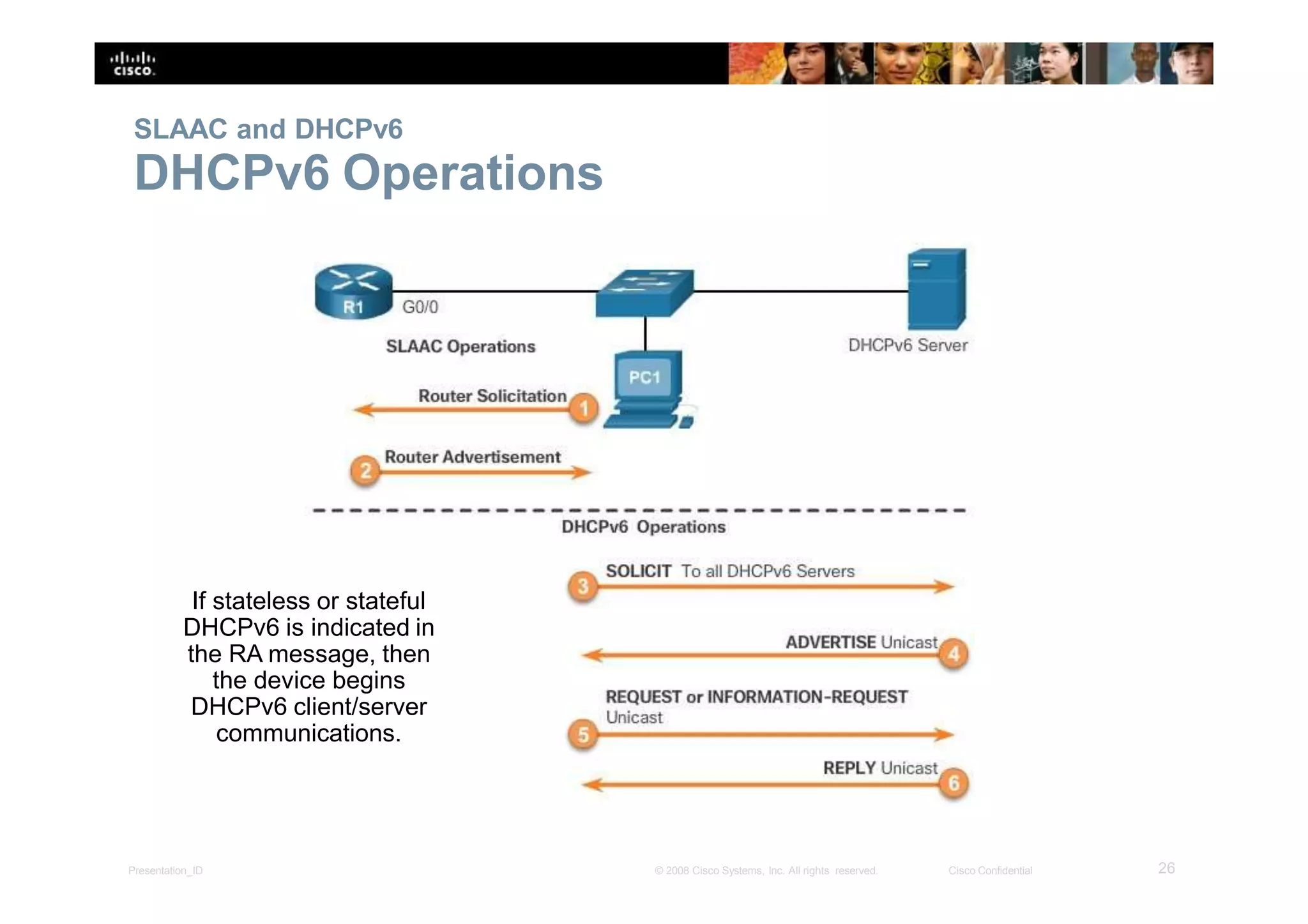
DHCPv6 Operations
If stateless or stateful
DHCPv6 is indicated in
the RA message, then
the device begins
DHCPv6 client/server
communications.
26Presentation_ID © 2008 Cisco Systems, Inc. All rights reserved. Cisco Confidential
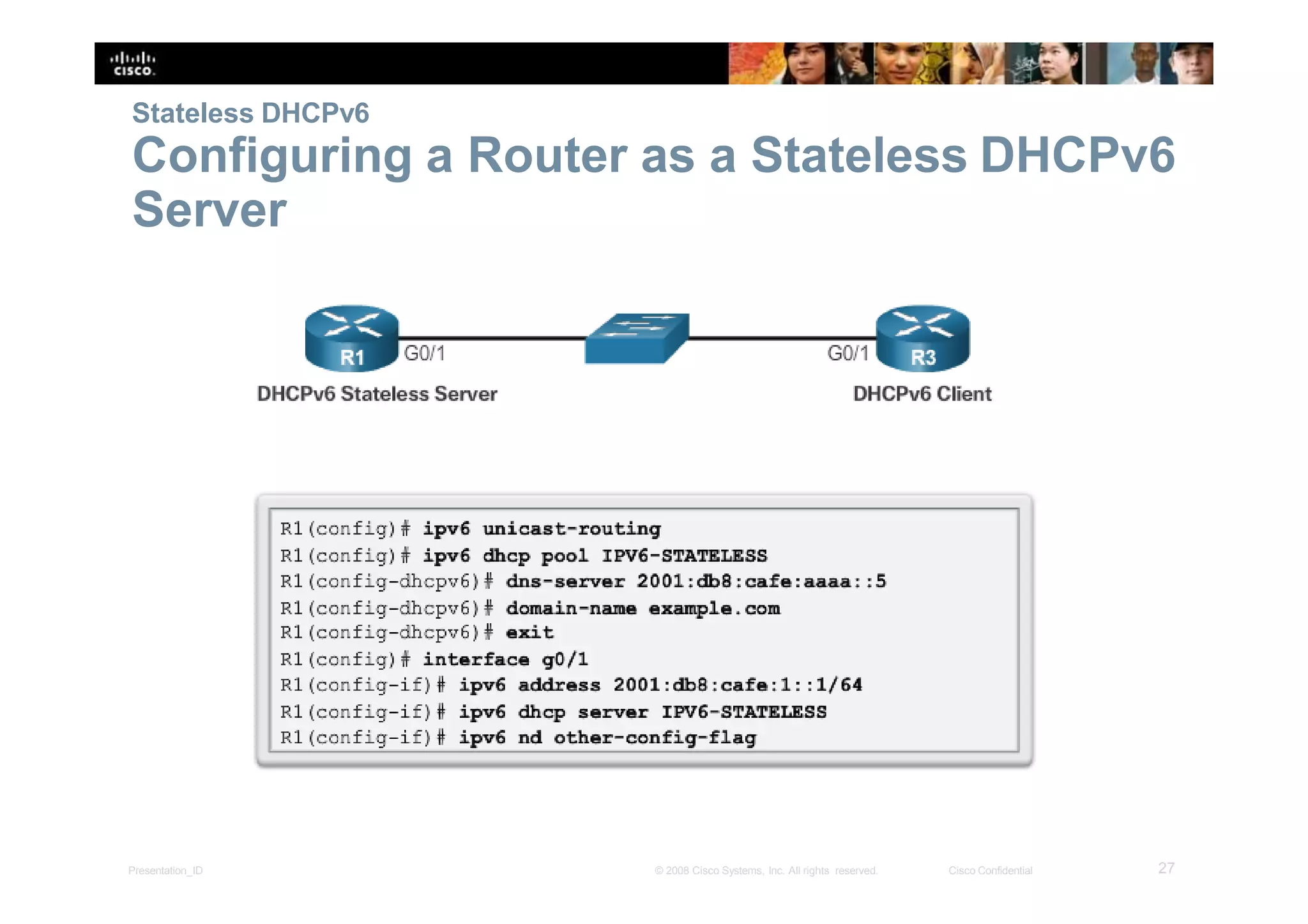
Stateless DHCPv6
Configuring a Router as a Stateless DHCPv6
Server
27Presentation_ID © 2008 Cisco Systems, Inc. All rights reserved. Cisco Confidential
Stateless DHCPv6
Configuring a Router as a Stateless DHCPv6
Client
28Presentation_ID © 2008 Cisco Systems, Inc. All rights reserved. Cisco Confidential
Stateless DHCPv6
Verifying Stateless DHCPv6
Verify the stateless DHCP client using the following commands:
▪ show ipv6 interface
▪ debug ipv6 dhcp detail
29Presentation_ID © 2008 Cisco Systems, Inc. All rights reserved. Cisco Confidential
Stateful DHCPv6 Server
Configuring a Router as a Stateful DHCPv6
Server
30Presentation_ID © 2008 Cisco Systems, Inc. All rights reserved. Cisco Confidential
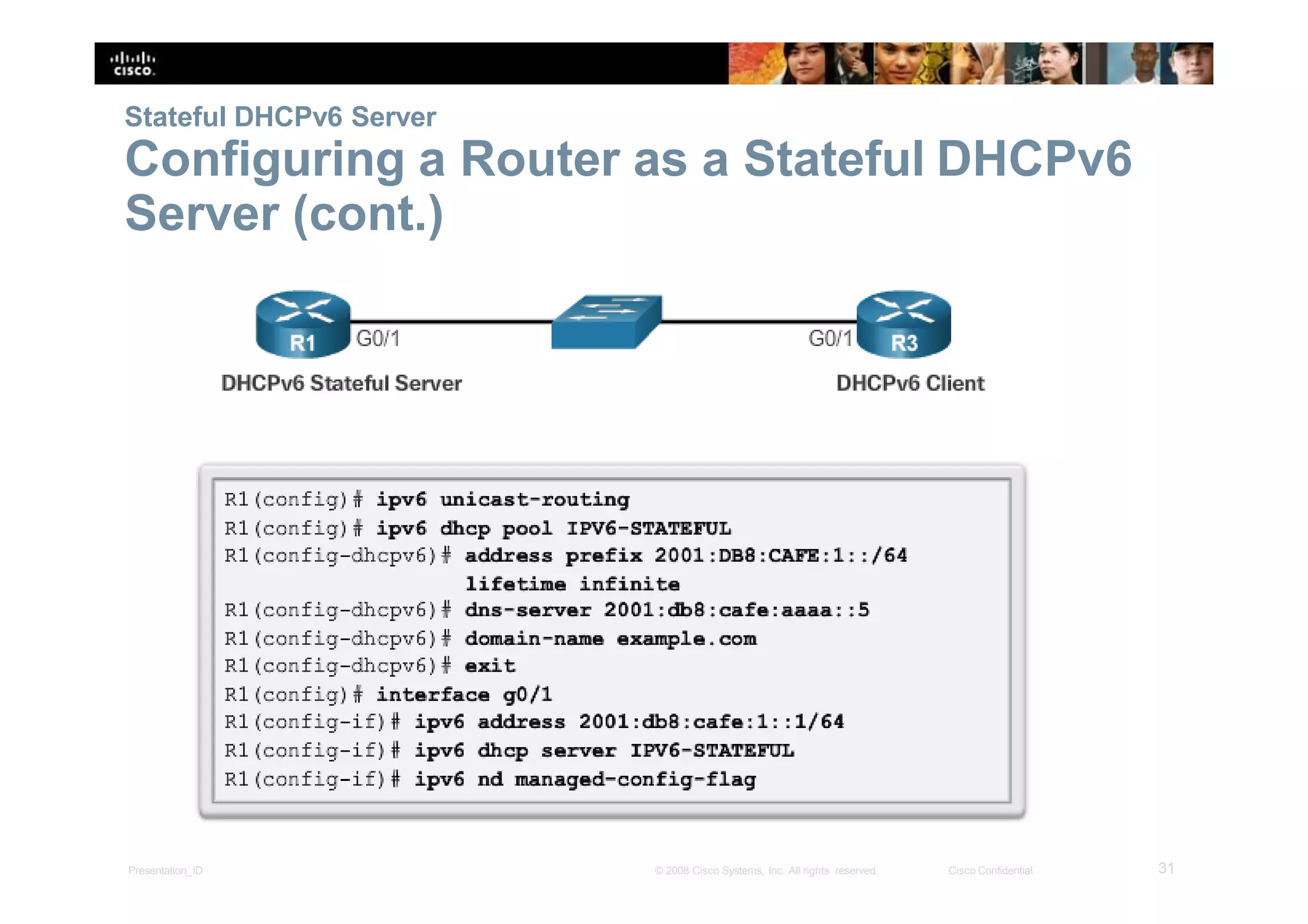
Stateful DHCPv6 Server
Configuring a Router as a Stateful DHCPv6
Server (cont.)
31Presentation_ID © 2008 Cisco Systems, Inc. All rights reserved. Cisco Confidential
Stateful DHCPv6 Server
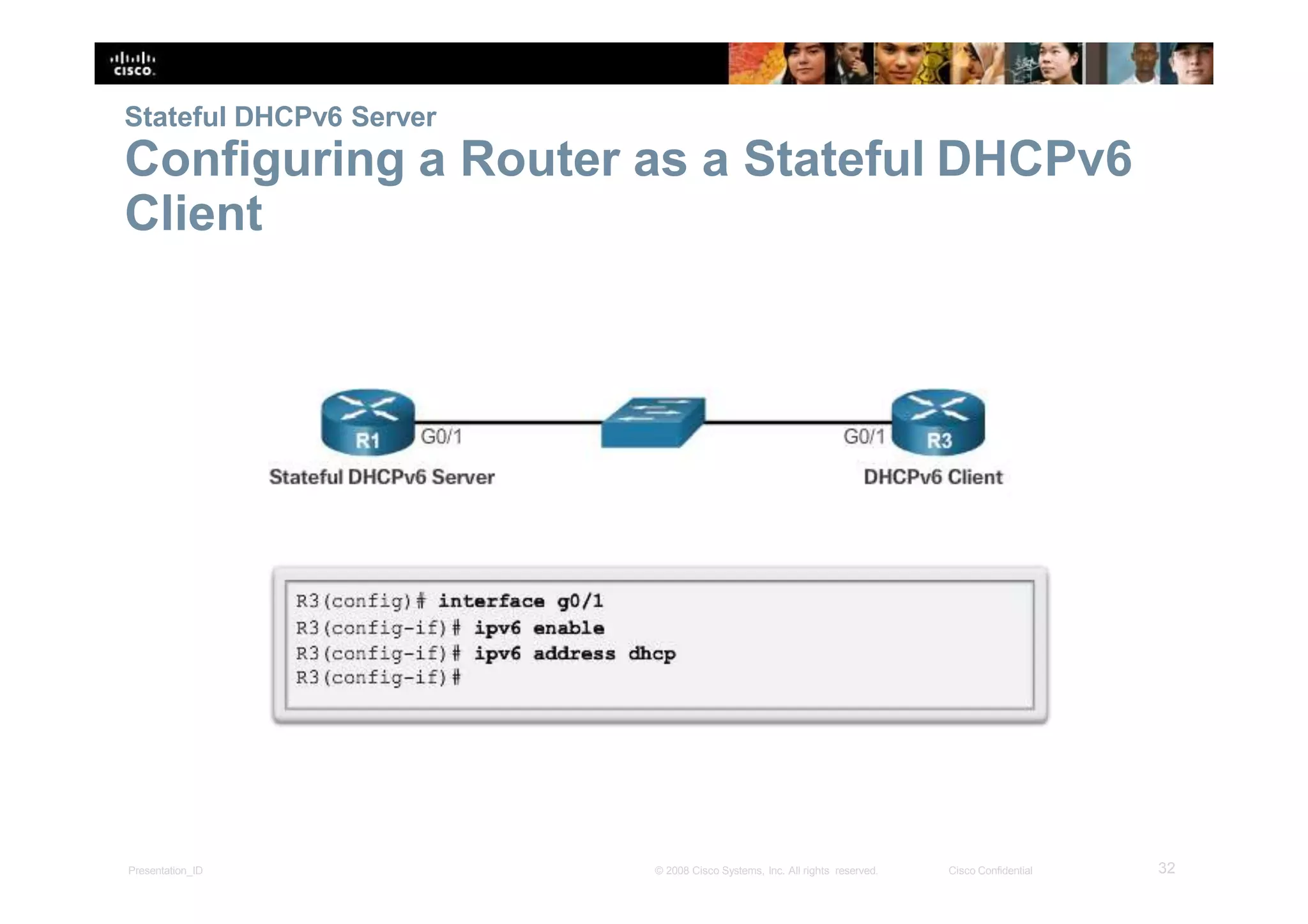
Configuring a Router as a Stateful DHCPv6
Client
32Presentation_ID © 2008 Cisco Systems, Inc. All rights reserved. Cisco Confidential
Stateful DHCPv6 Server
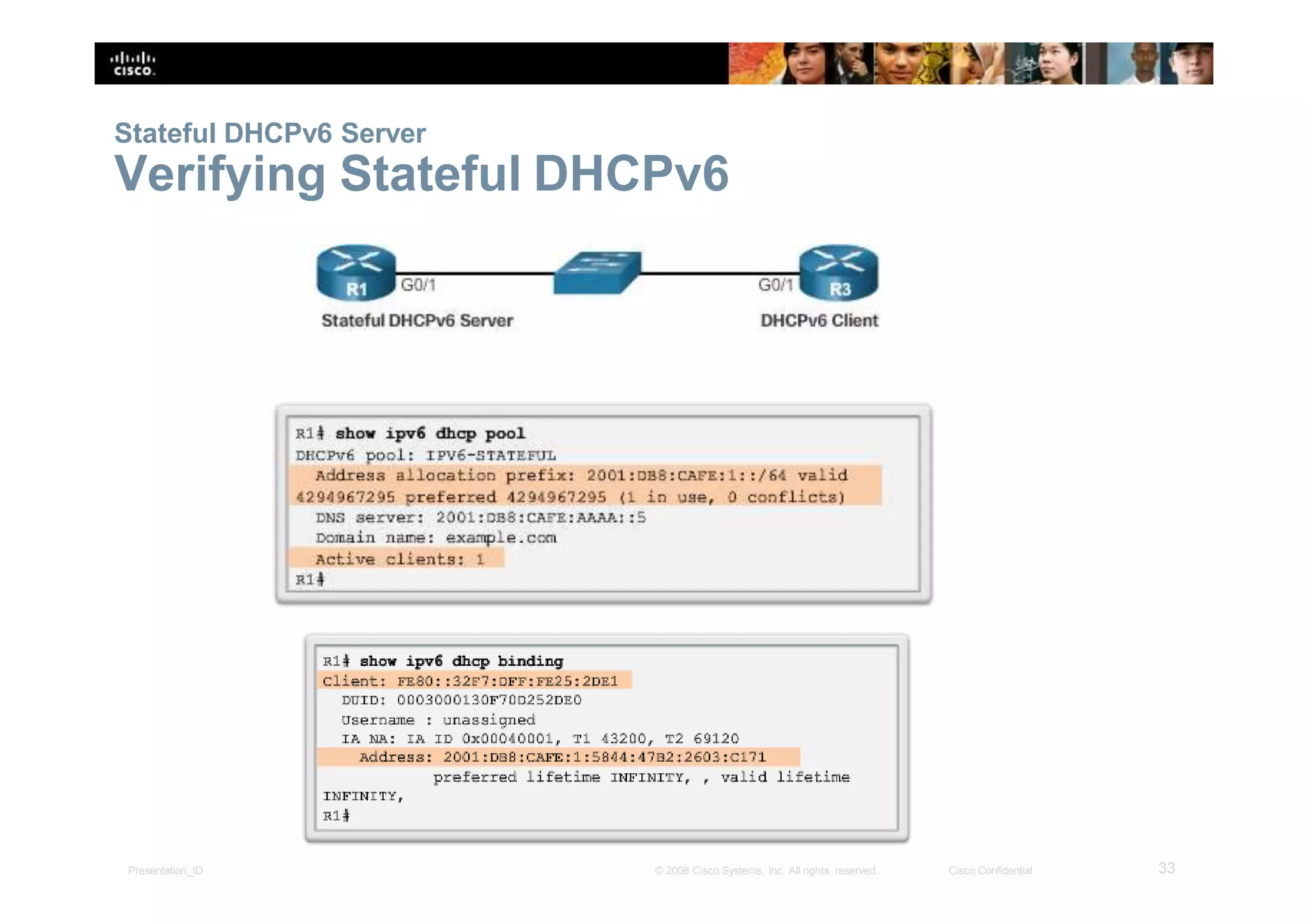
Verifying Stateful DHCPv6
33Presentation_ID © 2008 Cisco Systems, Inc. All rights reserved. Cisco Confidential
Stateful DHCPv6 Server
Verifying Stateful DHCPv6 (cont.)
34Presentation_ID © 2008 Cisco Systems, Inc. All rights reserved. Cisco Confidential
Stateful DHCPv6
35Presentation_ID © 2008 Cisco Systems, Inc. All rights reserved. Cisco Confidential
Configuring a Router as a DHCPv6 Relay
Agent
Troubleshooting DHCPv6
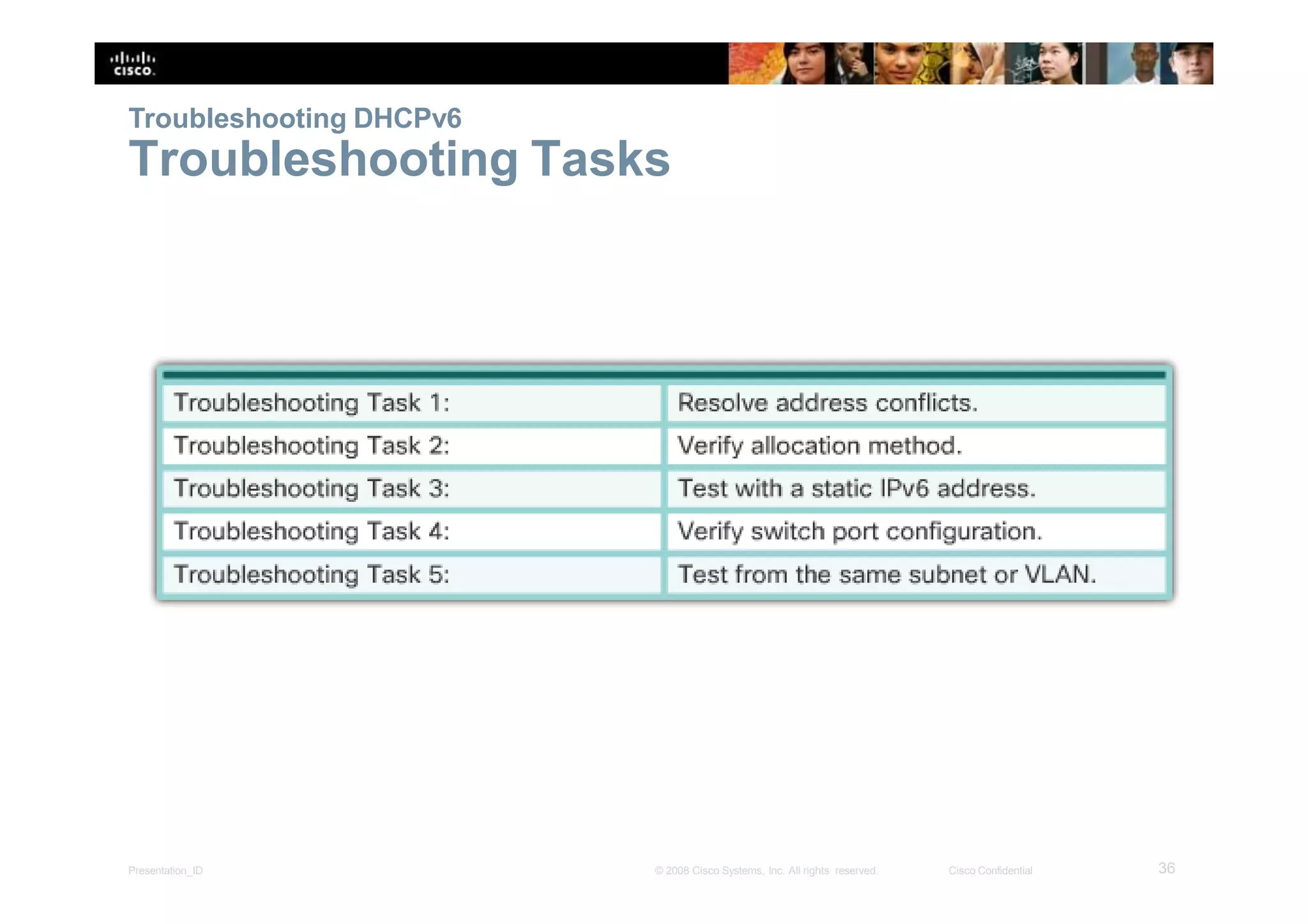
Troubleshooting Tasks
36Presentation_ID © 2008 Cisco Systems, Inc. All rights reserved. Cisco Confidential
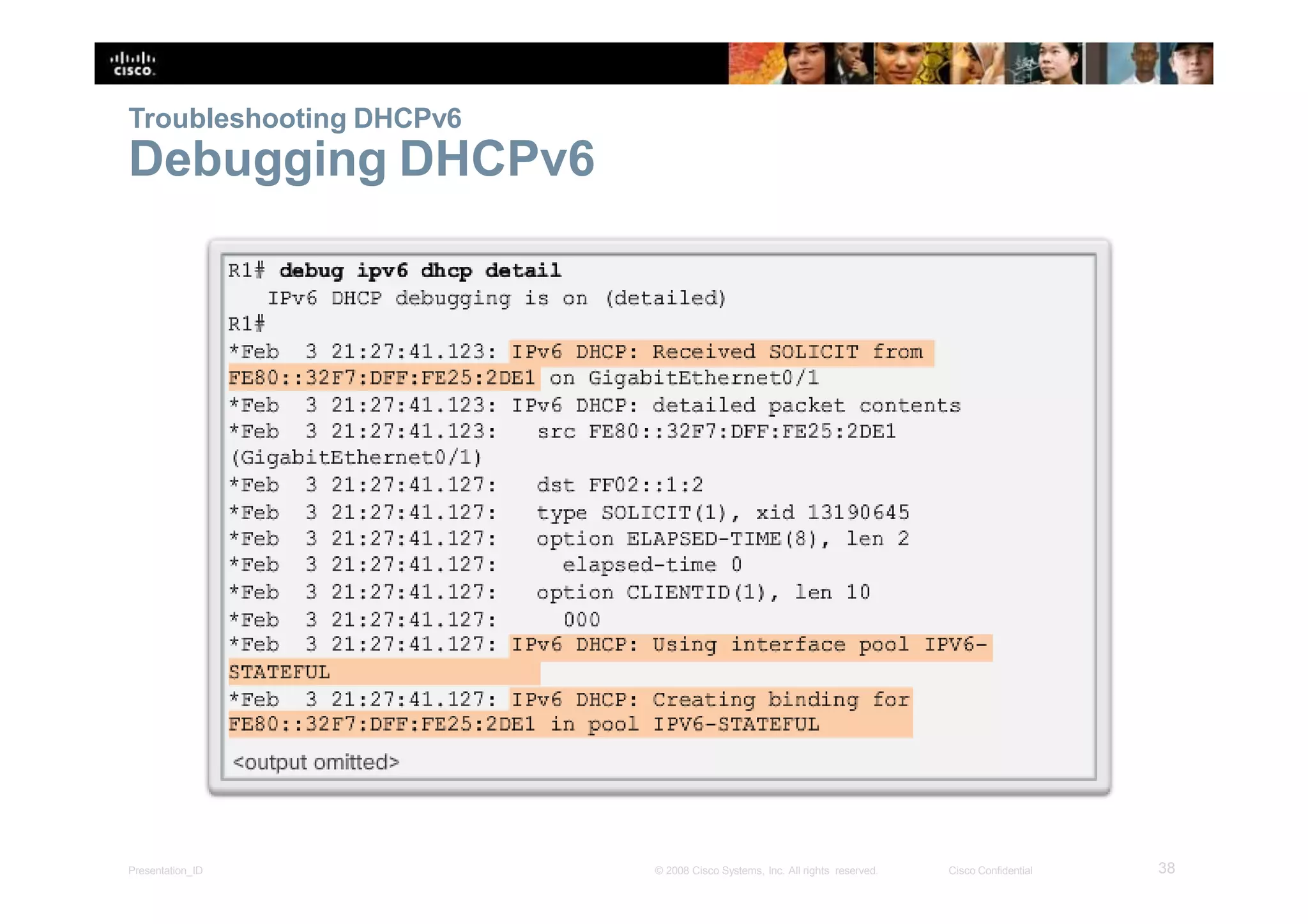
Troubleshooting DHCPv6
Verify Router DHCPv6 Configuration
37Presentation_ID © 2008 Cisco Systems, Inc. All rights reserved. Cisco Confidential
Troubleshooting DHCPv6
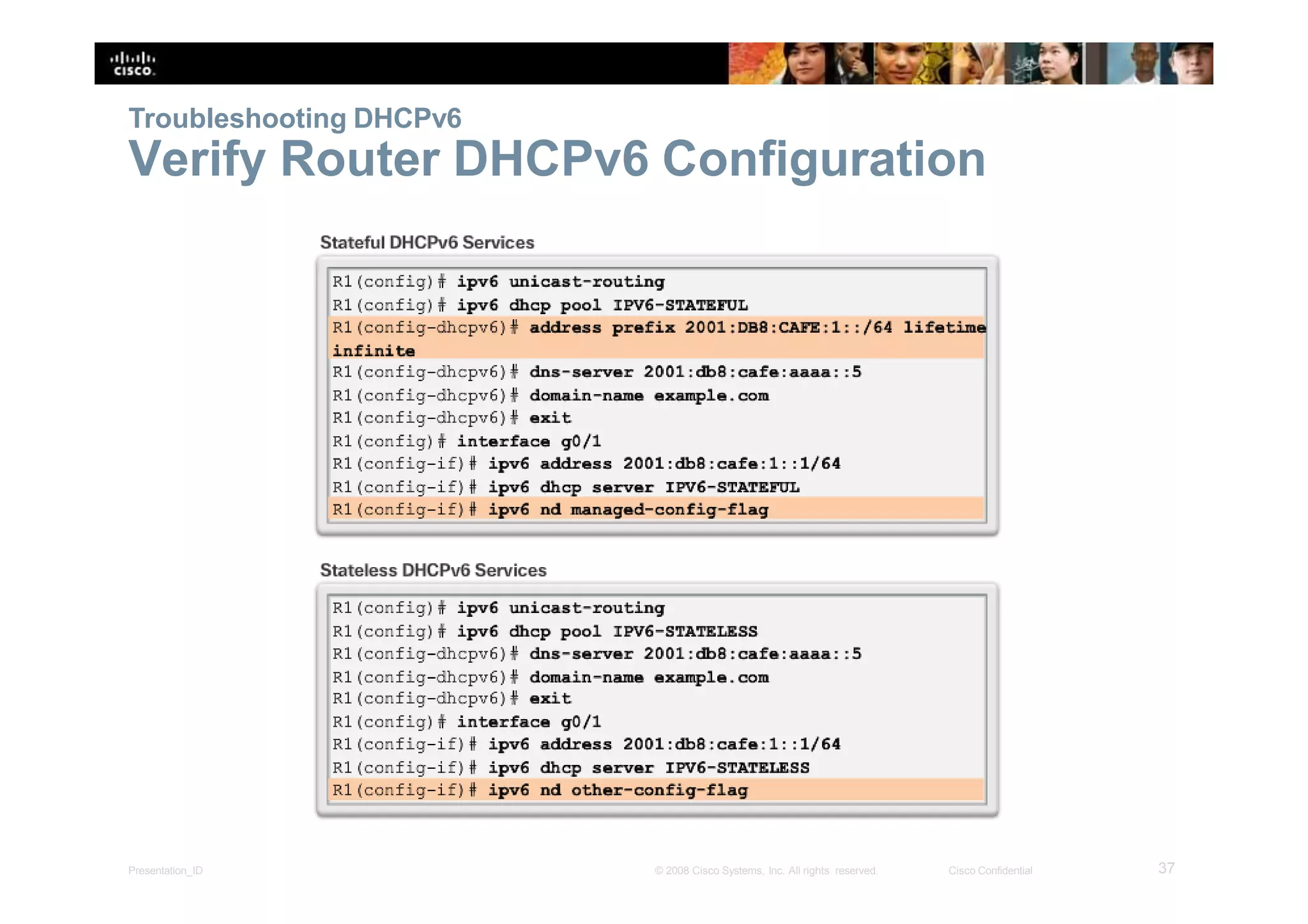
Debugging DHCPv6
38Presentation_ID © 2008 Cisco Systems, Inc. All rights reserved. Cisco Confidential
8.3 Summary
39Presentation_ID © 2008 Cisco Systems, Inc. All rights reserved. Cisco Confidential
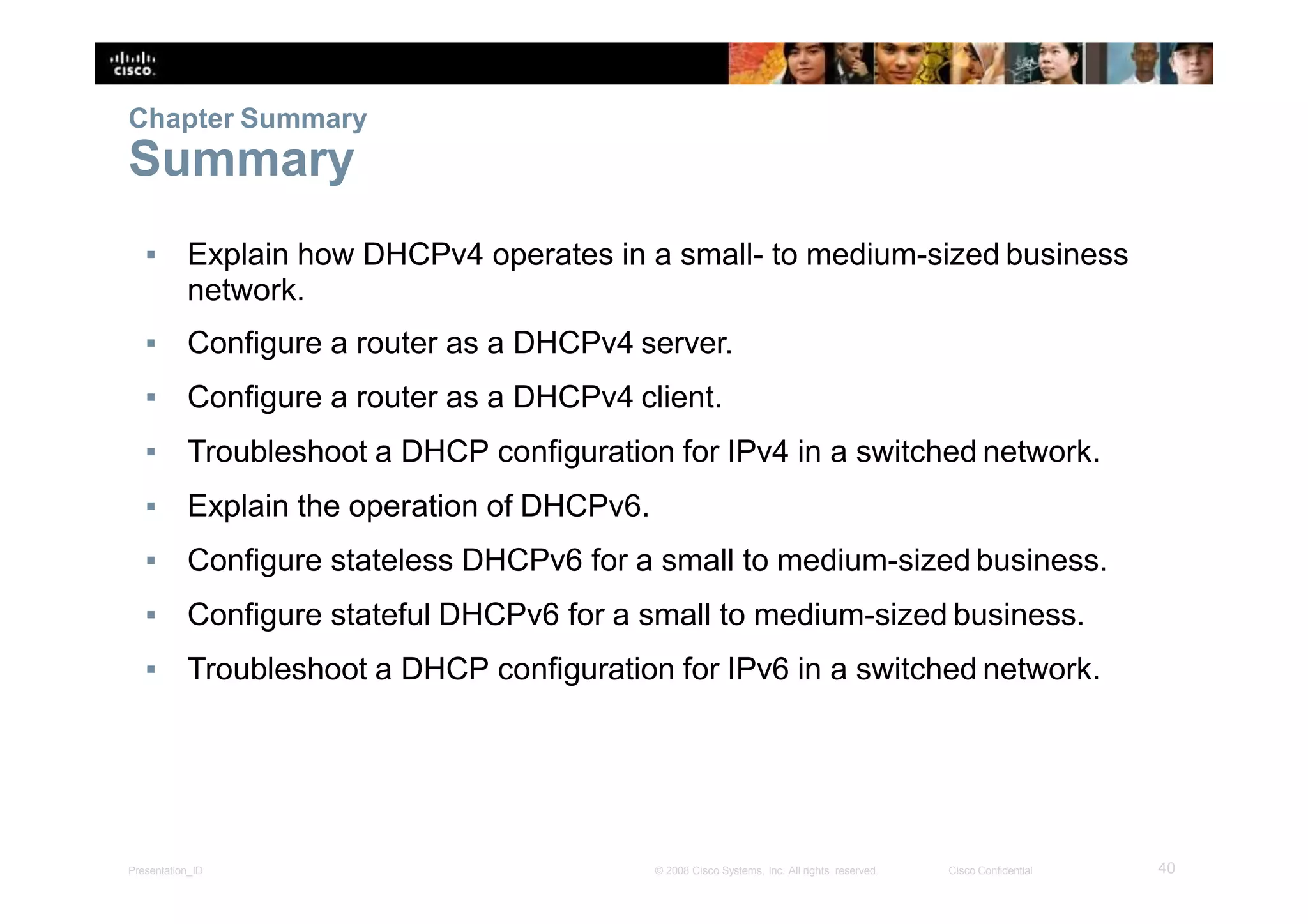
▪ Explain how DHCPv4 operates in a small- to medium-sized business
network.
▪ Configure a router as a DHCPv4 server.
▪ Configure a router as a DHCPv4 client.
▪ Troubleshoot a DHCP configuration for IPv4 in a switched network.
▪ Explain the operation of DHCPv6.
▪ Configure stateless DHCPv6 for a small to medium-sized business.
▪ Configure stateful DHCPv6 for a small to medium-sized business.
▪ Troubleshoot a DHCP configuration for IPv6 in a switched network.
40Presentation_ID © 2008 Cisco Systems, Inc. All rights reserved. Cisco Confidential
Chapter Summary
Summary
41Presentation_ID © 2008 Cisco Systems, Inc. All rights reserved. Cisco Confidential

Dhc pv4

  • 1.
    Chapter 8: DHCP 1Presentation_ID© 2008 Cisco Systems, Inc. All rights reserved. Cisco Confidential Routing and Switching Essentials v6.0
  • 2.
    Chapter 8 -Sections & Objectives 2Presentation_ID © 2008 Cisco Systems, Inc. All rights reserved. Cisco Confidential 1. DHCPv4 • Explain how DHCPv4 operates in a small- to medium-sized business network. • Configure a router as a DHCPv4 server. • Configure a router as a DHCPv4 client. • Troubleshoot a DHCP configuration for IPv4 in a switched network. 2. DHCPv6 • Explain the operation of DHCPv6. • Configure stateless DHCPv6 for a small to medium-sized business. • Configure stateful DHCPv6 for a small to medium-sized business. • Troubleshoot a DHCP configuration for IPv6 in a switched network.
  • 3.
    8.1 DHCPv4 3Presentation_ID ©2008 Cisco Systems, Inc. All rights reserved. Cisco Confidential
  • 4.
    DHCPv4 Operation Introducing DHCPv4 ▪DHCPv4: ▪ assigns IPv4 addresses and other network configuration information dynamically ▪ useful and timesaving tool for network administrators ▪ dynamically assigns, or leases, an IPv4 address from a pool of addresses ▪ A Cisco router can be configured to provide DHCPv4services. ▪ Administrators configure DHCPv4 servers so that leases expire. Then the client must ask for another address, although the client is typically reassigned the same address. 4Presentation_ID © 2008 Cisco Systems, Inc. All rights reserved. Cisco Confidential
  • 5.
    DHCPv4 Operation DHCPv4 Operation 5Presentation_ID© 2008 Cisco Systems, Inc. All rights reserved. Cisco Confidential
  • 6.
    DHCPv4 Operation DHCPv4 Operation(cont.) 6Presentation_ID © 2008 Cisco Systems, Inc. All rights reserved. Cisco Confidential
  • 7.
    DHCPv4 Operation DHCPv4 MessageFormat 7Presentation_ID © 2008 Cisco Systems, Inc. All rights reserved. Cisco Confidential
  • 8.
    DHCPv4 Operation DHCPv4 Discoverand Offer Messages 8Presentation_ID © 2008 Cisco Systems, Inc. All rights reserved. Cisco Confidential
  • 9.
    DHCPv4 Operation DHCPv4 Discoverand Offer Messages (cont.) 9Presentation_ID © 2008 Cisco Systems, Inc. All rights reserved. Cisco Confidential
  • 10.
    Configure DHCPv4 Server Configurea Basic DHCPv4 Server A Cisco router running the Cisco IOS software can be configured toact as a DHCPv4 server. To set up DHCP: 1. Exclude addresses from the pool. 2. Set up the DHCP pool name. 3. Define the range of addresses and subnet mask. Use the default-routercommand for the default gateway. Optional parameters that can be included in the pool – dns server, domain-name. To disable DHCP, use the no service dhcp command. 10Presentation_ID © 2008 Cisco Systems, Inc. All rights reserved. Cisco Confidential
  • 11.
    Configure DHCPv4 Server VerifyingDHCPv4 ▪ Commands to verify DHCP: sho w sho w sho w running-config | section dhcp ip dhcp binding ip dhcp server statistics ▪ On the PC, issue the ipconfig /all command. 11Presentation_ID © 2008 Cisco Systems, Inc. All rights reserved. Cisco Confidential
  • 12.
    Configure DHCPv4 Server DHCPv4Relay 12Presentation_ID © 2008 Cisco Systems, Inc. All rights reserved. Cisco Confidential
  • 13.
    Configure DHCPv4 Server DHCPv4Relay (cont.) ▪ Using an IP helper address enables a router to forwardDHCPv4 broadcasts to the DHCPv4 server. Acting as arelay. 13Presentation_ID © 2008 Cisco Systems, Inc. All rights reserved. Cisco Confidential
  • 14.
    Configure DHCPv4 Client Configuringa Router as a DHCPv4 client 14Presentation_ID © 2008 Cisco Systems, Inc. All rights reserved. Cisco Confidential
  • 15.
    Configure DHCPv4 Client Configuringa Wireless Router as a DHCPv4 Client 15Presentation_ID © 2008 Cisco Systems, Inc. All rights reserved. Cisco Confidential
  • 16.
    Troubleshooting DHCPv4 Troubleshooting Tasks 16Presentation_ID© 2008 Cisco Systems, Inc. All rights reserved. Cisco Confidential
  • 17.
    Troubleshooting DHCPv4 Verify RouterDHCPv4 Configuration 17Presentation_ID © 2008 Cisco Systems, Inc. All rights reserved. Cisco Confidential
  • 18.
    Troubleshooting DHCPv4 Debugging DHCPv4 ▪The figure shows an extended ACL permitting only packets with UDP destination ports of 67 or 68. These are the typical ports used by DHCPv4 clients and servers when sending DHCPv4 messages. The extended ACL is used with the debug ip packetcommand to display only DHCPv4 messages. 18Presentation_ID © 2008 Cisco Systems, Inc. All rights reserved. Cisco Confidential
  • 19.
    8.2 DHCPv6 19Presentation_ID ©2008 Cisco Systems, Inc. All rights reserved. Cisco Confidential
  • 20.
    SLAAC and DHCPv6 StatelessAddress Autoconfiguration (SLAAC) ▪ SLAAC uses ICMPv6 Router Solicitation and Router Advertisement messages to provide addressing and other configuration information that would normally be provided by a DHCP server: 20Presentation_ID © 2008 Cisco Systems, Inc. All rights reserved. Cisco Confidential
  • 21.
    SLAAC and DHCPv6 SLAACOperation ▪ A router must have IPv6 routing enabled before it can sendRA messages: Router(config)# ipv6 unicast-routing 21Presentation_ID © 2008 Cisco Systems, Inc. All rights reserved. Cisco Confidential
  • 22.
    SLAAC and DHCPv6 SLAACand DHCPv6 22Presentation_ID © 2008 Cisco Systems, Inc. All rights reserved. Cisco Confidential
  • 23.
    SLAAC and DHCPv6 SLAACOption ▪ SLAAC is the default option on Cisco routers. Both the M flag and the O flag are set to 0 in the RA, as shown in the figure. 23Presentation_ID © 2008 Cisco Systems, Inc. All rights reserved. Cisco Confidential
  • 24.
    SLAAC and DHCPv6 StatelessDHCPv6 Option ▪ To modify the RA message sent on the interface of a router to indicate stateless DHCPv6, use the following command: Router(config- if)# ipv6 nd other-config-flag 24Presentation_ID © 2008 Cisco Systems, Inc. All rights reserved. Cisco Confidential
  • 25.
    SLAAC and DHCPv6 StatefulDHCPv6 Option ▪ This option is the most similar to DHCPv4. In this case, the RA message informs the client not to use the information in the RA message. All addressing information and configuration information must be obtained from a stateful DHCPv6 server. Router(config-if)# ipv6 nd managed-config-flag 25Presentation_ID © 2008 Cisco Systems, Inc. All rights reserved. Cisco Confidential
  • 26.
    SLAAC and DHCPv6 DHCPv6Operations If stateless or stateful DHCPv6 is indicated in the RA message, then the device begins DHCPv6 client/server communications. 26Presentation_ID © 2008 Cisco Systems, Inc. All rights reserved. Cisco Confidential
  • 27.
    Stateless DHCPv6 Configuring aRouter as a Stateless DHCPv6 Server 27Presentation_ID © 2008 Cisco Systems, Inc. All rights reserved. Cisco Confidential
  • 28.
    Stateless DHCPv6 Configuring aRouter as a Stateless DHCPv6 Client 28Presentation_ID © 2008 Cisco Systems, Inc. All rights reserved. Cisco Confidential
  • 29.
    Stateless DHCPv6 Verifying StatelessDHCPv6 Verify the stateless DHCP client using the following commands: ▪ show ipv6 interface ▪ debug ipv6 dhcp detail 29Presentation_ID © 2008 Cisco Systems, Inc. All rights reserved. Cisco Confidential
  • 30.
    Stateful DHCPv6 Server Configuringa Router as a Stateful DHCPv6 Server 30Presentation_ID © 2008 Cisco Systems, Inc. All rights reserved. Cisco Confidential
  • 31.
    Stateful DHCPv6 Server Configuringa Router as a Stateful DHCPv6 Server (cont.) 31Presentation_ID © 2008 Cisco Systems, Inc. All rights reserved. Cisco Confidential
  • 32.
    Stateful DHCPv6 Server Configuringa Router as a Stateful DHCPv6 Client 32Presentation_ID © 2008 Cisco Systems, Inc. All rights reserved. Cisco Confidential
  • 33.
    Stateful DHCPv6 Server VerifyingStateful DHCPv6 33Presentation_ID © 2008 Cisco Systems, Inc. All rights reserved. Cisco Confidential
  • 34.
    Stateful DHCPv6 Server VerifyingStateful DHCPv6 (cont.) 34Presentation_ID © 2008 Cisco Systems, Inc. All rights reserved. Cisco Confidential
  • 35.
    Stateful DHCPv6 35Presentation_ID ©2008 Cisco Systems, Inc. All rights reserved. Cisco Confidential Configuring a Router as a DHCPv6 Relay Agent
  • 36.
    Troubleshooting DHCPv6 Troubleshooting Tasks 36Presentation_ID© 2008 Cisco Systems, Inc. All rights reserved. Cisco Confidential
  • 37.
    Troubleshooting DHCPv6 Verify RouterDHCPv6 Configuration 37Presentation_ID © 2008 Cisco Systems, Inc. All rights reserved. Cisco Confidential
  • 38.
    Troubleshooting DHCPv6 Debugging DHCPv6 38Presentation_ID© 2008 Cisco Systems, Inc. All rights reserved. Cisco Confidential
  • 39.
    8.3 Summary 39Presentation_ID ©2008 Cisco Systems, Inc. All rights reserved. Cisco Confidential
  • 40.
    ▪ Explain howDHCPv4 operates in a small- to medium-sized business network. ▪ Configure a router as a DHCPv4 server. ▪ Configure a router as a DHCPv4 client. ▪ Troubleshoot a DHCP configuration for IPv4 in a switched network. ▪ Explain the operation of DHCPv6. ▪ Configure stateless DHCPv6 for a small to medium-sized business. ▪ Configure stateful DHCPv6 for a small to medium-sized business. ▪ Troubleshoot a DHCP configuration for IPv6 in a switched network. 40Presentation_ID © 2008 Cisco Systems, Inc. All rights reserved. Cisco Confidential Chapter Summary Summary
  • 41.
    41Presentation_ID © 2008Cisco Systems, Inc. All rights reserved. Cisco Confidential