Device Management with
OMA Lightweight M2M
Simon Lemay and
Hannes Tschofenig
Overview
 Why Lightweight Device Management
 OMA Lightweight M2M Standard
 Bootstrapping Interface
 Object Model
 Access Control Model
 Application Server Interaction
 Example Flows
©Sensinode 2013
Why Lightweight Device
Management
 Traditional Device Management (DM) is widely used in mobile devices
 Used by operators and enterprises for managing smart phones, tablets and
laptops
 Some M2M DM use today with cellular devices, mostly proprietary
 OMA DM was one of the first standards for device management in the
mobile handset sector.
 In the meanwhile various standards exist that provide similar functionality,
such as TR 69, or IEEE 802.1AR.
 OMA Lightweight M2M (LWM2M) created to serve the IoT market with
a focus on lightweight nature:
 Applicable to various radio technologies (devices just need IP connectivity)
 Extensible object model and registry open to the whole industry
 Enables both management and application data handling with the same
solution
 Addresses security need for software updates and device re-configuration.
 Re-uses IETF specifications.
Why Lightweight Device
Management?
©Sensinode 2013
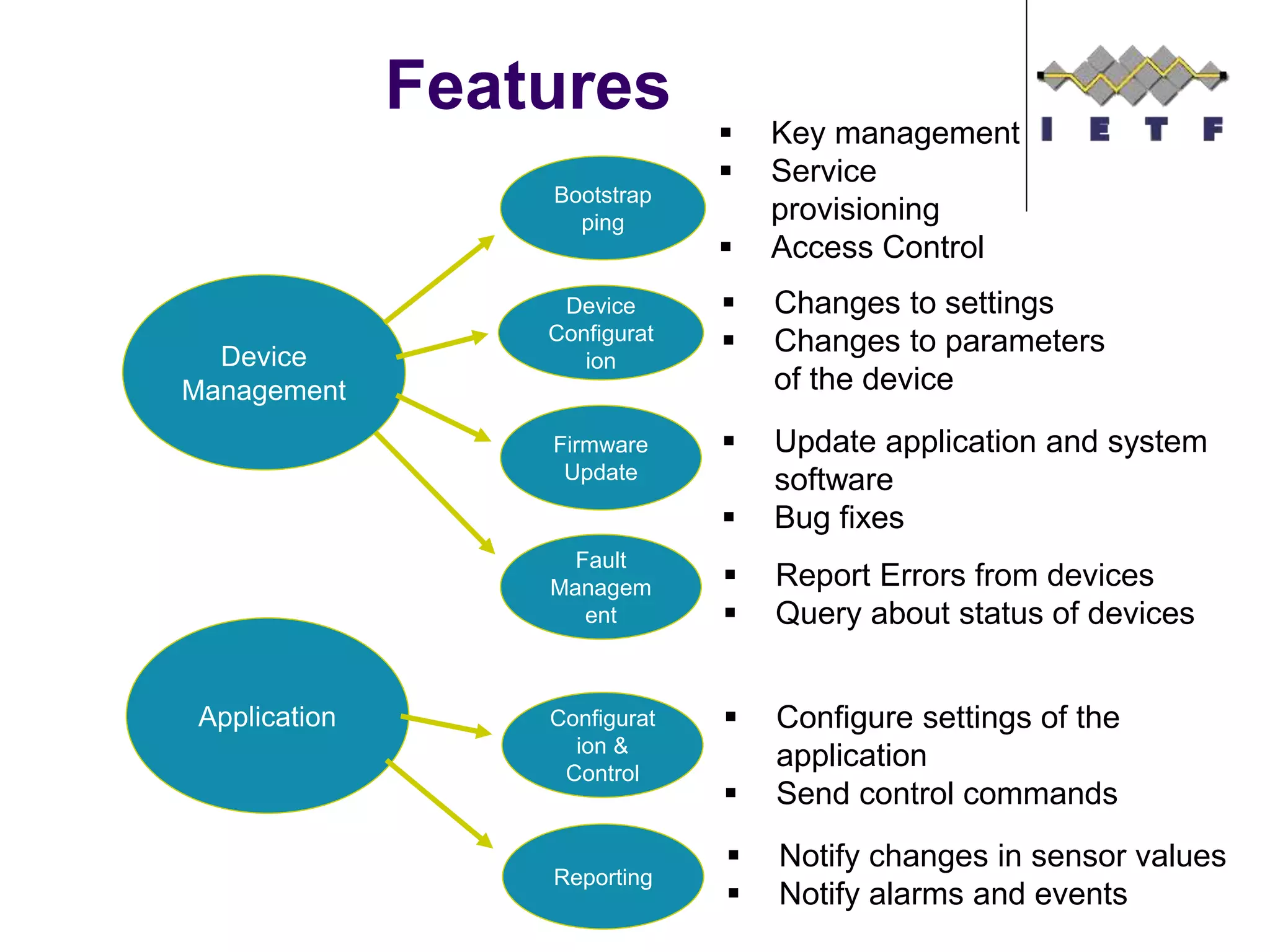
Features
Mobile Device
Management
Device
Management
Bootstrap
ping
Device
Configurat
ion
Firmware
Update
Fault
Managem
ent
 Key management
 Service
provisioning
 Access Control
 Changes to settings
 Changes to parameters
of the device
 Update application and system
software
 Bug fixes
 Report Errors from devices
 Query about status of devices
Application Configurat
ion &
Control
Reporting
 Configure settings of the
application
 Send control commands
 Notify changes in sensor values
 Notify alarms and events
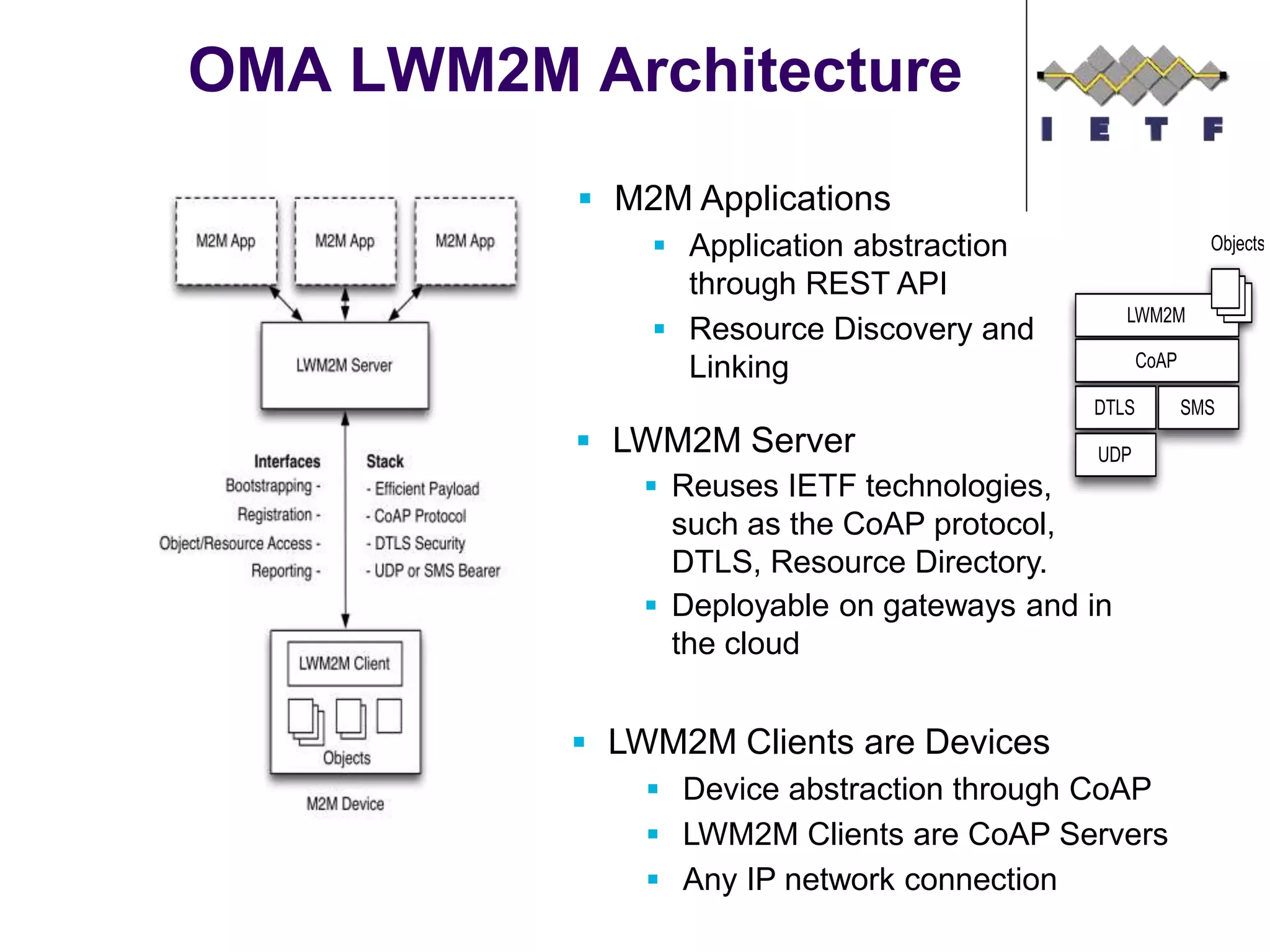
OMA LWM2M Architecture
 M2M Applications
 Application abstraction
through REST API
 Resource Discovery and
Linking
 LWM2M Clients are Devices
 Device abstraction through CoAP
 LWM2M Clients are CoAP Servers
 Any IP network connection
 LWM2M Server
 Reuses IETF technologies,
such as the CoAP protocol,
DTLS, Resource Directory.
 Deployable on gateways and in
the cloud
UDP
SMSDTLS
CoAP
LWM2M
Objects
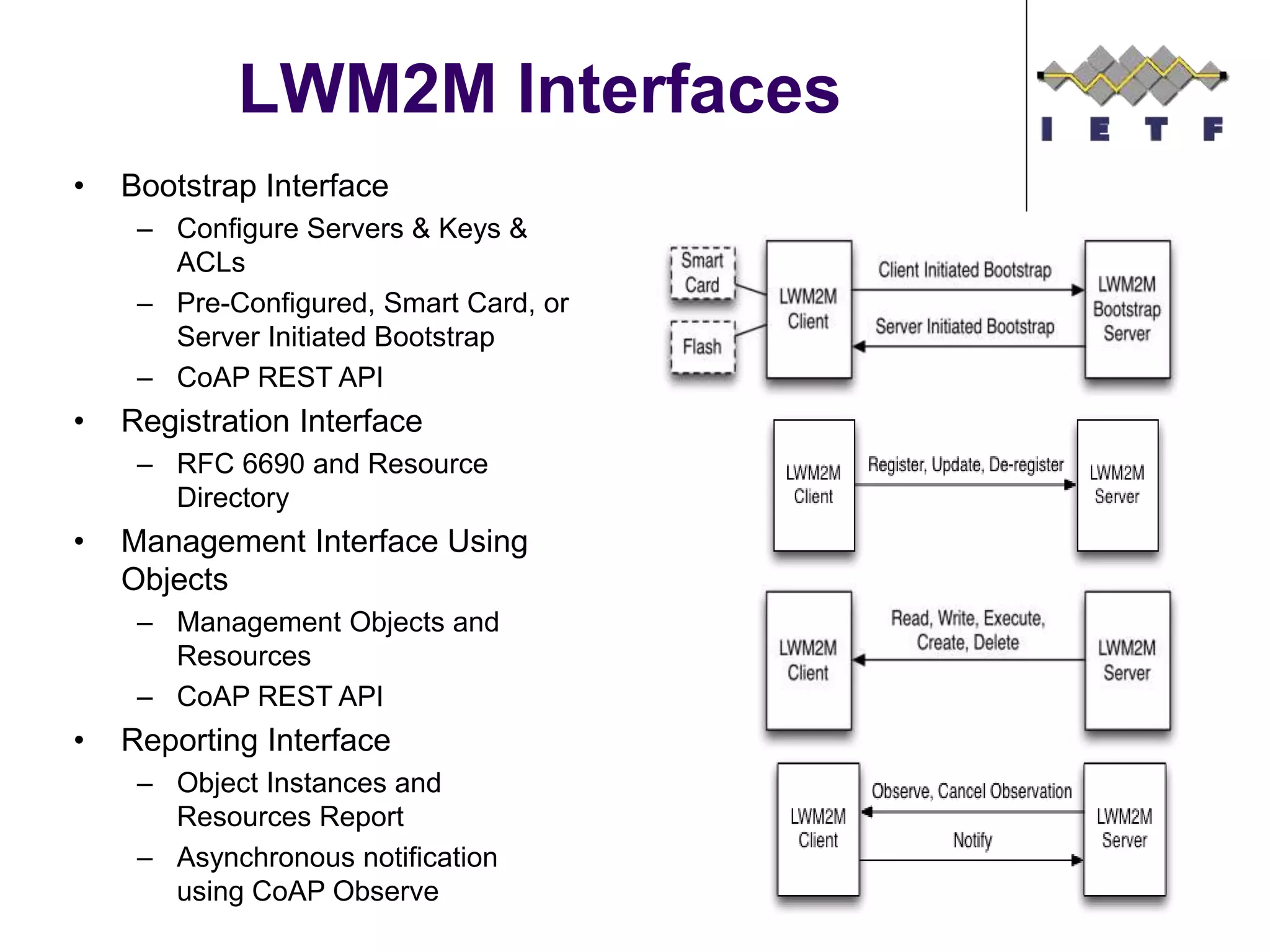
LWM2M Interfaces
• Bootstrap Interface
– Configure Servers & Keys &
ACLs
– Pre-Configured, Smart Card, or
Server Initiated Bootstrap
– CoAP REST API
• Registration Interface
– RFC 6690 and Resource
Directory
• Management Interface Using
Objects
– Management Objects and
Resources
– CoAP REST API
• Reporting Interface
– Object Instances and
Resources Report
– Asynchronous notification
using CoAP Observe
Bootstrap Interface
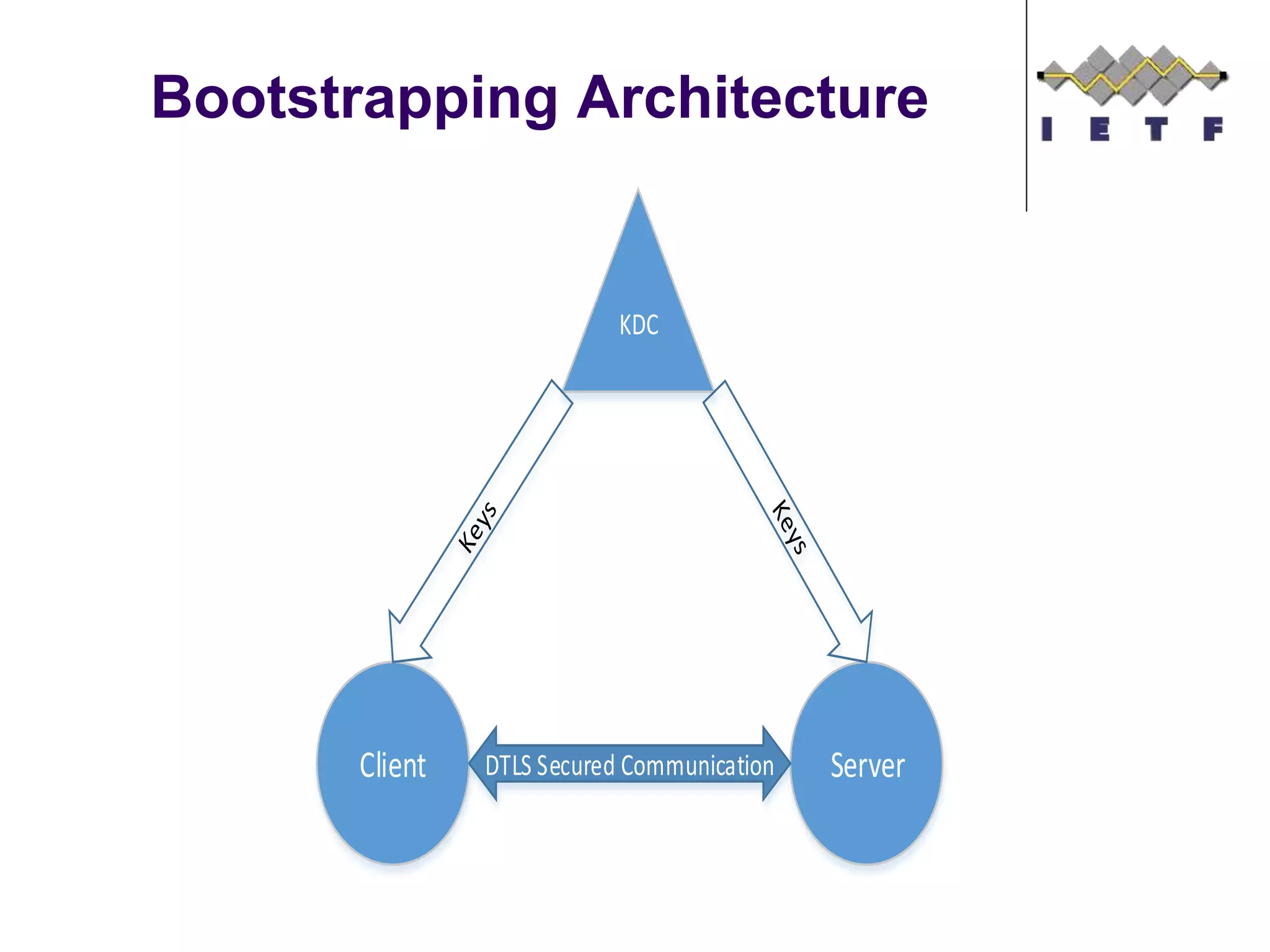
Bootstrapping Architecture
Client Server
KDC
DTLS Secured Communication
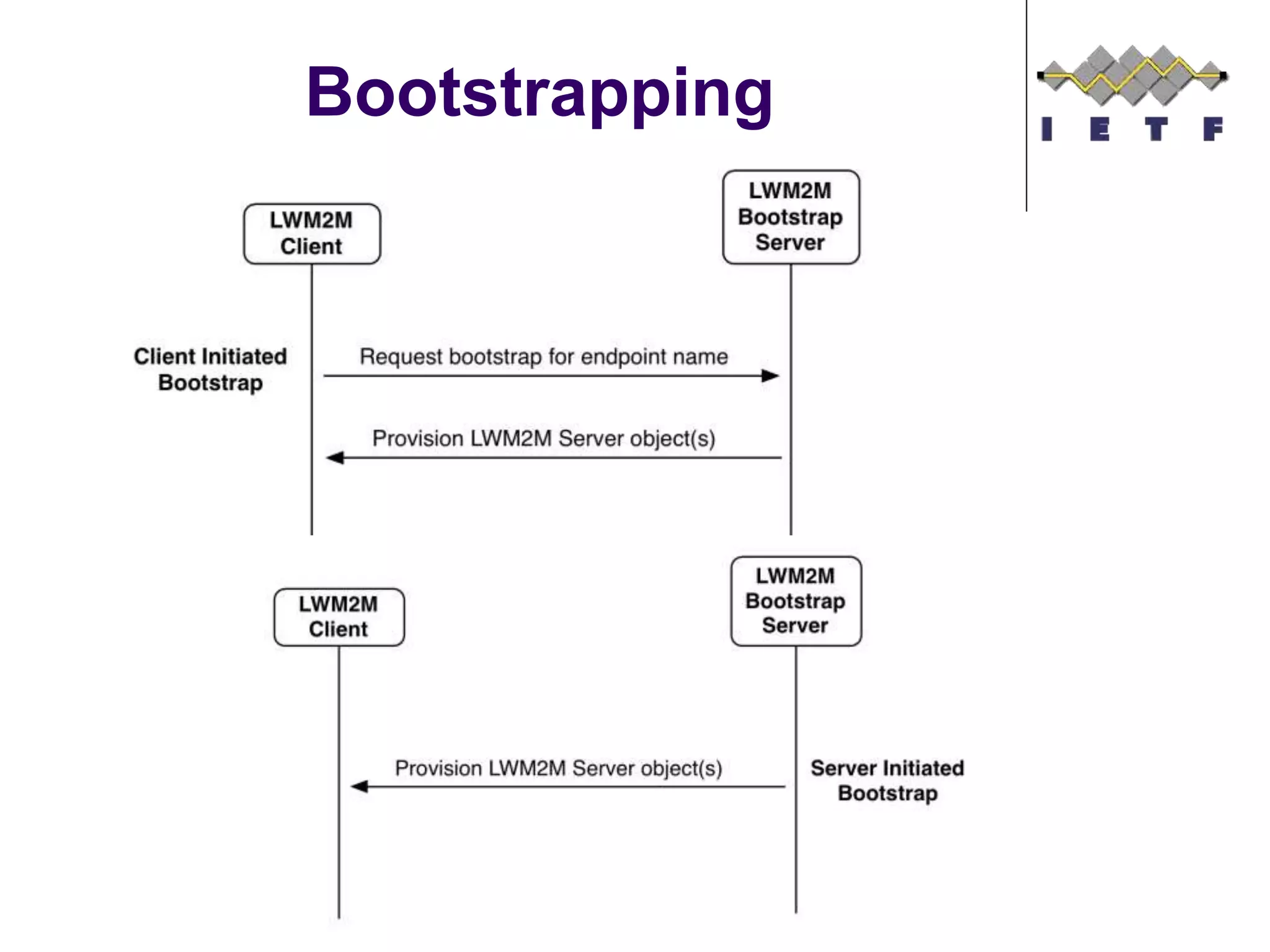
Bootstrapping
©Sensinode 2013
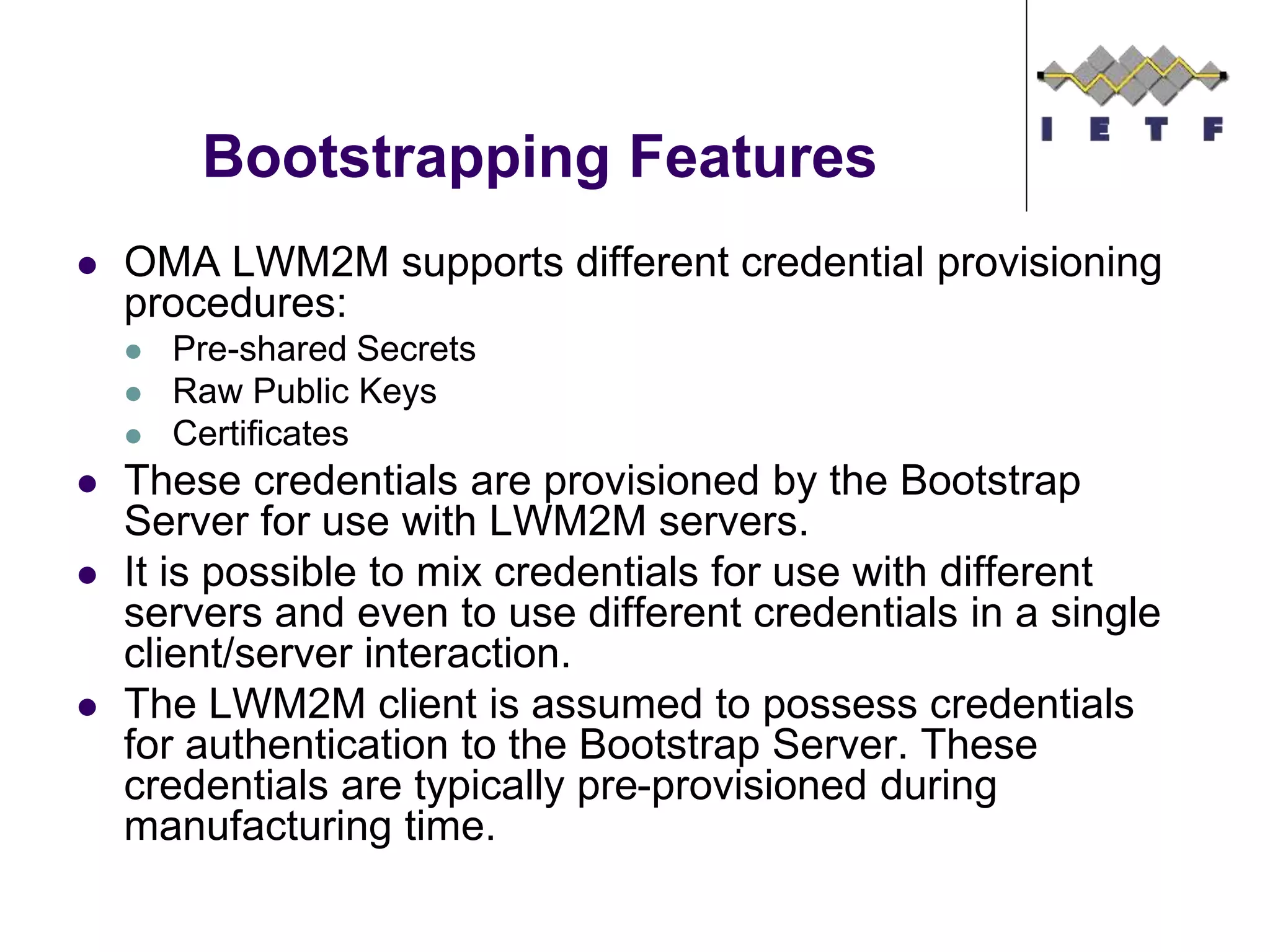
Bootstrapping Features
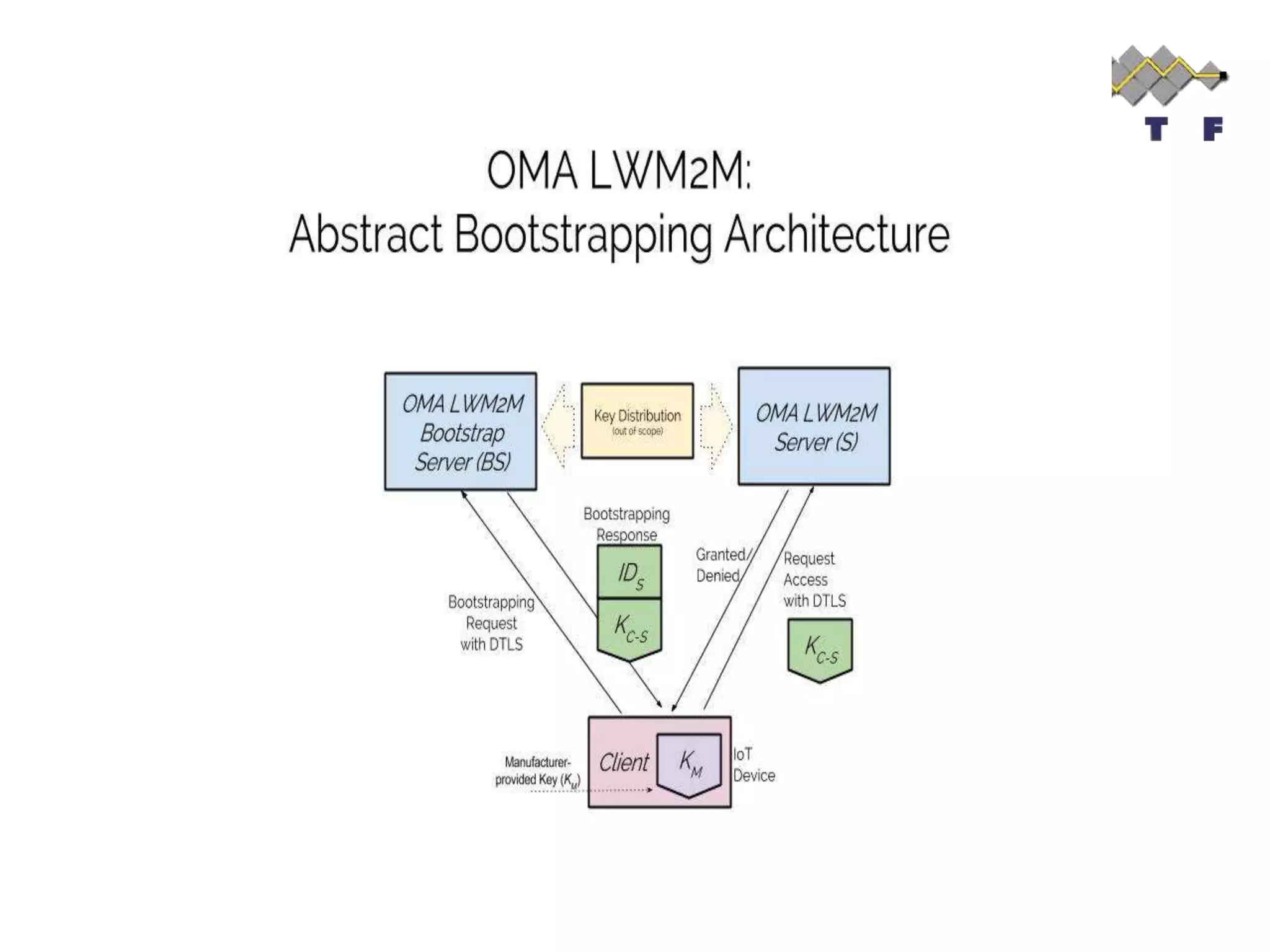
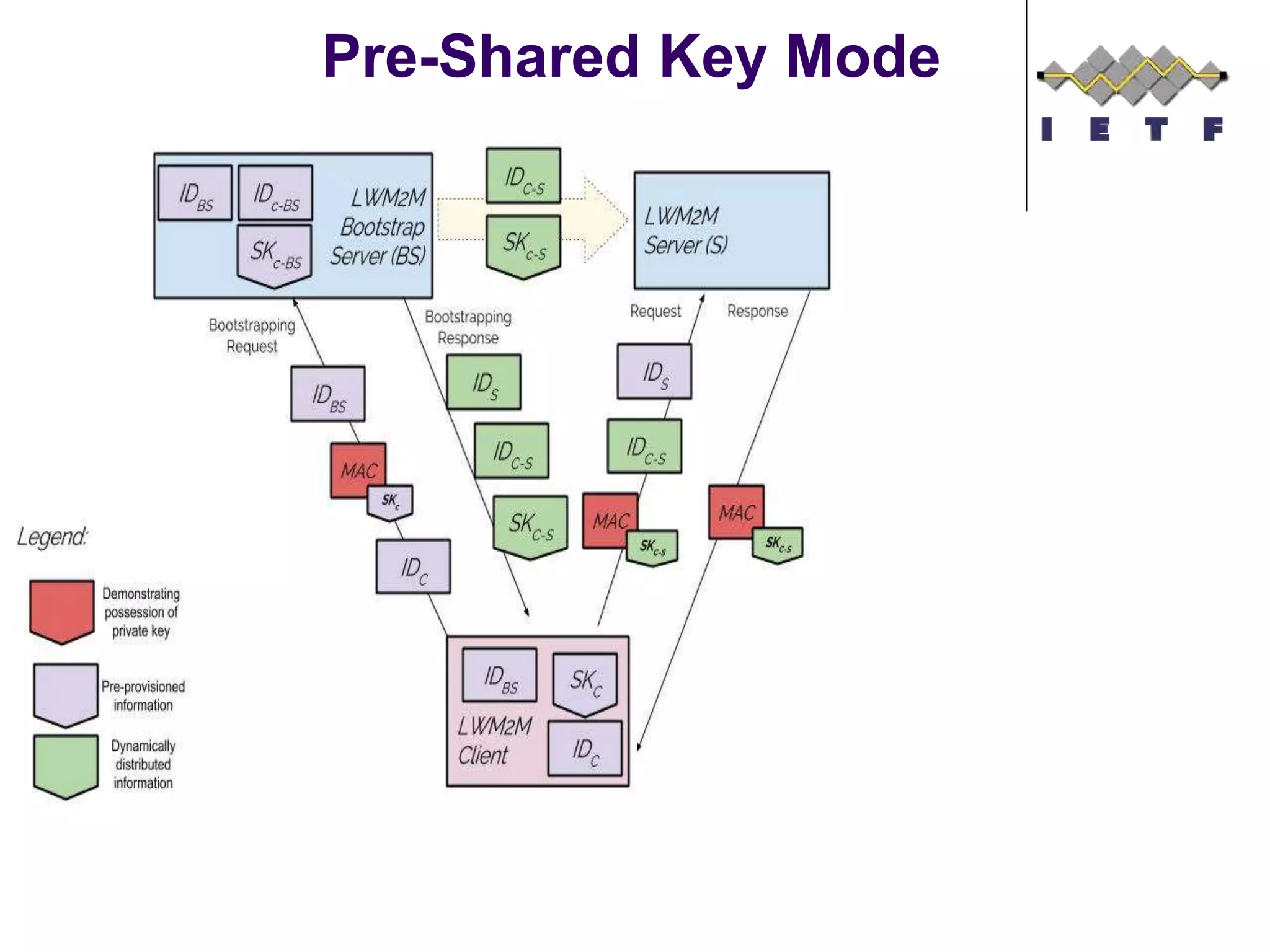
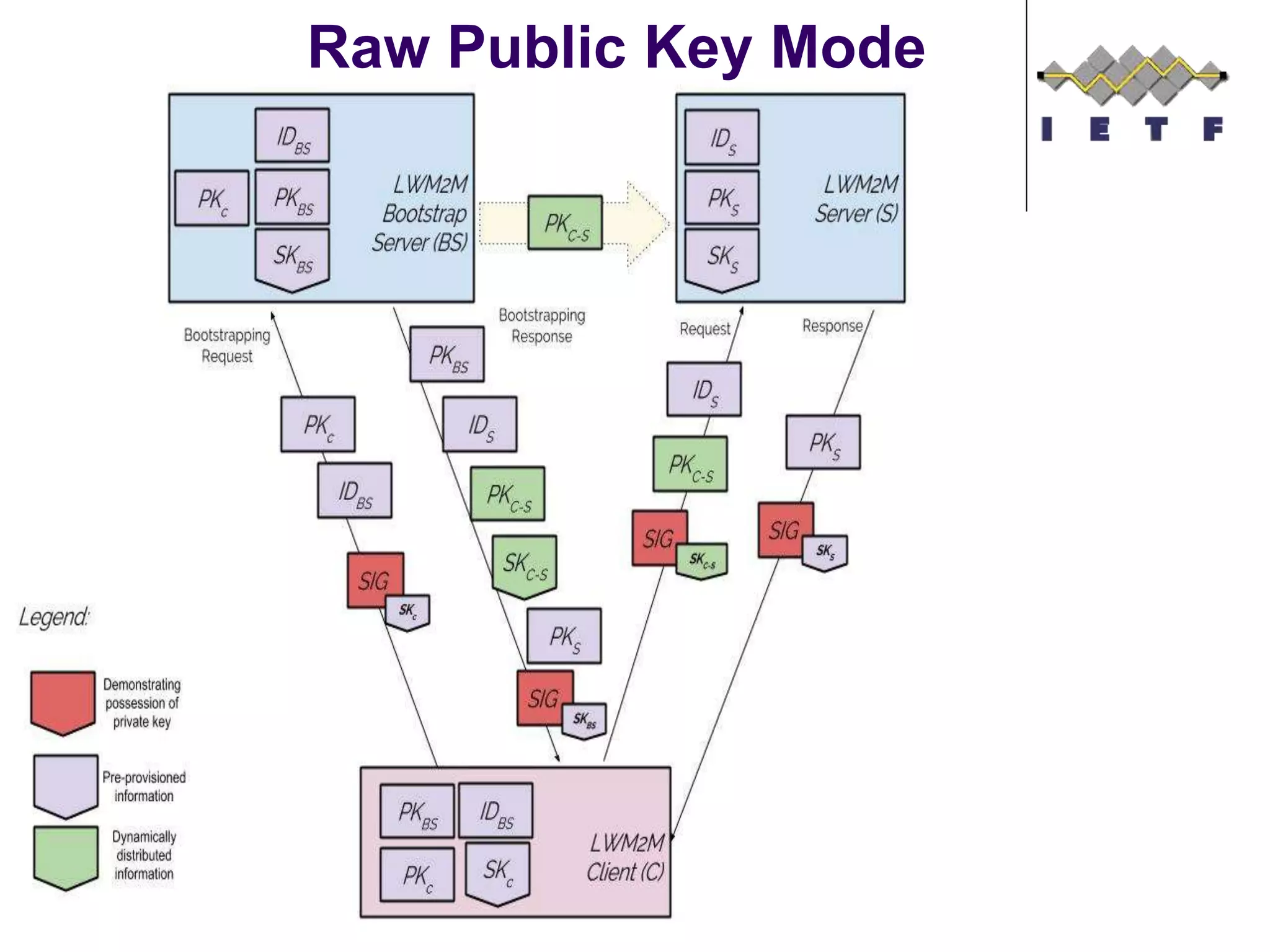
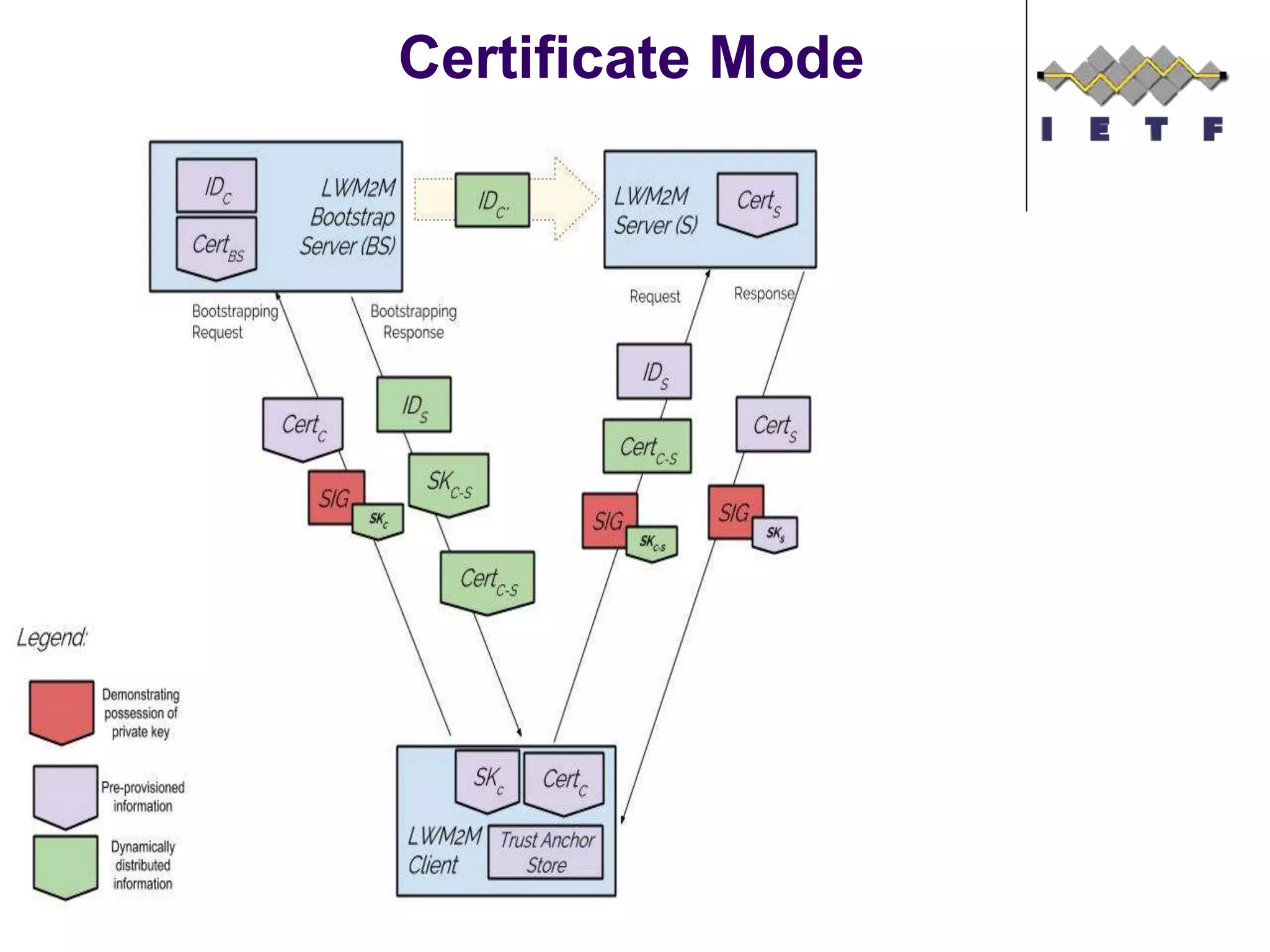
 OMA LWM2M supports different credential provisioning
procedures:
 Pre-shared Secrets
 Raw Public Keys
 Certificates
 These credentials are provisioned by the Bootstrap
Server for use with LWM2M servers.
 It is possible to mix credentials for use with different
servers and even to use different credentials in a single
client/server interaction.
 The LWM2M client is assumed to possess credentials
for authentication to the Bootstrap Server. These
credentials are typically pre-provisioned during
manufacturing time.
Pre-Shared Key Mode
Raw Public Key Mode
Certificate Mode
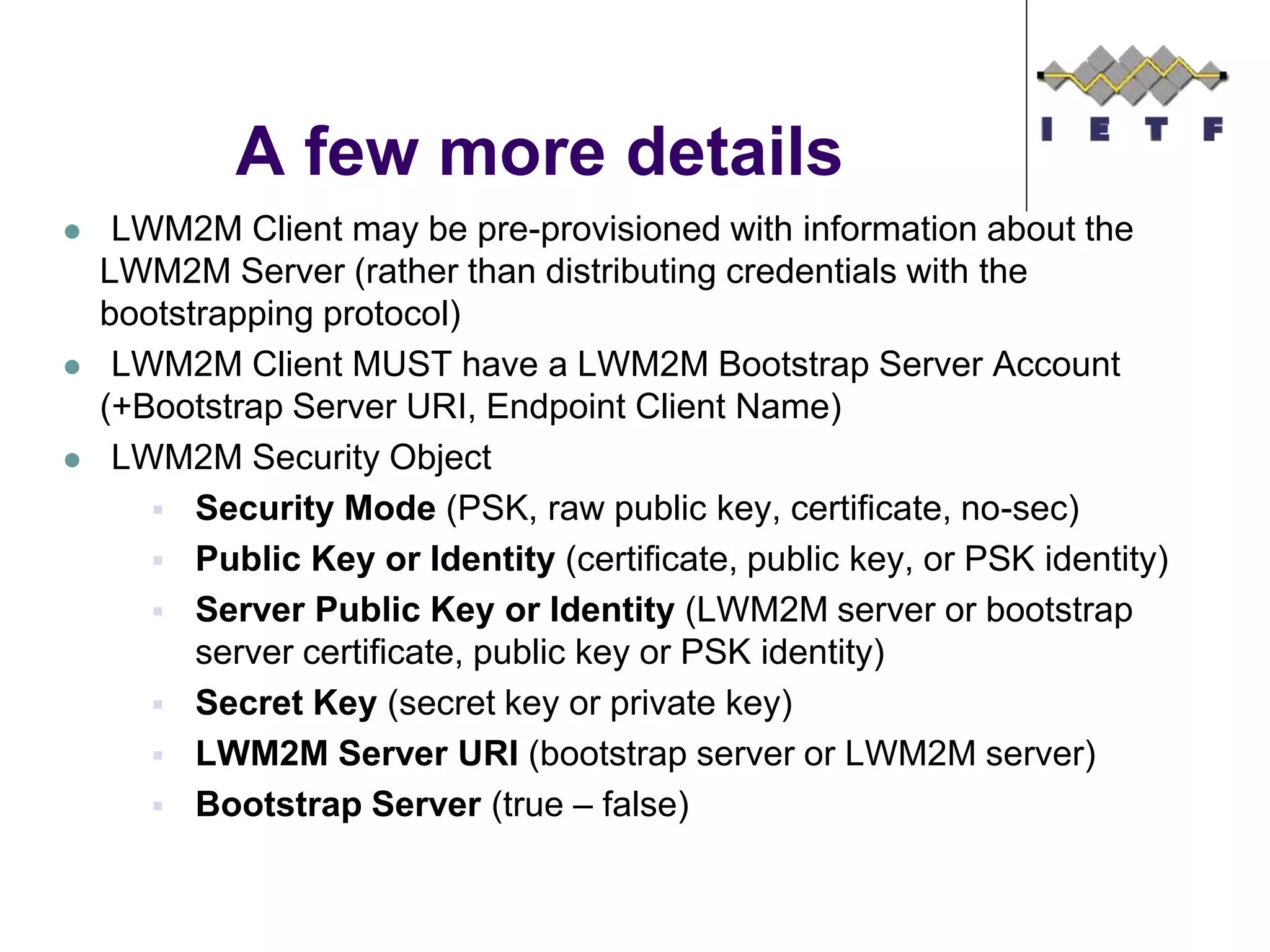
 LWM2M Client may be pre-provisioned with information about the
LWM2M Server (rather than distributing credentials with the
bootstrapping protocol)
 LWM2M Client MUST have a LWM2M Bootstrap Server Account
(+Bootstrap Server URI, Endpoint Client Name)
 LWM2M Security Object
 Security Mode (PSK, raw public key, certificate, no-sec)
 Public Key or Identity (certificate, public key, or PSK identity)
 Server Public Key or Identity (LWM2M server or bootstrap
server certificate, public key or PSK identity)
 Secret Key (secret key or private key)
 LWM2M Server URI (bootstrap server or LWM2M server)
 Bootstrap Server (true – false)
A few more details
Object Model
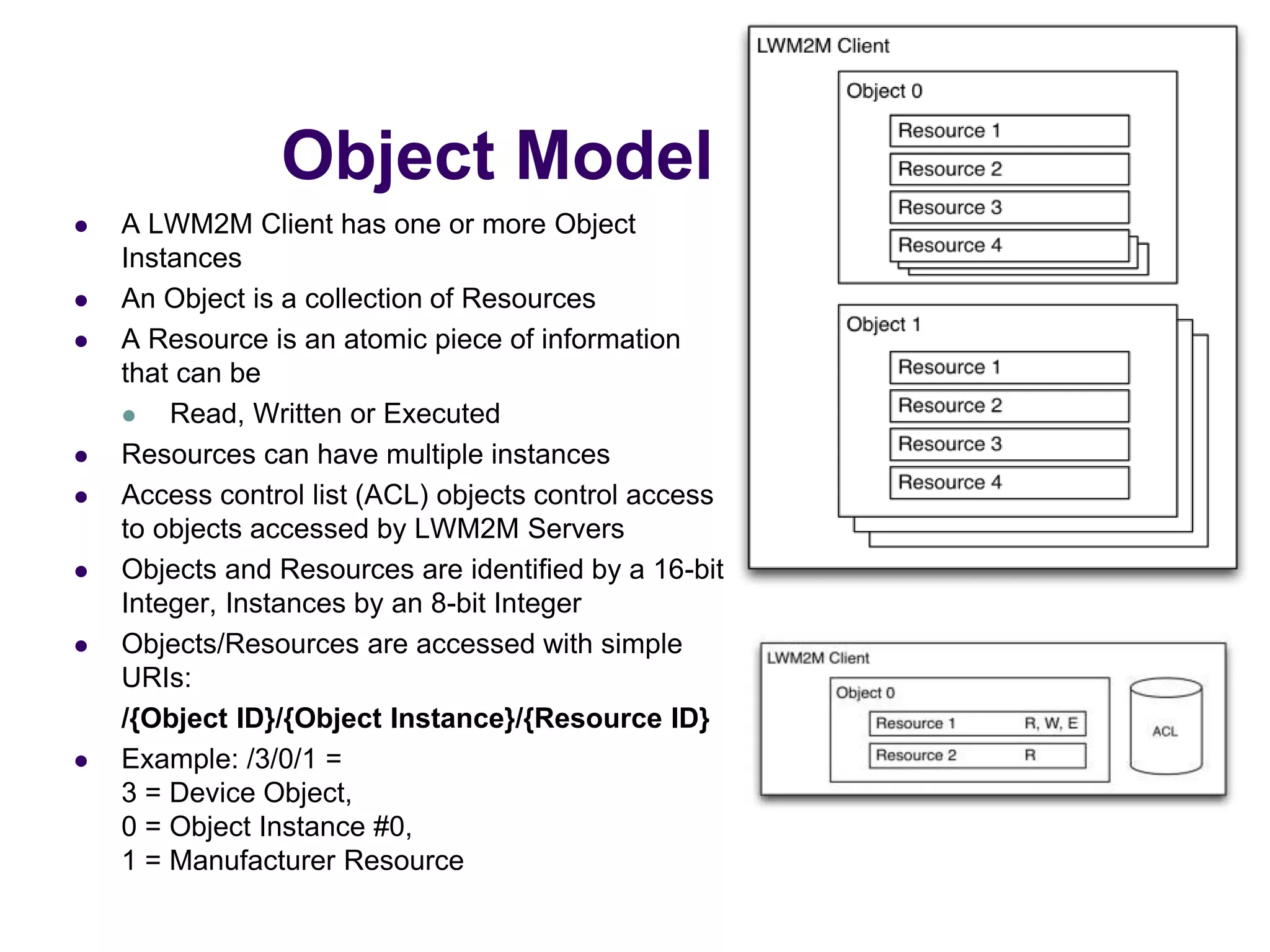
 A LWM2M Client has one or more Object
Instances
 An Object is a collection of Resources
 A Resource is an atomic piece of information
that can be
 Read, Written or Executed
 Resources can have multiple instances
 Access control list (ACL) objects control access
to objects accessed by LWM2M Servers
 Objects and Resources are identified by a 16-bit
Integer, Instances by an 8-bit Integer
 Objects/Resources are accessed with simple
URIs:
/{Object ID}/{Object Instance}/{Resource ID}
 Example: /3/0/1 =
3 = Device Object,
0 = Object Instance #0,
1 = Manufacturer Resource
Object Model
©Sensinode 2013
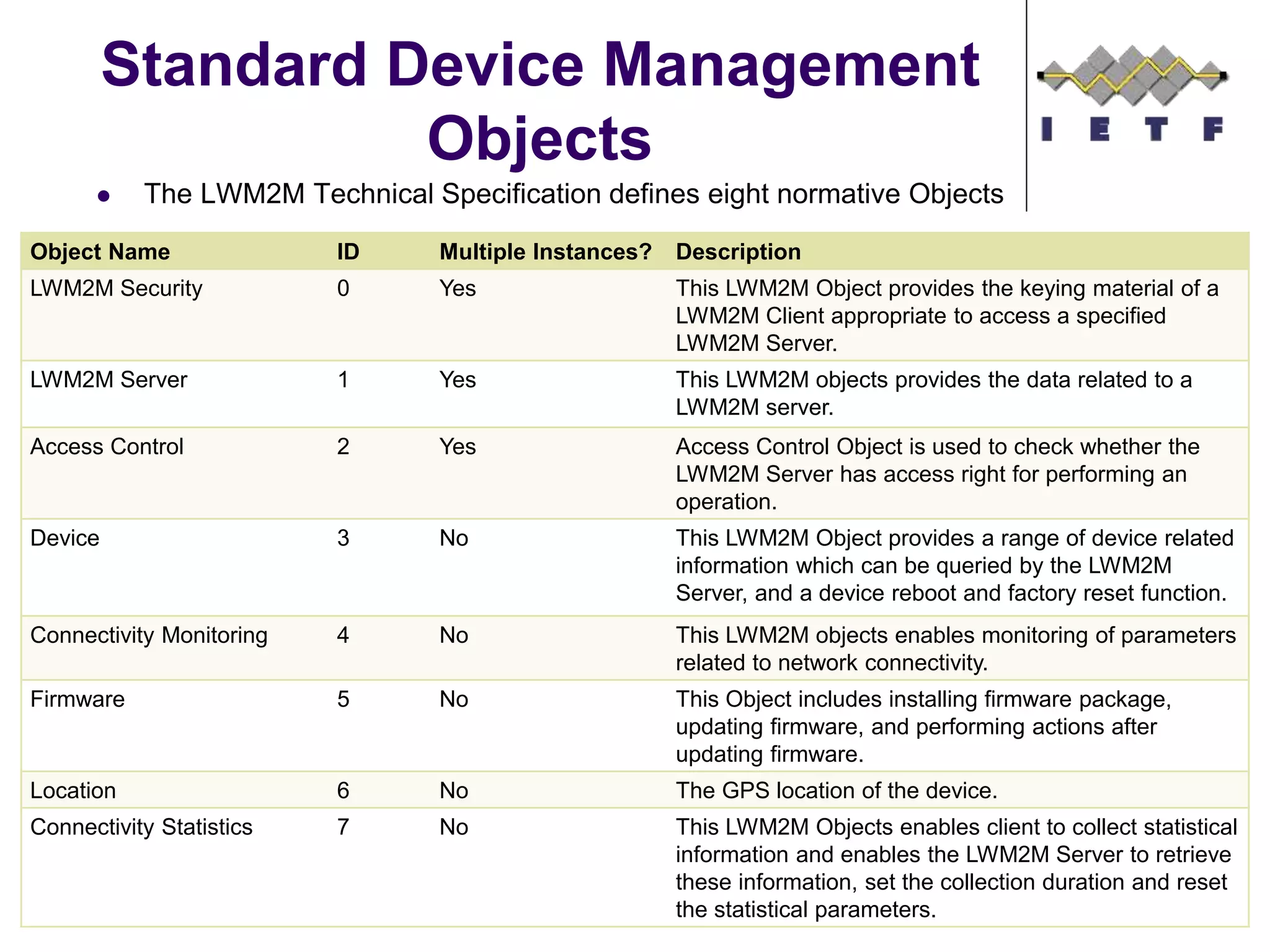
 The LWM2M Technical Specification defines eight normative Objects
Standard Device Management
Objects
©Sensinode 2013
Object Name ID Multiple Instances? Description
LWM2M Security 0 Yes This LWM2M Object provides the keying material of a
LWM2M Client appropriate to access a specified
LWM2M Server.
LWM2M Server 1 Yes This LWM2M objects provides the data related to a
LWM2M server.
Access Control 2 Yes Access Control Object is used to check whether the
LWM2M Server has access right for performing an
operation.
Device 3 No This LWM2M Object provides a range of device related
information which can be queried by the LWM2M
Server, and a device reboot and factory reset function.
Connectivity Monitoring 4 No This LWM2M objects enables monitoring of parameters
related to network connectivity.
Firmware 5 No This Object includes installing firmware package,
updating firmware, and performing actions after
updating firmware.
Location 6 No The GPS location of the device.
Connectivity Statistics 7 No This LWM2M Objects enables client to collect statistical
information and enables the LWM2M Server to retrieve
these information, set the collection duration and reset
the statistical parameters.
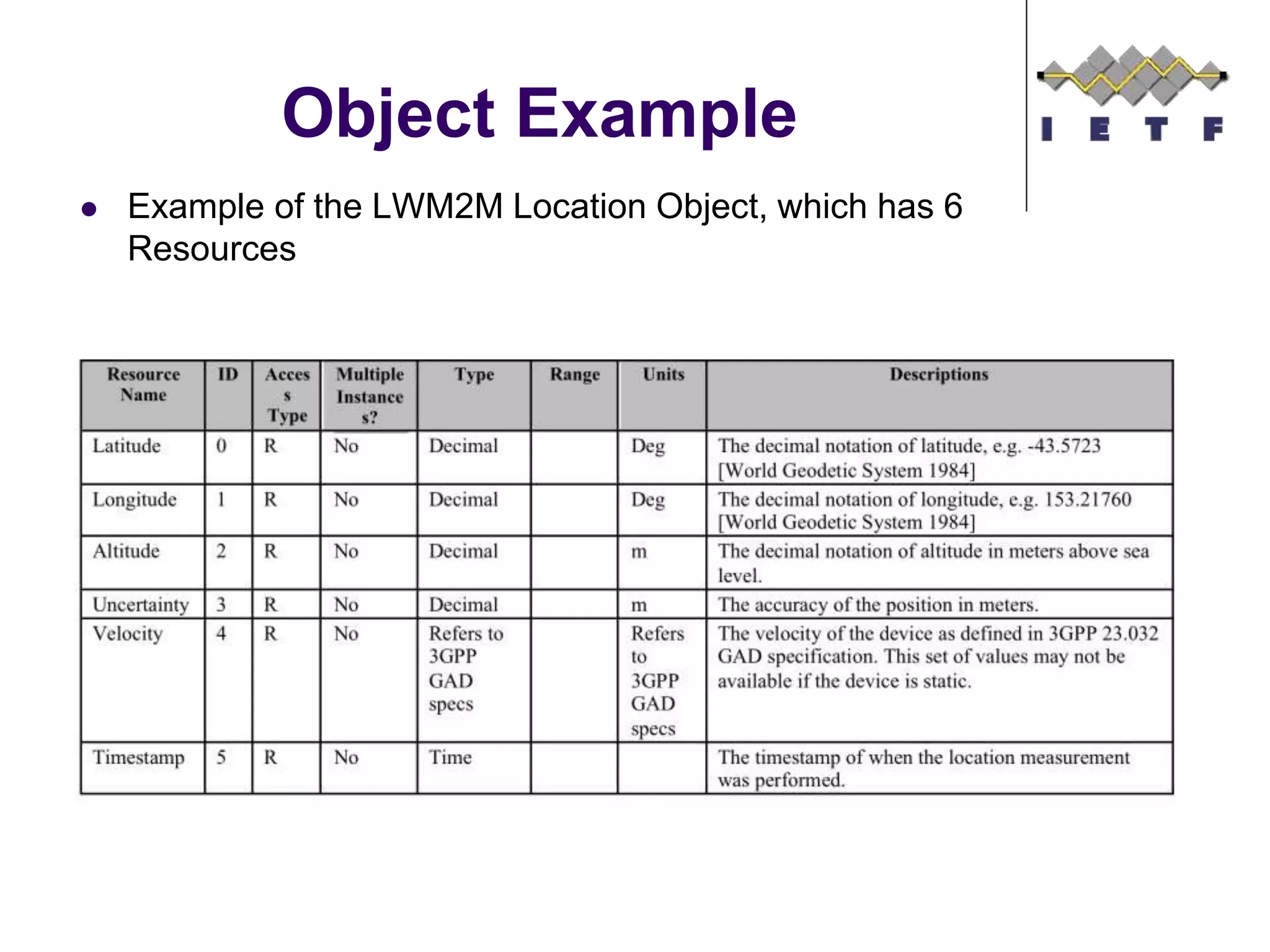
 Example of the LWM2M Location Object, which has 6
Resources
Object Example
©Sensinode 2013
 Defining a new Object is straightforward
 Object IDs are registered with the OMA Naming Authority
(OMNA)
 Who can register an Object?
 OMA working groups
 3rd party organizations
 Enterprises
 How to register an Object?
 Write a specification filling out the Object template tables:
 Object Name, Description and if it can have Multiple
Instances
 The list of resources the Object defines
 Fill out the Lightweight Object form on-line.
 IPSO Alliance has created additional objects, which are
documented here (Starter Pack) and here (Expansion Pack).
Defining new Objects
©Sensinode 2013
Access Control Model
Overview
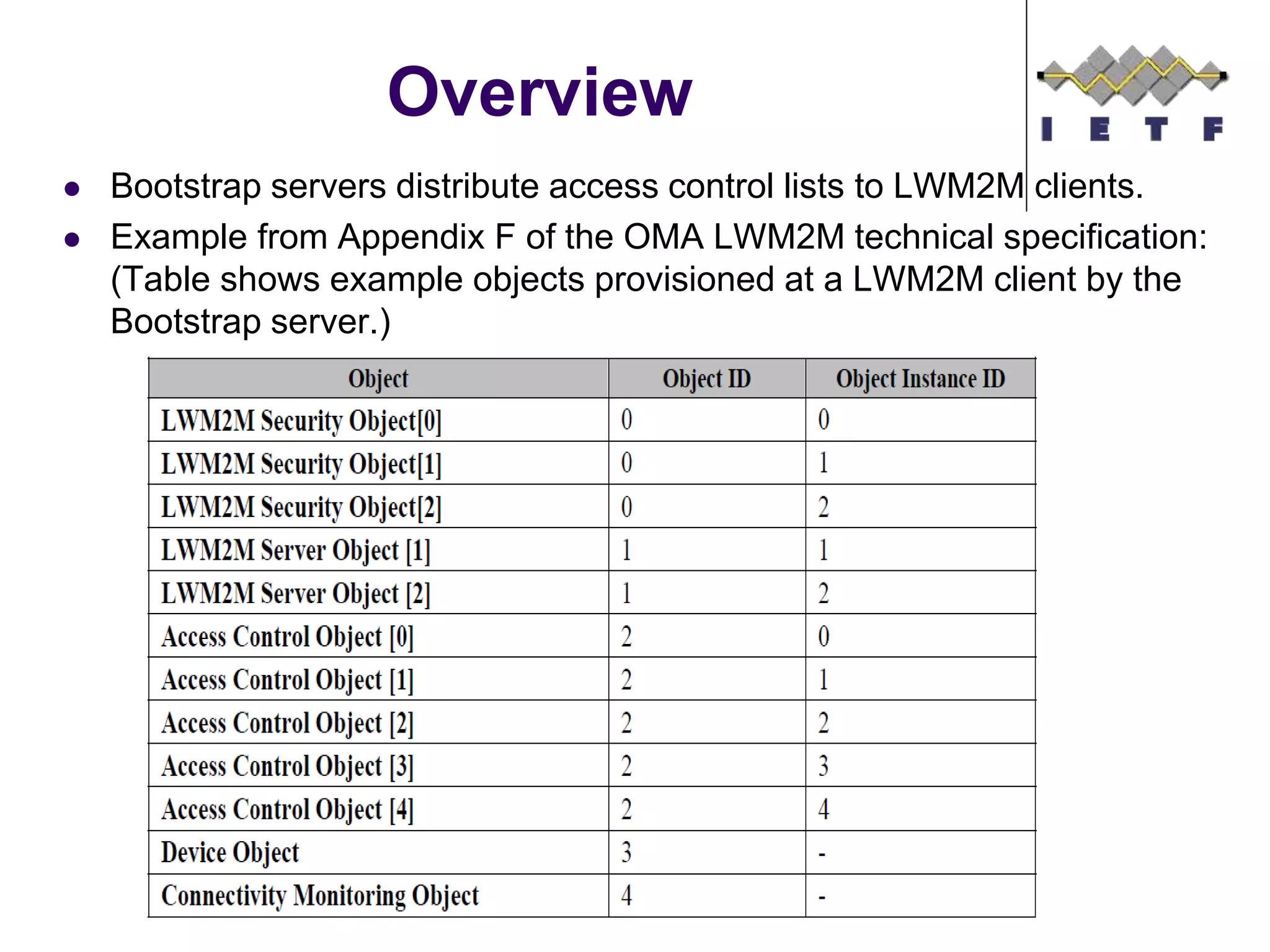
 Bootstrap servers distribute access control lists to LWM2M clients.
 Example from Appendix F of the OMA LWM2M technical specification:
(Table shows example objects provisioned at a LWM2M client by the
Bootstrap server.)
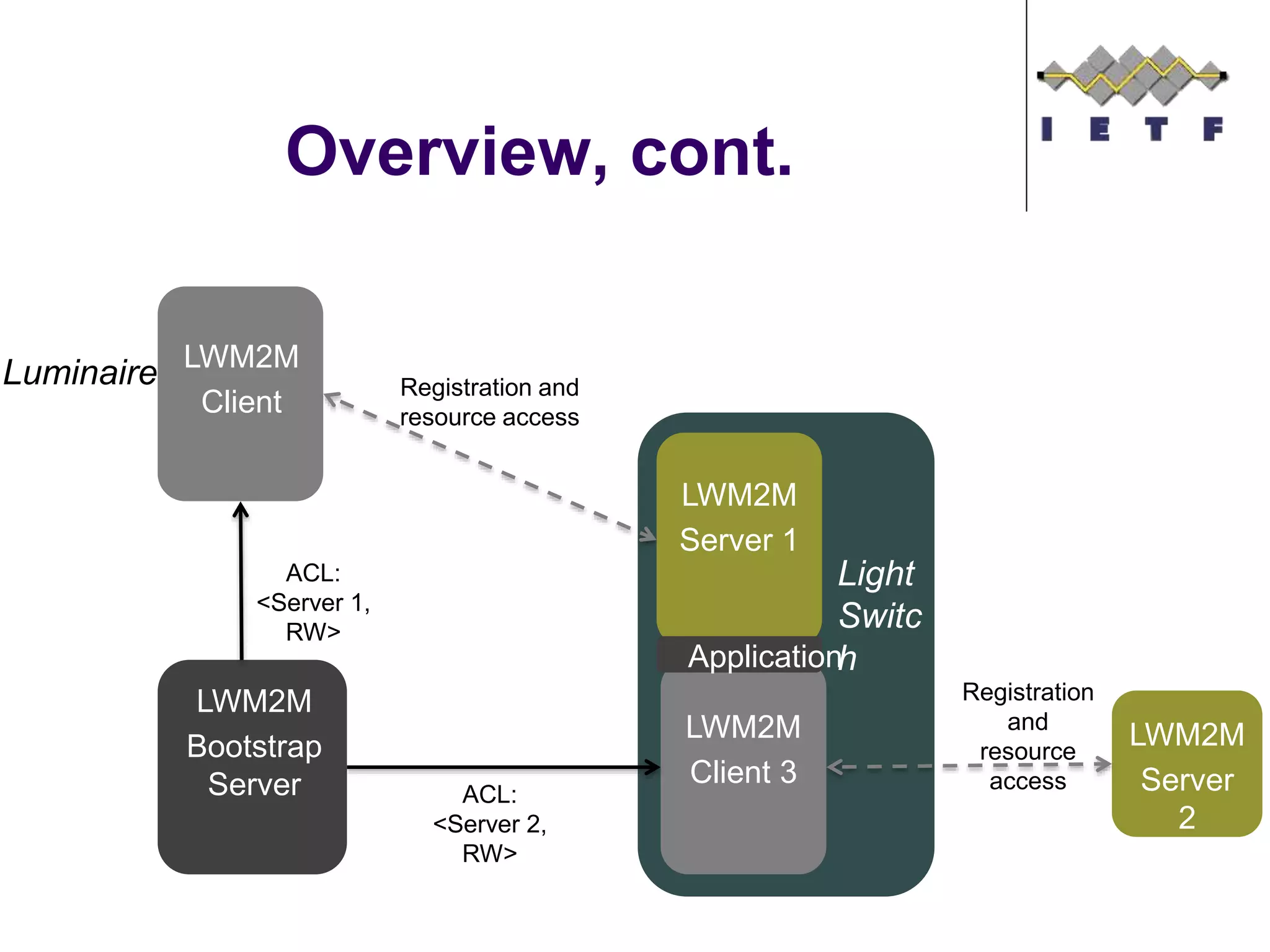
Overview, cont.
LWM2M
Client
LWM2M
Server
2
Luminaire
LWM2M
Client 3
Registration and
resource access
Light
Switc
h
ACL:
<Server 1,
RW>
LWM2M
Server 1
Registration
and
resource
access
LWM2M
Bootstrap
Server
Application
ACL:
<Server 2,
RW>
Discussion
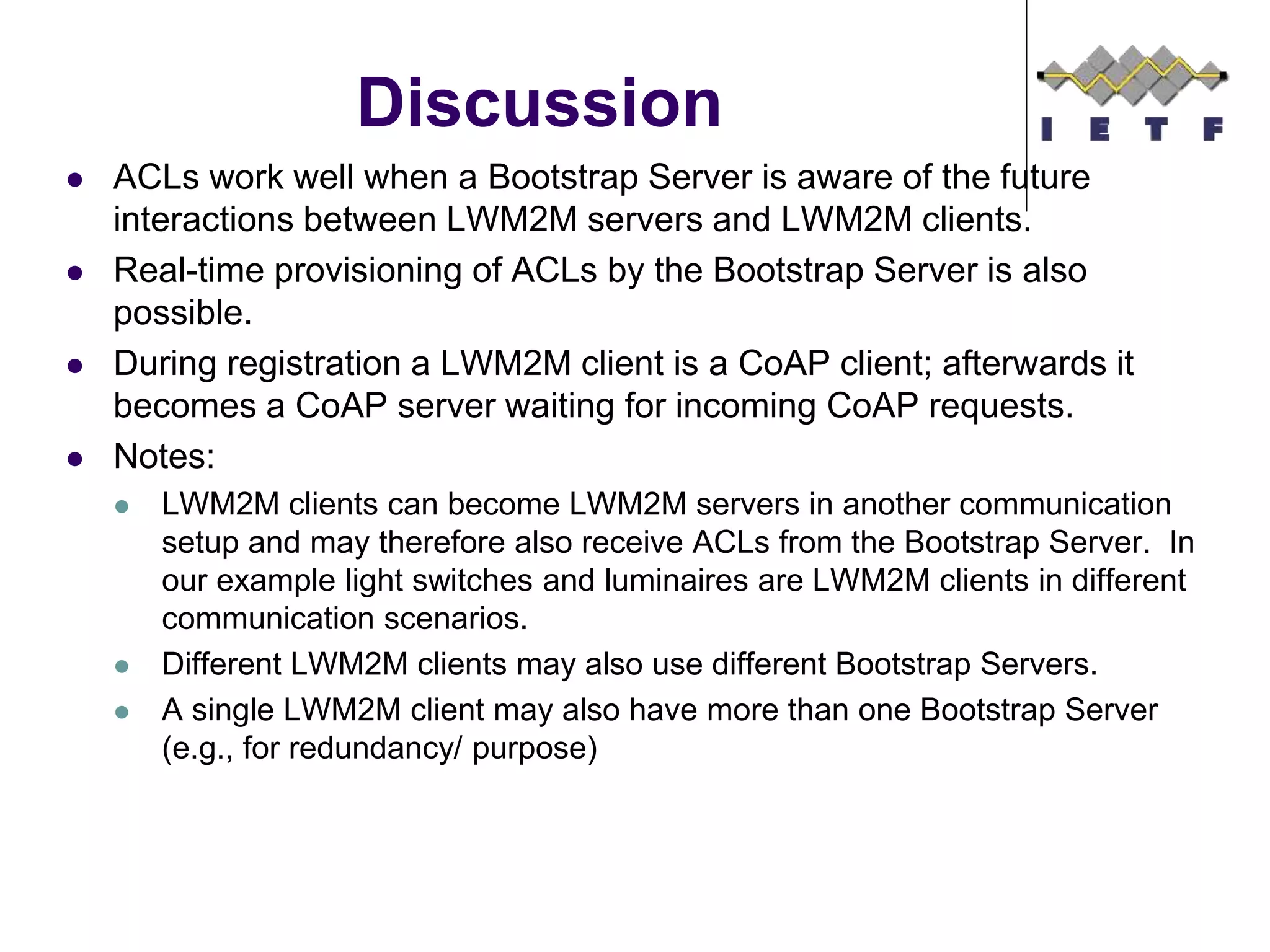
 ACLs work well when a Bootstrap Server is aware of the future
interactions between LWM2M servers and LWM2M clients.
 Real-time provisioning of ACLs by the Bootstrap Server is also
possible.
 During registration a LWM2M client is a CoAP client; afterwards it
becomes a CoAP server waiting for incoming CoAP requests.
 Notes:
 LWM2M clients can become LWM2M servers in another communication
setup and may therefore also receive ACLs from the Bootstrap Server. In
our example light switches and luminaires are LWM2M clients in different
communication scenarios.
 Different LWM2M clients may also use different Bootstrap Servers.
 A single LWM2M client may also have more than one Bootstrap Server
(e.g., for redundancy/ purpose)
Application Server Interaction
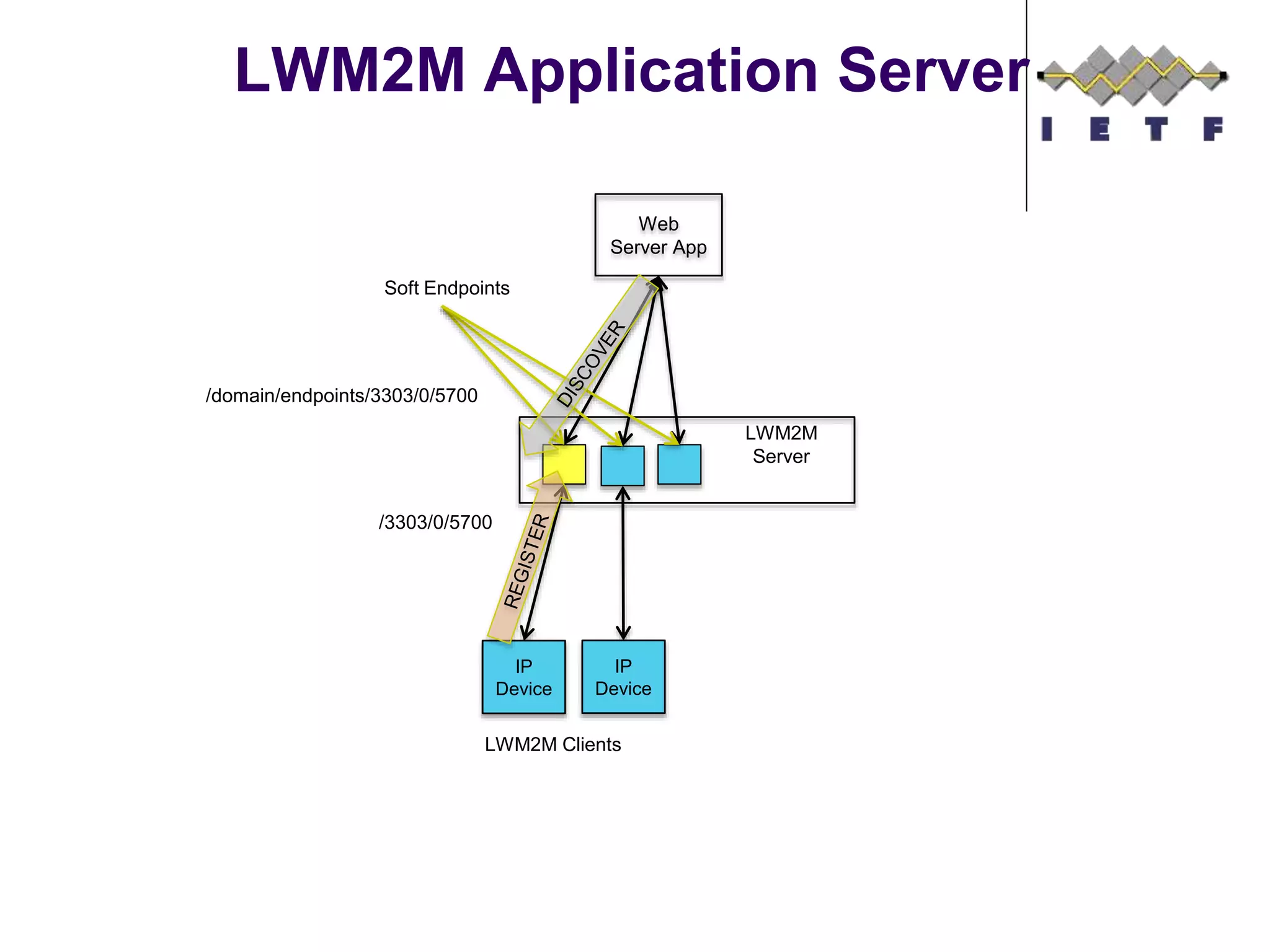
LWM2M Application Server
Web
Server App
LWM2M
Server
Soft Endpoints
IP
Device
IP
Device
LWM2M Clients
/3303/0/5700
/domain/endpoints/3303/0/5700
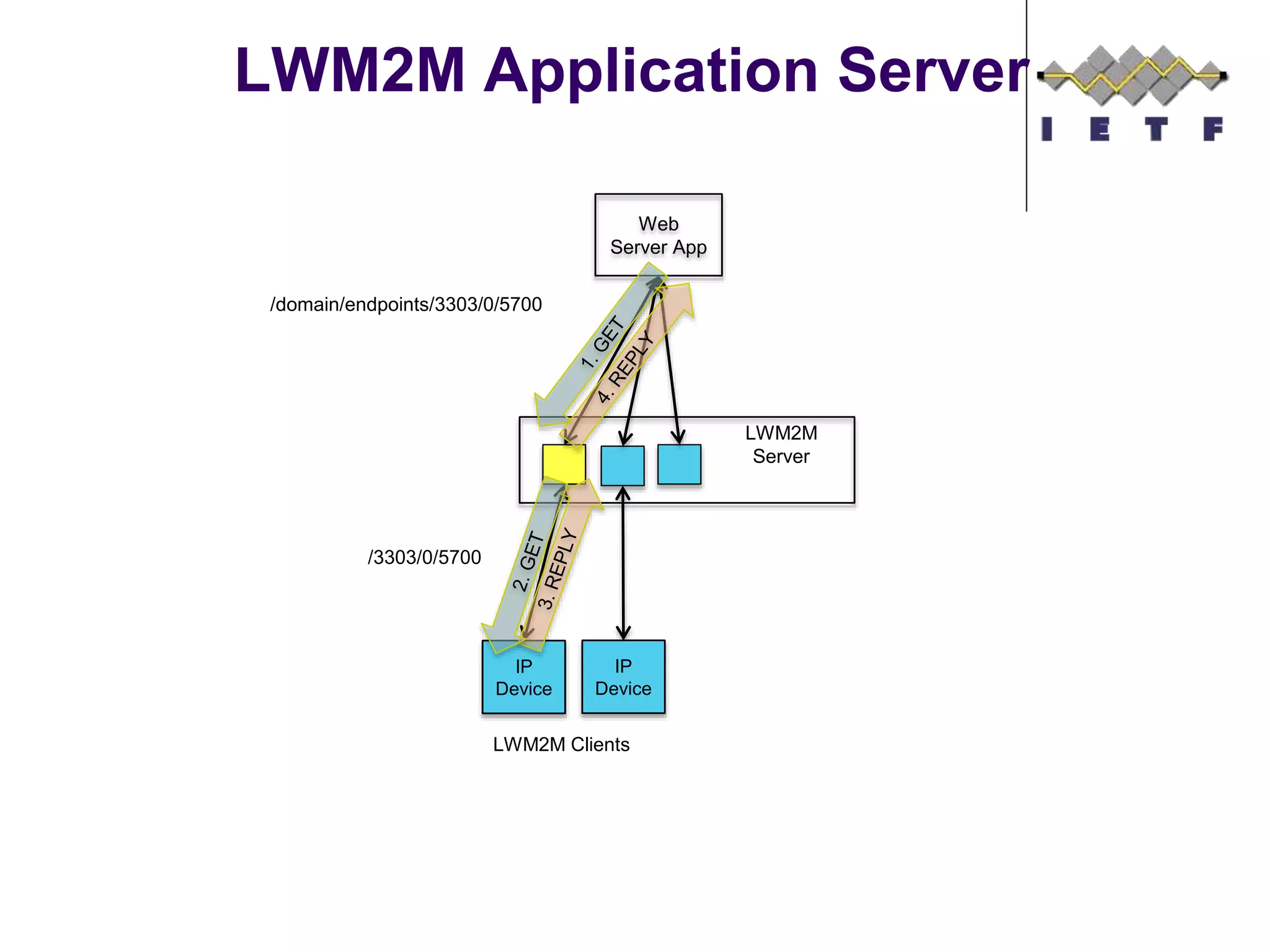
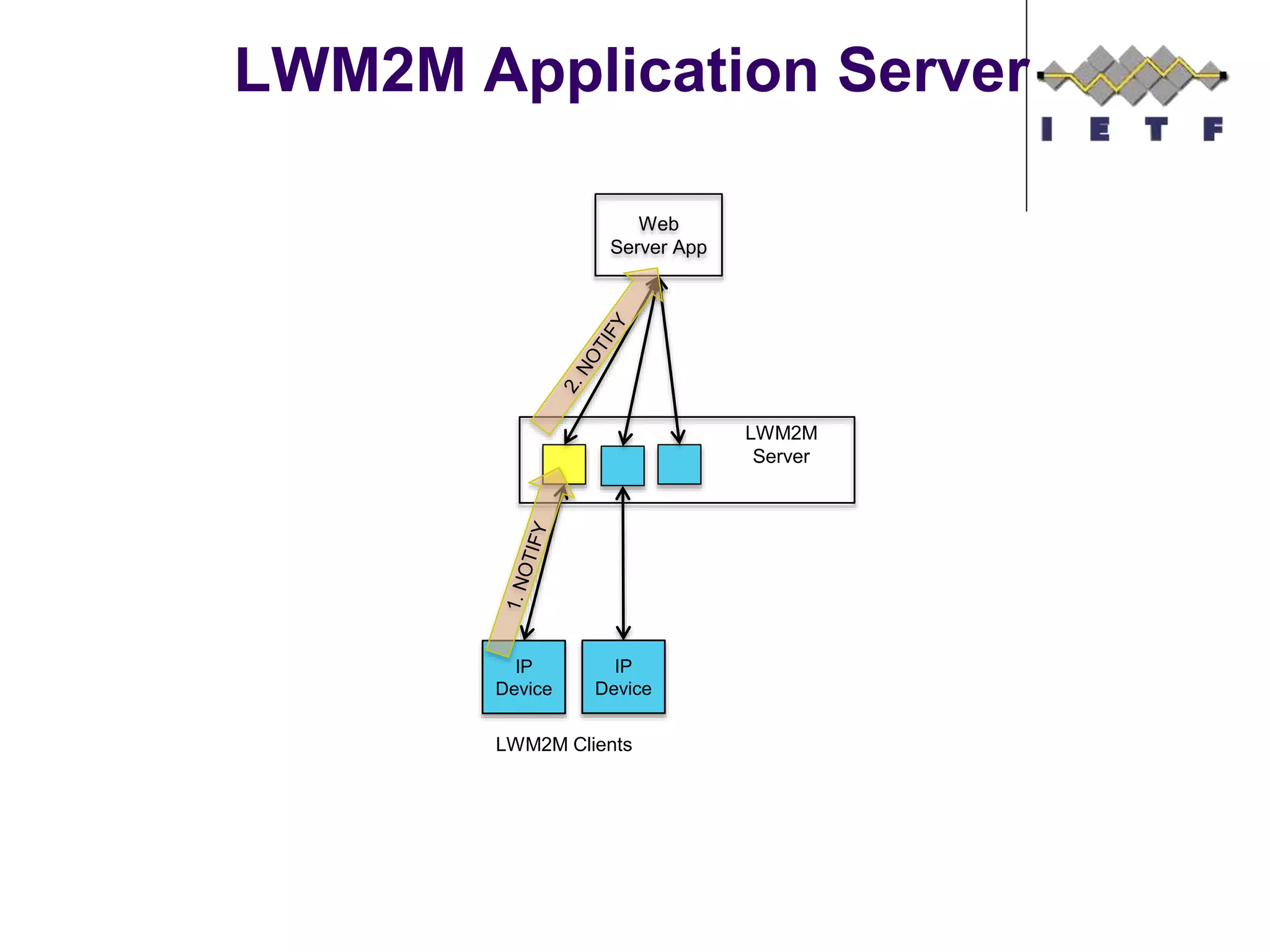
LWM2M Application Server
Web
Server App
LWM2M
Server
IP
Device
IP
Device
LWM2M Clients
/domain/endpoints/3303/0/5700
/3303/0/5700
LWM2M Application Server
Web
Server App
LWM2M
Server
IP
Device
IP
Device
LWM2M Clients
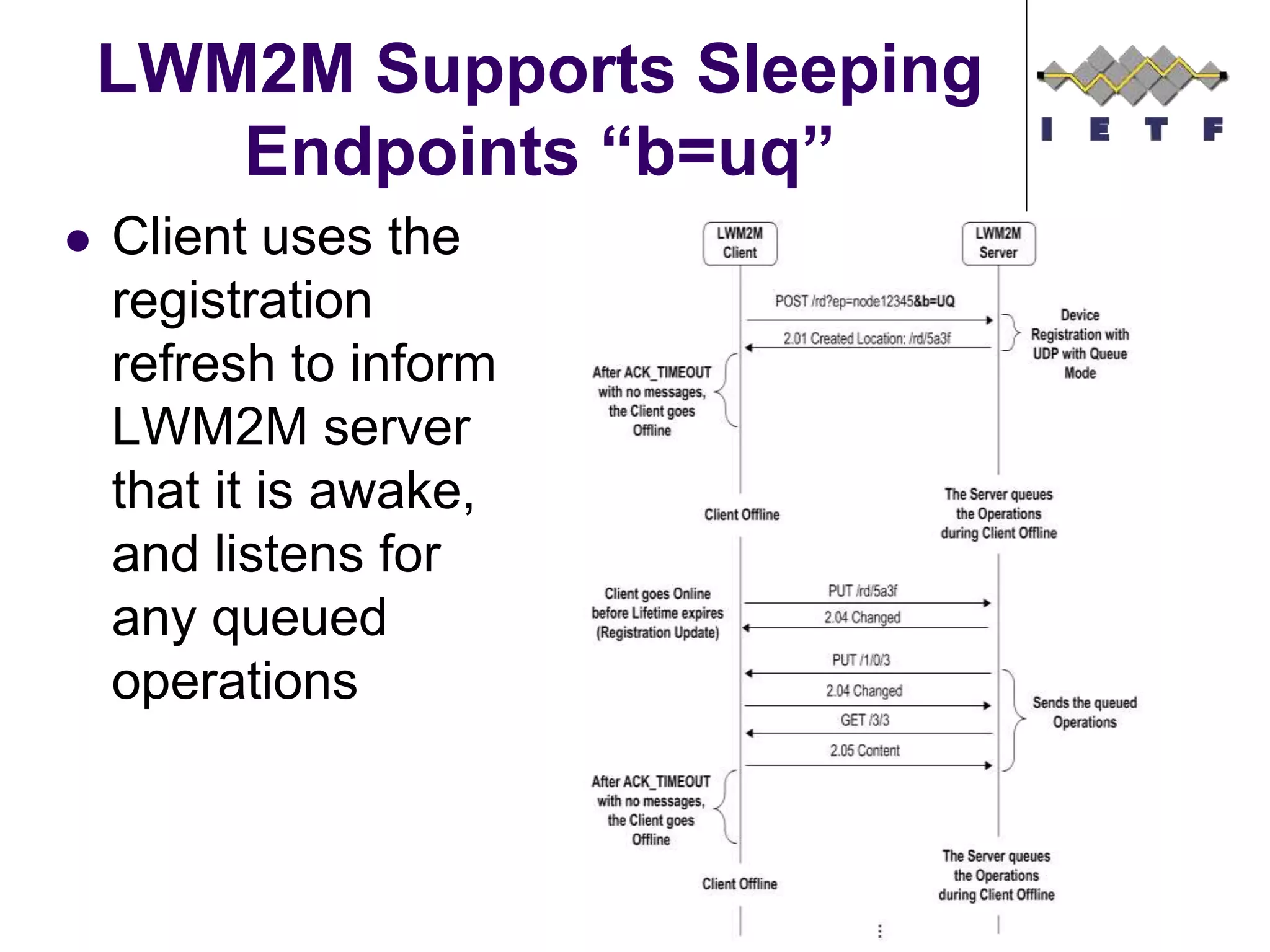
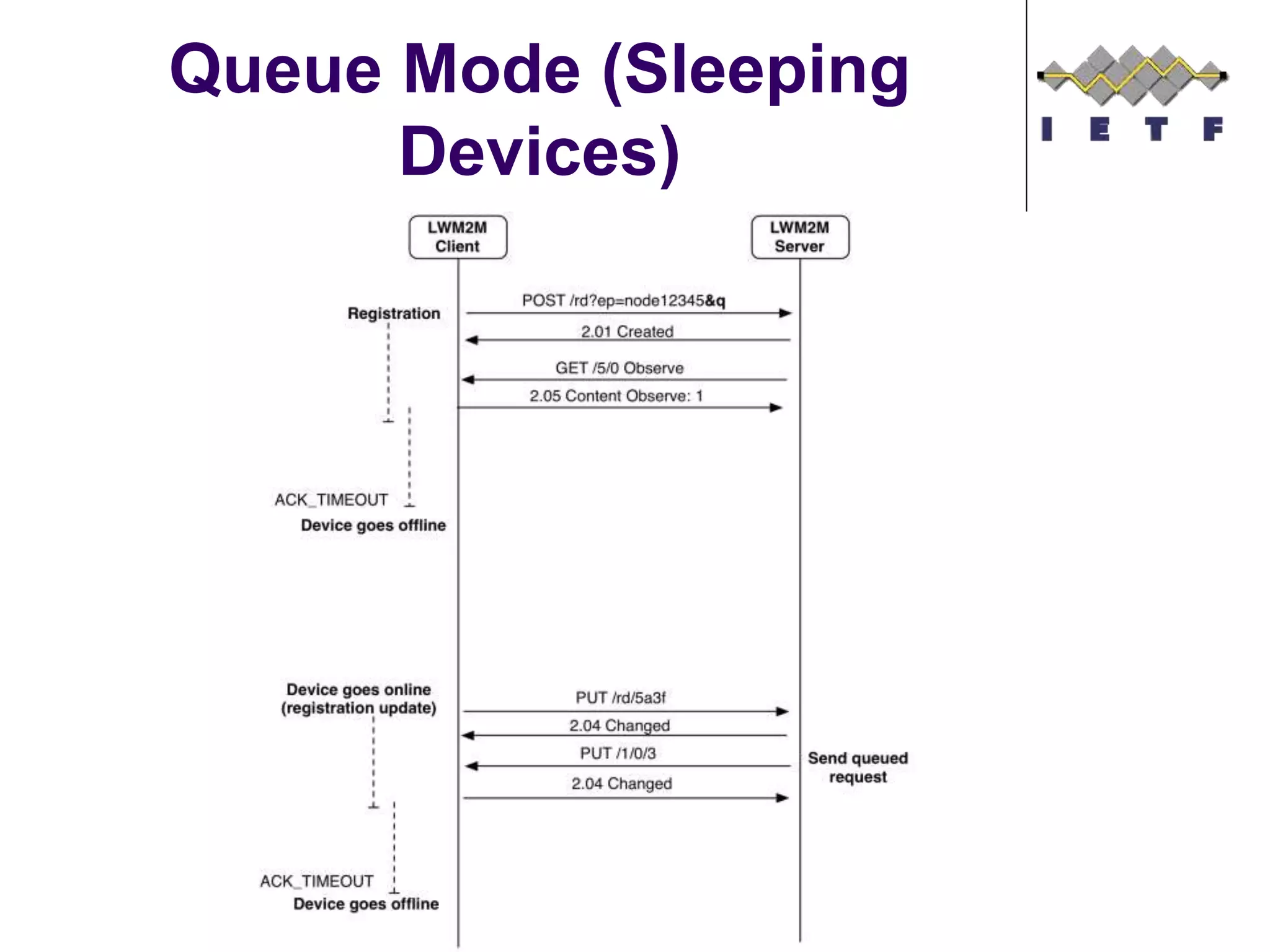
LWM2M Supports Sleeping
Endpoints “b=uq”
 Client uses the
registration
refresh to inform
LWM2M server
that it is awake,
and listens for
any queued
operations
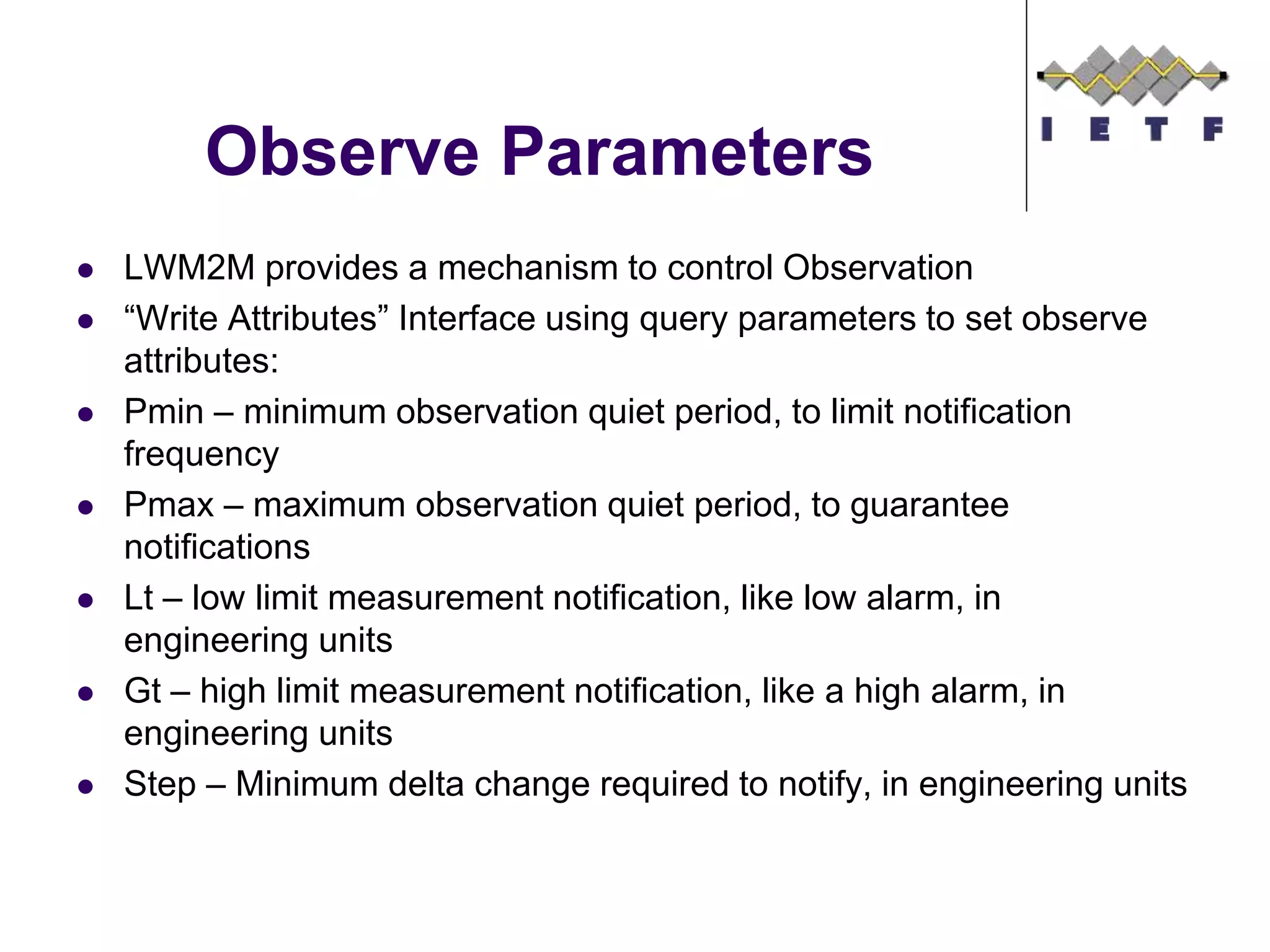
Observe Parameters
 LWM2M provides a mechanism to control Observation
 “Write Attributes” Interface using query parameters to set observe
attributes:
 Pmin – minimum observation quiet period, to limit notification
frequency
 Pmax – maximum observation quiet period, to guarantee
notifications
 Lt – low limit measurement notification, like low alarm, in
engineering units
 Gt – high limit measurement notification, like a high alarm, in
engineering units
 Step – Minimum delta change required to notify, in engineering units
LWM2M Bulk Read
 Returns TLV or
JSON based on
requested
content-format
 CBOR needs to
be added
 Linked Objects
are supported
{“e”:[
{"n":"0","sv":"Open Mobile
Alliance"},
{"n":"1","sv":"Lightweight M2M
Client"},
{"n":"2","sv":"345000123"},
{"n":"3","sv":"1.0"},
{"n":"6/0","v":"1"},
{"n":"6/1","v":"5"},
{"n":"7/0","v":"3800"},
{"n":"7/1","v":"5000"},
{"n":"8/0","v":"125"},
{"n":"8/1","v":"900"},
{"n":"9","v":"100"},
{"n":"10","v":"15"},
{"n":"11/0","v":"0"},
{"n":"13","v":"1367491215"},
{"n":"14","sv":"+02:00"},
{"n":"15","sv":"U"}]
}
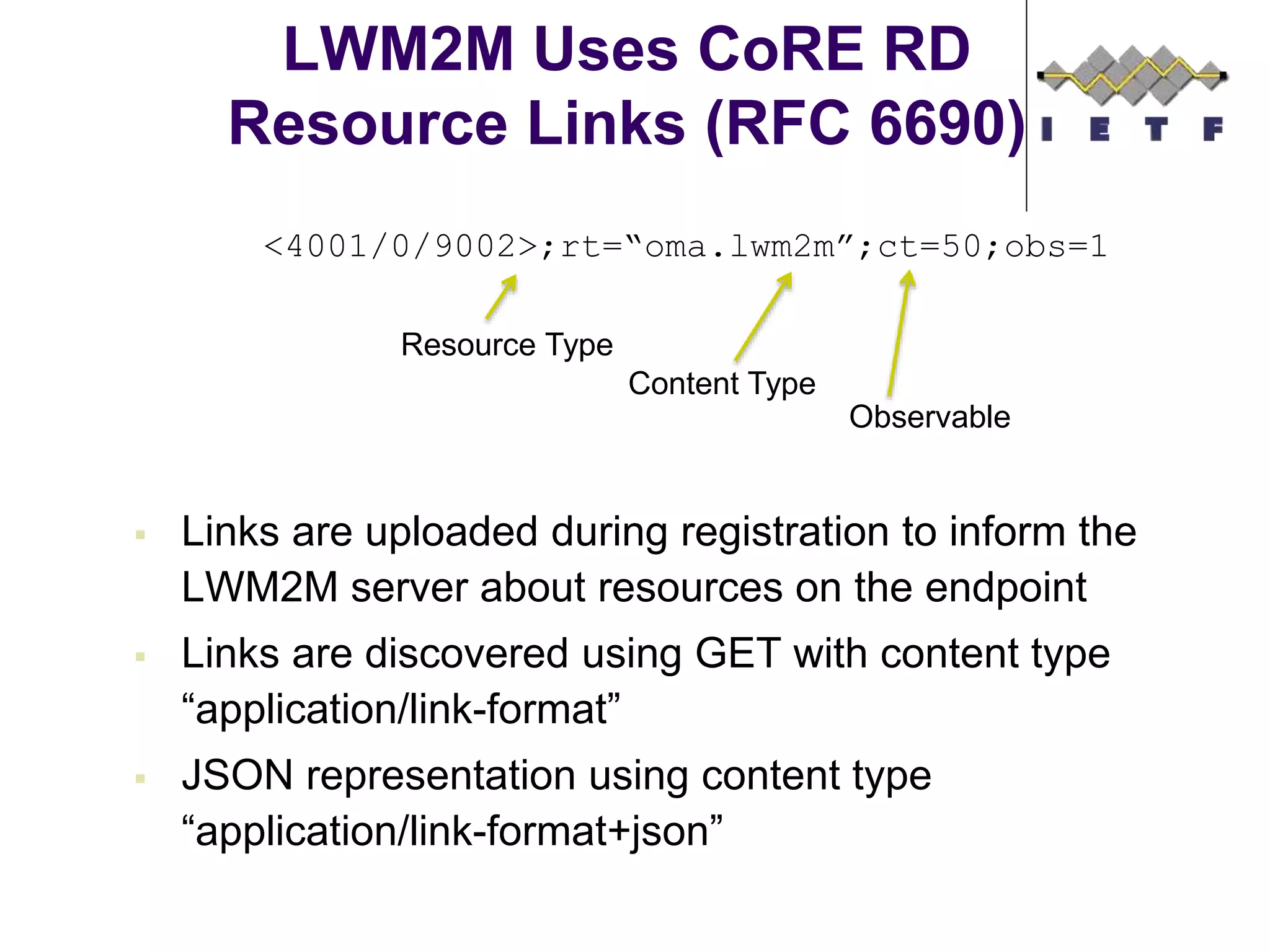
LWM2M Uses CoRE RD
Resource Links (RFC 6690)
 Links are uploaded during registration to inform the
LWM2M server about resources on the endpoint
 Links are discovered using GET with content type
“application/link-format”
 JSON representation using content type
“application/link-format+json”
<4001/0/9002>;rt=“oma.lwm2m”;ct=50;obs=1
Resource Type
Content Type
Observable
Example Flows
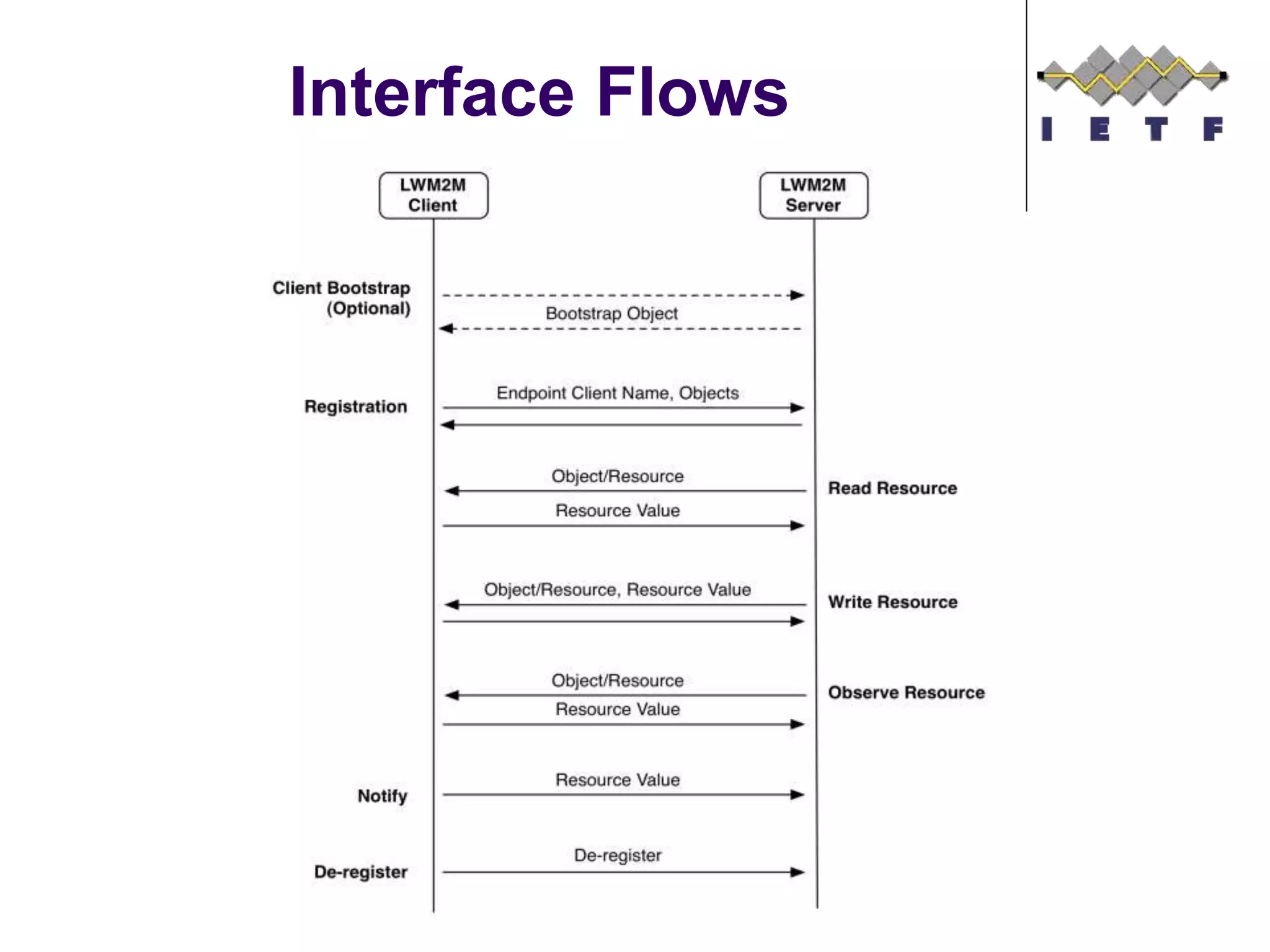
Interface Flows
©Sensinode 2013
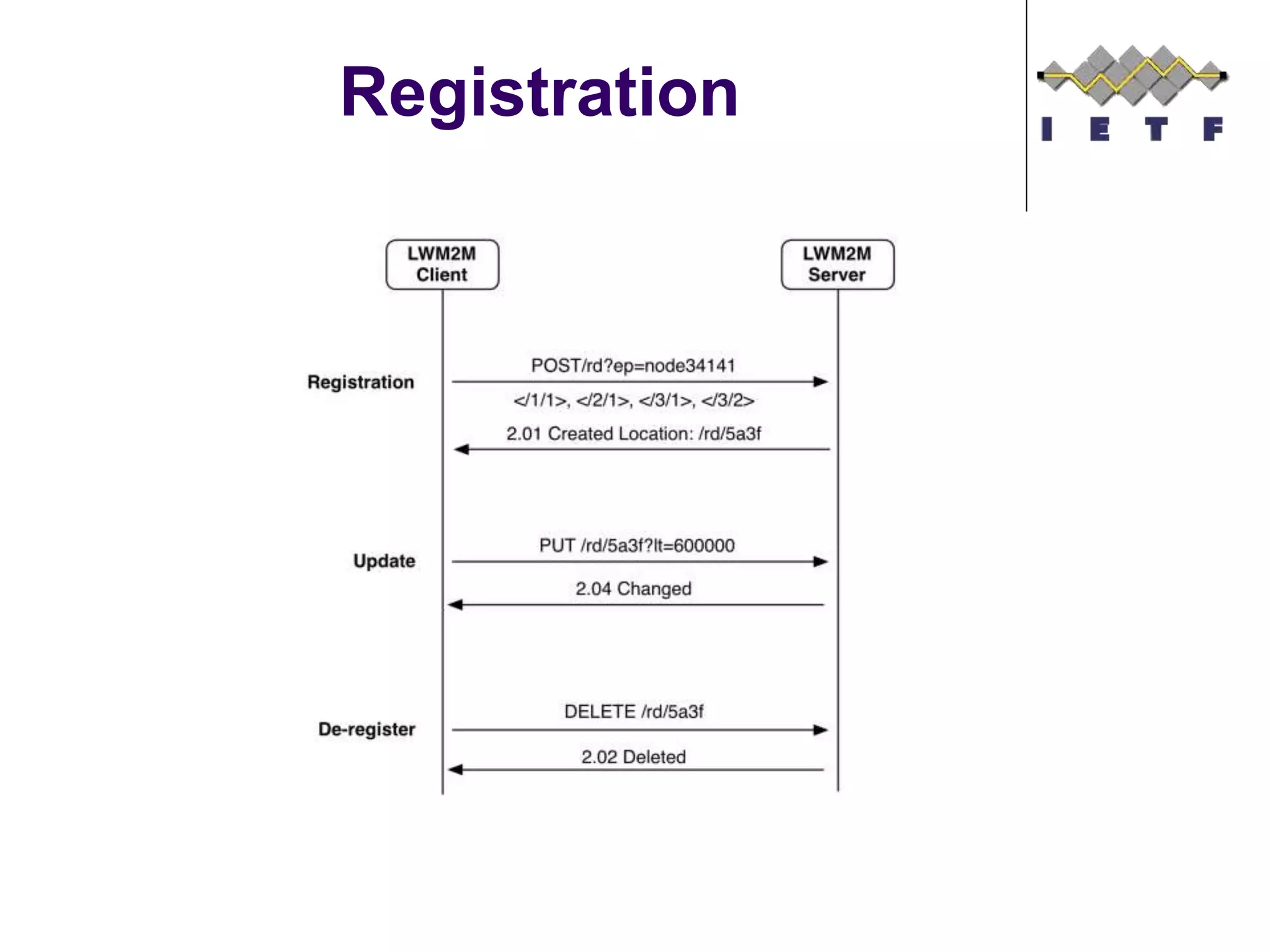
Registration
©Sensinode 2013
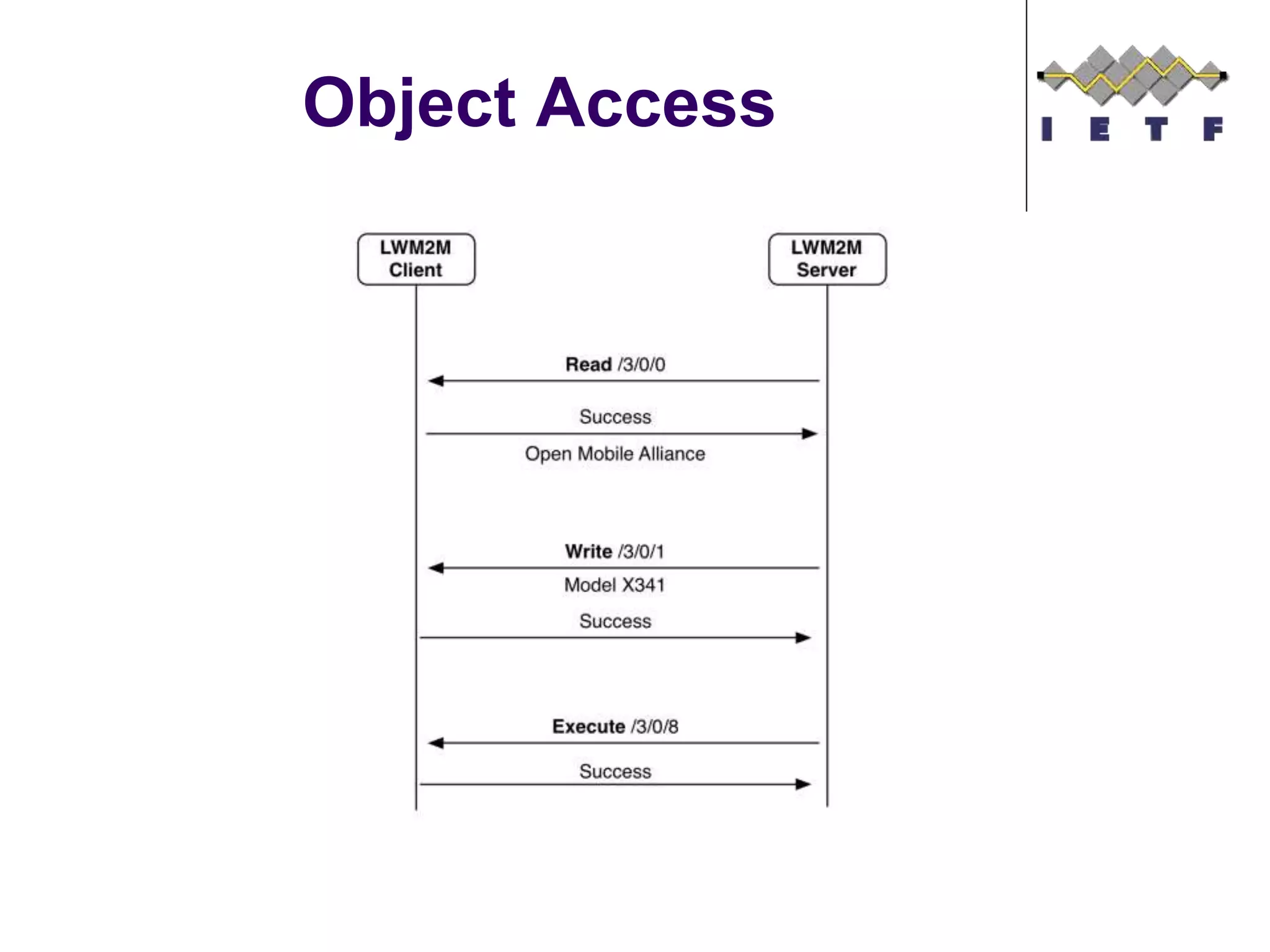
Object Access
©Sensinode 2013
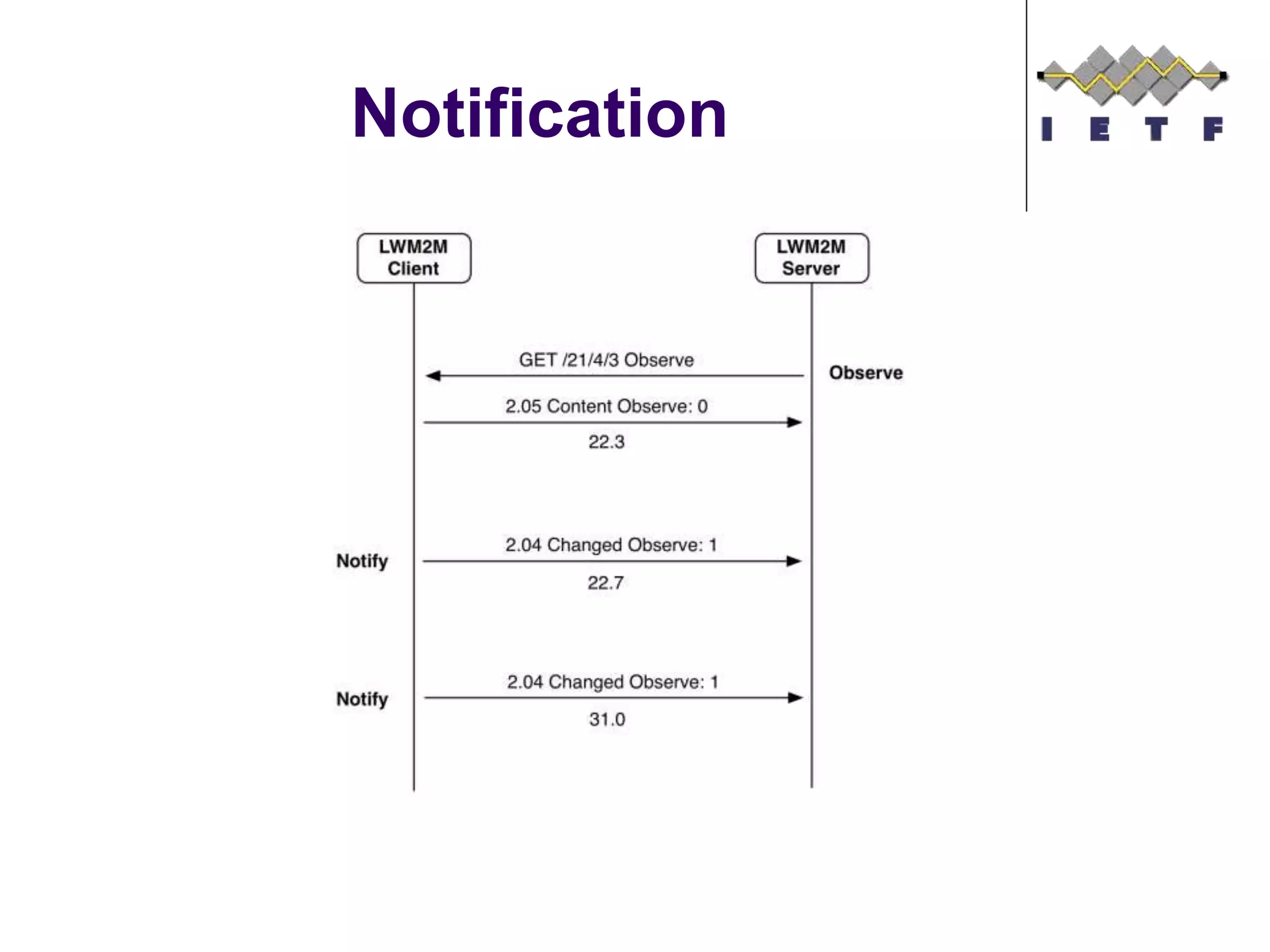
Notification
©Sensinode 2013
Queue Mode (Sleeping
Devices)
©Sensinode 2013
Summary
 LWM2M re-uses many IETF specifications.
Specifications are publically available for download here.
 Implementations and products are available. Example:
Leshan (as an open source implementation)
 Several plugfests took place already and
there the issue list can be found here.
 Work on a bugfix release is in progress and
the Version 1.1 specification work will be
started soon to specification with ongoing IETF work.
40
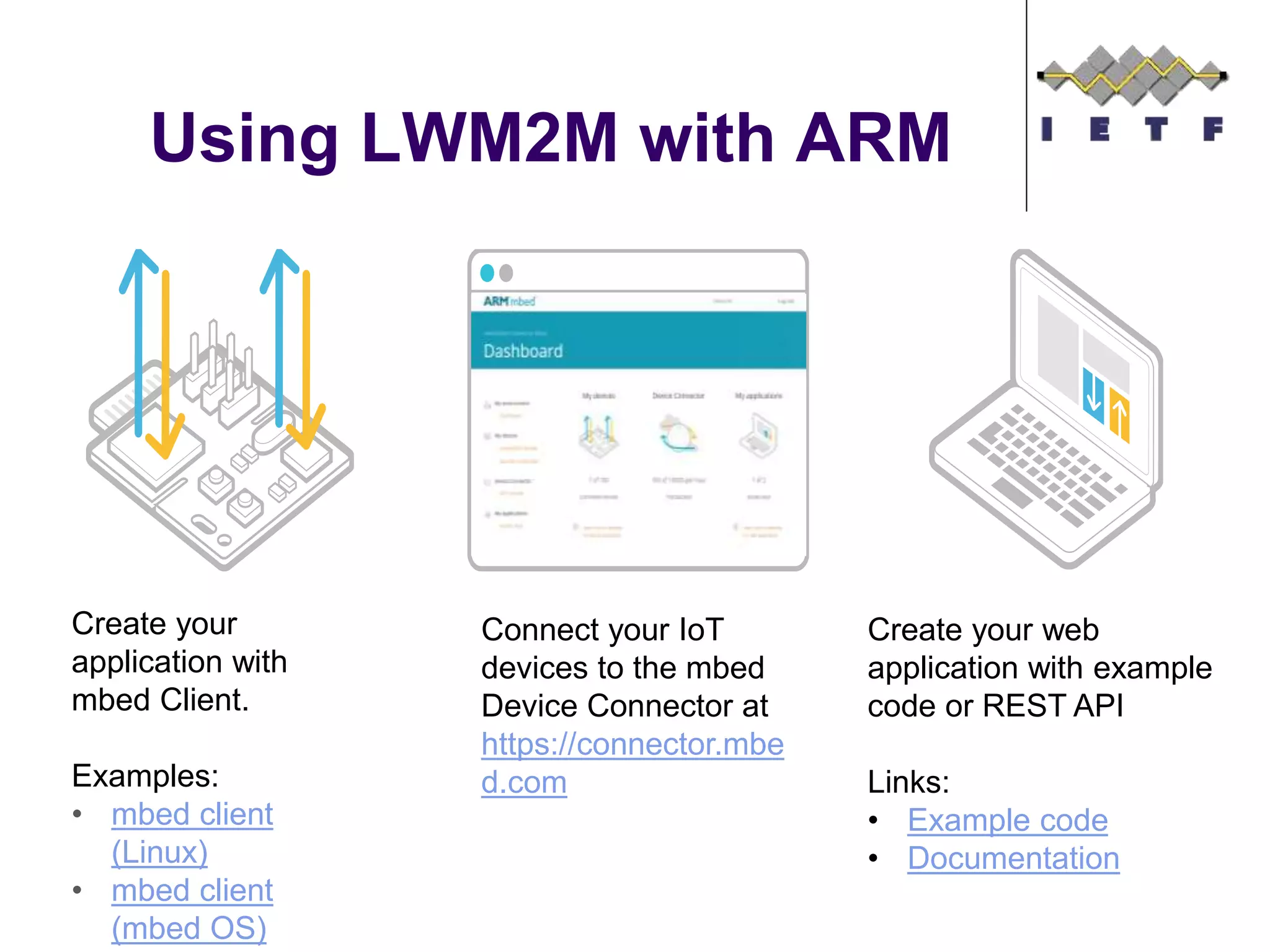
Using LWM2M with ARM
Create your
application with
mbed Client.
Examples:
• mbed client
(Linux)
• mbed client
(mbed OS)
Connect your IoT
devices to the mbed
Device Connector at
https://connector.mbe
d.com
Create your web
application with example
code or REST API
Links:
• Example code
• Documentation

Device Management with OMA Lightweight M2M

  • 1.
    Device Management with OMALightweight M2M Simon Lemay and Hannes Tschofenig
  • 2.
    Overview  Why LightweightDevice Management  OMA Lightweight M2M Standard  Bootstrapping Interface  Object Model  Access Control Model  Application Server Interaction  Example Flows ©Sensinode 2013
  • 3.
  • 4.
     Traditional DeviceManagement (DM) is widely used in mobile devices  Used by operators and enterprises for managing smart phones, tablets and laptops  Some M2M DM use today with cellular devices, mostly proprietary  OMA DM was one of the first standards for device management in the mobile handset sector.  In the meanwhile various standards exist that provide similar functionality, such as TR 69, or IEEE 802.1AR.  OMA Lightweight M2M (LWM2M) created to serve the IoT market with a focus on lightweight nature:  Applicable to various radio technologies (devices just need IP connectivity)  Extensible object model and registry open to the whole industry  Enables both management and application data handling with the same solution  Addresses security need for software updates and device re-configuration.  Re-uses IETF specifications. Why Lightweight Device Management? ©Sensinode 2013
  • 5.
    Features Mobile Device Management Device Management Bootstrap ping Device Configurat ion Firmware Update Fault Managem ent  Keymanagement  Service provisioning  Access Control  Changes to settings  Changes to parameters of the device  Update application and system software  Bug fixes  Report Errors from devices  Query about status of devices Application Configurat ion & Control Reporting  Configure settings of the application  Send control commands  Notify changes in sensor values  Notify alarms and events
  • 6.
    OMA LWM2M Architecture M2M Applications  Application abstraction through REST API  Resource Discovery and Linking  LWM2M Clients are Devices  Device abstraction through CoAP  LWM2M Clients are CoAP Servers  Any IP network connection  LWM2M Server  Reuses IETF technologies, such as the CoAP protocol, DTLS, Resource Directory.  Deployable on gateways and in the cloud UDP SMSDTLS CoAP LWM2M Objects
  • 7.
    LWM2M Interfaces • BootstrapInterface – Configure Servers & Keys & ACLs – Pre-Configured, Smart Card, or Server Initiated Bootstrap – CoAP REST API • Registration Interface – RFC 6690 and Resource Directory • Management Interface Using Objects – Management Objects and Resources – CoAP REST API • Reporting Interface – Object Instances and Resources Report – Asynchronous notification using CoAP Observe
  • 8.
  • 9.
  • 10.
  • 12.
    Bootstrapping Features  OMALWM2M supports different credential provisioning procedures:  Pre-shared Secrets  Raw Public Keys  Certificates  These credentials are provisioned by the Bootstrap Server for use with LWM2M servers.  It is possible to mix credentials for use with different servers and even to use different credentials in a single client/server interaction.  The LWM2M client is assumed to possess credentials for authentication to the Bootstrap Server. These credentials are typically pre-provisioned during manufacturing time.
  • 13.
  • 14.
  • 15.
  • 16.
     LWM2M Clientmay be pre-provisioned with information about the LWM2M Server (rather than distributing credentials with the bootstrapping protocol)  LWM2M Client MUST have a LWM2M Bootstrap Server Account (+Bootstrap Server URI, Endpoint Client Name)  LWM2M Security Object  Security Mode (PSK, raw public key, certificate, no-sec)  Public Key or Identity (certificate, public key, or PSK identity)  Server Public Key or Identity (LWM2M server or bootstrap server certificate, public key or PSK identity)  Secret Key (secret key or private key)  LWM2M Server URI (bootstrap server or LWM2M server)  Bootstrap Server (true – false) A few more details
  • 17.
  • 18.
     A LWM2MClient has one or more Object Instances  An Object is a collection of Resources  A Resource is an atomic piece of information that can be  Read, Written or Executed  Resources can have multiple instances  Access control list (ACL) objects control access to objects accessed by LWM2M Servers  Objects and Resources are identified by a 16-bit Integer, Instances by an 8-bit Integer  Objects/Resources are accessed with simple URIs: /{Object ID}/{Object Instance}/{Resource ID}  Example: /3/0/1 = 3 = Device Object, 0 = Object Instance #0, 1 = Manufacturer Resource Object Model ©Sensinode 2013
  • 19.
     The LWM2MTechnical Specification defines eight normative Objects Standard Device Management Objects ©Sensinode 2013 Object Name ID Multiple Instances? Description LWM2M Security 0 Yes This LWM2M Object provides the keying material of a LWM2M Client appropriate to access a specified LWM2M Server. LWM2M Server 1 Yes This LWM2M objects provides the data related to a LWM2M server. Access Control 2 Yes Access Control Object is used to check whether the LWM2M Server has access right for performing an operation. Device 3 No This LWM2M Object provides a range of device related information which can be queried by the LWM2M Server, and a device reboot and factory reset function. Connectivity Monitoring 4 No This LWM2M objects enables monitoring of parameters related to network connectivity. Firmware 5 No This Object includes installing firmware package, updating firmware, and performing actions after updating firmware. Location 6 No The GPS location of the device. Connectivity Statistics 7 No This LWM2M Objects enables client to collect statistical information and enables the LWM2M Server to retrieve these information, set the collection duration and reset the statistical parameters.
  • 20.
     Example ofthe LWM2M Location Object, which has 6 Resources Object Example ©Sensinode 2013
  • 21.
     Defining anew Object is straightforward  Object IDs are registered with the OMA Naming Authority (OMNA)  Who can register an Object?  OMA working groups  3rd party organizations  Enterprises  How to register an Object?  Write a specification filling out the Object template tables:  Object Name, Description and if it can have Multiple Instances  The list of resources the Object defines  Fill out the Lightweight Object form on-line.  IPSO Alliance has created additional objects, which are documented here (Starter Pack) and here (Expansion Pack). Defining new Objects ©Sensinode 2013
  • 22.
  • 23.
    Overview  Bootstrap serversdistribute access control lists to LWM2M clients.  Example from Appendix F of the OMA LWM2M technical specification: (Table shows example objects provisioned at a LWM2M client by the Bootstrap server.)
  • 24.
    Overview, cont. LWM2M Client LWM2M Server 2 Luminaire LWM2M Client 3 Registrationand resource access Light Switc h ACL: <Server 1, RW> LWM2M Server 1 Registration and resource access LWM2M Bootstrap Server Application ACL: <Server 2, RW>
  • 25.
    Discussion  ACLs workwell when a Bootstrap Server is aware of the future interactions between LWM2M servers and LWM2M clients.  Real-time provisioning of ACLs by the Bootstrap Server is also possible.  During registration a LWM2M client is a CoAP client; afterwards it becomes a CoAP server waiting for incoming CoAP requests.  Notes:  LWM2M clients can become LWM2M servers in another communication setup and may therefore also receive ACLs from the Bootstrap Server. In our example light switches and luminaires are LWM2M clients in different communication scenarios.  Different LWM2M clients may also use different Bootstrap Servers.  A single LWM2M client may also have more than one Bootstrap Server (e.g., for redundancy/ purpose)
  • 26.
  • 27.
    LWM2M Application Server Web ServerApp LWM2M Server Soft Endpoints IP Device IP Device LWM2M Clients /3303/0/5700 /domain/endpoints/3303/0/5700
  • 28.
    LWM2M Application Server Web ServerApp LWM2M Server IP Device IP Device LWM2M Clients /domain/endpoints/3303/0/5700 /3303/0/5700
  • 29.
    LWM2M Application Server Web ServerApp LWM2M Server IP Device IP Device LWM2M Clients
  • 30.
    LWM2M Supports Sleeping Endpoints“b=uq”  Client uses the registration refresh to inform LWM2M server that it is awake, and listens for any queued operations
  • 31.
    Observe Parameters  LWM2Mprovides a mechanism to control Observation  “Write Attributes” Interface using query parameters to set observe attributes:  Pmin – minimum observation quiet period, to limit notification frequency  Pmax – maximum observation quiet period, to guarantee notifications  Lt – low limit measurement notification, like low alarm, in engineering units  Gt – high limit measurement notification, like a high alarm, in engineering units  Step – Minimum delta change required to notify, in engineering units
  • 32.
    LWM2M Bulk Read Returns TLV or JSON based on requested content-format  CBOR needs to be added  Linked Objects are supported {“e”:[ {"n":"0","sv":"Open Mobile Alliance"}, {"n":"1","sv":"Lightweight M2M Client"}, {"n":"2","sv":"345000123"}, {"n":"3","sv":"1.0"}, {"n":"6/0","v":"1"}, {"n":"6/1","v":"5"}, {"n":"7/0","v":"3800"}, {"n":"7/1","v":"5000"}, {"n":"8/0","v":"125"}, {"n":"8/1","v":"900"}, {"n":"9","v":"100"}, {"n":"10","v":"15"}, {"n":"11/0","v":"0"}, {"n":"13","v":"1367491215"}, {"n":"14","sv":"+02:00"}, {"n":"15","sv":"U"}] }
  • 33.
    LWM2M Uses CoRERD Resource Links (RFC 6690)  Links are uploaded during registration to inform the LWM2M server about resources on the endpoint  Links are discovered using GET with content type “application/link-format”  JSON representation using content type “application/link-format+json” <4001/0/9002>;rt=“oma.lwm2m”;ct=50;obs=1 Resource Type Content Type Observable
  • 34.
  • 35.
  • 36.
  • 37.
  • 38.
  • 39.
  • 40.
    Summary  LWM2M re-usesmany IETF specifications. Specifications are publically available for download here.  Implementations and products are available. Example: Leshan (as an open source implementation)  Several plugfests took place already and there the issue list can be found here.  Work on a bugfix release is in progress and the Version 1.1 specification work will be started soon to specification with ongoing IETF work. 40
  • 41.
    Using LWM2M withARM Create your application with mbed Client. Examples: • mbed client (Linux) • mbed client (mbed OS) Connect your IoT devices to the mbed Device Connector at https://connector.mbe d.com Create your web application with example code or REST API Links: • Example code • Documentation