Developing SharePoint Solutions
with the Microsoft Graph
Fernando Leitzelar, PMP
Vice President ITSM
EVALS / PRIZES
Bring all items to the 6th Info Desk
• Bingo Cards = how you win prizes at the
end of the event.
• The cards must be stamped by ALL the
Sponsors by the last session (4pm)
• Fill out speakers evaluations (located in
the front of the rooms
• Fill out the event evaluations
27 in Curved Samsung
Lenovo IdeaPad
Name your game bundle
THANK YOU
EVENT SPONSORS
We appreciated you supporting the
New York SharePoint Community!
• Diamond, Platinum, Gold, & Silver have
tables scattered throughout
• Please visit them and inquire about their
products & services
• To be eligible for prizes make sure to get
your bingo card stamped by ALL sponsors
• Raffle at the end of the day and you must
be present to win!
Beer Authority
300 W 40h St
[across the street]
Join us for a round of drinks & some
appetizers
http://www.beerauthoritynyc.com
Speaker
Fernando Leitzelar, PMP
Vice President ITSM
Fernando Leitzelar is a senior SharePoint Evangelist and Vice-president with a Large Bank As a
consultant he regularly interfaced with clients and development teams to design SharePoint-based
solutions. Fernando has progressively held SharePoint positions ranging from developer and
administrator to Architect and Manager. He has been a SharePoint Saturday Speaker since 2010,
having worked extensively on designing and architecting sophisticated SharePoint based applications.
He maintains expertise in Office 365, Azure, SharePoint 2016/2013/2010/2007/2003, BI and IOT
Solutions.
Twitter: @fleitzelar
Blog: http://sharepointusa.wordpress.com
•What is it ?
•What can I use it for ?
•How can I use it ?
Introduction to MS
Graph
•Attendance System using Raspberry Pi, Graph and SharePoint
IOT, Graph and
SharePoint
•MS Graph and SharePoint for Both on-premise and the cloud
•MS Graph SDKCloud and on-premise
•One endpoint to rule them all
•ReactJS Webparts and MS GraphSharePoint and Graph
Agenda
Single API for:
1.Accessing data
/me, /users, /groups, /messages, /drive, ….
2.Traversing data
/drive/items/<id>/lastmodifiedByUser
3.Accessing insights
/insights/trending
4.Work/School and
Personal
WHAT IS MICROSOFT GRAPH?
https://graph.microsoft.com/
Many different APIs to access data
Separate auth stacks for work and personal
STATE OF THE WORLD BEFORE MICROSOFT GRAPH
Work and school Personal
TODAY’S WORLD WITH MICROSOFT GRAPH
Microsoft Graph
(https://graph.microsoft.com/)
Work and school Personal
…
MICROSOFT GRAPH IN THE SHAREPOINT SYSTEM
SharePoint
OneDrive
For Business
Pages Team Sites NewsList and Libraries
CSOMREST
SharePoint Apps
Authentication with Azure Active Directory
OAuth 2.0 Implicit Flow
Authentication with Azure Active Directory
OAuth 2.0 Authorization Code Grant
USAGE SCENARIOS
`/drive` entity
Best for files-focused applications
Common interface for files across SharePoint and OneDrive
`/list` entity
Best for SharePoint-focused apps
Common interface for all SharePoint entities
Access to custom columns, data types, and other SharePoint
concepts
Document libraries in SharePoint can be used either way
Badge Scanner app
Python app running on Raspberry Pi 3
RFID badge scanner
Records data to an Entry Log list
Uses Microsoft Graph API to update SharePoint lists
IOT, GRAPH AND SHAREPOINT
COMPONENTS
CardScanner.py
SharePoint
Service
Microsoft
Graph
Microsoft
Graph
A badge is scanned to the CardScanner.py IoT
application
The application creates a new entry in the list using
Microsoft Graph APIs
1
2
3
js
MSGRAPH ON-PREMISE
Step 1: User provides email address
No need to provide app with user credentials.
Step 2: App calls Microsoft Graph
Microsoft Graph checks if user is in cloud or on-premises.
User signs in, grants consent and app gets a token.
App connects to mailbox with easy-to-use REST APIs!
Granular permission(s)
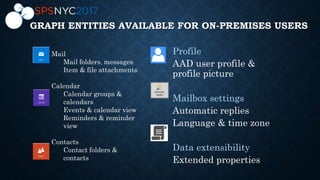
GRAPH ENTITIES AVAILABLE FOR ON-PREMISES USERS
Mail
Mail folders, messages
Item & file attachments
Calendar
Calendar groups &
calendars
Events & calendar view
Reminders & reminder
view
Contacts
Contact folders &
contacts
MSGRAPH ON-PREMISE DEMO
Cloud-only & cloud-first capabilities
Some Microsoft Graph capabilities are cloud-only or cloud-first
User distribution across cloud & on-premises.
Direct users to organization-configurable support channels.
Same API version ≠ same features
New entities, actions & nullable properties
GET response may include new properties that your app or service doesn’t recognize
Release cadence
Exchange Online upgraded multiple times a month
Exchange 2016 CU shipped quarterly
Key Features
Simple: Use Microsoft Graph + OAuth 2.0 to reach online & on-premises users!
Secure: Industry standard OAuth 2 flow that respects customer’s auth policies.
Easier: REST APIs that are easy to build apps on your chosen platform
SET UP OFFICE 365 DEV
• Node.js - https://nodejs.org/en/
• Visual Studio Code - https://code.visualstudio.com/
• Install Yeoman and Gulp - npm install -g yo gulp
• SharePoint Tools - npm install -g @microsoft/generator-sharepoint
• Yo @microsoft/sharepoint
• Gulp trust-dev-cert
• Gulp Serve
• Gulp package-solution
• SPFx Samples - https://github.com/SharePoint/sp-dev-fx-webparts/tree/master/samples
ONE ENDPOINT TO RULE THEM ALL DEMO
https://graph.microsoft.com
Operation Service endpoint
GET my profile https://graph.microsoft.com/v1.0/me
GET my files https://graph.microsoft.com/v1.0/me/drive/root/children
GET my photo https://graph.microsoft.com/v1.0/me/photo/$value
GET my mail https://graph.microsoft.com/v1.0/me/messages
GET my calendar https://graph.microsoft.com/v1.0/me/calendar
GET my manager https://graph.microsoft.com/v1.0/me/manager
GET last user to modify file foo.txt https://graph.microsoft.com/v1.0/me/drive/root/children/foo.txt/lastModifiedByUser
GET users in my organization https://graph.microsoft.com/v1.0/users
GET group conversations https://graph.microsoft.com/v1.0/groups/<id>/conversations
GET people related to me https://graph.microsoft.com/beta/me/people
GET my tasks https://graph.microsoft.com/beta/me/tasks
GET my notes https://graph.microsoft.com/beta/me/notes/notebooks
GET files trending around me https://graph.microsoft.com/beta/me/insights/trending
ONE ENDPOINT TO RULE THEM ALL DEMO
https://graph.microsoft.com
Operation Service endpoint
GET my Lists https://graph.microsoft.com/beta/sites/root/lists
GET my List Items https://graph.microsoft.com/beta/sites/root/lists/{ListGUID}/items
GET my List Items with Fields
https://graph.microsoft.com/beta/sites/root/lists/{ListGUID}/items/?$select=id,fields&$expa
nd=fields
GET a single list item with Fields
https://graph.microsoft.com/beta/sites/root/lists/{ListGUID}/items/{itemid}?$s
elect=id,fields&$expand=fields
POST create an empty item on my
List
https://graph.microsoft.com/beta/sites/root/lists/{ListGUID}/items
PATCH update an existing item on
my List
https://graph.microsoft.com/beta/sites/root/lists/{ListGUID}/items/{itemid}/fields
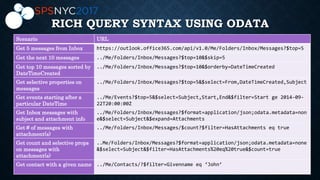
RICH QUERY SYNTAX USING ODATA
Scenario URL
Get 5 messages from Inbox https://outlook.office365.com/api/v1.0/Me/Folders/Inbox/Messages?$top=5
Get the next 10 messages ../Me/Folders/Inbox/Messages?$top=10&$skip=5
Get top 10 messages sorted by
DateTimeCreated
../Me/Folders/Inbox/Messages?$top=10&$orderby=DateTimeCreated
Get selective properties on
messages
../Me/Folders/Inbox/Messages?$top=5&$select=From,DateTimeCreated,Subject
Get events starting after a
particular DateTime
../Me/Events?$top=5&$select=Subject,Start,End&$filter=Start ge 2014-09-
22T20:00:00Z
Get Inbox messages with
subject and attachment info
../Me/Folders/Inbox/Messages?$format=application/json;odata.metadata=non
e&$select=Subject&$expand=Attachments
Get # of messages with
attachment(s)
../Me/Folders/Inbox/Messages/$count?$filter=HasAttachments eq true
Get count and selective props
on messages with
attachment(s)
..Me/Folders/Inbox/Messages?$format=application/json;odata.metadata=none
&$select=Subject&$filter=HasAttachments%20eq%20true&$count=true
Get contact with a given name ../Me/Contacts/?$filter=Givenname eq ‘John’
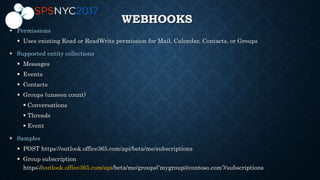
WEBHOOKS

 Uses existing Read or ReadWrite permission for Mail, Calendar, Contacts, or Groups

 Messages
 Events
 Contacts
 Groups (unseen count)
 Conversations
 Threads
 Event

 POST https://outlook.office365.com/api/beta/me/subscriptions
 Group subscription
https://outlook.office365.com/api/beta/me/groups(‘mygroup@contoso.com’)/subscriptions
/V1.0 CAPABILITIES
Users
Data Extensions
OneDrive
Excel
Outlook Mail
Outlook Calendar
Personal Contact
Groups
Directory
WebHooks
Target the /v1.0 branch
Decoupled for easy authentication integration
Active Directory Authentication Library (ADAL)
Microsoft Authentication Library (MSAL)
…
Available on multiple platforms
UWP, iOS, Android and ASP.NET MVC
More coming soon…
Consistent primitives
MICROSOFT GRAPH SDK
https://graph.microsoft.io
https://github.com/sharepoint
https://github.com/onedrive
https://officespdev.uservoice.com
https://github.com/MicrosoftGraph
ADDITIONAL RESOURCES
Developing share point solutions with the microsoft graph

Developing share point solutions with the microsoft graph

  • 1.
    Developing SharePoint Solutions withthe Microsoft Graph Fernando Leitzelar, PMP Vice President ITSM
  • 2.
    EVALS / PRIZES Bringall items to the 6th Info Desk • Bingo Cards = how you win prizes at the end of the event. • The cards must be stamped by ALL the Sponsors by the last session (4pm) • Fill out speakers evaluations (located in the front of the rooms • Fill out the event evaluations 27 in Curved Samsung Lenovo IdeaPad Name your game bundle
  • 3.
    THANK YOU EVENT SPONSORS Weappreciated you supporting the New York SharePoint Community! • Diamond, Platinum, Gold, & Silver have tables scattered throughout • Please visit them and inquire about their products & services • To be eligible for prizes make sure to get your bingo card stamped by ALL sponsors • Raffle at the end of the day and you must be present to win!
  • 4.
    Beer Authority 300 W40h St [across the street] Join us for a round of drinks & some appetizers http://www.beerauthoritynyc.com
  • 5.
    Speaker Fernando Leitzelar, PMP VicePresident ITSM Fernando Leitzelar is a senior SharePoint Evangelist and Vice-president with a Large Bank As a consultant he regularly interfaced with clients and development teams to design SharePoint-based solutions. Fernando has progressively held SharePoint positions ranging from developer and administrator to Architect and Manager. He has been a SharePoint Saturday Speaker since 2010, having worked extensively on designing and architecting sophisticated SharePoint based applications. He maintains expertise in Office 365, Azure, SharePoint 2016/2013/2010/2007/2003, BI and IOT Solutions. Twitter: @fleitzelar Blog: http://sharepointusa.wordpress.com
  • 6.
    •What is it? •What can I use it for ? •How can I use it ? Introduction to MS Graph •Attendance System using Raspberry Pi, Graph and SharePoint IOT, Graph and SharePoint •MS Graph and SharePoint for Both on-premise and the cloud •MS Graph SDKCloud and on-premise •One endpoint to rule them all •ReactJS Webparts and MS GraphSharePoint and Graph Agenda
  • 7.
    Single API for: 1.Accessingdata /me, /users, /groups, /messages, /drive, …. 2.Traversing data /drive/items/<id>/lastmodifiedByUser 3.Accessing insights /insights/trending 4.Work/School and Personal WHAT IS MICROSOFT GRAPH? https://graph.microsoft.com/
  • 8.
    Many different APIsto access data Separate auth stacks for work and personal STATE OF THE WORLD BEFORE MICROSOFT GRAPH Work and school Personal
  • 9.
    TODAY’S WORLD WITHMICROSOFT GRAPH Microsoft Graph (https://graph.microsoft.com/) Work and school Personal …
  • 10.
    MICROSOFT GRAPH INTHE SHAREPOINT SYSTEM SharePoint OneDrive For Business Pages Team Sites NewsList and Libraries CSOMREST SharePoint Apps
  • 11.
    Authentication with AzureActive Directory OAuth 2.0 Implicit Flow
  • 12.
    Authentication with AzureActive Directory OAuth 2.0 Authorization Code Grant
  • 13.
    USAGE SCENARIOS `/drive` entity Bestfor files-focused applications Common interface for files across SharePoint and OneDrive `/list` entity Best for SharePoint-focused apps Common interface for all SharePoint entities Access to custom columns, data types, and other SharePoint concepts Document libraries in SharePoint can be used either way
  • 14.
    Badge Scanner app Pythonapp running on Raspberry Pi 3 RFID badge scanner Records data to an Entry Log list Uses Microsoft Graph API to update SharePoint lists IOT, GRAPH AND SHAREPOINT
  • 15.
    COMPONENTS CardScanner.py SharePoint Service Microsoft Graph Microsoft Graph A badge isscanned to the CardScanner.py IoT application The application creates a new entry in the list using Microsoft Graph APIs 1 2 3 js
  • 16.
    MSGRAPH ON-PREMISE Step 1:User provides email address No need to provide app with user credentials. Step 2: App calls Microsoft Graph Microsoft Graph checks if user is in cloud or on-premises. User signs in, grants consent and app gets a token. App connects to mailbox with easy-to-use REST APIs! Granular permission(s)
  • 17.
    GRAPH ENTITIES AVAILABLEFOR ON-PREMISES USERS Mail Mail folders, messages Item & file attachments Calendar Calendar groups & calendars Events & calendar view Reminders & reminder view Contacts Contact folders & contacts
  • 18.
    MSGRAPH ON-PREMISE DEMO Cloud-only& cloud-first capabilities Some Microsoft Graph capabilities are cloud-only or cloud-first User distribution across cloud & on-premises. Direct users to organization-configurable support channels. Same API version ≠ same features New entities, actions & nullable properties GET response may include new properties that your app or service doesn’t recognize Release cadence Exchange Online upgraded multiple times a month Exchange 2016 CU shipped quarterly Key Features Simple: Use Microsoft Graph + OAuth 2.0 to reach online & on-premises users! Secure: Industry standard OAuth 2 flow that respects customer’s auth policies. Easier: REST APIs that are easy to build apps on your chosen platform
  • 19.
    SET UP OFFICE365 DEV • Node.js - https://nodejs.org/en/ • Visual Studio Code - https://code.visualstudio.com/ • Install Yeoman and Gulp - npm install -g yo gulp • SharePoint Tools - npm install -g @microsoft/generator-sharepoint • Yo @microsoft/sharepoint • Gulp trust-dev-cert • Gulp Serve • Gulp package-solution • SPFx Samples - https://github.com/SharePoint/sp-dev-fx-webparts/tree/master/samples
  • 20.
    ONE ENDPOINT TORULE THEM ALL DEMO https://graph.microsoft.com Operation Service endpoint GET my profile https://graph.microsoft.com/v1.0/me GET my files https://graph.microsoft.com/v1.0/me/drive/root/children GET my photo https://graph.microsoft.com/v1.0/me/photo/$value GET my mail https://graph.microsoft.com/v1.0/me/messages GET my calendar https://graph.microsoft.com/v1.0/me/calendar GET my manager https://graph.microsoft.com/v1.0/me/manager GET last user to modify file foo.txt https://graph.microsoft.com/v1.0/me/drive/root/children/foo.txt/lastModifiedByUser GET users in my organization https://graph.microsoft.com/v1.0/users GET group conversations https://graph.microsoft.com/v1.0/groups/<id>/conversations GET people related to me https://graph.microsoft.com/beta/me/people GET my tasks https://graph.microsoft.com/beta/me/tasks GET my notes https://graph.microsoft.com/beta/me/notes/notebooks GET files trending around me https://graph.microsoft.com/beta/me/insights/trending
  • 21.
    ONE ENDPOINT TORULE THEM ALL DEMO https://graph.microsoft.com Operation Service endpoint GET my Lists https://graph.microsoft.com/beta/sites/root/lists GET my List Items https://graph.microsoft.com/beta/sites/root/lists/{ListGUID}/items GET my List Items with Fields https://graph.microsoft.com/beta/sites/root/lists/{ListGUID}/items/?$select=id,fields&$expa nd=fields GET a single list item with Fields https://graph.microsoft.com/beta/sites/root/lists/{ListGUID}/items/{itemid}?$s elect=id,fields&$expand=fields POST create an empty item on my List https://graph.microsoft.com/beta/sites/root/lists/{ListGUID}/items PATCH update an existing item on my List https://graph.microsoft.com/beta/sites/root/lists/{ListGUID}/items/{itemid}/fields
  • 22.
    RICH QUERY SYNTAXUSING ODATA Scenario URL Get 5 messages from Inbox https://outlook.office365.com/api/v1.0/Me/Folders/Inbox/Messages?$top=5 Get the next 10 messages ../Me/Folders/Inbox/Messages?$top=10&$skip=5 Get top 10 messages sorted by DateTimeCreated ../Me/Folders/Inbox/Messages?$top=10&$orderby=DateTimeCreated Get selective properties on messages ../Me/Folders/Inbox/Messages?$top=5&$select=From,DateTimeCreated,Subject Get events starting after a particular DateTime ../Me/Events?$top=5&$select=Subject,Start,End&$filter=Start ge 2014-09- 22T20:00:00Z Get Inbox messages with subject and attachment info ../Me/Folders/Inbox/Messages?$format=application/json;odata.metadata=non e&$select=Subject&$expand=Attachments Get # of messages with attachment(s) ../Me/Folders/Inbox/Messages/$count?$filter=HasAttachments eq true Get count and selective props on messages with attachment(s) ..Me/Folders/Inbox/Messages?$format=application/json;odata.metadata=none &$select=Subject&$filter=HasAttachments%20eq%20true&$count=true Get contact with a given name ../Me/Contacts/?$filter=Givenname eq ‘John’
  • 23.
    WEBHOOKS   Uses existingRead or ReadWrite permission for Mail, Calendar, Contacts, or Groups   Messages  Events  Contacts  Groups (unseen count)  Conversations  Threads  Event   POST https://outlook.office365.com/api/beta/me/subscriptions  Group subscription https://outlook.office365.com/api/beta/me/groups(‘mygroup@contoso.com’)/subscriptions
  • 24.
    /V1.0 CAPABILITIES Users Data Extensions OneDrive Excel OutlookMail Outlook Calendar Personal Contact Groups Directory WebHooks
  • 25.
    Target the /v1.0branch Decoupled for easy authentication integration Active Directory Authentication Library (ADAL) Microsoft Authentication Library (MSAL) … Available on multiple platforms UWP, iOS, Android and ASP.NET MVC More coming soon… Consistent primitives MICROSOFT GRAPH SDK
  • 26.