Home Automation with my
Rasberry Pi
(FHEM,Z-Wave,Enocean, Zigbee, Wlan)
Developer Camp 2018, Dipl. Inf. Thilo Röhl
Motivation
• Everyone has a smartphone, no one knows how to create things or
develop software
• First Generation of Apple being garage builders
• Smartphone and tablets create a out of the box
• No expertise with making things, creating things
• Even computer science students tend to have virtual expierience
The Rasberry Pi
• Invented for School people to educate programming
• Project founded in UK
• Roughly sold 5 Millions (2013)
• Production in UK – moved back from China
• Non Profit Organisation
• Open Design
• Low Power, about 12 € for a whole year
Operation System
• Linux
• Open Source
• Invented by Linus Torvalds et al
FabLabs
• Open laboratories to fix things
• People want to understand how things work rather than buying new
things
• The makers build their own systems
• Connection and building own things
• Open space, non profit
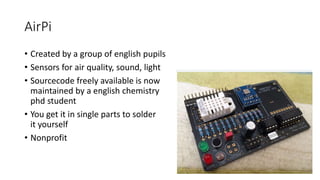
AirPi
• Created by a group of english pupils
• Sensors for air quality, sound, light
• Sourcecode freely available is now
maintained by a english chemistry
phd student
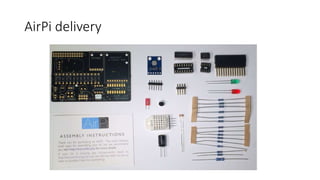
• You get it in single parts to solder
it yourself
• Nonprofit
AirPi delivery
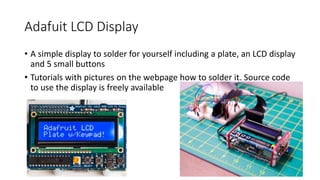
Adafuit LCD Display
• A simple display to solder for yourself including a plate, an LCD display
and 5 small buttons
• Tutorials with pictures on the webpage how to solder it. Source code
to use the display is freely available
Ardafruit LCD Template Delivery
FHEM
• Created by Rudolf König / Germany in 2005
• Perl script to be used for home automation, GPL open source
• Module based system, module maintained by anyone active on the
forum
• Very active community
• Independent of cloud or networks
Sensors, Events, Actors
• FHEM connects Sensors with different modules creating inside events
using triggers to start actors
• Any Sensor can be freely connected to any Actor
• The perl language allows regular expressions and powerful
combinations
• Local scripts can be executed or web services called
• FHEM instances can be connected to allow a distributed model
• It is possible to connect devices over many different wired or wireless
protocols e.g. KNX, EIB, Homematic, GPIO of the rasberry pi
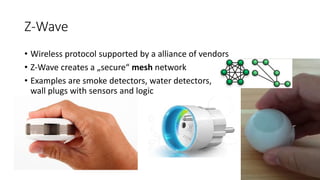
Z-Wave
• Wireless protocol supported by a alliance of vendors
• Z-Wave creates a „secure“ mesh network
• Examples are smoke detectors, water detectors,
wall plugs with sensors and logic
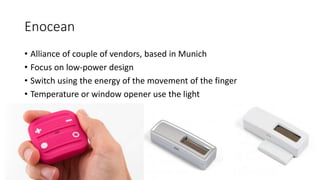
Enocean
• Alliance of couple of vendors, based in Munich
• Focus on low-power design
• Switch using the energy of the movement of the finger
• Temperature or window opener use the light
Bluetooth LE
• New devices in the market, mainly
for smart phone connections can be
interconnected with FHEM
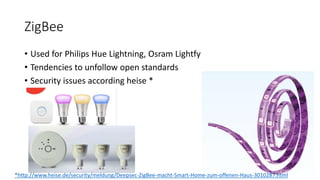
ZigBee
• Used for Philips Hue Lightning, Osram Lightfy
• Tendencies to unfollow open standards
• Security issues according heise *
*http://www.heise.de/security/meldung/Deepsec-ZigBee-macht-Smart-Home-zum-offenen-Haus-3010287.html
Wlan
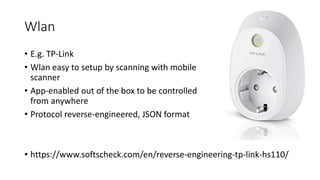
• E.g. TP-Link
• Wlan easy to setup by scanning with mobile
scanner
• App-enabled out of the box to be controlled
from anywhere
• Protocol reverse-engineered, JSON format
• https://www.softscheck.com/en/reverse-engineering-tp-link-hs110/
If you cannot decide…
• Chose an open system !
• FHEM is able to integrate them all
• Consider Home Automation as a journey. Step by step integration,
avoid buying island solutions
Base Setup of Rasberry Pi
• Basis setup of pi
• sudo apt-get update
• sudo apt-get upgrade
• sudo raspi-config
• to expand file-system and to setup localisation/keyboard
• date –s „03/08/2016 12:30“
• to setup time. The pi has no clock – use ntp if possible
• In some cases, a kernel update using „sudo rpi-update“ might be necessary. I
had to turn of the device tree using raspi-config to get some device back
working. Do only do this if really necessary 
Base setup of FHEM
• http://www.fhemwiki.de/wiki/Raspberry_Pi
• wget http://fhem.de/fhem-5.7.deb
• sudo dpkg -i fhem-X.Y.deb
• Start browser to access local system 127.0.0.1:8083
• Access is possible over smartphone, table and with VPN even remote
First update
• FHEM does not support a proxy for updating
• Put update in the command line
• Current perl modules will be download
• „update“ in the browser window
• „shutdown restart“
• „backup“
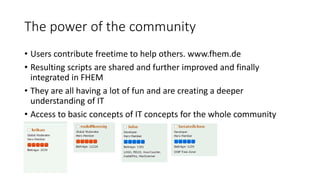
The power of the community
• Users contribute freetime to help others. www.fhem.de
• Resulting scripts are shared and further improved and finally
integrated in FHEM
• They are all having a lot of fun and are creating a deeper
understanding of IT
• Access to basic concepts of IT concepts for the whole community
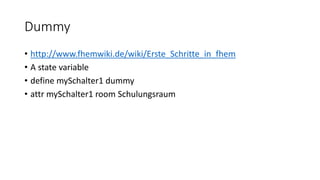
Dummy
• http://www.fhemwiki.de/wiki/Erste_Schritte_in_fhem
• A state variable
• define mySchalter1 dummy
• attr mySchalter1 room Schulungsraum
Readingsgroup Battery Status
• define battStatus readingsGroup .*:[Bb]attery
• All Readings with Battery or Battery from all Devices
• Get connectivity overview
Dummies with with symbols and colors
• Dummies for alarms, Symbols, On/Off button
Zwave battery powered outside sensor
• Temperature, Humidity, Lux, Movement
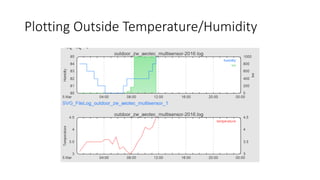
Plotting Outside Temperature/Humidity
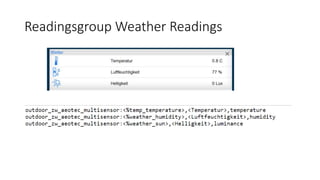
Readingsgroup Weather Readings
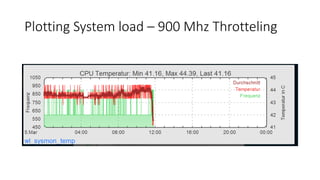
Plotting System load – 900 Mhz Throtteling
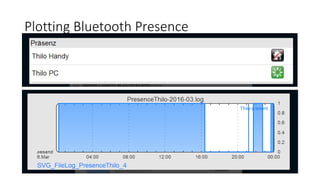
Plotting Bluetooth Presence
notify
• Notify triggers because of an event.
• A notify can trigger an SMS over a USB SIM Stick or a pushover app
message or an email
• define b3lampV1 notify btn3 set lamp $EVENT
• define b3lampV2 notify btn3 { fhem "set lamp $EVENT" }
• define b3lampV3 notify btn3 "/usr/local/bin/setlamp "$EVENT"“
• define n_mySchalter1_on notify mySchalter1:on set myLampe1 on
at
• At triggers something depening on a time
• define a1 at 17:00:00 set lamp on # fhem Befehl
• define a2 at 17:00:00 { Log 1, "Teatime" } # Perl Befehl
• define a5 at +00:00:10 set lamp on # Start in 10 secs
• define a12 at +*{sunset_rel()}
{ fhem("set lamp on-till 23:00") if($we) } # Only Weekends
before sunset
Notify for Smoke Alarm
Combine any input with any output
• Everything in FHEM can be combined regardless of the proctol
connecting to the outside
• If you are not satisified with a current solution, integrated you own
and show the example to the community
Combine Cloud Services
• Use the cloud to archive data, visualise data, trigger actions
• Useful when you need more power, more storage or a long term data
qualitiy
• Examples are ubitdot as general IOT data collector, netatmo as
weather service, Amazon as storage provider or Pushover as mobile
messaging service
Create installation short manuals
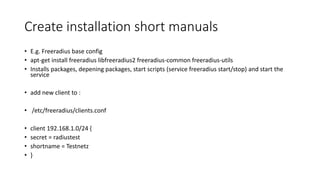
• E.g. Freeradius base config
• apt-get install freeradius libfreeradius2 freeradius-common freeradius-utils
• Installs packages, depening packages, start scripts (service freeradius start/stop) and start the
service
• add new client to :
• /etc/freeradius/clients.conf
• client 192.168.1.0/24 {
• secret = radiustest
• shortname = Testnetz
• }
And no go ahead and play with it 
• Rasberry Pi Setup
• https://www.raspberrypi.org/documentation/installation/installing-images/
• Zwave
• Example devices taken from www.fibaro.com, www.aeotec.com, www.popp.eu
• Enocean
• Example devices taken from www.nodon.fr
• Bluetooth
• Example devices taken from www.parrot.com/flowerpower, www.playbulb.com

Developercamp 08032018 home-automation_with_rasberry_pi_zwave_enocean_zigbee_wlan_thilo_roehl

  • 1.
    Home Automation withmy Rasberry Pi (FHEM,Z-Wave,Enocean, Zigbee, Wlan) Developer Camp 2018, Dipl. Inf. Thilo Röhl
  • 2.
    Motivation • Everyone hasa smartphone, no one knows how to create things or develop software • First Generation of Apple being garage builders • Smartphone and tablets create a out of the box • No expertise with making things, creating things • Even computer science students tend to have virtual expierience
  • 3.
    The Rasberry Pi •Invented for School people to educate programming • Project founded in UK • Roughly sold 5 Millions (2013) • Production in UK – moved back from China • Non Profit Organisation • Open Design • Low Power, about 12 € for a whole year
  • 4.
    Operation System • Linux •Open Source • Invented by Linus Torvalds et al
  • 5.
    FabLabs • Open laboratoriesto fix things • People want to understand how things work rather than buying new things • The makers build their own systems • Connection and building own things • Open space, non profit
  • 6.
    AirPi • Created bya group of english pupils • Sensors for air quality, sound, light • Sourcecode freely available is now maintained by a english chemistry phd student • You get it in single parts to solder it yourself • Nonprofit
  • 7.
  • 8.
    Adafuit LCD Display •A simple display to solder for yourself including a plate, an LCD display and 5 small buttons • Tutorials with pictures on the webpage how to solder it. Source code to use the display is freely available
  • 9.
  • 10.
    FHEM • Created byRudolf König / Germany in 2005 • Perl script to be used for home automation, GPL open source • Module based system, module maintained by anyone active on the forum • Very active community • Independent of cloud or networks
  • 11.
    Sensors, Events, Actors •FHEM connects Sensors with different modules creating inside events using triggers to start actors • Any Sensor can be freely connected to any Actor • The perl language allows regular expressions and powerful combinations • Local scripts can be executed or web services called • FHEM instances can be connected to allow a distributed model • It is possible to connect devices over many different wired or wireless protocols e.g. KNX, EIB, Homematic, GPIO of the rasberry pi
  • 12.
    Z-Wave • Wireless protocolsupported by a alliance of vendors • Z-Wave creates a „secure“ mesh network • Examples are smoke detectors, water detectors, wall plugs with sensors and logic
  • 13.
    Enocean • Alliance ofcouple of vendors, based in Munich • Focus on low-power design • Switch using the energy of the movement of the finger • Temperature or window opener use the light
  • 14.
    Bluetooth LE • Newdevices in the market, mainly for smart phone connections can be interconnected with FHEM
  • 15.
    ZigBee • Used forPhilips Hue Lightning, Osram Lightfy • Tendencies to unfollow open standards • Security issues according heise * *http://www.heise.de/security/meldung/Deepsec-ZigBee-macht-Smart-Home-zum-offenen-Haus-3010287.html
  • 16.
    Wlan • E.g. TP-Link •Wlan easy to setup by scanning with mobile scanner • App-enabled out of the box to be controlled from anywhere • Protocol reverse-engineered, JSON format • https://www.softscheck.com/en/reverse-engineering-tp-link-hs110/
  • 17.
    If you cannotdecide… • Chose an open system ! • FHEM is able to integrate them all • Consider Home Automation as a journey. Step by step integration, avoid buying island solutions
  • 18.
    Base Setup ofRasberry Pi • Basis setup of pi • sudo apt-get update • sudo apt-get upgrade • sudo raspi-config • to expand file-system and to setup localisation/keyboard • date –s „03/08/2016 12:30“ • to setup time. The pi has no clock – use ntp if possible • In some cases, a kernel update using „sudo rpi-update“ might be necessary. I had to turn of the device tree using raspi-config to get some device back working. Do only do this if really necessary 
  • 19.
    Base setup ofFHEM • http://www.fhemwiki.de/wiki/Raspberry_Pi • wget http://fhem.de/fhem-5.7.deb • sudo dpkg -i fhem-X.Y.deb • Start browser to access local system 127.0.0.1:8083 • Access is possible over smartphone, table and with VPN even remote
  • 20.
    First update • FHEMdoes not support a proxy for updating • Put update in the command line • Current perl modules will be download • „update“ in the browser window • „shutdown restart“ • „backup“
  • 21.
    The power ofthe community • Users contribute freetime to help others. www.fhem.de • Resulting scripts are shared and further improved and finally integrated in FHEM • They are all having a lot of fun and are creating a deeper understanding of IT • Access to basic concepts of IT concepts for the whole community
  • 22.
    Dummy • http://www.fhemwiki.de/wiki/Erste_Schritte_in_fhem • Astate variable • define mySchalter1 dummy • attr mySchalter1 room Schulungsraum
  • 23.
    Readingsgroup Battery Status •define battStatus readingsGroup .*:[Bb]attery • All Readings with Battery or Battery from all Devices • Get connectivity overview
  • 24.
    Dummies with withsymbols and colors • Dummies for alarms, Symbols, On/Off button
  • 25.
    Zwave battery poweredoutside sensor • Temperature, Humidity, Lux, Movement
  • 26.
  • 27.
  • 28.
    Plotting System load– 900 Mhz Throtteling
  • 29.
  • 30.
    notify • Notify triggersbecause of an event. • A notify can trigger an SMS over a USB SIM Stick or a pushover app message or an email • define b3lampV1 notify btn3 set lamp $EVENT • define b3lampV2 notify btn3 { fhem "set lamp $EVENT" } • define b3lampV3 notify btn3 "/usr/local/bin/setlamp "$EVENT"“ • define n_mySchalter1_on notify mySchalter1:on set myLampe1 on
  • 31.
    at • At triggerssomething depening on a time • define a1 at 17:00:00 set lamp on # fhem Befehl • define a2 at 17:00:00 { Log 1, "Teatime" } # Perl Befehl • define a5 at +00:00:10 set lamp on # Start in 10 secs • define a12 at +*{sunset_rel()} { fhem("set lamp on-till 23:00") if($we) } # Only Weekends before sunset
  • 32.
  • 33.
    Combine any inputwith any output • Everything in FHEM can be combined regardless of the proctol connecting to the outside • If you are not satisified with a current solution, integrated you own and show the example to the community
  • 34.
    Combine Cloud Services •Use the cloud to archive data, visualise data, trigger actions • Useful when you need more power, more storage or a long term data qualitiy • Examples are ubitdot as general IOT data collector, netatmo as weather service, Amazon as storage provider or Pushover as mobile messaging service
  • 35.
    Create installation shortmanuals • E.g. Freeradius base config • apt-get install freeradius libfreeradius2 freeradius-common freeradius-utils • Installs packages, depening packages, start scripts (service freeradius start/stop) and start the service • add new client to : • /etc/freeradius/clients.conf • client 192.168.1.0/24 { • secret = radiustest • shortname = Testnetz • }
  • 36.
    And no goahead and play with it  • Rasberry Pi Setup • https://www.raspberrypi.org/documentation/installation/installing-images/ • Zwave • Example devices taken from www.fibaro.com, www.aeotec.com, www.popp.eu • Enocean • Example devices taken from www.nodon.fr • Bluetooth • Example devices taken from www.parrot.com/flowerpower, www.playbulb.com