Designer              Developer


     Steven Trotter Refresh Jonesboro #17
“You broke my whole
  fraking design!”
              kkthxbye,
              The Designer
Discuss potential problem areas
during wireframe process.

Explain how you arrived at the
design solutions you’re presenting.

Find compromises when things
don’t work out perfectly.
“Oh hells no! That’s
 going to take too
  long to build.”
             pwncakes & roflcopters,
             The Developer
Explain why you really want things
a particular way. Both of you.

Evaluate with the whole team to
find better, streamlined methods.

Decide together. Will this function
make the product better? If not,
where is the time better spent?
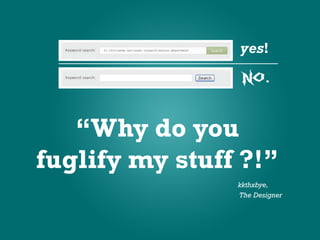
“Why do you
fuglify my stuff ?!”
                kkthxbye,
                The Designer
Review the design internally before
beginning development. Point out
small nuances in your design.

Is there a reason for the styling?
C/B compliant? Is it accessible?
What’s the user experience?

Explain your point of view. Listen to
their point of view. Rinse & repeat.
“Yeeeaaahhh…
I’m kinda coming in
  the back door on
      this one.”
            pwncakes & roflcopters,
            The Developer
Brainstorm together before
beginning design & development.

Get & give input during the entire
process. Blur the lines between
designer & developer.

Review everything internally
before presenting to the client.
“Let’s throw a little
 AJAX in there…
make it real slick.”
                  kkthxbye,
                  The Designer
Don’t be afraid to be a teacher.
Knowledge sharing now makes for
more streamlined projects later.

Learn to trust each other so that
you can be honest. - “I don’t know
what the hell you’re talking about. "

It’s a relationship. You’ll start
completing each other’s sentences.
”Um, yeah. We’re
not including that…
  it’s completely
      useless.”
            pwncakes & roflcopters,
            The Developer
Remember that you are not the
user. Often times, developers lack
empathy for the user’s POV.

It goes both ways: Too much or too
little – both suck.

Developing for geeks: include the
kitchen sink. Developing for task
management: a few streamlined
features.
“Let’s throw an
 add to calendar link
in there. That’s easy
   enough right?”
                 kkthxbye,
                 The Designer
Scope creep: Did the user request a
calendar on the site? Will this link
add to the site’s calendar or is it an
iCal file to be imported to a desktop
calendar?

Know the specs. Inside. And out.

Yes, the developers can work their
magic, but that doesn’t mean the
client will pay.
”Can’t do it.”
          pwncakes & roflcopters,
          The Developer
Keep in mind that the ultimate goal
is to create the best product possible.

Requirements change, and though it
sucks to complicate elegant solutions,
sometimes change is necessary.

Avoid the “knee-jerk no” & when a
truly bad idea lands on your plate,
your objections will carry a lot more
weight.
KK THX BYE
                  download me:
                  refreshjonesboro.org


http://www.twitter.com/steventrotter

Designer vs Developer

  • 1.
    Designer Developer Steven Trotter Refresh Jonesboro #17
  • 2.
    “You broke mywhole fraking design!” kkthxbye, The Designer
  • 3.
    Discuss potential problemareas during wireframe process. Explain how you arrived at the design solutions you’re presenting. Find compromises when things don’t work out perfectly.
  • 4.
    “Oh hells no!That’s going to take too long to build.” pwncakes & roflcopters, The Developer
  • 5.
    Explain why youreally want things a particular way. Both of you. Evaluate with the whole team to find better, streamlined methods. Decide together. Will this function make the product better? If not, where is the time better spent?
  • 6.
    “Why do you fuglifymy stuff ?!” kkthxbye, The Designer
  • 7.
    Review the designinternally before beginning development. Point out small nuances in your design. Is there a reason for the styling? C/B compliant? Is it accessible? What’s the user experience? Explain your point of view. Listen to their point of view. Rinse & repeat.
  • 8.
    “Yeeeaaahhh… I’m kinda comingin the back door on this one.” pwncakes & roflcopters, The Developer
  • 9.
    Brainstorm together before beginningdesign & development. Get & give input during the entire process. Blur the lines between designer & developer. Review everything internally before presenting to the client.
  • 10.
    “Let’s throw alittle AJAX in there… make it real slick.” kkthxbye, The Designer
  • 11.
    Don’t be afraidto be a teacher. Knowledge sharing now makes for more streamlined projects later. Learn to trust each other so that you can be honest. - “I don’t know what the hell you’re talking about. " It’s a relationship. You’ll start completing each other’s sentences.
  • 12.
    ”Um, yeah. We’re notincluding that… it’s completely useless.” pwncakes & roflcopters, The Developer
  • 13.
    Remember that youare not the user. Often times, developers lack empathy for the user’s POV. It goes both ways: Too much or too little – both suck. Developing for geeks: include the kitchen sink. Developing for task management: a few streamlined features.
  • 14.
    “Let’s throw an add to calendar link in there. That’s easy enough right?” kkthxbye, The Designer
  • 15.
    Scope creep: Didthe user request a calendar on the site? Will this link add to the site’s calendar or is it an iCal file to be imported to a desktop calendar? Know the specs. Inside. And out. Yes, the developers can work their magic, but that doesn’t mean the client will pay.
  • 16.
    ”Can’t do it.” pwncakes & roflcopters, The Developer
  • 17.
    Keep in mindthat the ultimate goal is to create the best product possible. Requirements change, and though it sucks to complicate elegant solutions, sometimes change is necessary. Avoid the “knee-jerk no” & when a truly bad idea lands on your plate, your objections will carry a lot more weight.
  • 18.
    KK THX BYE download me: refreshjonesboro.org http://www.twitter.com/steventrotter