Menyebutkan dan Menjelaskan Peralatan
Kantor/
Describing Office Equipmentt
BHS.IS02.005.01
Tujuan Umum
 mampu menyebutkan dan menjelaskan peralatan kantor
dengan benar.
Tujuan Khusus
1. Mengidentifikasi nama-nama peralatan kantor dengan benar;
2. Menyebutkan jenis peralatan kantor dengan benar;
3. Menjelaskan kegunaan peralatan kantor dengan benar;
4. Menjelaskan cara penggunaan peralatan kantor dengan benar.
MENYEBUTKAN PERALATAN KANTOR
 Pengetahuan yang diperlukan dalam menyebutkan peralatan kantor
1. Mengidentifikasi nama-nama peralatan kantor
Stapler(s)
Staples
staple
Paper clip
Binder Clip / Bulldog Clip
Hole Punch/ Perforator
Sharpener
Ruler
Eraser / rubber
Scissors (noun)
Scissor (verb)
Correction Fluid
Correction pen
White – out pen
Pen (s)
Pencil (s)
Pushpin(s)
Letter tray (Baki Surat)
Ordners
Stapler remover
Snelheckter map/ file folder
(Stopmap Snelheckter)
Paper Cutter
(Pemotong Kertas)
Paper Shredder
(Mesin Penghancur Kertas)
Calculator
(Mesin Hitung)
Printer
Computer
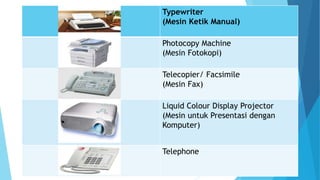
Typewriter
(Mesin Ketik Manual)
Photocopy Machine
(Mesin Fotokopi)
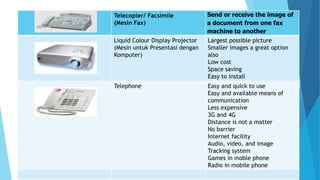
Telecopier/ Facsimile
(Mesin Fax)
Liquid Colour Display Projector
(Mesin untuk Presentasi dengan
Komputer)
Telephone
Highlighter
Sticky notes
Tape
2. Menyebutkan jenis peralatan kantor
a. Manual
Office equipments which are operated manually by human.
Example: binder, paper cutter, perforator.
b. Electric
Office equipments which are operated by using electricity.
Example: komputer, printer, LCD projector
Manual Office Equipment
a. Snelheckter map/ file folder (US usage)
 A file folder is a kind of folder that holds loose papers and money
together for organization and protection. File folders usually consist of a
sheet of heavy paper stock or other thin but stiff material which is folded
in half, are used to keep paper documents.
b. Ordner
 Ordner is a huge map with backs size of about 5 cm in which there is an
iron clamp. The archive will be stored in advance ordner perforated using
a perforator.
c. Perforator/ hole punch (alat pelubang kertas)
A hole punch (also known as a hole puncher) is a common office tool that is used to create
holes in sheets of paper, often for the purpose of collecting the sheets in a binder or folder.
d. Stapler ( alat menyatukan kertas)
Staplers are an efficient way to bind paper together. Manual desktop staplers are most
common in an office environment, but there are also electric staplers and heavy-duty
staplers. Heavy-duty staplers and manual desktop staplers work in the same way, but heavy-
duty ones are usually larger and may have a handle on the front end. You can also use manual
and desktop staplers to tack paper to a wall.
e. Letter tray (Kotak atau tempat surat masuk dan surat keluar)
Letter tray is basically a place to put letters or documents whether they are incoming or
outgoing mails.
f. Staples
Staples are small pieces of bent wire that are used mainly for holding sheets of paper
together firmly. You put the staples into the paper using a device called stapler.
g. Binder Clips (Jepitan bendel tebal)
A binder clip, or a banker’s clip or fold over clip or a cow clip is a simple device for
binding sheets of paper together. It leaves the paper intact and can be removed quickly
and easily unlike staple.
h. Stapler remover (pengungkit kawat jepret)
A staple remover is a device that allows for the quick removal of a staple from a
material without causing damage. In American English-speaking areas, the staple
remover is also known as a staple extractor, staple puller, de-stapler, "staple taker-
outer[er]," "staple monster," "staple muncher," "staple serial killer," "jaws," or
"crocodile."
Electric Office Eqiuipment
a. Computer
Computer is a programmable electronic device designed to accept data, perform prescribed
mathematical and logical operations at high speed, and display the results of these operations.
Mainframes, desktop and laptop computers, tablets, and smartphones are some of the different
types of computers.
b. Photocopy Machine (Mesin Fotocopy)
Photocopier (also known as a copier or copy machine) is a machine that makes paper copies of
documents and other visual images quickly and cheaply. Most current photocopiers use a
technology called xerography, a dry process that uses electrostatic charges on a light-sensitive
photoreceptor to first attract and then transfer toner particles (a powder) onto paper in the form
of an image.
c. Telecopier (Facsimile)
Fax (short for facsimile), sometimes called telecopying or telefax (the latter short for
telefacsimile), is the telephonic transmission of scanned printed material (both text and images),
normally to a telephone number connected to a printer or other output device.
d. Paper Shredder (mesin penghancur kertas)
A paper shredder is a mechanical device used to cut paper into either strips or fine particles.
Government organizations, businesses, and private individuals use shredders to destroy private,
confidential, or otherwise sensitive documents.
e. LCD Projector ( Mesin untuk presentasi dengan perangkat computer )
An LCD projector is a type of video projector for displaying video, images or computer data on a screen
or other flat surface. It is a modern equivalent of the slide projector or overhead projector..
f. Printer
A printer is a machine that can be connected to a computer in order to make copies on a paper of
documents or other information held by the computer .In computing, a printer is a peripheral which
makes a persistent human-readable representation of graphics or text on paper or similar physical media.
g. Telephone
The telephone is the electrical system of communication that you use to talk directly to someone else in
a different place. You use the telephone by dialing a number on a piece of equipment and speaking into
it
h. Facsimile
-- Fax (short for facsimile), sometimes called telecopying or telefax (the latter short for telefacsimile), is
the telephonic transmission of scanned printed material (both text and images), normally to a telephone
number connected to a printer or other output device. The original document is scanned with a fax
machine (or a telecopier), which processes the contents (text or images) as a single fixed graphic image,
converting it into a bitmap, and then transmitting it through the telephone system in the form of audio-
frequency tones.
-- duplicator that transmits the copy by wire or radio
MENJELASKAN KEGUNAAN DAN CARA KERJA PERALATAN KANTOR
1. Menjelaskan kegunaan peralatan kantor.
Stapler(s) Bind paper together
Staples
staple
the actual fasteners that hold
documents together
Paper clip hold pieces of paper together
Binder Clip / Bulldog Clip - Binding sheets of paper
together
- keep large amounts of
paper together
Hole Punch/ Perforator Create holes in sheets of paper
Sharpener used for sharpening pencils.
Ruler A ruler is a long, flat piece of wood,
metal, or plastic with straight edges
marked in or inches or centimeters.
Rulers are used to measure things and
to draw straight lines
Eraser used for removing marks from paper or
skin
Make pencil’s mistake go away
Scissors Cut paper
Correction Fluid
Correction pen
White – out pen
White fluid applied to paper to mask
error in text. Once dried, it can be
written over. It is typically packaged in
small bottles.
Pens Pen is a writing implement used to apply
ink to a surface, usually paper, for writing
or drawing.
Pencil A pencil is an object that you write or draw
with. It consists of a thin piece of wood
with a rod of a black or colored substance
through the middle
Pushpins -Fastening an object or material together
-A tack for attaching papers to a bulletin
board or drawing bord
Letter tray (Baki Surat)  Put documents that don’t yet have a place
Ordners Save letters or documents
which have been processed
Stapler remover Remove staples from paper
Snelheckter map/ file folder
(Stopmap Snelheckter)/ map
business file
- A kind of folder that holds
loose papers and money
together for organization and
protection
- Save a pieces of
paper/document
Paper Cutter
(Pemotong Kertas)
Cut a large set of paper at once
with a straight edge
Paper Shredder
(Mesin Penghancur Kertas)
Document security
Reduced size of the waste
Increased protection
Cost effectiveness
Instantaneous shredding
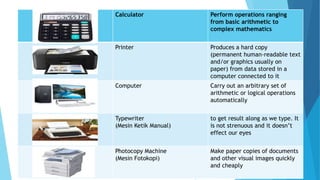
Calculator Perform operations ranging
from basic arithmetic to
complex mathematics
Printer Produces a hard copy
(permanent human-readable text
and/or graphics usually on
paper) from data stored in a
computer connected to it
Computer Carry out an arbitrary set of
arithmetic or logical operations
automatically
Typewriter
(Mesin Ketik Manual)
to get result along as we type. It
is not strenuous and it doesn’t
effect our eyes
Photocopy Machine
(Mesin Fotokopi)
Make paper copies of documents
and other visual images quickly
and cheaply
Telecopier/ Facsimile
(Mesin Fax)
Send or receive the image of
a document from one fax
machine to another
Liquid Colour Display Projector
(Mesin untuk Presentasi dengan
Komputer)
Largest possible picture
Smaller images a great option
also
Low cost
Space saving
Easy to install
Telephone Easy and quick to use
Easy and available means of
communication
Less expensive
3G and 4G
Distance is not a matter
No barrier
Internet facility
Audio, video, and image
Tracking system
Games in moble phone
Radio in mobile phone
Highlighter put the important
facts in a bright
colour.
Sticky notes Attaching notes to
documents or other
surfaces such as
refrigerator at the wall
,etc
Tape Sticking things
together
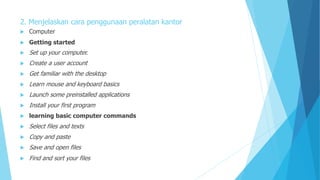
2. Menjelaskan cara penggunaan peralatan kantor
 Computer
 Getting started
 Set up your computer.
 Create a user account
 Get familiar with the desktop
 Learn mouse and keyboard basics
 Launch some preinstalled applications
 Install your first program
 learning basic computer commands
 Select files and texts
 Copy and paste
 Save and open files
 Find and sort your files
 connecting to the internet
 Set up a connection
 Open a web browser
 Install an antivirus
 Browse safely when online
 Send an email
 Downloading file
 increasing functionality
 Install a printer
 Set up a home network
 Install a webcam or microphone
 Add speakers
 Paper cutter
 Paper shredder
 Computer
 Printer
 Telephone
 Highlighter
 Tape
 Stapler
 Hole punch
 Sharpener
 Correction fluid
 Staple remover

Describing Office Equipment

  • 1.
    Menyebutkan dan MenjelaskanPeralatan Kantor/ Describing Office Equipmentt BHS.IS02.005.01
  • 2.
    Tujuan Umum  mampumenyebutkan dan menjelaskan peralatan kantor dengan benar.
  • 3.
    Tujuan Khusus 1. Mengidentifikasinama-nama peralatan kantor dengan benar; 2. Menyebutkan jenis peralatan kantor dengan benar; 3. Menjelaskan kegunaan peralatan kantor dengan benar; 4. Menjelaskan cara penggunaan peralatan kantor dengan benar.
  • 4.
    MENYEBUTKAN PERALATAN KANTOR Pengetahuan yang diperlukan dalam menyebutkan peralatan kantor 1. Mengidentifikasi nama-nama peralatan kantor Stapler(s) Staples staple
  • 5.
    Paper clip Binder Clip/ Bulldog Clip Hole Punch/ Perforator Sharpener Ruler
  • 6.
    Eraser / rubber Scissors(noun) Scissor (verb) Correction Fluid Correction pen White – out pen Pen (s) Pencil (s)
  • 7.
    Pushpin(s) Letter tray (BakiSurat) Ordners Stapler remover Snelheckter map/ file folder (Stopmap Snelheckter)
  • 8.
    Paper Cutter (Pemotong Kertas) PaperShredder (Mesin Penghancur Kertas) Calculator (Mesin Hitung) Printer Computer
  • 9.
    Typewriter (Mesin Ketik Manual) PhotocopyMachine (Mesin Fotokopi) Telecopier/ Facsimile (Mesin Fax) Liquid Colour Display Projector (Mesin untuk Presentasi dengan Komputer) Telephone
  • 10.
  • 11.
    2. Menyebutkan jenisperalatan kantor a. Manual Office equipments which are operated manually by human. Example: binder, paper cutter, perforator. b. Electric Office equipments which are operated by using electricity. Example: komputer, printer, LCD projector
  • 12.
    Manual Office Equipment a.Snelheckter map/ file folder (US usage)  A file folder is a kind of folder that holds loose papers and money together for organization and protection. File folders usually consist of a sheet of heavy paper stock or other thin but stiff material which is folded in half, are used to keep paper documents. b. Ordner  Ordner is a huge map with backs size of about 5 cm in which there is an iron clamp. The archive will be stored in advance ordner perforated using a perforator.
  • 13.
    c. Perforator/ holepunch (alat pelubang kertas) A hole punch (also known as a hole puncher) is a common office tool that is used to create holes in sheets of paper, often for the purpose of collecting the sheets in a binder or folder. d. Stapler ( alat menyatukan kertas) Staplers are an efficient way to bind paper together. Manual desktop staplers are most common in an office environment, but there are also electric staplers and heavy-duty staplers. Heavy-duty staplers and manual desktop staplers work in the same way, but heavy- duty ones are usually larger and may have a handle on the front end. You can also use manual and desktop staplers to tack paper to a wall. e. Letter tray (Kotak atau tempat surat masuk dan surat keluar) Letter tray is basically a place to put letters or documents whether they are incoming or outgoing mails. f. Staples Staples are small pieces of bent wire that are used mainly for holding sheets of paper together firmly. You put the staples into the paper using a device called stapler.
  • 14.
    g. Binder Clips(Jepitan bendel tebal) A binder clip, or a banker’s clip or fold over clip or a cow clip is a simple device for binding sheets of paper together. It leaves the paper intact and can be removed quickly and easily unlike staple. h. Stapler remover (pengungkit kawat jepret) A staple remover is a device that allows for the quick removal of a staple from a material without causing damage. In American English-speaking areas, the staple remover is also known as a staple extractor, staple puller, de-stapler, "staple taker- outer[er]," "staple monster," "staple muncher," "staple serial killer," "jaws," or "crocodile."
  • 15.
    Electric Office Eqiuipment a.Computer Computer is a programmable electronic device designed to accept data, perform prescribed mathematical and logical operations at high speed, and display the results of these operations. Mainframes, desktop and laptop computers, tablets, and smartphones are some of the different types of computers. b. Photocopy Machine (Mesin Fotocopy) Photocopier (also known as a copier or copy machine) is a machine that makes paper copies of documents and other visual images quickly and cheaply. Most current photocopiers use a technology called xerography, a dry process that uses electrostatic charges on a light-sensitive photoreceptor to first attract and then transfer toner particles (a powder) onto paper in the form of an image. c. Telecopier (Facsimile) Fax (short for facsimile), sometimes called telecopying or telefax (the latter short for telefacsimile), is the telephonic transmission of scanned printed material (both text and images), normally to a telephone number connected to a printer or other output device. d. Paper Shredder (mesin penghancur kertas) A paper shredder is a mechanical device used to cut paper into either strips or fine particles. Government organizations, businesses, and private individuals use shredders to destroy private, confidential, or otherwise sensitive documents.
  • 16.
    e. LCD Projector( Mesin untuk presentasi dengan perangkat computer ) An LCD projector is a type of video projector for displaying video, images or computer data on a screen or other flat surface. It is a modern equivalent of the slide projector or overhead projector.. f. Printer A printer is a machine that can be connected to a computer in order to make copies on a paper of documents or other information held by the computer .In computing, a printer is a peripheral which makes a persistent human-readable representation of graphics or text on paper or similar physical media. g. Telephone The telephone is the electrical system of communication that you use to talk directly to someone else in a different place. You use the telephone by dialing a number on a piece of equipment and speaking into it h. Facsimile -- Fax (short for facsimile), sometimes called telecopying or telefax (the latter short for telefacsimile), is the telephonic transmission of scanned printed material (both text and images), normally to a telephone number connected to a printer or other output device. The original document is scanned with a fax machine (or a telecopier), which processes the contents (text or images) as a single fixed graphic image, converting it into a bitmap, and then transmitting it through the telephone system in the form of audio- frequency tones. -- duplicator that transmits the copy by wire or radio
  • 17.
    MENJELASKAN KEGUNAAN DANCARA KERJA PERALATAN KANTOR 1. Menjelaskan kegunaan peralatan kantor. Stapler(s) Bind paper together Staples staple the actual fasteners that hold documents together Paper clip hold pieces of paper together Binder Clip / Bulldog Clip - Binding sheets of paper together - keep large amounts of paper together
  • 18.
    Hole Punch/ PerforatorCreate holes in sheets of paper Sharpener used for sharpening pencils. Ruler A ruler is a long, flat piece of wood, metal, or plastic with straight edges marked in or inches or centimeters. Rulers are used to measure things and to draw straight lines Eraser used for removing marks from paper or skin Make pencil’s mistake go away Scissors Cut paper
  • 19.
    Correction Fluid Correction pen White– out pen White fluid applied to paper to mask error in text. Once dried, it can be written over. It is typically packaged in small bottles. Pens Pen is a writing implement used to apply ink to a surface, usually paper, for writing or drawing. Pencil A pencil is an object that you write or draw with. It consists of a thin piece of wood with a rod of a black or colored substance through the middle Pushpins -Fastening an object or material together -A tack for attaching papers to a bulletin board or drawing bord Letter tray (Baki Surat)  Put documents that don’t yet have a place
  • 20.
    Ordners Save lettersor documents which have been processed Stapler remover Remove staples from paper Snelheckter map/ file folder (Stopmap Snelheckter)/ map business file - A kind of folder that holds loose papers and money together for organization and protection - Save a pieces of paper/document Paper Cutter (Pemotong Kertas) Cut a large set of paper at once with a straight edge Paper Shredder (Mesin Penghancur Kertas) Document security Reduced size of the waste Increased protection Cost effectiveness Instantaneous shredding
  • 21.
    Calculator Perform operationsranging from basic arithmetic to complex mathematics Printer Produces a hard copy (permanent human-readable text and/or graphics usually on paper) from data stored in a computer connected to it Computer Carry out an arbitrary set of arithmetic or logical operations automatically Typewriter (Mesin Ketik Manual) to get result along as we type. It is not strenuous and it doesn’t effect our eyes Photocopy Machine (Mesin Fotokopi) Make paper copies of documents and other visual images quickly and cheaply
  • 22.
    Telecopier/ Facsimile (Mesin Fax) Sendor receive the image of a document from one fax machine to another Liquid Colour Display Projector (Mesin untuk Presentasi dengan Komputer) Largest possible picture Smaller images a great option also Low cost Space saving Easy to install Telephone Easy and quick to use Easy and available means of communication Less expensive 3G and 4G Distance is not a matter No barrier Internet facility Audio, video, and image Tracking system Games in moble phone Radio in mobile phone
  • 23.
    Highlighter put theimportant facts in a bright colour. Sticky notes Attaching notes to documents or other surfaces such as refrigerator at the wall ,etc Tape Sticking things together
  • 24.
    2. Menjelaskan carapenggunaan peralatan kantor  Computer  Getting started  Set up your computer.  Create a user account  Get familiar with the desktop  Learn mouse and keyboard basics  Launch some preinstalled applications  Install your first program  learning basic computer commands  Select files and texts  Copy and paste  Save and open files  Find and sort your files
  • 25.
     connecting tothe internet  Set up a connection  Open a web browser  Install an antivirus  Browse safely when online  Send an email  Downloading file  increasing functionality  Install a printer  Set up a home network  Install a webcam or microphone  Add speakers
  • 26.
     Paper cutter Paper shredder  Computer  Printer  Telephone  Highlighter  Tape  Stapler  Hole punch  Sharpener  Correction fluid  Staple remover