Deploy Meteor in production 
miro.radenovic@dev4side.com 
.
Who is Miro? 
• Dev4Side srl - Milano (12 emp) 
• 10years of .NET (asp.net) 
• 8months with server-side JS
Why meteor 
• Fullstack JS 
• $11.2 million in funding 
• Mongodb 
• Reactive
So, you wanna see your meteor 
project online? 
• Deploy 
– meteor deploy (core) 
– meteor build (core) 
– Demeteorizer (from modulus) 
– MUP (arunoda) 
• Host 
– on meteor.com 
– on Modulus 
– Own infrastructure 
• Solutions, tuning and tips
meteor deploy
Meteor deploy 
$ meteor deploy myapp.meteor.com 
• Part of the core 
• Running on Meteor's infrastructure 
• The easiest way to deploy your application is to use meteor 
• Your application is now available at myapp.meteor.com 
Client 
[Meteor] 
Server 
meteor.com
Meteor deploy 
• Galaxy (from trello) 
This is MDG's commercial product -- a managed 
cloud platform for deploying Meteor apps. You 
have control of the underlying hardware (you 
own the servers or the EC2 instances, and 
Galaxy manages them for you). 
General Availability for Galaxy will be sometime 
after 1.0, since we want to focus on Meteor 1.0 
and get it out as quickly as possible.
meteor build 
(meteor bundle)
Meteor build 
$ meteor build my_directory 
• Part of the meteor core 
• Running on your own infrastructure 
• Generates a fully-contained Node.js application in the form of a tarball 
Client 
[Meteor] 
Server 
[Node.js 
+ deps] 
(bundle). 
• Used also for generating mobile versions (android/ios) 
• Starts the app with: node main.js 
• Still not documented in docs.meteor.com
Meteor build – still some deps are 
missing... 
• But if you’ve used a binary npm module, you 
need to re-install it manually. Just like you are 
doing it with fibers. 
• Actually things are changing from version 
>0.9 
But If you are using demeteorizer, then there is 
no problem.
demeteorizer
demeteorizer 
• Installs via NPM 
• Demeteorizer's output is similar to meteor 
build except that it generates a package.json 
containing all required dependencies. This 
allows you to easily run npm install on the 
destination server, which is especially 
important for compiled modules. 
• Adds package.json 
• Installs with npm install -g demeteorizer
demeteorizer 
$ meteor build my_directory 
• Running on your own infrastructure 
• Generates a fully-contained Node.js application in the form of a tarball 
Client 
[Meteor] 
Server 
[Node.js] 
(bundle) 
• Starts the app with: node main.js
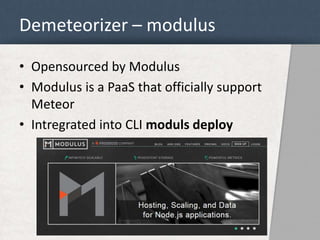
Demeteorizer – modulus 
• Opensourced by Modulus 
• Modulus is a PaaS that officially support 
Meteor 
• Intregrated into CLI moduls deploy
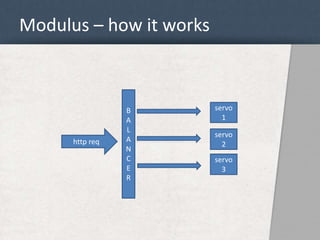
Modulus – how it works 
B 
A 
L 
A 
N 
C 
E 
R 
servo 
1 
servo 
2 
servo 
3 
http req
MUP 
Production Quality Meteor 
Deployments
MUP 
• Installs via NPM 
• Developed by Arunoda 
• Single command server setup 
• Single command deployment 
• Autostarts app (upstart and forever) 
• Access, logs from the terminal (supports log tailing) 
• Support for multiple meteor deployments 
Client 
[Meteor] 
Server 
[ubuntu/debian 
opensolaris]
Mup – why is cool 
• Deploys on AWS EC2 
• Rebuilds platform dependent NPM modules 
• Uses JSON for muliple deployment paths (can 
manipulate them via gruntjs) 
• Supports meteor.settings 
• Env vars are in json
How I launched my project on line 
• problem 
– We want to serve many users, from everyware 
– We want to scale easy 
– Backgrounds and heavy loads are moved outside 
meteor. 
• solution 
– Platform: AWS + compose.io 
– Deployment: gruntjs + mup
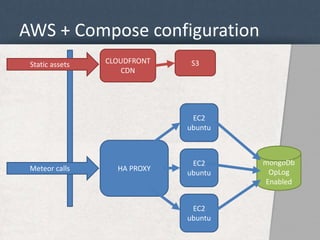
AWS + Compose configuration 
Static assets S3 
HA PROXY 
EC2 
ubuntu 
EC2 
ubuntu 
EC2 
ubuntu 
CLOUDFRONT 
CDN 
Meteor calls 
mongoDb 
OpLog 
Enabled
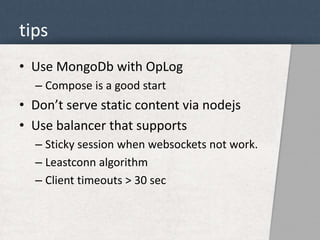
tips 
• Use MongoDb with OpLog 
– Compose is a good start 
• Don’t serve static content via nodejs 
• Use balancer that supports 
– Sticky session when websockets not work. 
– Leastconn algorithm 
– Client timeouts > 30 sec
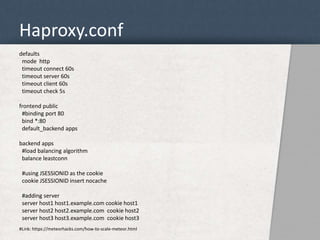
Haproxy.conf 
defaults 
mode http 
timeout connect 60s 
timeout server 60s 
timeout client 60s 
timeout check 5s 
frontend public 
#binding port 80 
bind *:80 
default_backend apps 
backend apps 
#load balancing algorithm 
balance leastconn 
#using JSESSIONID as the cookie 
cookie JSESSIONID insert nocache 
#adding server 
server host1 host1.example.com cookie host1 
server host2 host2.example.com cookie host2 
server host3 host3.example.com cookie host3 
#Link: https://meteorhacks.com/how-to-scale-meteor.html
deployment 
• Use Gruntjs for your deployment steps 
– Create a .deploy folder in your meteor proj 
– Run tests, before deployment 
– Compile Scss to css 
– Upload statics to CDN (S3) 
– Add private local npm modules 
– Edit MUP json conf files before deploying 
• And finally, use mup for the upload
deployment 
..and make sure your deployments to Test and 
Production enviroments requires minimum 
manual operations...
Grazie 
miro.radenovic@dev4side.com

Deploy meteor in production

  • 1.
    Deploy Meteor inproduction miro.radenovic@dev4side.com .
  • 2.
    Who is Miro? • Dev4Side srl - Milano (12 emp) • 10years of .NET (asp.net) • 8months with server-side JS
  • 3.
    Why meteor •Fullstack JS • $11.2 million in funding • Mongodb • Reactive
  • 4.
    So, you wannasee your meteor project online? • Deploy – meteor deploy (core) – meteor build (core) – Demeteorizer (from modulus) – MUP (arunoda) • Host – on meteor.com – on Modulus – Own infrastructure • Solutions, tuning and tips
  • 5.
  • 6.
    Meteor deploy $meteor deploy myapp.meteor.com • Part of the core • Running on Meteor's infrastructure • The easiest way to deploy your application is to use meteor • Your application is now available at myapp.meteor.com Client [Meteor] Server meteor.com
  • 7.
    Meteor deploy •Galaxy (from trello) This is MDG's commercial product -- a managed cloud platform for deploying Meteor apps. You have control of the underlying hardware (you own the servers or the EC2 instances, and Galaxy manages them for you). General Availability for Galaxy will be sometime after 1.0, since we want to focus on Meteor 1.0 and get it out as quickly as possible.
  • 8.
  • 9.
    Meteor build $meteor build my_directory • Part of the meteor core • Running on your own infrastructure • Generates a fully-contained Node.js application in the form of a tarball Client [Meteor] Server [Node.js + deps] (bundle). • Used also for generating mobile versions (android/ios) • Starts the app with: node main.js • Still not documented in docs.meteor.com
  • 10.
    Meteor build –still some deps are missing... • But if you’ve used a binary npm module, you need to re-install it manually. Just like you are doing it with fibers. • Actually things are changing from version >0.9 But If you are using demeteorizer, then there is no problem.
  • 11.
  • 12.
    demeteorizer • Installsvia NPM • Demeteorizer's output is similar to meteor build except that it generates a package.json containing all required dependencies. This allows you to easily run npm install on the destination server, which is especially important for compiled modules. • Adds package.json • Installs with npm install -g demeteorizer
  • 13.
    demeteorizer $ meteorbuild my_directory • Running on your own infrastructure • Generates a fully-contained Node.js application in the form of a tarball Client [Meteor] Server [Node.js] (bundle) • Starts the app with: node main.js
  • 14.
    Demeteorizer – modulus • Opensourced by Modulus • Modulus is a PaaS that officially support Meteor • Intregrated into CLI moduls deploy
  • 15.
    Modulus – howit works B A L A N C E R servo 1 servo 2 servo 3 http req
  • 16.
    MUP Production QualityMeteor Deployments
  • 17.
    MUP • Installsvia NPM • Developed by Arunoda • Single command server setup • Single command deployment • Autostarts app (upstart and forever) • Access, logs from the terminal (supports log tailing) • Support for multiple meteor deployments Client [Meteor] Server [ubuntu/debian opensolaris]
  • 18.
    Mup – whyis cool • Deploys on AWS EC2 • Rebuilds platform dependent NPM modules • Uses JSON for muliple deployment paths (can manipulate them via gruntjs) • Supports meteor.settings • Env vars are in json
  • 19.
    How I launchedmy project on line • problem – We want to serve many users, from everyware – We want to scale easy – Backgrounds and heavy loads are moved outside meteor. • solution – Platform: AWS + compose.io – Deployment: gruntjs + mup
  • 20.
    AWS + Composeconfiguration Static assets S3 HA PROXY EC2 ubuntu EC2 ubuntu EC2 ubuntu CLOUDFRONT CDN Meteor calls mongoDb OpLog Enabled
  • 21.
    tips • UseMongoDb with OpLog – Compose is a good start • Don’t serve static content via nodejs • Use balancer that supports – Sticky session when websockets not work. – Leastconn algorithm – Client timeouts > 30 sec
  • 22.
    Haproxy.conf defaults modehttp timeout connect 60s timeout server 60s timeout client 60s timeout check 5s frontend public #binding port 80 bind *:80 default_backend apps backend apps #load balancing algorithm balance leastconn #using JSESSIONID as the cookie cookie JSESSIONID insert nocache #adding server server host1 host1.example.com cookie host1 server host2 host2.example.com cookie host2 server host3 host3.example.com cookie host3 #Link: https://meteorhacks.com/how-to-scale-meteor.html
  • 23.
    deployment • UseGruntjs for your deployment steps – Create a .deploy folder in your meteor proj – Run tests, before deployment – Compile Scss to css – Upload statics to CDN (S3) – Add private local npm modules – Edit MUP json conf files before deploying • And finally, use mup for the upload
  • 24.
    deployment ..and makesure your deployments to Test and Production enviroments requires minimum manual operations...
  • 25.

Editor's Notes

  • #12 Its been here for long to time to help you deploy meteor on node PaaS