Defining Classes – Part I
    Classes, Fields, Constructors, Methods, Properties


Svetlin Nakov
Technical Trainer
www.nakov.com
Telerik Software Academy
academy.telerik.com
Table of Contents
1.   Defining Simple Classes
2.   Fields
3.   Access Modifiers
4.   Using Classes and Objects
5.   Constructors
6.   Methods
7.   Properties
8.   Enumerations (Enums)
9.   Keeping the Object State
                                                   2
Defining Simple Classes
Classes in OOP
   Classes model real-world objects and define
     Attributes (state, properties, fields)
     Behavior (methods, operations)
   Classes describe the structure of objects
     Objects describe particular instance of a class
   Properties hold information about the
    modeled object relevant to the problem
   Operations implement object behavior
                                                        4
Classes in C#
 Classes   in C# can have members:
   Fields, constants, methods, properties,
    indexers, events, operators, constructors,
    destructors, …
   Inner types (inner classes, structures,
    interfaces, delegates, ...)
 Members can have access modifiers (scope)

   public, private, protected, internal
 Members can be

   static (common) or specific for a given object
                                                     5
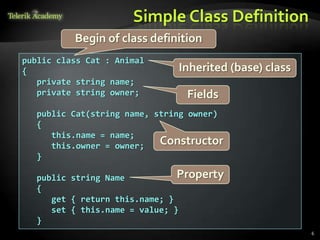
Simple Class Definition
          Begin of class definition
public class Cat : Animal
{                             Inherited (base) class
   private string name;
   private string owner;        Fields
  public Cat(string name, string owner)
  {
     this.name = name;
     this.owner = owner;   Constructor
  }

  public string Name           Property
  {
     get { return this.name; }
     set { this.name = value; }
  }
                                                       6
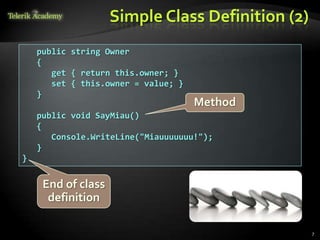
Simple Class Definition (2)
    public string Owner
    {
       get { return this.owner; }
       set { this.owner = value; }
    }
                                     Method
    public void SayMiau()
    {
       Console.WriteLine("Miauuuuuuu!");
    }
}


     End of class
      definition

                                                  7
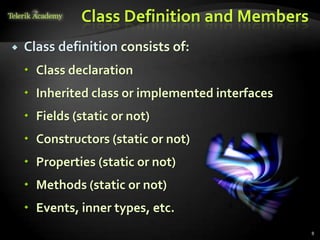
Class Definition and Members
   Class definition consists of:
     Class declaration
     Inherited class or implemented interfaces
     Fields (static or not)
     Constructors (static or not)
     Properties (static or not)
     Methods (static or not)
     Events, inner types, etc.
                                                  8
Fields
Defining and Using Data Fields
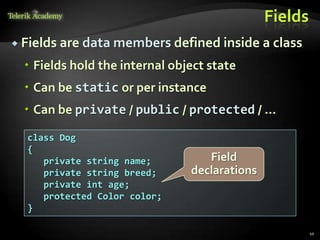
Fields
 Fields are data members defined inside a class

   Fields hold the internal object state
   Can be static or per instance
   Can be private / public / protected / …

  class Dog
  {
     private string name;          Field
     private string breed;      declarations
     private int age;
     protected Color color;
  }

                                                        10
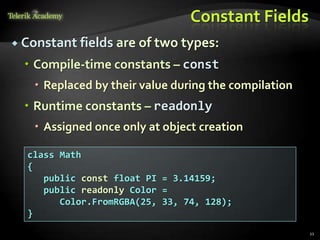
Constant Fields
 Constant fields are of two types:

   Compile-time constants – const
    Replaced by their value during the compilation
   Runtime constants – readonly
    Assigned once only at object creation

  class Math
  {
     public const float PI = 3.14159;
     public readonly Color =
        Color.FromRGBA(25, 33, 74, 128);
  }
                                                      11
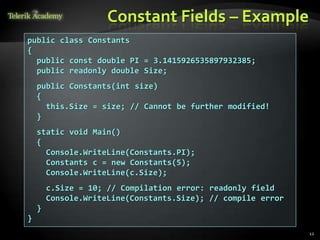
Constant Fields – Example
public class Constants
{
  public const double PI = 3.1415926535897932385;
  public readonly double Size;
    public Constants(int size)
    {
      this.Size = size; // Cannot be further modified!
    }
    static void Main()
    {
      Console.WriteLine(Constants.PI);
      Constants c = new Constants(5);
      Console.WriteLine(c.Size);
        c.Size = 10; // Compilation error: readonly field
        Console.WriteLine(Constants.Size); // compile error
    }
}
                                                              12
Access Modifiers
Public, Private, Protected, Internal
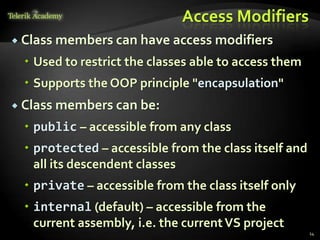
Access Modifiers
 Class   members can have access modifiers
   Used to restrict the classes able to access them
   Supports the OOP principle "encapsulation"
 Class   members can be:
   public – accessible from any class
   protected – accessible from the class itself and
    all its descendent classes
   private – accessible from the class itself only
   internal (default) – accessible from the
    current assembly, i.e. the current VS project
                                                       14
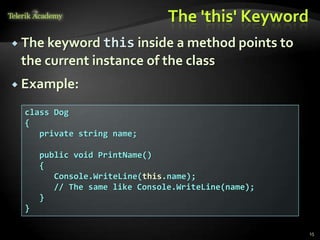
The 'this' Keyword
 The keyword this inside  a method points to
 the current instance of the class
 Example:

  class Dog
  {
     private string name;

      public void PrintName()
      {
         Console.WriteLine(this.name);
         // The same like Console.WriteLine(name);
      }
  }

                                                     15
Defining Simple Classes
         Example
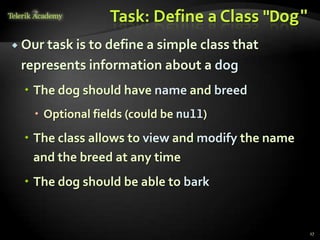
Task: Define a Class "Dog"
 Our task is
            to define a simple class that
 represents information about a dog
   The dog should have name and breed
    Optional fields (could be null)
   The class allows to view and modify the name
    and the breed at any time
   The dog should be able to bark


                                                   17
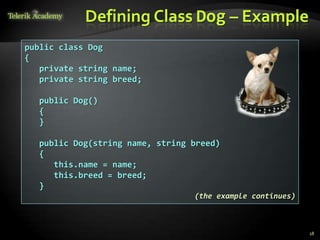
Defining Class Dog – Example
public class Dog
{
   private string name;
   private string breed;

  public Dog()
  {
  }

  public Dog(string name, string breed)
  {
     this.name = name;
     this.breed = breed;
  }
                                 (the example continues)


                                                           18
Defining Class Dog – Example (2)
    public string Name
    {
       get { return this.name; }
       set { this.name = value; }
    }

    public string Breed
    {
       get { return this.breed; }
       set { this.breed = value; }
    }

    public void SayBau()
    {
       Console.WriteLine("{0} said: Bauuuuuu!",
          this.name ?? "[unnamed dog]");
    }
}
                                                  19
Using Classes and Objects
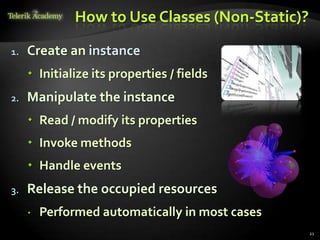
How to Use Classes (Non-Static)?

1.   Create an instance
      Initialize its properties / fields
2.   Manipulate the instance
      Read / modify its properties
      Invoke methods
      Handle events
3.   Release the occupied resources
        Performed automatically in most cases
                                                 21
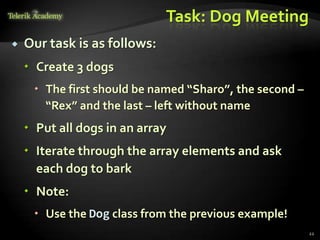
Task: Dog Meeting
   Our task is as follows:
     Create 3 dogs
      The first should be named “Sharo”, the second –
       “Rex” and the last – left without name
     Put all dogs in an array
     Iterate through the array elements and ask
      each dog to bark
     Note:
      Use the Dog class from the previous example!
                                                         22
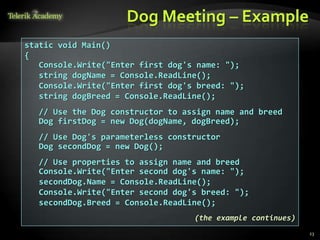
Dog Meeting – Example
static void Main()
{
   Console.Write("Enter first dog's name: ");
   string dogName = Console.ReadLine();
   Console.Write("Enter first dog's breed: ");
   string dogBreed = Console.ReadLine();
  // Use the Dog constructor to assign name and breed
  Dog firstDog = new Dog(dogName, dogBreed);
  // Use Dog's parameterless constructor
  Dog secondDog = new Dog();
  // Use properties to assign name and breed
  Console.Write("Enter second dog's name: ");
  secondDog.Name = Console.ReadLine();
  Console.Write("Enter second dog's breed: ");
  secondDog.Breed = Console.ReadLine();
                                   (the example continues)
                                                             23
Dog Meeting – Example (2)
    // Create a Dog with no name and breed
    Dog thirdDog = new Dog();

    // Save the dogs in an array
    Dog[] dogs = new Dog[] {
      firstDog, secondDog, thirdDog };

    // Ask each of the dogs to bark
    foreach(Dog dog in dogs)
    {
      dog.SayBau();
    }
}


                                              24
Dog Meeting
  Live Demo
Constructors
Defining and Using Class Constructors
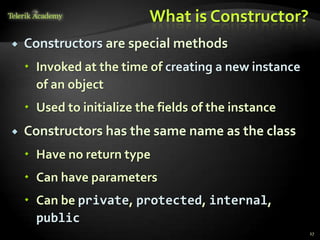
What is Constructor?
   Constructors are special methods
     Invoked at the time of creating a new instance
      of an object
     Used to initialize the fields of the instance
   Constructors has the same name as the class
     Have no return type
     Can have parameters
     Can be private, protected, internal,
      public
                                                       27
Defining Constructors
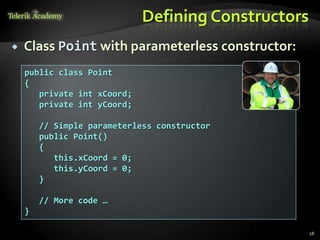
   Class Point with parameterless constructor:
    public class Point
    {
       private int xCoord;
       private int yCoord;

        // Simple parameterless constructor
        public Point()
        {
           this.xCoord = 0;
           this.yCoord = 0;
        }

        // More code …
    }

                                                     28
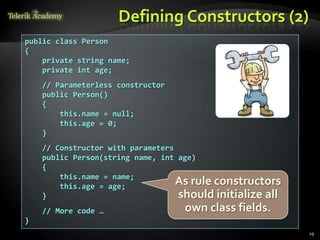
Defining Constructors (2)
public class Person
{
    private string name;
    private int age;
    // Parameterless constructor
    public Person()
    {
        this.name = null;
        this.age = 0;
    }
    // Constructor with parameters
    public Person(string name, int age)
    {
        this.name = name;
        this.age = age;
                                   As rule constructors
    }                              should initialize all
    // More code …                 own class fields.
}
                                                           29
Constructors and Initialization
   Pay attention when using inline initialization!
public class AlarmClock
{
   private int hours = 9; // Inline initialization
   private int minutes = 0; // Inline initialization
     // Parameterless constructor (intentionally left empty)
     public AlarmClock()
     { }
     // Constructor with parameters
     public AlarmClock(int hours, int minutes)
     {
        this.hours = hours;      // Invoked after the inline
        this.minutes = minutes; // initialization!
     }
     // More code …
}
                                                               30
Chaining Constructors Calls
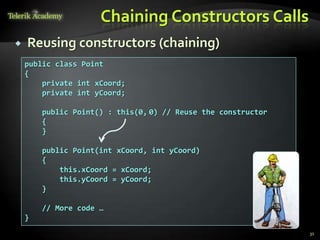
   Reusing constructors (chaining)
    public class Point
    {
        private int xCoord;
        private int yCoord;

        public Point() : this(0, 0) // Reuse the constructor
        {
        }

        public Point(int xCoord, int yCoord)
        {
            this.xCoord = xCoord;
            this.yCoord = yCoord;
        }

        // More code …
    }
                                                               31
Constructors
   Live Demo
Methods
Defining and Invoking Methods
Methods
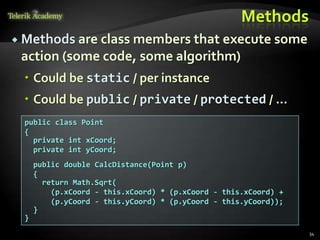
 Methods are class members that execute some
 action (some code, some algorithm)
  Could be static / per instance
  Could be public / private / protected / …
  public class Point
  {
    private int xCoord;
    private int yCoord;
      public double CalcDistance(Point p)
      {
        return Math.Sqrt(
          (p.xCoord - this.xCoord) * (p.xCoord - this.xCoord) +
          (p.yCoord - this.yCoord) * (p.yCoord - this.yCoord));
      }
  }
                                                                  34
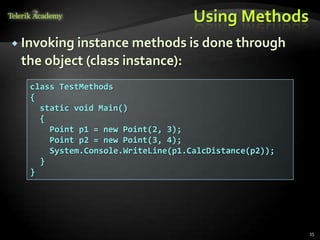
Using Methods
 Invoking instance methods is done through
 the object (class instance):
  class TestMethods
  {
    static void Main()
    {
      Point p1 = new Point(2, 3);
      Point p2 = new Point(3, 4);
      System.Console.WriteLine(p1.CalcDistance(p2));
    }
  }


                                                       35
Methods
 Live Demo
Properties
Defining and Using Properties
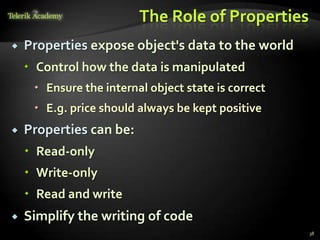
The Role of Properties
   Properties expose object's data to the world
     Control how the data is manipulated
      Ensure the internal object state is correct
      E.g. price should always be kept positive
   Properties can be:
     Read-only
     Write-only
     Read and write
   Simplify the writing of code
                                                     38
Defining Properties
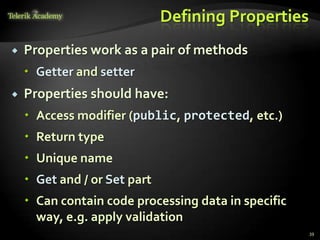
   Properties work as a pair of methods
     Getter and setter
   Properties should have:
     Access modifier (public, protected, etc.)
     Return type
     Unique name
     Get and / or Set part
     Can contain code processing data in specific
      way, e.g. apply validation
                                                     39
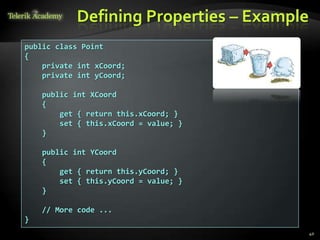
Defining Properties – Example
public class Point
{
    private int xCoord;
    private int yCoord;

    public int XCoord
    {
        get { return this.xCoord; }
        set { this.xCoord = value; }
    }

    public int YCoord
    {
        get { return this.yCoord; }
        set { this.yCoord = value; }
    }

    // More code ...
}
                                           40
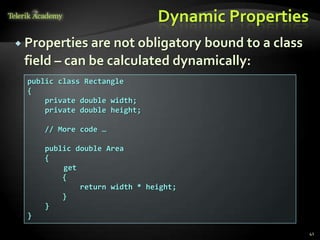
Dynamic Properties
 Properties are not obligatory bound to a class
 field – can be calculated dynamically:
  public class Rectangle
  {
      private double width;
      private double height;

      // More code …

      public double Area
      {
          get
          {
              return width * height;
          }
      }
  }

                                                    41
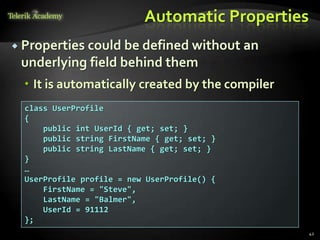
Automatic Properties
 Properties could be defined without an
 underlying field behind them
   It is automatically created by the compiler
  class UserProfile
  {
      public int UserId { get; set; }
      public string FirstName { get; set; }
      public string LastName { get; set; }
  }
  …
  UserProfile profile = new UserProfile() {
      FirstName = "Steve",
      LastName = "Balmer",
      UserId = 91112
  };
                                                  42
Properties
  Live Demo
Enumerations
Defining and Using Enumerated Types
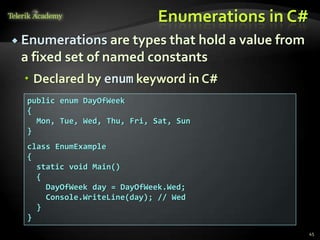
Enumerations in C#
 Enumerations are types that hold a value   from
 a fixed set of named constants
   Declared by enum keyword in C#
  public enum DayOfWeek
  {
    Mon, Tue, Wed, Thu, Fri, Sat, Sun
  }
  class EnumExample
  {
    static void Main()
    {
      DayOfWeek day = DayOfWeek.Wed;
      Console.WriteLine(day); // Wed
    }
  }
                                                    45
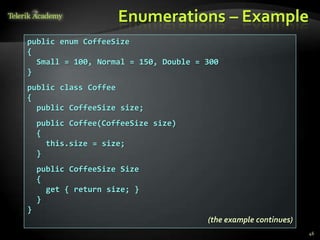
Enumerations – Example
public enum CoffeeSize
{
  Small = 100, Normal = 150, Double = 300
}
public class Coffee
{
  public CoffeeSize size;
    public Coffee(CoffeeSize size)
    {
      this.size = size;
    }
    public CoffeeSize Size
    {
      get { return size; }
    }
}
                                      (the example continues)
                                                                46
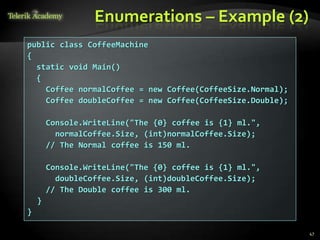
Enumerations – Example (2)
public class CoffeeMachine
{
  static void Main()
  {
    Coffee normalCoffee = new Coffee(CoffeeSize.Normal);
    Coffee doubleCoffee = new Coffee(CoffeeSize.Double);

        Console.WriteLine("The {0} coffee is {1} ml.",
          normalCoffee.Size, (int)normalCoffee.Size);
        // The Normal coffee is 150 ml.

        Console.WriteLine("The {0} coffee is {1} ml.",
          doubleCoffee.Size, (int)doubleCoffee.Size);
        // The Double coffee is 300 ml.
    }
}

                                                           47
Enumerations
   Live Demo
Keeping the Object
  State Correct
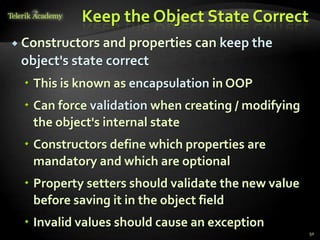
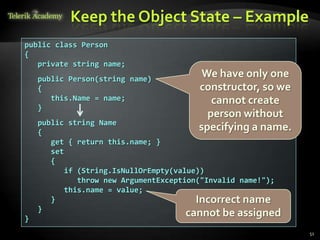
Keep the Object State Correct
 Constructors and properties   can keep the
 object's state correct
   This is known as encapsulation in OOP
   Can force validation when creating / modifying
    the object's internal state
   Constructors define which properties are
    mandatory and which are optional
   Property setters should validate the new value
    before saving it in the object field
   Invalid values should cause an exception
                                                     50
Keep the Object State – Example
public class Person
{
   private string name;
    public Person(string name)
                                          We have only one
    {                                    constructor, so we
       this.Name = name;                    cannot create
    }
                                           person without
    public string Name
    {
                                         specifying a name.
       get { return this.name; }
       set
       {
           if (String.IsNullOrEmpty(value))
              throw new ArgumentException("Invalid name!");
           this.name = value;
       }                                 Incorrect name
    }
}
                                      cannot be assigned
                                                              51
Keeping the
Object State
  Correct
   Live Demo
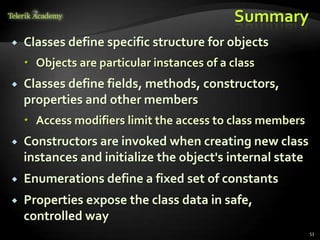
Summary
   Classes define specific structure for objects
     Objects are particular instances of a class
   Classes define fields, methods, constructors,
    properties and other members
     Access modifiers limit the access to class members
   Constructors are invoked when creating new class
    instances and initialize the object's internal state
   Enumerations define a fixed set of constants
   Properties expose the class data in safe,
    controlled way
                                                           53
Defining Classes – Part I


  Questions?


            http://academy.telerik.com
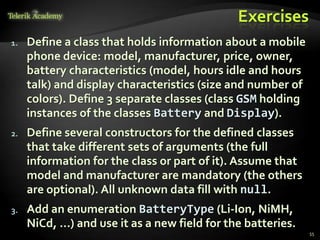
Exercises
1.   Define a class that holds information about a mobile
     phone device: model, manufacturer, price, owner,
     battery characteristics (model, hours idle and hours
     talk) and display characteristics (size and number of
     colors). Define 3 separate classes (class GSM holding
     instances of the classes Battery and Display).
2.   Define several constructors for the defined classes
     that take different sets of arguments (the full
     information for the class or part of it). Assume that
     model and manufacturer are mandatory (the others
     are optional). All unknown data fill with null.
3.   Add an enumeration BatteryType (Li-Ion, NiMH,
     NiCd, …) and use it as a new field for the batteries.
                                                             55
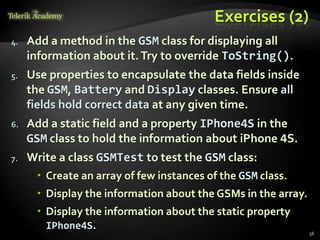
Exercises (2)
4.   Add a method in the GSM class for displaying all
     information about it. Try to override ToString().
5.   Use properties to encapsulate the data fields inside
     the GSM, Battery and Display classes. Ensure all
     fields hold correct data at any given time.
6.   Add a static field and a property IPhone4S in the
     GSM class to hold the information about iPhone 4S.
7.   Write a class GSMTest to test the GSM class:
       Create an array of few instances of the GSM class.
       Display the information about the GSMs in the array.
       Display the information about the static property
        IPhone4S.
                                                               56
Exercises (3)
8.    Create a class Call to hold a call performed through
      a GSM. It should contain date, time, dialed phone
      number and duration (in seconds).
9.    Add a property CallHistory in the GSM class to
      hold a list of the performed calls. Try to use the
      system class List<Call>.
10.   Add methods in the GSM class for adding and
      deleting calls from the calls history. Add a method to
      clear the call history.
11.   Add a method that calculates the total price of the
      calls in the call history. Assume the price per minute
      is fixed and is provided as a parameter.
                                                               57
Exercises (4)
12.   Write a class GSMCallHistoryTest to test the call
      history functionality of the GSM class.
        Create an instance of the GSM class.
        Add few calls.
        Display the information about the calls.
        Assuming that the price per minute is 0.37 calculate
         and print the total price of the calls in the history.
        Remove the longest call from the history
         and calculate the total price again.
        Finally clear the call history and print it.
                                                                  58
Free Trainings @ Telerik Academy
 C# Programming        @ Telerik Academy
       csharpfundamentals.telerik.com

   Telerik Software Academy
       academy.telerik.com

   Telerik Academy @ Facebook
       facebook.com/TelerikAcademy

   Telerik Software Academy Forums
       forums.academy.telerik.com

Defining classes-part-i-constructors-properties

  • 1.
    Defining Classes –Part I Classes, Fields, Constructors, Methods, Properties Svetlin Nakov Technical Trainer www.nakov.com Telerik Software Academy academy.telerik.com
  • 2.
    Table of Contents 1. Defining Simple Classes 2. Fields 3. Access Modifiers 4. Using Classes and Objects 5. Constructors 6. Methods 7. Properties 8. Enumerations (Enums) 9. Keeping the Object State 2
  • 3.
  • 4.
    Classes in OOP  Classes model real-world objects and define  Attributes (state, properties, fields)  Behavior (methods, operations)  Classes describe the structure of objects  Objects describe particular instance of a class  Properties hold information about the modeled object relevant to the problem  Operations implement object behavior 4
  • 5.
    Classes in C# Classes in C# can have members:  Fields, constants, methods, properties, indexers, events, operators, constructors, destructors, …  Inner types (inner classes, structures, interfaces, delegates, ...)  Members can have access modifiers (scope)  public, private, protected, internal  Members can be  static (common) or specific for a given object 5
  • 6.
    Simple Class Definition Begin of class definition public class Cat : Animal { Inherited (base) class private string name; private string owner; Fields public Cat(string name, string owner) { this.name = name; this.owner = owner; Constructor } public string Name Property { get { return this.name; } set { this.name = value; } } 6
  • 7.
    Simple Class Definition(2) public string Owner { get { return this.owner; } set { this.owner = value; } } Method public void SayMiau() { Console.WriteLine("Miauuuuuuu!"); } } End of class definition 7
  • 8.
    Class Definition andMembers  Class definition consists of:  Class declaration  Inherited class or implemented interfaces  Fields (static or not)  Constructors (static or not)  Properties (static or not)  Methods (static or not)  Events, inner types, etc. 8
  • 9.
  • 10.
    Fields  Fields aredata members defined inside a class  Fields hold the internal object state  Can be static or per instance  Can be private / public / protected / … class Dog { private string name; Field private string breed; declarations private int age; protected Color color; } 10
  • 11.
    Constant Fields  Constantfields are of two types:  Compile-time constants – const  Replaced by their value during the compilation  Runtime constants – readonly  Assigned once only at object creation class Math { public const float PI = 3.14159; public readonly Color = Color.FromRGBA(25, 33, 74, 128); } 11
  • 12.
    Constant Fields –Example public class Constants { public const double PI = 3.1415926535897932385; public readonly double Size; public Constants(int size) { this.Size = size; // Cannot be further modified! } static void Main() { Console.WriteLine(Constants.PI); Constants c = new Constants(5); Console.WriteLine(c.Size); c.Size = 10; // Compilation error: readonly field Console.WriteLine(Constants.Size); // compile error } } 12
  • 13.
  • 14.
    Access Modifiers  Class members can have access modifiers  Used to restrict the classes able to access them  Supports the OOP principle "encapsulation"  Class members can be:  public – accessible from any class  protected – accessible from the class itself and all its descendent classes  private – accessible from the class itself only  internal (default) – accessible from the current assembly, i.e. the current VS project 14
  • 15.
    The 'this' Keyword The keyword this inside a method points to the current instance of the class  Example: class Dog { private string name; public void PrintName() { Console.WriteLine(this.name); // The same like Console.WriteLine(name); } } 15
  • 16.
  • 17.
    Task: Define aClass "Dog"  Our task is to define a simple class that represents information about a dog  The dog should have name and breed  Optional fields (could be null)  The class allows to view and modify the name and the breed at any time  The dog should be able to bark 17
  • 18.
    Defining Class Dog– Example public class Dog { private string name; private string breed; public Dog() { } public Dog(string name, string breed) { this.name = name; this.breed = breed; } (the example continues) 18
  • 19.
    Defining Class Dog– Example (2) public string Name { get { return this.name; } set { this.name = value; } } public string Breed { get { return this.breed; } set { this.breed = value; } } public void SayBau() { Console.WriteLine("{0} said: Bauuuuuu!", this.name ?? "[unnamed dog]"); } } 19
  • 20.
  • 21.
    How to UseClasses (Non-Static)? 1. Create an instance  Initialize its properties / fields 2. Manipulate the instance  Read / modify its properties  Invoke methods  Handle events 3. Release the occupied resources  Performed automatically in most cases 21
  • 22.
    Task: Dog Meeting  Our task is as follows:  Create 3 dogs  The first should be named “Sharo”, the second – “Rex” and the last – left without name  Put all dogs in an array  Iterate through the array elements and ask each dog to bark  Note:  Use the Dog class from the previous example! 22
  • 23.
    Dog Meeting –Example static void Main() { Console.Write("Enter first dog's name: "); string dogName = Console.ReadLine(); Console.Write("Enter first dog's breed: "); string dogBreed = Console.ReadLine(); // Use the Dog constructor to assign name and breed Dog firstDog = new Dog(dogName, dogBreed); // Use Dog's parameterless constructor Dog secondDog = new Dog(); // Use properties to assign name and breed Console.Write("Enter second dog's name: "); secondDog.Name = Console.ReadLine(); Console.Write("Enter second dog's breed: "); secondDog.Breed = Console.ReadLine(); (the example continues) 23
  • 24.
    Dog Meeting –Example (2) // Create a Dog with no name and breed Dog thirdDog = new Dog(); // Save the dogs in an array Dog[] dogs = new Dog[] { firstDog, secondDog, thirdDog }; // Ask each of the dogs to bark foreach(Dog dog in dogs) { dog.SayBau(); } } 24
  • 25.
    Dog Meeting Live Demo
  • 26.
  • 27.
    What is Constructor?  Constructors are special methods  Invoked at the time of creating a new instance of an object  Used to initialize the fields of the instance  Constructors has the same name as the class  Have no return type  Can have parameters  Can be private, protected, internal, public 27
  • 28.
    Defining Constructors  Class Point with parameterless constructor: public class Point { private int xCoord; private int yCoord; // Simple parameterless constructor public Point() { this.xCoord = 0; this.yCoord = 0; } // More code … } 28
  • 29.
    Defining Constructors (2) publicclass Person { private string name; private int age; // Parameterless constructor public Person() { this.name = null; this.age = 0; } // Constructor with parameters public Person(string name, int age) { this.name = name; this.age = age; As rule constructors } should initialize all // More code … own class fields. } 29
  • 30.
    Constructors and Initialization  Pay attention when using inline initialization! public class AlarmClock { private int hours = 9; // Inline initialization private int minutes = 0; // Inline initialization // Parameterless constructor (intentionally left empty) public AlarmClock() { } // Constructor with parameters public AlarmClock(int hours, int minutes) { this.hours = hours; // Invoked after the inline this.minutes = minutes; // initialization! } // More code … } 30
  • 31.
    Chaining Constructors Calls  Reusing constructors (chaining) public class Point { private int xCoord; private int yCoord; public Point() : this(0, 0) // Reuse the constructor { } public Point(int xCoord, int yCoord) { this.xCoord = xCoord; this.yCoord = yCoord; } // More code … } 31
  • 32.
    Constructors Live Demo
  • 33.
  • 34.
    Methods  Methods areclass members that execute some action (some code, some algorithm)  Could be static / per instance  Could be public / private / protected / … public class Point { private int xCoord; private int yCoord; public double CalcDistance(Point p) { return Math.Sqrt( (p.xCoord - this.xCoord) * (p.xCoord - this.xCoord) + (p.yCoord - this.yCoord) * (p.yCoord - this.yCoord)); } } 34
  • 35.
    Using Methods  Invokinginstance methods is done through the object (class instance): class TestMethods { static void Main() { Point p1 = new Point(2, 3); Point p2 = new Point(3, 4); System.Console.WriteLine(p1.CalcDistance(p2)); } } 35
  • 36.
  • 37.
  • 38.
    The Role ofProperties  Properties expose object's data to the world  Control how the data is manipulated  Ensure the internal object state is correct  E.g. price should always be kept positive  Properties can be:  Read-only  Write-only  Read and write  Simplify the writing of code 38
  • 39.
    Defining Properties  Properties work as a pair of methods  Getter and setter  Properties should have:  Access modifier (public, protected, etc.)  Return type  Unique name  Get and / or Set part  Can contain code processing data in specific way, e.g. apply validation 39
  • 40.
    Defining Properties –Example public class Point { private int xCoord; private int yCoord; public int XCoord { get { return this.xCoord; } set { this.xCoord = value; } } public int YCoord { get { return this.yCoord; } set { this.yCoord = value; } } // More code ... } 40
  • 41.
    Dynamic Properties  Propertiesare not obligatory bound to a class field – can be calculated dynamically: public class Rectangle { private double width; private double height; // More code … public double Area { get { return width * height; } } } 41
  • 42.
    Automatic Properties  Propertiescould be defined without an underlying field behind them  It is automatically created by the compiler class UserProfile { public int UserId { get; set; } public string FirstName { get; set; } public string LastName { get; set; } } … UserProfile profile = new UserProfile() { FirstName = "Steve", LastName = "Balmer", UserId = 91112 }; 42
  • 43.
  • 44.
  • 45.
    Enumerations in C# Enumerations are types that hold a value from a fixed set of named constants  Declared by enum keyword in C# public enum DayOfWeek { Mon, Tue, Wed, Thu, Fri, Sat, Sun } class EnumExample { static void Main() { DayOfWeek day = DayOfWeek.Wed; Console.WriteLine(day); // Wed } } 45
  • 46.
    Enumerations – Example publicenum CoffeeSize { Small = 100, Normal = 150, Double = 300 } public class Coffee { public CoffeeSize size; public Coffee(CoffeeSize size) { this.size = size; } public CoffeeSize Size { get { return size; } } } (the example continues) 46
  • 47.
    Enumerations – Example(2) public class CoffeeMachine { static void Main() { Coffee normalCoffee = new Coffee(CoffeeSize.Normal); Coffee doubleCoffee = new Coffee(CoffeeSize.Double); Console.WriteLine("The {0} coffee is {1} ml.", normalCoffee.Size, (int)normalCoffee.Size); // The Normal coffee is 150 ml. Console.WriteLine("The {0} coffee is {1} ml.", doubleCoffee.Size, (int)doubleCoffee.Size); // The Double coffee is 300 ml. } } 47
  • 48.
    Enumerations Live Demo
  • 49.
    Keeping the Object State Correct
  • 50.
    Keep the ObjectState Correct  Constructors and properties can keep the object's state correct  This is known as encapsulation in OOP  Can force validation when creating / modifying the object's internal state  Constructors define which properties are mandatory and which are optional  Property setters should validate the new value before saving it in the object field  Invalid values should cause an exception 50
  • 51.
    Keep the ObjectState – Example public class Person { private string name; public Person(string name) We have only one { constructor, so we this.Name = name; cannot create } person without public string Name { specifying a name. get { return this.name; } set { if (String.IsNullOrEmpty(value)) throw new ArgumentException("Invalid name!"); this.name = value; } Incorrect name } } cannot be assigned 51
  • 52.
    Keeping the Object State Correct Live Demo
  • 53.
    Summary  Classes define specific structure for objects  Objects are particular instances of a class  Classes define fields, methods, constructors, properties and other members  Access modifiers limit the access to class members  Constructors are invoked when creating new class instances and initialize the object's internal state  Enumerations define a fixed set of constants  Properties expose the class data in safe, controlled way 53
  • 54.
    Defining Classes –Part I Questions? http://academy.telerik.com
  • 55.
    Exercises 1. Define a class that holds information about a mobile phone device: model, manufacturer, price, owner, battery characteristics (model, hours idle and hours talk) and display characteristics (size and number of colors). Define 3 separate classes (class GSM holding instances of the classes Battery and Display). 2. Define several constructors for the defined classes that take different sets of arguments (the full information for the class or part of it). Assume that model and manufacturer are mandatory (the others are optional). All unknown data fill with null. 3. Add an enumeration BatteryType (Li-Ion, NiMH, NiCd, …) and use it as a new field for the batteries. 55
  • 56.
    Exercises (2) 4. Add a method in the GSM class for displaying all information about it. Try to override ToString(). 5. Use properties to encapsulate the data fields inside the GSM, Battery and Display classes. Ensure all fields hold correct data at any given time. 6. Add a static field and a property IPhone4S in the GSM class to hold the information about iPhone 4S. 7. Write a class GSMTest to test the GSM class:  Create an array of few instances of the GSM class.  Display the information about the GSMs in the array.  Display the information about the static property IPhone4S. 56
  • 57.
    Exercises (3) 8. Create a class Call to hold a call performed through a GSM. It should contain date, time, dialed phone number and duration (in seconds). 9. Add a property CallHistory in the GSM class to hold a list of the performed calls. Try to use the system class List<Call>. 10. Add methods in the GSM class for adding and deleting calls from the calls history. Add a method to clear the call history. 11. Add a method that calculates the total price of the calls in the call history. Assume the price per minute is fixed and is provided as a parameter. 57
  • 58.
    Exercises (4) 12. Write a class GSMCallHistoryTest to test the call history functionality of the GSM class.  Create an instance of the GSM class.  Add few calls.  Display the information about the calls.  Assuming that the price per minute is 0.37 calculate and print the total price of the calls in the history.  Remove the longest call from the history and calculate the total price again.  Finally clear the call history and print it. 58
  • 59.
    Free Trainings @Telerik Academy  C# Programming @ Telerik Academy  csharpfundamentals.telerik.com  Telerik Software Academy  academy.telerik.com  Telerik Academy @ Facebook  facebook.com/TelerikAcademy  Telerik Software Academy Forums  forums.academy.telerik.com