INDEX Introduction TransparencyDeferred Rendering Overview DRT Rendering DRT Result Discussion Performance Downsides Summary and Future Work References
3.
Introduction Transparency DeferredRendering Overview DRT Rendering DRT Result Discussion Performance Downsides Summary and Future Work References
Deferred Rendering Transparency핵심 아이디어 Geometry Phase: 투명 오브젝트를 불투명 오브젝트와 함께 interlace. Perform Lighting Composition Phase: de-interlace and blend them. 장점 G-buffer 에 저장될 transparency alpha 만 필요 추가적인 데이터 , 파이프라인 변경 필요 없음
10.
Introduction Transparency DeferredRendering Overview DRT Rendering DRT Result Discussion Performance Downsides Summary and Future Work References
Splitting the renderingpipeline Render opaque objects 모든 불투명 오브젝트들을 deferred rendering 으로 렌더링 최종 조합된 이미지를 얻기 위해 G,L,C phase 를 수행 Render transparent objects 뒤에서 앞으로 정렬된 모든 투명 오브젝트들을 렌더링 deferred rendering 된 최종 이미지와 blend 시킨다
New Approach Deferred rendering을 사용할 때 투명 오브젝트들의 lighting consistency 문제를 해결하는 알고리즘 Deferred Rendering Transparency 로 명명 장점 Lighting consistency Simple and robust Speed
19.
Lighting consistency 투명/ 불투명 오브젝트들이 같은 lighting pipeline 을 사용하기 때문에 동일한 lighting quality 를 보여줌 lighting glitches 없이 불투명 오브젝트들이 서서히 fade out 됨
20.
Simple and robustNo pipeline change No additional object sorting or object separation 추가적인 코딩 없이 , 정점 레벨과 텍스처 레벨의 투명도를 다 처리할 수 있음
21.
Speed Only +7~10 shader instruction Only + 2 texture fetch No additional render targets switching
22.
Introduction Transparency DeferredRendering Overview DRT Rendering DRT Result Discussion Performance Downsides Summary and Future Work References
23.
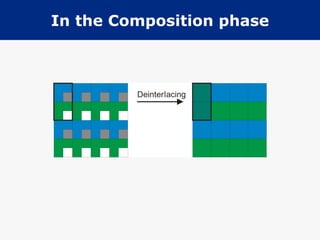
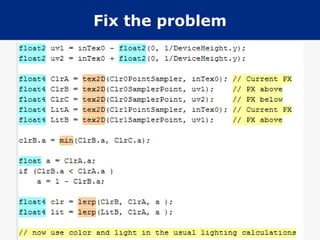
Deferred Rendering Transparency기존의 deferred rendering 에 삽입할 pixel shader code 조각 2 개 필요 G-phase 에서 투명 오브젝트들을 interlace C-phase 에서 투명 오브젝트들을 de-interlace 시키고 background 와 blend 시킴
Introduction Transparency DeferredRendering Overview DRT Rendering DRT Result Discussion Performance Downsides Summary and Future Work References
36.
Downsides Vertical blur투명 오브젝트에서 2- 픽셀 버티컬 블러가 약간 보임 interlacing 정보가 손실되기 때문 이것은 투명 오브젝트들에 대한 정보를 보존하기 위해 vertical oversampling 으로 해결 가능 하지만 성능이 심각하게 떨어진다 . Jaggy edges Only one transparency layer
37.
Downsides Vertical blurJaggy edges 앨리어싱 . 래스터 그래픽스에서 피할 수 없는 문제 투명 오브젝트들의 경계에서 약간의 jaggy edge 들이 보인다 . Only one transparency layer
38.
Downsides Vertical blurJaggy edges Only one transparency layer 알고리즘의 태생적 한계 최근접 투명 오브젝트만이 보인다 .
39.
Introduction Transparency DeferredRendering Overview DRT Rendering DRT Result Discussion Performance Downsides Summary and Future Work References
40.
Future Work Betterde-interlacing C-phase 에서 더 나은 de-interlacing 처리로 jagged edge 효과를 줄일 수 있다 아마 (?) 텍스처 read 수를 줄일 수 있을 것임 Blending modes Vertical blur
41.
Future Work Betterde-interlacing Blending modes 추가적인 픽셀 속성을 가져서 , 다른 유용한 블렌딩 모드들을 구현 가능 multiply, add, overlay Vertical blur
42.
Future Work Betterde-interlacing Blending modes Vertical blur 이 문제에 대한 빠르고 간단한 솔루션이 연구되어야 한다 예를 들면 , 2 개의 8bit color 값들을 16bit render target 에 저장하는 것 ...
43.
Introduction Transparency DeferredRendering Overview DRT Rendering DRT Result Discussion Performance Downsides Summary and Future Work References
44.
References Alpha-to-coverage indepth, ShaderX 5 Deferred shading, GDC 2004 The triangle processor and normal vector shader, SIGGRAPH 1998
#7 깊이 , 노말 그리고 스페큘라 요소들이 확산광과 반영반사를 계산하기 위해 사용되고 , 나중에 albedo 색과 조합되어 최종 이미지를 만든다
#14 Geometry phase 오브젝트 메쉬 데이트를 사용하는 유일한 phase. objects, color, position, normal, 그리고 추가적인 lighting factor 들이 Render Target 에 쓰여짐 Lighting phase Light 들은 screen-space 에서 적용됨 Composition phase G-phase 에서의 Color buffer 와 L-phase 에서의 lighting 이 조합됨 . Post-processing phase 다양한 효과들이 최종 이미지를 만들어 내기 위해 적용됨 . Motion blur, Volumetric fog, DOF, HDR 등 .
#15 Deferred Rendering 에서의 Transparency 는 대게 렌더링 파이프라인을 2 부분으로 나눠서 해결한다
#17 [ wikipedia ] Alpha to coverage is a multisampling computer graphics technique useful for situations where dense foliage or grass must be rendered in a video game . This technique uses the alpha channel of textures as a coverage mask for anti-aliasing . Alpha to coverage multisampling is based on regular multisampling, except that the alpha coverage mask is ANDed with the multisample mask. Alpha-to-coverage converts the alpha component output from the pixel shader to a coverage mask. When the multisampling is applied each output fragment gets a transparency of 0 or 1 depending on alpha coverage and the multisampling result. http://forum.beyond3d.com/showthread.php?t=21414 http://kyruie.tistory.com/88#footnote_link_88_1
#18 Normal rendering with 2xAA | Alpha-to-Coverage with 2xAA ----------------------+----------------------- Normal rendering with 6xAA | Alpha-to-Coverage with 6xAA
#20 [ Lighting glitch ] 이 현상이 맞나 몰겠네요… 같이 보면서 의논 필요 . http://www.youtube.com/watch?v=VlCGEq0jwS4 이런 이미지도… http://img525.imageshack.us/img525/3210/hairlightingbugsxo5.jpg
#25 모든 투명 픽셀들은 interlace 되어 렌더링 홀수 horizontal line 들만 렌더되고 픽셀 알파 값은 알파 채널에 저장됨 간단한 픽셀 쉐이더와 알파가 0 인 홀수 라인들만을 걸러내는 알파 테스트
#26 현재 픽셀과 이것의 바로 위의 픽셀의 최소 알파값을 구함 최소 알파 값이 1 보다 작다면 , 양 픽셀은 서로 블렌드되고 de-interlaced 됨
#28 여기서 기술된 내용은 픽셀쉐이더 3 를 기반으로 하지만 2 로도 쉽게 적용될 수 있다 . 또 , 수평 라인에 대한 transparency blend 를 수행하지만 , 수직 또는 지그재그 패턴 역시 구현 가능하다 . G-buffer 생성 phase 에서 모든 투명 / 불투명 오브젝트를 그린다 . 이때 알파 소트 필요없고 , 투명 오브젝트를 나눠서 그리지 않는다 . 하지만 front to back 정렬은 항상 유용하다 . current H/W 는 매우 빠르게 reject 가능하기 때문 . 알파 테스팅을 활성화 시킴 . 알파가 0 인 odd line 을 걸러내기 위함 . 픽셀 쉐이더에서 ... 홀수 라인의 투명 픽셀들의 값을 zero 로 설정하여 알파테스트에서 걸러지도록 . 짝수 라인은 변경되지 않는다 이 방법은 최종 이미지에서 조합될 interlaced transparent object 들을 생성한다 . 이 phase 후에 , deferred rendering 에서 하던 데로 lighting pass 를 수행한다 .
#29 이 phase 에서 , color 와 lighting render target 들이 최종 이미지로 조합된다 . 픽셀 쉐이더는 투명 오브젝트를 백그라운드와 de-interlace 시키고 blend 시킨다 . 모든 픽셀들이 처리됨을 명시 , 그렇지 않으면 투명 오브젝트는 de-interlaced 될 수 없다 . 픽셀 쉐이더는 2 위치에서 샘플링한다 . 현재 픽셀과 이것의 바로 위 픽셀의 color 와 light 이 두 컬러의 최소 알파값이 . 두 픽셀을 블렌드하기 위해 사용된다 .
#30 두 픽셀만을 취하면 알파 블렌드 되는 부분의 경계에서 artifacts 가 발생함 바로 위 뿐만이 아니라 바로 아래에서도 한 번 더 샘플링하여 해결
#31 두 픽셀만을 취하면 알파 블렌드 되는 부분의 경계에서 artifacts 가 발생함 바로 위 뿐만이 아니라 바로 아래에서도 한 번 더 샘플링하여 해결
#35 normal deferred rendering 과 비교해서 약 2.2% 의 Speed Hit 만이 있을 뿐
#41 간단한 구현으로 높은 퍼포먼스의 투명 / 불투명 오브젝트간 lighting consistency 를 보여주는 알고리즘 제공







![Mathematical Structures for CS [Chapter3]456](https://cdn.slidesharecdn.com/ss_thumbnails/chapter3456-100312123740-phpapp01-thumbnail.jpg?width=640&height=640&fit=bounds)


