Download free for 30 days
Sign in
Upload
Language (EN)
Support
Business
Mobile
Social Media
Marketing
Technology
Art & Photos
Career
Design
Education
Presentations & Public Speaking
Government & Nonprofit
Healthcare
Internet
Law
Leadership & Management
Automotive
Engineering
Software
Recruiting & HR
Retail
Sales
Services
Science
Small Business & Entrepreneurship
Food
Environment
Economy & Finance
Data & Analytics
Investor Relations
Sports
Spiritual
News & Politics
Travel
Self Improvement
Real Estate
Entertainment & Humor
Health & Medicine
Devices & Hardware
Lifestyle
Change Language
Language
English
Español
Português
Français
Deutsche
Cancel
Save
EN
Uploaded by
AltairKorea
773 views
Defeature hm10
Read more
0
Save
Share
Embed
Embed presentation
Download
Downloaded 13 times
1
/ 9
2
/ 9
3
/ 9
4
/ 9
5
/ 9
6
/ 9
7
/ 9
8
/ 9
9
/ 9
More Related Content
PDF
Saving and retrieving_normal_modes_analysis_results
by
AltairKorea
PDF
Hyper mesh tip_webinar_20110531
by
AltairKorea
PPT
설인 Abaqus Dogbone따라하기
by
snowmen0
PPT
DesignTech Systems and Altair Engineering SlideShare 2016
by
DesignTech Systems Ltd.
PPTX
OptiStruct_autocontact
by
So-Hyung Lee
PDF
Opti struct tips_and_tricks_atc
by
Altair
PDF
Quick edit v10
by
AltairKorea
PDF
Webinar 20110617
by
AltairKorea
Saving and retrieving_normal_modes_analysis_results
by
AltairKorea
Hyper mesh tip_webinar_20110531
by
AltairKorea
설인 Abaqus Dogbone따라하기
by
snowmen0
DesignTech Systems and Altair Engineering SlideShare 2016
by
DesignTech Systems Ltd.
OptiStruct_autocontact
by
So-Hyung Lee
Opti struct tips_and_tricks_atc
by
Altair
Quick edit v10
by
AltairKorea
Webinar 20110617
by
AltairKorea
More from AltairKorea
PDF
Mod vis technical_overview_v11_hv11_webinar_20110512_02
by
AltairKorea
PDF
Hm10 m vol_webinar_20110526
by
AltairKorea
PDF
New force india_f1_principal roll structure design using non-linear implicit ...
by
AltairKorea
PDF
Principal roll structure_design_using_non-linear_implicit_optimisation_in_ra...
by
AltairKorea
PDF
HyperMorph 교육자료
by
AltairKorea
PDF
Validation of High Fidelity CFD Modeling Approach for Utility Scale Wind Turb...
by
AltairKorea
PDF
Advanced seam creation with quad transition at HW11.0SA
by
AltairKorea
PDF
Free shape panel_설명_v10
by
AltairKorea
PDF
White paper multi objopt
by
AltairKorea
PPT
OptiStruct / Pattern grouping – uniform
by
AltairKorea
PDF
EHTC2010 Oil Bearing Calculations In Ship Diesel Engines Using MotionSolve
by
AltairKorea
PDF
Hyper study 10.0
by
AltairKorea
PDF
HyperStudy 10 Training Manual
by
AltairKorea
PDF
Optistruct Optimization 10 Training Manual
by
AltairKorea
PPTX
Radioss analysis quality_ht
by
AltairKorea
PDF
CASE - Cleveland golf 101410
by
AltairKorea
PPTX
Crocodile PPT
by
AltairKorea
PDF
Radioss version 11.0
by
AltairKorea
PDF
Radioss general overview
by
AltairKorea
Mod vis technical_overview_v11_hv11_webinar_20110512_02
by
AltairKorea
Hm10 m vol_webinar_20110526
by
AltairKorea
New force india_f1_principal roll structure design using non-linear implicit ...
by
AltairKorea
Principal roll structure_design_using_non-linear_implicit_optimisation_in_ra...
by
AltairKorea
HyperMorph 교육자료
by
AltairKorea
Validation of High Fidelity CFD Modeling Approach for Utility Scale Wind Turb...
by
AltairKorea
Advanced seam creation with quad transition at HW11.0SA
by
AltairKorea
Free shape panel_설명_v10
by
AltairKorea
White paper multi objopt
by
AltairKorea
OptiStruct / Pattern grouping – uniform
by
AltairKorea
EHTC2010 Oil Bearing Calculations In Ship Diesel Engines Using MotionSolve
by
AltairKorea
Hyper study 10.0
by
AltairKorea
HyperStudy 10 Training Manual
by
AltairKorea
Optistruct Optimization 10 Training Manual
by
AltairKorea
Radioss analysis quality_ht
by
AltairKorea
CASE - Cleveland golf 101410
by
AltairKorea
Crocodile PPT
by
AltairKorea
Radioss version 11.0
by
AltairKorea
Radioss general overview
by
AltairKorea
Defeature hm10
1.
Surface edit :
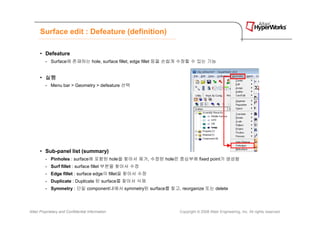
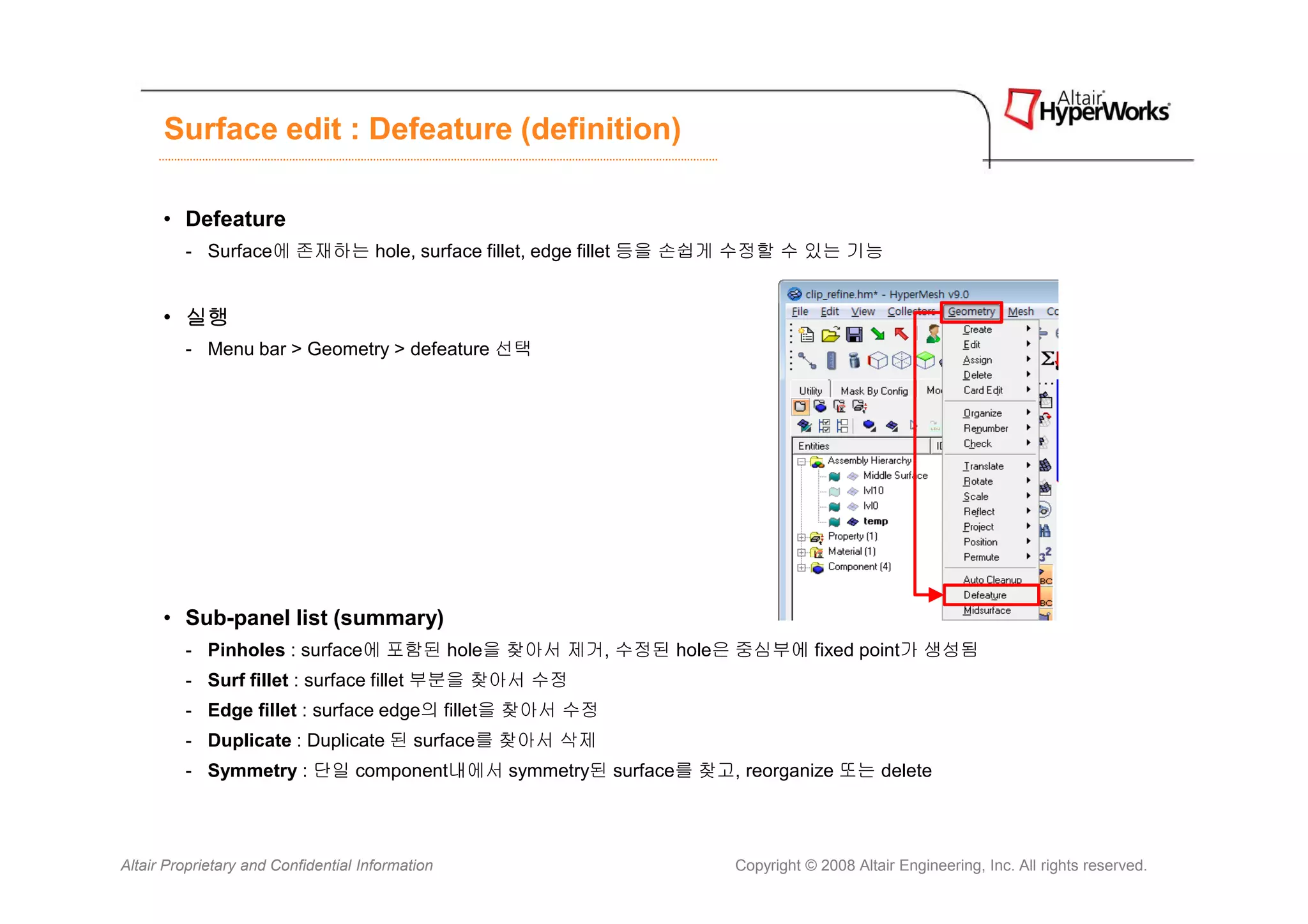
Defeature (definition) • Defeature - Surface에 존재하는 hole, surface fillet, edge fillet 등을 손쉽게 수정할 수 있는 기능 • 실행 - Menu bar > Geometry > defeature 선택 • Sub-panel list (summary) - Pinholes : surface에 포함된 hole을 찾아서 제거, 수정된 hole은 중심부에 fixed point가 생성됨 - Surf fillet : surface fillet 부분을 찾아서 수정 - Edge fillet : surface edge의 fillet을 찾아서 수정 - Duplicate : Duplicate 된 surface를 찾아서 삭제 - Symmetry : 단일 component내에서 symmetry된 surface를 찾고, reorganize 또는 delete Altair Proprietary and Confidential Information Copyright © 2008 Altair Engineering, Inc. All rights reserved.
2.
Surface edit :
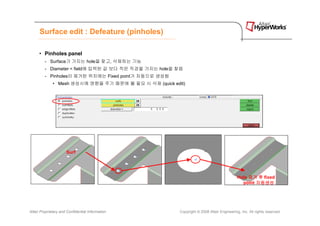
Defeature (pinholes) • Pinholes panel - Surface가 가지는 hole을 찾고, 삭제하는 기능 - Diameter < field에 입력된 값 보다 작은 직경을 가지는 hole을 찾음 - Pinholes이 제거된 위치에는 Fixed point가 자동으로 생성됨 • Mesh 생성시에 영향을 주기 때문에 불 필요 시 삭제 (quick edit) Surf Hole 제거 후 fixed point 자동생성 Altair Proprietary and Confidential Information Copyright © 2008 Altair Engineering, Inc. All rights reserved.
3.
Surface edit :
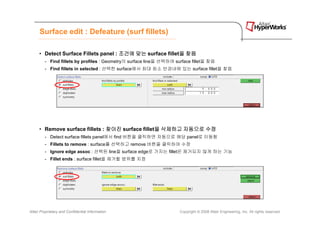
Defeature (surf fillets) • Detect Surface Fillets panel : 조건에 맞는 surface fillet을 찾음 을 - Find fillets by profiles : Geometry의 surface line을 선택하여 surface fillet을 찾음 - Find fillets in selected : 선택한 surface에서 최대 최소 반경내에 있는 surface fillet을 찾음 • Remove surface fillets : 찾아진 surface fillet을 삭제하고 자동으로 수정 을 - Detect surface fillets panel에서 find 버튼을 클릭하면 자동으로 해당 panel로 이동함 - Fillets to remove : surface를 선택하고 remove 버튼을 클릭하여 수정 - Ignore edge assoc : 선택된 line을 surface edge로 가지는 fillet은 제거되지 않게 하는 기능 - Fillet ends : surface fillet을 제거할 범위를 지정 Altair Proprietary and Confidential Information Copyright © 2008 Altair Engineering, Inc. All rights reserved.
4.
Surface edit :
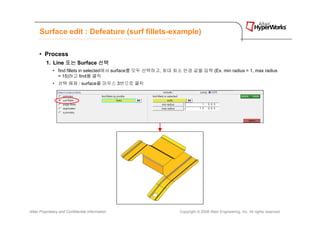
Defeature (surf fillets-example) • Process 1. Line 또는 Surface 선택 • find fillets in selected에서 surface를 모두 선택하고, 최대 최소 반경 값을 입력 (Ex. min radius = 1, max radius = 15)하고 find를 클릭 • 선택 해제 : surface를 마우스 3번으로 클릭 Altair Proprietary and Confidential Information Copyright © 2008 Altair Engineering, Inc. All rights reserved.
5.
Surface edit :
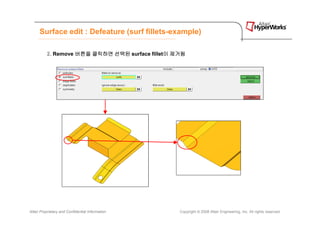
Defeature (surf fillets-example) 2. Remove 버튼을 클릭하면 선택된 surface fillet이 제거됨 이 Altair Proprietary and Confidential Information Copyright © 2008 Altair Engineering, Inc. All rights reserved.
6.
Surface edit :
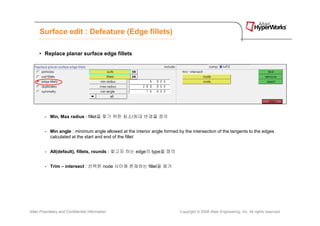
Defeature (Edge fillets) • Replace planar surface edge fillets - Min, Max radius : fillet을 찾기 위한 최소/최대 반경을 정의 - Min angle : minimum angle allowed at the interior angle formed by the intersection of the tangents to the edges calculated at the start and end of the fillet - All(default), fillets, rounds : 찾고자 하는 edge의 type을 정의 - Trim – intersect : 선택한 node 사이에 존재하는 fillet을 제거 Altair Proprietary and Confidential Information Copyright © 2008 Altair Engineering, Inc. All rights reserved.
7.
Surface edit :
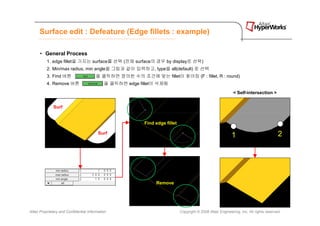
Defeature (Edge fillets : example) • General Process 1. edge fillet을 가지는 surface를 선택 (전체 surface의 경우 by display로 선택) 2. Min/max radius, min angle을 그림과 같이 입력하고, type을 all(default) 로 선택 3. Find 버튼 을 클릭하면 정의한 수의 조건에 맞는 fillet이 찾아짐 (F : fillet, R : round) 4. Remove 버튼 을 클릭하면 edge fillet이 삭제됨 < Self-intersection > Surf Find edge fillet Surf 1 2 Remove Altair Proprietary and Confidential Information Copyright © 2008 Altair Engineering, Inc. All rights reserved.
8.
Surface edit :
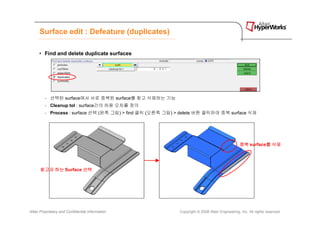
Defeature (duplicates) • Find and delete duplicate surfaces - 선택된 surface에서 서로 중복된 surface를 찾고 삭제하는 기능 - Cleanup tol : surface간의 허용 오차를 정의 - Process : surface 선택 (왼쪽 그림) > find 클릭 (오른쪽 그림) > delete 버튼 클릭하여 중복 surface 삭제 중복 surface를 삭제 를 찾고자 하는 Surface 선택 Altair Proprietary and Confidential Information Copyright © 2008 Altair Engineering, Inc. All rights reserved.
9.
Surface edit :
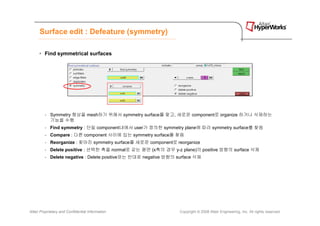
Defeature (symmetry) • Find symmetrical surfaces - Symmetry 형상을 mesh하기 위해서 symmetry surface를 찾고, 새로운 component로 organize 하거나 삭제하는 기능을 수행 - Find symmetry : 단일 component내에서 user가 정의한 symmetry plane에 따라 symmetry surface를 찾음 - Compare : 다른 component 사이에 있는 symmetry surface를 찾음 - Reorganize : 찾아진 symmetry surface를 새로운 component로 reorganize - Delete positive : 선택한 축을 normal로 갖는 평면 (x축의 경우 y-z plane)의 positive 방향의 surface 삭제 - Delete negative : Delete positive와는 반대로 negative 방향의 surface 삭제 Altair Proprietary and Confidential Information Copyright © 2008 Altair Engineering, Inc. All rights reserved.
Download