1© Entrust Inc. All Rights Reserved. 1
Defeating
Man-in-the-Browser
Malware
How to prevent the latest malware attacks
against consumer and corporate banking
© Entrust Inc. All Rights Reserved.
Get this
White Paper
2© Entrust Inc. All Rights Reserved. 2
Contents
Introduction ........................................................................ 3
What is a Man-in-the-Browser Attack?............................. 5
MITB Attack Phase One: Infection............................................................6
MITB Attack Phase Two: Transaction Takeover.......................................7
What Can Be Done?........................................................... 9
Active Safeguards.....................................................................................9
Passive Safeguards ................................................................................14
Summary........................................................................... 17
Entrust & You ................................................................... 18
3© Entrust Inc. All Rights Reserved. 3
Introduction
The Internet offers financial institutions the promise of delivering new
services at a fraction of the cost of traditional channels. As more
consumers move online, this migration helps reduce operating costs and
increase their customer base. The challenge lies in being able to offer
these services across new and sophisticated channels — for example,
the mobile channel — while not sacrificing security or usability.
Unfortunately, the benefits of the Web are also available to criminals;
and the world of organized crime has been quick to exploit its
weaknesses. Criminals are using very persuasive and often personalized
tactics to entice users to take specific actions that will result in the
attacker’s ability to misdirect or take over a user’s online banking session
— or their entire machine.
While many safeguards are deployed within financial institutions,
criminals are evolving their techniques rapidly. Instead of phishing
attacks that lead to fake websites designed to harvest usernames and
passwords, the techniques are now more sophisticated and effective
against previously deployed defenses.
Phishing and spear-phishing attacks1
are now designed to deploy
malware, which takes over users’ browsers and executes malicious
transactions. The malware is crafted to avoid detection by antivirus tools.
The result is known as a “man-in-the-browser” attack.
1
A spear-phishing attack is a highly targeted form of phishing, using specific messages and information tailored to a
particular user or small user group.
Phishing and spear-phishing
attacks are now designed to
deploy malware, which
takes over users’ browsers
and executes malicious
transactions. The malware
is crafted to avoid detection
by antivirus tools. The result
is known as a ‘man-in-the-
browser’ attack.
”
“
4© Entrust Inc. All Rights Reserved. 4
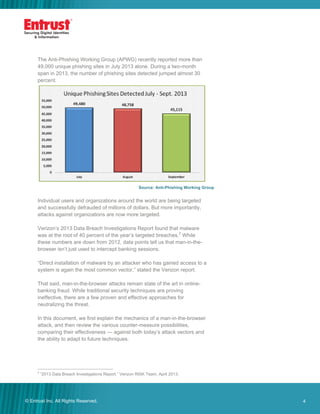
The Anti-Phishing Working Group (APWG) recently reported more than
49,000 unique phishing sites in July 2013 alone. During a two-month
span in 2013, the number of phishing sites detected jumped almost 30
percent.
Source: Anti-Phishing Working Group
Individual users and organizations around the world are being targeted
and successfully defrauded of millions of dollars. But more importantly,
attacks against organizations are now more targeted.
Verizon’s 2013 Data Breach Investigations Report found that malware
was at the root of 40 percent of the year’s targeted breaches.2
While
these numbers are down from 2012, data points tell us that man-in-the-
browser isn’t just used to intercept banking sessions.
“Direct installation of malware by an attacker who has gained access to a
system is again the most common vector,” stated the Verizon report.
That said, man-in-the-browser attacks remain state of the art in online-
banking fraud. While traditional security techniques are proving
ineffective, there are a few proven and effective approaches for
neutralizing the threat.
In this document, we first explain the mechanics of a man-in-the-browser
attack, and then review the various counter-measure possibilities,
comparing their effectiveness — against both today’s attack vectors and
the ability to adapt to future techniques.
2
“2013 Data Breach Investigations Report,” Verizon RISK Team, April 2013.
5© Entrust Inc. All Rights Reserved. 5
What is a Man-in-the-Browser Attack?
The man-in-the-browser (MITB) attack leverages what is known as a
Trojan Horse (or simply a Trojan). A Trojan is malicious software that is
somehow installed — often initiated by various social engineering tactics
— and resides concealed on the user's computer, frequently
undetectable by traditional virus scanning.
It is commonly in the form of a browser helper object, user script, or
Active X control. It wakes up when the user visits a target site, and
functions by transparently capturing and modifying information as it
moves between the browser's user interface and the Internet.
In this way, the malware can show the user a completely consistent
picture of the transaction he or she is executing, while actually executing
a totally different transaction with their bank. Transaction details may be
modified or totally unrelated transactions may be launched — all without
the user ever understanding that an attack is underway.
Most traditional defenses are rendered completely ineffective, because
the Trojan is difficult to detect through traditional virus-scanning, and it
has direct access to authentication data (e.g., static and one-time
passcodes or even biometrics) and details of the transaction.
The criminal community is heavily focusing its attacks today on
corporate-banking customers, as the available funds are often greater,
transaction limits are higher and the corporate customer has access to a
wire transfer or Automated Clearing House (ACH) services through the
online banking interface.
However, there are many examples of attacks on high-value banking
customers as well, with the possibility of the average user being attacked
in future being very real. Examples of well-known man-in-the-browser
attacks include the Zeus and Silentbanker Trojans, each which have
been successfully installed on millions of PCs.
Interestingly, there are even man-in-the-browser attacks like Russian-
born Spy Eye that actually first attack existing malware (e.g., Zeus),
taking over all of the information captured already and then attacking the
user.
What is Social
Engineering?
Social engineering is the act of
manipulating a person into taking
specific actions or sharing
confidential information without
the use of any technical hacking
methods.
Uses of social engineering include
sending targeted phishing emails
that resonate with particular users
(often referred to as spear-
phishing or harpooning) and
cause them to take action that
results in an unwanted result.
Example: A group of 20,000
financial services executives were
targeted with specific emails that
looked like subpoenas, causing
more than 10 percent to follow
links and become infected with a
Trojan.
6© Entrust Inc. All Rights Reserved. 6
MITB Attack Phase One: Infection
The first phase of an MITB attack is the infection of a target computer. A
number of techniques have proven to be effective, typically relying on
social engineering to trick a user into doing something unwise, but
sometimes exploiting other browser or network vulnerabilities. The most
common techniques in use today are as follows:
1. Infected Download
A phishing or spear-phishing email suggesting that a user visit a
site for some compelling reason, such as a breaking news
report, free software download or celebrity images. Unlike a
traditional man-in-the-middle attack, these phishing emails don’t
always claim to come from a financial institution looking to
“confirm” identification details, because the goal is to deploy
malware, not harvest usernames and passwords.
The user clicks on the link and is taken to a malicious website
where malware-infected software is offered for download as a
“necessary” video codec, pirated software package, interesting
PDF document, or the like. When the user executes or opens
the download package on their computer the malware is installed
while the user remains unaware.
2. Browser Vulnerability
As with Method 1 above, a user is tricked to visit a malicious site,
which then exploits unpatched browser vulnerabilities to silently
install malware.
Current estimates put the number of computers infected with malware at
31.88 percent, representing millions of users globally infected. Through
the third quarter of 2013, the financial industry (21.74 percent) and
payment services (56.39 percent) represented more than 78 percent of
all industries targeted.3
3
“Phishing Activity Trends Report: Third Quarter 2013," Anti-Phishing Working Group, February 10, 2014.
7© Entrust Inc. All Rights Reserved. 7
MITB Attack Phase Two: Transaction Takeover
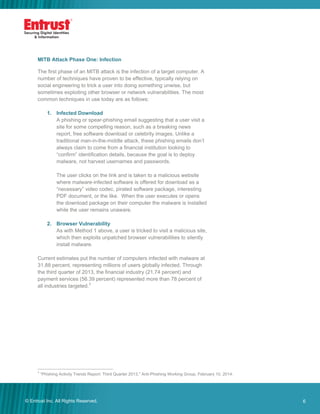
In the second phase of the attack, the user launches their browser. The
Trojan is automatically and silently activated, transparently storing or
actively relaying the user's activities unmodified between the browser
and the Internet, while unbeknownst to the user monitoring all of their
activity.
The Trojan is capable of recognizing when the user visits a designated
online-banking site to do their banking (Trojans are coded to watch for
one or more online banks).
Once the user has successfully authenticated — even with strong
authentication like an OTP token — the Trojan can appropriate the user's
privileges, enabling it to modify transaction details and initiate new
transactions without the user or the bank noticing.
Clearly, this can result in the user's funds being directed to accounts
under the criminal's control, either directly or via mule accounts.
8© Entrust Inc. All Rights Reserved. 8
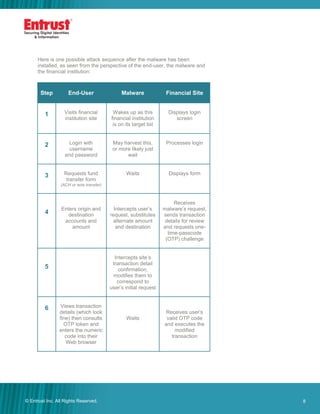
Here is one possible attack sequence after the malware has been
installed, as seen from the perspective of the end-user, the malware and
the financial institution:
Step End-User Malware Financial Site
1 Visits financial
institution site
Wakes up as this
financial institution
is on its target list
Displays login
screen
2 Login with
username
and password
May harvest this,
or more likely just
wait
Processes login
3 Requests fund
transfer form
(ACH or wire transfer)
Waits Displays form
4
Enters origin and
destination
accounts and
amount
Intercepts user’s
request, substitutes
alternate amount
and destination
Receives
malware’s request,
sends transaction
details for review
and requests one-
time-passcode
(OTP) challenge
5
Intercepts site’s
transaction detail
confirmation,
modifies them to
correspond to
user’s initial request
6 Views transaction
details (which look
fine) then consults
OTP token and
enters the numeric
code into their
Web browser
Waits
Receives user’s
valid OTP code
and executes the
modified
transaction
9© Entrust Inc. All Rights Reserved. 9
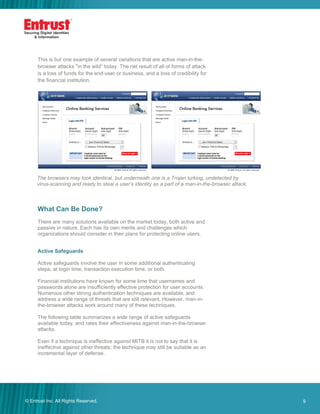
The browsers may look identical, but underneath one is a Trojan lurking, undetected by
virus-scanning and ready to steal a user’s identity as a part of a man-in-the-browser attack.
This is but one example of several variations that are active man-in-the-
browser attacks "in the wild” today. The net result of all of forms of attack
is a loss of funds for the end-user or business, and a loss of credibility for
the financial institution.
What Can Be Done?
There are many solutions available on the market today, both active and
passive in nature. Each has its own merits and challenges which
organizations should consider in their plans for protecting online users.
Active Safeguards
Active safeguards involve the user in some additional authenticating
steps, at login time, transaction execution time, or both.
Financial institutions have known for some time that usernames and
passwords alone are insufficiently effective protection for user accounts.
Numerous other strong authentication techniques are available, and
address a wide range of threats that are still relevant. However, man-in-
the-browser attacks work around many of these techniques.
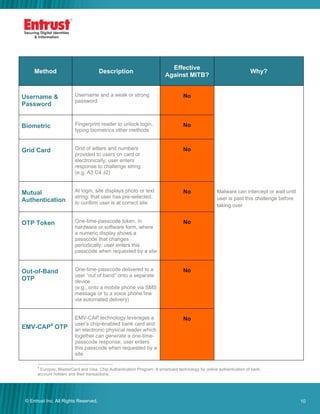
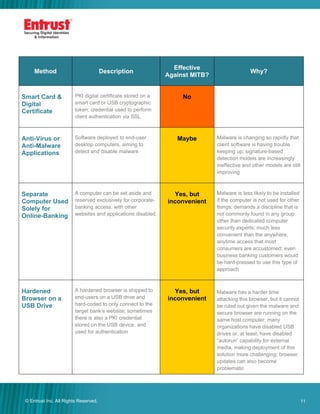
The following table summarizes a wide range of active safeguards
available today, and rates their effectiveness against man-in-the-browser
attacks.
Even if a technique is ineffective against MITB it is not to say that it is
ineffective against other threats; the technique may still be suitable as an
incremental layer of defense.
10© Entrust Inc. All Rights Reserved. 10
Method Description
Effective
Against MITB?
Why?
Username &
Password
Username and a weak or strong
password
No
Malware can intercept or wait until
user is past this challenge before
taking over
Biometric Fingerprint reader to unlock login,
typing biometrics other methods
No
Grid Card Grid of letters and numbers
provided to users on card or
electronically; user enters
response to challenge string
(e.g. A3 C4 J2)
No
Mutual
Authentication
At login, site displays photo or text
string, that user has pre-selected,
to confirm user is at correct site
No
OTP Token One-time-passcode token, in
hardware or software form, where
a numeric display shows a
passcode that changes
periodically; user enters this
passcode when requested by a site
No
Out-of-Band
OTP
One-time-passcode delivered to a
user “out of band” onto a separate
device
(e.g., onto a mobile phone via SMS
message or to a voice phone line
via automated delivery)
No
EMV-CAP4
OTP
EMV-CAP technology leverages a
user’s chip-enabled bank card and
an electronic physical reader which
together can generate a one-time-
passcode response; user enters
this passcode when requested by a
site
No
4
Europay, MasterCard and Visa: Chip Authentication Program. A smartcard technology for online authentication of bank
account holders and their transactions.
11© Entrust Inc. All Rights Reserved. 11
Method Description
Effective
Against MITB?
Why?
Smart Card &
Digital
Certificate
PKI digital certificate stored on a
smart card or USB cryptographic
token; credential used to perform
client authentication via SSL
No
Anti-Virus or
Anti-Malware
Applications
Software deployed to end-user
desktop computers, aiming to
detect and disable malware
Maybe Malware is changing so rapidly that
client software is having trouble
keeping up; signature-based
detection models are increasingly
ineffective and other models are still
improving
Separate
Computer Used
Solely for
Online-Banking
A computer can be set aside and
reserved exclusively for corporate-
banking access, with other
websites and applications disabled.
Yes, but
inconvenient
Malware is less likely to be installed
if the computer is not used for other
things; demands a discipline that is
not commonly found in any group
other than dedicated computer
security experts; much less
convenient than the anywhere,
anytime access that most
consumers are accustomed; even
business banking customers would
be hard-pressed to use this type of
approach
Hardened
Browser on a
USB Drive
A hardened browser is shipped to
end-users on a USB drive and
hard-coded to only connect to the
target bank’s website; sometimes
there is also a PKI credential
stored on the USB device, and
used for authentication
Yes, but
inconvenient
Malware has a harder time
attacking this browser, but it cannot
be ruled out given the malware and
secure browser are running on the
same host computer; many
organizations have disabled USB
drives or, at least, have disabled
“autorun” capability for external
media, making deployment of this
solution more challenging; browser
updates can also become
problematic
12© Entrust Inc. All Rights Reserved. 12
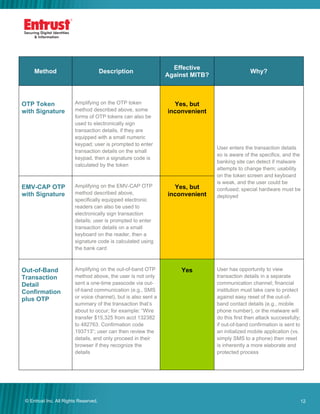
Method Description
Effective
Against MITB?
Why?
OTP Token
with Signature
Amplifying on the OTP token
method described above, some
forms of OTP tokens can also be
used to electronically sign
transaction details, if they are
equipped with a small numeric
keypad; user is prompted to enter
transaction details on the small
keypad, then a signature code is
calculated by the token
Yes, but
inconvenient
User enters the transaction details
so is aware of the specifics, and the
banking site can detect if malware
attempts to change them; usability
on the token screen and keyboard
is weak, and the user could be
confused; special hardware must be
deployed
EMV-CAP OTP
with Signature
Amplifying on the EMV-CAP OTP
method described above,
specifically equipped electronic
readers can also be used to
electronically sign transaction
details; user is prompted to enter
transaction details on a small
keyboard on the reader, then a
signature code is calculated using
the bank card
Yes, but
inconvenient
Out-of-Band
Transaction
Detail
Confirmation
plus OTP
Amplifying on the out-of-band OTP
method above, the user is not only
sent a one-time passcode via out-
of-band communication (e.g., SMS
or voice channel), but is also sent a
summary of the transaction that’s
about to occur; for example: “Wire
transfer $15,325 from acct 132382
to 482763. Confirmation code
193713”; user can then review the
details, and only proceed in their
browser if they recognize the
details
Yes User has opportunity to view
transaction details in a separate
communication channel; financial
institution must take care to protect
against easy reset of the out-of-
band contact details (e.g., mobile
phone number), or the malware will
do this first then attack successfully;
if out-of-band confirmation is sent to
an initialized mobile application (vs.
simply SMS to a phone) then reset
is inherently a more elaborate and
protected process
13© Entrust Inc. All Rights Reserved. 13
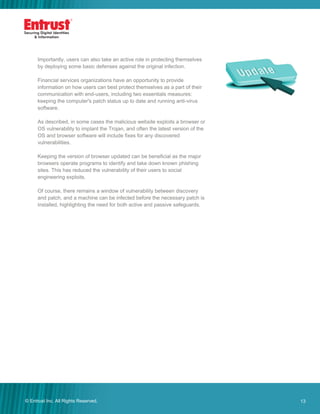
Importantly, users can also take an active role in protecting themselves
by deploying some basic defenses against the original infection.
Financial services organizations have an opportunity to provide
information on how users can best protect themselves as a part of their
communication with end-users, including two essentials measures:
keeping the computer's patch status up to date and running anti-virus
software.
As described, in some cases the malicious website exploits a browser or
OS vulnerability to implant the Trojan, and often the latest version of the
OS and browser software will include fixes for any discovered
vulnerabilities.
Keeping the version of browser updated can be beneficial as the major
browsers operate programs to identify and take down known phishing
sites. This has reduced the vulnerability of their users to social
engineering exploits.
Of course, there remains a window of vulnerability between discovery
and patch, and a machine can be infected before the necessary patch is
installed, highlighting the need for both active and passive safeguards.
14© Entrust Inc. All Rights Reserved. 14
Passive Safeguards
Passive safeguards are invisible to the user, yet help identify the user or
flag suspicious activity. These techniques are attractive because they
don’t impact the user experience in any way and, as a result, are easily
deployed to protect all customers, even those who do not wish to see
visible security measures.
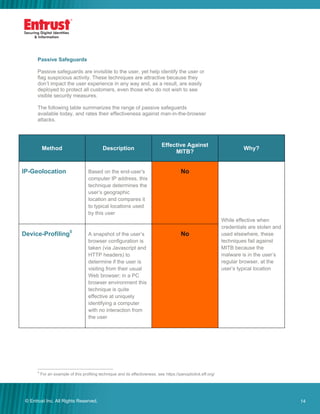
The following table summarizes the range of passive safeguards
available today, and rates their effectiveness against man-in-the-browser
attacks.
Method Description
Effective Against
MITB?
Why?
IP-Geolocation Based on the end-user’s
computer IP address, this
technique determines the
user’s geographic
location and compares it
to typical locations used
by this user
No
While effective when
credentials are stolen and
used elsewhere, these
techniques fail against
MITB because the
malware is in the user’s
regular browser, at the
user’s typical location
Device-Profiling5
A snapshot of the user’s
browser configuration is
taken (via Javascript and
HTTP headers) to
determine if the user is
visiting from their usual
Web browser; in a PC
browser environment this
technique is quite
effective at uniquely
identifying a computer
with no interaction from
the user
No
5
For an example of this profiling technique and its effectiveness, see https://panopticlick.eff.org/
15© Entrust Inc. All Rights Reserved. 15
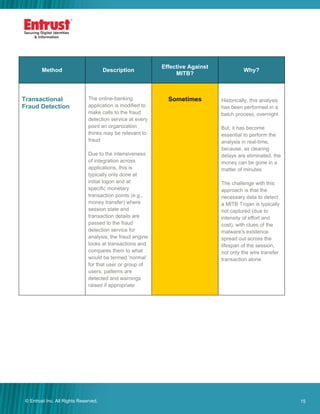
Method Description
Effective Against
MITB?
Why?
Transactional
Fraud Detection
The online-banking
application is modified to
make calls to the fraud
detection service at every
point an organization
thinks may be relevant to
fraud
Due to the intensiveness
of integration across
applications, this is
typically only done at
initial logon and at
specific monetary
transaction points (e.g.,
money transfer) where
session state and
transaction details are
passed to the fraud
detection service for
analysis; the fraud engine
looks at transactions and
compares them to what
would be termed ‘normal’
for that user or group of
users; patterns are
detected and warnings
raised if appropriate
Sometimes Historically, this analysis
has been performed in a
batch process, overnight
But, it has become
essential to perform the
analysis in real-time,
because, as clearing
delays are eliminated, the
money can be gone in a
matter of minutes
The challenge with this
approach is that the
necessary data to detect
a MITB Trojan is typically
not captured (due to
intensity of effort and
cost), with clues of the
malware’s existence
spread out across the
lifespan of the session,
not only the wire transfer
transaction alone
16© Entrust Inc. All Rights Reserved. 16
Method Description
Effective Against
MITB?
Why?
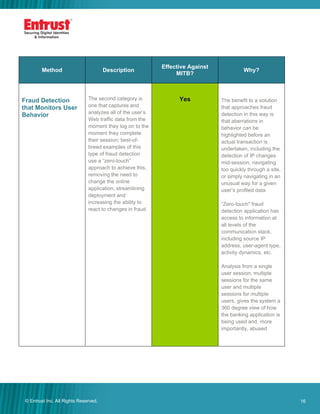
Fraud Detection
that Monitors User
Behavior
The second category is
one that captures and
analyzes all of the user’s
Web traffic data from the
moment they log on to the
moment they complete
their session; best-of-
breed examples of this
type of fraud detection
use a “zero-touch”
approach to achieve this,
removing the need to
change the online
application, streamlining
deployment and
increasing the ability to
react to changes in fraud
Yes The benefit to a solution
that approaches fraud
detection in this way is
that aberrations in
behavior can be
highlighted before an
actual transaction is
undertaken, including the
detection of IP changes
mid-session, navigating
too quickly through a site,
or simply navigating in an
unusual way for a given
user’s profiled data
“Zero-touch" fraud
detection application has
access to information at
all levels of the
communication stack,
including source IP
address, user-agent type,
activity dynamics, etc.
Analysis from a single
user session, multiple
sessions for the same
user and multiple
sessions for multiple
users, gives the system a
360 degree view of how
the banking application is
being used and, more
importantly, abused
17© Entrust Inc. All Rights Reserved. 17
Summary
Online fraud has become the domain of serious criminal organizations.
The world is in an "arms race" and should expect that criminal ingenuity
will continue to be applied; attacks will get more and more difficult to
thwart. Countermeasures will continue to evolve and be replaced by
more effective approaches.
Traditional two-factor authentication solutions such as one-time
passcode tokens, while continuing to be effective in a wide range of
scenarios, are no longer effective for high-value transaction
environments such as corporate online-banking now that malware is a
widespread attack technique.
Fortunately, a number of techniques remain strongly effective against
man-in-the-browser attacks, either through use of a separate
communication channel with the user, or by relying on fraud detection
engines that run on the target website instead of the infected computer.
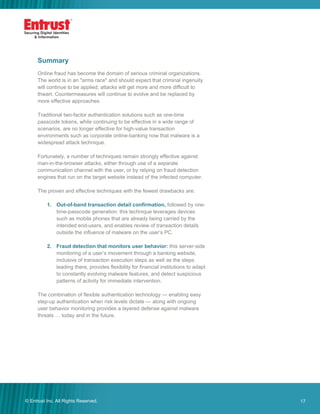
The proven and effective techniques with the fewest drawbacks are:
1. Out-of-band transaction detail confirmation, followed by one-
time-passcode generation: this technique leverages devices
such as mobile phones that are already being carried by the
intended end-users, and enables review of transaction details
outside the influence of malware on the user’s PC.
2. Fraud detection that monitors user behavior: this server-side
monitoring of a user’s movement through a banking website,
inclusive of transaction execution steps as well as the steps
leading there, provides flexibility for financial institutions to adapt
to constantly evolving malware features, and detect suspicious
patterns of activity for immediate intervention.
The combination of flexible authentication technology — enabling easy
step-up authentication when risk levels dictate — along with ongoing
user behavior monitoring provides a layered defense against malware
threats … today and in the future.
18© Entrust Inc. All Rights Reserved. 18
Company Facts
Website: www.entrust.com
Employees: 359
Customers: 5,000
Offices: 10 Globally
Headquarters
Three Lincoln Centre
5430 LBJ Freeway, Suite 1250
Dallas, Texas 75240
Sales
North America: 1-888-690-2424
EMEA: +44 (0) 118 953 3000
Email: entrust@entrust.com
Entrust & You
More than ever, Entrust understands your organization’s security pain
points. Whether it’s the protection of information, securing online
customers, regulatory compliance or large-scale government projects,
Entrust provides identity-based security solutions that are not only
proven in real-world environments, but cost-effective in today’s uncertain
economic climate.
Now part of the Datacard Group, Entrust empowers governments,
enterprises and financial institutions in more than 5,000 organizations
spanning 85 countries. Entrust’s award-winning software authentication
platforms manage today’s most secure identity credentials, addressing
customer pain points for cloud and mobile security, physical and logical
access, citizen eID initiatives, certificate management and SSL.
For more information about Entrust products and services, call
888-690-2424, email entrust@entrust.com or visit entrust.com.
24002/3-14

Defeating Man-in-the-Browser Malware

  • 1.
    1© Entrust Inc.All Rights Reserved. 1 Defeating Man-in-the-Browser Malware How to prevent the latest malware attacks against consumer and corporate banking © Entrust Inc. All Rights Reserved. Get this White Paper
  • 2.
    2© Entrust Inc.All Rights Reserved. 2 Contents Introduction ........................................................................ 3 What is a Man-in-the-Browser Attack?............................. 5 MITB Attack Phase One: Infection............................................................6 MITB Attack Phase Two: Transaction Takeover.......................................7 What Can Be Done?........................................................... 9 Active Safeguards.....................................................................................9 Passive Safeguards ................................................................................14 Summary........................................................................... 17 Entrust & You ................................................................... 18
  • 3.
    3© Entrust Inc.All Rights Reserved. 3 Introduction The Internet offers financial institutions the promise of delivering new services at a fraction of the cost of traditional channels. As more consumers move online, this migration helps reduce operating costs and increase their customer base. The challenge lies in being able to offer these services across new and sophisticated channels — for example, the mobile channel — while not sacrificing security or usability. Unfortunately, the benefits of the Web are also available to criminals; and the world of organized crime has been quick to exploit its weaknesses. Criminals are using very persuasive and often personalized tactics to entice users to take specific actions that will result in the attacker’s ability to misdirect or take over a user’s online banking session — or their entire machine. While many safeguards are deployed within financial institutions, criminals are evolving their techniques rapidly. Instead of phishing attacks that lead to fake websites designed to harvest usernames and passwords, the techniques are now more sophisticated and effective against previously deployed defenses. Phishing and spear-phishing attacks1 are now designed to deploy malware, which takes over users’ browsers and executes malicious transactions. The malware is crafted to avoid detection by antivirus tools. The result is known as a “man-in-the-browser” attack. 1 A spear-phishing attack is a highly targeted form of phishing, using specific messages and information tailored to a particular user or small user group. Phishing and spear-phishing attacks are now designed to deploy malware, which takes over users’ browsers and executes malicious transactions. The malware is crafted to avoid detection by antivirus tools. The result is known as a ‘man-in-the- browser’ attack. ” “
  • 4.
    4© Entrust Inc.All Rights Reserved. 4 The Anti-Phishing Working Group (APWG) recently reported more than 49,000 unique phishing sites in July 2013 alone. During a two-month span in 2013, the number of phishing sites detected jumped almost 30 percent. Source: Anti-Phishing Working Group Individual users and organizations around the world are being targeted and successfully defrauded of millions of dollars. But more importantly, attacks against organizations are now more targeted. Verizon’s 2013 Data Breach Investigations Report found that malware was at the root of 40 percent of the year’s targeted breaches.2 While these numbers are down from 2012, data points tell us that man-in-the- browser isn’t just used to intercept banking sessions. “Direct installation of malware by an attacker who has gained access to a system is again the most common vector,” stated the Verizon report. That said, man-in-the-browser attacks remain state of the art in online- banking fraud. While traditional security techniques are proving ineffective, there are a few proven and effective approaches for neutralizing the threat. In this document, we first explain the mechanics of a man-in-the-browser attack, and then review the various counter-measure possibilities, comparing their effectiveness — against both today’s attack vectors and the ability to adapt to future techniques. 2 “2013 Data Breach Investigations Report,” Verizon RISK Team, April 2013.
  • 5.
    5© Entrust Inc.All Rights Reserved. 5 What is a Man-in-the-Browser Attack? The man-in-the-browser (MITB) attack leverages what is known as a Trojan Horse (or simply a Trojan). A Trojan is malicious software that is somehow installed — often initiated by various social engineering tactics — and resides concealed on the user's computer, frequently undetectable by traditional virus scanning. It is commonly in the form of a browser helper object, user script, or Active X control. It wakes up when the user visits a target site, and functions by transparently capturing and modifying information as it moves between the browser's user interface and the Internet. In this way, the malware can show the user a completely consistent picture of the transaction he or she is executing, while actually executing a totally different transaction with their bank. Transaction details may be modified or totally unrelated transactions may be launched — all without the user ever understanding that an attack is underway. Most traditional defenses are rendered completely ineffective, because the Trojan is difficult to detect through traditional virus-scanning, and it has direct access to authentication data (e.g., static and one-time passcodes or even biometrics) and details of the transaction. The criminal community is heavily focusing its attacks today on corporate-banking customers, as the available funds are often greater, transaction limits are higher and the corporate customer has access to a wire transfer or Automated Clearing House (ACH) services through the online banking interface. However, there are many examples of attacks on high-value banking customers as well, with the possibility of the average user being attacked in future being very real. Examples of well-known man-in-the-browser attacks include the Zeus and Silentbanker Trojans, each which have been successfully installed on millions of PCs. Interestingly, there are even man-in-the-browser attacks like Russian- born Spy Eye that actually first attack existing malware (e.g., Zeus), taking over all of the information captured already and then attacking the user. What is Social Engineering? Social engineering is the act of manipulating a person into taking specific actions or sharing confidential information without the use of any technical hacking methods. Uses of social engineering include sending targeted phishing emails that resonate with particular users (often referred to as spear- phishing or harpooning) and cause them to take action that results in an unwanted result. Example: A group of 20,000 financial services executives were targeted with specific emails that looked like subpoenas, causing more than 10 percent to follow links and become infected with a Trojan.
  • 6.
    6© Entrust Inc.All Rights Reserved. 6 MITB Attack Phase One: Infection The first phase of an MITB attack is the infection of a target computer. A number of techniques have proven to be effective, typically relying on social engineering to trick a user into doing something unwise, but sometimes exploiting other browser or network vulnerabilities. The most common techniques in use today are as follows: 1. Infected Download A phishing or spear-phishing email suggesting that a user visit a site for some compelling reason, such as a breaking news report, free software download or celebrity images. Unlike a traditional man-in-the-middle attack, these phishing emails don’t always claim to come from a financial institution looking to “confirm” identification details, because the goal is to deploy malware, not harvest usernames and passwords. The user clicks on the link and is taken to a malicious website where malware-infected software is offered for download as a “necessary” video codec, pirated software package, interesting PDF document, or the like. When the user executes or opens the download package on their computer the malware is installed while the user remains unaware. 2. Browser Vulnerability As with Method 1 above, a user is tricked to visit a malicious site, which then exploits unpatched browser vulnerabilities to silently install malware. Current estimates put the number of computers infected with malware at 31.88 percent, representing millions of users globally infected. Through the third quarter of 2013, the financial industry (21.74 percent) and payment services (56.39 percent) represented more than 78 percent of all industries targeted.3 3 “Phishing Activity Trends Report: Third Quarter 2013," Anti-Phishing Working Group, February 10, 2014.
  • 7.
    7© Entrust Inc.All Rights Reserved. 7 MITB Attack Phase Two: Transaction Takeover In the second phase of the attack, the user launches their browser. The Trojan is automatically and silently activated, transparently storing or actively relaying the user's activities unmodified between the browser and the Internet, while unbeknownst to the user monitoring all of their activity. The Trojan is capable of recognizing when the user visits a designated online-banking site to do their banking (Trojans are coded to watch for one or more online banks). Once the user has successfully authenticated — even with strong authentication like an OTP token — the Trojan can appropriate the user's privileges, enabling it to modify transaction details and initiate new transactions without the user or the bank noticing. Clearly, this can result in the user's funds being directed to accounts under the criminal's control, either directly or via mule accounts.
  • 8.
    8© Entrust Inc.All Rights Reserved. 8 Here is one possible attack sequence after the malware has been installed, as seen from the perspective of the end-user, the malware and the financial institution: Step End-User Malware Financial Site 1 Visits financial institution site Wakes up as this financial institution is on its target list Displays login screen 2 Login with username and password May harvest this, or more likely just wait Processes login 3 Requests fund transfer form (ACH or wire transfer) Waits Displays form 4 Enters origin and destination accounts and amount Intercepts user’s request, substitutes alternate amount and destination Receives malware’s request, sends transaction details for review and requests one- time-passcode (OTP) challenge 5 Intercepts site’s transaction detail confirmation, modifies them to correspond to user’s initial request 6 Views transaction details (which look fine) then consults OTP token and enters the numeric code into their Web browser Waits Receives user’s valid OTP code and executes the modified transaction
  • 9.
    9© Entrust Inc.All Rights Reserved. 9 The browsers may look identical, but underneath one is a Trojan lurking, undetected by virus-scanning and ready to steal a user’s identity as a part of a man-in-the-browser attack. This is but one example of several variations that are active man-in-the- browser attacks "in the wild” today. The net result of all of forms of attack is a loss of funds for the end-user or business, and a loss of credibility for the financial institution. What Can Be Done? There are many solutions available on the market today, both active and passive in nature. Each has its own merits and challenges which organizations should consider in their plans for protecting online users. Active Safeguards Active safeguards involve the user in some additional authenticating steps, at login time, transaction execution time, or both. Financial institutions have known for some time that usernames and passwords alone are insufficiently effective protection for user accounts. Numerous other strong authentication techniques are available, and address a wide range of threats that are still relevant. However, man-in- the-browser attacks work around many of these techniques. The following table summarizes a wide range of active safeguards available today, and rates their effectiveness against man-in-the-browser attacks. Even if a technique is ineffective against MITB it is not to say that it is ineffective against other threats; the technique may still be suitable as an incremental layer of defense.
  • 10.
    10© Entrust Inc.All Rights Reserved. 10 Method Description Effective Against MITB? Why? Username & Password Username and a weak or strong password No Malware can intercept or wait until user is past this challenge before taking over Biometric Fingerprint reader to unlock login, typing biometrics other methods No Grid Card Grid of letters and numbers provided to users on card or electronically; user enters response to challenge string (e.g. A3 C4 J2) No Mutual Authentication At login, site displays photo or text string, that user has pre-selected, to confirm user is at correct site No OTP Token One-time-passcode token, in hardware or software form, where a numeric display shows a passcode that changes periodically; user enters this passcode when requested by a site No Out-of-Band OTP One-time-passcode delivered to a user “out of band” onto a separate device (e.g., onto a mobile phone via SMS message or to a voice phone line via automated delivery) No EMV-CAP4 OTP EMV-CAP technology leverages a user’s chip-enabled bank card and an electronic physical reader which together can generate a one-time- passcode response; user enters this passcode when requested by a site No 4 Europay, MasterCard and Visa: Chip Authentication Program. A smartcard technology for online authentication of bank account holders and their transactions.
  • 11.
    11© Entrust Inc.All Rights Reserved. 11 Method Description Effective Against MITB? Why? Smart Card & Digital Certificate PKI digital certificate stored on a smart card or USB cryptographic token; credential used to perform client authentication via SSL No Anti-Virus or Anti-Malware Applications Software deployed to end-user desktop computers, aiming to detect and disable malware Maybe Malware is changing so rapidly that client software is having trouble keeping up; signature-based detection models are increasingly ineffective and other models are still improving Separate Computer Used Solely for Online-Banking A computer can be set aside and reserved exclusively for corporate- banking access, with other websites and applications disabled. Yes, but inconvenient Malware is less likely to be installed if the computer is not used for other things; demands a discipline that is not commonly found in any group other than dedicated computer security experts; much less convenient than the anywhere, anytime access that most consumers are accustomed; even business banking customers would be hard-pressed to use this type of approach Hardened Browser on a USB Drive A hardened browser is shipped to end-users on a USB drive and hard-coded to only connect to the target bank’s website; sometimes there is also a PKI credential stored on the USB device, and used for authentication Yes, but inconvenient Malware has a harder time attacking this browser, but it cannot be ruled out given the malware and secure browser are running on the same host computer; many organizations have disabled USB drives or, at least, have disabled “autorun” capability for external media, making deployment of this solution more challenging; browser updates can also become problematic
  • 12.
    12© Entrust Inc.All Rights Reserved. 12 Method Description Effective Against MITB? Why? OTP Token with Signature Amplifying on the OTP token method described above, some forms of OTP tokens can also be used to electronically sign transaction details, if they are equipped with a small numeric keypad; user is prompted to enter transaction details on the small keypad, then a signature code is calculated by the token Yes, but inconvenient User enters the transaction details so is aware of the specifics, and the banking site can detect if malware attempts to change them; usability on the token screen and keyboard is weak, and the user could be confused; special hardware must be deployed EMV-CAP OTP with Signature Amplifying on the EMV-CAP OTP method described above, specifically equipped electronic readers can also be used to electronically sign transaction details; user is prompted to enter transaction details on a small keyboard on the reader, then a signature code is calculated using the bank card Yes, but inconvenient Out-of-Band Transaction Detail Confirmation plus OTP Amplifying on the out-of-band OTP method above, the user is not only sent a one-time passcode via out- of-band communication (e.g., SMS or voice channel), but is also sent a summary of the transaction that’s about to occur; for example: “Wire transfer $15,325 from acct 132382 to 482763. Confirmation code 193713”; user can then review the details, and only proceed in their browser if they recognize the details Yes User has opportunity to view transaction details in a separate communication channel; financial institution must take care to protect against easy reset of the out-of- band contact details (e.g., mobile phone number), or the malware will do this first then attack successfully; if out-of-band confirmation is sent to an initialized mobile application (vs. simply SMS to a phone) then reset is inherently a more elaborate and protected process
  • 13.
    13© Entrust Inc.All Rights Reserved. 13 Importantly, users can also take an active role in protecting themselves by deploying some basic defenses against the original infection. Financial services organizations have an opportunity to provide information on how users can best protect themselves as a part of their communication with end-users, including two essentials measures: keeping the computer's patch status up to date and running anti-virus software. As described, in some cases the malicious website exploits a browser or OS vulnerability to implant the Trojan, and often the latest version of the OS and browser software will include fixes for any discovered vulnerabilities. Keeping the version of browser updated can be beneficial as the major browsers operate programs to identify and take down known phishing sites. This has reduced the vulnerability of their users to social engineering exploits. Of course, there remains a window of vulnerability between discovery and patch, and a machine can be infected before the necessary patch is installed, highlighting the need for both active and passive safeguards.
  • 14.
    14© Entrust Inc.All Rights Reserved. 14 Passive Safeguards Passive safeguards are invisible to the user, yet help identify the user or flag suspicious activity. These techniques are attractive because they don’t impact the user experience in any way and, as a result, are easily deployed to protect all customers, even those who do not wish to see visible security measures. The following table summarizes the range of passive safeguards available today, and rates their effectiveness against man-in-the-browser attacks. Method Description Effective Against MITB? Why? IP-Geolocation Based on the end-user’s computer IP address, this technique determines the user’s geographic location and compares it to typical locations used by this user No While effective when credentials are stolen and used elsewhere, these techniques fail against MITB because the malware is in the user’s regular browser, at the user’s typical location Device-Profiling5 A snapshot of the user’s browser configuration is taken (via Javascript and HTTP headers) to determine if the user is visiting from their usual Web browser; in a PC browser environment this technique is quite effective at uniquely identifying a computer with no interaction from the user No 5 For an example of this profiling technique and its effectiveness, see https://panopticlick.eff.org/
  • 15.
    15© Entrust Inc.All Rights Reserved. 15 Method Description Effective Against MITB? Why? Transactional Fraud Detection The online-banking application is modified to make calls to the fraud detection service at every point an organization thinks may be relevant to fraud Due to the intensiveness of integration across applications, this is typically only done at initial logon and at specific monetary transaction points (e.g., money transfer) where session state and transaction details are passed to the fraud detection service for analysis; the fraud engine looks at transactions and compares them to what would be termed ‘normal’ for that user or group of users; patterns are detected and warnings raised if appropriate Sometimes Historically, this analysis has been performed in a batch process, overnight But, it has become essential to perform the analysis in real-time, because, as clearing delays are eliminated, the money can be gone in a matter of minutes The challenge with this approach is that the necessary data to detect a MITB Trojan is typically not captured (due to intensity of effort and cost), with clues of the malware’s existence spread out across the lifespan of the session, not only the wire transfer transaction alone
  • 16.
    16© Entrust Inc.All Rights Reserved. 16 Method Description Effective Against MITB? Why? Fraud Detection that Monitors User Behavior The second category is one that captures and analyzes all of the user’s Web traffic data from the moment they log on to the moment they complete their session; best-of- breed examples of this type of fraud detection use a “zero-touch” approach to achieve this, removing the need to change the online application, streamlining deployment and increasing the ability to react to changes in fraud Yes The benefit to a solution that approaches fraud detection in this way is that aberrations in behavior can be highlighted before an actual transaction is undertaken, including the detection of IP changes mid-session, navigating too quickly through a site, or simply navigating in an unusual way for a given user’s profiled data “Zero-touch" fraud detection application has access to information at all levels of the communication stack, including source IP address, user-agent type, activity dynamics, etc. Analysis from a single user session, multiple sessions for the same user and multiple sessions for multiple users, gives the system a 360 degree view of how the banking application is being used and, more importantly, abused
  • 17.
    17© Entrust Inc.All Rights Reserved. 17 Summary Online fraud has become the domain of serious criminal organizations. The world is in an "arms race" and should expect that criminal ingenuity will continue to be applied; attacks will get more and more difficult to thwart. Countermeasures will continue to evolve and be replaced by more effective approaches. Traditional two-factor authentication solutions such as one-time passcode tokens, while continuing to be effective in a wide range of scenarios, are no longer effective for high-value transaction environments such as corporate online-banking now that malware is a widespread attack technique. Fortunately, a number of techniques remain strongly effective against man-in-the-browser attacks, either through use of a separate communication channel with the user, or by relying on fraud detection engines that run on the target website instead of the infected computer. The proven and effective techniques with the fewest drawbacks are: 1. Out-of-band transaction detail confirmation, followed by one- time-passcode generation: this technique leverages devices such as mobile phones that are already being carried by the intended end-users, and enables review of transaction details outside the influence of malware on the user’s PC. 2. Fraud detection that monitors user behavior: this server-side monitoring of a user’s movement through a banking website, inclusive of transaction execution steps as well as the steps leading there, provides flexibility for financial institutions to adapt to constantly evolving malware features, and detect suspicious patterns of activity for immediate intervention. The combination of flexible authentication technology — enabling easy step-up authentication when risk levels dictate — along with ongoing user behavior monitoring provides a layered defense against malware threats … today and in the future.
  • 18.
    18© Entrust Inc.All Rights Reserved. 18 Company Facts Website: www.entrust.com Employees: 359 Customers: 5,000 Offices: 10 Globally Headquarters Three Lincoln Centre 5430 LBJ Freeway, Suite 1250 Dallas, Texas 75240 Sales North America: 1-888-690-2424 EMEA: +44 (0) 118 953 3000 Email: entrust@entrust.com Entrust & You More than ever, Entrust understands your organization’s security pain points. Whether it’s the protection of information, securing online customers, regulatory compliance or large-scale government projects, Entrust provides identity-based security solutions that are not only proven in real-world environments, but cost-effective in today’s uncertain economic climate. Now part of the Datacard Group, Entrust empowers governments, enterprises and financial institutions in more than 5,000 organizations spanning 85 countries. Entrust’s award-winning software authentication platforms manage today’s most secure identity credentials, addressing customer pain points for cloud and mobile security, physical and logical access, citizen eID initiatives, certificate management and SSL. For more information about Entrust products and services, call 888-690-2424, email entrust@entrust.com or visit entrust.com. 24002/3-14