Data Independence
- Software application must not be
changed when changes occur in data definition.
2 kinds of Data Independence
Physical Data Independence
- indicates that the physical storage
structure or devices could be change without
affecting conceptual schema. The changed
would be absorbed by the mapping between the
conceptual and internal level.
Logical Data Independence
- indicates that the conceptual schema
can be changed without affecting the existing
external schemas. The change would be
absorbed by the mapping between the
external and conceptual levels.
*For example: consider two users A & B.
Both are selecting the empno and ename. If user
B add a new column salary in his view/table then
it will not effect the external view user; user A, but
internal view of database has been changed for
both users A & B. Now user A can also print the
salary.
Data
- In general, data is any set of characters that
has been gathered and translated for some
purpose, usually analysis. It can be any
character, including text and numbers, pictures,
sound, or video. If data is not put into context, it
doesn't do anything to a human or computer.
- Within a computer's storage, data is a
collection of numbers represented
as bytes that are in turn composed
of bits (binary digits) that can have the value
one or zero. Data is processed by the CPU,
which uses logical operations to produce new
data (output) from source data (input).
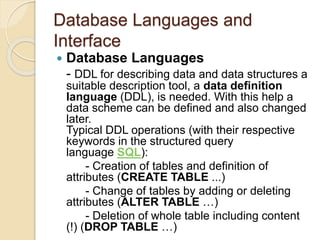
Database Languages and
Interface
 Database Languages
- DDL for describing data and data structures a
suitable description tool, a data definition
language (DDL), is needed. With this help a
data scheme can be defined and also changed
later.
Typical DDL operations (with their respective
keywords in the structured query
language SQL):
- Creation of tables and definition of
attributes (CREATE TABLE ...)
- Change of tables by adding or deleting
attributes (ALTER TABLE …)
- Deletion of whole table including content
(!) (DROP TABLE …)
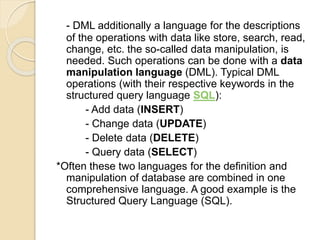
- DML additionally a language for the descriptions
of the operations with data like store, search, read,
change, etc. the so-called data manipulation, is
needed. Such operations can be done with a data
manipulation language (DML). Typical DML
operations (with their respective keywords in the
structured query language SQL):
- Add data (INSERT)
- Change data (UPDATE)
- Delete data (DELETE)
- Query data (SELECT)
*Often these two languages for the definition and
manipulation of database are combined in one
comprehensive language. A good example is the
Structured Query Language (SQL).
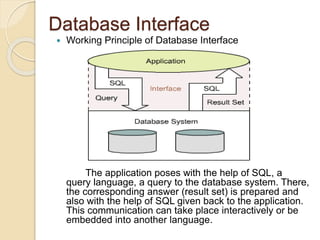
Database Interface
 Working Principle of Database Interface
The application poses with the help of SQL, a
query language, a query to the database system. There,
the corresponding answer (result set) is prepared and
also with the help of SQL given back to the application.
This communication can take place interactively or be
embedded into another language.
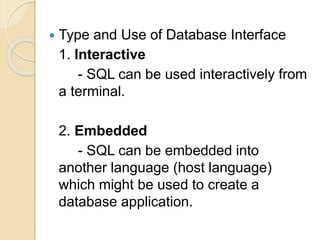
 Type and Use of Database Interface
1. Interactive
- SQL can be used interactively from
a terminal.
2. Embedded
- SQL can be embedded into
another language (host language)
which might be used to create a
database application.
Data Modeling Using the
Entity-Relationship
Model
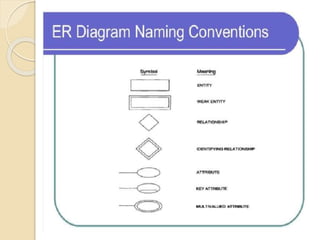
Entity-Relationship (ER)Model
- an entity-relationship model, also
called an Entity-Relationship (ER)
diagram, is a graphical representation
of Entity and their Relationship to each
other, typically used in computing in
regard to the organization of data
within databases or information
systems.
Entity and Attributes
Entity
- an entity can be a real world object,
either animate or inanimate, that can be
easily identifiable.
*Example
In a school database; students,
teachers, classes and courses
offered.
All these entities have some attributes or
properties that give them their identity.
- an entity set is a collection of similar
types of entities. An entity set may
contain entities with attribute sharing
similar value.
*Example
- a Students set may contain all the
students of a school.
- a Teacher set may contain all the
teachers of a school from all faculties.
Entity Type/Entity set
Entity Type (Intension): STUDENT
Attributes: Name, Age,
Address
Entity Set (Extension):e1 = (John Smith,
16,
Antipolo City)
e2 = (Joe Doe, 40,
Manila)
e3 = (Jane Doe, 27,
Taytay)
Entity and Attributes
 Attributes
- entities are represented by means of
their properties, called attributes. All
attributes have values.
*Example
- Student entity may have name,
age and address as attributes.
- There exists a domain or range of
values that can be assigned to
attributes.
*Example
- a student’s name cannot be a
numeric value, it has to be alphabetic.
- a student’s age cannot be
negative, etc.
Types of Attributes
 Simple Attributes
- simple attributes are atomic values, which
cannot be divided further.
*Example
-Student’s phone number is an atomic value
of 7 digits.
 Composite Attributes
- composite attributes are made of more than
one simple attribute.
*Example
- Student’s complete name may have
First_name and Last_name
Types of Attributes
 Derived Attribute
- are the attributes that do not exist in the physical
database, but their values are derived from other
attributes present in the database.
*Example
Age can be derived from date_of_birth
 Single-value Attribute
- single-value attributes contain single value.
*Example : SSS number
 Multi-value Attribute
- may contain more than one values.
*Example : Phone number, email address
Entity Set and Keys
 Key – is an attribute or collection of
attributes that uniquely identifies an
entity among entity set.
*Example
- the id_number of a student makes
him/her identifiable among students.

DBMS2_topic2.pptx

  • 1.
    Data Independence - Softwareapplication must not be changed when changes occur in data definition. 2 kinds of Data Independence Physical Data Independence - indicates that the physical storage structure or devices could be change without affecting conceptual schema. The changed would be absorbed by the mapping between the conceptual and internal level.
  • 2.
    Logical Data Independence -indicates that the conceptual schema can be changed without affecting the existing external schemas. The change would be absorbed by the mapping between the external and conceptual levels. *For example: consider two users A & B. Both are selecting the empno and ename. If user B add a new column salary in his view/table then it will not effect the external view user; user A, but internal view of database has been changed for both users A & B. Now user A can also print the salary.
  • 3.
    Data - In general,data is any set of characters that has been gathered and translated for some purpose, usually analysis. It can be any character, including text and numbers, pictures, sound, or video. If data is not put into context, it doesn't do anything to a human or computer. - Within a computer's storage, data is a collection of numbers represented as bytes that are in turn composed of bits (binary digits) that can have the value one or zero. Data is processed by the CPU, which uses logical operations to produce new data (output) from source data (input).
  • 4.
    Database Languages and Interface Database Languages - DDL for describing data and data structures a suitable description tool, a data definition language (DDL), is needed. With this help a data scheme can be defined and also changed later. Typical DDL operations (with their respective keywords in the structured query language SQL): - Creation of tables and definition of attributes (CREATE TABLE ...) - Change of tables by adding or deleting attributes (ALTER TABLE …) - Deletion of whole table including content (!) (DROP TABLE …)
  • 5.
    - DML additionallya language for the descriptions of the operations with data like store, search, read, change, etc. the so-called data manipulation, is needed. Such operations can be done with a data manipulation language (DML). Typical DML operations (with their respective keywords in the structured query language SQL): - Add data (INSERT) - Change data (UPDATE) - Delete data (DELETE) - Query data (SELECT) *Often these two languages for the definition and manipulation of database are combined in one comprehensive language. A good example is the Structured Query Language (SQL).
  • 6.
    Database Interface  WorkingPrinciple of Database Interface The application poses with the help of SQL, a query language, a query to the database system. There, the corresponding answer (result set) is prepared and also with the help of SQL given back to the application. This communication can take place interactively or be embedded into another language.
  • 7.
     Type andUse of Database Interface 1. Interactive - SQL can be used interactively from a terminal. 2. Embedded - SQL can be embedded into another language (host language) which might be used to create a database application.
  • 8.
    Data Modeling Usingthe Entity-Relationship Model
  • 9.
    Entity-Relationship (ER)Model - anentity-relationship model, also called an Entity-Relationship (ER) diagram, is a graphical representation of Entity and their Relationship to each other, typically used in computing in regard to the organization of data within databases or information systems.
  • 11.
    Entity and Attributes Entity -an entity can be a real world object, either animate or inanimate, that can be easily identifiable. *Example In a school database; students, teachers, classes and courses offered. All these entities have some attributes or properties that give them their identity.
  • 12.
    - an entityset is a collection of similar types of entities. An entity set may contain entities with attribute sharing similar value. *Example - a Students set may contain all the students of a school. - a Teacher set may contain all the teachers of a school from all faculties.
  • 13.
    Entity Type/Entity set EntityType (Intension): STUDENT Attributes: Name, Age, Address Entity Set (Extension):e1 = (John Smith, 16, Antipolo City) e2 = (Joe Doe, 40, Manila) e3 = (Jane Doe, 27, Taytay)
  • 14.
    Entity and Attributes Attributes - entities are represented by means of their properties, called attributes. All attributes have values. *Example - Student entity may have name, age and address as attributes.
  • 15.
    - There existsa domain or range of values that can be assigned to attributes. *Example - a student’s name cannot be a numeric value, it has to be alphabetic. - a student’s age cannot be negative, etc.
  • 16.
    Types of Attributes Simple Attributes - simple attributes are atomic values, which cannot be divided further. *Example -Student’s phone number is an atomic value of 7 digits.  Composite Attributes - composite attributes are made of more than one simple attribute. *Example - Student’s complete name may have First_name and Last_name
  • 17.
    Types of Attributes Derived Attribute - are the attributes that do not exist in the physical database, but their values are derived from other attributes present in the database. *Example Age can be derived from date_of_birth  Single-value Attribute - single-value attributes contain single value. *Example : SSS number  Multi-value Attribute - may contain more than one values. *Example : Phone number, email address
  • 18.
    Entity Set andKeys  Key – is an attribute or collection of attributes that uniquely identifies an entity among entity set. *Example - the id_number of a student makes him/her identifiable among students.