Copyright © 2015, Oracle and/or its affiliates. All rights reserved. |
Database-As-A-Service with Copy on Write
Cloning: Just minutes with minimal storage usages
Jos van den Oord
Oracle Consultant
ORACLE Nederland
Month 04, 2015
Oracle Netherland
Copyright © 2015, Oracle and/or its affiliates. All rights reserved. |
Safe Harbor Statement
The following is intended to outline our general product direction. It is intended for
information purposes only, and may not be incorporated into any contract. It is not a
commitment to deliver any material, code, or functionality, and should not be relied
upon in making purchasing decisions. The development, release, and timing of any
features or functionality described for Oracle’s products remains at the sole discretion of
Oracle.
Oracle Netherland
Copyright © 2015, Oracle and/or its affiliates. All rights reserved. |
Program Agenda
Why Clone Databases?
How do we Clone Databases?
Database Thin Cloning with Copy-On-Write
Direct NFS and Databases
DBaaS – Copy-On-Write
1
2
3
4
5
Oracle Netherland
Copyright © 2015, Oracle and/or its affiliates. All rights reserved. |
Why Clone Databases?
• Setup new databases as copies of existing ones
• Data refresh for development and test environments from production
• Test backup and recovery
• Create standby databases
• Recover lost data or objects
Oracle Netherland
Copyright © 2015, Oracle and/or its affiliates. All rights reserved. |
How do we Clone Databases?
• There are several methods for cloning databases
– Manually copy files and recreate the database
– RMAN duplicate – from active database
– RMAN duplicate – from backup
– 3rd
Party Solutions
• All methods require copying or restoring files to new location
– Additional disk space
– Time to perform the copy action
Oracle Netherland
Copyright © 2015, Oracle and/or its affiliates. All rights reserved. |
Database Thin Cloning with Copy-On-Write
• Based on Network File System (NFS)
– Preferable using Direct NFS (dNFS) clients to the database
• Copy-on-Write (COW) Technology
– Clones use read-only image copies of data-files as source
• Read Only Databases
• Snapshot method
• RMAN copy Backup
– Only modified blocks are written to dNFS location
• CloneDB, snapshot copy, Snap Clone
• Snap Manager Utility, Enterprise Manager
Oracle Netherland
Copyright © 2015, Oracle and/or its affiliates. All rights reserved. |
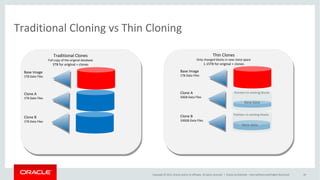
Traditional Cloning vs Thin Cloning
Oracle Netherland
Base Image
1TB Data Files
Clone A
1TB Data Files
Clone B
1TB Data Files
Traditional Clones
Full copy of the original database
3TB for original + clones
Thin Clones
Only changed blocks in new clone space
1.15TB for original + clones
Base Image
1TB Data Files
Clone A
50GB Data Files
Clone B
100GB Data Files
Pointers to existing blocks
New data
New data
Copyright © 2015, Oracle and/or its affiliates. All rights reserved. |
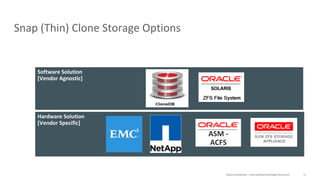
Supported Cloning Options
Oracle Netherland
Snap (Thin) Clones
Software Solution
Snap (Thin) Clones
Hardware Solution
ASM -
ACFS
Full Clones
Database Native RMAN
Restore
RMAN
Duplicate
Data
Pump
Copyright © 2015, Oracle and/or its affiliates. All rights reserved. |
Direct NFS and Databases
Oracle Netherland
• Standard NFS Clients software
– Not optimized for Oracle Database file I/O access patterns
• Oracle Database 11g
• Direct NFS Client is capable of performing concurrent direct I/O, which
bypasses any operating system level cache
• Eliminates any operating system write-ordering locks
• Asynchronous I/O
• Improve performance, high availability, and scalability of NFS storage
Copyright © 2015, Oracle and/or its affiliates. All rights reserved. |
Direct NFS Client Configuration
Oracle Netherland
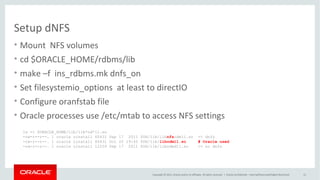
• Mount NFS volumes
• Mount options are not relevant
• $ORACLE_HOME/rdbms/lib
• Make –f ins_rdbms.mk dnfs_on
• Set filesystemio_options at least to directIO
• Configure oranfstab file
- Multipathing, scalability
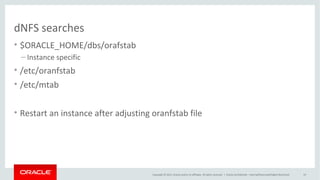
• dNFS Client use oranfstab or /etc/mtab info to determine mount point
settings for NFS storage devices
Copyright © 2015, Oracle and/or its affiliates. All rights reserved. |
Direct NFS validation
Oracle Netherland
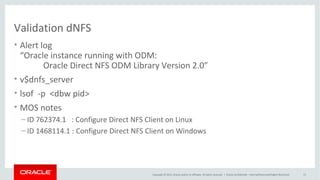
• Alertlog
“ Oracle instance running with ODM: Oracle Direct NFS ODM Library Version 3.0”
• V$DNFS_* views (V$DNFS_SERVER, V$DNFS_STATS)
• lsof -p <dbw pid>
“ joordshost:65543->zfssa:nfs (ESTABLISHED)”
Copyright © 2015, Oracle and/or its affiliates. All rights reserved. |
Program Agenda
CloneDB
Snap Manager Utility
ZFSSAADM
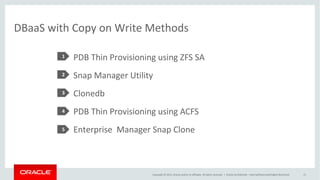
PDB Thin Provisioning using ZFS SA
PDB Thin Provisioning using ACFS
Enterprise Manager Snap Clone
1
2
3
4
5
Oracle Netherland
6
Copyright © 2015, Oracle and/or its affiliates. All rights reserved. |
CloneDB (1)
Oracle Netherland
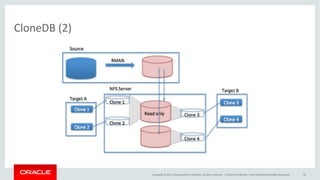
• Static read only image backup files source database
• Use NFS v3 client embedded in database
• Supported Versions: 11.2.0.3+, 12.1
• No Special storage software needed
• Works on all platforms
• Uses dNFS to improve performance, high availability, and scalability of NFS
storage
Copyright © 2015, Oracle and/or its affiliates. All rights reserved. |
CloneDB (2)
Oracle Netherland
Copyright © 2015, Oracle and/or its affiliates. All rights reserved. |
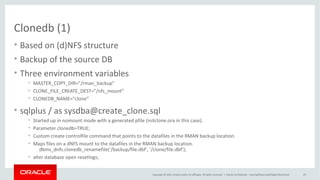
CloneDB (3)
Oracle Netherland
• $ORACLE_HOME/rdbms/install/clonedb.pl
• Three environment variables
– MASTER_COPY_DIR= “/rman_backup”
– CLONE_FILE_CREATE_DEST= “/nfs_mount”
– CLONEDB_NAME= “clone”
• sqlplus / as sysdba @create_clone.sql [@crtdb.sql ; @dbren.sql]
– Started up in nomount with generated pfile
– Parameter clonedb=TRUE
– Create controlfile command that points to the datafiles in “/rman_backup”
– dbms_dnfs.clonedb_renamefile(‘/rman_backup/file.dbf’,’/nfs_mount/file.dbf’
– Alter database open resetlogs;
Copyright © 2015, Oracle and/or its affiliates. All rights reserved. |
Oracle Snap Management Utility (1)
Oracle Netherland
• Standalone Management Tool with
Oracle ZFS Storage Appliance
• Quick and Easy Snapshots and
Clones for Oracle Databases
• Supported Versions: 10g, 11g,12c
• Uses dNFS to improve performance,
high availability, and scalability of
NFS storage
Copyright © 2015, Oracle and/or its affiliates. All rights reserved. | Oracle Netherland
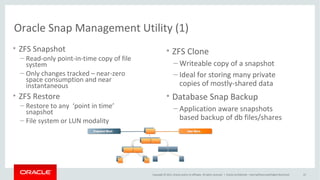
Oracle Snap Management Utility (2)
• ZFS Snapshot
– Read-only point-in-time copy of file
system
– Only changes tracked – near-zero
space consumption and near
instantaneous
• ZFS Restore
– Restore to any ‘point in time’
snapshot
– File system or LUN modality
• ZFS Clone
– Writeable copy of a snapshot
– Ideal for storing many private copies of
mostly-shared data
• Database Snap Backup
– Application aware snapshots based
backup of db files/shares
Copyright © 2015, Oracle and/or its affiliates. All rights reserved. | Oracle Netherland
Oracle Snap Management Utility (3)
• ZFSSA server needs to be
registered in DNS
• Create Storage user for ZFSSA
• Create user server for DB server
• Create SMU Application
• Create Snapshot Backup
• Create Database Clone
• SMU works with:
– Online databases
– Image backup files
– Standby databases
– Issue with Temp files
Copyright © 2015, Oracle and/or its affiliates. All rights reserved. |
Create ZFS Clones with ZFSSAADM Oracle 12c
Oracle Netherland
• $OH/rdbms/utl/zfssa/bin/zfssaadm
– Usage:
• zfssaadm version
zfssaadm [-v] [-l login] [-P password] [-p port] clone [-n newmountpoint] server:mountpoint
zfssaadm [-v] [-l login] [-P password] [-p port] destroy [-F] server:mountpoint
• $OH/rdbms/utl/zfssa/bin/zfssaadm –l <username> “clone” –n <voltag>
<server_vol>
• Mount the <voltag>
• Create DB with the files of the clone file system <voltag>
– Spfile
– Controlfile
Copyright © 2015, Oracle and/or its affiliates. All rights reserved. |
PDB Thin Provisioning using ZFS Storage (1)
• ZFS snapshots are instantaneous and read-write
• Created as one atomic operation
• Theoretical max limit of 264
• ZFS clones are created from read-only ZFS snapshots
• Clones occupy no extra space when they are created
• Clones share the same ZFS pool as the source
Oracle Netherland
Copyright © 2015, Oracle and/or its affiliates. All rights reserved. |
PDB Thin Provisioning using ZFS (2)
• Enable the SNMP service on Oracle ZFS Storage
• Oracle Transparent Data Encryption (TDE) keystore for ZFSSA credentials
– Not needed when using parameter clonedb=true
• Source PDB in read-only mode
• Use snapshot copy clause to the CREATE PLUGGABLE DATABASE command
• New PDB GUID
• Query the CLONETAG column of the DBA_PDB_HISTORY
• V$DBA_PDB_STORAGE_CLONE
• Source PDB cannot be unplugged or dropped
Oracle Netherland
Copyright © 2015, Oracle and/or its affiliates. All rights reserved. |
Snapshot Copy
Oracle Netherland
• Not Supported
ORA-17517: Database cloning
using storage snapshot failed
Copyright © 2015, Oracle and/or its affiliates. All rights reserved. |
PDB Thin Provisioning using ACFS (1)
Oracle Netherland
Copyright © 2015, Oracle and/or its affiliates. All rights reserved. |
PDB Thin Provisioning using ACFS (2)
Oracle Netherland
• ACFS snapshots are immediate, online copies of the source
• Space efficient, copy-on-write
• ACFS extents copied before being modified or deleted
• Maximum of 63 snapshot views
• Space usage can be seen using
• acfsutil info <fs>
• du command on source file will include space occupied by snapshots
• ACFS snapshots are created on the same file system
Copyright © 2015, Oracle and/or its affiliates. All rights reserved. |
Database Thin Provisioning Using ACFS (3)
• ACFS snapshot create
– acfsutil snap create <snapshot>
<mount_point>
• ACFS snapshot delete
– acfsutil snap delete <snapshot>
<mount_point>
• ADMV version >= 11.2.3.0
• Not required to store storage
credentials
Oracle Netherland
• Alter pluggable database srcPDB
open read only;
• Create pluggable database trgPDB
file_name_convert
=(‘srcPDB,’trgPDB’) snapshot copy;
• Create ACFS clone by calling acfsutil
• /sbin/acfsutil snap create
<voltag> <mount_point>
• <ssrc_mntpt>/.ACFS/snaps
/<voltag
Copyright © 2015, Oracle and/or its affiliates. All rights reserved. |
Safe Harbor Statement
The preceding is intended to outline our general product direction. It is intended for
information purposes only, and may not be incorporated into any contract. It is not a
commitment to deliver any material, code, or functionality, and should not be relied
upon in making purchasing decisions. The development, release, and timing of any
features or functionality described for Oracle’s products remains at the sole discretion of
Oracle.
Note: The speaker notes for this slide include
instructions for when to use Safe Harbor
Statement slides.
Tip! Remember to remove this text box.
Oracle Netherland
Copyright © 2015, Oracle and/or its affiliates. All rights reserved. | Oracle Netherland
dbaas-clone

dbaas-clone

  • 2.
    Copyright © 2015,Oracle and/or its affiliates. All rights reserved. | Database-As-A-Service with Copy on Write Cloning: Just minutes with minimal storage usages Jos van den Oord Oracle Consultant ORACLE Nederland Month 04, 2015 Oracle Netherland
  • 3.
    Copyright © 2015,Oracle and/or its affiliates. All rights reserved. | Safe Harbor Statement The following is intended to outline our general product direction. It is intended for information purposes only, and may not be incorporated into any contract. It is not a commitment to deliver any material, code, or functionality, and should not be relied upon in making purchasing decisions. The development, release, and timing of any features or functionality described for Oracle’s products remains at the sole discretion of Oracle. Oracle Netherland
  • 4.
    Copyright © 2015,Oracle and/or its affiliates. All rights reserved. | Program Agenda Why Clone Databases? How do we Clone Databases? Database Thin Cloning with Copy-On-Write Direct NFS and Databases DBaaS – Copy-On-Write 1 2 3 4 5 Oracle Netherland
  • 5.
    Copyright © 2015,Oracle and/or its affiliates. All rights reserved. | Why Clone Databases? • Setup new databases as copies of existing ones • Data refresh for development and test environments from production • Test backup and recovery • Create standby databases • Recover lost data or objects Oracle Netherland
  • 6.
    Copyright © 2015,Oracle and/or its affiliates. All rights reserved. | How do we Clone Databases? • There are several methods for cloning databases – Manually copy files and recreate the database – RMAN duplicate – from active database – RMAN duplicate – from backup – 3rd Party Solutions • All methods require copying or restoring files to new location – Additional disk space – Time to perform the copy action Oracle Netherland
  • 7.
    Copyright © 2015,Oracle and/or its affiliates. All rights reserved. | Database Thin Cloning with Copy-On-Write • Based on Network File System (NFS) – Preferable using Direct NFS (dNFS) clients to the database • Copy-on-Write (COW) Technology – Clones use read-only image copies of data-files as source • Read Only Databases • Snapshot method • RMAN copy Backup – Only modified blocks are written to dNFS location • CloneDB, snapshot copy, Snap Clone • Snap Manager Utility, Enterprise Manager Oracle Netherland
  • 8.
    Copyright © 2015,Oracle and/or its affiliates. All rights reserved. | Traditional Cloning vs Thin Cloning Oracle Netherland Base Image 1TB Data Files Clone A 1TB Data Files Clone B 1TB Data Files Traditional Clones Full copy of the original database 3TB for original + clones Thin Clones Only changed blocks in new clone space 1.15TB for original + clones Base Image 1TB Data Files Clone A 50GB Data Files Clone B 100GB Data Files Pointers to existing blocks Pointers to existing blocks New data New data
  • 9.
    Copyright © 2015,Oracle and/or its affiliates. All rights reserved. | Supported Cloning Options Oracle Netherland Snap (Thin) Clones Software Solution Snap (Thin) Clones Hardware Solution ASM - ACFS Full Clones Database Native RMAN Restore RMAN Duplicate Data Pump
  • 10.
    Copyright © 2015,Oracle and/or its affiliates. All rights reserved. | Direct NFS and Databases Oracle Netherland • Standard NFS Clients software – Not optimized for Oracle Database file I/O access patterns • Oracle Database 11g • Direct NFS Client is capable of performing concurrent direct I/O, which bypasses any operating system level cache • Eliminates any operating system write-ordering locks • Asynchronous I/O • Improve performance, high availability, and scalability of NFS storage
  • 11.
    Copyright © 2015,Oracle and/or its affiliates. All rights reserved. | Direct NFS Client Configuration Oracle Netherland • Mount NFS volumes • Mount options are not relevant • $ORACLE_HOME/rdbms/lib • Make –f ins_rdbms.mk dnfs_on • Set filesystemio_options at least to directIO • Configure oranfstab file - Multipathing, scalability • dNFS Client use oranfstab or /etc/mtab info to determine mount point settings for NFS storage devices
  • 12.
    Copyright © 2015,Oracle and/or its affiliates. All rights reserved. | Direct NFS validation Oracle Netherland • Alertlog “ Oracle instance running with ODM: Oracle Direct NFS ODM Library Version 3.0” • V$DNFS_* views (V$DNFS_SERVER, V$DNFS_STATS) • lsof -p <dbw pid> “ joordshost:65543->zfssa:nfs (ESTABLISHED)”
  • 13.
    Copyright © 2015,Oracle and/or its affiliates. All rights reserved. | Program Agenda CloneDB Snap Manager Utility ZFSSAADM PDB Thin Provisioning using ZFS SA PDB Thin Provisioning using ACFS Enterprise Manager Snap Clone 1 2 3 4 5 Oracle Netherland 6
  • 14.
    Copyright © 2015,Oracle and/or its affiliates. All rights reserved. | CloneDB (1) Oracle Netherland • Static read only image backup files source database • Use NFS v3 client embedded in database • Supported Versions: 11.2.0.3+, 12.1 • No Special storage software needed • Works on all platforms • Uses dNFS to improve performance, high availability, and scalability of NFS storage
  • 15.
    Copyright © 2015,Oracle and/or its affiliates. All rights reserved. | CloneDB (2) Oracle Netherland
  • 16.
    Copyright © 2015,Oracle and/or its affiliates. All rights reserved. | CloneDB (3) Oracle Netherland • $ORACLE_HOME/rdbms/install/clonedb.pl • Three environment variables – MASTER_COPY_DIR= “/rman_backup” – CLONE_FILE_CREATE_DEST= “/nfs_mount” – CLONEDB_NAME= “clone” • sqlplus / as sysdba @create_clone.sql [@crtdb.sql ; @dbren.sql] – Started up in nomount with generated pfile – Parameter clonedb=TRUE – Create controlfile command that points to the datafiles in “/rman_backup” – dbms_dnfs.clonedb_renamefile(‘/rman_backup/file.dbf’,’/nfs_mount/file.dbf’ – Alter database open resetlogs;
  • 17.
    Copyright © 2015,Oracle and/or its affiliates. All rights reserved. | Oracle Snap Management Utility (1) Oracle Netherland • Standalone Management Tool with Oracle ZFS Storage Appliance • Quick and Easy Snapshots and Clones for Oracle Databases • Supported Versions: 10g, 11g,12c • Uses dNFS to improve performance, high availability, and scalability of NFS storage
  • 18.
    Copyright © 2015,Oracle and/or its affiliates. All rights reserved. | Oracle Netherland Oracle Snap Management Utility (2) • ZFS Snapshot – Read-only point-in-time copy of file system – Only changes tracked – near-zero space consumption and near instantaneous • ZFS Restore – Restore to any ‘point in time’ snapshot – File system or LUN modality • ZFS Clone – Writeable copy of a snapshot – Ideal for storing many private copies of mostly-shared data • Database Snap Backup – Application aware snapshots based backup of db files/shares
  • 19.
    Copyright © 2015,Oracle and/or its affiliates. All rights reserved. | Oracle Netherland Oracle Snap Management Utility (3) • ZFSSA server needs to be registered in DNS • Create Storage user for ZFSSA • Create user server for DB server • Create SMU Application • Create Snapshot Backup • Create Database Clone • SMU works with: – Online databases – Image backup files – Standby databases – Issue with Temp files
  • 20.
    Copyright © 2015,Oracle and/or its affiliates. All rights reserved. | Create ZFS Clones with ZFSSAADM Oracle 12c Oracle Netherland • $OH/rdbms/utl/zfssa/bin/zfssaadm – Usage: • zfssaadm version zfssaadm [-v] [-l login] [-P password] [-p port] clone [-n newmountpoint] server:mountpoint zfssaadm [-v] [-l login] [-P password] [-p port] destroy [-F] server:mountpoint • $OH/rdbms/utl/zfssa/bin/zfssaadm –l <username> “clone” –n <voltag> <server_vol> • Mount the <voltag> • Create DB with the files of the clone file system <voltag> – Spfile – Controlfile
  • 21.
    Copyright © 2015,Oracle and/or its affiliates. All rights reserved. | PDB Thin Provisioning using ZFS Storage (1) • ZFS snapshots are instantaneous and read-write • Created as one atomic operation • Theoretical max limit of 264 • ZFS clones are created from read-only ZFS snapshots • Clones occupy no extra space when they are created • Clones share the same ZFS pool as the source Oracle Netherland
  • 22.
    Copyright © 2015,Oracle and/or its affiliates. All rights reserved. | PDB Thin Provisioning using ZFS (2) • Enable the SNMP service on Oracle ZFS Storage • Oracle Transparent Data Encryption (TDE) keystore for ZFSSA credentials – Not needed when using parameter clonedb=true • Source PDB in read-only mode • Use snapshot copy clause to the CREATE PLUGGABLE DATABASE command • New PDB GUID • Query the CLONETAG column of the DBA_PDB_HISTORY • V$DBA_PDB_STORAGE_CLONE • Source PDB cannot be unplugged or dropped Oracle Netherland
  • 23.
    Copyright © 2015,Oracle and/or its affiliates. All rights reserved. | Snapshot Copy Oracle Netherland • Not Supported ORA-17517: Database cloning using storage snapshot failed
  • 24.
    Copyright © 2015,Oracle and/or its affiliates. All rights reserved. | PDB Thin Provisioning using ACFS (1) Oracle Netherland
  • 25.
    Copyright © 2015,Oracle and/or its affiliates. All rights reserved. | PDB Thin Provisioning using ACFS (2) Oracle Netherland • ACFS snapshots are immediate, online copies of the source • Space efficient, copy-on-write • ACFS extents copied before being modified or deleted • Maximum of 63 snapshot views • Space usage can be seen using • acfsutil info <fs> • du command on source file will include space occupied by snapshots • ACFS snapshots are created on the same file system
  • 26.
    Copyright © 2015,Oracle and/or its affiliates. All rights reserved. | Database Thin Provisioning Using ACFS (3) • ACFS snapshot create – acfsutil snap create <snapshot> <mount_point> • ACFS snapshot delete – acfsutil snap delete <snapshot> <mount_point> • ADMV version >= 11.2.3.0 • Not required to store storage credentials Oracle Netherland • Alter pluggable database srcPDB open read only; • Create pluggable database trgPDB file_name_convert =(‘srcPDB,’trgPDB’) snapshot copy; • Create ACFS clone by calling acfsutil • /sbin/acfsutil snap create <voltag> <mount_point> • <ssrc_mntpt>/.ACFS/snaps /<voltag
  • 27.
    Copyright © 2015,Oracle and/or its affiliates. All rights reserved. | Safe Harbor Statement The preceding is intended to outline our general product direction. It is intended for information purposes only, and may not be incorporated into any contract. It is not a commitment to deliver any material, code, or functionality, and should not be relied upon in making purchasing decisions. The development, release, and timing of any features or functionality described for Oracle’s products remains at the sole discretion of Oracle. Note: The speaker notes for this slide include instructions for when to use Safe Harbor Statement slides. Tip! Remember to remove this text box. Oracle Netherland
  • 28.
    Copyright © 2015,Oracle and/or its affiliates. All rights reserved. | Oracle Netherland

Editor's Notes

  • #4 This is a Safe Harbor Front slide, one of two Safe Harbor Statement slides included in this template. One of the Safe Harbor slides must be used if your presentation covers material affected by Oracle’s Revenue Recognition Policy To learn more about this policy, e-mail: Revrec-americasiebc_us@oracle.com For internal communication, Safe Harbor Statements are not required. However, there is an applicable disclaimer (Exhibit E) that should be used, found in the Oracle Revenue Recognition Policy for Future Product Communications. Copy and paste this link into a web browser, to find out more information.   http://my.oracle.com/site/fin/gfo/GlobalProcesses/cnt452504.pdf For all external communications such as press release, roadmaps, PowerPoint presentations, Safe Harbor Statements are required. You can refer to the link mentioned above to find out additional information/disclaimers required depending on your audience.
  • #23 When you use the SNAPSHOT COPY clause to create a clone of a source PDB and the CLONEDB initialization parameter is set to FALSE, the underlying file system for the source PDB&amp;apos;s files must support storage snapshots. Such file systems include Oracle Automatic Storage Management Cluster File System (Oracle ACFS) and Direct NFS Client storage. ou can query the CLONETAG column ofDBA_PDB_HISTORY view to view clone tags for storage clones. Thin Provisioning and Instantaneous Cloning: The Oracle ZFS Storage Appliance Advantage The Oracle Multitenant architecture is integrated with Oracle ZFS Storage Appliance, which provides unlimited snapshots and cloning services. A snapshot is a read-only point-in-time copy of a file system. It is instantaneously created and no space is allocated initially. Blocks are allocated as changes are made to the base file system. Any reads to the snapshot blocks are served by the base file system&amp;apos;s block. When changes happen to the base file system, the older block is then referenced by the snapshot and the new, changed block is referenced by the file system. A clone is an instantaneously created read-writable copy of a snapshot. One or more clones can be created from a single snapshot. These clones are presented to users as a normal file system. Similar to snapshots, when a clone is created, no space is allocated. The reads of the clone are served by the base file system&amp;apos;s blocks. The changed blocks are allocated only when the blocks are changed in the clone. Since space is shared between snapshots and clones, and since a snapshot may have multiple clones, a snapshot cannot be destroyed without also destroying any active clones. You can use the CREATE PLUGGABLE DATABASE statement to clone a PDB. This technique clones a source PDB and plugs the clone into the CDB. To use this technique, you must include a FROM clause that specifies the source PDB. The source PDB is the existing PDB that is copied. The target PDB is the clone of the source PDB. The CREATE PLUGGABLE DATABASE statement copies the files associated with the source PDB to a new location and associates the files with the target PDB. The source PDB needs to be in read-only mode in order to be cloned. If your source PDB is on Oracle ZFS Storage Appliance, you can create a snapshot clone of that PDB by merely adding a snapshot copy clause to the CREATE PLUGGABLE DATABASE command. When an Oracle Database client issues a CREATE PLUGGABLE DATABASE SQL statement with a snapshot copy clause, Oracle Database logs in to Oracle ZFS Storage Appliance and creates a snapshot of the file system on which the source PDB resides, and it promotes that snapshot as a clone on Oracle ZFS Storage Appliance. The clone creation on Oracle ZFS Storage Appliance is instantaneous and no space is initially allocated to that clone. When you use the snapshot copy clause to create a clone of a source PDB, the following restrictions apply to the source PDB as long as any clones exist: It cannot be unplugged. It cannot be dropped. Storage clones are named and tagged using the new PDB GUID . You can query the CLONETAG column of the DBA_PDB_HISTORY view to view clone tags for storage clones.
  • #24 Thin Provisioning and Instantaneous Cloning: The Oracle ZFS Storage Appliance Advantage The Oracle Multitenant architecture is integrated with Oracle ZFS Storage Appliance, which provides unlimited snapshots and cloning services. A snapshot is a read-only point-in-time copy of a file system. It is instantaneously created and no space is allocated initially. Blocks are allocated as changes are made to the base file system. Any reads to the snapshot blocks are served by the base file system&amp;apos;s block. When changes happen to the base file system, the older block is then referenced by the snapshot and the new, changed block is referenced by the file system. A clone is an instantaneously created read-writable copy of a snapshot. One or more clones can be created from a single snapshot. These clones are presented to users as a normal file system. Similar to snapshots, when a clone is created, no space is allocated. The reads of the clone are served by the base file system&amp;apos;s blocks. The changed blocks are allocated only when the blocks are changed in the clone. Since space is shared between snapshots and clones, and since a snapshot may have multiple clones, a snapshot cannot be destroyed without also destroying any active clones. You can use the CREATE PLUGGABLE DATABASE statement to clone a PDB. This technique clones a source PDB and plugs the clone into the CDB. To use this technique, you must include a FROM clause that specifies the source PDB. The source PDB is the existing PDB that is copied. The target PDB is the clone of the source PDB. The CREATE PLUGGABLE DATABASE statement copies the files associated with the source PDB to a new location and associates the files with the target PDB. The source PDB needs to be in read-only mode in order to be cloned. If your source PDB is on Oracle ZFS Storage Appliance, you can create a snapshot clone of that PDB by merely adding a snapshot copy clause to the CREATE PLUGGABLE DATABASE command. When an Oracle Database client issues a CREATE PLUGGABLE DATABASE SQL statement with a snapshot copy clause, Oracle Database logs in to Oracle ZFS Storage Appliance and creates a snapshot of the file system on which the source PDB resides, and it promotes that snapshot as a clone on Oracle ZFS Storage Appliance. The clone creation on Oracle ZFS Storage Appliance is instantaneous and no space is initially allocated to that clone. When you use the snapshot copy clause to create a clone of a source PDB, the following restrictions apply to the source PDB as long as any clones exist: It cannot be unplugged. It cannot be dropped. Storage clones are named and tagged using the new PDB GUID . You can query the CLONETAG column of the DBA_PDB_HISTORY view to view clone tags for storage clones.
  • #30 This is a Safe Harbor Front slide, one of two Safe Harbor Statement slides included in this template. One of the Safe Harbor slides must be used if your presentation covers material affected by Oracle’s Revenue Recognition Policy To learn more about this policy, e-mail: Revrec-americasiebc_us@oracle.com For internal communication, Safe Harbor Statements are not required. However, there is an applicable disclaimer (Exhibit E) that should be used, found in the Oracle Revenue Recognition Policy for Future Product Communications. Copy and paste this link into a web browser, to find out more information.   http://my.oracle.com/site/fin/gfo/GlobalProcesses/cnt452504.pdf For all external communications such as press release, roadmaps, PowerPoint presentations, Safe Harbor Statements are required. You can refer to the link mentioned above to find out additional information/disclaimers required depending on your audience.